
Table of Contents
Table of Contents
MSK Connect pricing looks narrow until the first production bill arrives. The visible line item is managed connector capacity, but the real cost is shaped by worker sizing, connector behavior, broker pressure, data transfer, source and sink charges, monitoring, and recovery work. For teams using Kafka Connect for CDC, ETL, search indexing, data lake ingestion, or warehouse sync, the connector estate can become a material part of the AWS Kafka bill even when the broker cluster gets most of the attention.
AWS prices Amazon MSK Connect around connector capacity measured in MSK Connect Units, or MCUs. The current AWS pricing page defines 1 MCU as 1 vCPU and 4 GiB of memory, and AWS documentation states that each connector needs at least 1 worker with 1 MCU. That is the starting point, not the total. A source connector that reads from a database, writes to MSK, increases broker retention, and sends records across Availability Zones is participating in several pricing models at once.
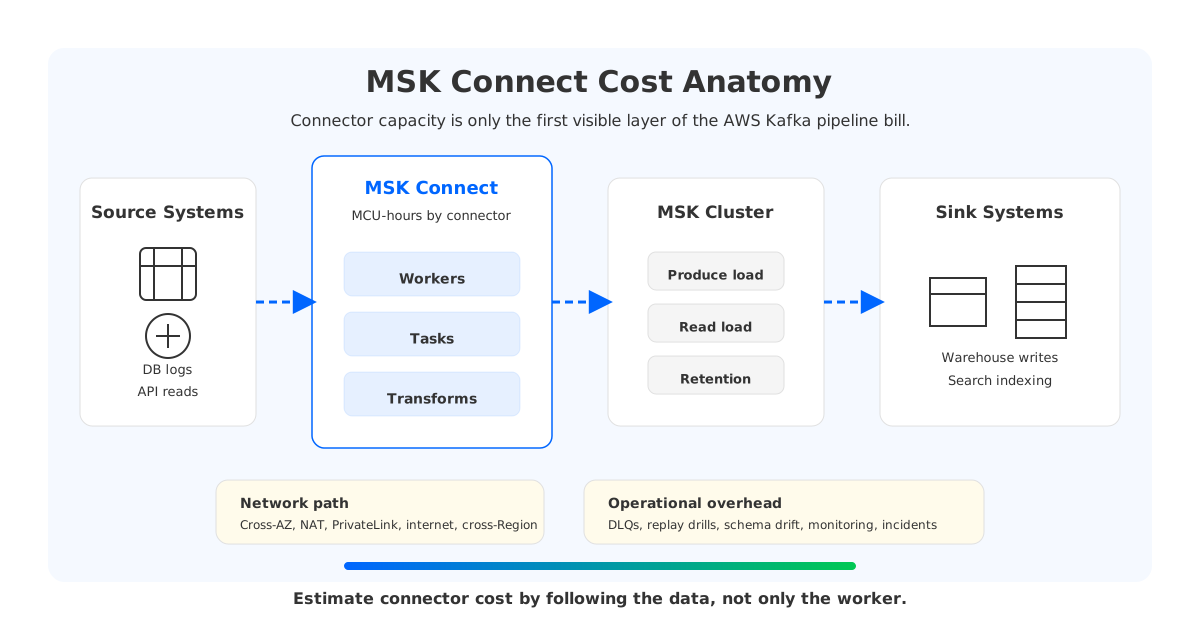
The cost problem is not that MSK Connect is unusually opaque. It is that connector platforms sit at the intersection of metered services. A FinOps review should ask what work each connector forces the rest of the Kafka pipeline and AWS network to perform.
1What MSK Connect Charges For
Amazon MSK Connect is AWS's managed Kafka Connect service for running source and sink connectors with Amazon MSK or compatible Apache Kafka clusters. AWS documentation describes connectors, custom plugins, worker configurations, and capacity modes that remove the need to operate the Connect worker fleet. In Apache Kafka's own model, connectors split work into tasks that execute on workers. The managed service changes who operates the workers, not the unit of work.
The pricing concepts to verify before estimating are:
- Connector capacity. AWS prices MSK Connect by MCUs allocated to workers over time. Exact regional rates should come from the current Amazon MSK pricing page.
- Provisioned capacity. You choose worker count and MCU count per worker. This gives deterministic capacity, but idle capacity remains billable while the connector runs.
- Autoscaled capacity. AWS can scale worker count between a minimum and maximum based on CPU utilization. The minimum workers still define a standing charge.
- Worker configuration and plugins. They are not the headline pricing unit, but they affect CPU, memory, task count, and troubleshooting effort.
The responsible estimate is not a single multiplication. Select the Region, count worker-hours by connector, multiply by MCUs per worker, then add network, broker, and downstream charges created by the connector. That final clause is where many estimates go wrong.
2Hidden Cost Drivers Beyond the Connector
MSK Connect is often adopted to reduce operational burden. Managed workers reduce the need to run EC2 instances, patch Connect clusters, wire service discovery, and build custom autoscaling scripts. The trade-off is that decisions move into connector configuration, topology, and data movement.
| Cost driver | Where it appears | Why it matters |
|---|---|---|
| Worker capacity | MSK Connect MCU-hours | CPU-heavy transforms, converters, TLS, and high task counts raise capacity needs. |
| Connector count | Minimum worker capacity per connector | Many small connectors can create a large baseline even at modest throughput. |
| Kafka broker load | MSK brokers, storage, retention | Connect writes, reads, retries, and replays consume broker network, CPU, and storage. |
| Data transfer | AWS network, VPC, NAT, PrivateLink | Connector locality can turn steady pipeline traffic into recurring network spend. |
| Source and sink systems | Databases, warehouses, search, object storage | Connectors may trigger read I/O, write I/O, ingestion, requests, or compute charges outside Kafka. |
| Operations | Monitoring, DLQs, incidents, upgrades | Managed workers do not remove schema drift, bad records, lag, or replay planning. |
This table is broader than the MSK Connect pricing page because Kafka Connect is middleware. Middleware costs are partly billed where it runs and partly billed where it pushes pressure.
2.1Worker Capacity and Connector Count
The most visible MSK Connect cost is worker capacity. A connector with provisioned capacity has a worker count and MCU count per worker. A connector with autoscaled capacity has minimum and maximum workers, MCU count per worker, and scaling thresholds. Either way, the connector runs with a paid capacity envelope.
Capacity sizing depends on connector behavior more than connector name. A CDC source may spend CPU on parsing database logs, converting formats, applying transforms, and maintaining offsets. A sink connector may spend CPU and memory on batching, retries, and downstream client libraries. Enough per-record transformations can turn a network-bound connector into a CPU-bound connector.
Many teams notice high-throughput connectors first. The quieter cost often comes from low-throughput connectors, each with its own minimum worker footprint. Separate connectors can improve blast-radius control, credentials isolation, and deployment ownership. The pricing question is whether those boundaries are intentional or accidental.
2.2Data Transfer
Network cost is less forgiving because it compounds with throughput. AWS data transfer pricing is route-specific: traffic can be free in some same-AZ private IP paths, charged across Availability Zones, charged through NAT gateways, or charged across Regions and internet paths. AWS also prices NAT Gateway by gateway-hour and data processing.
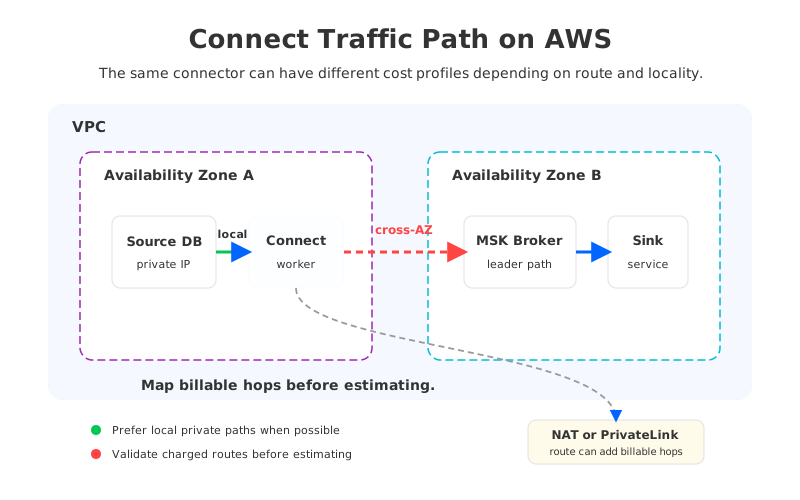
MSK Connect workers, MSK brokers, databases, warehouses, schema services, and object storage endpoints may not live in the same subnet or Availability Zone. The difference between "private, local, and symmetric" and "private but hairpinned through a managed network hop" becomes material when the pipeline runs all day.
Draw the packet path before estimating price. Identify where workers run, which broker endpoints they use, whether traffic crosses AZ boundaries, whether PrivateLink or NAT is involved, and whether object storage access uses VPC endpoints.
2.3Replays, Retention, and Bad Records
Connectors make normal Kafka operations more expensive when they create replays. A bad schema deployment, downstream outage, connector bug, or offset reset can force a sink connector to reread a large topic. That replay consumes worker capacity, broker read throughput, network transfer, and downstream ingestion capacity. If the topic retained more data for recovery, storage cost was accumulating before the incident.
Dead Letter Queues add a similar trade-off. DLQs keep pipelines moving when individual records fail, but they are also Kafka topics with retention, replication, monitoring, and sometimes downstream processing. Treat them as production data streams with lifecycle policies.
Replays should be modeled as events, not exceptions outside the budget. A platform with strict RPO/RTO, CDC, or warehouse freshness requirements should know the cost and time to replay the largest critical topic. That number often drives worker maximums and topic retention.
3How Connect Affects Your MSK Cluster
Kafka Connect is a client framework, but production connectors behave like infrastructure. Source connectors produce records into MSK. Sink connectors consume records from MSK. MirrorMaker 2, which Kafka documents as a Connect-based replication tool, can both read and write at high volume.
The broker effects usually show up in four places:
- Produce throughput. Source connectors add write load to brokers. Poor batching or many small records can make request overhead more visible than byte volume.
- Consume throughput. Sink connectors add read load. A slow sink can increase consumer lag, which pushes teams toward longer retention and larger broker storage.
- Internal state. Connect clusters maintain configs, offsets, and status. Managed MSK Connect abstracts worker operations, but connector correctness still depends on state and task health.
- Incident amplification. When a connector falls behind, the response may include scaling workers, extending retention, replaying data, or throttling producers.
MSK Connect pricing belongs in the same review as MSK broker sizing. A connector estate can make a modest broker cluster look expensive, and an undersized broker cluster can make a connector look inefficient.
4A Practical Cost Model
A useful model starts with the AWS-billed worker baseline and then follows the data. It does not need false precision; it needs to force the right questions before a connector moves to production.
| Layer | Formula or question | Source of truth |
|---|---|---|
| MSK Connect worker cost | Region price × worker-hours × MCUs per worker × worker count | AWS MSK pricing page |
| Autoscaling range | Minimum worker cost plus observed time at higher worker counts | MSK Connect metrics and scaling settings |
| MSK broker impact | Incremental produce/read throughput, partitions, storage, retention | MSK metrics and topic configuration |
| Network path | GB by route: same AZ, cross-AZ, PrivateLink, NAT, cross-Region, internet | AWS data transfer and VPC pricing |
| Source/sink impact | Read I/O, write I/O, ingestion, indexing, API calls | Source and sink service pricing |
| Operations | Failed records, replay drills, upgrade and plugin testing | Incident history and platform SLOs |
A low-throughput connector might still deserve isolation if it carries regulated data and needs separate credentials. A high-throughput connector might benefit more from batching and locality work than from adding MCUs. Another connector might look cost-effective inside MSK Connect but expensive in the sink warehouse because every retry creates billable ingestion work.
5Optimization Checklist
Cost optimization for MSK Connect should begin with correctness. A connector that silently drops records, duplicates writes, or cannot recover offsets is not optimized; it is deferred incident cost. Once correctness is established, strong optimizations are usually architectural and operational rather than one-off tuning flags.
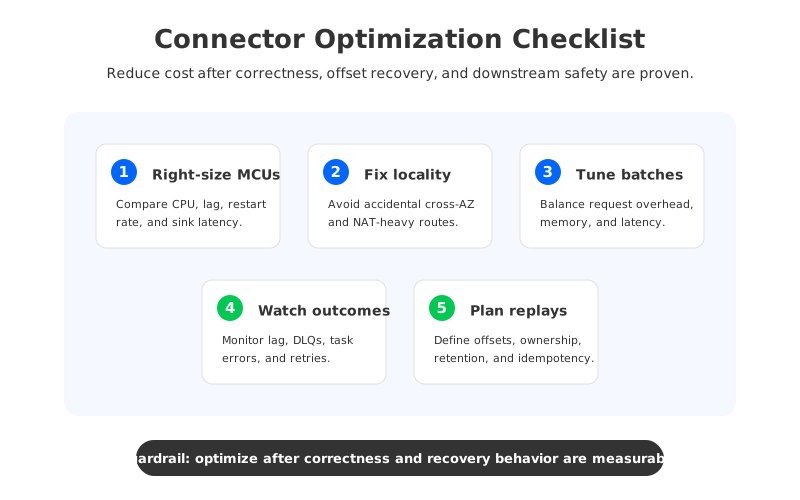
Start with capacity right-sizing. Use provisioned capacity when the workload is steady and the team wants predictable cost. Use autoscaled capacity when traffic varies enough to warrant scaling, but set the minimum worker count deliberately because it defines the standing charge. Watch CPU utilization, task error rate, connector lag, worker restart behavior, and downstream latency together.
Then check data locality and routes. Place sources, workers, brokers, and sinks to reduce unnecessary cross-AZ or NAT paths where the architecture allows it. When object storage is involved, validate whether VPC endpoints can avoid unnecessary NAT processing.
Batching and format choices matter next. Larger batches can reduce per-request overhead and improve sink efficiency, but they can also increase memory pressure and failure blast radius. Compression can reduce network bytes while increasing CPU.
Finally, treat replays as a planned workflow. Define DLQ retention, replay ownership, offset reset procedures, and downstream idempotency before a failure. A replay plan that only exists in a senior engineer's memory is a risk reserve with no line item.
6Where AutoMQ Fits for Kafka-Compatible Pipelines
After the connector estate is understood, the next architecture question is broader than MSK Connect pricing: should the Kafka-compatible target platform make connectors less expensive to operate around? Teams still need CDC, sink delivery, schema governance, DLQs, and replay procedures. What can change is the storage and scaling economics of the Kafka layer that those connectors depend on.
AutoMQ fits that category as a Kafka-compatible, object-storage-backed streaming platform. Its public documentation describes a design that keeps Kafka protocol compatibility while moving durable data into S3-compatible object storage and separating broker compute from storage. AutoMQ Cloud documentation also describes BYOC deployment, where the service runs in the customer's cloud account and data remains in the customer's VPC boundary. That does not replace Kafka Connect; it changes the target architecture in which Kafka Connect, MirrorMaker 2, CDC tools, and ecosystem clients operate.
The distinction matters. A product pitch would say "replace your connectors." A more useful architecture review asks whether the Kafka substrate is forcing connector decisions that would look different with independent compute and storage:
- If sink lag forces long retention on broker-attached storage, object-storage-backed retention can change the cost discussion.
- If connector backfills require temporary broker headroom, stateless broker scaling can make capacity events less tied to data movement.
- If MSK cost work keeps circling around cross-AZ replication, storage architecture and deployment model should be part of the modernization review.
AutoMQ should enter an MSK Connect cost project at that point, not at the first spreadsheet cell. The immediate work is still to size workers, reduce unnecessary network paths, and make connector recovery reliable. If the connector estate exposes a deeper Kafka cost problem, Kafka compatibility plus a different broker storage model gives architects another option.
For teams evaluating that path, test a representative pipeline rather than a synthetic connector demo. Use one source connector, one sink connector, realistic schema evolution, a DLQ, a replay, and a peak-load window. Keep the connector logic familiar and compare what changes in broker scaling, retention, recovery, and network cost.
7FAQ
7.1How is MSK Connect priced?
AWS prices MSK Connect based on connector capacity measured in MSK Connect Units, or MCUs, over time. The AWS pricing page defines 1 MCU as 1 vCPU and 4 GiB of memory. Exact regional rates should be verified on the current Amazon MSK pricing page before publication or procurement.
7.2Is MSK Connect lower cost than running Kafka Connect on EC2?
It depends on workload shape and operational assumptions. MSK Connect can reduce worker fleet operations, patching, deployment plumbing, and custom scaling work. Self-managed Kafka Connect on EC2 may offer more control over instance choice and consolidation. Compare worker-hours, utilization, network paths, operational labor, and failure recovery cost.
7.3What is the biggest hidden cost in MSK Connect?
For many production pipelines, the largest hidden cost is not the connector process itself but the data movement it causes. Cross-AZ transfer, NAT processing, PrivateLink, downstream ingestion, replays, and longer Kafka retention can outweigh the visible connector capacity line.
7.4Does autoscaling remove MSK Connect idle cost?
No. Autoscaling can reduce over-provisioning above the minimum worker count, but each connector still has a configured minimum capacity. It also needs enough maximum capacity to survive bursts, replays, and downstream recovery without falling behind.
7.5Can AutoMQ replace MSK Connect?
No. AutoMQ is a Kafka-compatible streaming platform, not a Kafka Connect connector runtime. The relevant question is whether a Kafka-compatible target architecture with object-storage-backed storage and stateless brokers changes the cost and scaling behavior around the connectors you already need.
8References
- AWS, Amazon MSK pricing, including MSK Connect pricing and MCU definitions.
- AWS, Capacity planning for MSK Connect.
- AWS, Creating connectors in MSK Connect, custom plugins, and worker configurations.
- Apache Kafka, Kafka Connect documentation and MirrorMaker 2 geo-replication documentation.
- AWS, Data transfer on Amazon EC2 and Amazon VPC pricing for NAT Gateway and PrivateLink-related pricing concepts.
- AutoMQ, What is AutoMQ, S3Stream shared storage, AutoMQ Cloud BYOC overview, and migration overview.


