
Table of Contents
Table of Contents
An MSK pricing calculator is useful only after the platform team has described the workload in production terms. Broker hours, storage, Serverless capacity, connector workers, replication throughput, PrivateLink, and AWS data transfer are billing meters. They are not the architecture. If the input sheet starts with instance types instead of traffic, retention, fan-out, and recovery boundaries, the result will look precise while still missing the expensive part of the system.
That is why teams searching for MSK Cost often need a worksheet more than a quote. Amazon MSK can be a rational AWS-native choice for Apache Kafka, but production Kafka cost depends on how records move through a real platform. A topic that receives steady writes from one service, feeds one consumer group, and retains data for one day is not the same budget object as a topic that feeds analytics, search, fraud, observability, and a cross-region recovery copy. The calculator has to know the difference.
1Start with workload facts, not service names
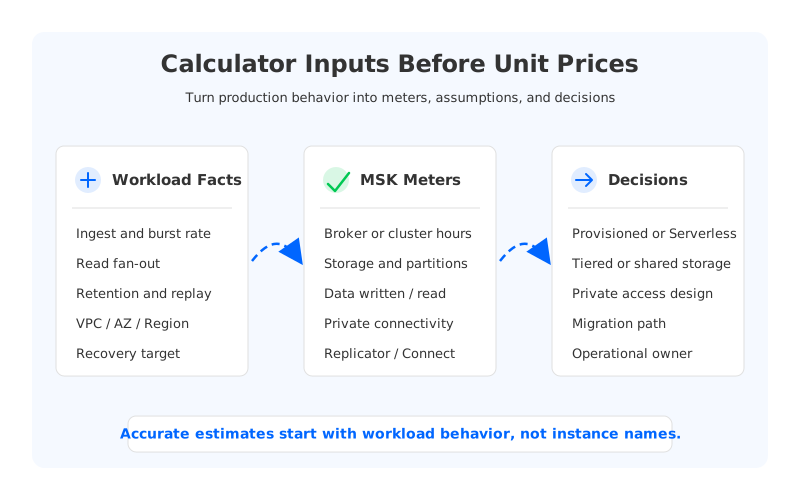
The first mistake is asking, "How much does MSK cost?" before asking, "What does this Kafka workload do all day?" The service name tells you which pricing page to open. The workload tells you which lines on that page matter.
A production estimate should begin with five facts that every Kafka owner can defend:
- Ingest rate and burst pattern. Average throughput matters for storage and traffic, but peak throughput drives broker, partition, connector, and recovery headroom.
- Read fan-out. One consumer group and eight consumer groups can share the same write rate while creating very different broker read pressure and network movement.
- Retention and replay behavior. Retaining data for compliance is different from retaining data because downstream teams routinely replay old topics.
- Network boundary. Same VPC, multi-VPC, cross-account, cross-AZ, cross-region, and internet-facing paths hit different AWS meters.
- Failure and migration target. A warm standby, a one-time migration, and active regional distribution all copy data for different reasons.
These inputs sound basic, but they change the conversation. Instead of comparing one managed Kafka option against another by headline pricing, the team can map a specific workload to billable meters. That makes the estimate harder to fake and easier to review.
2Map inputs to the MSK meters
Amazon MSK pricing is not one flat line. MSK Provisioned includes broker instance usage, storage, optional provisioned storage throughput for Standard brokers, storage used and data written for Express brokers, and data transfer into or out of MSK clusters under AWS rules. MSK Serverless changes the model toward cluster hours, partition hours, data written, data read, and consumed storage. MSK Connect is priced around connector worker capacity. MSK Replicator adds Replicator hours, processed data, and, for cross-region replication, standard AWS cross-region transfer.
That list is not a reason to panic. It is a reason to keep the worksheet structured. Each production input should map to a meter and to an engineering assumption.
| Calculator input | MSK meter it can affect | Engineering assumption to write down |
|---|---|---|
| Peak write throughput | Broker sizing, data written, connector load | How much headroom is required during bursts? |
| Consumer fan-out | Broker read capacity, data out, PrivateLink processing | Which consumers read full topics and where do they run? |
| Retention window | Primary storage, tiered storage, storage used | How much data must stay hot for normal operations? |
| Partition count | Broker pressure, Serverless partition hours | Are partitions sized for current load or future tenants? |
| Replication topology | Replicator data processed, cross-region transfer | Is replication for migration, recovery, or active distribution? |
| Private connectivity | MSK private connectivity and AWS PrivateLink | Which VPCs, accounts, and auth schemes are in scope? |
The right side of the table matters as much as the middle. A calculator can multiply units by prices, but it cannot decide whether a workload needs 30% headroom, whether replay is normal behavior, or whether a migration copy can be turned off after cutover. Those are architecture decisions.
3Treat traffic paths as first-class inputs
Kafka cost estimation becomes unreliable when the network line is added at the end. In cloud deployments, data movement is not a footnote. It is one of the main ways a logical workload becomes a bill.
Draw the traffic before entering service units. Start with producers and their placement. Then draw broker or service-managed replication, consumer groups, connector sources and sinks, private endpoints, and cross-region copies. The diagram should show where records cross an Availability Zone, VPC, account, or Region boundary. AWS billing documentation is explicit that data transfer charges depend on services, regions, and direction, and that cross-AZ transfer appears as regional data transfer line items. A Kafka platform that multiplies records across many boundaries can therefore look reasonable in broker cost and still surprise finance.
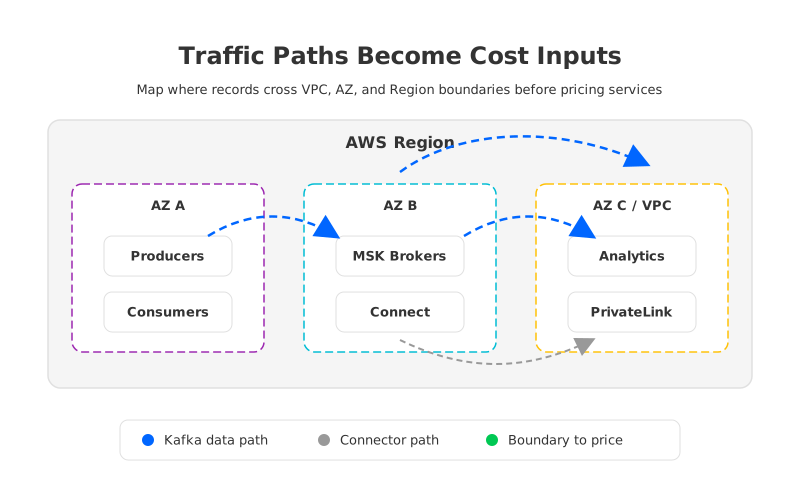
This is also where engineering and FinOps stop talking past each other. Engineers think in producers, partitions, consumer groups, offsets, and failover. Finance sees usage types, GB processed, and transfer categories. The shared diagram turns those into the same object.
4Separate steady-state, burst, and recovery cost
A single monthly estimate hides three different operating modes. Steady-state cost is the normal bill when traffic behaves as expected. Burst cost is the headroom required when producers spike, consumers fall behind, or connectors catch up after an outage. Recovery cost is what happens when data has to be copied, reassigned, replayed, or promoted under pressure.
Production teams should model all three because Kafka tends to make them interact. A broker sized tightly for steady state may look efficient until a consumer backlog turns into a long read storm. A retention policy that looks small at the topic level can become large when replicated to another Region. A connector that is low-cost in normal operation can become expensive if retries cause repeated reads and writes.
The estimate should name which mode each line belongs to:
- Steady state covers normal ingest, normal consumption, normal connector work, and expected retained data.
- Burst mode covers traffic spikes, backlog catch-up, autoscaling response, and any extra capacity kept for peak periods.
- Recovery mode covers broker replacement, partition movement, cluster migration, cross-region replication, and disaster recovery testing.
This split prevents a common spreadsheet error: using average throughput for everything. Kafka systems are rarely budgeted for average conditions alone. They are budgeted for the moment when being wrong would create an incident.
5Tiered storage is not the same as shared storage
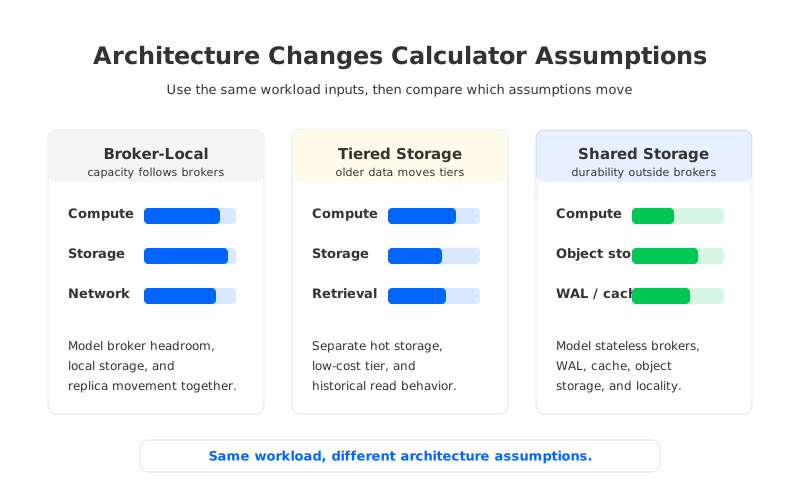
Storage architecture is one of the most important calculator assumptions. MSK tiered storage for Standard brokers can reduce pressure on primary broker storage by moving older data to a lower-cost tier while retaining Kafka access to that data. That is valuable for workloads with longer retention and less frequent historical reads.
But tiered storage does not make brokers stateless. The broker still owns the hot path, local or primary storage remains part of the operating model, and the team still needs to reason about broker capacity, partition placement, recovery, and how often older data is retrieved. Tiered storage changes the retention line of the estimate. It does not automatically change every compute, network, and recovery assumption.
Shared-storage Kafka-compatible architectures change a different part of the model. They move the durable log layer to object storage and make brokers closer to stateless compute. That can reduce the coupling between retained data and broker-local disks, and it can change how teams think about scaling, recovery, and cross-zone traffic. It also introduces its own design questions: write-ahead log behavior, cache hit rate, object storage request patterns, and compatibility with Kafka clients and tools.
The calculator should make this distinction visible. If a team is comparing MSK Standard with tiered storage, MSK Express, MSK Serverless, and a shared-storage Kafka-compatible engine, the worksheet should not put them under one generic "Kafka storage" row. They change different assumptions.
6Where AutoMQ fits the evaluation
AutoMQ belongs in the evaluation after the team has identified which assumptions are driving the MSK estimate. It is a Kafka-compatible streaming system built around shared object storage, a WAL layer, and stateless brokers. The practical question is not whether every workload must leave MSK. The question is whether the workload's cost curve is dominated by broker-local storage, over-provisioned capacity, cross-AZ data movement, slow scaling, or recovery operations.
For those cases, AutoMQ changes the architecture under the calculator. Kafka compatibility keeps the evaluation anchored in client and ecosystem behavior. Shared storage moves durable data away from broker-local disks. Stateless brokers make compute scaling and replacement less tied to stored log volume. AutoMQ's inter-zone traffic design is also relevant when a platform team is trying to reduce Kafka-related cross-AZ movement while preserving multi-AZ durability semantics.
That does not remove the need for a model. A serious AutoMQ estimate still needs the same workload inputs: ingest rate, read fan-out, retention, replay, network placement, availability boundary, and operations. The difference is that some of those inputs map to different meters and different operational risks. That is exactly why architecture should be part of pricing work instead of something reviewed after procurement.
7A calculator-ready worksheet
A useful MSK pricing calculator pack should be small enough to maintain and detailed enough to survive review. One page is usually enough for the first pass.
Use this order:
- Define one representative workload: topic family, producer count, average and peak ingest, record size, partitions, retention, and consumer groups.
- Draw the traffic paths: producers, brokers, consumers, connectors, replication, VPCs, accounts, Availability Zones, and Regions.
- Choose candidate architectures: MSK Provisioned, MSK Serverless if the workload fits, and a Kafka-compatible shared-storage option if storage or network coupling is material.
- Estimate five cost groups for each candidate: compute, storage, data written/read, network or private connectivity, and operations.
- Run sensitivity cases: double fan-out, extend retention, add a recovery copy, move clients into another VPC, and simulate a backlog catch-up event.
The output should be a decision memo, not a lonely total. A good memo says which assumptions dominate the estimate, which operational risks remain, which public pricing pages were used, and which condition would change the recommendation.
8Close the gap between calculator and architecture
The phrase MSK Cost sounds like a pricing question, but production teams are usually asking whether their Kafka platform will remain governable as usage grows. A calculator can answer only the part of that question that has been translated into workload inputs. The rest is architecture judgment.
If the worksheet shows that your largest assumptions are broker-local storage, cross-zone movement, replay-heavy retention, or recovery headroom, compare MSK with a shared-storage Kafka-compatible design before locking the plan. AutoMQ provides a concrete architecture to evaluate against those assumptions: model your workload with the AutoMQ pricing calculator.
9References
- Amazon MSK pricing
- Amazon MSK Developer Guide
- Amazon MSK tiered storage for Standard brokers
- AWS Billing and Cost Management: understanding data transfer charges
- AWS PrivateLink pricing
- Apache Kafka documentation
- AutoMQ architecture overview
- AutoMQ compatibility with Apache Kafka
- AutoMQ inter-zone traffic overview
10FAQ
10.1What inputs should an MSK pricing calculator include?
Include average and peak ingest, record size, partition count, retention, read fan-out, connector workload, replication topology, VPC and Region boundaries, private connectivity, and recovery objectives. Broker instance type is only one part of the estimate.
10.2Is MSK Serverless always easier to estimate than MSK Provisioned?
It removes broker instance selection, but it still requires workload diligence. Teams need to check partition count, data written, data read, storage, quotas, network boundaries, and feature fit before assuming the model is simpler for production.
10.3Does MSK tiered storage solve long-retention cost?
It can help when older data does not need to stay in primary broker storage, but it is not the same as a fully shared-storage architecture. Teams still need to model hot data, retrieval behavior, broker capacity, and operational recovery.
10.4When should AutoMQ be considered in an MSK cost review?
Consider AutoMQ when the estimate is dominated by broker-local storage, cross-AZ movement, over-provisioned capacity, recovery work, or retention growth, and when Kafka protocol compatibility remains a requirement.
10.5Should calculator results include operational cost?
Yes. Production Kafka ownership includes capacity reviews, scaling decisions, connector incidents, rebalancing, upgrades, failover tests, and cost anomaly investigation. Managed services reduce some tasks, but they do not remove workload ownership.


