
Table of Contents
Table of Contents
Someone searching for salesforce event pipeline kafka is rarely asking whether Salesforce can emit events or Kafka can store them. The harder question is whether a pipeline that starts with business-critical Salesforce changes can survive production traffic, replay, downstream fan-out, network controls, and cloud bills without becoming a hand-built integration platform.
Salesforce event streams have a different rhythm from ordinary application logs. Change Data Capture events can arrive in bursts after bulk updates. Platform Events may be tied to customer-facing workflows where delay is visible to sales, support, or revenue operations. Downstream consumers may include warehouses, enrichment services, fraud checks, notifications, and dashboards. Kafka is a natural buffer and distribution layer, but it is not the whole design.
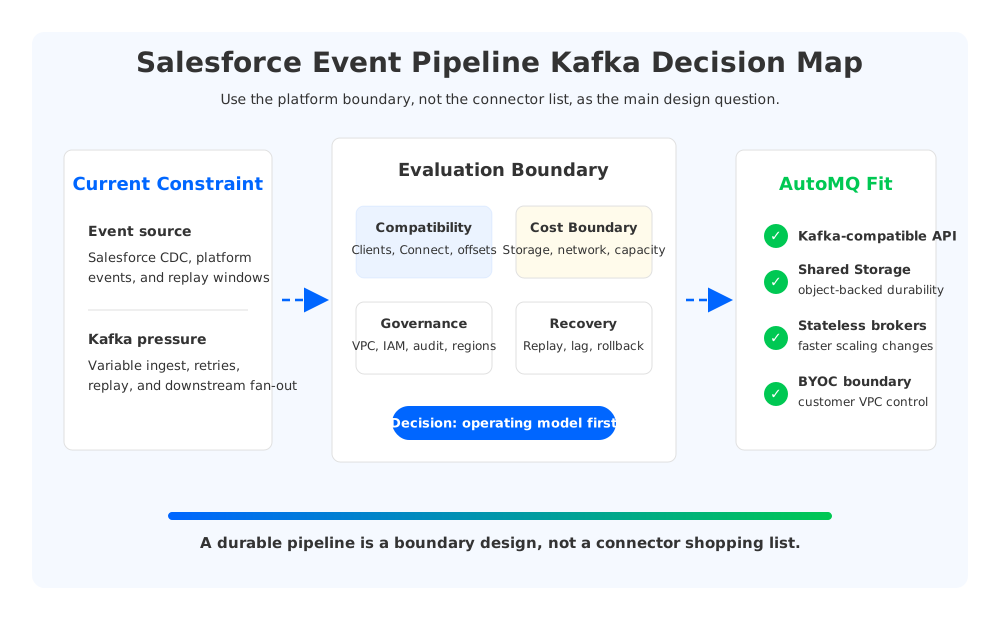
The useful framing is this: a Salesforce-to-Kafka pipeline is a boundary problem before it is a connector problem. The connector gets data into Kafka. The platform boundary decides where data lives, who pays for movement, how replay works, who owns scaling, and how much of the path remains inside the customer's network.
1Why Teams Search for salesforce event pipeline kafka
The search query tends to appear when a team has outgrown point-to-point integration. A CRM team wants Salesforce events to trigger workflows. A data integration team wants a durable stream for downstream systems. A platform team wants the pipeline to behave like the rest of the Kafka estate, with topics, Consumer groups, offsets, monitoring, and access controls instead of a separate runtime for every destination.
That is a reasonable instinct. Kafka gives teams a durable commit log, ordered Partitions, Consumer group fan-out, and a large ecosystem of clients and Connectors. Salesforce provides Platform Events, Change Data Capture, and API-based delivery models. Together, they decouple CRM from downstream workloads with different latency, retention, and failure profiles.
The production risk starts when teams treat "Salesforce connector to Kafka" as the architecture. A connector can handle polling, subscription, or delivery mechanics, but it does not answer the questions that appear after the first incident:
- Replay boundary: How far back can the pipeline replay Salesforce events, and how does that map to Kafka retention and committed offsets?
- Network boundary: Does traffic stay inside the intended VPC, region, or private connectivity path, or does it cross public or inter-zone paths during normal operation?
- Cost boundary: Which parts of the system charge for storage, cross-zone movement, endpoint processing, connector workers, and over-provisioned broker capacity?
- Ownership boundary: When Salesforce is healthy but Kafka lag grows, which team owns triage: integration, platform, application, or networking?
These boundaries matter because Salesforce event pipelines often feed systems that disagree about freshness. A warehouse sink can replay overnight, while a customer notification path needs deterministic behavior during business hours. Kafka can support both only when elasticity, observability, and governance are designed into the platform boundary.
2The Production Constraint Behind the Problem
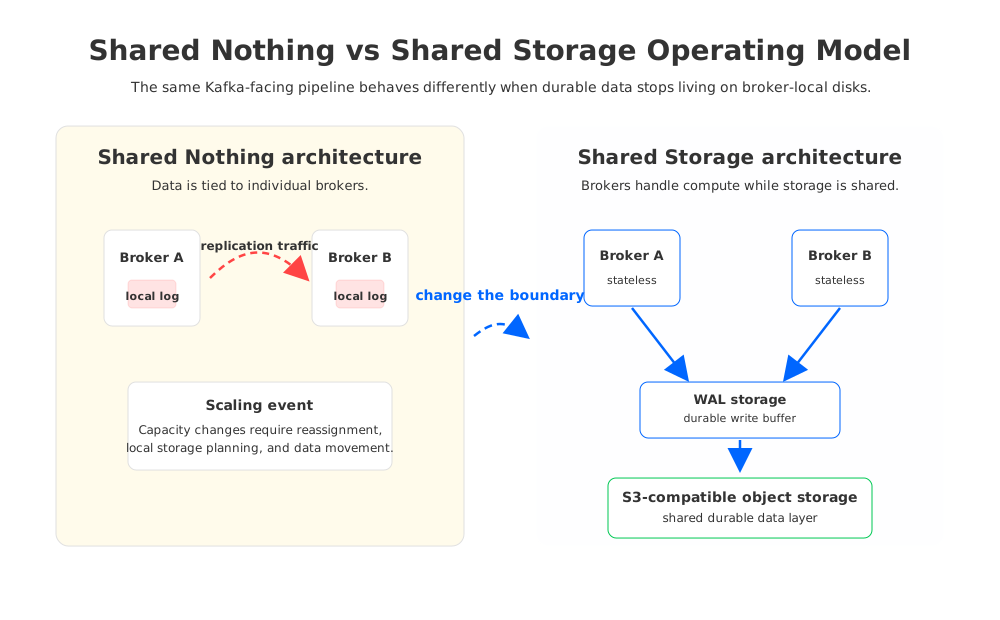
Traditional Kafka makes Salesforce integration teams share one operating model with every other high-throughput workload in the cluster. In the classic Shared Nothing architecture, each Broker owns local log segments for its Partitions. Durability comes from replication across Brokers, and scaling, replacing nodes, or reassigning Partitions often involves data movement. This model is proven, but it pushes many cloud decisions into broker-local storage and cross-zone networking.
That becomes visible because Salesforce traffic is uneven. A bulk account update, campaign import, or backfill can generate a surge. Downstream consumers may lag while enriching records or writing to slower systems. The platform team then chooses between over-provisioning for bursts or accepting that replay and lag recovery will consume the same storage, network, and Broker resources as normal traffic.
Capacity planning is only one side. Multi-Availability Zone Kafka deployments replicate data across failure domains. That improves availability, but it creates network paths that must be understood under each cloud provider's pricing model. Private connectivity services such as AWS PrivateLink add another boundary: they keep traffic on private paths, but introduce endpoint and data-processing dimensions for the bill model.
Connector feature lists do not show this design tension. Salesforce has event delivery and replay semantics. Kafka has offsets, retention, Consumer groups, transactions, and Connect workers. The cloud environment has VPC routing, Availability Zone placement, object storage, endpoint services, and data transfer pricing. A production design has to align all three.
3Architecture Options and Trade-Offs
There are several valid ways to build a Salesforce event pipeline with Kafka. A self-managed Kafka cluster gives control over Broker configuration, Connect workers, networking, and storage. A managed Kafka service can reduce cluster operations, but the team still needs to inspect networking, Connect runtime placement, retention, and migration in its own cloud account. A Kafka-compatible cloud-native platform can preserve Kafka-facing behavior while changing the storage and scaling model underneath.
Evaluate the trade-off by the failure mode each option reduces. Self-managed Kafka reduces abstraction risk, but keeps the team responsible for Broker storage, upgrades, reassignment, and Connect runtime operations. A managed service reduces infrastructure work, but may limit network topology, plugin management, or migration mechanics. A Kafka-compatible cloud-native platform can reduce data movement and capacity coupling, but compatibility must be proven against the clients, Connectors, schemas, and tools the pipeline uses.
Use this matrix before choosing the platform:
| Evaluation area | What to verify | Why it matters for Salesforce events |
|---|---|---|
| Kafka compatibility | Producer, Consumer, admin client, Kafka Connect, transactions, and Consumer group behavior match assumptions. | Downstream services may fail after a restart or rebalance. |
| Replay and offset model | Salesforce replay IDs, Kafka offsets, retention, and Consumer group commits are documented together. | Recovery needs one shared view of position across source, Kafka, and sinks. |
| Network boundary | VPC placement, endpoints, inter-zone paths, DNS, TLS, and egress controls are explicit. | CRM data often carries customer context that security teams expect inside approved paths. |
| Cost boundary | Broker storage, object storage, connector workers, endpoint processing, and cross-zone traffic are modeled separately. | The expensive part is often movement and over-provisioning, not the connector itself. |
| Elasticity | The platform can absorb bursts, backfills, and catch-up reads without long data rebalancing windows. | Salesforce bursts are not always predictable, and lag recovery should not require a storage migration project. |
| Migration and rollback | Topic mapping, offset continuity, producer switch, consumer switch, and rollback triggers are rehearsed. | A cutover without rollback becomes data reconciliation. |
| Observability | Connector lag, Kafka lag, event age, failed records, network spend, and storage growth are visible together. | Incidents cross team boundaries; dashboards should too. |
This matrix keeps the decision grounded. The question is whether the platform can run this Salesforce event pipeline with the right boundary between source delivery, Kafka durability, cloud network control, and downstream consumption.
4Evaluation Checklist for Platform Teams
A production checklist should start with compatibility because Salesforce pipelines accumulate hidden assumptions. A Connector may serialize payloads in JSON, Avro, or Protobuf. Downstream services may depend on Kafka headers, keys, ordering, idempotent writes, or specific Consumer group behavior. Kafka Connect workers may need custom plugins, secret management, dead-letter topics, and per-task observability.
The next check is the replay contract. Salesforce event delivery has its own replay model, and Kafka has retention and offsets. A replay ID tells the source-side position. A Kafka offset tells the position inside a Topic Partition. A Consumer group commit tells where an application believes it has safely processed records. A reliable runbook maps all three.
Network and cost review should happen before load testing. Draw the path from Salesforce to the Connector runtime, from the runtime to Kafka Brokers, from Brokers to storage, and from Kafka to each major sink. Mark where traffic crosses Availability Zones or VPC boundaries, where endpoint services process traffic, and where object storage API calls or growth occur.
Security review should be concrete. A good Salesforce event pipeline design answers where credentials live, which identity can modify Connectors, how TLS is enforced, where audit logs go, which topics contain sensitive fields, and how dead-letter topics are protected. A dead-letter topic is not harmless because it often contains malformed, unexpected, or sensitive payloads.
Finally, test under operational conditions, not only happy-path throughput. Pause a sink Consumer, restart Connect workers, revoke a staging credential, trigger a schema mismatch, and run a backfill while normal events continue. Verify whether the platform exposes enough information before the source replay window, Kafka retention window, or business SLA is at risk.
5How AutoMQ Changes the Operating Model
After the neutral evaluation work is done, AutoMQ becomes relevant because it changes the part of Kafka that makes cloud operations expensive and rigid. AutoMQ is a Kafka-compatible streaming platform that keeps Kafka protocol semantics while replacing broker-local log storage with Shared Storage architecture. Persistent data is stored through S3Stream using WAL (Write-Ahead Log) storage and S3-compatible object storage, which makes AutoMQ Brokers stateless.
For a Salesforce event pipeline, that changes scaling. Traditional Kafka scaling has to account for where Partition data lives and how much movement a topology change creates. In AutoMQ, durable data is in shared storage, so adding or replacing Brokers is more about compute ownership, metadata, cache warm-up, and traffic placement than copying retained logs across Broker disks. That matters when a surge or catch-up workload needs temporary compute without turning capacity changes into storage operations.
The same architecture changes the cost boundary. Shared Storage architecture can reduce broker-local durable storage and avoid the cross-AZ replication traffic pattern associated with traditional Kafka replica movement in many cloud deployments. The exact cost model still depends on provider pricing, workload shape, WAL type, object storage usage, and network topology, but the unit drivers become easier to separate: compute for active processing, object storage for durable data, and intentional network paths.
AutoMQ BYOC also gives integration and security teams a cleaner deployment boundary. In AutoMQ BYOC, the control plane and data plane run inside the customer's cloud account and VPC. For Salesforce pipelines carrying customer, revenue, or operational data, that boundary can be as important as throughput. The platform team can evaluate Connect runtime placement, Kafka access, object storage, monitoring, and IAM scope as one environment.
Managed Connector support fits because Kafka Connect is often the operational center of Salesforce integration. The value is that Connector lifecycle, plugin management, task placement, metrics, and Kafka storage behavior can be evaluated together. A Connector writing into stateless Brokers and shared storage has a different failure profile from one writing into a cluster where Broker disks and reassignment dominate.
Migration planning also becomes more explicit. AutoMQ Kafka Linking is designed for Kafka migration scenarios where topic data and Consumer group progress need to move with offset consistency. A Salesforce pipeline migration still has to validate source replay IDs, schemas, Connect task state, and downstream idempotency, but Kafka-side cutover can use clearer gates.
6A Practical Readiness Scorecard
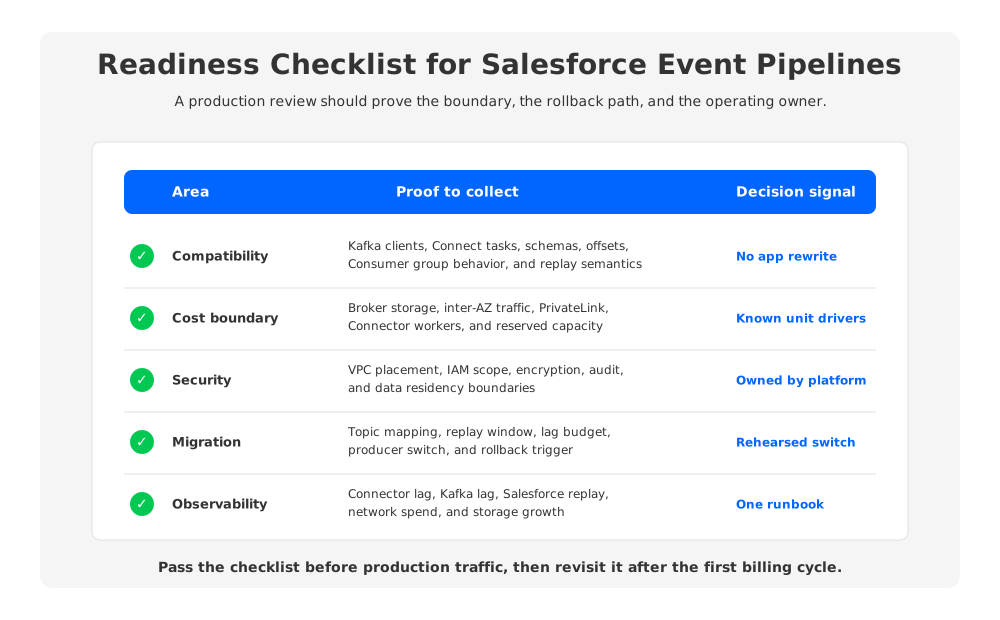
A readiness scorecard is more useful than a generic checklist because it forces teams to assign evidence. For each category, write "green," "yellow," or "red," and link the proof. No proof is red. A diagram without a tested runbook is yellow. Green means the team has tested the behavior or validated it against official documentation.
| Category | Green signal | Red signal |
|---|---|---|
| Compatibility | Kafka clients, Connectors, schemas, and Consumer groups run against the target path in staging. | Compatibility is assumed from protocol claims alone. |
| Replay | Source replay position, Kafka offset, and Consumer group commit are mapped. | The runbook says "replay from latest." |
| Cost | Storage, network, endpoint, and compute drivers are identified before load testing. | Cost review waits for production traffic. |
| Scaling | Burst and catch-up tests show how capacity is added and lag drains. | The cluster is sized for average throughput. |
| Security | Secrets, IAM, TLS, audit, dead-letter topics, and residency are reviewed together. | Connector credentials are treated as an integration detail. |
| Rollback | Producer, Connector, and Consumer rollback steps are tested before promotion. | Rollback depends on manual offset reconstruction. |
The scorecard should be owned by the platform team, but not filled out by that team alone. Salesforce owners understand event semantics and replay limits. Application owners understand idempotency and side effects. Networking owns private paths and endpoint policy. FinOps understands unit drivers at scale.
The first search for salesforce event pipeline kafka usually starts with a connector decision. The production design ends somewhere more concrete: a network path, a storage model, an offset contract, a replay plan, and a cost model the owning teams can defend. If your next Salesforce pipeline needs Kafka compatibility while keeping the operating boundary inside your cloud account, review the AutoMQ BYOC path: talk to AutoMQ.
7FAQ
7.1What is a Salesforce event pipeline with Kafka?
It moves Salesforce events, such as Platform Events or Change Data Capture events, into Kafka so downstream systems can consume them through Topics, Partitions, offsets, and Consumer groups.
7.2Is Kafka a good fit for Salesforce event pipelines?
Kafka is a strong fit when multiple downstream systems need durable fan-out, replay, independent scaling, and visibility. The platform still needs careful design around source replay, Kafka retention, network paths, and ownership.
7.3What should I check before choosing a Salesforce-to-Kafka connector?
Check event support, serialization, schema handling, retries, dead-letter topics, replay behavior, credential storage, Connect worker placement, observability, and Kafka platform compatibility.
7.4How does AutoMQ help with Salesforce event pipeline architecture?
AutoMQ keeps Kafka compatibility while using Shared Storage architecture and stateless Brokers. That can reduce coupling between durable data, Broker capacity, scaling, and replacement.
7.5Does PrivateLink remove all network cost concerns?
No. Private connectivity can help with network control, but teams still need to review endpoint processing, cross-zone paths, data transfer, and placement of Connector workers, Brokers, storage, and sinks.
8References
- Apache Kafka documentation
- Apache Kafka consumer groups
- Apache Kafka transactions and delivery semantics
- Apache Kafka KRaft mode
- Apache Kafka Tiered Storage
- Apache Kafka Connect
- Salesforce Pub/Sub API overview
- Salesforce Change Data Capture developer guide
- AWS PrivateLink pricing
- Amazon EC2 On-Demand Pricing: Data Transfer
- AWS PrivateLink concepts
- AutoMQ architecture overview
- AutoMQ compatibility with Apache Kafka
- AutoMQ S3Stream shared streaming storage
- AutoMQ WAL storage
- AutoMQ Kafka Connect overview
- AutoMQ Kafka Linking overview


