
Table of Contents
Table of Contents
When a Kafka cluster changes shape, the operational question is whether the balancer is seeing fresh evidence, whether the move addresses the real hotspot, and whether clients stay inside their latency and lag budgets while ownership changes.
That is the operator’s job after AutoMQ Self-Balancing is enabled. Automation can remove hand-written reassignment work, but it cannot tell you whether telemetry is stale, a Broker is fenced, a consumer group is coordinating, or storage is the real bottleneck.
Before reading a dashboard, separate a consumer group rebalance, which changes the consumer reading a partition, from a partition reassignment, which changes Broker ownership. They can overlap during a failure, but have different symptoms and responses.
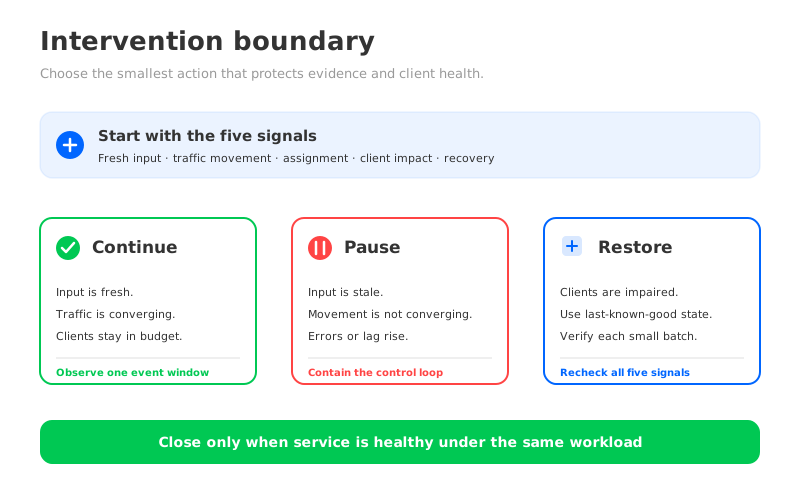
Let Self-Balancing finish when evidence is fresh, the overloaded Broker is recovering, and client-facing signals remain inside their budget. Intervene when evidence is stale, the move is not converging, or the move is masking a wider failure.
1What Self-Balancing is trying to change
Self-Balancing is a continuous placement loop. AutoMQ’s documentation names three ordinary causes of imbalance: traffic fluctuations, Topic creation or deletion, and Broker failures or restarts. Each can change which Broker is carrying useful work even when the topic configuration itself has not changed.
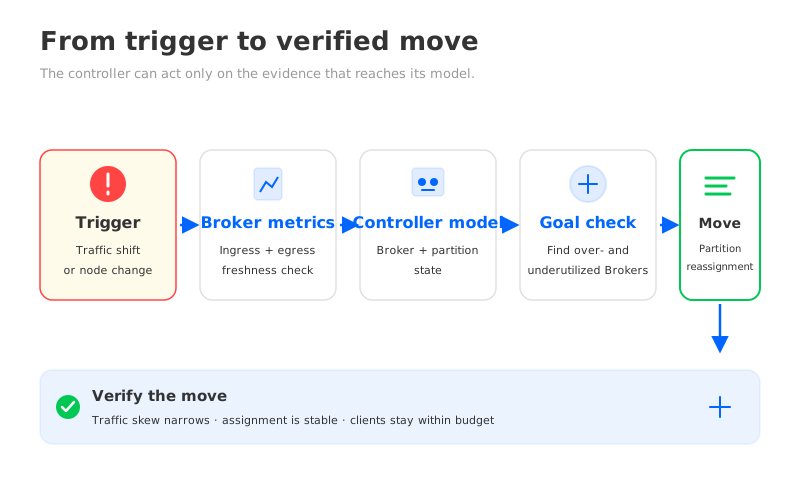
The loop starts with measurements. AutoMQ samples network and CPU signals, pre-aggregates observations on Brokers, and sends them to an internal Topic. The Controller combines them with Broker and Topic-Partition state, evaluates predefined goals, and can propose partition reassignment or exchange for overutilized and underutilized Brokers. The Continuous Self-Balancing documentation describes the loop.
The scheduler sees the signals made available to it; it does not understand business priority unless that priority is reflected in measured traffic and alert policy. A balanced byte rate can still hide a slow consumer, a storage request problem, or a client rollout.
For a self-managed multi-node deployment, the official example calls out autobalancer.controller.enable=true when starting the Controller. Treat that as a version- and deployment-specific configuration requirement, and verify it against the cluster-node Self-Balancing example before changing a production cluster. The important operational point is to confirm that the controller loop is actually enabled before diagnosing its decisions.
2Five signals to put on the operator board
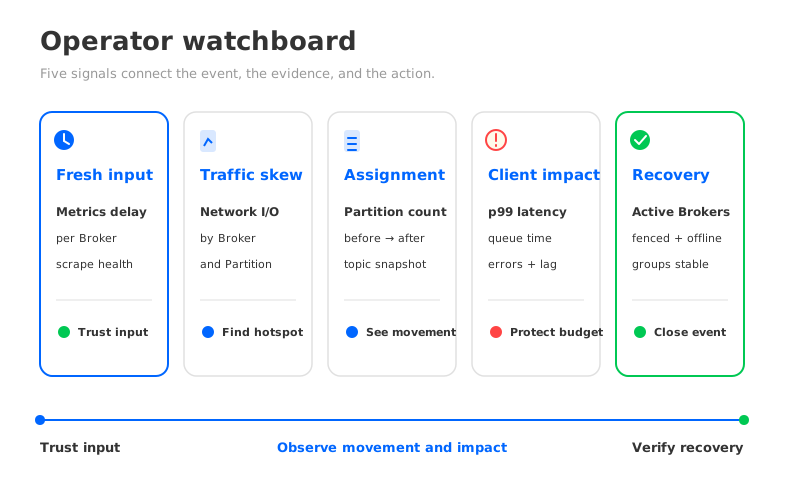
The five signals below are deliberately broader than a single “balance score.” They answer five different questions: can the balancer trust its input, where is the work, what changed, did clients feel it, and has the cluster returned to a usable state?
| Signal | What to inspect | What it tells the operator |
|---|---|---|
| Telemetry freshness | Kafka_stream_auto_balancer_metrics_time_delay_milliseconds | Whether a Broker is reporting observations quickly enough to participate in a reassignment decision |
| Traffic skew | The rate of Kafka_network_io_bytes_total, grouped by Broker, Topic, Partition, and direction | Whether a hotspot is real, which traffic path is heavy, and whether the skew is narrowing |
| Assignment change | Kafka_partition_count plus before-and-after kafka-topics.sh --describe snapshots | Which Brokers and partitions changed ownership; this is where you derive movement evidence rather than inventing a move counter |
| Client impact | Request latency and queue-time percentiles, request errors, and consumer-group state | Whether the infrastructure change is becoming a producer, fetch, or consumer availability problem |
| Cluster recovery | Active and fenced Broker counts, offline partitions, and the return of consumer groups to Stable | Whether the cluster has recovered enough to close the event |
2.1Telemetry freshness comes before balance
The metric Kafka_stream_auto_balancer_metrics_time_delay_milliseconds measures the delay between a Broker’s observations and the Controller’s view of them. AutoMQ documents a specific consequence: when the delay passes a threshold, the Broker is treated as out of sync and excluded from partition reassignment by the AutoBalancer. That means a Broker can look quiet on a dashboard because it is underloaded, or because its telemetry has stopped arriving. Those are opposite operating conditions.
Watch it per node_id, alongside scrape health and Controller status. Do not copy a threshold from another release or environment. If freshness is bad, pause your interpretation of the balance result before touching assignment: a plan built from delayed input is a containment candidate, not proof of convergence.
2.2Traffic skew explains why a move exists
Kafka_network_io_bytes_total is a Counter with Topic, Partition, and direction labels. Its rate gives the message-size throughput observed by a Broker. Plot it by Broker and keep the Partition dimension available for drill-down. A Broker with high aggregate traffic and one hot Partition needs a different response from a Broker whose many partitions are all moderately busy.
The direction label matters. Incoming and outgoing traffic can point to different pressure: producer-heavy writes, consumer fan-out, or object-storage activity. Pair the rate with Kafka_message_count_total when record count and record size may have changed. A falling byte rate does not prove health if record rate is stable and payload shape changed.
The operator’s question is not “are all Brokers equal?” It is “is the measured pressure moving toward the operating range that justified the event?” That keeps the dashboard tied to the reason for the reassignment.
2.3Assignment change tells you what actually moved
There is a difference between deciding to move a partition and reaching the new assignment. Use Kafka_partition_count for current counts, then capture kafka-topics.sh --describe before and after the event. The snapshots show which partitions moved and which Brokers gained or lost ownership.
Do not treat partition count as load. Ten quiet partitions do not equal one hot partition, and equal counts do not imply equal network or request pressure. Keep assignment and traffic shape on the same screen. If placement changes but the hotspot does not, the move solved the wrong constraint or traffic changed again.
The AutoMQ partition reassignment guide explains why a Shared Storage architecture can avoid copying an entire retained partition during reassignment. That changes the cost of a move; it does not remove the need to verify ownership and client behavior.
2.4Client impact decides whether the move is safe
Infrastructure can look healthier while applications get worse. Watch produce and fetch processing and queue-time percentiles with Kafka_request_error_count_total. A short metadata-related increase may be recoverable; a sustained increase means the event is competing with the serving path or exposing another failure.
Consumer-group state is a second client check. AutoMQ exposes counts for groups preparing to rebalance, completing a rebalance, and in Stable. These metrics do not measure Broker reassignment; they keep the two forms of rebalance separate. If a group is unstable while traffic converges, investigate membership, heartbeats, processing, and metadata refresh.
This is where a consumer-lag diagnosis guide is useful as a companion runbook. Lag is a symptom. During a balancing event, the operator needs to decide whether it follows assignment movement, a slow consumer, request queueing, or storage access.
2.5Cluster recovery closes the event
The final signal is a recovery set. Check Kafka_broker_active_count, Kafka_broker_fenced_count, and Kafka_partition_offline_count, then add consumer-group state and the client request view. A Broker can be active while a partition is offline, or assigned while the application still waits for metadata or catches up.
Close the event only when the original pressure is improving, the assignment is stable, no partitions are offline, Brokers are eligible, and client errors or queue time have returned to the workload’s normal range. “The move completed” is intermediate; “the service is healthy under the same workload” closes the event.
3When to let automation continue
Operators often interrupt because a dashboard looks busy. Movement itself is not a failure. A healthy event has a recognizable shape: a trigger changes traffic or membership, telemetry remains fresh, assignments change, the overloaded path eases, and client signals remain bounded.
Let the scheduler continue when those relationships hold. Keep the event in one observation window and avoid overlapping manual reassignment, Broker maintenance, or capacity changes that make the next snapshot hard to interpret.
Step in when one of these boundaries appears:
- The input is stale. One or more Brokers stop reporting timely AutoBalancer metrics, or the Controller cannot maintain a trustworthy cluster view.
- The output is not converging. Traffic remains skewed after the assignment changes, the same partitions oscillate between owners, or each move creates another hotspot.
- The serving path is deteriorating. Request errors, queue time, tail latency, producer retries, or consumer lag remain above the workload’s established budget.
- The cluster is losing safety margin. Brokers are fenced, partitions are offline, or the event overlaps with a failure that needs a separate incident response.
- The change is not the real fix. A client rollout, a hot key, a downstream outage, or object-storage/WAL pressure explains the symptoms better than placement does.
These are intervention boundaries, not universal numeric thresholds. Set alerts from the workload baseline, failure objectives, and release-specific configuration. “Stop after five minutes” is not a portable runbook.
4How to pause, contain, and roll back
Rollback starts with evidence. Record the timestamp, trigger, Controller and Broker membership, telemetry freshness, traffic rates, request and consumer signals, and assignment before manual action. Save Prometheus results and relevant logs; otherwise rollback can erase why the first plan was created.
Then contain the control loop. Use the supported Controller configuration or platform control for your AutoMQ version to pause Self-Balancing. Do not guess a disable key. If no live pause exists, keep topology stable, stop competing reassignment commands, and use the documented operational path.
If clients are healthy and only convergence is slow, holding the current assignment is often safer than creating a second plan. If clients are impaired, restore the last known-good assignment in the smallest safe batch using the Apache Kafka partition reassignment procedure. Confirm Self-Balancing is paused and verify each batch with the same five signals. The JSON file alone is not a recovery procedure.
After the cluster settles, decide whether to re-enable automation. Re-enable it only after the stale input, repeated movement, client impact, or cluster safety issue has a named cause and a test. If the feature is disabled as a permanent workaround, record the capacity and hotspot work that becomes manual again. That operational cost belongs in the post-incident action list.
5Read the balancing event after it settles
An after-action reconstruction should capture a small timeline: what changed, what did the Controller know, what moved, what did clients experience, and what evidence closed the event?
AutoMQ’s documentation gives a demonstration boundary: three Brokers start near 40 MiB/s, then Broker-0 reaches about 80 MiB/s and Broker-1 about 120 MiB/s while Broker-2 stays near 40 MiB/s. It says balancing triggers in the second phase and takes about 1 minute with the documented default configuration. Those values describe the demonstration, not a production SLO.
Use the same shape in your retrospective, replacing demonstration values with measured data:
- Trigger: record the traffic, Topic, membership, or failure change.
- Input quality: confirm metric freshness and a consistent Controller view.
- Decision: identify the overutilized and underutilized Brokers, goal, and selected partitions.
- Impact: correlate assignment changes with latency, errors, group transitions, lag, and storage or WAL signals.
- Close: show improved skew without offline partitions, fenced Brokers, or a new client failure.
This turns Self-Balancing from a black-box feature into an auditable operating loop. If the same trigger recurs, the retrospective should tell you whether to adjust capacity, partitioning, client behavior, storage limits, or the balancing policy. The answer should come from the causal chain, not from the fact that a green status eventually appeared.
6How AutoMQ changes the operator’s boundary
The neutral requirement is clear: automatic balancing needs fresh inputs, a bounded move, client-visible evidence, and a reversible path. AutoMQ’s Shared Storage architecture changes how much retained data is tied to a Broker. The stateless Broker documentation describes storage-compute separation, while the reassignment documentation describes uploading only data still in WAL before ownership changes.
That architecture lets placement focus more on traffic and Broker capacity instead of a full retained-log copy for every change. The trade-off moves toward shared-storage access, WAL choice, cache behavior, Controller coordination, and their observability. Those dependencies belong on the same board.
Self-Balancing can reduce manual placement work when inputs are healthy and its move is cheaper than a traditional data-copy reassignment. It does not replace workload baselines, client checks, or rollback. Teams evaluating that boundary can run a workload-specific AutoMQ evaluation and measure the five signals before granting unattended authority.
7FAQ
7.1Is AutoMQ Self-Balancing the same as a Kafka consumer group rebalance?
No. Self-Balancing changes Broker ownership to address placement and traffic distribution. A consumer group rebalance changes which consumer owns each assigned partition. Monitor both when a Broker failure or metadata change affects clients.
7.2What triggers AutoMQ Self-Balancing?
AutoMQ documents traffic fluctuations, Topic creation or deletion, and Broker failures or restarts. The Controller evaluates cluster state against predefined goals and may propose reassignment or exchange for overutilized and underutilized Brokers.
7.3Which metric shows whether the balancer can trust a Broker’s input?
Use Kafka_stream_auto_balancer_metrics_time_delay_milliseconds per node_id. A Broker whose delay exceeds the applicable threshold is treated as out of sync and excluded from AutoBalancer reassignment. Verify the threshold for the release and deployment in use.
7.4Should I manually reassign partitions when the dashboard looks uneven?
Not while Self-Balancing is actively making a healthy, converging move. Capture evidence first. If input is stale, client impact is rising, or the cluster is losing safety margin, pause the supported control loop and apply a last-known-good assignment only with a verification plan.
7.5Does second-level reassignment mean there is no client impact?
No. AutoMQ describes second-level reassignment under its Shared Storage design, but clients can still see metadata refreshes, retries, cache or storage effects, and lag. Measure the client path during the event.
8References
- AutoMQ: Continuous Self-Balancing
- AutoMQ: Prometheus Metrics
- AutoMQ: Example — Self-Balancing when Cluster Nodes Change
- AutoMQ: Partition Reassignment in Seconds
- AutoMQ: Stateless Broker
- Apache Kafka documentation: Cluster expansion and partition reassignment
- Apache Kafka documentation: Operations monitoring


