
Table of Contents
Table of Contents
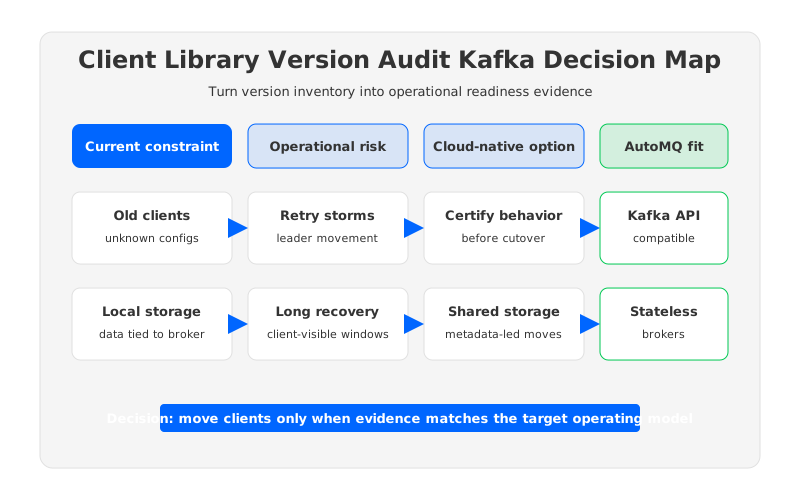
A client library version audit kafka search usually starts after a platform team discovers a simple but uncomfortable fact: the Kafka cluster is only one side of the contract. The other side is spread across application repositories, connector workers, stream-processing jobs, CI templates, Docker images, and a few long-running services that nobody has rebuilt in years. When the platform changes, those clients do not fail in a neat, centralized way. They fail where retry policies, serializers, offset commits, security settings, and broker metadata assumptions meet production traffic.
That is why a client library audit should not be treated as a spreadsheet exercise. Listing org.apache.kafka:kafka-clients versions is useful, but it does not answer the operational question: which applications can survive a broker upgrade, a migration, a listener change, a credential rotation, or a failover event without changing their observable behavior? The useful audit connects version inventory to runtime semantics, ownership, rollback paths, and the architecture of the target Kafka-compatible platform.
1Why teams search for client library version audit kafka
The pressure usually appears during a larger change. A team may be removing ZooKeeper dependencies, preparing for a Kafka migration, consolidating clusters, changing TLS and SASL policies, moving to Kubernetes, or evaluating a cloud-native Kafka-compatible platform. The change request sounds infrastructure-focused, but the risk lives in clients. Older producers may depend on retry behavior that changed across client generations. Consumers may commit offsets in patterns that make cutover validation harder. Connectors may package a Kafka client version that differs from the application fleet. Stream-processing jobs may use transactions or idempotent producers in ways that need explicit compatibility testing.
Apache Kafka's client model is intentionally broad. Producers, consumers, AdminClient, Kafka Connect, Kafka Streams, serializers, interceptors, and security modules all participate in the platform contract. A version audit therefore has to separate three questions that are often mixed together:
- What is deployed? Record the client library, language binding, framework wrapper, serializer, security mechanism, and runtime image for every application path.
- What behavior does it rely on? Identify offset commit style, group membership behavior, idempotence, transactions, retry and timeout settings, metadata refresh behavior, and schema compatibility assumptions.
- What change is coming? Tie the inventory to a concrete event: broker upgrade, cluster migration, listener rewrite, authentication change, cloud move, or architecture replacement.
The third question matters most. A client that is old but boring may be lower risk than a later-version client that uses transactions, custom partitioners, and aggressive timeouts. Version age is a signal; it is not the decision.
2The production constraint behind the problem
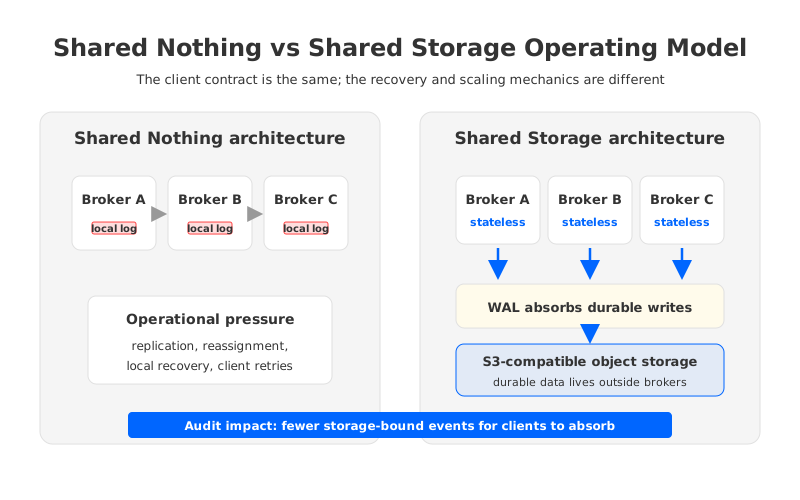
Traditional Kafka runs as a Shared Nothing architecture: each broker owns local storage, and reliability depends on partition replicas staying in sync across brokers. That model gives strong operational control, but it also turns infrastructure changes into data-placement events. Expanding a cluster, replacing brokers, moving partitions, and recovering from failures can trigger large amounts of local data movement. During those windows, clients experience the platform through metadata changes, leader movement, retry storms, consumer group rebalances, and occasionally longer recovery paths than the application team expected.
This is where a client library audit becomes more than compatibility bookkeeping. The audit has to ask whether clients are resilient to the operational shape of the platform. A producer with short delivery timeouts may behave differently during leader movement than one tuned for longer broker-side recovery. A consumer with static membership may handle rolling changes differently from one with older group behavior. A job using exactly-once semantics needs validation around transactional IDs, fencing, offset commits, and restart ordering. These are client concerns, but they are activated by broker-side operations.
The most common mistake is to audit only the client version and skip the failure mode. The version tells you whether a capability is available. It does not prove the application actually uses that capability correctly, or that its configuration is suitable for a migration. A useful audit starts from production events and works backward to the clients that will observe them.
3Architecture options and trade-offs
Platform teams usually have four broad options when a client audit exposes drift. None of them is universally correct. The right choice depends on blast radius, application ownership, workload criticality, and how much the target architecture changes the operational events clients must tolerate.
| Option | When it fits | Main operational risk | What to test |
|---|---|---|---|
| Keep current clients and certify behavior | Stable applications with low-risk usage patterns | Hidden assumptions remain undocumented | Retry behavior, metadata refresh, offset commits, and security negotiation |
| Upgrade client libraries in place | Active services with clear owners and CI coverage | Application release cycles may block platform work | Serialization, transactions, consumer group behavior, and framework compatibility |
| Wrap migration with compatibility gates | Large fleets where full client upgrades are not possible before cutover | Audit evidence may be incomplete for long-tail apps | Shadow reads, offset validation, rollback, and ownership sign-off |
| Change the platform architecture | Teams moving from broker-local storage to shared storage or cloud-native operations | New operating model must still preserve Kafka API expectations | Kafka protocol behavior, client observability, failover, and migration paths |
This table is deliberately neutral. A disciplined team can run Kafka well with careful client management, clear ownership, and conservative change windows. The problem is that those practices become harder as the fleet grows. Client versions drift because application teams optimize for feature delivery, platform teams optimize for shared reliability, and neither side has a perfect map of the other side's constraints.
The architectural question is whether the platform can reduce the number of disruptive broker-side events that clients must absorb. If adding capacity requires large partition movement, every capacity plan has a client-facing risk profile. If replacing a broker requires local data recovery, every failure drill has a client-facing timing profile. If cross-Availability Zone replication is part of the write path, every traffic surge has a networking and cost profile. Client audit work becomes easier when the platform's recovery, scaling, and migration behavior is less coupled to local broker disks.
4Evaluation checklist for platform teams
A production audit should produce evidence, not opinions. The output should be a readiness scorecard that application owners and platform owners can both use. Start with the client inventory, but avoid stopping there.
| Audit area | Evidence to collect | Readiness signal |
|---|---|---|
| Version and wrapper inventory | Kafka client version, language client, framework, container image, and build source | Every runtime path has an owner and a reproducible build |
| Protocol and API usage | Producer, consumer, AdminClient, Connect, Streams, transactions, and idempotence | Critical APIs are covered by integration tests against the target cluster |
| Offset behavior | Commit strategy, group IDs, replay tolerance, and reset policy | Cutover and rollback behavior is rehearsed with real offsets |
| Security | TLS, SASL mechanism, ACL model, secret rotation, and truststore handling | Authentication changes are tested without emergency application patches |
| Runtime configuration | Timeouts, retries, batching, metadata refresh, max poll settings, and backoff | Settings match the expected failure and migration windows |
| Observability | Client metrics, error logs, lag, rebalance events, and producer delivery failures | Operators can detect client-side regressions before users do |
| Governance | Service owner, risk tier, change window, and rollback owner | Each application has an explicit go/no-go decision |
The useful pattern is to assign each application to a migration lane. Lane 1 contains actively maintained services with recent clients, strong tests, and clear owners. Lane 2 contains services that are compatible but need configuration changes or extra soak time. Lane 3 contains services that need a client upgrade or framework change before they can move. Lane 4 contains unknowns. Lane 4 is not a technical category; it is an ownership problem, and it should block broad cutover until the team has a containment plan.
For critical workloads, add a small compatibility test suite that runs outside application release cycles. It should produce and consume records, commit offsets, exercise authentication, call AdminClient metadata APIs, trigger consumer group rebalances, and run a restart scenario. If the workload uses transactions, the suite should include transactional producer behavior and offset commits as part of the transaction. If the workload uses Kafka Connect or Kafka Streams, test the deployed runtime, not only the direct application dependency.
5How AutoMQ changes the operating model
Once the audit framework is clear, the platform choice becomes easier to evaluate. AutoMQ is a Kafka-compatible streaming platform that keeps the Kafka protocol and client ecosystem while changing the storage architecture underneath. Instead of binding durable partition data to broker-local disks, AutoMQ uses a Shared Storage architecture backed by object storage, with stateless brokers serving the Kafka protocol layer.
That distinction matters for client library audits because it changes the operational events behind the client contract. In a Shared Nothing Kafka cluster, scaling and recovery often involve moving or rebuilding data tied to broker storage. In AutoMQ's Shared Storage architecture, durable data lives in shared object storage, while brokers focus on request handling, leadership, caching, and scheduling. WAL (Write-Ahead Log) storage absorbs durable writes before data is uploaded to object storage, and the WAL type can vary by deployment model and workload requirements.
For client teams, the goal is not to learn another messaging API. The goal is to keep Kafka semantics while reducing the amount of application-facing risk created by storage-bound operations. A stateless broker model can make capacity changes, broker replacement, and partition reassignment less dependent on copying local data. That does not remove the need for client testing; it narrows the reasons a client should notice infrastructure work.
Migration planning is where this becomes concrete. AutoMQ Kafka Linking is designed for migrations from Apache Kafka or Kafka-compatible systems to AutoMQ, including byte-level data synchronization and Consumer group progress synchronization in supported scenarios. For a client audit, that means the migration plan can separate client readiness from a forced rewrite. Teams still need to verify offsets, authentication, producer behavior, and rollback windows, but they can evaluate those gates against a Kafka-compatible target rather than a different application interface.
The deployment boundary is also part of readiness. AutoMQ BYOC runs the control plane and Data Plane Cluster in the customer's cloud account, while AutoMQ Software is intended for private data center environments. For regulated or platform-heavy teams, that boundary affects security review, network design, observability, and ownership. A client audit should therefore include not only the library version but also where the target control plane, data plane, credentials, logs, and metrics live.
6A readiness scorecard you can run
The audit is ready for platform change when it can answer seven questions without hand-waving:
- Compatibility: Have the actual deployed clients been tested against the target Kafka-compatible platform, including producer, consumer, AdminClient, Connect, and Streams paths where relevant?
- Semantics: Do the tests cover offset commits, idempotence, transactions, group rebalances, retries, timeouts, and serialization rather than only a happy-path produce/consume loop?
- Ownership: Does every application have a service owner who can approve risk, change configuration, and participate in rollback?
- Migration: Can the team prove how offsets, group progress, and producer writes behave before, during, and after cutover?
- Security: Are TLS, SASL, ACLs, secret rotation, and network routes tested in the same shape they will have in production?
- Observability: Can operators see client-side regressions through metrics and logs before the incident is reported by downstream users?
- Rollback: Is there a written rule for when to stop, when to retry, and when to return traffic to the previous cluster?
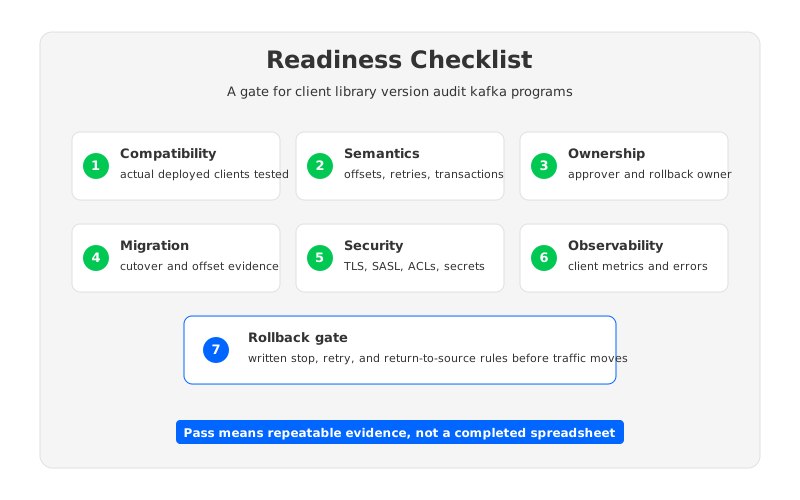
Treat this scorecard as a gate, not a report. A report can be filed and forgotten. A gate changes the release process. It gives platform owners a defensible way to say which applications can move, which need more evidence, and which should stay behind until their owners fix the risk.
7FAQ
7.1What should a Kafka client library version audit include?
It should include the deployed client version, language binding, framework wrapper, serializer, security mechanism, runtime image, owner, and usage pattern. The audit should also test runtime behavior such as retries, offset commits, transactions, metadata refresh, and consumer group rebalances.
7.2Is an old Kafka client always unsafe?
No. An older client with a narrow, well-tested usage pattern can be lower risk than a later-version client using complex features without coverage. Version age should trigger investigation, not automatic rejection.
7.3Should client upgrades happen before a Kafka migration?
Upgrade clients before migration when the audit finds unsupported behavior, missing security support, poor retry behavior, or no owner. If the current client is compatible and tested, a migration gate can allow it to move while a later application release handles cleanup.
7.4How does Shared Storage architecture help client readiness?
Shared Storage architecture moves durable data away from broker-local disks, so scaling and recovery can depend less on large local data movement. Clients still need Kafka compatibility testing, but the platform can reduce the operational events that expose fragile client assumptions.
7.5Where should AutoMQ fit in a migration checklist?
Evaluate AutoMQ after defining neutral readiness gates. Check Kafka compatibility, migration behavior with Kafka Linking, security boundaries, observability, rollback design, and whether stateless brokers reduce the operational risks that triggered the audit.
8References
- Apache Kafka documentation
- Apache Kafka upgrade documentation
- AutoMQ Kafka compatibility documentation
- AutoMQ Shared Storage architecture overview
- AutoMQ WAL storage documentation
- AutoMQ migration overview
If your audit is already stuck between application ownership and platform deadlines, run the readiness scorecard against a Kafka-compatible target that changes the storage operating model. You can explore AutoMQ on GitHub through the project CTA: review the open-source repository.


