
Table of Contents
Table of Contents
Teams rarely search for ai assisted kafka operations because Kafka is unfamiliar. They search for it because the familiar work has become too slow for the number of clusters, application teams, and incident paths they support. A consumer group falls behind after a deployment, a broker runs close to disk limits, a connector task fails during a replay, or a platform engineer has to explain why a routine partition change is tied to a large operational window. The question is not whether an AI assistant can summarize a dashboard. The question is whether the operating model behind Kafka gives that assistant a safe surface to reason over.
That distinction matters because Kafka operations sit at the boundary between infrastructure and application correctness. Consumer offsets are not only counters; they represent committed business progress. Transactions and idempotent producers are not only client features; they affect how recovery plans should treat duplicate writes and partial failures. KRaft metadata is not only cluster metadata; it is the control plane for broker membership and partition leadership. An assistant that can read these signals may reduce cognitive load. An assistant that changes them without guardrails can create a cleaner incident report and a worse incident.
1Why teams search for ai assisted kafka operations
The appeal is obvious in the middle of an incident. Kafka state is spread across admin APIs, broker metrics, logs, deployment events, service ownership records, topic configuration, connector status, and runbooks. A human operator can gather those pieces, but the work is repetitive and time-sensitive. An assistant can help by turning a broad operational question into a bounded investigation: which consumer group is affected, which partitions are hot, whether lag began after a deploy, whether a reassignment is active, and which runbook step applies.
The dangerous part is that the same conversational interface can make write actions feel casual. Changing retention, resetting offsets, deleting topics, expanding partitions, moving leaders, or altering ACLs are not equivalent to reading lag. Some actions are reversible, some are reversible only with downtime, and some affect application semantics after the cluster looks healthy. A production runbook for AI-assisted Kafka work should begin by separating observation, recommendation, approval, and execution.
Use this operating split as the first filter:
- Read and explain. The assistant reads topic metadata, consumer group state, broker health, connector status, and runbook text, then cites the evidence behind its diagnosis.
- Draft and route. The assistant prepares a change request, rollback note, Terraform diff, or migration checklist, but does not apply the change.
- Execute through platform controls. The platform performs approved writes through existing identity, policy, audit, and rollout paths.
This split sounds conservative, but it is what makes the assistant useful for more people. Application teams can ask better questions without receiving broad cluster access. SREs can review a prepared plan instead of rebuilding the evidence from scratch. Platform teams can see which repeated recommendations point to missing automation, weak observability, or an architecture that makes ordinary work too stateful.
2The production constraint behind the problem
Traditional Kafka follows a Shared Nothing architecture. Each broker owns local or attached storage for partition replicas, and replication keeps leader and follower copies in sync. That model has served Kafka well because it gives clear ownership and mature failure semantics. It also means that capacity changes, broker replacement, and partition reassignment often involve the location of durable data, not only the location of compute.
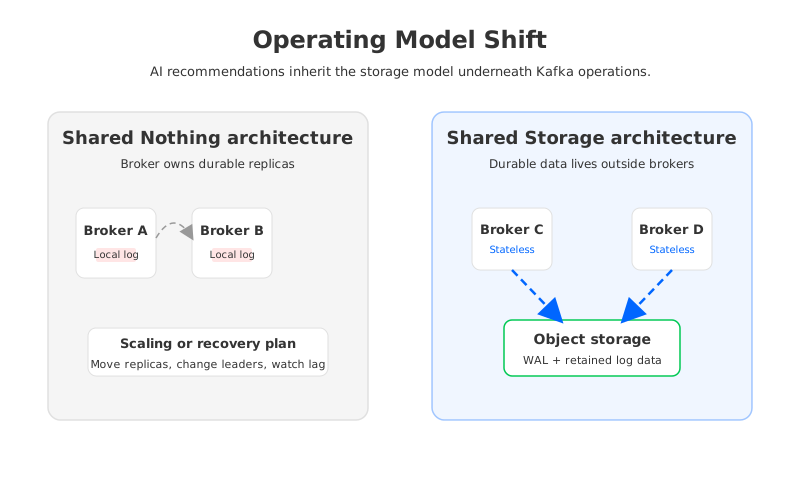
AI assistance does not remove that coupling. If a broker is disk constrained, the assistant can identify the symptom, correlate it with topic growth, and propose a reassignment. The risky part remains the same: data may need to move, leaders may need to change, and the plan needs a safe window. If a consumer group has lag, the assistant can identify hot partitions and slow consumers, but it still cannot know from metrics alone whether a downstream sink can tolerate replay or whether key ordering assumptions block a partition increase.
The runbook should therefore treat Kafka operations as stateful workflows, not command suggestions. For each proposed action, ask what state it changes, who owns the business impact, and how rollback works. A recommendation to increase partitions is incomplete without noting ordering impact. A recommendation to reset offsets is incomplete without a replay and idempotency check. A recommendation to change retention is incomplete without storage, compliance, and recovery consequences.
3Architecture options and trade-offs
An AI-assisted operations program has two design surfaces. One is the assistant interface: tools, prompts, approvals, logs, and identity. The other is the Kafka-compatible platform underneath. Teams often focus on the first surface because it is visible in demos. The second surface decides how much risk sits behind each recommendation.
There are several reasonable architecture choices, and none should be evaluated by a single feature checkbox:
| Option | Operational strength | Trade-off to examine |
|---|---|---|
| Self-managed Kafka on local or attached disks | Maximum control and familiar Kafka behavior | Data movement, capacity planning, and disk operations remain platform-owned. |
| Managed Kafka service | Less infrastructure ownership for the platform team | Service boundaries may limit deep customization, governance, or migration control. |
| Kafka with Tiered Storage | Historical data can move to object storage while Kafka APIs remain familiar | Hot data and broker-local operations still matter, so scaling is not fully detached from brokers. |
| Kafka-compatible Shared Storage architecture | Durable data is separated from broker-local disks | Teams must validate compatibility, latency profile, deployment boundaries, and operational tooling. |
The important evaluation question is not "Which system has AI features?" It is "Which system gives AI-assisted work a smaller blast radius?" If routine operations still require large broker-local data movement, the assistant will mostly produce better explanations for slow actions. If the platform separates durable storage from broker compute, the assistant can spend more of its time on diagnosis, governance, and change preparation rather than planning data relocation.
4Evaluation checklist for platform teams
A production checklist should be boring enough to survive an incident. Start with compatibility, because application rewrites turn an operations project into a migration program. Apache Kafka clients, Consumer groups, offsets, transactions, Kafka Connect, Schema Registry usage, and common admin workflows should keep their expected semantics. If a platform claims Kafka compatibility, test the clients and tools your teams actually use, not only a happy-path producer and consumer.
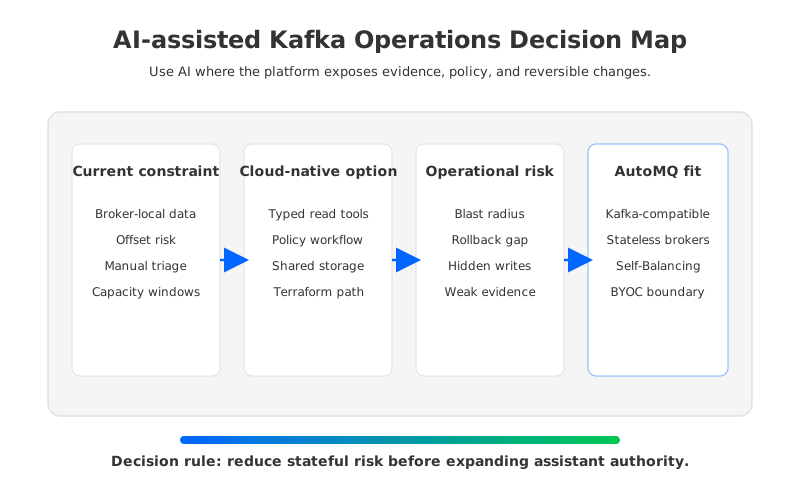
Next, check the operational control path. The assistant should call typed tools with narrow inputs, not a shell wrapped in natural language. Read tools can be broadly useful, but write tools should map to a service account, role, approval policy, affected resource, audit record, and rollback note. The platform should also preserve evidence: the metrics, logs, configs, time windows, and runbook sections used to produce a recommendation.
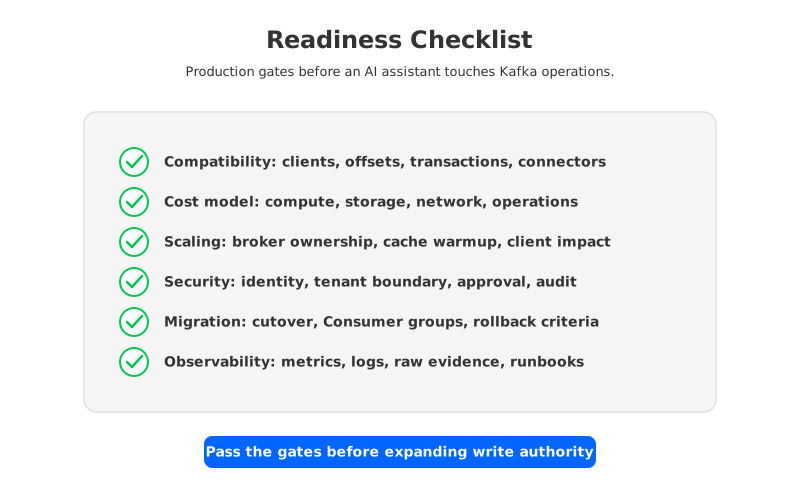
The evaluation is stronger when it covers seven gates:
- Compatibility. Kafka clients, topic semantics, Consumer group behavior, offsets, transactions, connectors, and admin tooling need explicit validation.
- Cost model. Separate compute, storage, network, data movement, observability, and operational labor instead of treating Kafka cost as broker count alone.
- Elasticity. Measure how scaling changes broker ownership, partition placement, cache warmup, and client impact.
- Governance. Every assistant-visible action needs identity, tenant boundaries, approval, policy checks, and audit logs.
- Recovery. Run failover, broker replacement, replay, connector restart, and offset recovery drills before trusting incident recommendations.
- Migration. Validate source and target semantics, offset handling, producer cutover, consumer switch, and rollback.
- Observability. The assistant needs current metrics and logs, but operators still need dashboards, alerts, and raw evidence.
This checklist also helps separate real automation from polished chat. A useful assistant might not execute any production change in its first release. If it can gather evidence, explain the current state, draft the right ticket, and link the exact runbook section, it has already removed a large amount of toil without weakening production controls.
5How AutoMQ changes the operating model
After the checklist is in place, AutoMQ becomes relevant as a Kafka-compatible Shared Storage architecture option. AutoMQ keeps Kafka protocol compatibility while replacing broker-local log storage with S3Stream, WAL (Write-Ahead Log) storage, data caching, and S3-compatible object storage. In operational terms, brokers are more stateless because durable log data is not owned by a single broker's local disk.
That changes the shape of AI-assisted operations. A broker replacement plan can focus more on traffic ownership and less on copying durable log segments. A scaling recommendation can be evaluated through partition leadership, cache behavior, and workload placement rather than through a large data migration window. Self-Balancing can continuously redistribute traffic across brokers, while Self-healing can isolate abnormal nodes before the failure path spreads into application behavior.
AutoMQ BYOC and AutoMQ Software also matter for governance discussions because they keep the control plane and data plane inside the customer's cloud account or private environment. For AI-assisted operations, that boundary is practical, not cosmetic. The assistant, observability stack, Terraform workflow, AutoMQ Console, and Kafka clients can be mapped to customer-controlled identity, networking, and audit paths. The team can decide which tools are read-only, which create proposals, and which call approved platform APIs.
Migration deserves the same discipline. AutoMQ Kafka Linking is designed for migration from Kafka-compatible systems with byte-to-byte data synchronization and Consumer group progress handling, but the operational runbook should still rehearse the full cutover path. Producers, consumers, ACLs, schemas, connectors, dashboards, rollback criteria, and business owners should be named before an assistant is allowed to draft migration steps. AI can organize the plan; the platform must enforce the control path.
6Readiness scorecard
The fastest way to over-trust AI in Kafka operations is to start with an impressive demo and then discover missing boundaries during a real incident. A better scorecard begins with the boring facts: what can the assistant read, what can it propose, what can it change, and who can override it.
Use this scorecard before connecting an assistant to production:
| Area | Production-ready answer |
|---|---|
| Tool boundary | Read tools are available first; write tools are restricted and auditable. |
| Evidence | Every recommendation cites cluster state, metrics, logs, configs, and time windows. |
| Ownership | Each topic, Consumer group, connector, and cluster has a named owner or escalation path. |
| Rollback | High-impact actions include rollback steps and data correctness notes. |
| Platform fit | The architecture reduces routine data movement instead of hiding it behind a chat interface. |
| Migration path | Cutover, offset handling, client behavior, and rollback are rehearsed outside production pressure. |
The runbook should end where the search began: with the pressure of real operations. AI can shorten the time between symptom and explanation. It can draft better change plans and make runbooks easier to use. It cannot make stateful operations safe by wording them more confidently. If your Kafka-compatible platform reduces broker-local storage coupling, the assistant has a cleaner surface to work with. If it does not, start with read-only diagnosis and use the repeated pain points as architecture feedback.
For teams evaluating Kafka-compatible streaming with customer-controlled deployment boundaries, the next practical step is to compare your current runbook against AutoMQ's Shared Storage architecture and migration model. You can start from the AutoMQ Cloud Console and map one production incident path before changing the whole estate.
7FAQ
7.1What is AI-assisted Kafka operations?
AI-assisted Kafka operations means using an AI assistant to help read cluster state, gather evidence, explain incidents, draft change requests, and guide runbook execution for Kafka or Kafka-compatible systems. The safest production pattern starts with read-only tools and proposal generation before any write action is considered.
7.2Should an AI assistant reset Kafka offsets?
Offset resets should stay behind human approval and platform controls. A reset affects business progress and replay behavior, so the plan should name the Consumer group, affected partitions, target offsets, replay expectations, downstream idempotency, and rollback path.
7.3How does Shared Storage architecture help operations?
Shared Storage architecture separates durable log data from broker-local disks. That can reduce the operational weight of broker replacement, scaling, and reassignment because retained data is stored in shared object storage rather than bound to one broker's local disk.
7.4Is Tiered Storage the same as a diskless Kafka-compatible architecture?
No. Tiered Storage offloads historical data to object storage while brokers still keep recent data locally. A diskless Shared Storage architecture changes the primary storage model so brokers do not own durable log data on local disks.
7.5Where should AutoMQ appear in an AI operations evaluation?
AutoMQ should appear after the team defines its compatibility, governance, recovery, cost, and migration requirements. It is relevant when Kafka compatibility is required but broker-local storage operations are creating too much friction for cloud-native scaling and AI-assisted runbooks.


