
Table of Contents
Table of Contents
Teams usually search for platform support workflow kafka after the work has become uncomfortable. A service team wants a topic, a schema, a connector, a quota change, or a replay window. The platform team can provide it, but every request touches production risk: client compatibility, broker capacity, retention, access control, consumer lag, cost allocation, and rollback. The real problem is how to give application teams a fast path without turning the Kafka platform team into a ticket queue.
Apache Kafka is powerful because it gives teams a shared commit log with partitioned ordering, Consumer group coordination, offsets, transactions, Kafka Connect, and a large client ecosystem. The same breadth makes support workflows tricky. A small platform request can cross several boundaries at once: the application owns message contracts, the platform team owns cluster safety, security owns access rules, and finance cares when retention or replay expands storage and network bills. A production guardrail has to make those boundaries visible before the request reaches a change window.
A good Kafka platform support workflow is an architecture decision as much as a process decision. Runbooks, templates, and approval gates help, but they cannot remove storage locality, broker data movement, or capacity reservation from the system. If the underlying platform turns every support action into a broker-local storage event, the workflow stays fragile.
1Why teams search for platform support workflow kafka
The search query sounds narrow, but it points to a broader operating model. Platform teams are trying to standardize how application teams request Kafka resources without losing production discipline. They want a workflow where a developer can ask for a topic, a connector, a longer retention window, or a replay, and the platform can answer with a repeatable path rather than a long thread across Slack, Jira, cloud dashboards, and cluster metrics.
The requests themselves are familiar:
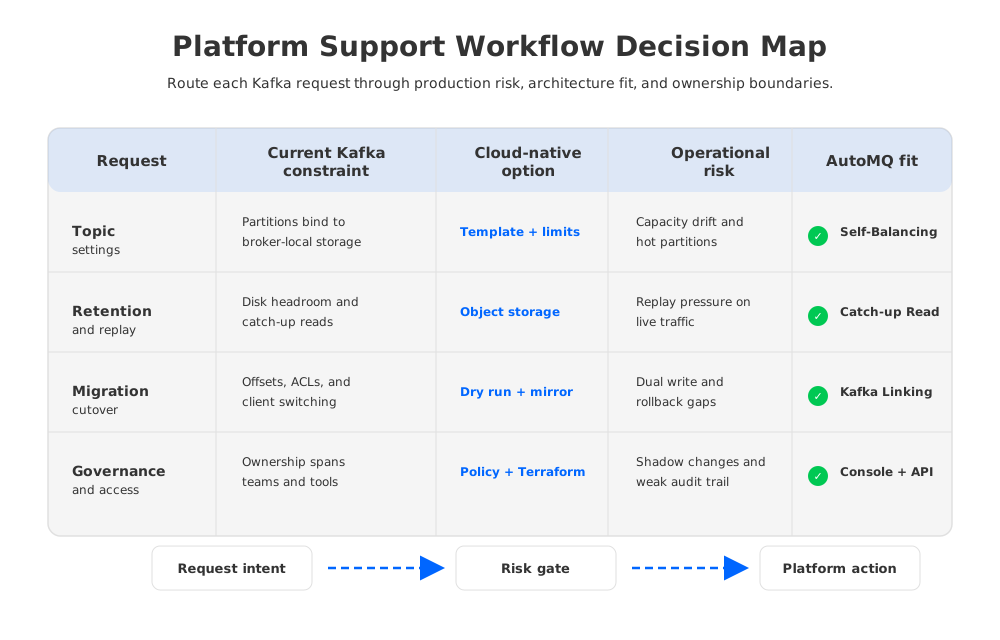
- Topic and partition changes. The application team knows its throughput and ordering needs, but the platform team has to translate those needs into partitions, replication, retention, quotas, and broker placement.
- Consumer group support. Offset resets, lag investigations, and replay requests look like application issues until they create catch-up read pressure on the cluster.
- Connector and integration work. Kafka Connect can standardize data movement, but each connector brings credentials, network paths, task parallelism, error handling, and ownership questions.
- Migration and rollback. Moving workloads between clusters requires client compatibility, offset continuity, ACL parity, DNS or bootstrap server changes, and a way back if the cutover exposes a hidden dependency.
These are not beginner questions. The people asking them know that the wrong answer can create a second incident while trying to solve the first one. They are looking for guardrails because production support work can start as a small request and end as a capacity, governance, or recovery decision.
2The production constraint behind the problem
Traditional Kafka follows a Shared Nothing architecture. Each Broker owns local log storage for its assigned partitions, and durability is built through replication across brokers. That model fits many environments, but it creates a specific constraint for platform support: the operational unit is not only a topic or a workflow request. It is a topic tied to broker-local data, replica placement, disk capacity, and network movement.
That constraint shows up in routine work. Increasing retention may require more disk headroom on brokers that host the affected partitions. Rebalancing partitions can move data across machines. Adding brokers can reduce pressure, but the cluster still has to redistribute partition ownership and sometimes data. Serving a large replay can compete with tailing reads and writes because historical fetches travel through the same broker fleet. A ticket that looks like "please keep this topic for longer" becomes "which brokers absorb the storage, how does replication change traffic, and what happens during catch-up reads?"
Many support workflows hide cost until late in the process. Replication across Availability Zones is a durability strategy, but it can also create inter-zone network traffic. Larger retention windows raise storage usage. Replays and backfills can increase egress paths or force extra broker capacity. A guardrail that only checks topic naming misses the part of the request that changes the platform's economic shape.
Apache Kafka documentation defines the mechanics that platform teams must respect: consumers commit offsets, Consumer groups divide partitions among members, transactions add producer-side semantics, KRaft manages metadata without ZooKeeper, and Kafka Connect runs source and sink integrations. A support workflow should not paper over those semantics. It should turn them into explicit questions: which client behavior is in scope, which offsets matter, which connector state must be preserved, and which failure path has been tested?
3Architecture options and trade-offs
The first architectural option is to keep the existing Kafka operating model and build a better workflow around it. This can work when workloads are predictable, retention is short, replay is rare, and one platform team owns enough cluster expertise. The workflow should encode hard limits for partition counts, retention, quota changes, and connector ownership. It should also require capacity checks before storage-heavy changes and rollback plans before migration work.
A second option is to add managed services or higher-level tooling around Kafka. This can reduce cluster setup and day-to-day administration, but the team still has to verify behavior for the workloads that matter. Managed control planes do not automatically solve client compatibility, offset movement, data residency, cost attribution, or catch-up read isolation. The request path may improve while production risk still lives in the storage and networking model.
A third option is to evaluate a Kafka-compatible platform with a different storage architecture. This is where the trade-off becomes more interesting. If persistent data is no longer bound to broker-local disks, support workflows can stop treating every capacity change as a data movement event. The platform still needs Kafka semantics, security, observability, and migration discipline, but the mechanics behind scaling, recovery, and rebalancing change.
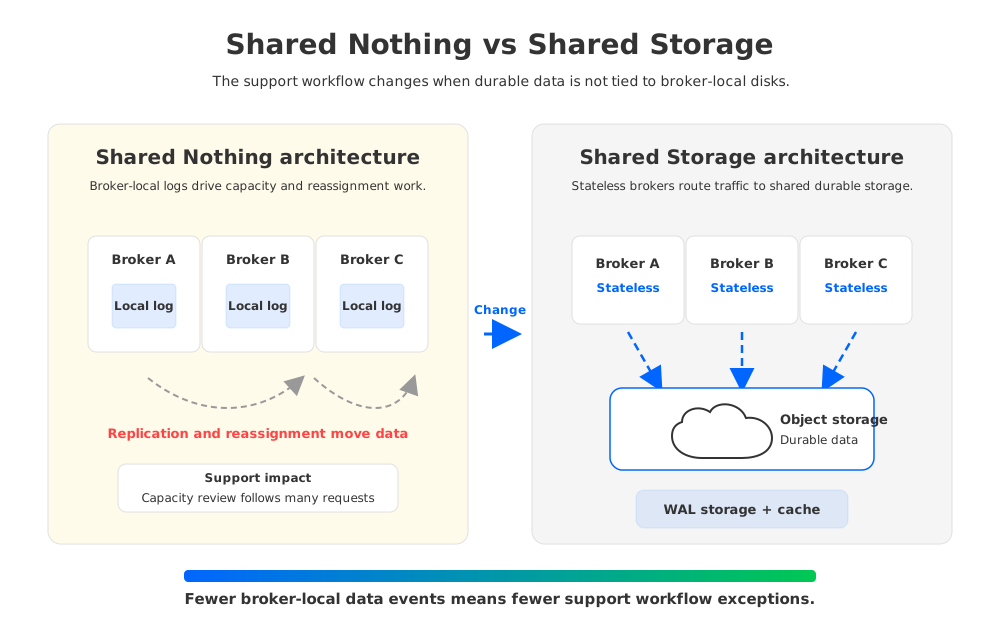
The right comparison is not "old Kafka versus a shiny replacement." A platform team should compare operating models:
| Decision area | Shared Nothing architecture | Shared Storage architecture |
|---|---|---|
| Storage ownership | Partition data lives on broker-local disks and replicas. | Persistent data lives in shared object storage, with brokers focused on compute and routing. |
| Scaling behavior | Adding or removing brokers can require partition movement and careful storage planning. | Broker changes mainly shift compute ownership and traffic placement. |
| Replay pressure | Historical reads can compete with live traffic through broker-local resources. | Tailing Read and Catch-up Read paths can be designed around cache and object storage access patterns. |
| Cost review | Storage, replication traffic, and capacity reservation need repeated inspection. | Object storage, WAL storage, compute, and network paths become the main cost model. |
| Migration risk | Offset continuity, client behavior, ACLs, and rollback remain the hard parts. | The same migration checks apply, but less local data movement can reduce some operating friction. |
The table does not remove the need for testing. It gives platform teams a sharper question: which architecture makes the support workflow easier to keep inside production boundaries?
4Evaluation checklist for platform teams
A useful workflow starts before the ticket form. It defines what application teams can request, what the platform team must validate, and what requires an architecture review. That separation matters because many Kafka requests have a safe default path and a risky variant. Creating a small topic for a stable service is not the same as extending retention for a high-throughput telemetry topic.
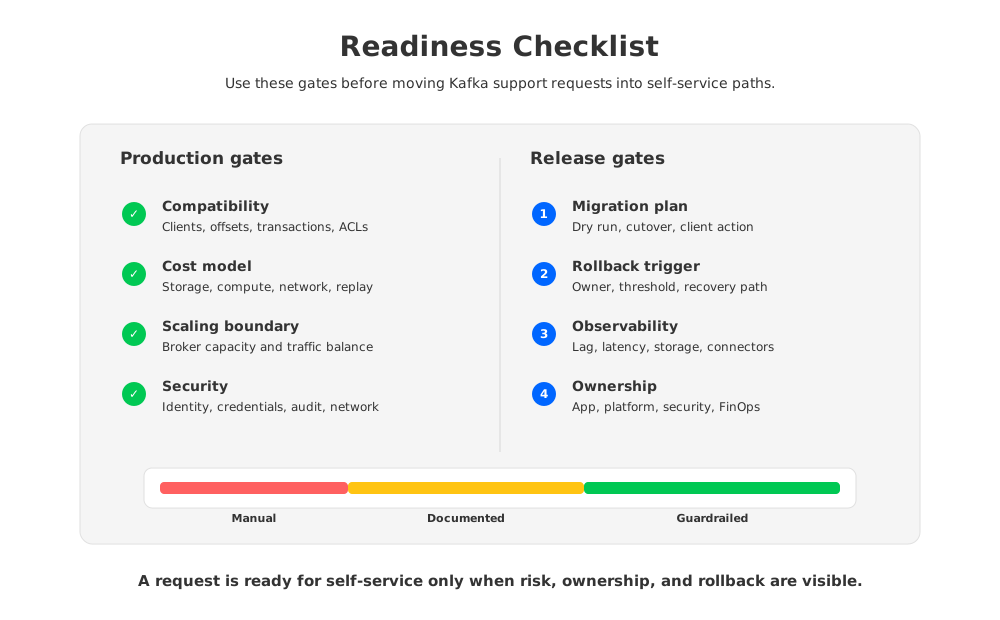
Use this checklist as the first pass before choosing tools or platforms:
- Compatibility. Confirm client versions, producer settings, Consumer group behavior, offset handling, transactions, ACLs, authentication, and serialization formats. A produce-and-consume smoke test is useful, but it does not cover the semantics that break migrations.
- Capacity and cost. Tie each request to storage growth, write throughput, read fan-out, catch-up read pressure, inter-zone traffic, and connector task capacity. Make the expected cost driver visible before approval.
- Governance. Define who owns topic naming, retention, schemas, credentials, quotas, connector configs, and incident response. A workflow without ownership rules becomes a shared inbox.
- Recovery. Require a rollback path for migrations, connector changes, offset resets, and retention changes. The rollback path should name the trigger, owner, and client-side action.
- Observability. Track broker health, partition load, Consumer lag, request latency, connector task status, storage usage, and object storage behavior if the platform uses shared storage.
- Team boundary. Decide which changes application teams can self-serve and which changes need platform approval. The boundary should reflect blast radius, not organizational politics.
The checklist is intentionally boring. Production guardrails are supposed to be boring. If the workflow only works when a senior Kafka engineer reads every request by hand, it is expert triage with a form in front of it.
5How AutoMQ changes the operating model
After the neutral evaluation, the architectural question becomes specific: can a Kafka-compatible platform reduce the amount of broker-local operational work behind support requests? AutoMQ is a Kafka-compatible, cloud-native streaming platform that uses Shared Storage architecture. It keeps Kafka protocol and API compatibility while moving persistent data to S3-compatible object storage through S3Stream, WAL storage, and data caching.
This matters for platform support because AutoMQ Brokers are stateless brokers. They still handle Kafka requests, leadership, routing, and compute work, but durable data is not tied to local disks in the traditional way. When the platform team changes capacity, isolates an unhealthy node, or rebalances traffic, the operation is less likely to become a large local data movement project. The workflow can focus more on request intent, compatibility, and risk boundaries.
AutoMQ also gives platform teams a clearer separation between control work and data work. AutoMQ BYOC runs the control plane and data plane in the customer's cloud account and VPC, while AutoMQ Software is available for private data centers. AutoMQ Console, Terraform workflows, monitoring, Self-Balancing, and Self-healing can sit behind the support process, so the request path and the operational path use the same resource model.
The migration story still deserves discipline. AutoMQ commercial editions provide Kafka Linking for byte-to-byte message synchronization, offset consistency, and zero-downtime migration patterns, but the readiness checks do not disappear. Platform teams should still validate client behavior, ACLs, Consumer group state, connector dependencies, cutover triggers, and rollback. Architecture can reduce friction, but it should not become an excuse to skip production rehearsal.
AutoMQ's Table Topic and Managed Connector capabilities can also change the support boundary for data platform teams. Instead of treating every downstream data lake request as a separate ETL project, a platform team can define when streaming data should land directly in Apache Iceberg tables and when Kafka Connect remains the better integration path. The guardrail is not "use one tool for everything." It is "make the request type explicit, then route it to the safest supported path."
6A readiness scorecard you can use before rollout
Before rolling out a platform support workflow, score each area from 1 to 3. A 1 means the team relies on manual judgment. A 2 means the process is documented, but enforcement is inconsistent. A 3 means the process is encoded in templates, automation, policy, or platform controls.
| Area | 1: Manual | 2: Documented | 3: Guardrailed |
|---|---|---|---|
| Topic requests | Engineers choose settings case by case. | Templates exist for common workloads. | Defaults, limits, ownership, and review triggers are enforced. |
| Retention and replay | Approved through ad hoc review. | Requires capacity notes and owner approval. | Capacity, cost, and replay impact are checked before the change. |
| Migration | Cutover plan lives in project notes. | Runbook covers clients, offsets, ACLs, and rollback. | Dry runs, promotion criteria, and rollback triggers are tracked. |
| Observability | Dashboards exist but are not tied to requests. | Common metrics are named in runbooks. | Each workflow type has required validation metrics. |
| Cost governance | Costs are reviewed after growth. | Cost drivers are estimated during review. | Storage, compute, and network drivers are visible in the request path. |
If most scores are 1, start with process and ownership. If most scores are 2, the next improvement is usually automation or platform controls. If scores are 3 but support still feels slow, the bottleneck may be the underlying architecture. That is where Shared Storage architecture, stateless brokers, and customer-controlled deployment boundaries deserve evaluation.
7FAQ
7.1What is a Kafka platform support workflow?
A Kafka platform support workflow handles production requests such as topic creation, partition changes, retention updates, Consumer group support, connector deployment, migration, access control, and rollback. It should define ownership, validation, approval, automation, and monitoring for each request type.
7.2How is this different from a normal Kafka runbook?
A runbook usually describes how to perform an operation. A platform support workflow decides when the operation is safe, who owns the request, which checks are required, what metrics prove success, and how rollback works. The workflow connects technical actions to production accountability.
7.3Does Kafka compatibility remove migration risk?
No. Kafka compatibility reduces application rewrite risk, but platform teams still need to test client versions, authentication, ACLs, Consumer groups, offsets, transactions, connector behavior, observability, and rollback. Compatibility is the starting point for migration planning, not the whole plan.
7.4When should a team evaluate Shared Storage architecture?
Evaluate it when broker-local storage work dominates support workflows: slow partition reassignment, heavy retention planning, replay pressure, frequent capacity changes, cross-AZ traffic review, or recovery work that depends on where partition data lives. These are signs that the operating model, not only the process, needs attention.
7.5Where does AutoMQ fit in this evaluation?
AutoMQ fits after the team has defined compatibility, governance, cost, recovery, and observability requirements. It is relevant when the team wants Kafka-compatible streaming with Shared Storage architecture, stateless brokers, object-storage-backed durability, customer-controlled deployment boundaries, and platform controls for scaling and migration.
If your team is ready to test a Kafka-compatible platform support workflow with Shared Storage architecture and customer-controlled deployment boundaries, start from the AutoMQ environment setup path.


