
Table of Contents
Table of Contents
Open source streaming systems rarely fail a budget review because of the license line. They fail it when the platform team realizes how much human time is attached to keeping the system boring. Apache Pulsar can be a capable distributed messaging and streaming platform, especially for teams that need multi-tenancy, topic-level isolation, geo-replication patterns, or a storage architecture built around BookKeeper. The operational question is more concrete: what does it cost to run Pulsar well after the first cluster is live?
Pulsar operations cost is the sum of cloud resources, storage growth, network behavior, engineering time, on-call load, upgrade risk, security work, and the cost of being wrong during an incident. That last category is easy to ignore during a proof of concept because no one is paging yet. In production, every component boundary becomes an ownership boundary, and Pulsar has several of them.
1What Operations Cost Includes
The cleanest way to estimate Pulsar operational cost is to separate resource cost from responsibility cost. Resource cost is visible in your cloud bill: compute nodes, disks, object storage if tiered storage is enabled, load balancers, and network transfer. Responsibility cost is less visible: who tunes BookKeeper, who owns ZooKeeper or metadata services, who validates upgrades, who designs alert thresholds, who investigates backlog growth, and who decides when a broker restart is safe.
Those responsibilities do not all have the same frequency. Monitoring happens continuously. Capacity planning happens every time retention, throughput, or tenant mix changes. Upgrades may be episodic, but they concentrate risk because they touch the broker, BookKeeper, proxies, clients, and metadata dependencies. Failure recovery is rarer, yet it determines how much institutional knowledge the team must keep available outside normal business hours.
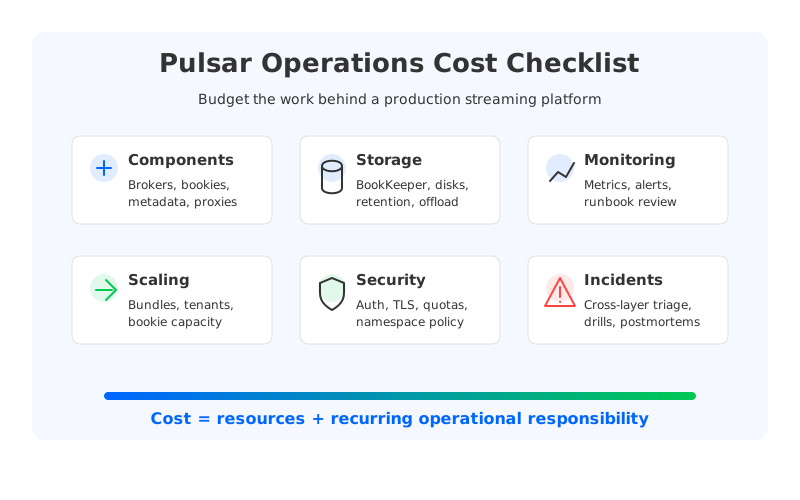
A useful estimate should include at least six operating surfaces:
- Component lifecycle: brokers, BookKeeper bookies, proxies, function workers, and metadata services each need deployment, configuration, health checks, and version management.
- Storage management: BookKeeper ledger placement, disk utilization, journal behavior, compaction, retention, and tiered storage offload policy directly affect durability and cost.
- Monitoring and alerting: broker metrics alone are not enough; production teams also need bookie, JVM, disk, network, backlog, namespace, and tenant-level signals.
- Scaling and rebalancing: adding capacity is not only a node-count decision. Teams must understand how traffic, ledgers, bundles, and clients move.
- Security and multi-tenancy: authentication, authorization, TLS, namespace policy, quotas, and isolation groups create ongoing governance work.
- Incident response: the cost of a streaming platform includes runbooks, drills, postmortems, and the time senior engineers spend diagnosing partial failures.
Google's SRE guidance gives a practical lens here: toil is the manual, repetitive, automatable work that grows with service size. Pulsar operations cost is not measured by the number of dashboards you build; it is how much recurring operational work grows as tenants, topics, retention windows, and throughput increase.
2Pulsar Components That Affect On-Call Load
Pulsar's architecture intentionally separates serving, storage, and metadata responsibilities. Brokers handle client traffic and serve topics. BookKeeper stores message data in ledgers across bookies. Metadata services coordinate cluster state. Proxies may sit in front of brokers, and Pulsar Functions can add another runtime layer. This separation can be powerful, but it also means production incidents are rarely explained by a single process name.
The cost implication is diagnostic fan-out. A producer timeout might involve broker load, bookie write latency, journal disk pressure, network paths, metadata lookups, authentication, or client configuration. A backlog spike might be a consumer issue, a namespace policy issue, a storage bottleneck, or a tenant-level quota decision. The platform team must know enough about each layer to decide where the failure begins.
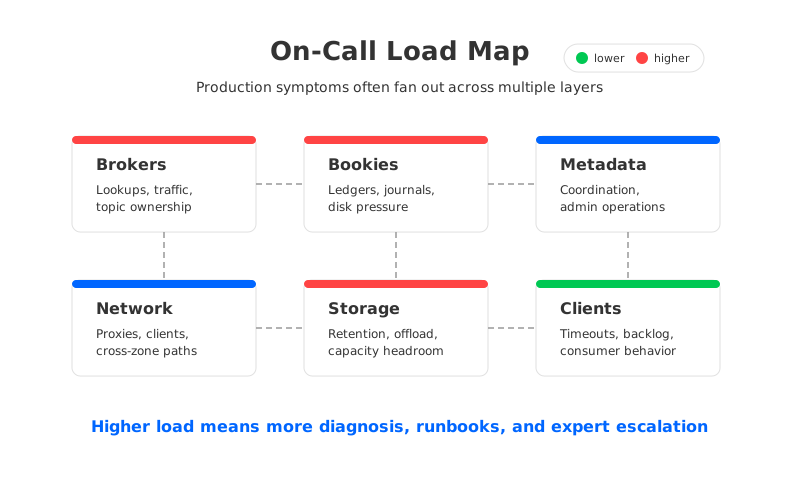
BookKeeper deserves special attention because it is not a background implementation detail. It is the persistent storage layer for Pulsar, and its behavior depends on bookie health, disk layout, ledger replication, journal performance, and ensemble/quorum settings. When bookies run hot or disks fill unevenly, the operational problem is no longer "Pulsar is slow." It becomes a storage-system investigation with streaming semantics attached.
The metadata layer creates a different class of concern. Metadata problems can affect topic ownership, lookup behavior, namespace operations, and cluster coordination. A team that treats metadata services as a generic dependency may underinvest in backup, observability, and upgrade discipline. In a small cluster, that gap may be hidden. In a multi-tenant platform, it becomes a source of broad blast radius.
3Scaling, Upgrades, and Failure Recovery
Scaling Pulsar is not a single action. Brokers, bookies, proxies, and function workers can have different bottlenecks, and each bottleneck points to a different intervention. If brokers are CPU-bound, the team may add brokers or tune traffic distribution. If bookies are disk-bound, the team may add storage capacity, adjust ledger placement, or revisit retention. If namespace bundles are uneven, the team may need to split or unload bundles. That is reasonable engineering work, and it is still work.
Upgrades are where the responsibility surface becomes most visible. Official upgrade guidance exists for a reason: a production upgrade must preserve compatibility, plan sequencing, validate clients, and account for components that do not fail in the same way. The cost is not only the maintenance window. It is the staging environment, rollback plan, test matrix, runbook, and the senior engineer hours required to trust the change.
Failure recovery adds another layer because streaming systems are judged by continuity. Data durability, producer availability, consumer catch-up, and administrative access can fail independently. A runbook that only says "restart the broker" is too thin for a system where storage, metadata, and serving paths are separated. The team needs operational drills that answer sharper questions: Which bookie failures are tolerated? When does under-replication become customer risk? Which alerts indicate a tenant issue rather than platform-wide degradation?
| Operations area | Cost driver | What to budget for |
|---|---|---|
| Monitoring | Multiple component layers | Metrics pipelines, dashboards, alert reviews, runbook maintenance |
| Storage | BookKeeper and retention behavior | Disk capacity planning, ledger health, compaction, offload validation |
| Upgrades | Component sequencing | Staging clusters, compatibility tests, rollback rehearsals |
| Scaling | Different bottlenecks per layer | Load analysis, bundle operations, bookie expansion, proxy capacity |
| Security | Tenant and namespace controls | Policy audits, certificate rotation, access reviews |
| Incidents | Cross-layer diagnosis | On-call training, drills, postmortems, expert escalation paths |
The table is deliberately framed as budgeting work, not as a verdict against Pulsar. Some organizations have platform teams that are comfortable operating distributed storage systems. For them, Pulsar's architecture may fit the operating model. The mistake is assuming that because the software can be downloaded for free, the production responsibility model is also free.
4Self-Managed Pulsar vs Managed Pulsar
Managed Pulsar can reduce operational cost by shifting part of the component lifecycle to a provider. That may include provisioning, upgrades, core monitoring, and certain reliability practices. It does not remove every operating responsibility. The customer still owns workload design, tenant structure, data retention choices, client behavior, access policy, integration testing, and the business impact of downtime.
Self-managed Pulsar makes sense when the team wants deep control and has the operational maturity to use it. The platform team can tune deployment topology, storage media, network paths, multi-tenancy policy, and security posture. The trade-off is obvious: the same control that helps specialized workloads also creates more work for SREs and platform engineers.
Managed Pulsar makes sense when the team values the Pulsar model but does not want to staff the full storage and lifecycle burden. The key procurement question is where the provider's responsibility ends. A managed service that hides upgrades but leaves workload diagnosis, quota design, and incident interpretation to the customer may still require a strong internal streaming team.
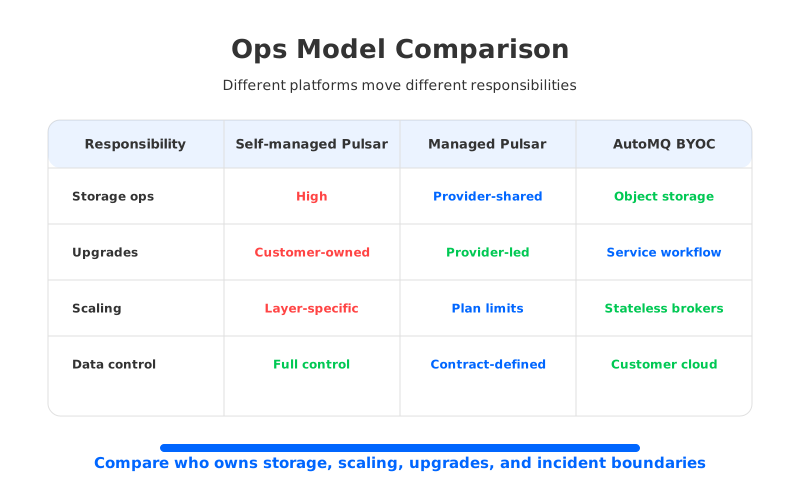
Teams should ask vendors and internal platform owners the same questions:
- Who owns broker, bookie, metadata, and proxy upgrades?
- Who responds when write latency rises but broker CPU looks normal?
- How are tenant quotas, namespace policies, and access controls reviewed?
- What metrics are exposed to the customer, and which remain provider-only?
- How is retention growth modeled before it becomes an urgent storage event?
- What is the documented rollback path for a failed upgrade or configuration change?
These questions keep the discussion grounded. "Managed" should mean a smaller operational surface, not an unclear one.
5Where Kafka-Compatible Cloud-Native Storage Fits
Some teams researching Pulsar operations cost are not committed to Pulsar specifically. They are trying to escape an operating model they associate with traditional Kafka: broker-local disks, partition reassignment, storage-heavy recovery, and capacity planning that couples compute with retention. If the real problem is Kafka operations rather than Kafka APIs, switching ecosystems may be a larger migration than necessary.
This is where Kafka-compatible cloud-native streaming systems become relevant. AutoMQ is in that category: it keeps Kafka protocol compatibility while redesigning the storage layer around object storage and stateless brokers. The operational goal is not to make distributed systems effortless. It is to remove specific sources of toil that come from binding durable data to broker-local disks.
In a traditional Kafka cluster, scaling and recovery often become data movement projects. A broker replacement or partition rebalance can move large volumes across the network, and operators must budget for both time and risk. In an object-storage-backed design, durable log data lives outside the broker compute layer, so broker changes can become more like compute operations than storage migrations. That changes the shape of on-call work: fewer emergency disk-expansion stories, less waiting for reassignment, and a clearer path to elastic capacity.
The fit is strongest when a team wants Kafka ecosystem continuity. Existing Kafka clients, Kafka Connect integrations, Kafka Streams applications, and operational muscle memory still matter. If the evaluation started with Pulsar because Kafka operations felt too heavy, it is worth asking whether the target architecture needs a different messaging API or a better storage model underneath Kafka semantics.
6Operations Cost Checklist
The most useful Pulsar cost model is not a single per-topic number. It is a checklist that forces the hidden work into the same conversation as cloud resources. Start with workload shape: write throughput, read fan-out, retention, number of tenants, topic count, message size distribution, geo-replication needs, and security isolation requirements. Then map each workload dimension to a component that someone must operate.
For a small team, the biggest risk is usually expertise concentration. One or two engineers learn enough about BookKeeper, metadata services, and broker behavior to keep the platform healthy, then every incident waits for those people. For a mature platform team, the cost shifts toward process: standardizing runbooks, building guardrails for tenant onboarding, running upgrade rehearsals, and automating capacity actions. For a managed-service buyer, the cost becomes boundary management: understanding what the provider handles, what the customer must still monitor, and what happens when a gray-area incident appears.
A realistic estimate should include these inputs:
| Input | Why it matters |
|---|---|
| Number of production clusters | Multiplies upgrade, monitoring, and policy work |
| Tenant and namespace count | Drives governance, quotas, isolation, and support load |
| Retention window | Expands storage planning and recovery exposure |
| BookKeeper capacity headroom | Determines how often storage becomes urgent |
| Upgrade frequency | Converts version policy into recurring engineering work |
| On-call escalation model | Shows whether expertise is distributed or concentrated |
| Automation coverage | Reduces toil only when runbooks are codified and tested |
The answer may still be "run Pulsar." That is a valid answer when the architecture fits the workload and the team is ready for the responsibility surface. The better outcome is that the decision is explicit. You know whether you are paying in provider fees, staff time, operational risk, or migration complexity.
If your team is comparing Pulsar with Kafka-compatible cloud-native alternatives, use the same checklist across options. AutoMQ's architecture is worth evaluating when the main pain is broker-local storage operations and Kafka ecosystem compatibility remains valuable. A practical next step is to model your workload against storage, scaling, recovery, and on-call responsibilities before choosing a platform. You can use AutoMQ's pricing calculator as a starting point for that workload-based comparison.
7FAQ
7.1Is Pulsar expensive to operate?
Pulsar can be cost-effective for the right team and workload, but it is not operationally free. The cost comes from running multiple distributed components, especially brokers, BookKeeper, metadata services, monitoring, upgrades, security policy, and incident response. The more tenants, topics, retention, and throughput you add, the more important automation and operational expertise become.
7.2What is the biggest hidden Pulsar operations cost?
The biggest hidden cost is usually cross-layer diagnosis. A production symptom such as producer timeout, backlog growth, or write latency can involve brokers, bookies, metadata, clients, quotas, disks, or networks. Teams need enough expertise and observability to identify the failing layer quickly.
7.3Does managed Pulsar remove operations cost?
Managed Pulsar can reduce component lifecycle work, but it does not remove workload ownership. Customers still need to understand retention, tenant design, client behavior, access policy, integration risk, and the business impact of incidents. The right question is which responsibilities move to the provider and which stay with your team.
7.4How should I compare Pulsar operations cost with Kafka operations cost?
Compare responsibility surfaces, not only software features. Traditional Kafka often concentrates operational work around broker-local storage, partition reassignment, and recovery. Pulsar separates serving and storage through BookKeeper, which changes the operational surface. Kafka-compatible cloud-native systems such as AutoMQ try to keep Kafka semantics while reducing broker-local storage operations through object storage and stateless brokers.
7.5When should a team consider AutoMQ instead of Pulsar?
Consider AutoMQ when the main goal is to reduce Kafka infrastructure operations while preserving Kafka client and ecosystem compatibility. Pulsar may be a better fit when the team specifically wants Pulsar's API model, multi-tenancy semantics, and BookKeeper-based architecture. The decision should start from workload requirements and operational ownership, not from a generic platform preference.
8References
- Apache Pulsar: Architecture overview
- Apache Pulsar: Deploying a Pulsar cluster on bare metal
- Apache Pulsar: Monitoring
- Apache BookKeeper documentation
- Google SRE Book: Eliminating Toil
- Google SRE Book: Monitoring Distributed Systems
- AutoMQ documentation: Architecture overview
- AutoMQ GitHub repository


