
Table of Contents
Table of Contents
Most teams searching for "Pulsar vs Kafka" are not asking which project is more elegant on a whiteboard. They are asking a more expensive question: should we keep building around Kafka, or is Apache Pulsar different enough to justify a protocol, tooling, and operations shift? Event streaming platforms rarely live alone; they sit between application teams, stream processors, connectors, schema systems, observability, security, procurement, and incident response.
Kafka and Pulsar both handle durable pub/sub at serious scale, but they make different architectural bets. Kafka grew around a broker-local partitioned log and a vast ecosystem. Pulsar separates serving from storage more explicitly, using brokers for traffic handling and Apache BookKeeper for persistent message storage. The right answer depends less on a generic feature checklist and more on where your pain actually comes from: protocol compatibility, storage elasticity, geo-replication, multi-tenancy, operational surface area, or cloud cost.
1Quick Answer: When Kafka, Pulsar, or AutoMQ Fits
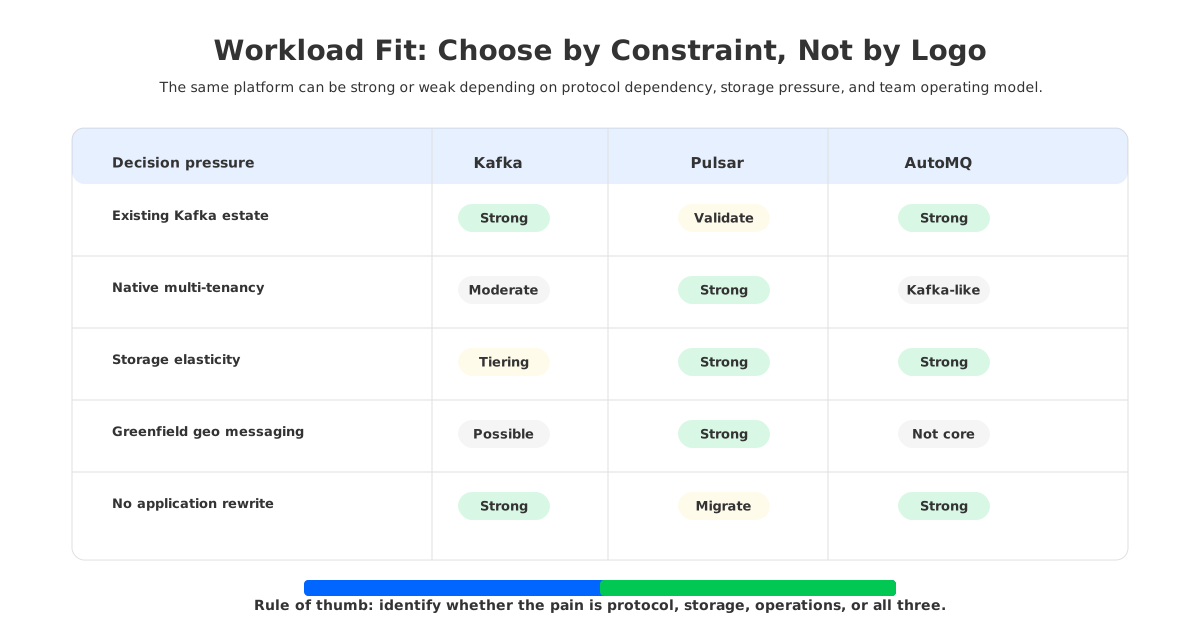
Kafka is usually the safer default when your organization already depends on Kafka clients, Kafka Connect, Kafka Streams, monitoring, and the operational knowledge base around the Kafka protocol. Pulsar becomes attractive when you want multi-tenancy, namespace-level administration, built-in geo-replication patterns, and a serving/storage split based on BookKeeper. The tradeoff is that Pulsar is not a drop-in Kafka replacement for most production estates; even when compatibility layers help, teams still need to validate clients, offsets, connectors, stream processing jobs, security behavior, and runbooks.
There is also a third path. If the core problem is Kafka's cloud storage and scaling behavior, not Kafka's API or ecosystem, a Kafka-compatible shared-storage architecture can be a better fit. AutoMQ belongs in that category: it keeps Kafka protocol compatibility while moving durable storage away from broker-local disks into object-storage-backed shared storage. That changes the decision for teams that want cloud-native elasticity without rewriting Kafka workloads.
| Decision pressure | Kafka | Pulsar | AutoMQ |
|---|---|---|---|
| Existing Kafka ecosystem dependency | Strong fit | Requires migration validation | Strong fit |
| Native multi-tenancy and namespace model | Possible, but less central | Strong fit | Kafka-compatible model |
| Broker/storage separation | Limited by broker-local log design | Core design with BookKeeper | Core design with shared object storage |
| Operational familiarity in Kafka-heavy teams | Strong fit | New stack to learn | Close to Kafka operations plus cloud-native storage |
| Cloud elasticity without application rewrite | Depends on deployment and tooling | Possible, but protocol migration may remain | Strong fit when Kafka compatibility is required |
A platform team with no Kafka estate and strong multi-tenant messaging requirements may find Pulsar compelling. A Kafka-heavy organization trying to reduce broker disk pressure, slow reassignment, and over-provisioning should first separate "we dislike Kafka's storage economics" from "we need to leave the Kafka ecosystem."
2Architecture Comparison
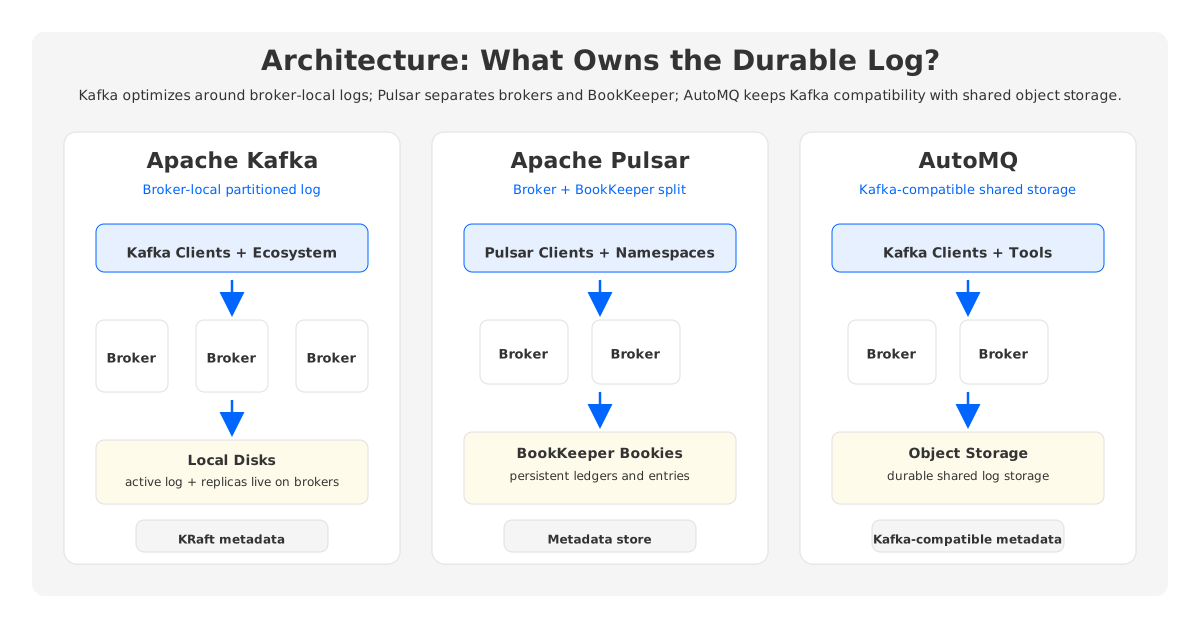
Kafka's core abstraction is the partitioned log. Producers write records to topic partitions, brokers persist those partitions, and consumers advance offsets. Replication protects data by copying partition data across brokers. Since Kafka 3.3, KRaft has been production-ready for metadata management, and current Kafka documentation describes KRaft as the required metadata mode rather than the older ZooKeeper mode. That simplifies Kafka's control plane, but brokers are still tightly connected to the local logs they host.
That broker-local model is why Kafka feels direct and predictable. A partition has leaders, followers, offsets, replicas, and clear operational knobs. It is also why cloud operations become heavy: when partitions move, data moves; when storage grows, brokers need enough disk and network capacity to keep up.
Pulsar starts from a different split. Pulsar's documentation describes a cluster as brokers, a BookKeeper cluster for persistent storage, and a metadata store for coordination and metadata. Brokers handle producers, consumers, topic lookup, dispatch, and replication coordination, while persistent entries live in BookKeeper ledgers managed by bookies. That gives Pulsar a cleaner separation between traffic serving and storage than traditional Kafka.
The cost of that separation is another distributed system to operate. Pulsar users need to understand brokers, bookies, ledgers, metadata stores, managed ledger cache, namespace policies, and the interaction between those layers. In return, they get primitives that map well to tenant isolation, geo-replication, and storage tiering.
AutoMQ takes a different route through the same problem space. Instead of asking teams to adopt the Pulsar protocol and BookKeeper architecture, it keeps Kafka-compatible clients and semantics while making brokers stateless around shared storage. For a Kafka estate, the application-facing contract can stay Kafka-shaped while the storage layer becomes cloud-shaped.
3Ecosystem and Compatibility Differences
Kafka's biggest advantage is ecosystem gravity. Kafka Connect is a standard integration surface for many data platforms, and Kafka Streams is widely used for application-level stream processing. Client libraries, managed services, monitoring dashboards, security integrations, and incident playbooks have accumulated around Kafka for years. That gravity reduces project risk because teams can hire, debug, and integrate around a known protocol.
Pulsar has its own ecosystem: client libraries, Pulsar Functions, Pulsar IO connectors, schema support, and tenants and namespaces as first-class concepts. It also offers Kafka protocol handling options, but compatibility is not the same as running an existing Kafka estate unchanged. The risky parts are rarely the happy-path producer and consumer tests; they are the edge cases that appear after a migration plan touches real workloads:
- Client behavior: batching, retries, transactions, ordering expectations, and error handling need workload-specific validation.
- Stream processing: Kafka Streams, Flink jobs, state stores, and checkpoint assumptions may depend on Kafka-specific behavior.
- Connectors: source and sink connectors can depend on Kafka Connect packaging, offsets, converters, and operational conventions.
- Security and observability: ACLs, authentication, metrics names, dashboards, and alert thresholds may all need rework.
- Rollback: a safe migration needs a path back when consumers, offsets, or replication lag do not behave as expected.
Feature parity does not erase migration surface. If you are greenfield, Pulsar's architecture can be evaluated on its own merits. If you are moving a production Kafka platform, compatibility becomes an engineering project, not a checkbox.
4Operations, Scaling, and Storage Tradeoffs
Kafka operations become painful when the physical shape of storage stops matching the logical shape of traffic. A topic may be hot for a few hours and cold for weeks. A broker may run out of disk while CPU is fine, or hit network ceilings while storage is fine. Because storage is attached to brokers, capacity planning bundles compute, disk, and network together even when the workload needs only one of them.
Kafka tiered storage is now part of the Kafka operations documentation. It helps by moving older log segments to remote storage while keeping the active log local. That can reduce disk pressure for retention-heavy workloads, but it does not make the broker fully stateless because the active write path and partition leadership still live on brokers. Tiering changes retention economics; shared storage changes how scaling and recovery behave.
Pulsar's BookKeeper layer addresses the coupling differently. Messages are written to ledgers on bookies, and brokers can serve traffic without owning all persistent storage locally. That is powerful when the platform needs independent scaling of serving and storage. It also means incidents can involve more moving parts: broker load balancing, bookie health, ledger metadata, managed ledger cache, and metadata store behavior.
The practical question is not "which one has fewer components?" It is "which operational model matches the team?" A Kafka-strong team may prefer improving Kafka's storage architecture. A team building a multi-tenant messaging service from scratch may accept Pulsar's additional layers because those layers map directly to the service they need to run.
5Cost Model Comparison in the Cloud
Cloud cost is where architecture stops being abstract. Kafka's traditional cost drivers are broker instances, attached disks, inter-zone replication traffic, retained data, over-provisioned capacity, and operations time. You often pay for broker resources sized to the worst combination of throughput, disk, and recovery margin, even when those peaks do not happen together.
Pulsar changes the cost model by separating brokers and bookies. Serving capacity and storage capacity can be scaled more independently, and tiered storage can offload older data to object storage. The cloud bill still includes bookie nodes, disks, metadata infrastructure, network traffic, and operational complexity.
AutoMQ's cost argument is narrower but relevant for Kafka-heavy teams. If applications already speak Kafka, object-storage-backed shared storage can reduce broker-local disk over-provisioning and make scaling less dependent on data movement. The important point is not that any architecture is automatically lower cost. The bill moves: traditional Kafka pays for replicated broker-local storage and movement; Pulsar pays for a separated serving/storage stack; Kafka-compatible shared storage pays for cloud object storage and serving compute.
Before making a decision, model cost around workload shape rather than vendor claims:
| Cost driver | What to estimate | Why it changes the decision |
|---|---|---|
| Write throughput | MiB/s, partition count, replication behavior | Determines broker, bookie, or shared-storage write pressure |
| Retention | Hot retention vs long-term retention | Separates active log cost from historical data cost |
| Cross-zone traffic | Replication, consumer placement, failover paths | Often dominates cloud Kafka surprises |
| Scaling events | Frequency of broker, bookie, or storage expansion | Measures whether capacity changes require data movement |
| Team time | On-call load, upgrades, tuning, incident complexity | Turns architecture complexity into operating expense |
A benchmark that proves one platform is faster in a lab may not answer whether your monthly cloud bill improves. A feature list that says "tiered storage" may not tell you whether the active write path remains tied to broker-local capacity. The useful comparison is a workload model with explicit assumptions.
6Migration Risk Surface
The most expensive Pulsar-vs-Kafka mistake is deciding at the architecture layer while ignoring migration reality. A new platform can be technically sound and still fail because invisible contracts were attached to the old one: offsets, connector behavior, consumer group semantics, dashboards, IAM patterns, audit controls, and team muscle memory.
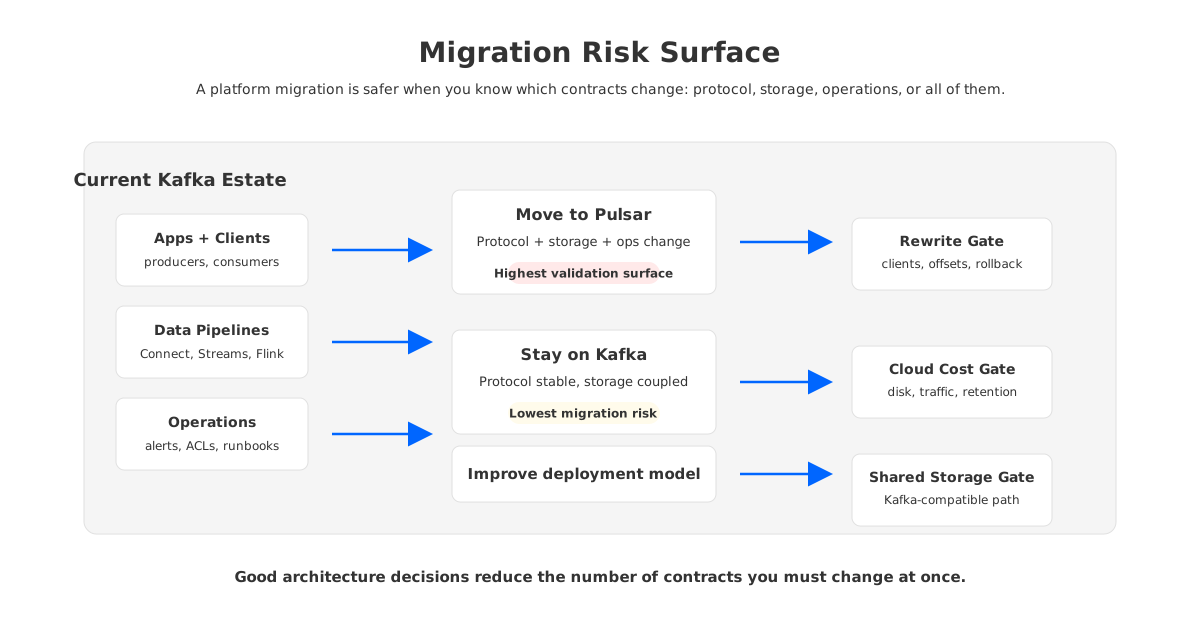
A healthy migration plan separates three questions. Do we need a different application protocol? Do we need a different storage architecture? Do we need a different operating model? Pulsar changes all three for many Kafka estates. AutoMQ changes the storage architecture and operating model while trying to preserve the Kafka-facing protocol surface.
That is why AutoMQ should appear late in the decision, not at the start. If your team wants Pulsar's tenant model, namespace administration, and native geo-replication patterns, AutoMQ is not a Pulsar clone. If your team wants Kafka clients, Kafka Connect, Kafka Streams, and existing application contracts while reducing broker-local storage weight, a Kafka-compatible shared-storage system is directly relevant.
7Decision Table by Workload
The final choice should come from workload fit, not brand preference. Kafka, Pulsar, and AutoMQ all make sense in different environments.
| Workload situation | Better first choice | Reason |
|---|---|---|
| Existing Kafka estate with many clients, connectors, and stream processing jobs | Kafka or AutoMQ | Protocol and ecosystem compatibility reduce migration risk |
| Greenfield multi-tenant messaging platform | Pulsar | Tenant, namespace, and serving/storage separation are central design elements |
| Kafka workload with slow reassignment, disk pressure, and cloud elasticity pain | AutoMQ | Keeps Kafka compatibility while changing storage architecture |
| Globally replicated pub/sub with Pulsar-native applications | Pulsar | Geo-replication is part of Pulsar's core architecture model |
| Conservative platform with strong Kafka SRE experience and stable workload shape | Kafka | Operational familiarity may outweigh architectural change |
| Long retention with bursty active traffic | Pulsar or AutoMQ | Both can decouple storage economics from broker-local disk assumptions |
The cleanest answer starts by naming the pain precisely. If the pain is "Kafka's ecosystem does not fit our application model," Pulsar deserves a serious look. If the pain is "Kafka's cloud storage and scaling model is too expensive to operate," leaving Kafka entirely may be unnecessary.
If you are evaluating that third path, review AutoMQ's architecture and run the comparison against your own throughput, retention, and migration constraints. The useful next step is a workload-shaped model that tells you whether your problem is protocol, storage, or both.
8FAQ
8.1Is Pulsar better than Kafka?
Pulsar is not universally better than Kafka. Pulsar has a stronger built-in serving/storage split, multi-tenancy model, and geo-replication architecture. Kafka has broader ecosystem adoption, deep operational familiarity, and strong compatibility with existing data infrastructure. The better choice depends on whether your main constraint is architecture, ecosystem, operations, or migration risk.
8.2Is Pulsar a drop-in replacement for Kafka?
Usually no. Pulsar has Kafka protocol handling options, but production replacement requires validating clients, offsets, connectors, stream processing jobs, security, observability, and rollback. Treat a Kafka-to-Pulsar move as a migration project, not a dependency swap.
8.3Why do teams choose Pulsar over Kafka?
Teams often choose Pulsar for multi-tenancy, namespace-level administration, separated broker and storage layers, and geo-replication patterns. These strengths are most compelling when the workload is greenfield or when the organization is ready to operate Pulsar's broker, BookKeeper, and metadata layers.
8.4Why do teams stay with Kafka?
Teams stay with Kafka because the ecosystem is mature and widely understood. Kafka clients, Kafka Connect, Kafka Streams, monitoring tools, managed services, and operational playbooks reduce delivery risk. If the existing Kafka estate is large, migration cost can outweigh architectural benefits.
8.5Where does AutoMQ fit in a Pulsar vs Kafka decision?
AutoMQ fits when the team wants to keep Kafka protocol and ecosystem compatibility but change Kafka's storage architecture. It is most relevant when the pain is broker-local disk, slow scaling, high cloud storage cost, or data movement during operations rather than dissatisfaction with Kafka clients or semantics.
8.6How should we compare cost?
Compare cost using workload assumptions: write throughput, read fanout, retention, partition count, cross-zone traffic, scaling frequency, and operations effort. Avoid relying on generic benchmark claims. Architecture changes the cost structure, but the result depends on your traffic and retention pattern.


