
Table of Contents
Table of Contents
The question sounds straightforward until you put a real workload behind it. A platform team asks whether Apache Pulsar costs less than Apache Kafka because the Kafka bill has started to look unreasonable. Storage keeps growing, brokers are sized for peak traffic, and cross-zone traffic shows up as a line item nobody can explain in a single meeting. Pulsar looks attractive because it separates brokers from storage through Apache BookKeeper, while Kafka looks familiar because the ecosystem and operational muscle memory are already there.
The uncomfortable answer is that neither system wins every cost model. Pulsar can reduce some broker pressure by moving durable log storage into BookKeeper, but it also introduces bookies, ledgers, quorum write behavior, and a larger operational surface. Kafka can be more direct to operate, but traditional broker-local storage ties compute, disk, replication, and recovery together. The useful comparison is not "Pulsar vs Kafka" in the abstract. It is "which architecture makes this workload scale the fewest expensive resources?"
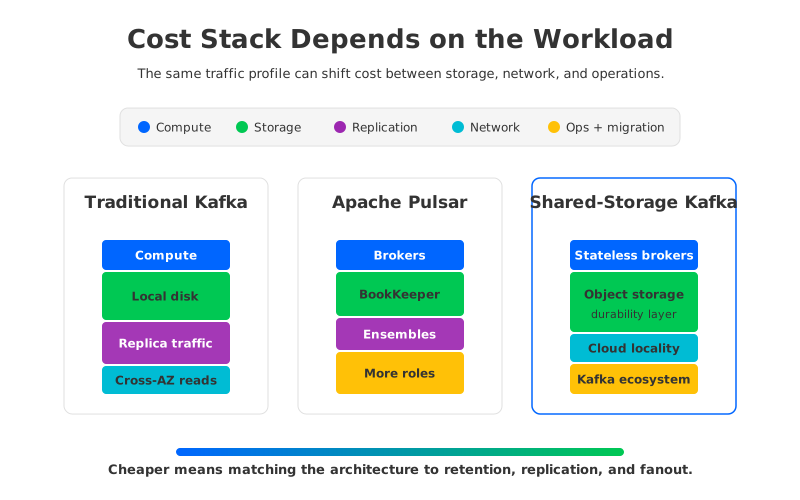
That framing matters because cloud cost is not a single number. It is a stack of compute, storage, replication traffic, cross-Availability-Zone movement, operational labor, and migration risk. A short-retention workload with high write throughput behaves differently from a long-retention workload with low write throughput and many consumers.
1Why There Is No Universal Lower-Cost Option
Kafka and Pulsar were shaped by different architectural bets. Kafka's classic model puts partitions on brokers and replicates them across brokers. Producers write to partition leaders, followers replicate, consumers read from the log, and durability comes from replicated broker-local storage. Apache Kafka now also includes KRaft metadata mode and tiered storage capabilities, but many deployments are still sized around brokers, local disks, and replica placement.
Pulsar splits the serving layer from the storage layer. Pulsar brokers handle serving and routing, while Apache BookKeeper bookies persist ledgers. That makes the broker role more elastic in principle, but it does not remove storage cost. It relocates storage cost into BookKeeper and changes the cost model from partition replicas on brokers to ledger fragments written to bookie ensembles. Pulsar also supports tiered storage, which can move older data from BookKeeper to systems such as S3-compatible object storage.
Those differences produce different winners:
- High retention, moderate throughput often puts pressure on Kafka broker disks. Pulsar tiered storage or Kafka tiered storage can help, and shared-storage Kafka can change the model more directly by placing durable data in object storage.
- High throughput, short retention usually shifts the bill toward compute, network, and write amplification. The storage architecture still matters, but broker and bookie sizing may dominate.
- Heavy consumer fanout can make network placement and cache behavior more important than raw write cost. A system that looks efficient on ingest can become expensive when multiple consumer groups read across zones.
- Strict multi-zone resilience changes the calculation because replication traffic and quorum placement become cost drivers.
The cost comparison becomes useful only when these assumptions are explicit. Without them, teams compare one optimistic default against another worst-case production configuration.
2Cost Drivers in Kafka
Traditional Kafka cost starts with the broker. Each broker carries CPU, memory, network capacity, and disk. Because partitions live on brokers, storage growth tends to push broker growth even when the additional data does not need more CPU. Retention is the trap: a low-throughput topic can still consume large disks if it retains data for weeks or months. Once disk utilization gets too close to the edge, the team expands disks, adds brokers, reassigns partitions, or reduces retention.
Replication multiplies the effect. A replication factor of 3 means each record is stored on 3 brokers, and followers must receive data from the leader. In a multi-AZ cloud deployment, that movement can cross zone boundaries depending on placement. AWS pricing pages separate storage, compute, and data transfer, so a Kafka bill can grow across EC2, EBS, and inter-AZ data transfer at the same time.
Kafka tiered storage changes part of this model by moving older log segments to remote storage. That can reduce pressure on local disks for long-retention topics, especially when historical reads are infrequent. But tiered storage is not the same as fully decoupled storage: brokers still serve hot data, local storage still matters, and recovery behavior still needs careful tuning.
| Cost driver | Why it appears in Kafka | What to model |
|---|---|---|
| Broker compute | Producers, consumers, replication, compression, and controller activity use CPU and network | Average and peak throughput, partition count, consumer fanout |
| Local block storage | Retained log segments live on broker disks unless tiered storage moves them | Retention, replication factor, disk headroom, throughput |
| Replica traffic | Followers copy data from leaders | Replication factor, AZ placement, network pricing |
| Rebalancing and recovery | Data movement can be large when brokers are added, removed, or replaced | Failure scenarios, expansion frequency, operator time |
| Ecosystem continuity | Existing Kafka clients and tools usually remain usable | Migration savings, not only runtime cost |
This is why "Kafka cost" is rarely a single knob. You can lower disk cost and raise network cost, or reduce utilization risk by adding idle capacity. The bill reflects the architecture you choose, not the logo on the cluster.
3Cost Drivers in Pulsar
Pulsar's cost model starts with separation of roles. Brokers do not own durable log storage in the same way Kafka brokers do. They serve traffic and coordinate with BookKeeper, while bookies store ledger entries. That separation can make broker scaling more flexible, and it can be attractive when Kafka broker-local disk growth is the main pain. But BookKeeper is not free capacity hiding in the corner. It needs compute, disks, network, quorum configuration, monitoring, and operational expertise.
BookKeeper writes data across bookie ensembles for durability. The cost impact depends on ensemble size, write quorum, ack quorum, disk type, and placement across zones. A conservative deployment can improve resilience, but it can also increase write amplification and cross-zone traffic. If the team treats "Pulsar has separate storage" as "Pulsar storage is automatically lower-cost," the spreadsheet will miss the bookie layer.
Pulsar tiered storage adds another dimension. Older ledgers can be offloaded to object storage, reducing the amount of data that must stay on bookies. For long-retention workloads, that can be a meaningful lever. The same caveat applies as with Kafka tiered storage: it helps most when historical data is large and read patterns are compatible with remote storage latency and retrieval behavior.
Pulsar may look cost-effective when the workload benefits from its storage-serving split, but it asks the team to operate more moving parts:
- Brokers for serving producers and consumers.
- Bookies for durable ledger storage and quorum writes.
- Metadata services for coordination.
- Offload storage if tiered storage is used.
- Operational runbooks for bookie failure, ledger recovery, compaction, upgrades, and placement policy.
That operational surface is not a reason to avoid Pulsar. It is a reason to price it honestly. A team with deep Pulsar experience may operate this stack efficiently. A Kafka-heavy team migrating mainly to reduce cost must count the time required to learn and automate the new failure modes.
4The Hidden Cost of Migration
Migration cost is where many Pulsar vs Kafka comparisons get too narrow. Runtime infrastructure cost matters, but a platform migration also changes client libraries, metrics, incident playbooks, data movement plans, compatibility assumptions, and rollback strategy. Even when Pulsar supports Kafka-compatible access through protocol handlers, teams still need to validate semantics, tooling, and edge cases.
The most expensive migration risk is not the first successful test. It is the middle period where both systems run, data must be mirrored or replayed, offsets must be mapped, and incident response has to cover two platforms. If the workload includes Kafka Connect, Kafka Streams, schema registry integrations, or custom clients, those pieces belong in the TCO worksheet.
The migration cost model should include:
- Engineering time for application compatibility testing.
- Dual-running infrastructure during cutover.
- Data backfill, replay, or mirroring cost.
- New monitoring, alerting, and capacity planning work.
- Rollback design and production rehearsal.
- Training cost for SREs and data platform engineers.
Pulsar's architecture and feature set may justify that work. For other teams, the lower-risk path is to keep Kafka compatibility while changing the storage cost structure underneath it.
5How AutoMQ Changes Kafka Cost Structure
If the root issue is Kafka's coupling of broker compute and local durable storage, the architectural answer does not have to be a full ecosystem migration. AutoMQ is a Kafka-compatible cloud-native streaming system that keeps Kafka protocol compatibility while moving durable log storage toward object storage and making brokers more stateless. In cost terms, data growth no longer has to force broker-local disk growth in the same way.
This changes the comparison. Traditional Kafka asks the team to size brokers for serving traffic and retained data. Pulsar separates brokers and BookKeeper but introduces another storage service to run. AutoMQ keeps the Kafka application surface and changes where durable data lives. Object storage becomes the foundation for persistence, while brokers focus more on compute and serving work.
The practical value is not that object storage is magic. It is that cloud object storage has a different cost and durability profile from attaching ever-larger block volumes to brokers. A well-designed shared-storage architecture can use those cloud primitives directly instead of re-creating all durability through broker-local replication.
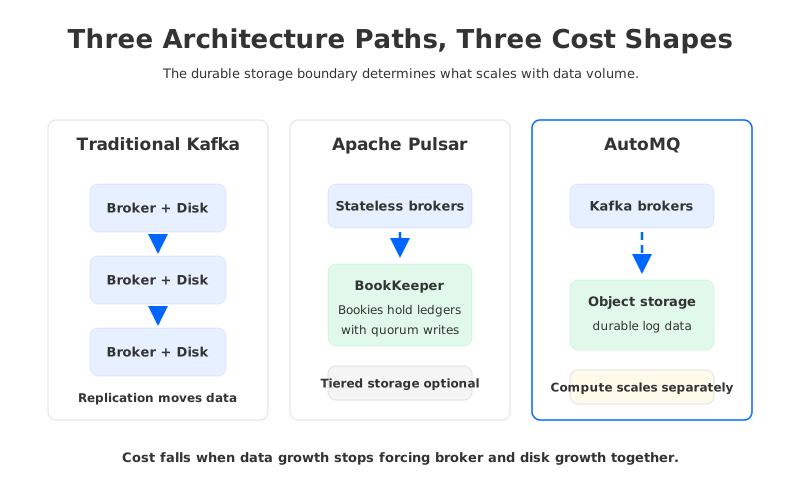
AutoMQ enters the decision when a team wants the Kafka ecosystem but not the full cost shape of traditional Kafka. Existing Kafka clients, Kafka Connect integrations, and Kafka operational concepts can remain relevant, while the storage architecture changes.
6Cost Comparison Worksheet
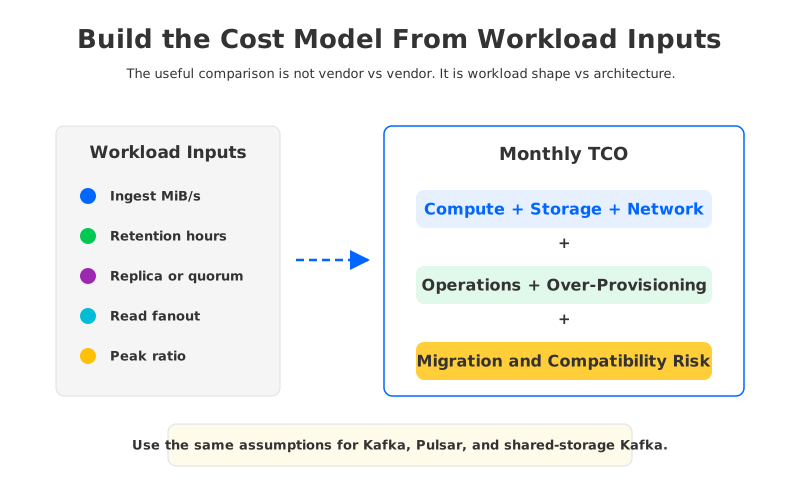
A fair worksheet starts with the same workload assumptions for every option. Pick one cloud region, one month length, one retention window, one availability target, and one traffic profile. Then fill in the architecture-specific multipliers. This keeps the comparison from turning into a debate over whose default is more flattering.
Use this structure:
| Input | Example question | Why it matters |
|---|---|---|
| Write throughput | How many MiB/s are written at average and peak? | Drives broker, bookie, network, and storage write pressure |
| Retention | How many hours or days must data remain queryable? | Determines hot storage and remote storage volume |
| Replication or quorum | What durability and AZ placement are required? | Changes storage copies and network movement |
| Read fanout | How many consumer groups read the same data? | Can dominate network and cache behavior |
| Peak-to-average ratio | How much idle capacity is kept for bursts? | Affects over-provisioning and autoscaling value |
| Migration scope | How many apps and integrations must change? | Often decides whether runtime savings are worth pursuing |
After those inputs are fixed, evaluate each architecture:
| Architecture | Cost shape | Strong fit | Watch carefully |
|---|---|---|---|
| Traditional Kafka | Broker compute, local block storage, replica traffic, operational data movement | Teams with Kafka expertise, moderate retention, stable partition growth | Long retention, broker disk pressure, cross-AZ replication cost |
| Kafka with tiered storage | Local hot path plus remote historical storage | Long retention with infrequent historical reads | Remote fetch behavior, metadata overhead, hot-path sizing |
| Apache Pulsar | Brokers plus BookKeeper bookies, quorum writes, optional tiered storage | Teams that benefit from separated serving and storage roles | BookKeeper operations, quorum placement, migration from Kafka |
| AutoMQ | Kafka-compatible serving with object-storage-backed durable data | Kafka ecosystem continuity plus storage cost restructuring | Validation for workload-specific latency, deployment model, and operational fit |
The worksheet does not produce a universal winner, and that is the point. It produces a defensible decision. If long retention is the dominant cost, remote or shared storage becomes important. If migration risk dominates, Kafka compatibility becomes valuable. If the team mostly wants to lower Kafka infrastructure cost without rewriting the estate, shared-storage Kafka deserves a closer look.
7What to Choose
Choose traditional Kafka when the workload is predictable, retention is moderate, the team already operates Kafka well, and the cost of change is higher than the cost of infrastructure. Choose Pulsar when the organization wants Pulsar's serving-storage separation and is ready to run BookKeeper as a core production dependency. Choose Kafka tiered storage when historical retention is the pressure point and the hot path still fits the broker-local model.
Choose AutoMQ when Kafka compatibility is strategically important but the traditional Kafka storage model is the cost problem. That is the case many cloud Kafka teams eventually run into: the applications are not broken, the ecosystem is not the issue, but broker-local storage and replication keep turning data growth into infrastructure growth. For teams evaluating that path, the AutoMQ documentation and AutoMQ GitHub repository are practical next steps for architecture validation.
The original question was whether Pulsar or Kafka is cheaper in the cloud. A better version is whether your workload is paying for the right things. Once the bill is broken into compute, storage, replication, network, operations, and migration, the decision becomes less emotional and more useful.
8FAQ
8.1Is Pulsar cheaper than Kafka?
Sometimes, but not by default. Pulsar can reduce broker-local storage pressure because durable data is handled by BookKeeper, and tiered storage can offload older data. The total cost still depends on bookie sizing, quorum writes, network placement, operational overhead, and migration cost.
8.2Why can Kafka become expensive in the cloud?
Traditional Kafka couples broker compute with local durable storage. As retention and replication grow, teams may pay for larger disks, more brokers, replica traffic, cross-AZ movement, and operational data movement during recovery or expansion. Tiered storage and shared-storage designs can reduce some of these pressures.
8.3Does Pulsar eliminate storage cost?
No. Pulsar moves durable storage into Apache BookKeeper and can offload older data to tiered storage. BookKeeper still needs machines, disks, network, monitoring, and failure handling. The storage cost changes shape rather than disappearing.
8.4Should migration cost be part of a Pulsar vs Kafka TCO comparison?
Yes. Application compatibility, dual-running infrastructure, data migration, observability changes, SRE training, and rollback planning can outweigh a narrow infrastructure saving. This is especially true for teams with many Kafka clients, Kafka Connect pipelines, or Kafka Streams applications.
8.5Where does AutoMQ fit in this comparison?
AutoMQ fits when the team wants Kafka compatibility but needs a different cloud cost structure. It keeps the Kafka protocol surface while using object-storage-backed shared storage and more stateless brokers, so teams can evaluate storage cost restructuring without treating the project as a full Kafka-to-Pulsar migration.


