
Table of Contents
Table of Contents
Teams do not search for queue semantics kafka workloads because they forgot how Kafka consumers work. They search for it when a Kafka deployment starts behaving like a queueing backbone for payments, alerts, order fulfillment, task dispatch, AI pipelines, or change data capture, and the operating model begins to feel harder than the application logic. The code still produces records to Topics, consumers still commit Offsets, and Consumer groups still divide work across Partitions. The pressure comes from everything around those semantics: retries, backlogs, replay, elasticity, storage placement, cost, and recovery.
The core thesis is that queue semantics in Kafka workloads are not only a client-side design question. They are also an infrastructure question. Kafka can support queue-like processing patterns through Consumer groups, ordered Partitions, Offset commits, retries, idempotent producers, and transactions, but broker architecture determines how expensive and operationally heavy those patterns become when the workload grows. If the broker is both the compute node and the long-term owner of local persistent data, every queue-like surge can turn into a storage, replication, and rebalancing event. If brokers become stateless and durable data moves into shared storage, the same application semantics sit on a different operating model.
1Why teams search for queue semantics kafka workloads
Queue-like Kafka workloads usually start with a reasonable assumption: Kafka gives each Consumer group its own position in a Topic, so one group can process work independently while another group reads the same stream for analytics, auditing, or downstream enrichment. That model is powerful because it avoids a hard choice between event streaming and work distribution. A Topic can behave like a durable event log, while each Consumer group turns that log into a queue of work assigned across its members.
The difficulty appears when the work is no longer smooth. A payment processor pauses because a downstream service is throttled. A data quality job needs to replay 24 hours of events after a schema fix. A task worker fleet scales out during a campaign and scales down after the peak. None of these cases violates Kafka semantics. They are normal. But they change the shape of broker load, retained data, consumer lag, and recovery expectations.
| Requirement | Kafka semantic surface | Operational question |
|---|---|---|
| Parallel work distribution | Consumer group partition assignment | Can the cluster absorb bursts without long rebalancing or disk pressure? |
| Retry and replay | Offset management and retained log data | How much retained history can be reread without disrupting hot traffic? |
| Ordering | Ordering within a Partition | Does the partitioning strategy create hot shards or slow workers? |
| Exactly-once processing | Idempotent producer and transactions | Are clients, sinks, and failure paths configured consistently? |
| Independent consumers | Separate Consumer groups | Can each group create lag or catch-up reads without making storage the bottleneck? |
For platform teams, the question is rarely "Can Kafka do queues?" A better question is: what guarantees do we actually need, and where do they live? The table is intentionally split in two. The left side is the API and semantics layer. The right side is where many production incidents happen. A team can get the Kafka client contract right and still struggle if the cluster turns every backlog, replay, or capacity adjustment into broker-local data movement.
2The production constraint behind the problem
Traditional Kafka uses a Shared Nothing architecture. Each broker manages local storage, and Partition replicas are distributed across brokers for durability and availability. In the data center era, this was a practical design: disks were attached to machines, network assumptions were different, and the broker that served a Partition also held the log segments for that Partition. In cloud deployments, the same design creates a tighter coupling between compute capacity, local or block storage, cross-Availability Zone (AZ) replication, and operational recovery.
Queue-like workloads amplify that coupling because they create uneven pressure. A Consumer group that falls behind does not only create a metric called lag. It creates future read demand against retained log data. A retry topic does not only add application safety. It increases retained records and may change the write/read mix. A surge of task workers does not only add consumers. It may increase fetch concurrency, cache churn, and broker network load. When the durable log is bound to broker-local storage, these effects accumulate on specific brokers and Partitions.
Tiered Storage helps with one part of the problem by moving older log segments to remote storage while keeping the active log on broker storage. That can improve retention economics for historical data, and it is useful for long-retention clusters. It does not make brokers stateless. The active write path, local storage planning, leader placement, and many reassignment concerns remain tied to the broker fleet. For queue-like workloads that care about burst recovery and elastic capacity, that distinction matters.
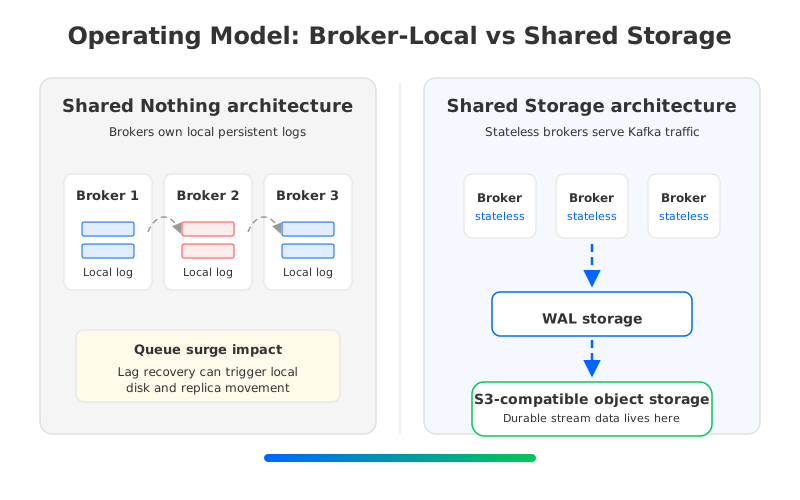
The broker-local model is not wrong. It is a proven architecture with a large ecosystem. The issue is fit. If your queue-like workload has stable throughput, modest retention, predictable consumers, and a team comfortable with broker sizing, replica placement, and reassignment, a conventional cluster can work well. If the workload has sharp bursts, frequent replay, long retention, cloud cost pressure, or strict recovery objectives, the storage model becomes part of the queue semantics decision.
3Architecture options and trade-offs
A practical evaluation should separate semantic compatibility from operational shape. Semantic compatibility asks whether producers, consumers, Streams applications, Kafka Connect workers, security settings, transactions, and Offset behavior continue to work as expected. Operational shape asks what happens when the workload creates lag, replay, scale-out, scale-in, broker failure, or data movement. Treating those as one question leads to vague comparisons.
There are three broad architecture choices for teams that want Kafka-compatible queue-like workloads:
- Broker-local Kafka. This keeps the familiar Shared Nothing architecture and mature operational playbooks. It fits teams that value full control and already have strong Kafka operations, but it also keeps durable data tied to broker-local storage and replica movement.
- Managed Kafka services. This shifts part of the operational burden to a provider. The team still needs to understand limits, pricing dimensions, networking, migration paths, and how the service handles bursts, replays, and scaling.
- Kafka-compatible shared-storage platforms. This keeps the Kafka protocol and client model while changing the storage layer beneath brokers. The evaluation focus moves to compatibility depth, write durability, object storage behavior, WAL (Write-Ahead Log) design, observability, and deployment boundaries.
The right choice depends on where your pain sits. If the problem is application-level ordering, bad key selection, poison messages, or sink idempotency, a different broker architecture will not fix the design. If the problem is that every capacity event becomes a storage event, then the architecture underneath Kafka becomes a first-order factor.
4Evaluation checklist for platform teams
The evaluation should begin before any vendor name appears on the whiteboard. Queue semantics touch application correctness, platform economics, and incident response. A checklist makes the trade-offs explicit enough for application teams, SREs, security, and finance to discuss the same system.
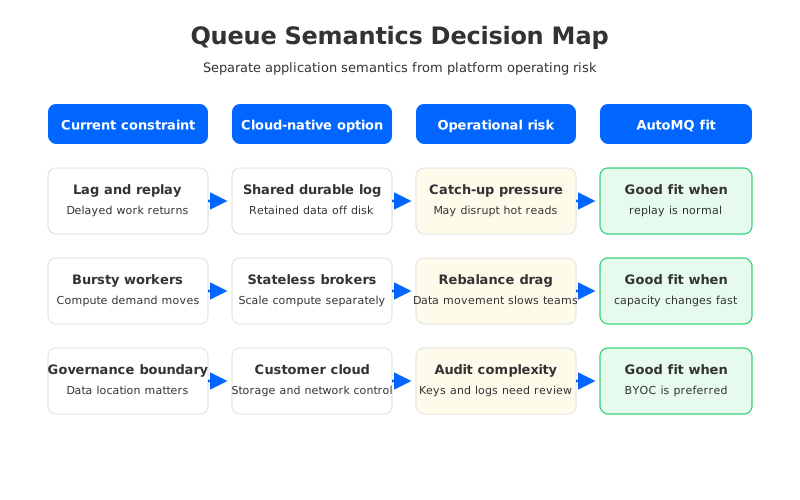
Start with compatibility because it is the gate that keeps the migration realistic. Verify client versions, producer configuration, Consumer group behavior, Offset commits, transactions, ACLs, quotas, Schema Registry expectations, Kafka Connect workers, and operational tooling. Kafka-compatible does not only mean "the client can connect." It means your failure and recovery paths still behave correctly under the configurations you actually use.
Then examine the workload shape. Queue-like systems often have asymmetric reads and writes. A Topic may receive steady writes, while a delayed Consumer group later creates a read spike. A retry flow may be low volume most of the day and then dominate the cluster during an upstream incident. A platform that looks cost-effective under average throughput can become painful when lag recovery, catch-up reads, and retention are included.
The checklist should cover seven gates:
- Compatibility gate: List the Kafka APIs, client versions, transactions, idempotent producer settings, Connectors, and admin tools that must work unchanged.
- Ordering gate: Identify which workloads need Partition-level order, which can shard more aggressively, and which can use idempotent processing to reduce ordering pressure.
- Lag and replay gate: Define how much retained data each Consumer group may need to reread, and whether catch-up reads can coexist with hot traffic.
- Scaling gate: Test scale-out and scale-in as normal operations, not as exceptional events. Include cache warm-up, leader movement, and consumer rebalancing behavior.
- Cost gate: Model compute, storage, cross-AZ traffic, object storage requests, managed service charges, and operational labor separately.
- Governance gate: Verify where data, metadata, logs, metrics, encryption keys, IAM policies, and network endpoints live.
- Migration gate: Prove rollback, Offset continuity, dual-write or replication strategy, and cutover runbooks before production traffic moves.
The result is not a score that automatically chooses a platform. It is a risk map. A team with strict ordering and low replay may optimize for predictable latency. A team with heavy replay and long retention may prioritize storage economics and broker replacement behavior. A regulated team may choose the option that keeps the data plane inside its own cloud account or private environment.
5How AutoMQ changes the operating model
Once the neutral checklist exposes broker-local storage as a limiting factor, AutoMQ becomes relevant as a Kafka-compatible shared-storage option. AutoMQ keeps the Kafka protocol and ecosystem surface while replacing broker-local durable storage with a Shared Storage architecture. AutoMQ Brokers handle Kafka-facing compute, request routing, Partition leadership, scheduling, and caching, while durable stream data is stored through S3Stream, WAL storage, and S3-compatible object storage.
That architectural shift changes the queue semantics conversation in a specific way. It does not redefine Consumer groups, Offsets, Partitions, or transactions. Those semantics remain the contract application teams depend on. What changes is the operational cost of supporting those semantics when a Consumer group falls behind, a replay begins, a broker fails, or a fleet needs to scale.
In a Shared Nothing architecture, a broker is both a compute node and a storage owner. In AutoMQ's Shared Storage architecture, the broker is closer to an elastic compute node in front of shared durable storage. Fresh writes are protected through WAL storage, and retained stream data is organized in object storage rather than treated as a long-lived possession of one broker disk. That means scaling and replacement can focus more on ownership, leadership, cache, and traffic, and less on copying retained Partition data between brokers.
This matters for queue-like workloads in three concrete places. First, lag recovery becomes less entangled with local disk placement because retained data is not anchored to the broker that originally accepted it. Second, scale-out can be evaluated as a compute and traffic event rather than a large storage migration. Third, customer-controlled deployments such as AutoMQ BYOC and AutoMQ Software give platform teams clearer boundaries for where the data plane, object storage, network controls, and observability live.
There are still engineering choices to make. WAL type affects latency and deployment design. Object storage configuration, permissions, request patterns, and observability need production review. Consumer group rebalancing, key design, poison message handling, and sink idempotency remain application concerns. A stateless broker architecture removes one major source of coupling, but it does not remove the need for disciplined queue design.
6Readiness scorecard
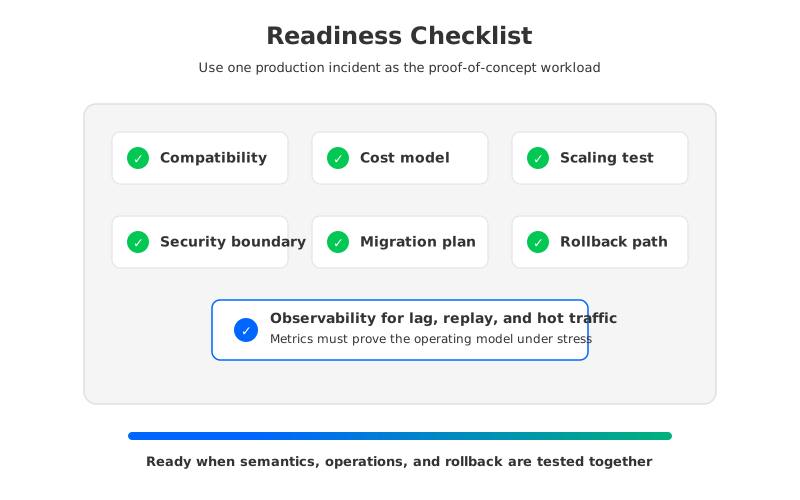
Use the scorecard below after the checklist, not before it. The goal is to decide whether a shared-storage Kafka-compatible architecture deserves a proof of concept, and what that proof should test.
| Readiness area | What to verify | Strong signal for stateless brokers |
|---|---|---|
| Client compatibility | Existing producers, consumers, admin tools, and Connectors work without application rewrites. | Migration risk is mainly operational, not semantic. |
| Replay behavior | Catch-up reads can run while hot consumers keep their service objectives. | Retention and replay are regular workload modes. |
| Elasticity | Scaling brokers does not require large retained-log movement. | Capacity demand changes faster than traditional reassignment can follow. |
| Governance | Data plane resources stay inside approved cloud or private boundaries. | Security review values customer-controlled storage and networking. |
| Rollback | Offsets, replication, cutover, and fallback are tested before production. | The team can migrate incrementally instead of relying on a single switch. |
The useful proof of concept is not a generic benchmark. It should replay one of your real queue-like incidents: a paused sink, a delayed Consumer group, a hot Partition, a worker fleet scale-out, or a recovery from broker loss. Measure the boring things that decide production fit: time to recover lag, impact on hot traffic, operator steps, data movement, cost line items, and rollback clarity.
7FAQ
7.1Is Kafka a queue or a log for queue-like workloads?
Kafka is a distributed event log, but Consumer groups allow teams to build queue-like work distribution on top of Topics and Partitions. The important distinction is that Kafka keeps records according to retention policy, while each Consumer group tracks its own Offset position. That makes replay and independent consumption natural, but it also means retained data and lag recovery become platform concerns.
7.2Do stateless brokers change Kafka Consumer group semantics?
No. Stateless brokers change where durable stream data lives and how broker lifecycle operations behave. Consumer groups still coordinate members, assign Partitions, and commit Offsets according to Kafka semantics. Application teams still need correct processing, idempotency, retries, and error handling.
7.3Does Tiered Storage solve the same problem as Shared Storage architecture?
Not exactly. Tiered Storage moves older log segments to remote storage while brokers still manage the active local log. Shared Storage architecture uses shared object storage as the durable data layer behind stateless brokers, with WAL storage on the write path. The operational effect is different because broker replacement and scaling are less tied to retained local log ownership.
7.4When should a team evaluate AutoMQ for queue semantics Kafka workloads?
Evaluate AutoMQ after the team has a neutral compatibility, scaling, cost, governance, and migration checklist. It is most relevant when the workload is Kafka-compatible but broker-local storage, replay, cross-AZ traffic, or slow scaling has become the operational bottleneck. For teams ready to test this model, start with the AutoMQ Cloud trial.


