
Table of Contents
Table of Contents
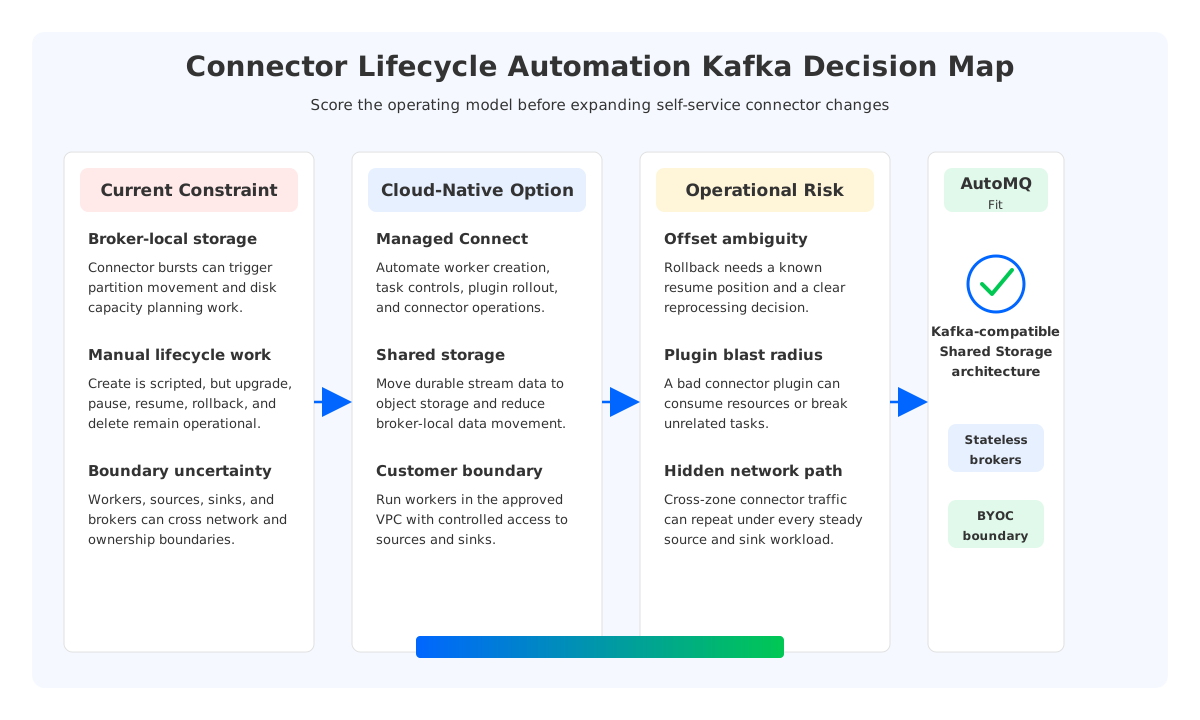
A team usually searches for connector lifecycle automation kafka after the first wave of connectors has already worked. The database source connector is running, a few sink connectors are feeding analytics systems, and the platform team has a deployment script that can create another one when another application team asks. Then the harder questions arrive: who owns connector upgrades, how are offsets protected during a rollback, what happens when a plugin misbehaves, and whether the Kafka cluster can absorb connector churn without turning every change into a storage and capacity event.
That is the real readiness problem. Connector automation is not only an API for creating connectors. It is the operating model around source and sink workloads whose failures can duplicate data, pause ingestion, create lag, or corrupt downstream assumptions. A production checklist has to examine Kafka compatibility, worker isolation, offset handling, network placement, scaling, observability, and migration behavior together. The core thesis is straightforward: connector lifecycle automation becomes reliable when the streaming platform treats connectors as governed workloads and removes broker-local storage movement from routine operations.
1Why Teams Search for connector lifecycle automation kafka
Kafka Connect gives teams a standard framework for moving data between Apache Kafka and external systems. The Apache Kafka documentation defines Connect around connectors and tasks, where connectors manage integration logic and tasks perform the parallel work. That model is powerful because it separates integration configuration from application code, but it also gives platform teams a second distributed system to operate alongside Kafka itself.
The first connector is rarely the problem. A single Debezium source or object-storage sink can be reviewed manually, deployed by an infrastructure engineer, and monitored by a dashboard built for that workload. The pressure appears when connectors become a shared platform: 20 source systems, several sink domains, multiple plugin versions, different credentials, and a mix of low-volume and high-throughput pipelines. At that point, manual lifecycle management starts to hide risk instead of reducing it.
Production connector automation has to answer several questions before it deserves the name:
- Can teams create, update, pause, resume, restart, and delete connectors through controlled workflows? The answer should include approval paths, configuration validation, and clear ownership between application teams and the platform team.
- Can the worker runtime change without surprising running tasks? Plugin upgrades, worker scaling, JVM tuning, and rolling restarts should be handled as lifecycle events, not as ad hoc maintenance windows.
- Can offsets and task status survive failure and rollback? A connector rollback is not complete until the team knows whether it will reprocess, skip, or resume from a known position.
- Can the network path stay inside the intended boundary? Source databases, sinks, Kafka brokers, and worker nodes often sit in different subnets or Availability Zones, so placement becomes a cost and security question.
- Can observability distinguish a connector problem from a Kafka problem? Task failures, source backpressure, sink throttling, consumer lag, and broker pressure need different runbooks.
This is why a checklist is more useful than a feature comparison. A feature table can tell you whether a platform exposes a connector API. A readiness checklist tells you whether that API can survive production change.
2The Production Constraint Behind the Problem
Connector lifecycle automation becomes difficult because each connector spans three state domains. The source or sink system has its own transaction model, Kafka stores records and offsets, and Kafka Connect stores connector configuration, status, and progress metadata. When a connector changes, those domains do not move in lockstep. A worker restart might be harmless for one sink connector and risky for a CDC source whose upstream log retention is tight.
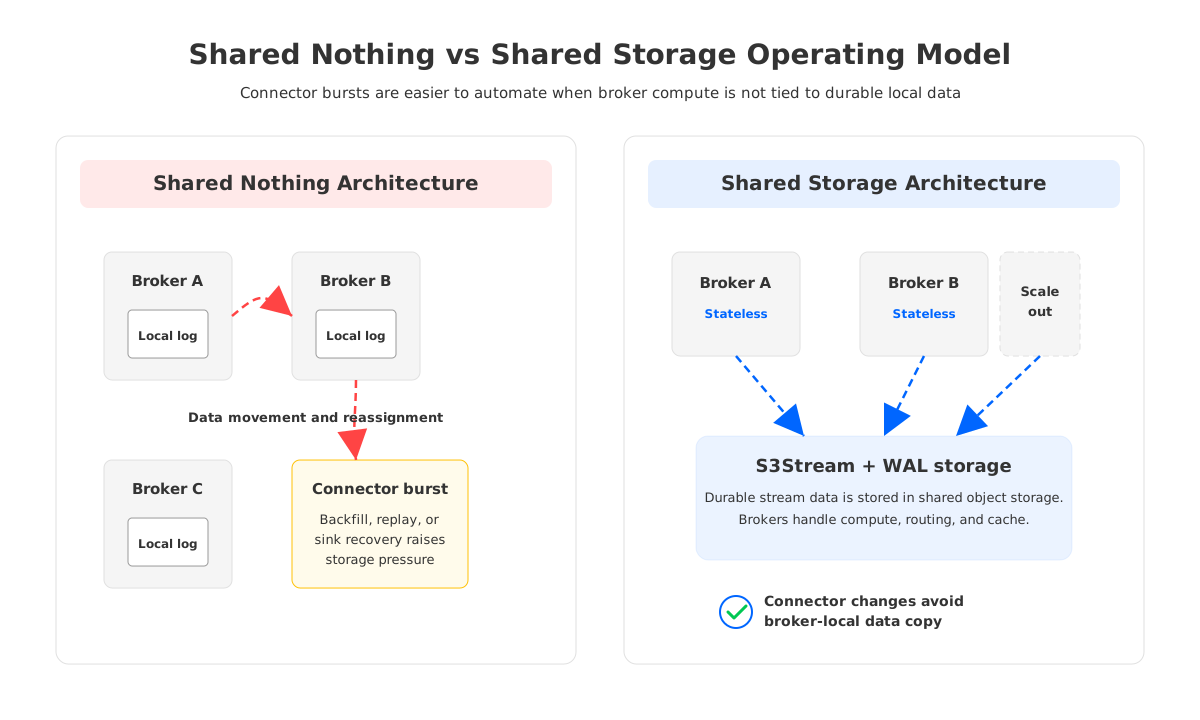
Traditional Kafka infrastructure adds another constraint: broker-local storage. In a Shared Nothing architecture, each broker owns local partition data, and Kafka uses replication between brokers for durability and availability. That model is proven, but it makes capacity and placement decisions sticky. If connector growth increases write throughput, retention, or read fan-out, the cluster may need more brokers or more disk. Adding capacity can require partition reassignment and data movement, so a connector rollout can become coupled to broker storage operations.
The coupling is especially visible in three situations. First, connector teams often need temporary capacity during backfills, replay, or migration rehearsals. Second, connector failures can create catch-up reads and lag recovery patterns that stress hot partitions. Third, connector placement across Availability Zones can create network paths that look minor on a diagram but repeat continuously under production traffic.
Tiered Storage can reduce pressure from older retained data by moving historical segments to object storage, but it does not make the broker stateless. Recent data still lives on broker-local storage, partition ownership still matters, and broker expansion still has to respect local storage layout. For connector automation, that means the platform can improve retention economics while still treating broker storage as a planning constraint.
3Architecture Options and Trade-Offs
There are three common ways to approach connector lifecycle automation. None is universally correct. The right choice depends on workload criticality, team boundaries, compliance requirements, and how much Kafka infrastructure work the platform team wants to own.
| Option | What It Solves | What It Leaves Exposed |
|---|---|---|
| Self-managed Kafka Connect | Maximum control over worker images, plugins, networking, and deployment process. Works well when the platform team already operates Kubernetes or VM automation. | The team owns worker lifecycle, plugin compatibility, metadata topics, scaling, incident response, and integration with Kafka capacity planning. |
| Managed connector service | Reduces day-to-day worker operations and gives application teams a simpler creation path. Useful when supported connectors match the data estate. | Boundaries, pricing dimensions, plugin flexibility, network routing, and migration behavior can become platform constraints. |
| Kafka-compatible platform with connector lifecycle management | Keeps Kafka APIs and connector ecosystem compatibility while moving more lifecycle work into the platform control plane. | Still requires workload-specific validation for source semantics, sink idempotency, offset behavior, and governance controls. |
The trade-off is not "managed versus unmanaged." The useful question is what state each option manages for you, and what state remains your responsibility. A connector platform that hides worker deployment but leaves plugin versioning, task placement, offset validation, and rollback undefined has only moved the operational burden to a less visible place.
For platform teams, the architectural decision should start with failure scenarios rather than the creation workflow. Create is the easiest verb. Upgrade, pause, resume, restart, replay, and delete are the verbs that decide whether automation is safe.
4Evaluation Checklist for Platform Teams
A production review should be concrete enough that two teams can score the same platform and reach the same conclusion. The following checklist is intentionally practical. It avoids generic "ease of use" language and focuses on controls that show up during incidents, migrations, and audits.
| Readiness Area | What to Verify | Production Signal |
|---|---|---|
| Kafka compatibility | Existing clients, connector frameworks, serialization formats, consumer groups, and offset behavior work without application rewrites. | A representative connector can run against the target platform with the same client assumptions and no hidden protocol translation. |
| Runtime isolation | Plugins, worker resources, credentials, and task failures are isolated enough to prevent one connector from degrading unrelated pipelines. | A failed plugin or overloaded sink connector does not take down other connector domains. |
| Offset and rollback control | Teams can reason about where a connector resumes after pause, restart, upgrade, or rollback. | Runbooks specify whether the connector reprocesses, skips, or resumes from a known offset. |
| Scaling model | Worker scaling and Kafka capacity scaling are separate enough that connector bursts do not require storage-heavy broker maintenance. | Backfills and catch-up reads can be modeled without triggering disruptive broker-local data movement. |
| Network and security boundary | Workers run where they can reach sources and sinks through approved paths, with credentials and audit trails under customer control. | The data path matches the security review, not only the architecture diagram. |
| Observability | Connector task status, source and sink errors, lag, throughput, worker resource pressure, and Kafka broker metrics can be correlated. | On-call engineers can identify whether the bottleneck is the source, connector, sink, worker, network, or Kafka platform. |
| Migration readiness | Cutover and rollback can be rehearsed with topics, offsets, credentials, and downstream consumers included. | A migration drill produces a decision record, not only a successful demo connector. |
The checklist also protects teams from over-automating too early. If a connector domain lacks clear ownership, safe rollback behavior, or source-system retention controls, adding self-service creation can increase risk. Automation should make safe paths repeatable; it should not make unsafe paths easier to trigger.
5How AutoMQ Changes the Operating Model
Once the neutral checklist is in place, the platform question becomes sharper: which architecture removes the most operational coupling while preserving Kafka semantics? This is where AutoMQ, a Kafka-compatible cloud-native streaming platform, enters the evaluation. AutoMQ keeps compatibility with the Apache Kafka protocol and ecosystem while replacing broker-local persistent storage with S3Stream and Shared Storage architecture.
That storage change matters for connector lifecycle automation because connectors are workload multipliers. They create bursts, replays, sink stalls, source retries, and long-running data movement. In a broker-local model, those behaviors often turn into disk placement and partition movement concerns. In AutoMQ, durable stream data is stored in S3-compatible object storage, and AutoMQ Brokers are stateless brokers. Scaling and replacement become compute operations more than data-copy operations.
AutoMQ BYOC also changes the connector boundary. AutoMQ managed Kafka Connect runs Connect Workers inside the user's VPC, so connector traffic can stay close to databases, caches, object stores, and private services. The control plane handles connector task creation and worker startup, while the data path remains inside the customer-controlled environment. For regulated teams, that distinction is not a detail; it decides whether connector automation fits the security model.
The architecture has several practical effects for the readiness checklist:
- Compatibility stays central. AutoMQ's Kafka compatibility is designed so existing Kafka clients, connectors, and ecosystem tools can be evaluated against familiar Kafka semantics.
- Storage movement is reduced as an operational blocker. Shared Storage architecture means broker replacement, scaling, and partition ownership changes do not require the same broker-local data movement pattern as traditional Kafka.
- Network placement becomes more deliberate. AutoMQ's zero cross-AZ traffic design and BYOC deployment model give teams a cleaner way to reason about connector workers, brokers, and cloud resources inside a customer boundary.
- Migration can be rehearsed with offsets in mind. AutoMQ Kafka Linking is built for Kafka migration workflows where topic data and Consumer group progress need to be treated as part of the cutover plan.
This does not remove the need for connector-specific validation. Source systems still have transaction logs, sink systems still have idempotency limits, and plugin behavior still varies by connector. The benefit is narrower and more important: the streaming platform stops turning every connector lifecycle decision into a broker-local storage decision.
6Readiness Scorecard
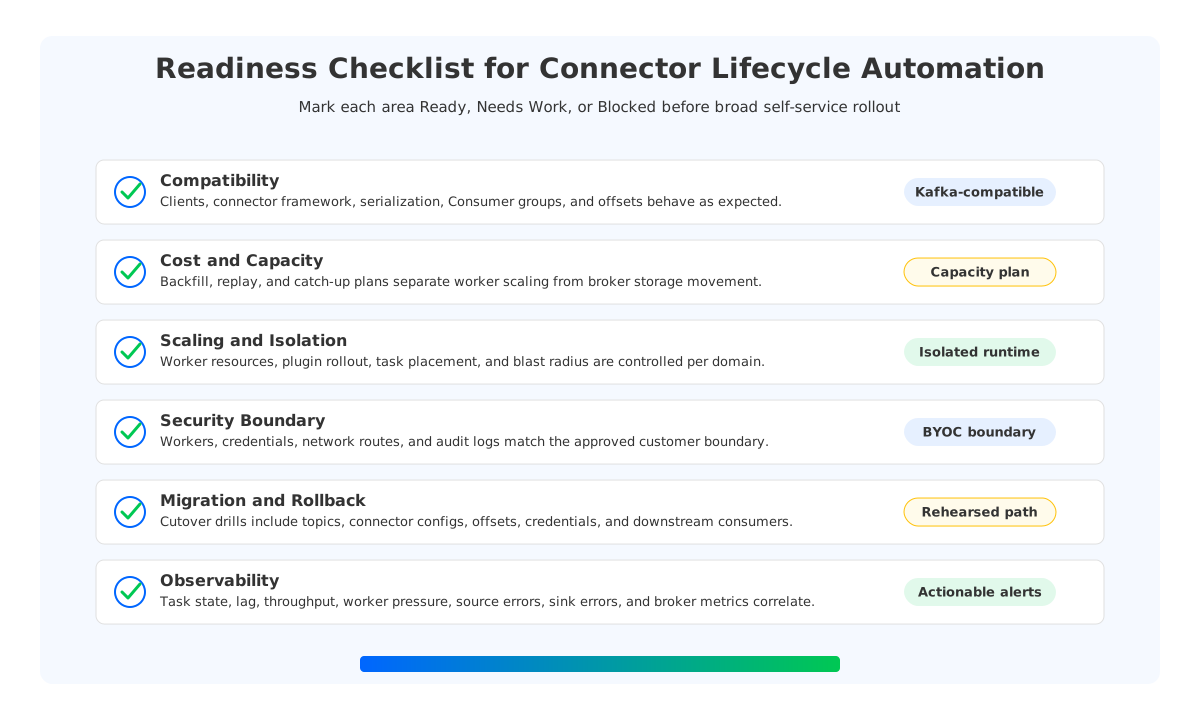
Use this scorecard before expanding connector automation from a few pipelines to a shared platform. Score each item as Ready, Needs Work, or Blocked, and write the evidence next to the score. The evidence is more valuable than the label.
| Area | Ready Means |
|---|---|
| Connector ownership | Every connector has an owning team, an escalation path, and a change approval rule. |
| Plugin lifecycle | Plugin versions are reviewed, staged, rolled out, and rolled back through a repeatable process. |
| Offset safety | Pause, restart, upgrade, rollback, and delete behavior are documented for source and sink connectors. |
| Capacity elasticity | Backfill and catch-up scenarios have capacity plans that separate worker scaling from Kafka storage movement. |
| Security boundary | Worker placement, credentials, network access, and audit logging match the organization's control model. |
| Observability | Dashboards and alerts cover task state, throughput, lag, worker resources, source errors, sink errors, and broker pressure. |
| Migration path | Cutover and rollback are tested with topics, Consumer groups, connector configs, and downstream consumers included. |
The scorecard gives teams a useful stopping rule. If ownership, offset safety, and observability are weak, do not start with broad self-service connector creation. Start by hardening those controls for one high-value connector domain. If the main blocker is broker-local capacity, storage movement, or network cost during connector bursts, evaluate a Kafka-compatible Shared Storage architecture as part of the platform decision.
7FAQ
7.1What is connector lifecycle automation in Kafka?
Connector lifecycle automation is the controlled creation, update, pause, resume, restart, scaling, upgrade, rollback, and deletion of Kafka Connect connectors and their worker runtime. In production, it also includes offset handling, plugin governance, credentials, network placement, observability, and incident runbooks.
7.2Is Kafka Connect itself enough for lifecycle automation?
Kafka Connect provides the framework for connectors, tasks, workers, and REST-based management. A production platform still needs surrounding controls for deployment, plugin versioning, worker isolation, approval workflows, monitoring, rollback, and integration with Kafka capacity planning.
7.3Why does Kafka storage architecture matter for connectors?
Connectors can create bursts, replay traffic, long catch-up reads, and steady write amplification. In a broker-local storage model, that pressure can trigger disk and partition movement work. A Shared Storage architecture reduces the amount of broker-local data movement tied to connector growth and recovery.
7.4When should a team evaluate AutoMQ for connector automation?
Evaluate AutoMQ when the team wants Kafka-compatible semantics, customer-controlled deployment boundaries, managed connector lifecycle capabilities, and a storage model that reduces broker-local data movement. The evaluation should use real connectors, source systems, sink systems, offsets, and failure drills.
Return to the search that started this review: connector lifecycle automation kafka. The useful answer is not another connector creation screen; it is a platform that can change, recover, and migrate connector workloads without losing control of offsets, cost, or boundaries. If your checklist points toward Kafka-compatible streaming with Shared Storage architecture, start a focused evaluation through the AutoMQ BYOC path and test it against one connector domain before widening the rollout.


