
Table of Contents
Table of Contents
When an SRE searches for incident timeline reconstruction kafka, they are usually not looking for a generic logging tutorial. They are asking whether the team can rebuild what happened across producers, brokers, consumers, offsets, deployments, and operators fast enough for an incident review. Kafka often sits in the middle because it preserves ordered records by Topic and Partition, exposes offsets, supports Consumer group coordination, and feeds later audit trails, metrics, and analytics.
Kafka is rarely the only system involved. A useful timeline joins application events, broker logs, consumer lag, schema changes, deployment events, access changes, network symptoms, and human actions. If those signals have different retention windows or ownership boundaries, the timeline becomes a negotiation instead of a shared operational fact. Incident reconstruction is not only observability; it is a readiness test for the streaming architecture underneath it.
1Why teams search for incident timeline reconstruction kafka
The search usually starts after a messy event. A payment stream stalled, a fraud model consumed duplicate records, a CDC pipeline skipped a table window, or an analytics job read a burst of late data. Someone can point to a symptom, but the team needs a sequence: which Producer changed first, which Partition saw the spike, when the Consumer group committed offsets, whether a rebalance happened, and whether the recovery path created more disorder than the original fault.
Kafka gives investigators strong primitives, but not a complete forensic system. Offsets define position inside a Partition, not the cause of an incident. Consumer group metadata explains assignment and progress, not why a consumer paused. Transactions and idempotent producers can reduce write-path ambiguity, but they do not replace deployment records, access logs, or alert context.
For platform teams, this creates three practical requirements:
- Preserve the evidence window. Retention for topics, logs, metrics, and audit records must outlive the time it takes to detect, escalate, and review an incident.
- Keep positions explainable. Offsets, Consumer group commits, transactional writes, and replay boundaries need to be visible to the people who own recovery.
- Avoid recovery side effects. Scaling, broker replacement, partition movement, or migration should not destroy the very evidence the team is trying to understand.
That last requirement is where architecture matters. Dashboards cannot make reconstruction reliable if the storage model turns every operational change into data movement.
2The production constraint behind the problem
Traditional Kafka uses a Shared Nothing architecture. Each Broker owns local storage, and Kafka maintains durability by replicating Partition data across Brokers. The design is proven and well understood, especially for teams that already operate Kafka at scale. It also gives operators many explicit levers: replication factor, ISR behavior, retention, rack awareness, rebalance tools, and client-side controls.
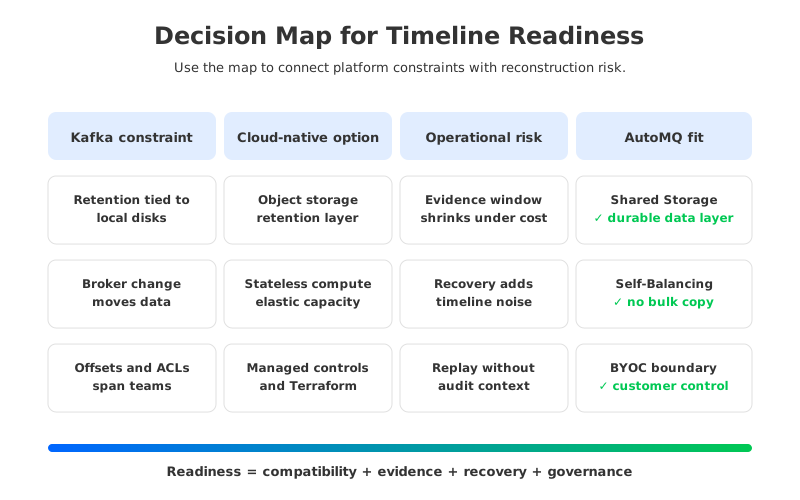
The trade-off appears when the incident overlaps with capacity or failure recovery. Broker-local storage means that Partition placement, disk usage, and replica movement become part of the incident surface. If a Broker is unhealthy, the team may need leader election, reassignment, replication catch-up, or disk triage while also trying to establish a timeline. If a retention window is too short because storage was provisioned tightly, the review may lose the exact records needed to compare Producer timestamps, broker append order, and Consumer group progress.
Cloud deployment adds another layer. Multi-Availability Zone Kafka deployments are common for fault isolation, but replica traffic and client traffic can cross zone boundaries. Incident readiness depends on capacity and retention choices, and those choices are constrained by storage, network, and operational cost.
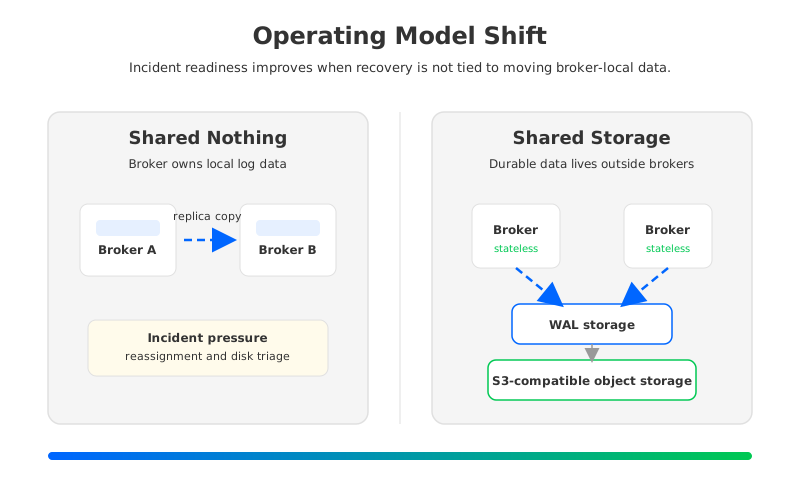
Tiered Storage can help historical retention by moving older segments to object storage while keeping active data on local broker storage. It does not fully remove broker-local state from the hot path, so incident response still has to account for local storage pressure, leader placement, and reassignment behavior.
3Architecture options and trade-offs
A readiness review should compare operating models before comparing product names. The wrong starting point is "which platform has the most incident response features?" The better starting point is "which architecture keeps evidence durable, positions explainable, and recovery actions reversible under stress?"
| Option | What it gives you | Timeline reconstruction risk | Operational question to ask |
|---|---|---|---|
| Self-managed Kafka with local disks | Maximum control over broker placement, configs, and tooling | Evidence windows compete with disk planning and reassignment load | Can you retain enough data while leaving room for failure recovery? |
| Managed Kafka service | Less infrastructure ownership and faster baseline operations | Platform boundaries may hide some broker-level signals or change recovery controls | Which logs, metrics, and audit events are exportable during an incident? |
| Kafka with Tiered Storage | Longer historical retention with object storage for older data | Hot-path state and local storage still affect failover and scaling behavior | What remains broker-local, and how does that affect reassignment? |
| Kafka-compatible Shared Storage architecture | Durable data is separated from stateless broker compute | Requires careful review of compatibility, WAL type, and cloud boundary | Can your clients and governance model move without semantic surprises? |
Each option can be reasonable. A regulated team may value direct operational control. A small platform group may prefer a managed baseline. A team with long retention and bursty workloads may care more about separating compute from storage. The readiness review should make those preferences explicit before an incident.
The most useful review sessions treat Kafka as both a data system and an evidence system. Instead of stopping at "can we replay data?" the team asks "can we prove where replay starts, who approved it, which offsets were used, and how we return to normal if the replay path is wrong?"
4Evaluation checklist for platform teams
Use the checklist below before a migration, a managed service evaluation, a retention policy change, or a major incident review process redesign. It is written for teams that already know Kafka basics and need a production gate, not a beginner worksheet.
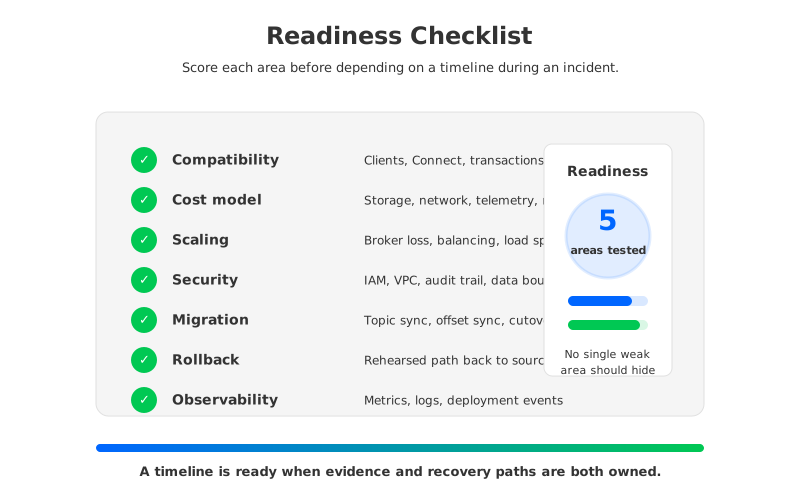
- Compatibility boundary. Confirm that Producer, Consumer, Admin, Kafka Connect, and stream processing clients work without protocol or semantic changes. Pay special attention to transactions, idempotent producers, Consumer group behavior, offset visibility, ACLs, and client version policy.
- Evidence retention. Define the minimum retention window for business records, broker logs, metrics, audit events, deployment events, and schema changes. The timeline is only as complete as the shortest critical evidence window.
- Offset and replay governance. Decide who can reset offsets, promote a mirror or migration target, pause consumers, or run replay jobs. The decision should leave an audit trail, because replay is both a technical and operational action.
- Failure recovery behavior. Test broker loss, controller failover, client reconnects, and Consumer group rebalances under load. Record what evidence remains visible while recovery is happening.
- Scaling and balancing behavior. Verify whether adding or removing Brokers causes large data movement, throttling, or long reassignment periods. A scaling event during an incident should reduce pressure, not become a second incident.
- Cloud cost and network model. Review storage, data transfer, PrivateLink or peering, object storage operations, and monitoring export costs. Avoid cost models that force teams to shorten retention or reduce telemetry during quiet periods.
- Security and tenancy boundary. Confirm where business records, logs, metrics, credentials, and control actions live. For BYOC (Bring Your Own Cloud) deployments, verify that the control path and data path match the organization's security review.
- Rollback and migration plan. A platform that is easy to enter but hard to roll back is not incident-ready. Validate topic sync, offset sync, write cutover, consumer cutover, and rollback steps before production traffic depends on them.
The checklist exposes a pattern: timeline reconstruction fails less often because teams lack logs, and more often because ownership is split. Application teams own payload semantics. Platform teams own brokers and quotas. Security teams own access evidence. Data teams own downstream correctness. The platform should make those boundaries visible.
5How AutoMQ changes the operating model
After the neutral review, the architectural requirement becomes clearer. Teams that want stable retention, elastic recovery, and fewer broker-local failure modes should evaluate Kafka-compatible systems that separate compute from storage. AutoMQ is one implementation of that category: it keeps the Kafka protocol and ecosystem surface while replacing Kafka's broker-local log storage with a Shared Storage architecture backed by S3-compatible object storage.
The key operational change is that AutoMQ Brokers are stateless brokers. Durable stream data is written through S3Stream using WAL (Write-Ahead Log) storage and object storage, while Brokers handle Kafka protocol processing, caching, routing, and scheduling. When a Broker changes, the platform does not need to treat persistent Partition data as something trapped on that node. That difference matters during incident reconstruction because recovery actions can focus on ownership, leadership, cache, and traffic instead of large broker-to-broker data copies.
AutoMQ does not remove the need for an evidence model. You still need retention policy, monitoring, deployment records, access control, and replay governance. What it changes is the operational noise created by the streaming platform itself. Self-Balancing redistributes traffic, Self-healing isolates unhealthy nodes, and fast partition reassignment reduces waiting on data movement.
For migration planning, Kafka compatibility is the first gate. AutoMQ's documentation describes compatibility with Apache Kafka clients and ecosystem components, while AutoMQ commercial editions provide Kafka Linking for migrations that need byte-level message synchronization and offset consistency. That is relevant to incident readiness because migration is a period when two timelines can diverge: the source cluster has one set of offsets and audit events, and the target cluster has another. A migration plan should make that boundary explicit.
Deployment boundary is the second gate. AutoMQ BYOC runs the control plane and data plane in the customer's cloud account and VPC, while AutoMQ Software is designed for customer-operated environments. That model helps teams align streaming operations with existing network, IAM, monitoring, and compliance controls.
The result is a simpler readiness conversation. The team can separate compute capacity from durable storage policy, make balancing part of normal operations, and treat compatibility and rollback as first-class review items.
6A readiness scorecard you can use
Give each dimension a score from 1 to 5, where 1 means "unclear or manual" and 5 means "tested, documented, and owned." The number matters less than the discussion it forces. Strong retention with weak replay governance is not ready. Elegant storage architecture with unclear security boundaries is not ready either.
| Dimension | 1: not ready | 3: partially ready | 5: production-ready |
|---|---|---|---|
| Compatibility | Client behavior is assumed | Main clients tested, edge cases pending | Clients, transactions, offsets, Connect, and tooling verified |
| Evidence window | Retention follows default settings | Critical topics and logs have defined windows | Records, logs, metrics, audit events, and deployments align |
| Recovery behavior | Failover steps are tribal knowledge | Runbooks exist but are rarely tested | Broker loss, scaling, and replay are exercised under load |
| Governance | Offset changes rely on operator access | Approval exists outside the platform | Replay, reset, migration, and rollback actions are audited |
| Cost model | Retention is limited by budget anxiety | Major storage and network costs are understood | Cost model supports the evidence window by design |
| Migration and rollback | Cutover plan is one-way | Sync and rollback are documented | Cutover, offset continuity, and rollback are rehearsed |
If your weakest scores are retention, scaling, or broker recovery, architecture is probably part of the problem. If your weakest scores are access control, replay approval, or deployment evidence, tooling and process may matter more than the streaming engine. Most mature teams need both: an operating model that avoids unnecessary data movement, and a governance model that makes every recovery action explainable.
The next incident will not wait for the perfect platform review. Start with the evidence window, because it quietly expires. Then test the recovery path that scares the team most: broker loss, Consumer group replay, migration cutover, or a sudden traffic spike. If local storage movement, unclear offsets, or cloud cost pressure blocks the timeline, evaluate a Kafka-compatible Shared Storage architecture.
To compare this checklist against a Kafka-compatible Shared Storage deployment, review AutoMQ's architecture and try the BYOC workflow here: evaluate AutoMQ for your streaming platform.
7FAQ
7.1Is Kafka enough for incident timeline reconstruction?
Kafka provides ordered records, offsets, Consumer group metadata, and integration points that are valuable for reconstruction. It is not enough by itself. You also need logs, metrics, deployment records, access history, schema history, and governance around replay and offset changes.
7.2What Kafka data is most useful during an incident review?
Topic and Partition offsets, Consumer group commits, broker logs, controller events, rebalance timing, retention configuration, Producer error rates, and lag metrics are usually the most useful starting points. The exact set depends on whether the incident is about missing data, duplicate processing, latency, ordering, or access.
7.3Does Shared Storage architecture replace observability tooling?
No. Shared Storage architecture changes how durable data is placed and how Brokers recover, but it does not replace metrics, logs, traces, dashboards, or audit trails. It can reduce operational noise during scaling and recovery, which makes those tools easier to interpret.
7.4How should teams test readiness before migration?
Run a controlled exercise that includes topic synchronization, Consumer group offset validation, Producer cutover, rollback, and evidence collection. The test should prove that the team can explain both data position and operational actions before production traffic moves.


