
Table of Contents
Table of Contents
Redpanda Cloud cost is rarely explained by one bad line item. A streaming bill usually grows because the workload changed shape: more consumer groups read the same topics, retention became longer than the original design assumed, traffic peaks forced more headroom, or private network paths moved charges into a cloud marketplace or provider bill. The vendor price page still matters, but the bill is written by the workload.
That distinction matters because Redpanda Cloud exposes Serverless, Dedicated, and BYOC cluster options, each with different billing dimensions. Redpanda documents Serverless around data in, data out, data stored, partitions, and uptime; Dedicated around uptime, data in, data out, and storage; and BYOC around compute, data in, data out, and storage.
The practical question is not "Is Redpanda expensive?" It is "Which usage metric is being amplified by our architecture?" Some savings come from tuning topics and topology. Others require evaluating whether broker-local storage and provisioned headroom are the wrong primitives for the workload.
1Why Streaming Bills Grow Faster Than Expected
Kafka-compatible streaming systems are cost multipliers by design. A producer writes a record once, but the platform may retain it, replicate it, serve it to several consumer groups, replay it for recovery, and move it across zones or private endpoints. That is why a monthly average throughput number is a weak budget model.
Redpanda's cloud billing docs make this visible through usage metrics. Ingress tracks data written into Redpanda, egress tracks data read out, and storage tracks object storage usage. Partitions are a Serverless metric. Uptime and compute matter depending on cluster type. Rates vary by region, plan, and commercial terms, so this article avoids quoting static Redpanda unit prices.
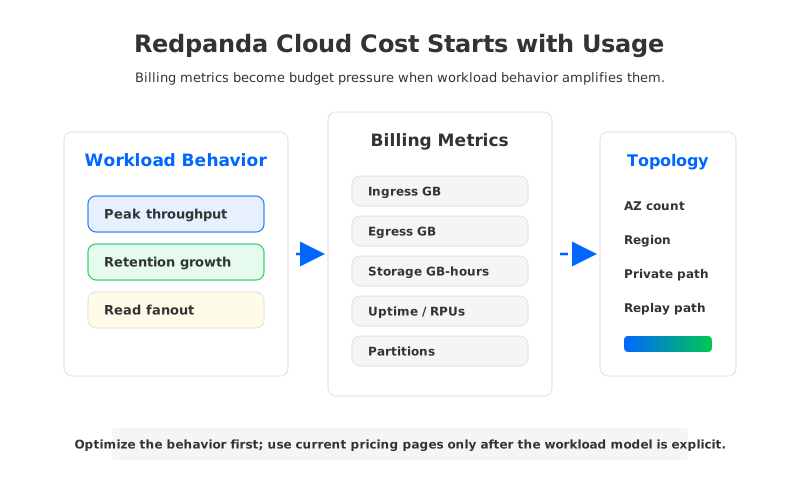
The first pass should separate five drivers:
- Ingress: producer traffic, request shape, compression behavior, and batch efficiency.
- Egress: consumer fanout, replay jobs, analytics exports, and failed or retried reads.
- Storage: retained bytes, object storage duration, topic lifecycle, and tiering behavior.
- Capacity: uptime, compute, RPUs, or provisioned cluster resources depending on plan.
- Topology: availability-zone count, region, marketplace billing, private access, and client placement.
Most optimization mistakes come from mixing these drivers too early. A team sees rising storage cost and starts reducing partitions. Another sees high egress and debates retention. Those changes can be valid, but only when they target the metric that is actually moving.
2Redpanda Cloud Cost Drivers to Inspect
The fastest way to understand a Redpanda Cloud bill is to review billing activity by resource and metric, then line it up with Kafka telemetry. Redpanda documents a billing activity view that can show resource breakdowns such as Compute, Ingress, Egress, Storage, Uptime, and Partitions. That view tells you what was charged; Kafka metrics and application ownership tell you why.
| Driver | What to inspect | Optimization question |
|---|---|---|
| Ingress | Producer GB, request rate, compression, batch size | Are producers sending efficient batches and avoiding duplicate writes? |
| Egress | Consumer groups, replay jobs, cross-region reads | Is read fanout intentional, or did one topic become an unmanaged data lake feed? |
| Storage | Topic retention, compaction, tiered storage behavior | Does every topic need its current retention window? |
| Capacity | Uptime, RPUs, dedicated capacity, peak headroom | Are resources sized for a real peak or an old safety margin? |
| Topology | AZ count, region, private endpoints, client location | Are data paths aligned with where producers and consumers run? |
Cost optimization works better when every row has an owner. Application teams own producer and consumer behavior. Platform teams own topic policy and cluster configuration. Cloud teams own network placement and private connectivity. Finance owns commercial terms, but finance cannot fix a consumer group reading from the wrong region.
2.1Throughput and Provisioned Capacity
Throughput drives usage and capacity. Steady ingress is simpler to model than a sharp peak, because the platform has to be ready for the peak while the bill is reviewed monthly. Redpanda Serverless exposes usage-style metrics, while Dedicated and BYOC introduce uptime or compute assumptions. Peak-to-average ratio belongs in the worksheet.
Use hourly throughput, not monthly totals. Monthly totals hide the difference between smooth traffic and a workload that compresses most writes into a short window. For each major topic group, capture producer ingress, consumer egress, partition count, message size distribution, and the busiest hour. Then ask whether that hour is a business requirement, a batch scheduling artifact, or a retry storm.
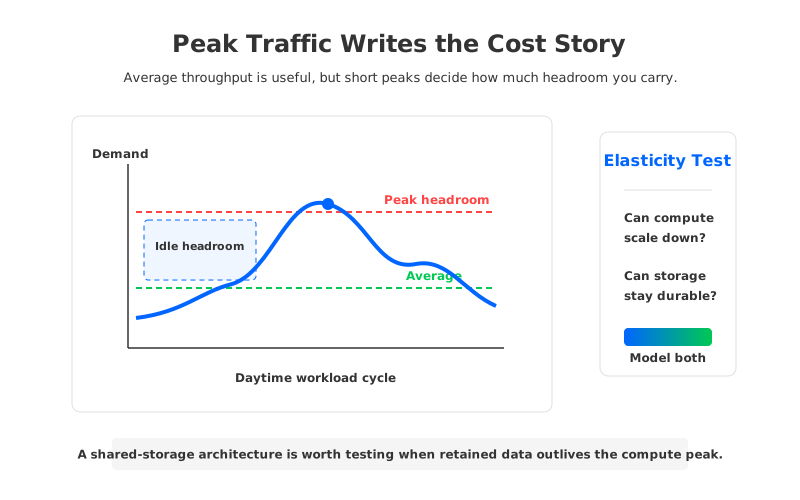
The same logic applies to compute. If BYOC compute is measured in RPUs, and Dedicated capacity depends on running cluster resources, then right-sizing is a feedback loop between traffic shape, latency target, durability settings, and operational headroom. A conservative buffer is healthy; a forgotten buffer becomes a tax.
2.2Retention and Storage Growth
Retention looks harmless until it compounds. Apache Kafka's topic configuration documentation describes retention.ms as the maximum time a log is retained before old segments are discarded under the delete policy, with a default of 7 days, and retention.bytes as a partition-level size limit. Those settings explain why retention policy should be owned per topic class rather than copied across the cluster.
Redpanda's Tiered Storage documentation says the feature offloads log segments to object storage and lets you specify how much storage to retain locally. In Redpanda Cloud billing docs, Dedicated and BYOC storage track object storage usage during the billing period, and the docs state that Redpanda counts each byte once for that storage metric even though topics use a fixed replication factor of 3. That helps estimate the Redpanda metric, but retention growth, replay reads, object storage behavior, and cloud-provider charges still belong in the model.
Good retention optimization starts with classification:
- Operational replay topics need enough history for consumer recovery, deploy rollback, and incident investigation.
- Audit or compliance topics need explicit retention tied to policy, not convenience.
- Compacted state topics need key cardinality, tombstone behavior, and compaction lag reviewed together.
- Dead-letter and error topics need ownership, because they often become storage leaks after incidents.
The question is not whether retention should be short. It is whether every retained byte still has a named consumer, recovery objective, or compliance reason.
2.3Networking and Read Fanout
Read fanout is where many Kafka budgets stop matching intuition. One producer stream may feed a fraud pipeline, feature store, search index, warehouse connector, observability sink, and replay job. If egress is charged, each reader matters. If readers sit across zones, regions, or private connectivity boundaries, topology matters too.
AWS pricing illustrates why topology should sit beside Redpanda billing data rather than below it as a vague note. AWS documents data transfer charges for traffic across Availability Zones in the same Region for several EC2-related paths, and AWS PrivateLink pricing includes endpoint-hour and per-GB processing dimensions. Applicability depends on deployment path, cloud provider, region, and network design. A Redpanda Cloud cost review should include both the Redpanda bill and the surrounding cloud bill.
A lagging consumer can turn a tail-read workload into a catch-up workload. A backfill can turn object storage from a quiet retention layer into an active read path. These are normal streaming operations, but they become budget problems when nobody models how often they happen.
3Short-Term Optimization Checklist
Start with changes that improve discipline without changing the platform architecture. They often surface enough waste to buy time for a better architectural decision.
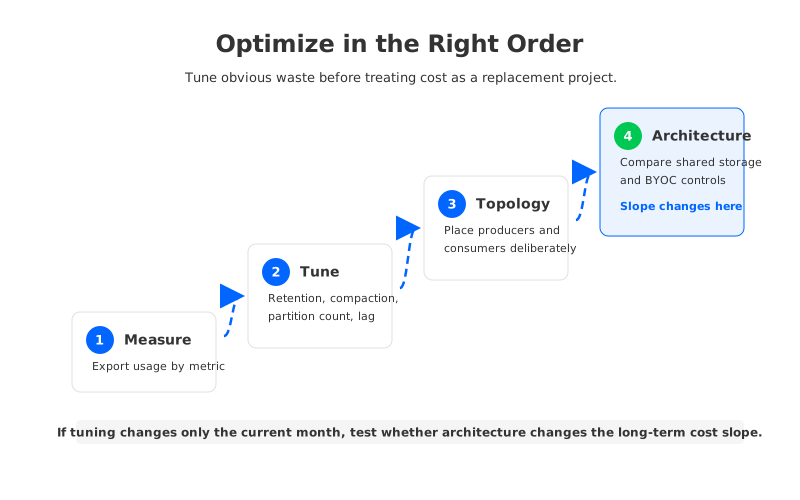
- Export billing activity and tag owners. Break down Redpanda Cloud usage by resource and metric, then map major topics and consumer groups to teams.
- Group topics by retention class. Create classes such as operational, replay, audit, compacted, and dead-letter, then review outliers.
- Audit consumer fanout. Find topics with many independent readers, replay-heavy jobs, or consumers outside the expected network boundary. Egress optimization is often an application architecture conversation.
- Review partition count and idle topics. Partitions are metered in Serverless and affect operational surface area. Remove abandoned topics and right-size partition counts with throughput and ordering requirements in mind.
- Inspect peak scheduling. If daily jobs all run at the same time, the platform may be sized for a scheduling choice rather than a business requirement. Spreading batch reads can reduce pressure without losing capability.
- Clean up non-production environments. Development, staging, migration, and proof-of-concept clusters often become permanent. Give every environment an owner, expiration policy, and budget line.
- Revisit cloud topology. Place producers and consumers deliberately. Private paths, multi-AZ choices, and cross-region movement should be explicit design choices, not inherited defaults.
The checklist should produce a before-and-after model. Track which Redpanda metrics changed, which cloud-provider lines changed, and which assumptions stayed stubborn. The stubborn assumptions are where the next decision lives.
4When Cost Optimization Becomes a Replacement Project
Higher cost alone is not a strong reason to replace a streaming platform. Managed services reduce operational work and can be the right tradeoff even when the invoice is visible. The stronger signal is that the cost curve no longer responds to tuning. If retention, read fanout, or peak headroom keeps growing for business reasons, the team is no longer solving a configuration problem.
This is where architecture enters the conversation. Redpanda's design and cloud service model can be a good fit for teams that value Kafka API compatibility, strong performance, and a managed operating experience. The cost question changes when the workload is retention-heavy, bursty, replay-heavy, or governed by data-control requirements. In those cases, compare architecture assumptions before comparing discounts.
A useful replacement evaluation keeps the same workload inputs across platforms: ingress, egress, retention, partition count, peak ratio, region, AZ strategy, replay frequency, migration overlap, and operational ownership. The goal is to discover whether a different architecture changes the slope of the model.
5How AutoMQ Approaches Cloud Cost Elasticity
Once the cost model points to architecture rather than tuning, AutoMQ belongs in the comparison as a Kafka-compatible shared-storage system, not as a generic discount. AutoMQ separates compute from durable storage by using stateless brokers, a WAL layer, and S3-compatible object storage as the primary durable layer. AutoMQ documentation describes this architecture as replacing Kafka's native log storage with S3Stream and making brokers stateless.
That changes the cost elasticity question. In a broker-local or tiered-storage model, compute, hot storage, partition placement, and operational recovery remain closely linked. Tiered storage can move older segments to object storage, but the primary broker-owned path still matters. In a shared-storage design, retained data can be modeled against object storage, while broker compute can be scaled around active traffic, cache behavior, and protocol handling. The bill does not vanish; it becomes more explicit.
BYOC changes the control tradeoff as well. With AutoMQ Cloud BYOC, teams evaluate resources in their own cloud environment, including compute, object storage, networking, observability, operations, and AutoMQ licensing or support. That can be attractive when data residency, cloud-account visibility, or procurement control matters. It also requires ownership: BYOC gives more visibility and control than a fully abstracted service, but it still needs a disciplined cloud resource model.
For a Redpanda Cloud user, the fair comparison is not "Redpanda versus AutoMQ" in the abstract. It is "our measured workload under the current Redpanda Cloud model versus the same workload under a shared-storage BYOC model." If retained data growth, burst headroom, or read-heavy replay dominates the forecast, shared storage may change the cost curve. If the workload is latency-sensitive, compact, and steady, the current architecture may remain the right answer.
6Build a Cost Model Before You Negotiate
A negotiation can reduce a price. A model explains whether the reduced price will still hold under growth. That is why Redpanda Cloud cost optimization should end with a worksheet rather than a complaint: current usage, committed growth, stress growth, tuning options, topology changes, and alternative architecture scenarios.
Give every row a source and confidence level. Redpanda pricing and billing dimensions should link to current official Redpanda pages. Kafka retention and compaction assumptions should link to topic configs and production telemetry. Cloud networking assumptions should link to AWS, Azure, or Google Cloud pricing pages. AutoMQ comparison rows should link to AutoMQ architecture and pricing resources. When an assumption cannot be sourced, label it as a risk instead of burying it inside a precise-looking total.
Back to the original bill: the number is not the starting point, it is the symptom. The useful work is finding which workload behavior created it. If that behavior can be tuned, tune it. If it is the natural shape of the business, compare architectures before the next commitment window closes. To test a shared-storage Kafka model with your own Redpanda Cloud workload assumptions, talk to the AutoMQ team.
7References
- Redpanda Cloud billing documentation
- Redpanda Cloud deployment options
- Redpanda pricing page
- Redpanda Tiered Storage documentation
- Apache Kafka topic configuration documentation
- AWS EC2 On-Demand pricing: Data Transfer
- AWS PrivateLink pricing
- AutoMQ architecture overview
- AutoMQ Cloud BYOC overview
- AutoMQ pricing calculator
8FAQ
8.1What drives Redpanda Cloud cost?
Redpanda Cloud cost is driven by deployment model and workload metrics. Redpanda documents Serverless metrics such as data in, data out, data stored, partitions, and uptime; Dedicated metrics such as uptime, data in, data out, and storage; and BYOC metrics such as compute, ingress, egress, and storage. Region, topology, support terms, and marketplace commitments can also affect the final cost.
8.2How can I reduce Redpanda Cloud cost without changing platforms?
Start by exporting billing activity by metric, then map the largest metrics to topic owners and application behavior. Common levers include retention policy, compaction policy, idle topics, partition count, consumer fanout, replay scheduling, non-production environments, and cloud network placement.
8.3Is Redpanda Cloud cost mainly a storage problem?
Not always. Storage becomes dominant for long-retention or replay-heavy workloads, but egress can dominate when many consumers read the same topics, and capacity can dominate when short peaks require persistent headroom. Treat storage, egress, ingress, capacity, and topology as separate variables.
8.4Does Redpanda Tiered Storage eliminate storage cost concerns?
No. Tiered Storage can offload log segments to object storage and reduce pressure on local storage, but retained data, object storage usage, replay reads, and topology still need to be modeled. It is different from a shared-storage architecture where object storage is the primary durable layer and brokers are more stateless.
8.5When should AutoMQ be evaluated as part of Redpanda cost optimization?
Evaluate AutoMQ when the cost issue is tied to retained data growth, bursty traffic, replay-heavy reads, broker-local storage assumptions, or data-control requirements. AutoMQ's Kafka-compatible shared-storage and BYOC architecture changes the model by separating compute from durable storage and making cloud resources more visible to the customer.


