
Table of Contents
Table of Contents
Redpanda's Kafka compatibility is useful, but it is not a magic yes/no property. A producer using the Java client can connect, publish records, and look healthy while another part of the same platform still depends on an Admin API behavior, ACL pattern, Schema Registry endpoint, transaction setting, or metric name that behaves differently during migration. That is why the right question is not "Is Redpanda compatible with Kafka?" The better question is: which Kafka surfaces does your workload actually use, and have you tested each one against the source and target?
Redpanda's documentation positions Redpanda as Kafka API-compatible for Kafka clients, and it documents client libraries, security, Schema Registry, Kafka Connect, and monitoring as separate operating surfaces. Apache Kafka's documentation divides the ecosystem the same way: wire protocol, producer and consumer semantics, Admin APIs, Connect, Streams, security, and monitoring are related, but they are not the same contract.
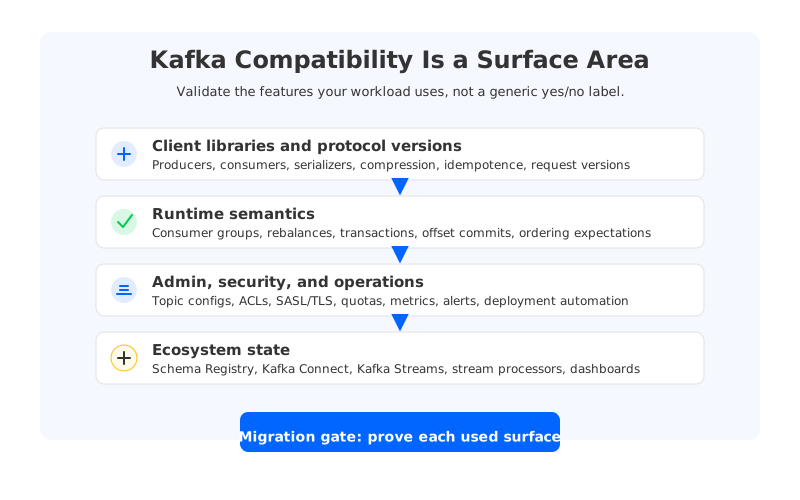
The same standard should apply when the target is Apache Kafka, Redpanda, Confluent, MSK, AutoMQ, or another Kafka-compatible platform. AutoMQ, for example, is a Kafka-compatible shared-storage system with stateless brokers and a BYOC deployment model, but that architecture does not remove the need to validate the client features and ecosystem components you depend on. Compatibility is a test plan before it is a migration claim.
1Kafka Compatibility Is a Surface Area, Not a Checkbox
Kafka compatibility starts with the wire protocol, but production workloads rarely stop there. A real Kafka deployment includes client libraries, serializers, topic configuration, consumer group coordination, transactions, authorization, deployment automation, dashboards, connector offsets, and stream processor state. These layers interact in ways that are easy to ignore during a proof of concept. A single happy-path produce-and-consume test proves that bootstrap, authentication, and basic record flow work; it does not prove that your platform can survive a rolling deployment, a rebalance storm, a failed transaction, or a connector restart.
It helps to separate compatibility into four layers:
- Protocol and clients. Validate the client versions, request versions, producer settings, partitioners, compression codecs, serializers, and retry behavior used in production.
- Kafka semantics. Validate consumer group rebalances, offset commits, idempotent producers, transactions, ordering assumptions, and failure recovery.
- Administrative and security control. Validate topic creation, config changes, ACL operations, SASL/TLS settings, quotas, certificates, and automation scripts.
- Ecosystem and operations. Validate Schema Registry, Kafka Connect, Kafka Streams, Flink or custom processors, metrics, alerts, audit trails, and incident runbooks.
This framing also prevents a common vendor-evaluation mistake. Redpanda compatibility, Kafka compatibility, and AutoMQ compatibility are implementation commitments that need to be mapped to the exact features your applications use.
2Client and Protocol Compatibility
Start with the client inventory. Redpanda's Kafka client documentation is the official place to verify its client compatibility guidance, and Apache Kafka's protocol documentation is the baseline for request and response behavior. The inventory should include every client library and version, not only the language. A Java producer, a Go service, a Python consumer, and a connector task all exercise the cluster differently.
For each client family, test the settings that change protocol behavior. Compression type, batch size, linger, acks, max in-flight requests, idempotence, delivery timeout, transactional ID, partitioner, isolation level, fetch size, cooperative rebalancing, and static membership can all affect migration behavior. Some settings are boring until they are not: a producer that relies on idempotence has different failure expectations than a best-effort logging producer, and a consumer using read_committed expects transactional visibility rules that a basic fetch test will never exercise.
The protocol test should include negative cases. Authentication failure, authorization denial, broker restart, metadata refresh, leader change, network timeout, oversized records, and retry exhaustion reveal whether client wrappers, alerting, and deployment scripts behave as expected. If the application team has custom retry code around Kafka exceptions, include it in the test harness.
3Consumer Groups, Offsets, and Transactions
Consumer groups are often the hardest compatibility surface because they combine protocol behavior with application state. A group can join, fetch, and commit offsets successfully while still breaking the business process if the resume point is wrong. Before migration, record group IDs, assignment strategy, active members, committed offsets, lag, reset policy, and ownership. Then test group behavior against the target under expected deployment timing.
Transactions deserve their own gate. Apache Kafka transactions connect producers, offsets, and consumer isolation level into one semantic contract. If a workload uses transactional IDs, idempotent producers, sendOffsetsToTransaction, or consumers configured with isolation.level=read_committed, validate those exact flows. The test should include a successful transaction, an aborted transaction, a producer restart with the same transactional ID, and a consumer reading after the transaction boundary.
The table below is a practical way to avoid hand-waving:
| Surface | Validation Question | Failure Signal |
|---|---|---|
| Consumer group membership | Does the group rebalance under real deployment timing? | Stuck members, repeated rebalances, unexpected partition ownership. |
| Offset commits | Can consumers resume from an approved point? | Duplicate side effects, skipped records, or reset to earliest/latest. |
| Idempotent producer | Are retries safe during leader or network disruption? | Duplicate records beyond application tolerance. |
| Transactions | Do committed and aborted records remain visible as expected? | read_committed consumers see the wrong boundary. |
| Ordering | Are key-based ordering assumptions preserved? | Changed partition assignment or downstream sequence violations. |
This is where a migration stops being a cluster exercise and becomes an application exercise. Application owners must define what "same behavior" means for their topics.
4Admin APIs, ACLs, and Security
Kafka-compatible migrations often fail in the control plane before they fail in the data path. Application code may only produce and consume, but CI/CD pipelines create topics, alter configs, inspect groups, manage ACLs, and validate connectivity. Redpanda documents ACL management and security features separately from client compatibility, which is a useful reminder: authorization is not implied by protocol compatibility.
Inventory these administrative surfaces before moving traffic:
- Topic administration. Check topic creation, partition counts, retention, compaction, cleanup policy, message size, and config mutation behavior.
- Group and offset inspection. Check whether deployment scripts and support tools can list groups, describe groups, inspect offsets, and reset offsets where appropriate.
- ACL and identity mapping. Map principals, resources, operations, hosts, wildcard rules, prefixed resources, and deny/allow expectations.
- Authentication and encryption. Validate SASL mechanisms, TLS certificates, mTLS, listener names, advertised listeners, certificate rotation, and secret management.
- Quotas and limits. Verify any client, topic, or cluster quota assumptions that protect the platform during incident conditions.
The important migration decision is whether you are preserving the security model or redesigning it. Preserving it is faster but can carry old mistakes forward. Redesigning it is cleaner but increases migration risk because every application identity must be tested. For regulated teams, the right answer may be a staged approach: preserve minimum functional access for cutover, then tighten policies once the target's audit and operational model are stable.
5Schema Registry, Connect, Streams, and Ecosystem State
The Kafka log is only part of the system. Schema Registry holds subject versions and compatibility levels. Kafka Connect holds connector configs, task state, offsets, secrets, dead-letter topics, and sink-side idempotency assumptions. Kafka Streams holds internal topics, changelogs, repartition topics, application IDs, and local state stores. These are Kafka ecosystem surfaces, but they do not migrate automatically because a broker accepts Kafka protocol requests.
Redpanda documents its Schema Registry API and Kafka Connect deployment path, while Apache Kafka documents Connect and Streams as separate components. Use that separation in your runbook. Schema validation should register and retrieve representative schemas, test compatibility checks, verify subject naming strategies, and include schema references if your organization uses them. Connect validation should start a non-production connector with production-like configs, verify task assignment, inspect offsets, and confirm that sink retries do not create unacceptable duplicates.
Kafka Streams needs extra care because the application state is tied to input topics, internal topics, and offsets. A Streams application may start successfully against the target and still rebuild state for hours if internal topics are missing or offsets are not accepted. For each Streams app, document the application ID, internal topic names, state store size, acceptable replay window, reset procedure, and downstream side effects.
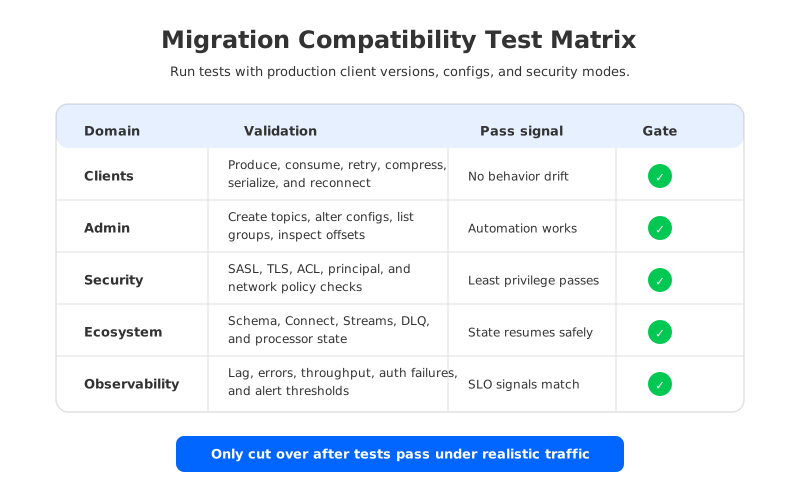
Monitoring belongs in the same ecosystem bucket. Redpanda exposes monitoring and metrics docs, and Kafka has a long operational tradition around JMX and broker/client metrics. A migration target may expose similar concepts with different metric names, labels, scrape paths, or dashboards. Treat alert parity as a migration deliverable: lag, produce errors, fetch errors, authorization failures, request latency, storage pressure, and connector task failures all need working alerts before traffic moves.
6Compatibility Checklist for Redpanda Migrations
A good compatibility checklist is short enough to run and strict enough to block unsafe cutover. It should be executable in a staging environment, then repeated with a limited production workload. Do not begin with your largest or most critical topic. Pick a topic that uses real schemas, real client libraries, real consumer groups, and real operational automation, but has a rollback path the team can rehearse.
Use the checklist as a gate:
- Inventory production usage. Capture clients, versions, topics, configs, ACLs, schemas, connectors, stream processors, dashboards, and owners.
- Create target parity. Recreate topics, security identities, schema settings, connector dependencies, and monitoring routes in the target environment.
- Run protocol and client tests. Produce, consume, retry, reconnect, compress, deserialize, and fail authentication with real settings.
- Run semantic tests. Validate consumer group rebalances, offset commits, idempotence, transactions, ordering, and replay behavior.
- Run ecosystem tests. Validate Schema Registry, Kafka Connect, Streams, custom processors, DLQs, and dashboard/alert parity.
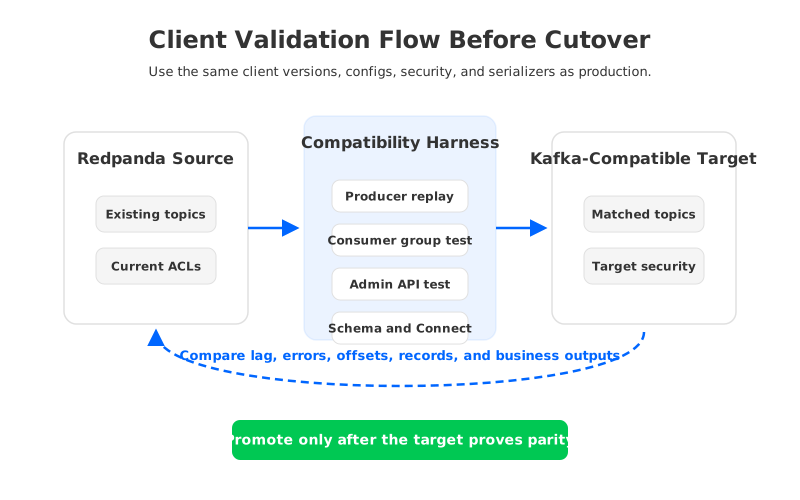
- Shadow and compare. Read from the target without production side effects and compare lag, counts, checksums or sampled records, errors, and business-level outputs.
- Approve rollback. Define what happens to records written only to the target, consumers moved to the target, and downstream systems that already processed target data.
The final item is not paperwork. Rollback becomes harder the moment producers write only to the target. After that point, rollback may require reconciliation, replay, or discard decisions. If those decisions are not written down before cutover, they will be made during an incident.
7How AutoMQ Approaches Kafka Compatibility
AutoMQ should enter the evaluation only after the compatibility surface is clear. It is not a reason to skip validation; it is a different Kafka-compatible target architecture to validate. AutoMQ keeps Kafka protocol and ecosystem compatibility as the user-facing contract, while replacing broker-local durable storage with a shared-storage design backed by WAL storage and object storage. Brokers become stateless compute nodes in front of shared durable data.
That distinction matters in Redpanda migration discussions. Redpanda is often evaluated as a Kafka-compatible platform with a different broker implementation. AutoMQ is evaluated as a Kafka-compatible shared-storage platform, especially when teams want data in their own cloud account, a BYOC boundary, and less broker-local data movement in steady-state operations. The compatibility questions remain familiar: clients, Admin APIs, consumer groups, transactions, ACLs, schemas, Connect, Streams, monitoring, and security. The architectural question is different: do you want durable Kafka data tied to broker-local storage, or placed behind stateless brokers on shared storage?
For a Redpanda-to-AutoMQ evaluation, validate both dimensions:
- Kafka behavior. Run the same workload-specific tests described above against AutoMQ, including client versions, producer settings, consumer groups, transactions, security, schemas, connectors, and monitoring.
- Architecture fit. Review how AutoMQ's stateless broker and shared-storage model affects scaling, recovery, retention, object storage operations, BYOC boundaries, and cost ownership.
- Migration mechanics. Use AutoMQ migration documentation as the starting point, then validate source-cluster behavior, authentication, topic shape, group synchronization, and application cutover in your environment.
This is the honest way to compare platforms. A compatibility claim helps you decide what to test first; passing the tests is what earns production traffic.
8References
- Redpanda Documentation, Kafka Compatibility
- Redpanda Documentation, Access Control Lists
- Redpanda Documentation, Schema Registry API
- Redpanda Documentation, Kafka Connect
- Redpanda Documentation, Monitoring
- Apache Kafka Documentation, Protocol Guide
- Apache Kafka Documentation, Kafka 4.1 Documentation
- Apache Kafka Documentation, Kafka Streams
- Apache Kafka Documentation, Kafka Connect
- Apache Kafka Documentation, Security and Authorization
- AutoMQ Documentation, Migrate to AutoMQ Overview
- AutoMQ Documentation, Architecture Overview
- AutoMQ GitHub, AutoMQ/automq
9FAQ
9.1Is Redpanda compatible with Kafka?
Redpanda documents Kafka API compatibility for Kafka clients, but production compatibility still depends on the specific client versions, APIs, security settings, ecosystem components, and operational tools your workload uses. Treat the official compatibility statement as a starting point for validation, not a replacement for it.
9.2Can I use existing Kafka producers and consumers with Redpanda?
Many Kafka clients can work with Redpanda, especially for common produce and consume paths. Before migration, test the actual libraries, versions, configs, authentication mode, serialization format, retry behavior, idempotence, transactions, and consumer group patterns used in production.
9.3What is the most commonly missed compatibility area?
Admin and ecosystem state are often missed. Teams test producer and consumer connectivity, then discover during cutover that topic automation, ACL scripts, Schema Registry behavior, connector offsets, Kafka Streams state, or monitoring dashboards were not validated.
9.4Do transactions and idempotent producers need separate tests?
Yes. Transactions and idempotence express stronger semantics than basic record flow. Test retries, leader changes, aborted transactions, committed transactions, read_committed consumers, and producer restarts with the same transactional IDs used by the application.
9.5How should Kafka Connect be validated during a Redpanda migration?
Validate connector configs, worker settings, task assignment, offset storage, secrets, source restart behavior, sink idempotency, dead-letter topics, and alerting. A connector that starts successfully has not necessarily proven safe cutover behavior.
9.6Where does AutoMQ fit in a Redpanda compatibility review?
AutoMQ is a Kafka-compatible shared-storage and stateless-broker target that can fit teams evaluating migration from Redpanda or another Kafka-compatible system. It should be validated with the same workload-specific checklist, then separately reviewed for shared storage, BYOC boundaries, scaling, recovery, and long-term operating model.
The safest migration plan starts with humility: every compatibility claim has a boundary. Build the inventory, run the tests, rehearse rollback, and only then decide whether the target should be Redpanda, Apache Kafka, AutoMQ, or another Kafka-compatible platform. If AutoMQ is on the shortlist, start with the migration overview and shared-storage architecture documentation, then bring measured compatibility results into the architecture review.


