
Table of Contents
Table of Contents
A Redpanda to Kafka migration rarely fails because one producer cannot connect to a new bootstrap address. It fails when a production team treats "Kafka-compatible" as "operationally identical." The surrounding estate still includes topic properties, ACL semantics, Schema Registry behavior, Kafka Connect workers, monitoring rules, client defaults, and runbooks tied to a specific platform.
The practical answer is a checklist organized by migration risk, not tool name. Production teams need to prove that data replication, metadata parity, client behavior, performance envelopes, and rollback paths are ready before cutover. The target may be Apache Kafka, a managed Kafka service, or a Kafka-compatible shared-storage platform such as AutoMQ, which keeps Kafka protocol compatibility while using object storage and stateless brokers in a BYOC deployment model.

1Migration Scope: Define the Target Before Moving Data
Start by naming the target architecture. "Kafka" can mean self-managed Apache Kafka, a cloud-managed Kafka service, or a Kafka-compatible system that preserves Kafka APIs while changing the storage layer. That choice affects configuration, security, observability, cost, and post-cutover operations.
For each workload, record the reason for migration: compatibility standardization, operational model change, cloud architecture change, or connector and schema consolidation. If the goal is a Kafka-compatible endpoint with less broker-local state, AutoMQ belongs in the target evaluation alongside Apache Kafka and managed Kafka offerings. If the goal is strict alignment with Apache Kafka, bias toward native Kafka configuration and operational semantics.
2Pre-Flight Checklist
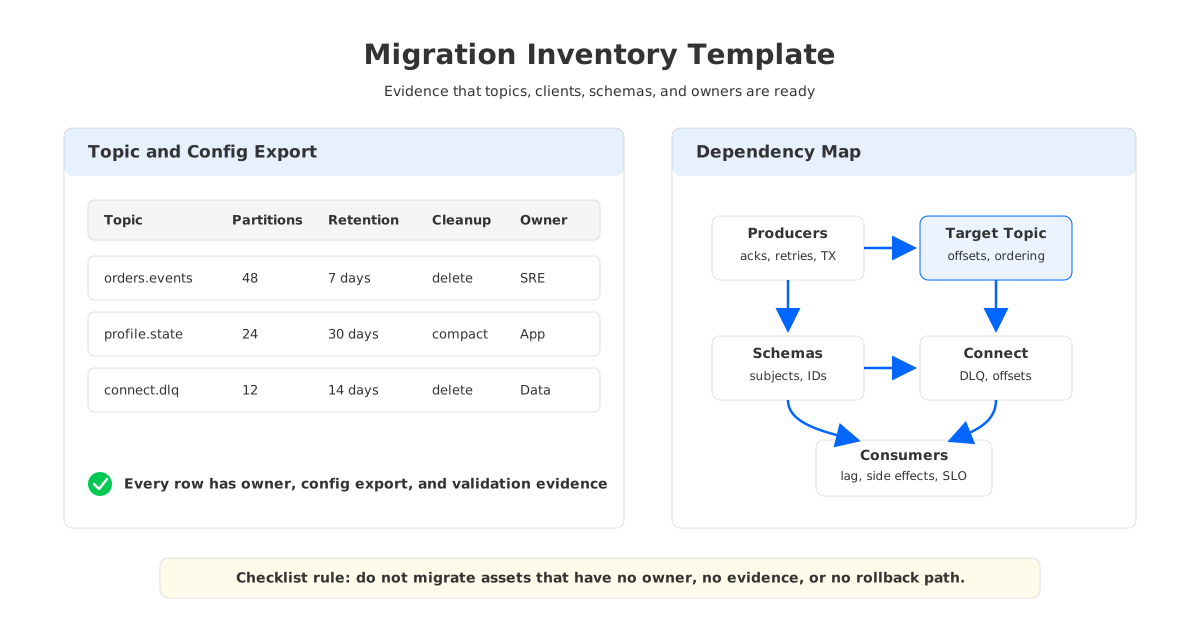
The pre-flight phase should produce an inventory that SRE, application, and security owners can all read. Do not start replication until it exists. Replication tools can move bytes, but they cannot tell you which consumer group can tolerate offset translation or which connector stores state in a platform-specific topic.
Use the following table as the minimum production inventory:
| Area | What to capture | Why it matters |
|---|---|---|
| Topics | Partitions, retention, cleanup policy, compression, min ISR, message size | Preserve ordering, replay, and durability |
| Configs | Cluster defaults, topic overrides, quotas, listeners, TLS/SASL | Surface hidden defaults |
| ACLs | Principals, hosts, patterns, operations, denies, superusers, registry ACLs | Map authorization explicitly |
| Clients | Library, version, acks, idempotence, transactions, batching, retries | Test real behavior |
| Schemas | Subjects, compatibility, schema IDs, formats, contexts | Avoid deserializer failures |
| Connect | Workers, plugins, configs, internal topics, offsets, DLQs, secrets | Treat Connect as stateful |
| Observability | Dashboards, alerts, lag, connector status, SLOs | Share health signals |
| Performance | Throughput, latency percentiles, lag, rebalances, replay rate | Gate by workload thresholds |
| Cutover | Producer/consumer order, endpoint change, freeze rules, approvals | Choose by workload risk |
| Rollback | Trigger, divergence policy, offset policy, revert path, owner | Design before change |
The inventory should also record ownership: application owner, platform owner, security owner when relevant, and a go/no-go signal. A checklist without ownership is a wish list with boxes.
3Topic and Configuration Checklist
Topic migration is not only about matching names. The target must preserve behavior that applications depend on, and some behavior is implicit in cluster defaults. Cleanup policy, retention, segment sizing, compression, min ISR, and message-size limits all need review.
Before replication starts, complete these checks:
- Topic mapping. Decide whether target topic names remain identical or carry a temporary prefix. Identity naming makes cutover easier for clients, while prefixed names reduce accidental reads and writes during validation.
- Partition count. Keep partition counts identical when ordering, key distribution, and consumer parallelism must remain stable. Increasing partitions during migration changes key-to-partition mapping for many producers.
- Replication and durability. Map Redpanda durability assumptions to Kafka target settings such as replication factor, min ISR, producer
acks, and unclean leader election policy. - Retention and compaction. Preserve
delete,compact, or combined cleanup policies with the same replay expectations. Compacted topics deserve extra checks because tombstone retention and segment behavior affect state rebuilds. - Large messages and compression. Align producer, broker, topic, and consumer limits for max message size, fetch size, and compression.
- Internal topics. Identify Connect, stream processing, transaction, Schema Registry, and migration-tool topics. Decide which state must move and which state should be rebuilt.
For AutoMQ as a target, add object-storage and BYOC checks: endpoint, bucket policy, network path, WAL configuration where applicable, and metrics export. Shared storage changes recovery and scaling mechanics, but topic semantics still need validation.
4Data Replication and Offset Checklist
Most Redpanda-to-Kafka migrations use MirrorMaker 2, managed MirrorMaker2 connectors where available, or application-level dual write. Apache Kafka documents MirrorMaker 2 under cross-cluster data mirroring and Kafka Connect; Redpanda documents managed MirrorMaker2 connectors in Redpanda Cloud.
Choose the pattern by risk. Use MirrorMaker 2 when you need Kafka-native topic discovery, heartbeats, and checkpointing; validate replication policy because prefixes can appear unless identity replication is configured. Use managed connectors when Redpanda Cloud support and control requirements fit. Use dual write only when producers can safely write to both clusters and the team has planned idempotency, ordering, and duplicate handling.
Offset migration deserves skepticism. Consumer group offsets are meaningful only relative to records available in the target topic. A checkpoint connector or MM2 offset sync can help, but every migrated group still needs validation against source offsets, target translated offsets, end offsets, lag, and application-level processing markers.
5ACL, Client, and Schema Checklist
Security and client behavior often decide whether the migration can be completed without emergency exceptions. Redpanda ACL documentation describes principals, hosts, resources, resource pattern types, operations, and Schema Registry ACL resources. Kafka ACL documentation uses similar concepts, but every target should be checked against its own authorization model, principal format, and supported resource types.
Complete these checks before any production client is pointed at the target:
- ACL export and mapping. Export source ACLs, group them by application, and map each principal to the target identity provider or service account. Check wildcard hosts, prefixed resources, deny rules, and superuser assumptions.
- Authentication and encryption. Validate TLS trust stores, SASL mechanisms, mTLS identities, listener names, advertised listeners, and client bootstrap behavior from every network zone.
- Client version matrix. Test the exact client libraries and versions used in production. Include idempotent producers, transactional producers, Kafka Streams applications, custom partitioners, interceptors, and consumers with cooperative rebalancing.
- Schema Registry migration. Export subjects, versions, compatibility settings, and schema formats. Validate Avro, Protobuf, and JSON Schema consumers against the target registry before changing producer endpoints.
- Schema ID behavior. Decide whether consumers depend on numeric schema IDs or only on subject/version compatibility.
- Authorization for schemas. Map subject-level and registry-level permissions separately from Kafka topic ACLs.
The safest client test is boring: same binary, same config except bootstrap and credentials, same traffic shape, and same failure scenarios. A migration that requires broad client rewrites is an application modernization project.
6Kafka Connect and Downstream Integration Checklist
Kafka Connect has its own state. Workers store connector offsets, configs, and status in internal topics. Connectors also depend on plugin versions, transforms, converters, credentials, dead-letter queues, and downstream system permissions.
For each connector, capture:
| Connector area | Migration check |
|---|---|
| Worker runtime | Version, group ID, internal topics, converters, REST endpoint, plugin path |
| Connector config | Source/sink type, tasks, topic regex, transforms, errors, DLQ, secrets |
| State | Offsets, checkpoints, exactly-once assumptions, idempotency, replay boundary |
| Dependencies | Database slots, cloud credentials, buckets, allowlists, quotas |
| Validation | Task status, record counts, DLQ rate, downstream parity, restart behavior |
Do not migrate every connector in one batch. Start with a bounded connector that exercises real credentials, schema conversion, and error handling. If it writes to an external system, define duplicate handling before replay.
7Observability and Performance Checklist
Observability needs to be ready before cutover, not after the first incident. Source and target dashboards should sit side by side during replication, validation, cutover, and rollback windows. Kafka monitoring guidance covers broker, producer, consumer, and Connect dimensions; AutoMQ adds shared-storage, WAL, cache, object storage, and stateless broker signals when it is the target.
Use a migration dashboard with these signals:
- Replication health: records replicated, bytes replicated, replication lag by topic and partition, checkpoint freshness, heartbeat freshness, connector task status.
- Client health: produce rate, error rate, retries, throttle time, latency, rebalances, commit failures.
- Topic health: under-replicated or unavailable partitions, leader distribution, end offsets, compaction backlog, retention behavior.
- Connector health: task failures, DLQ rate, source lag, sink latency, retry count, external errors.
- Target platform health: broker CPU, memory, disk or storage latency, network, controller health, object storage request and error metrics for shared-storage targets.
Performance validation should compare workload behavior, not vendor claims. Replay representative traffic, then measure p50, p95, and p99 produce latency; catch-up rate; peak throughput; application latency; rebalance time; and recovery after broker or worker restart. If the target is AutoMQ, include object storage path, cache behavior, and stateless broker scaling checks.
8Cutover and Rollback Checklist
There is no fixed downtime number that applies to every Redpanda-to-Kafka migration. A stateless analytics pipeline can tolerate a different sequence than a payment authorization stream or a CDC pipeline feeding operational databases. The cutover plan should state which side moves first, what gets frozen, what gets observed, and who can stop the change.
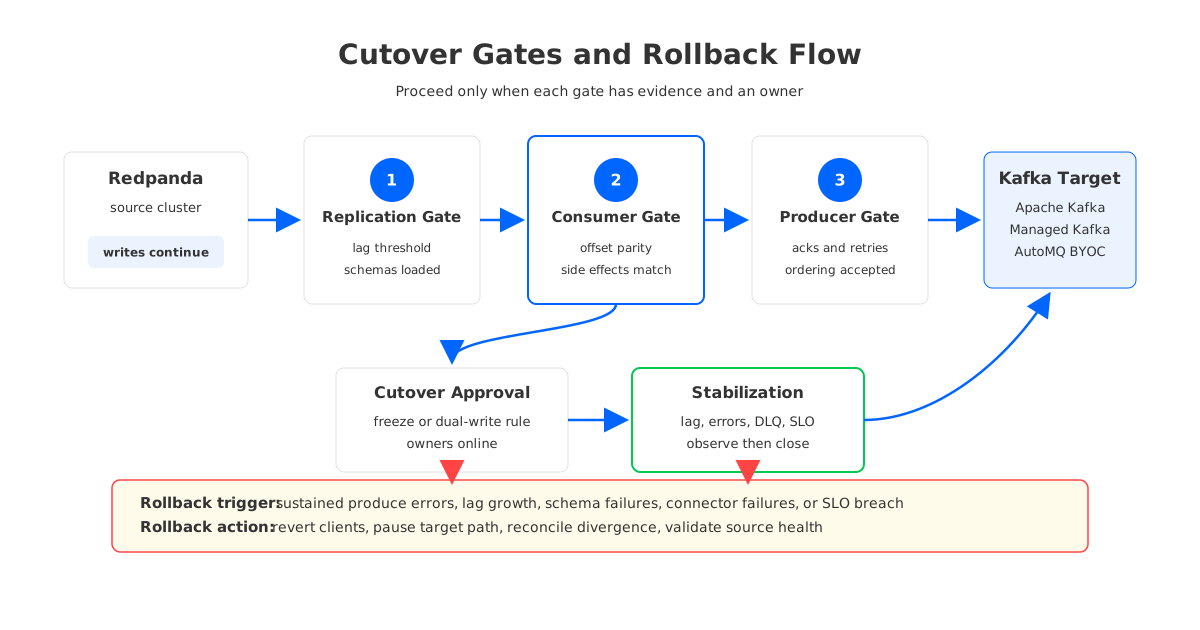
Use this gate sequence:
- Replication gate. Topics exist, configs are approved, ACLs are applied, schemas are loaded, lag is within threshold, and validation consumers can read expected records.
- Consumer gate. Selected consumers read from the target with translated or reset offsets, outputs match the source path, and rollback to the source consumer path is tested.
- Producer gate. Producers can authenticate, send with required
acks, preserve key ordering expectations, and stay within latency and error budgets. - Cutover gate. Change control approves the endpoint switch, DNS or config propagation is understood, source writes are frozen or dual-written according to plan, and on-call owners are present.
- Stabilization gate. Lag, error rate, DLQ rate, and application SLOs stay inside thresholds for the agreed observation window.
Rollback needs equal precision. Record trigger conditions: sustained produce errors, consumer lag growth, schema failures, connector task failure, downstream duplicate risk, or target instability. Then record the action: revert producers, pause target consumers, resume source consumers, freeze connector writes, or keep dual write while investigating. Decide in advance whether target-only records must be copied back, discarded, or reconciled by application logic.
9Target Option: Where AutoMQ Fits
A migration checklist should not force every team into the same target. Apache Kafka is the reference choice for native ecosystem depth. Managed Kafka reduces infrastructure ownership. AutoMQ fits a different profile: Kafka-compatible endpoints and semantics, shared object storage, stateless brokers, and BYOC deployment where the data plane runs in the customer's cloud environment.
That profile changes checklist items. Topic and client validation follow Kafka semantics, but capacity planning shifts from broker-local disk movement to compute, cache, WAL, and object storage behavior. Security review needs principals, ACLs, TLS, and network controls, while BYOC adds account, VPC, bucket, and IAM boundaries.
If your Redpanda migration is motivated by Kafka ecosystem alignment alone, compare AutoMQ with the same rigor as any Kafka-compatible target. If the migration is motivated by cloud operations, elasticity, and storage architecture, include AutoMQ's shared-storage model in the architecture review.
10Final Production Checklist
Before the change window, the migration owner should be able to answer "yes" to every item below:
- Topics, configs, retention, compaction, replication, and internal topics are approved.
- ACLs, principals, Schema Registry permissions, and authentication are mapped.
- Client libraries, producer settings, consumer settings, transactions, batching, retries, and partitioners are tested.
- Schemas, subjects, versions, compatibility levels, formats, and deserializers are validated.
- Kafka Connect workers, plugins, configs, internal topics, DLQs, offsets, and dependencies have a batch plan.
- Replication lag, offset translation, ordering, duplicate handling, and replay boundaries are measured.
- Dashboards and alerts cover source, target, replication tools, clients, connectors, and downstream systems.
- Performance gates cover throughput, latency percentiles, lag, rebalances, and failure recovery.
- Cutover sequence, owners, approvals, communication, and freeze or dual-write rules are written down.
- Rollback triggers, actions, divergence handling, and post-rollback validation are rehearsed.
The migration is ready when every box maps to evidence: a command output, a dashboard, a config export, a test result, or a named owner. If you are evaluating AutoMQ as the Kafka-compatible target, talk to the AutoMQ team with your topic inventory, replication plan, and rollback requirements so the architecture review starts from your real workload.
11FAQ
11.1Can I migrate from Redpanda to Kafka with no downtime?
Some workloads can cut over with no user-visible interruption when replication is healthy and downstream systems tolerate duplicate or delayed records. Do not promise a fixed downtime number. Define freeze, lag, and rollback conditions per workload.
11.2Should producers or consumers move first?
Move consumers first when you can validate reads without changing the write path. Move producers first only when dual write or target-first production is safe. CDC and financial workflows usually need stricter ordering and duplicate controls than analytics streams.
11.3Does MirrorMaker 2 migrate ACLs and offsets automatically?
MirrorMaker 2 and managed MirrorMaker2 connectors can help with topic replication, heartbeats, checkpoints, and in some environments ACL copying. Exact behavior depends on configuration and platform support. Treat ACLs and offsets as validation items, not assumptions.
11.4Do I need to migrate Schema Registry separately?
Yes. Topic data and schemas are different assets. Export subjects, versions, compatibility settings, and formats; then test real serializers and deserializers against the target registry.
11.5Where does AutoMQ fit in a Redpanda-to-Kafka migration?
AutoMQ is a Kafka-compatible target for teams that want Kafka protocol compatibility with shared object storage, stateless brokers, and BYOC deployment. Evaluate it with the same topic, client, schema, observability, performance, cutover, and rollback gates as any Kafka target.
12References
- Redpanda: Kafka client compatibility
- Redpanda: Access Control Lists
- Redpanda: Schema Registry
- Redpanda Cloud: MirrorMaker2 Source Connector
- Redpanda Cloud: MirrorMaker2 Checkpoint Connector
- Redpanda Self-Managed: Deploy Kafka Connect
- Apache Kafka: Cross-cluster data mirroring
- Apache Kafka: Authorization and ACLs
- Apache Kafka: Kafka Connect overview
- Apache Kafka: Monitoring
- AutoMQ: Migrating from Apache Kafka to AutoMQ
- AutoMQ: Architecture overview
- AutoMQ GitHub repository


