
Table of Contents
Table of Contents
Redpanda vs Kafka usually starts as a performance question. Redpanda is built in C++, uses a thread-per-core model through Seastar, and is designed to make better use of modern hardware from CPU cores down to disks. Redpanda's own production requirements call for NVMe drives because they provide the throughput and low latency needed for optimal performance. If your benchmark is focused on broker-side latency, Redpanda deserves the attention it gets.
The harder question is whether that advantage changes the decision for teams running Kafka-compatible streaming on AWS. In many cloud deployments, the biggest problem is not that Apache Kafka is a few milliseconds too slow. The problem is that a disk-based, multi-AZ replication model turns storage and network traffic into the largest lines on the bill. A faster engine helps, but it does not erase the cost model underneath it.
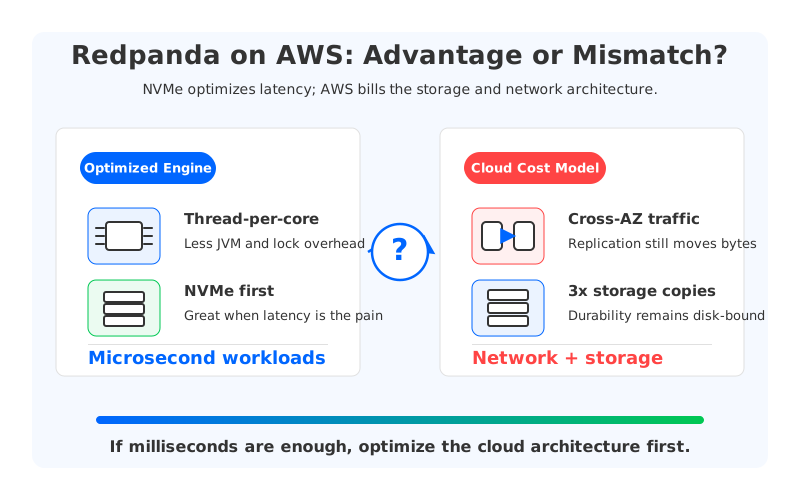
Here is the short version: Redpanda can be faster than Apache Kafka, especially for latency-sensitive workloads, but the AWS cost structure remains close to Kafka when the deployment still depends on local disk, replicated storage, and cross-AZ traffic. If your application truly needs sub-millisecond or microsecond-sensitive latency, that trade-off may be worth it. If your application is a typical streaming, observability, CDC, or microservice pipeline that is comfortable with millisecond-level latency, the architecture behind the bill matters more than the last few milliseconds.
1What Redpanda Actually Improves
Redpanda is not "Kafka with a different logo." For evaluation purposes, treat it as a Kafka API-compatible streaming platform with its own implementation rather than Apache Kafka itself, and verify exact client support and documented exceptions against the Redpanda version you plan to run.
The performance work is real. Redpanda's architecture documentation describes a thread-per-core model that pins application threads to CPU cores, avoids context switching, and uses asynchronous message passing between pinned threads. The same docs list platform and kernel optimizations such as Direct Memory Access for disk I/O, IRQ distribution across CPU cores, disabled CPU power-saving modes, and upfront memory allocation partitioned and pinned to CPU cores.
That gives Redpanda a clean performance story:
- Less runtime overhead than JVM-based Kafka. Redpanda removes JVM garbage collection behavior from the broker path and uses a C++ runtime designed for predictable resource usage.
- Better use of modern hardware. The thread-per-core model is designed around high core counts and fast disks rather than the older assumption that single-core performance is the main scaling lever.
- Strong fit for NVMe-heavy environments. Redpanda's production requirements explicitly require NVMe drives for production deployments, which makes sense for a system tuned around disk and CPU efficiency.
If you are running latency benchmarks on dedicated hardware, these differences matter. The mistake is assuming that the same benchmark answers the cloud cost question.
2The AWS Cost Benchmark: 300 MiB/s, 3 AZs, 72 Hours
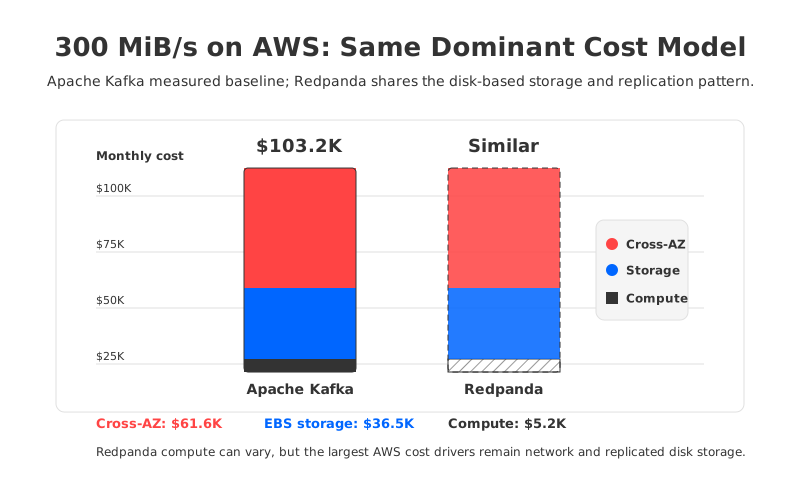
For a concrete baseline, use a typical production streaming workload: 300 MiB/s sustained write throughput, 2x read fanout, 72 hours of retention, 2,000 partitions, and a three-AZ deployment. The AutoMQ pricing calculator sizes self-managed Apache Kafka on AWS us-east-1 at 28 r5.xlarge brokers and 455,625 GB of provisioned EBS storage. The resulting monthly cost is $103,194.63.
The important part is not the exact broker count. Redpanda may need fewer brokers than Apache Kafka for the same workload because its engine is more efficient. The important part is the shape of the cost:
| Cost item | Apache Kafka baseline | Why Redpanda remains similar in cloud disk mode |
|---|---|---|
| Compute | $5,150.88/month | Redpanda can improve this line by using hardware more efficiently. |
| EBS storage | $36,450.00/month | Disk-based durability still requires provisioned local or attached storage, typically with replicated copies. |
| Cross-AZ produce traffic | $10,265.63/month | Producers still need to reach partition leaders across AZ boundaries unless placement is carefully controlled. |
| Cross-AZ consume traffic | $20,531.25/month | Consumers reading from leaders can still generate cross-AZ traffic at fanout. |
| Cross-AZ replication traffic | $30,796.88/month | Multi-AZ durability still moves replicated bytes between brokers. |
| Total | $103,194.63/month | Compute may move; network and storage dominate the bill. |
That is why Redpanda and Apache Kafka can have very different latency profiles while still having similar cloud economics. Compute is only about 5% of this baseline. Cross-AZ traffic is about 60%. EBS storage is about 35%. Even a large compute efficiency gain cannot remove the two largest cost drivers.
AWS pricing explains why this happens. EC2 data transfer pricing is based on data moving into and out of EC2, and multi-AZ architectures often create regional data transfer charges. EBS gp3 capacity is priced separately from performance and is listed by AWS Prescriptive Guidance at $0.08/GiB-month. S3 Standard storage, by contrast, starts around $0.023/GB-month, and object storage handles durability internally rather than asking Kafka brokers to maintain three independent disk copies.
This does not make Redpanda a bad system. It means its main optimization target is not the same as the main AWS cost driver.
3But What About Redpanda Tiered Storage?
Tiered Storage changes part of the retention story, and it is worth treating fairly. When evaluating Redpanda Tiered Storage, focus on whether it offloads older log segments to object storage while keeping recent reads on local storage; that can be useful for long retention windows, but verify the exact behavior against the Redpanda version you plan to run.
But Tiered Storage is not the same thing as making brokers stateless or removing the hot-path disk model. The production requirements still require NVMe drives, and the Tiered Storage cache and Redpanda data directory still live on a local file system. In other words, object storage helps with older segments and retention, but the core write path still depends on broker-attached storage and replicated ownership for low-latency topics.
That distinction matters in a 300 MiB/s cluster. If your retained data is the main cost, tiering can help. If cross-AZ replication and hot local capacity are the main cost, tiering does not automatically erase the bill.
4Latency: When Faster Is the Whole Point
There are workloads where Redpanda's answer is the right answer. If you are doing high-frequency trading, real-time bidding, fraud decisioning in the tightest path, or any workflow where the business result changes when latency moves from sub-millisecond to several milliseconds, then the system should be optimized for that target. You pay for the hardware and replication model because latency is the product requirement.
Most Kafka-style workloads are not like that. Observability pipelines, CDC fanout, event-driven microservices, stream processing, audit trails, feature pipelines, and internal data movement usually care about predictable latency, not the absolute lowest possible latency. For these systems, single-digit or tens-of-milliseconds latency is often already good enough, and some pipelines tolerate hundreds of milliseconds without changing user experience or business outcome.
The decision looks different when you frame it this way:
| Workload type | Latency need | What matters more |
|---|---|---|
| Trading, real-time bidding, very tight fraud path | Sub-millisecond or microsecond-sensitive | Redpanda-style hardware optimization can be worth the cost. |
| CDC, observability, microservice events, stream processing | Milliseconds to hundreds of milliseconds | Cost structure, elasticity, and operational simplicity usually matter more. |
| Long-retention replay and historical reads | Latency varies by access pattern | Tiered storage can help, but hot-path architecture still matters. |
This is the point that gets lost in benchmark discussions. A benchmark can tell you which broker is faster under a given workload. It cannot tell you whether your workload needs that performance enough to accept the same underlying cloud cost model.
5The Third Option: Change the Storage Architecture
If the real pain is AWS cost, there is a different question to ask: what if brokers stopped owning the data? That is the architectural idea behind diskless Kafka. Instead of treating EBS or local NVMe as the durable system of record and replicating bytes between stateful brokers, data is written to shared cloud storage such as S3, while brokers become much closer to stateless compute.
AutoMQ takes this route while preserving Kafka protocol compatibility. The point is not to beat Redpanda in a microsecond latency benchmark. The point is to remove the cost drivers that dominate cloud Kafka deployments: replicated EBS storage, cross-AZ replication traffic, and slow broker scaling caused by data movement.
That shift changes the optimization target:
- Apache Kafka optimizes for a proven shared-nothing log architecture.
- Redpanda optimizes that same broad model for modern CPU and NVMe hardware.
- Diskless Kafka optimizes for cloud economics, where object storage durability, elastic compute, and reduced cross-AZ traffic matter more than local disk ownership.
For teams that need the lowest possible latency, Redpanda remains a serious option. For teams whose Kafka bill is mostly storage and network traffic, optimizing CPU efficiency is solving the smallest part of the problem.
6How to Decide
Use Redpanda when latency is the buying criterion. If your SLO is built around sub-millisecond tails, if you have dedicated NVMe infrastructure, or if you run in an environment where cloud cross-AZ billing is not the dominant constraint, Redpanda's engineering choices line up with the problem.
Use Apache Kafka when ecosystem purity and operational familiarity matter more than raw performance or cloud cost. It remains the default choice for teams that want the canonical open-source implementation and already have the people, tooling, and runbooks to operate it well.
Use a diskless Kafka architecture when the AWS bill is the pain. If your cluster looks like the 300 MiB/s example above, the largest costs are not in the broker runtime. They are in replicated storage and cross-AZ data movement. The practical question is not "which broker is faster?" It is "why are we paying the cloud to move and store three copies of the same stream?"
7Bottom Line
Redpanda is faster than Kafka in the areas it was designed to improve: broker runtime efficiency, hardware utilization, and low-latency disk performance. That is a real engineering achievement. But on AWS, the biggest Kafka costs come from the storage and network architecture around the broker, not from the broker process alone.
So the answer to "Redpanda vs Kafka: is it really faster?" is yes, often. The answer to "does that make it the better cloud choice?" is more conditional. If your workload cannot tolerate milliseconds, optimize for latency. If it can, the bigger win is to change the cost model underneath the stream.
Run the numbers for your own workload with the AutoMQ pricing calculator. The benchmark that matters most may be the one on your AWS bill.


