
Table of Contents
Table of Contents
Event Hubs often wins the first Azure streaming decision because it removes the cluster from the discussion. A Kafka application can point to an Event Hubs Kafka endpoint, switch bootstrap and security settings, and start producing or consuming events without a broker fleet to install. For ingestion pipelines, audit streams, telemetry, and Azure-native consumers, that is a practical trade. The trouble starts when the application is not merely speaking the Kafka wire protocol. It expects the Kafka operating model around that protocol.
That difference matters for teams searching how to replace Event Hubs Kafka, because the migration trigger is rarely one broken client. It is usually a pattern: platform automation built around AdminClient, Kafka Connect workers that expect topic and offset semantics, Kafka Streams applications with state and transactional assumptions, replay workloads that need retention control, or SRE playbooks built around broker and topic configuration. Event Hubs solved ingestion, but your application and operations model still expect Kafka.
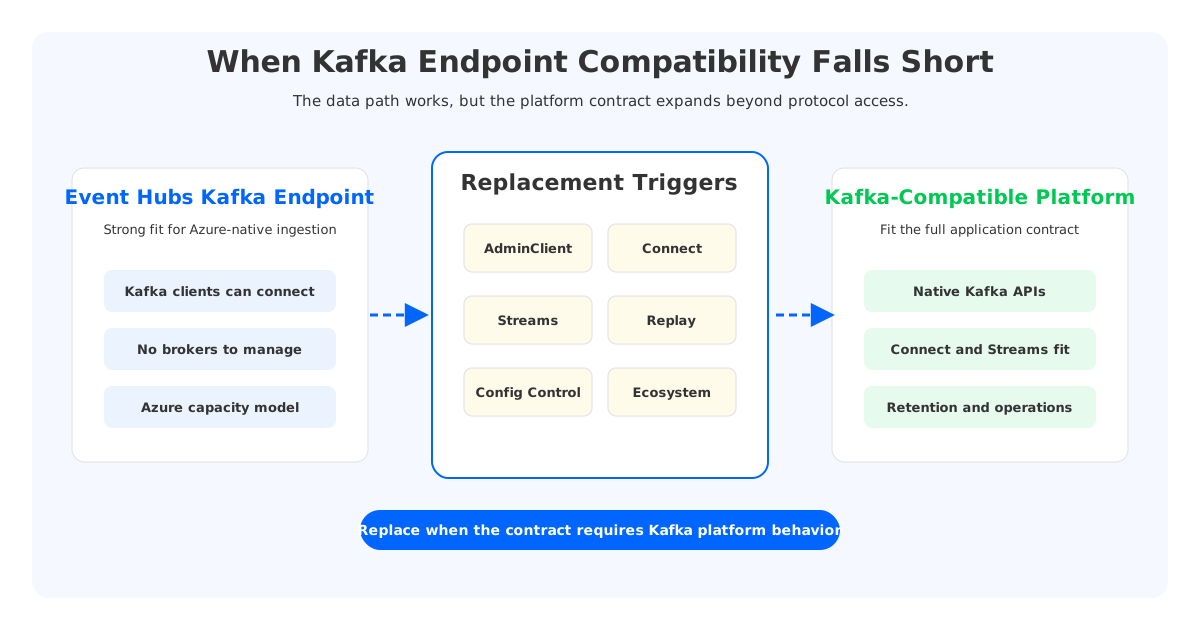
Microsoft's own documentation frames Event Hubs for Apache Kafka as an Event Hubs endpoint that lets Kafka clients stream into event hubs, which map conceptually to Kafka topics. It also documents important differences: Event Hubs is a managed service with no broker-side configuration access, partition count and retention are set through Azure surfaces rather than Kafka AdminClient topic management, and scale is purchased through throughput, processing, or capacity units depending on tier. None of that makes Event Hubs a bad service. It means a Kafka endpoint is not the same architectural object as a Kafka cluster.
For architects and SREs, the replacement question should therefore be precise: are you replacing Event Hubs because it failed as an event ingestion service, or because your workload crossed the boundary where Kafka compatibility must include the Kafka ecosystem and control plane?
1Why Teams Outgrow the Kafka Endpoint Model
Protocol compatibility is the first compatibility layer. It answers whether a producer or consumer can connect, authenticate, publish, poll, commit offsets, and keep running under normal load. Many Event Hubs deployments never need more than that. They prefer Azure-native provisioning, integrated security, straightforward scaling units, and the operational clarity of not owning brokers.
Kafka teams, however, often standardize around a wider contract:
- Topic lifecycle automation through Terraform, GitOps, service catalogs, or internal platform APIs.
- Kafka Connect source and sink behavior that assumes Kafka-native topics, consumer groups, offsets, and error topics.
- Kafka Streams or similar applications that rely on internal changelog topics, repartition topics, state recovery, and exactly-once or idempotent processing patterns.
- Replay and retention policies that differ by product domain, compliance window, or incident response workflow.
- Observability and incident playbooks that correlate producer, broker, topic, partition, consumer group, and offset data.
Event Hubs can support Kafka clients and selected Kafka ecosystem features, and Microsoft has expanded support in Premium and Dedicated tiers for areas such as Kafka Streams and transactions. But the fact that some features are tier-specific, in preview, or expressed through Event Hubs concepts is itself a planning signal. If your platform standard is "works with Kafka clients," Event Hubs may be enough. If your platform standard is "behaves like Kafka across clients, automation, ecosystem tools, and operations," you need a stricter replacement bar.
This is where many proofs of concept mislead. A producer and consumer demo proves the data path. It does not prove lifecycle automation, connector recovery, replay, schema governance, transaction behavior, quota behavior, failover, cost at retention depth, or the experience of debugging a production incident at 03:00.
2Replacement Signals: When Event Hubs Kafka Falls Short
The cleanest way to decide whether to stay or replace is to classify the friction. A single client configuration issue is usually tuning. Repeated friction across control, ecosystem, retention, and operational patterns points to replacement.
| Signal | What it means | Stay and tune when | Replace when |
|---|---|---|---|
| AdminClient automation breaks | Your platform expects Kafka-native topic operations | Azure provisioning APIs fit your workflow | Teams require Kafka AdminClient-based lifecycle tooling |
| Connect assumptions leak | Connectors expect Kafka topic semantics and recovery behavior | Connector set is small and validated | Connector fleet is broad, shared, or business-critical |
| Streams/state issues appear | Apps rely on internal topics, state stores, or transaction behavior | Workload fits documented tier support | Streams semantics must match Kafka consistently |
| Retention or replay becomes strategic | Teams need long replay windows per topic | Event Hubs retention and Capture cover the need | Replay, backfill, and retention are core product requirements |
| Config limits shape design | Broker or topic-level knobs are needed | Azure-managed defaults are acceptable | Per-workload Kafka configuration is part of the platform contract |
| Ecosystem tools need Kafka | Tooling assumes broker, topic, partition, or offset APIs | Azure-native tools replace them | Existing Kafka ecosystem must remain portable |
The most important column is not "Replace when." It is "What it means." The replacement trigger is not vendor dissatisfaction. It is a mismatch between the abstraction you bought and the abstraction your applications use.
Consider AdminClient automation. In a Kafka platform, internal developer portals often create topics, enforce naming rules, set retention, validate partition counts, manage ACLs, and reconcile drift through Kafka APIs or Kafka-aware operators. Microsoft documents that Event Hubs does not expose broker-side configurations and that topic-level concerns such as partition count and retention are set through Azure management surfaces rather than Kafka AdminClient topic management. If your organization already manages Azure resources through ARM, Bicep, Terraform, or Azure Policy, that model can be consistent. If you operate a multi-cloud Kafka platform where Kafka APIs are the common denominator, it becomes a portability break.
Kafka Connect is another common fault line. Connect is not just "a client." It is a distributed runtime with internal topics, offset tracking, task rebalancing, dead-letter patterns, and operational habits. A small set of validated connectors may work well. A shared connector platform serving database CDC, search indexing, lakehouse ingestion, and SaaS sinks needs stronger guarantees about how every connector behaves under rebalance, retry, compaction, schema evolution, and backfill.
3What Must Remain Compatible During Replacement
An Event Hubs Kafka replacement should not be evaluated as a greenfield Kafka deployment. You are carrying production assumptions from the old environment. The migration is successful when the new target preserves the contracts that matter while removing the constraints that triggered the move.
Start with clients. Producers and consumers should keep the same Kafka client libraries where practical, with connection, authentication, and endpoint settings changed deliberately. Do not hide this behind "no code changes" unless you have tested every language, library version, serializer, and retry policy used in production. Event Hubs documentation calls out recommended Kafka client configurations and Event Hubs-specific constraints; use that as evidence that configuration is part of the compatibility surface, not an implementation detail.
Then protect offsets and ordering assumptions. Consumer group offsets are the operational memory of a streaming system. If offsets are not migrated or reconciled, the team must choose between reprocessing, skipping, or building application-specific deduplication. For some analytics pipelines, reprocessing is acceptable. For payment, security, inventory, or customer-facing workflows, it is a change-management event.
Also preserve the security model in terms your organization can operate. Event Hubs Kafka clients typically connect with SASL_SSL and can use Shared Access Signatures or Microsoft Entra ID OAuth patterns. A replacement Kafka platform on Azure should map identities, network boundaries, private connectivity, TLS, ACLs, and secret rotation into a model SREs can audit. The goal is not to copy every security mechanism byte for byte. The goal is to avoid creating a second, weaker platform perimeter during migration.
Finally, preserve operations. Kafka teams have dashboards, alerts, runbooks, SLOs, and escalation paths built around producer error rates, consumer lag, broker health, topic growth, partition skew, and replication state. A replacement that keeps clients compatible but forces every runbook to be rewritten is not a low-risk replacement. It is a platform redesign.
4Migration Path From Event Hubs Kafka Endpoint To Kafka
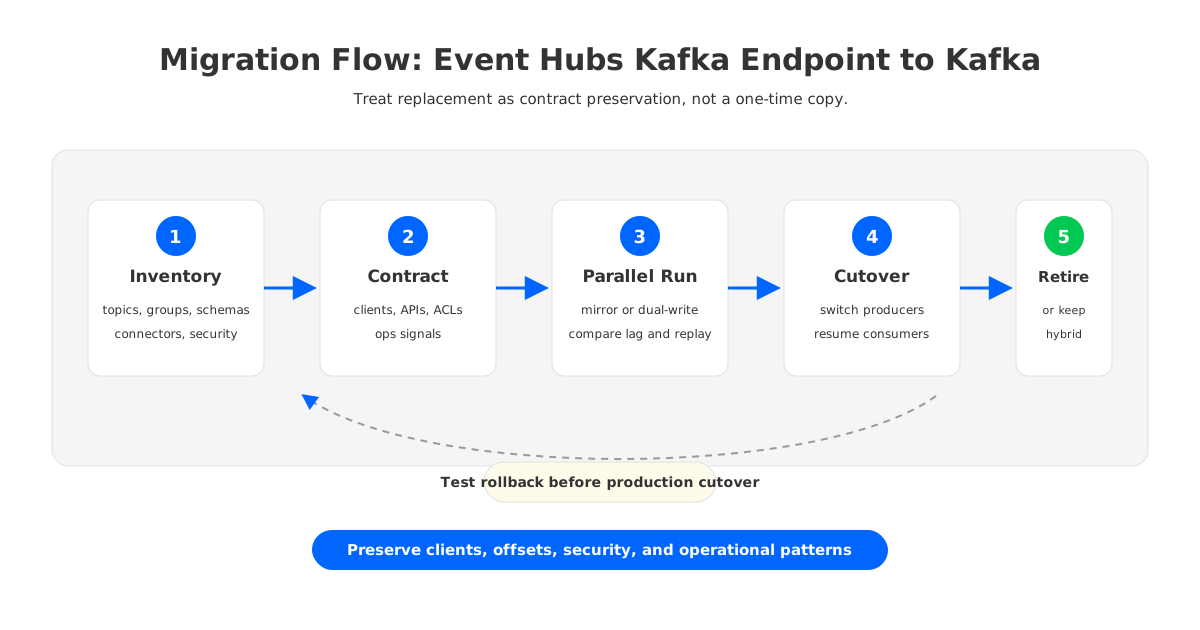
Treat the replacement as a controlled platform migration rather than a one-time data copy. A practical path has five phases.
First, inventory the current estate. Capture namespaces, event hubs, partitions, consumer groups, producers, consumers, schemas, connector jobs, retention requirements, authentication methods, private endpoints, firewall rules, monitoring integrations, and owners. Pay special attention to applications that use Kafka Streams, transactions, idempotent producers, large messages, compression, or strict replay windows, because these tend to expose semantic differences early.
Second, define the target compatibility contract. This document should say which Kafka client versions are supported, how topics are created, how retention is configured, how ACLs are managed, how consumer offsets are handled, what observability signals are required, and which ecosystem tools must work before cutover. Without this contract, the migration degenerates into subjective testing.
Third, run a parallel data path. Mirror or dual-write selected topics, then compare record counts, key distributions, consumer lag, end-to-end latency, and replay behavior. Avoid starting with the largest topic. Start with a topic that has enough volume to reveal operational behavior but low enough blast radius to tolerate repeated tests.
Fourth, rehearse cutover and rollback. Producers are usually easier than consumers because switching the write endpoint can be planned by application owner. Consumers need offset policy: resume from equivalent offset, replay from a timestamp, or start at the latest position with a signed-off data gap. Rollback is not a statement in a plan; it is a tested path with DNS, secrets, offsets, and ownership assigned.
Fifth, retire Event Hubs dependencies carefully. Some teams keep Event Hubs for Azure-native integration and replace it only where Kafka semantics are required. That is a valid hybrid architecture. The wrong move is to force every workload into Kafka or every workload into Event Hubs because the platform team wants one answer. Streaming architecture gets healthier when the boundary is explicit.
5Where AutoMQ Fits As The Replacement Target
Once the decision is to replace Event Hubs Kafka with a Kafka-compatible platform, the target architecture matters more than the brand name. Traditional self-managed Kafka on Azure can give teams Kafka control, but it also brings broker operations, disk sizing, partition reassignment, cross-zone replication planning, and capacity headroom back into the platform team's backlog. That may be acceptable for organizations with mature Kafka operations. It is painful for teams whose original reason for choosing Event Hubs was to avoid broker ownership.
AutoMQ fits this decision point as a Kafka-compatible, cloud-native streaming system that keeps the Kafka protocol and ecosystem model while changing the storage architecture underneath. Brokers are designed to be stateless, and durable data is backed by object storage rather than being tied to broker-local disks. On Azure, that architectural pattern is useful because it lets teams preserve Kafka clients, Kafka ecosystem expectations, and Azure data-plane control while reducing the operational weight commonly associated with broker-local storage.
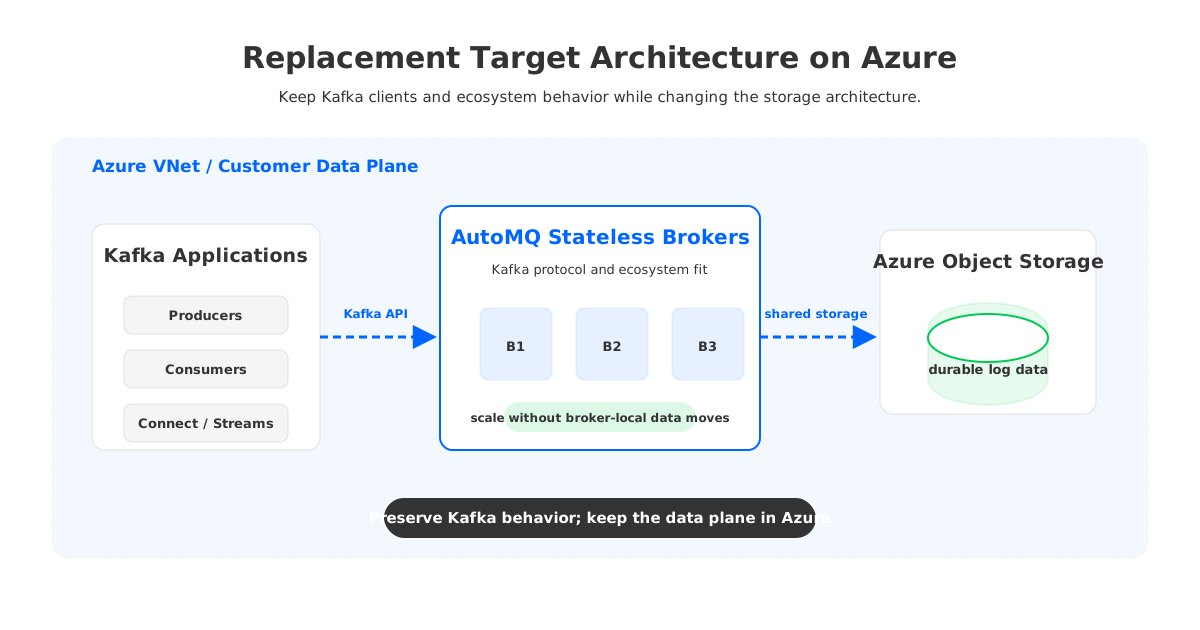
This is not an argument that every Event Hubs Kafka workload should move to AutoMQ. If your workload is Azure-native ingestion with limited Kafka ecosystem dependency, Event Hubs may be the cleaner service. The case for AutoMQ becomes stronger when the replacement requirement includes full Kafka protocol and ecosystem fit, topic and operational control, long retention or replay, elastic scaling, and a preference to keep data infrastructure inside the Azure environment rather than handing the data plane to an external SaaS.
The object-storage-backed design also changes the retention conversation. In classic Kafka, increasing retention often increases broker disk pressure and can complicate reassignment. In a shared-storage architecture, long-lived data is no longer anchored to the lifecycle of a specific broker. That distinction matters for teams that need replay for incident recovery, ML feature regeneration, or compliance investigations, but do not want retention to become a broker sizing exercise.
Stateless brokers are similarly relevant to migration. When compute and durable storage are less tightly coupled, adding or replacing broker capacity is less likely to become a large data movement project. For SREs, the benefit is operational: scaling and recovery become closer to capacity orchestration than storage relocation.
6Replace-Or-Stay Decision Checklist
Use a replacement checklist before turning frustration into a migration project.
- Stay with Event Hubs Kafka endpoint if your primary need is Azure-native ingestion, client compatibility is already validated, retention fits the documented limits for your tier, and Azure management APIs are acceptable for lifecycle control.
- Replace Event Hubs Kafka if Kafka AdminClient automation, Kafka Connect behavior, Kafka Streams/state semantics, broker or topic-level control, replay depth, or ecosystem portability are now part of your platform contract.
- Choose self-managed Kafka if your team wants maximum Apache Kafka control and accepts broker, disk, and reassignment operations.
- Choose a Kafka-compatible shared-storage platform such as AutoMQ if you need Kafka protocol and ecosystem compatibility but want an Azure-friendly architecture with object-storage-backed retention and stateless broker operations.
The decision is not whether Event Hubs is "compatible" in the abstract. It is whether its compatibility boundary matches the contract your applications, developers, and SREs already depend on. When that contract expands from data ingestion to Kafka platform behavior, protocol compatibility is no longer enough.
7References
- Microsoft Learn: What is Azure Event Hubs for Apache Kafka?
- Microsoft Learn: Apache Kafka client configurations for Azure Event Hubs
- Microsoft Learn: Azure Event Hubs quotas and limits
- Azure Event Hubs pricing
- Apache Kafka documentation
- Apache Kafka Streams documentation
- AutoMQ documentation: Architecture overview
8FAQ
8.1Is Event Hubs Kafka endpoint a full Kafka replacement?
It can replace Kafka for workloads that mainly need Kafka client protocol access to an Azure-managed event ingestion service. It is not the same as operating a Kafka cluster with broker configuration, Kafka-native topic lifecycle management, and the full Kafka ecosystem contract. The right answer depends on which parts of Kafka your applications actually use.
8.2When should a team replace Event Hubs Kafka instead of tuning it?
Replacement becomes reasonable when the friction is structural: AdminClient automation does not fit, Connect or Streams behavior requires Kafka-native assumptions, retention and replay are central to the workload, or ecosystem tools must remain portable across Kafka environments. Isolated producer or consumer tuning issues should be investigated before migration.
8.3Can Kafka Connect work with Event Hubs Kafka endpoint?
Some Kafka ecosystem tools and connectors can work when their assumptions match the documented Event Hubs Kafka behavior. The risk is connector diversity. A platform-wide Connect service with many source and sink connectors should be validated connector by connector, including offset storage, dead-letter handling, retries, compaction expectations, and recovery after rebalance.
8.4How should offsets be handled during migration?
Offsets should be treated as migration state, not incidental metadata. Teams typically choose among offset translation, timestamp-based replay, controlled reprocessing, or starting selected consumers at latest after business approval. The right choice depends on ordering, deduplication, downstream side effects, and data loss tolerance.
8.5Where does AutoMQ fit in an Azure Kafka replacement?
AutoMQ is relevant when the goal is to keep Kafka protocol and ecosystem compatibility while avoiding the operational burden of broker-local storage. Its stateless broker and object-storage-backed architecture can help Azure teams preserve Kafka patterns while improving elasticity, retention, and operational control.


