
Table of Contents
Table of Contents
Teams rarely decide to replace Redpanda Cloud because one Kafka request failed in a benchmark. The harder trigger is usually an operating-model change: security wants stronger data-location evidence, FinOps wants cloud-resource-level attribution, platform engineering wants direct VPC control, or procurement wants an exit path beyond one service boundary.
Redpanda Cloud is not one deployment shape. Redpanda documents Serverless, Dedicated, BYOC, BYOVPC, and BYOVNet options. Its BYOC architecture places the data plane in the customer's VPC while Redpanda's control plane handles provisioning, operations, and maintenance. If your current Redpanda Cloud boundary no longer satisfies data control, cost visibility, or migration-risk requirements, what must a BYOC Kafka-compatible target prove before it can replace it?
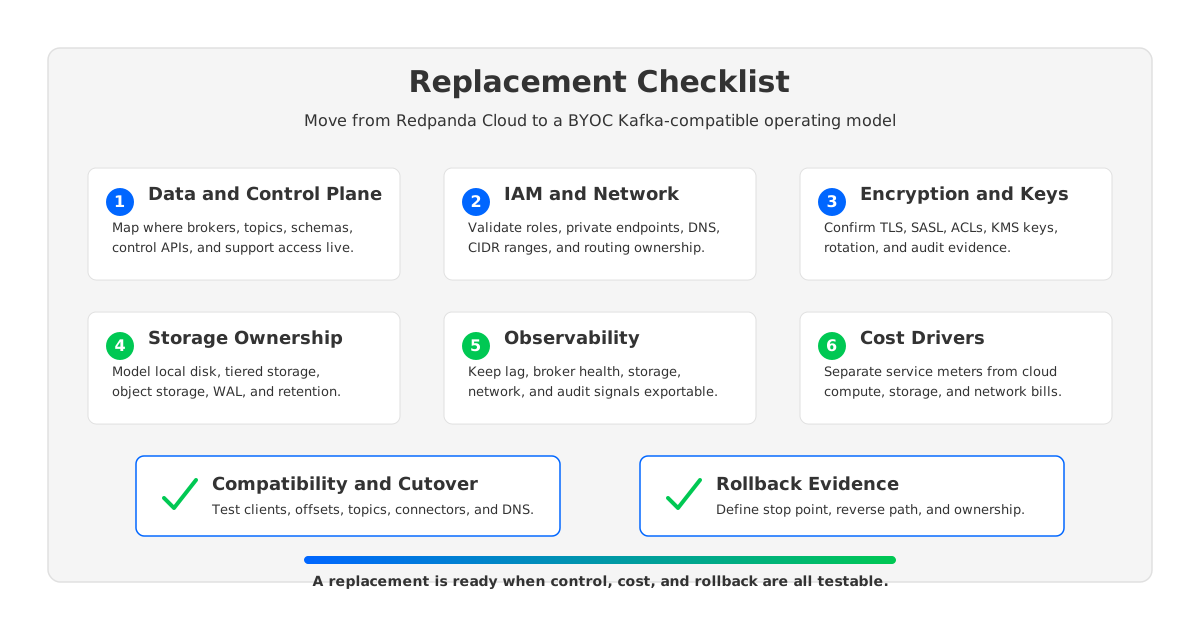
1Start With the Boundary, Not the Brand
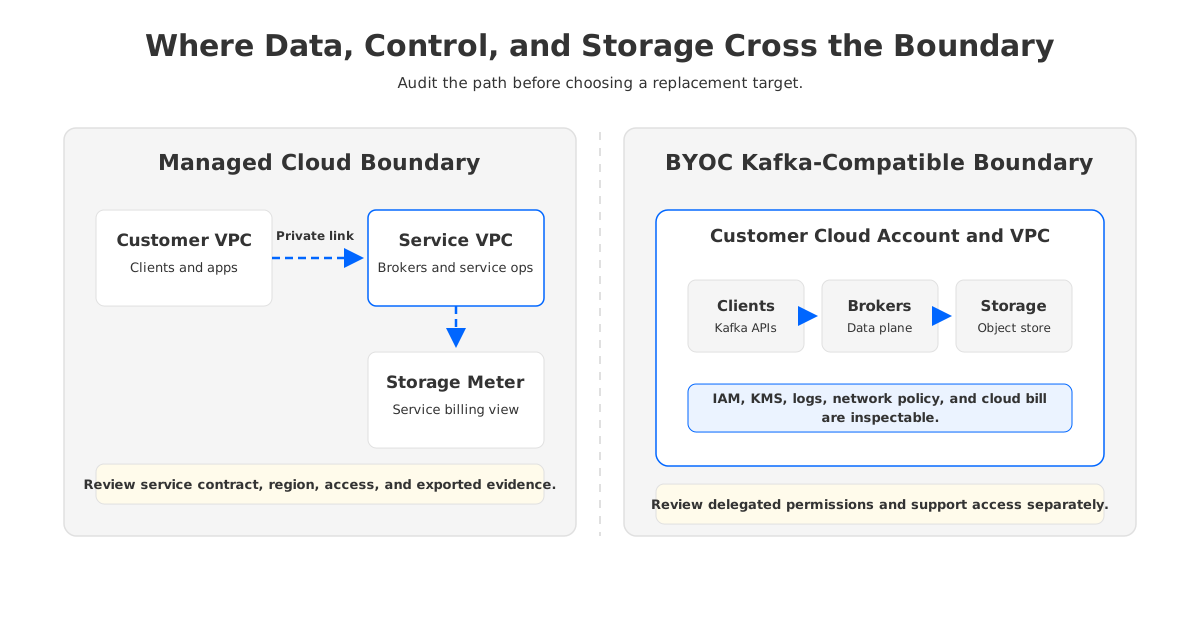
"BYOC Kafka" is not a single architecture. It can mean a vendor-operated control plane with customer-cloud data-plane resources, self-managed Apache Kafka on Kubernetes, or a shared-storage Kafka-compatible system in your cloud account.
Before comparing platforms, draw four boxes:
- Control plane: cluster creation, upgrades, policy, user management, support workflows, and operational automation.
- Data plane: brokers, topics, partitions, consumer groups, schemas, connectors, and client traffic.
- Storage plane: local disks, object storage, tiered storage, write-ahead log design, retention, backup, and replay.
- Network plane: VPC, subnets, private endpoints, DNS, routing, load balancers, security groups, and cross-AZ paths.
The replacement target should make those boxes auditable. Redpanda's BYOC documentation is explicit: the control plane manages provisioning and maintenance, while the data plane is where topics, consumer groups, connectors, and schemas live. Moving away from Redpanda Cloud increases control only when the target gives your team better evidence, ownership, or cost attribution for the layers that matter.
2Data and Control Plane Checklist
The first checklist is a responsibility map. Do not start with throughput. Start with the incident path.
| Question | What to verify | Why it matters |
|---|---|---|
| Where do brokers run? | Account, VPC, subnets, node groups | Defines cloud-resource control |
| Where does the control plane run? | Vendor SaaS, customer account, private console, or self-managed automation | Defines who can change infrastructure |
| Who can access metadata? | Topics, schemas, groups, ACLs, configs, billing data | Metadata is still audit-relevant |
| Who performs upgrades? | Vendor, customer, shared change window, emergency policy | Upgrade ownership is migration risk |
| What survives control-plane loss? | Client traffic, broker operations, observability | Defines degraded-mode behavior |
Redpanda Cloud BYOC keeps a managed control plane and a customer-cloud data plane. Self-managed Kafka moves nearly everything to the platform team. AutoMQ Cloud BYOC sits elsewhere: its docs describe a console deployed in the customer's AWS account and VPC, with customer-prepared VPC, S3, and endpoint resources. That makes AutoMQ one candidate when the requirement is Kafka-compatible infrastructure with inspectable cloud resources, not a universal replacement answer.
3IAM, Network, and Private Connectivity Checklist
Networking is where replacement projects become real. "Private connectivity" sounds tidy in a decision doc; the real work is routing every producer, consumer, connector, schema client, CI job, and admin tool without accidental public paths or DNS surprises.
Redpanda's AWS BYOC networking docs describe VPC peering, route-table updates, CIDR checks, and AWS Reachability Analyzer testing. They also call out controlled DNS switchover when moving from VPC peering to PrivateLink because shared hostnames can resolve to different endpoints after PrivateLink is enabled. Treat that as a general replacement warning.
For a BYOC target, require evidence for:
- IAM inventory: every role, trust policy, permission boundary, service account, and temporary credential path used by the platform.
- Network inventory: VPC IDs, subnet IDs, route tables, security groups, endpoint services, DNS zones, and listener hostnames.
- Connectivity matrix: producers, consumers, Connect workers, schema registry, admin API, monitoring exporters, migration tooling, and support access.
- Failure rehearsal: endpoint failure, route-table error, DNS rollback, certificate expiry, security-group denial, and cross-account denial.
- Ownership rule: which team can change each IAM policy, endpoint, DNS record, and security group during an incident.
AutoMQ's AWS BYOC VPC preparation guide lists control-plane and data-plane subnets, an S3 gateway endpoint, an EC2 interface endpoint, DNS hostnames, DNS resolution, and optional private DNS and security groups. If a target cannot produce a similarly concrete checklist, the project is still in slideware territory.
4Encryption, Keys, and Access Control Checklist
Encryption language can sound reassuring while hiding the hardest questions. "Encrypted in transit and at rest" is table stakes. Ask who owns the key, who can rotate it, what breaks during rotation, and what audit trail proves access.
For Kafka-compatible workloads, split the review into three layers:
| Layer | Checklist |
|---|---|
| Client authentication | SASL mechanism, mTLS support, certificate issuance, secret rotation, client library behavior |
| Authorization | Kafka ACLs, RBAC mapping, service accounts, Admin API access, schema and connector permissions |
| Storage encryption | KMS key ownership, object storage encryption, local/WAL storage encryption, backup and replica encryption |
Redpanda Cloud documentation lists SASL over TLS and mTLS options for Kafka clients, and its authentication docs describe unified authorization paths for BYOC and Dedicated clusters. Apache Kafka's durability model makes security testing more than a login exercise: producers using acks=all, topics using min.insync.replicas, and consumers using read_committed depend on semantics that should be validated with ACLs and failure behavior.
Test access control with real application identities, not admin credentials. A migration that succeeds under a broad admin principal can still fail at cutover when a schema client, connector task, Flink job, or observability scraper uses a narrower permission set.
5Storage Ownership Checklist
Storage is where Redpanda Cloud replacement becomes architectural rather than contractual. Apache Kafka's design centers on partition leaders, followers, in-sync replicas, producer acknowledgments, and committed messages. Tiered storage adds a remote tier, but Kafka still distinguishes local retention from remote retention.
A BYOC evaluation should record how the target stores:
- Hot log data: the active write and tail-read path. This drives latency, retries, and producer timeouts.
- Retained historical data: replay, backfill, catch-up reads, and compliance retention.
- Metadata: cluster state, topic configs, ACLs, consumer offsets, schemas, and connector configs.
- Operational state: WAL, caches, checkpoints, snapshots, and migration state.
Redpanda Cloud billing docs state that Dedicated and BYOC storage usage is tracked in object storage by GB-hours, with each byte counted once for billing. That is a cost meter, not a complete storage-control answer. The review still needs to know which buckets exist, who owns them, which keys protect them, and how deletion or retention changes are approved.
AutoMQ enters naturally here because its architecture changes the storage assumption. AutoMQ's S3Stream documentation describes offloading Kafka log storage to object storage with WAL acceleration; its stateless broker documentation describes brokers made stateless by separating storage and compute. For a Redpanda Cloud replacement, the question is whether durable stream data should remain coupled to broker-local or service-managed storage paths, or move to shared storage governed in the customer's cloud account.
6Observability Checklist
Many replacement projects over-focus on producing and consuming records. The first week after cutover is usually won or lost by observability, so preserve or improve visibility across:
| Signal area | Minimum evidence |
|---|---|
| Kafka client behavior | Request latency, timeout rate, retry rate, error codes, producer batch behavior |
| Consumer health | Lag, rebalance rate, offset commit failures, fetch latency, stalled groups |
| Broker health | CPU, memory, network, disk or cache pressure, request queues, controller health |
| Storage health | Object storage latency, WAL behavior, local cache, retention growth, read amplification |
| Security and audit | Login events, ACL changes, service-account activity, support access, key rotation |
| Migration health | Replication lag, checkpoint delay, topic parity, offset parity, rollback readiness |
Apache Kafka MirrorMaker documentation is a good sanity check because it treats migration as more than byte movement: topics, configs, consumer groups, offsets, ACLs, partitioning, and replication-latency metrics. Cover the same categories with any tool.
For AutoMQ migrations, Kafka Linking documentation describes byte-to-byte copy, synchronized consumption progress, and a producer proxy path. Those capabilities still need source lag, target lag, per-topic replication status, producer error rate, and rollback decision metrics during rehearsal.
7Cost Driver Checklist
Cost is not a single number in a Redpanda Cloud replacement. Redpanda Cloud billing documentation separates Serverless, Dedicated, and BYOC meters. Serverless depends on data in, data out, data stored, partitions, and uptime. Dedicated depends on uptime, ingress, egress, and storage. BYOC depends on compute, ingress, egress, and storage.
That gives you the starting point:
| Cost bucket | Redpanda Cloud view | BYOC replacement view |
|---|---|---|
| Service meter | Ingress, egress, storage, uptime, partitions or compute | Vendor subscription or license |
| Compute | Bundled or RPU-based depending on deployment type | Instances, Kubernetes nodes, autoscaling, Spot or reserved capacity |
| Storage | Service storage meter, often object-storage based | Object storage, WAL, local cache, snapshots, lifecycle rules |
| Network | Data out, AZ-dependent egress, private connectivity | Cross-AZ traffic, endpoints, peering, PrivateLink, NAT, internet egress |
| Operations | Support plan and service boundary | Platform labor, incident cost, upgrades, evidence production |
AutoMQ BYOC usage-based billing docs list data ingress, data egress, data retention, and cluster uptime, with AWS usage-based billing settled through AWS Marketplace. Reconcile both the vendor meter and the cloud bill.
Run the cost model on your workload shape: write throughput, read fanout, retention, partition count, compression ratio, peak-to-average ratio, AZ placement, connector traffic, and replay behavior. A target can look cost-effective for steady ingest and become expensive under catch-up reads, cross-AZ consumers, or migration dual-running.
8Compatibility Checklist
Kafka compatibility needs to be tested where your estate is strange, not where Kafka is generic. A basic produce -> consume test says little about the migration path.
Build a compatibility matrix:
- Producer behavior:
acks, idempotence, transactions, compression, batching, custom partitioners, retries, delivery timeout, max request size. - Consumer behavior: group protocol, static membership, cooperative rebalancing, offset commits, isolation level, fetch size, pause/resume behavior.
- Topic behavior: partition counts, retention, compaction, large messages, headers, timestamp type, config overrides.
- Admin behavior: topic creation, config updates, ACL automation, quota tooling, schema operations, monitoring integrations.
- Pipeline behavior: Kafka Connect, Redpanda Connect, Flink, Spark, Debezium, stream processors, sink idempotency, dead-letter behavior.
Redpanda is Kafka API-compatible, but it is not Apache Kafka internally. AutoMQ is Kafka-compatible and reuses the Kafka ecosystem while changing the storage layer. Self-managed Apache Kafka is the reference implementation but changes operational responsibility. Treat all three as targets that require proof, not assumptions.
9Migration and Rollback Checklist
Design the rollback path before the first production topic is copied.
Use this migration sequence:
- Inventory: topics, partitions, configs, ACLs, schemas, consumer groups, connectors, clients, certificates, and quotas.
- Classify: separate append-only topics from compacted, transactional, strict-ordering, and high-fanout workloads.
- Replicate: copy data and configs with a tool that exposes lag, parity, and error state.
- Shadow: run selected consumers against the target without committing business actions, or compare output downstream.
- Cut over: switch producers and consumers through a documented DNS, proxy, config, or rollout path.
- Hold: keep the source cluster readable and operational until the rollback deadline passes.
- Retire: delete or freeze source topics according to retention, legal, and audit policy.
Rollback should be a separate table:
| Rollback item | Required answer |
|---|---|
| Decision point | What metric or incident triggers rollback? |
| Deadline | How long can source and target diverge before rollback becomes unsafe? |
| Reverse path | How do producers and consumers return to Redpanda Cloud? |
| Data reconciliation | What happens to records written to the target during the failed window? |
| Owner | Who can execute network, client, and data-plane rollback? |
If any cell is blank, production cutover is premature.
10Where AutoMQ BYOC Fits
AutoMQ is worth evaluating when the replacement driver combines Kafka compatibility, customer-cloud data control, and storage economics. Its docs describe BYOC components in the customer's AWS account, VPC preparation with S3 and EC2 endpoints, and broker compute separated from durable storage through S3Stream. The GitHub repository positions AutoMQ as diskless Kafka on S3.
That makes AutoMQ a plausible target for teams that want to move off a Redpanda Cloud boundary without taking on the full burden of self-managed Kafka. The fit is strongest when retention, elasticity, replay, and cloud-resource ownership are central to the business case. The fit is weaker when the main requirement is to keep Redpanda-specific operational behavior or an already accepted service contract.
Keep the evaluation practical: deploy a representative BYOC environment, connect real clients, migrate a meaningful topic set, measure cost drivers under replay and tail-read traffic, test IAM and KMS evidence, and rehearse rollback.
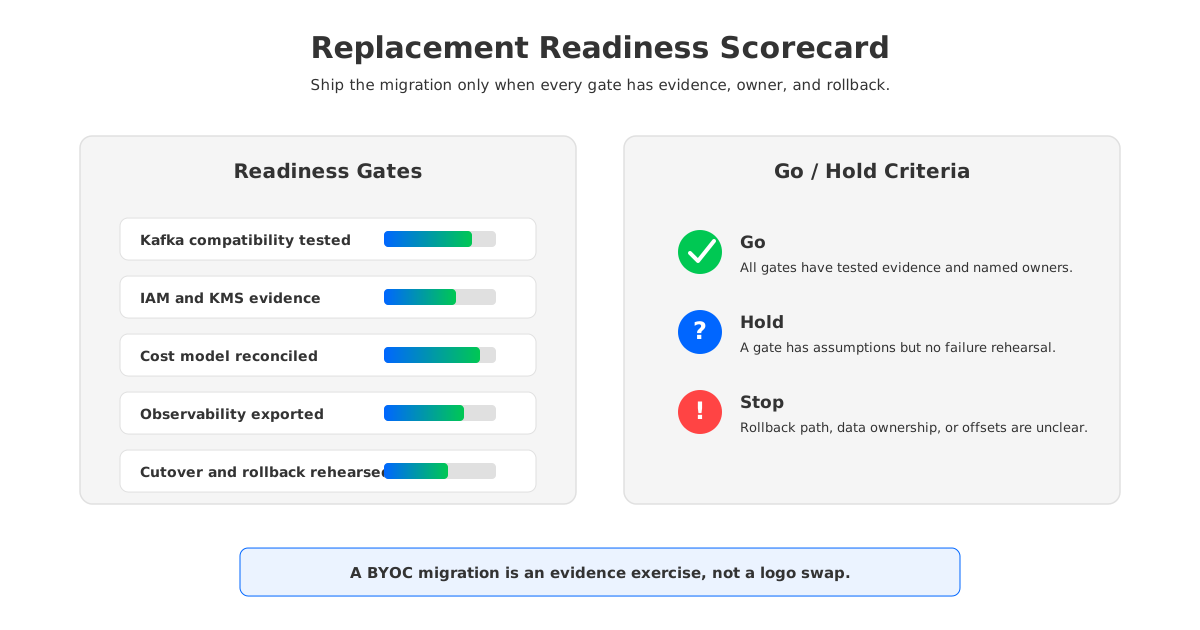
11Replacement Readiness Score
Use a 0-2 score for each gate:
| Gate | 0 | 1 | 2 |
|---|---|---|---|
| Data and control plane | Unknown boundary | Boundary documented | Failure tested |
| IAM and network | Broad permissions or public path | Least-privilege proposal | Route, DNS, and denial tests passed |
| Encryption and keys | Generic claim | Key ownership documented | Rotation and audit tested |
| Storage ownership | Storage meter understood | Buckets and retention mapped | Replay, delete, and failure tested |
| Observability | Basic dashboards | Migration metrics added | Alert and rollback rehearsed |
| Cost model | Service invoice compared | Cloud and service bills modeled | Dual-run, replay, and peak costs tested |
| Compatibility | Happy-path clients pass | Critical clients tested | Failure semantics and tooling tested |
| Rollback | Verbal plan | Runbook written | Rehearsed within deadline |
A score below 12 is still a design exercise. A score of 12-15 is a controlled pilot. A score of 16 is ready for production change review, assuming business owners accept the residual risk.
The decision to replace Redpanda Cloud should not be driven by discomfort with a logo on an invoice. It should be driven by evidence that a different BYOC Kafka-compatible boundary gives your organization better control, clearer costs, and a safer migration path. If your checklist points toward shared-storage Kafka in your own cloud account, map your workload against the AutoMQ BYOC AWS deployment guide and test the migration path with real topics before committing to cutover.
12FAQ
12.1Does replacing Redpanda Cloud always mean leaving managed operations?
No. Redpanda Cloud includes BYOC-style options, and other BYOC Kafka-compatible platforms may still provide managed operations. The real distinction is which resources run in your cloud account and what evidence your teams can inspect.
12.2Is BYOC Kafka the same as self-managed Apache Kafka?
No. Self-managed Apache Kafka means your team operates the cluster and automation. BYOC Kafka can still include a vendor-managed control plane, customer-cloud data plane, and shared responsibility model.
12.3What is the biggest migration risk when moving off Redpanda Cloud?
Assuming Kafka API compatibility is the same as production compatibility. Test idempotent producers, transactions, compacted topics, offsets, ACLs, schemas, connectors, monitoring, and failure behavior.
12.4How should we compare Redpanda Cloud cost with BYOC cost?
Compare both the service meter and the cloud bill: compute, object storage, endpoints, cross-AZ traffic, NAT, logs, support, and operational labor.
12.5When is AutoMQ a reasonable Redpanda Cloud replacement candidate?
Evaluate AutoMQ when you need Kafka compatibility, customer-cloud deployment, shared-storage economics, and stateless broker behavior. Test it against your own clients, topics, security model, observability stack, and rollback plan.
13References
- Redpanda Cloud deployment types
- Redpanda BYOC architecture
- Redpanda Cloud BYOC cluster type
- Redpanda Cloud billing metrics
- Redpanda Cloud AWS BYOC VPC peering
- Redpanda Cloud authentication
- Apache Kafka design: replication and durability
- Apache Kafka MirrorMaker 2 geo-replication
- Apache Kafka tiered storage
- AutoMQ BYOC installation on AWS
- AutoMQ BYOC AWS VPC preparation
- AutoMQ S3Stream shared storage architecture
- AutoMQ stateless broker architecture
- AutoMQ BYOC usage-based billing
- AutoMQ Kafka Linking migration overview
- AutoMQ GitHub repository


