
Table of Contents
Table of Contents
Most Kafka retention debates start with storage size, then drift into pricing tables. That is understandable, because long retention makes broker disks visible on the bill and painful during operations. But the harder question is not how many terabytes fit in a bucket or volume. The harder question is what happens when a team actually needs to replay that data at production speed, with the same offset expectations, consumer behavior, governance rules, and failure tolerance that made Kafka useful in the first place.
That is why Kafka on S3 is an overloaded search phrase. For one team, it means exporting records from Kafka into S3 for analytics. For another, it means moving older Kafka log segments to a remote tier. For a platform team planning months of replayable history, it can mean something deeper: object storage becomes part of the durability and recovery design, not an afterthought downstream from Kafka.
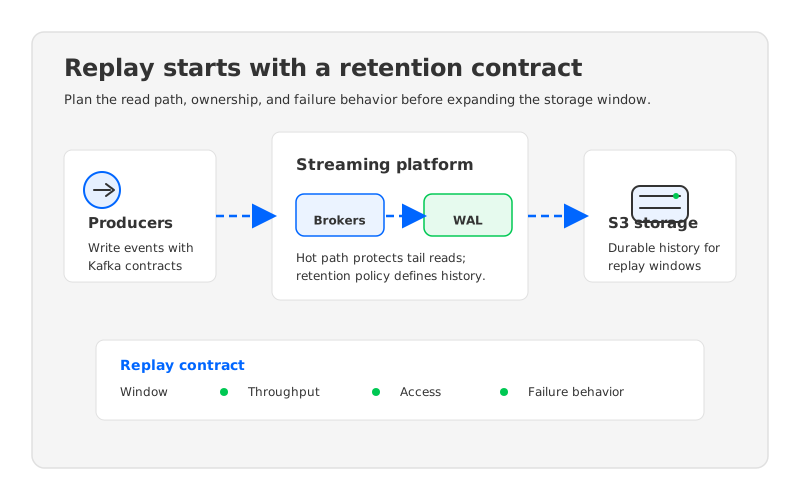
The retention plan should begin with the replay contract. If a fraud model, feature pipeline, incident investigation, or backfill job needs to read old events, the platform needs to define how far back the data must go, how fast it must be read, who is allowed to read it, and what blast radius the replay can create. A low storage price per GB does not answer those questions. It only says the bytes can be kept somewhere.
1Retention Is a Product Contract, Not a Bucket Setting
Kafka made retention operationally attractive because applications could treat the log as a replayable system of record for a bounded window. That contract is stronger than a backup file. Consumers can seek offsets, rebuild state, catch up after downtime, and feed new downstream systems without negotiating a custom restore workflow. When retention expands from days to weeks or months, the contract remains the same, but the infrastructure pressure changes sharply.
Three forces usually push teams toward S3-compatible object storage:
- Replay windows get longer than broker-local disks want to support. A topic that is easy to keep for 24 hours may become expensive and operationally stiff at 90 days, especially when replication and overprovisioning are included.
- Replay traffic becomes bursty. Historical reads are not evenly distributed. A new model rollout, customer incident, schema repair, or regulatory investigation can turn cold data into hot traffic for several hours.
- Compute and storage grow at different rates. Kafka brokers traditionally scale storage and serving capacity together. Long retention often grows storage faster than request handling, which leaves teams paying for broker resources they do not actually need.
This is where S3 is attractive, but also where designs diverge. A connector that writes Parquet files to S3 is useful for lakehouse analytics, but it does not preserve Kafka's log contract by itself. Tiered storage can reduce pressure on local disks while keeping the broker model recognizable. A shared-storage Kafka-compatible architecture goes further by making object storage part of the primary durable storage design. Each path can be valid. They solve different replay problems.
2Define the Replay Workload Before Choosing the Storage Pattern
The most common planning mistake is treating all old data reads as one workload. A consumer catching up from a short outage, a Flink job rebuilding state, and an audit process scanning months of activity are not the same operation. They differ in read shape, latency tolerance, concurrency, authorization, and cost attribution. A good retention plan separates those cases before any architecture choice is made.
| Replay case | What the platform must prove | Common planning failure |
|---|---|---|
| Consumer catch-up | Existing consumers can seek offsets and recover without special restore steps. | The old data exists, but not in a form existing consumers can use directly. |
| State rebuild | High-volume historical reads do not starve tailing consumers. | Backfill traffic competes with hot reads and causes lag where the business is most sensitive. |
| Investigation or audit | Access control, retention policy, and data lineage remain understandable. | S3 copies become a second governance plane with unclear ownership. |
| New downstream system | A new consumer can bootstrap from history without asking the platform team for manual extraction. | The platform keeps bytes, but replay requires a one-off data engineering project. |
This table is deliberately framed around proof, not features. If a team cannot describe the replay workload, a lower storage bill can hide an architecture that is harder to operate. The right question is not "Can we keep data in S3?" The right question is "Can we replay the data we kept, under the pressure pattern that caused us to keep it?"
3The Read Path Matters as Much as the Write Path
Object storage is built for durable, high-scale storage, not for pretending to be a local broker disk. That distinction matters during replay. A design that writes data into S3 efficiently may still struggle when many consumers read historical ranges at once, especially if the platform has no cache strategy, no admission control, or no way to isolate catch-up reads from tailing reads.
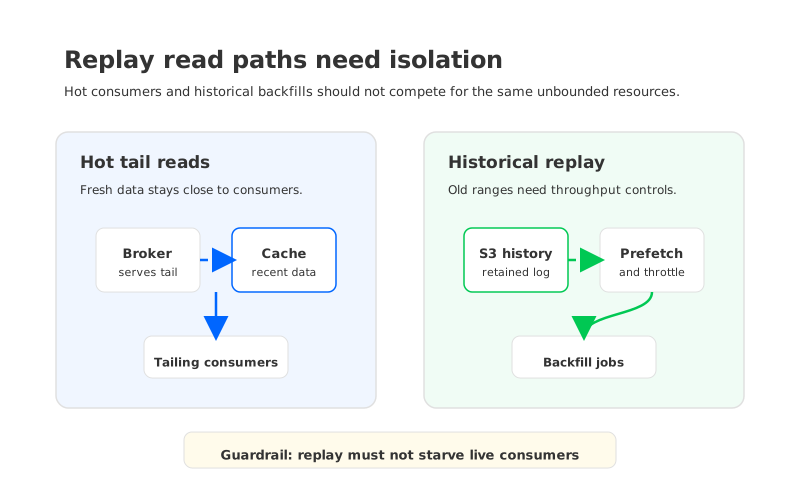
Production replay planning needs at least four read-path decisions:
- Hot tail reads. Consumers that follow the head of the log should not pay the penalty of a cold object read for every request. The platform needs a hot path, usually involving memory, local cache, or a write-ahead log layer.
- Historical range reads. Backfills need predictable throughput across older segments. The architecture should describe how objects are laid out, prefetched, cached, and throttled.
- Mixed workloads. Tail consumers and replay consumers often run at the same time. If a replay job can exhaust broker bandwidth, cache, or object request budgets, the retention policy has created a reliability risk.
- Failure recovery reads. Broker replacement, zone failure, or consumer restart should have a documented recovery path that does not depend on manually rehydrating disks.
Apache Kafka's tiered storage work is relevant because it formalizes remote log storage for older segments while preserving the Kafka abstraction. That can be a strong fit when the team wants to keep the conventional broker role and extend retention beyond local storage. But tiering is not the same as making brokers stateless. The active write path, leadership behavior, cache design, and recovery model still matter, and those are the details that determine whether replay feels routine or fragile.
4Cost Planning Must Follow the Replay Path
Storage price is the easiest number to compare and the easiest number to misuse. A retention plan for Kafka data in S3 should follow the byte path from write to retain to replay. The bill can include broker compute, local storage, object storage, object requests, cross-zone or cross-region traffic, monitoring, backup copies, and the engineering time spent operating special replay paths.
The FinOps model should separate three costs that often get blended together:
- Steady retention cost is the cost of keeping the historical window available. This includes storage volume, replication or durability strategy, metadata, and any local cache retained for performance.
- Replay activation cost is the cost when a retained window is actually read. This includes object retrieval, broker or cache bandwidth, downstream compute, and the operational guardrails needed to avoid hurting live traffic.
- Failure recovery cost is the cost of rebuilding service after infrastructure loss. This includes data movement, broker replacement time, and the amount of duplicated storage required before the cluster is healthy again.
S3-compatible storage can improve the first cost category because object storage is designed for large durable datasets. It can also improve recovery when the architecture avoids binding durable data to individual broker disks. But the second category, replay activation cost, needs testing. A 30-day replay window that looks inexpensive at rest can become noisy if every backfill creates unpredictable object requests, network traffic, and cache churn.
5Retention Policy Needs Topic Classes
Kafka platform teams rarely have one retention policy. They have business-critical hot topics, compacted state topics, observability topics, feature streams, audit streams, and topics that nobody wants to delete because nobody is sure who owns them. Moving old data to S3 does not remove that governance problem. It makes the problem more visible because the platform can now keep more data than the organization is ready to manage.
A practical retention design starts with topic classes:
| Topic class | Suggested planning question | Replay expectation |
|---|---|---|
| Hot operational streams | How much recent history is needed for consumer recovery? | Fast catch-up, low tail impact |
| Analytical event streams | How often will downstream systems reprocess history? | High-throughput batch replay |
| Audit or compliance streams | Who can read old records, and for how long? | Controlled access and traceable reads |
| Compacted state streams | Is the latest state enough, or are intermediate changes required? | Semantics depend on compaction policy |
| Experimental or orphaned streams | Who owns deletion and cost review? | Retention should be capped by policy |
This classification prevents one expensive habit: using a universal long retention window because it is easier than negotiating ownership. The storage layer may be able to keep the data, but retention is still a governance decision. Every retained topic should have an owner, a replay purpose, and a deletion rule that can be explained during an incident or audit.
6What a Production Readiness Scorecard Should Include
Before changing the storage pattern, platform teams should run a replay test that looks like the real reason they want long retention. A synthetic produce-consume benchmark is not enough. The test should include old offsets, real consumer libraries, representative message sizes, security controls, monitoring, and one failure scenario during replay.
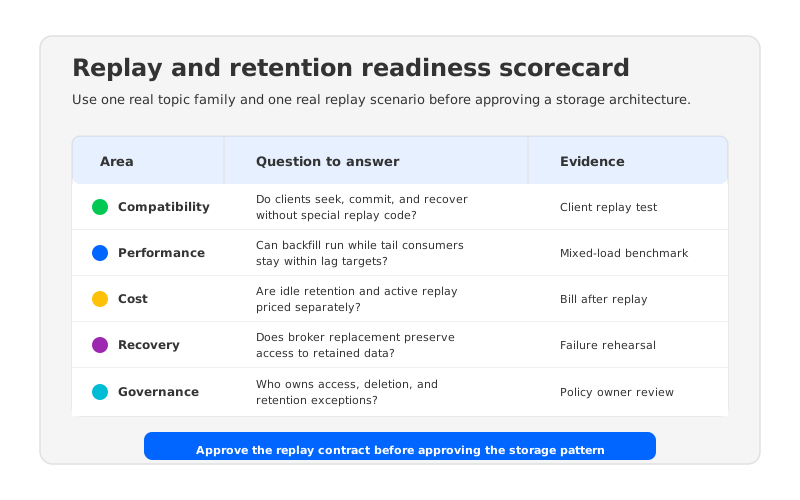
The scorecard should cover five areas. First, compatibility: existing Kafka clients should behave as expected when seeking, committing offsets, retrying, and recovering. Second, performance: tail reads and historical reads should have separate service expectations. Third, cost: the team should estimate both idle retention and active replay. Fourth, recovery: broker replacement or zone impairment should be rehearsed while historical data remains available. Fifth, governance: access, retention ownership, and deletion policy should not split across disconnected tools.
This is also the right point to evaluate Kafka-compatible shared-storage systems. AutoMQ fits into that category as a cloud-native streaming platform that keeps Kafka protocol compatibility while using S3Stream, a shared storage architecture, stateless brokers, and a write-ahead log path to decouple durable stream data from broker-local disks. The key evaluation question is not whether AutoMQ mentions S3. The question is whether its storage, cache, recovery, and deployment model match the replay contract your team has already defined.
For teams evaluating AutoMQ specifically, the relevant checks are concrete. Can existing Kafka clients pass compatibility tests? Can a long-retention topic be replayed without overprovisioning broker-local storage? Can broker compute scale independently from retained data volume? Can the deployment model satisfy data-plane ownership requirements? Those questions keep the evaluation grounded in architecture instead of marketing language.
7A Practical Planning Sequence
The safest way to plan retention is to move from workload to architecture, not from product to workload. Start with one or two topic families that actually create pressure: for example, a fraud event stream with 90-day investigation requirements, or a feature pipeline that occasionally rebuilds training data from historical events. Measure current retention, current replay behavior, current lag sensitivity, and the operational cost of broker storage growth.
Then write the replay contract in plain language. A useful contract says how far back consumers must read, how quickly a replay should complete, which live workloads must be protected, which identities can access older data, and what failure condition must be tolerated. It should also say what is not promised. Some data may be kept for analytics but not replayed through Kafka consumers. Some topics may need fast replay for seven days and slower archive access after that.
After the contract is written, compare architecture options against it:
- Use an S3 sink or lakehouse export when the goal is analytical access outside Kafka and the Kafka log contract is not required for old data.
- Use Kafka tiered storage when the goal is to extend retention while keeping the standard Kafka broker model and client semantics.
- Evaluate Kafka-compatible shared storage when the goal is to keep Kafka semantics while reducing the operational coupling between broker compute and durable retained data.
The final step is an unpleasant but necessary rehearsal. Run a backfill during normal traffic. Restart consumers at old offsets. Replace a broker or node during replay. Review the bill after the test, not before it. A retention architecture that only works in a quiet lab will become a hidden incident generator when the first production replay arrives.
The original question, Kafka on S3, is useful because it points to a real pressure in Kafka operations: teams want longer replay windows without making broker-local disks the center of every scaling and recovery decision. The answer should be a replay plan, not a storage slogan. If your team wants to evaluate a Kafka-compatible shared-storage path with that discipline, start with the AutoMQ Cloud Console and test one real retention workload against your replay, recovery, cost, and governance scorecard.
8References
- Apache Kafka documentation: Tiered Storage
- Apache Kafka KIP-405: Kafka Tiered Storage
- Amazon S3 User Guide
- Amazon S3 pricing
- AutoMQ documentation: Compatibility with Apache Kafka
- AutoMQ documentation: S3Stream Shared Streaming Storage
- AutoMQ documentation: WAL storage
9FAQ
9.1Is Kafka on S3 the same as long Kafka retention?
No. Long retention describes how long data remains available. Kafka on S3 can describe several architectures, including S3 exports, tiered storage, and Kafka-compatible shared storage. The planning question is whether retained data can still be replayed through the interfaces and operational controls your applications expect.
9.2When should a team use an S3 sink instead of changing Kafka storage?
Use an S3 sink when the goal is to land data in object storage for analytics, lakehouse processing, or offline governance workflows. That pattern is often direct and useful, but it usually does not preserve Kafka offset-based replay for old data by itself.
9.3What should be tested before relying on S3-backed retention?
Test existing clients, offset seeks, historical catch-up throughput, live traffic isolation, failure recovery, object storage request behavior, access control, and cost attribution. The test should include one realistic replay workload and one infrastructure failure while replay is running.
9.4Where does AutoMQ fit in replay and retention planning?
AutoMQ is relevant when the team wants Kafka-compatible APIs while reducing dependence on broker-local durable storage. Its shared storage architecture, S3Stream layer, stateless brokers, and WAL design should be evaluated against the same replay contract, recovery requirements, and governance model as any other production platform option.


