
Table of Contents
Table of Contents
Teams usually discover diskless Kafka through a cost question, but the production decision rarely turns on cost alone. The uncomfortable question arrives later, when someone asks what happens during a replay. If an incident forces a consumer group back several hours, if an additional service needs to bootstrap from the beginning of a compacted topic, or if an audit job scans retained events after the hot cache has moved on, the storage design becomes visible in user-facing latency. That is the moment when "Kafka on object storage" stops being an architecture diagram and becomes an SLO discussion.
Diskless Kafka is attractive because it attacks a real mismatch in traditional cloud Kafka deployments. Classic Kafka keeps partition logs on broker-attached disks and replicates them across brokers for durability. That model works, but in multi-AZ cloud environments it can amplify storage, compute, and cross-zone traffic. Apache Kafka's own KIP-1150 frames diskless topics as a way to persist topic data in object storage instead of local broker disks while preserving the Kafka client model. The proposal matters because it turns a vendor category into an ecosystem direction: object storage is no longer only an archival tier; it can be part of the primary streaming storage path.
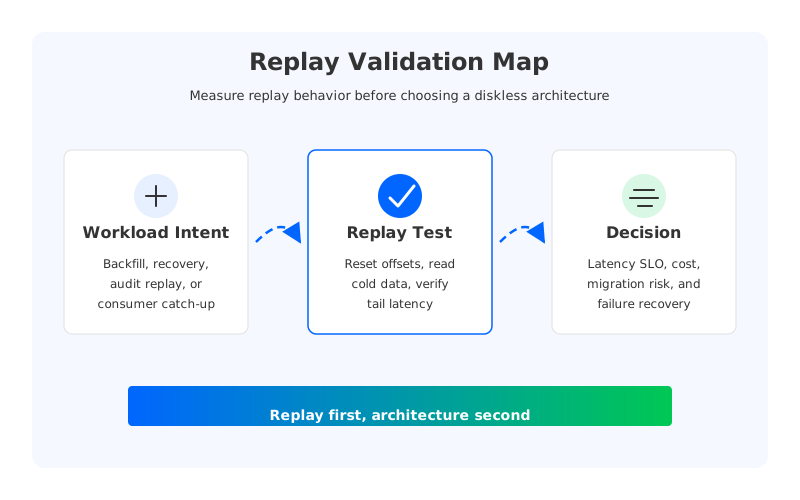
Replay latency is the right validation lens because it cuts through vague claims. A platform can look inexpensive during steady-state writes and still disappoint when consumers read cold historical data. A different platform can show good tail latency in a benchmark but require operational trade-offs that make recovery harder. The goal is not to crown a universal winner. The goal is to build a test that exposes the real behavior of each option before the architecture is locked in.
1Why Replay Is the Hard Part
Steady-state Kafka performance is often dominated by writes and near-tail reads. Producers append records, consumers follow close behind, and page cache or local storage hides many storage-layer details. Replay changes the access pattern. A consumer may jump to older offsets, read a large span of retained data, and compete with live traffic for network, cache, CPU, and object storage request capacity. If the platform is shared by many teams, the replay may happen at exactly the wrong time: during a deployment rollback, a data correction, or a regional recovery drill.
That makes replay a better proxy for production risk than a simple ingest benchmark. It exercises offset lookup, segment metadata, cache miss behavior, fetch batching, throttling, and client backpressure. It also exposes how the system behaves when data is not already warm on the broker that serves the request. Traditional Kafka, Kafka with tiered storage, diskless topics, and Kafka-compatible shared-storage engines can all answer the same Fetch API call, but the physical path behind that call can be very different.
The first trap is to treat "diskless" as one architecture. In practice, teams evaluate several patterns:
- Kafka with tiered storage, where local broker storage remains the hot tier and completed segments can move to remote storage.
- Proposed or emerging diskless topic designs, where object storage becomes the primary persistence layer for specific topics.
- Kafka-compatible shared-storage systems, where brokers keep the Kafka protocol surface while offloading durability to cloud storage and reducing broker state.
- Managed Kafka services with different broker, storage, and data transfer pricing models.
These options overlap, but they are not interchangeable. Apache Kafka tiered storage, described in the Kafka operations documentation, still uses local broker disks as the local tier and remote storage for completed log segments. A diskless architecture moves the decision boundary closer to the write path. That difference matters during replay because the platform has to locate, fetch, and serve historical data while maintaining Kafka semantics that applications already depend on.
2What to Measure Before Comparing Vendors
A replay test should start with the workload, not the product brochure. The test needs a topic shape, retention window, message size distribution, compression setting, consumer count, and live write rate that resemble the workloads you plan to run. If the production cluster has 2 KiB records, bursty producers, and consumers that sometimes fall behind for six hours, a clean 1 MiB sequential read benchmark will not tell you enough.
The minimum useful test has four phases. First, load the topic with representative data until some portion of it is outside the hottest cache path. Second, keep live producers running so replay competes with normal traffic. Third, reset or reposition a consumer group to an older offset and consume at a controlled rate. Fourth, inject at least one operational disturbance, such as broker replacement, node scale-out, or a network path change, while observing both replay and tail consumers.
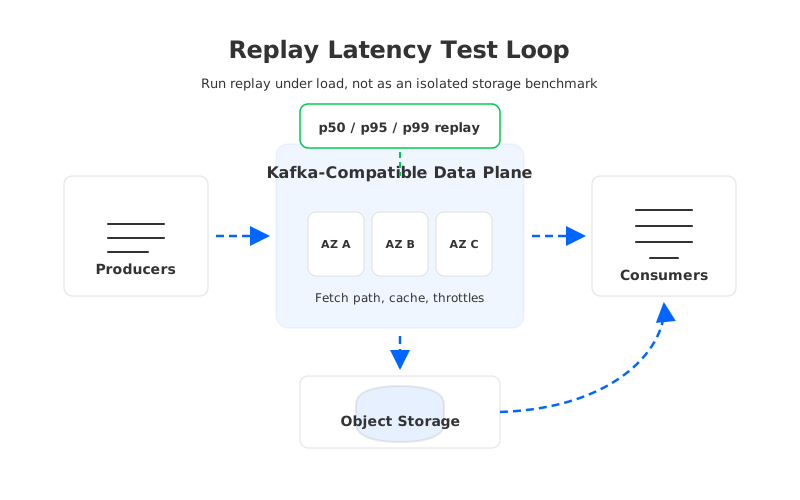
The measurements should be boringly concrete:
- Consumer fetch latency: Track p50, p95, and p99 during the replay window, not only average throughput. Tail latency is where storage path surprises appear.
- Replay completion time: Measure wall-clock time to catch up from a known lag depth under a fixed consumer configuration.
- Live traffic impact: Compare producer latency and near-tail consumer lag before, during, and after the replay.
- Cold-read ratio: Distinguish reads served from local cache, remote cache, and object storage when the platform exposes those metrics.
- Network cost shape: Attribute cross-AZ, cross-region, PrivateLink, and object storage traffic where your cloud billing system allows it.
- Recovery behavior: Record whether broker replacement requires partition data movement, metadata repair, cache warm-up, or consumer reassignment beyond normal Kafka group behavior.
This is also where procurement and engineering need the same spreadsheet. AWS MSK pricing, for example, includes broker instance charges, storage, and standard data transfer fees. AWS data transfer documentation separately warns that transfer charges vary by service and region. A replay test that ignores network paths can make a storage design look lower cost on paper while leaving a large line item outside the Kafka invoice.
3A Practical Validation Framework
The evaluation should separate correctness, latency, and operability. Correctness comes first: existing clients must produce, consume, commit offsets, enforce ACLs, and handle transactions or idempotent producers according to the semantics your applications use. Apache Kafka documents that consumers of a given topic-partition read events in write order, and production systems tend to rely on details like offset reset policy, committed offsets, and consumer group rebalancing. If a diskless option requires client changes, custom SDKs, or changed semantics, that cost belongs in the migration plan, not in a footnote.
Latency comes next, but it should be tested as a distribution rather than a headline number. A diskless design may have a low steady-state write path because it uses a write-ahead log, local cache, or regional low-latency storage before data lands in object storage. That does not automatically prove replay behavior. During cold replay, the fetch path may touch object storage metadata, remote segments, decompression, cache refill, and network links that steady-state tests barely exercise.
Operability is the dimension teams underestimate. If brokers are stateless or nearly stateless, scale-out and replacement can be faster because partition data does not have to be copied between local disks. If brokers still own substantial local state, replay and recovery can compete with rebalance traffic. Neither approach is automatically wrong. The question is whether the operational model matches your failure assumptions and staffing level.
| Validation dimension | Question to answer | Evidence to collect |
|---|---|---|
| Kafka compatibility | Do current clients, offsets, ACLs, and delivery settings behave unchanged? | Client integration tests, protocol/version matrix, migration dry run |
| Replay latency | What happens to p95 and p99 fetch latency during cold replay? | Consumer latency histograms and replay completion time |
| Live workload isolation | Does replay disturb active producers or tail consumers? | Producer latency, consumer lag, broker CPU, throttling events |
| Network economics | Which traffic paths are charged during writes, replication, and replay? | Cloud billing tags, VPC flow logs, service pricing pages |
| Failure recovery | Does broker loss trigger data copying or mostly metadata reassignment? | Failover drill, catch-up time, under-replicated or unavailable partitions |
| Governance | Are encryption, IAM, ACLs, audit logs, and data locality acceptable? | Security review, access logs, compliance checklist |
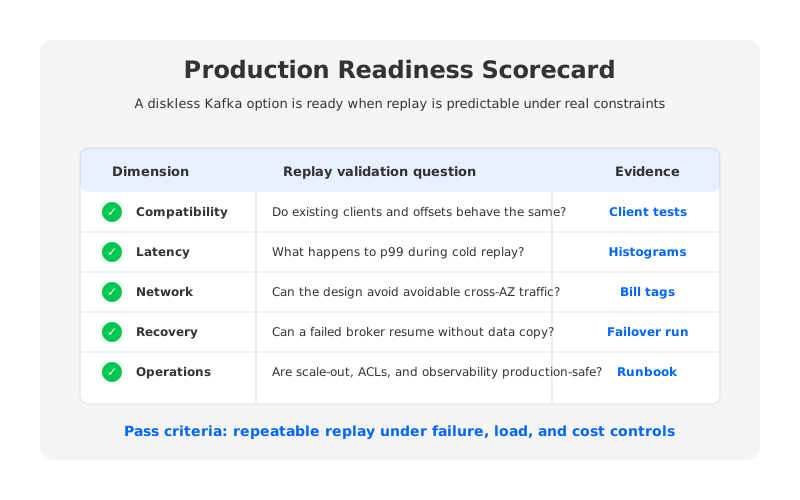
This table also prevents a common buying mistake: comparing a mature managed Kafka service, a self-managed Kafka cluster with tiered storage, and a diskless Kafka-compatible engine only on monthly infrastructure cost. The correct comparison is workload-specific. A platform for compliance replay, ML feature backfills, and long retention needs different proof than a platform for short-lived operational events with tight end-to-end latency.
4Where AutoMQ Fits
Once the test is framed this way, AutoMQ fits as one candidate in the Kafka-compatible shared-storage category. AutoMQ keeps Kafka protocol compatibility as a first-order requirement while replacing Kafka's local-disk storage layer with a shared storage architecture built around WAL storage and object storage. In AutoMQ's documentation, S3Stream is the shared streaming storage layer, and WAL storage is used to provide low-latency durable writes before data is uploaded to object storage. That design is relevant to replay validation because it separates the Kafka API surface from the physical location of durable data.
The important point is not that object storage magically makes latency disappear. It does not. The point is that a shared-storage architecture changes what must happen when brokers scale, fail, or serve data from older offsets. If data durability is not tied to a specific broker's local disk, replacing a broker should not require copying that broker's full partition data to another broker before service can recover. AutoMQ's continuous self-balancing documentation describes partition reassignment without data synchronization and copying, which is exactly the kind of operational behavior a replay test should verify.
AutoMQ also has a specific angle on cloud network cost. Its documentation describes a multi-AZ architecture intended to avoid server-side replica replication traffic and reduce cross-AZ producer traffic by allowing brokers in each AZ to serve produce requests for partitions. That does not remove the need to test your own topology. It does give platform teams a concrete hypothesis: if applications and brokers are deployed across the expected AZ layout, cross-AZ Kafka data-plane traffic should be materially lower than in a traditional leader-and-follower replication model.
For buyers, the practical next step is to run the same replay suite against the incumbent Kafka environment and any diskless candidate. Keep the client configuration constant where possible. Preserve the same topic count, partition count, retention, compression, and security settings. Then compare the operational evidence instead of debating architecture labels. A platform that performs well in that test has earned a deeper commercial evaluation.
5Migration Readiness Checklist
Replay validation should feed directly into a migration decision. A team that can tolerate a short read-latency increase during a quarterly audit replay may choose differently from a team that replays hours of events every day for derived-state rebuilds. A FinOps team may care most about storage and cross-AZ traffic, while an SRE team may care most about recovery time and runbook simplicity. The architecture decision is shared because the risk is shared.
Before approving a diskless Kafka option, ask for evidence in five areas:
- Workload fit: The benchmark should include your replay depth, record sizes, compression, partitioning, and consumer parallelism. Generic throughput claims are not enough.
- Semantic fit: The platform should preserve the Kafka client behavior your applications use, including committed offsets, consumer groups, ACLs, and transactional or idempotent write patterns where applicable.
- Cost fit: The model should include broker compute, storage, object requests, cross-AZ traffic, cross-region traffic, observability, and operational labor.
- Failure fit: The test should show broker replacement, AZ impairment assumptions, object storage throttling behavior, and consumer catch-up after interruption.
- Governance fit: The design should satisfy your encryption, IAM, audit, backup, and data residency requirements without custom exception processes.
The replay test is not a one-time acceptance ritual. It should become a regression test for platform upgrades. Diskless architectures rely on cloud services, metadata paths, caching policies, and client fetch behavior. Any of those can change across versions or deployment models. A short, repeatable replay suite gives the platform team a way to catch regressions before a real recovery event does.
If replay is the scenario that will decide your Kafka architecture, run it against a cloud-native Kafka-compatible design instead of relying on paper analysis. You can start with the AutoMQ demo path here: request an AutoMQ demo.
6References
- Apache Kafka documentation: Introduction and core guarantees
- Apache Kafka documentation: Tiered Storage
- Apache Kafka KIP: KIP-1150: Diskless Topics
- AWS documentation: Understanding data transfer charges
- AWS pricing: Amazon MSK pricing
- AutoMQ documentation: Architecture overview
- AutoMQ documentation: S3Stream shared streaming storage
- AutoMQ documentation: WAL Storage
- AutoMQ documentation: Save Cross-AZ Traffic Costs with AutoMQ
- AutoMQ documentation: Compatibility with Apache Kafka
7FAQ
7.1Is diskless Kafka the same as Kafka tiered storage?
No. Kafka tiered storage keeps a local broker tier and adds remote storage for completed log segments. Diskless Kafka designs move primary persistence toward object storage or shared storage, so the broker's local disk is no longer the durable source of truth for the topic data. The distinction matters during replay, scaling, and broker recovery.
7.2Does object storage make replay latency worse?
Not automatically. Object storage changes the fetch path, but the final latency depends on WAL design, cache behavior, metadata lookup, batching, object request patterns, network locality, and throttling. That is why replay should be measured with representative consumers and live producer traffic instead of inferred from storage type alone.
7.3What replay latency target should we use?
Use the target your applications can tolerate. For operational recovery, the key metric may be time to catch up from a known lag depth. For user-facing derived state, p99 fetch latency during replay may matter more. The best target is usually expressed as both a latency distribution and a maximum catch-up window.
7.4Should we test replay before or after migration?
Before migration. Run the same replay test on the current Kafka environment and on the candidate platform, then repeat it during staging and after major upgrades. Replay behavior depends on workload shape, not only vendor architecture.
7.5Where should AutoMQ be evaluated in this framework?
Evaluate AutoMQ as a Kafka-compatible shared-storage option. Its architecture is most relevant where teams want Kafka protocol compatibility, object-storage-backed durability, independent compute and storage scaling, and reduced cross-AZ data-plane traffic. The right proof is still your own replay test under your own workload.


