
Table of Contents
Table of Contents
Consider a production page that says one Kafka broker is approaching its disk threshold. The immediate fix is familiar: increase the EBS volume, move on-call back to normal work, and revisit the estimate during the next budget cycle. A few months later, another broker fills first because partition placement is uneven. The cluster now has more allocated storage, but nobody can answer a basic question: how much of it is required by retention, and how much exists only because the last incident was stressful?
That question is harder than multiplying throughput by retention. Apache Kafka writes compressed log segments, keeps replicas, deletes segments asynchronously, and may rewrite data for compaction. A broker also needs room for recovery, partition movement, and the time it takes an operator or an automation system to add capacity. A sound Kafka storage estimate makes each of those assumptions visible before it turns into another volume purchase.
1Disk-full pages and the over-provisioning reflex
Traditional Kafka keeps partition log data on broker-local disks. On a cloud deployment, those disks are often EBS (Elastic Block Store) volumes or an equivalent block-storage service. The model is straightforward: each broker owns a slice of the retained data, and the cluster's physical capacity is the sum of the usable space on those brokers.
The cost consequence is not obvious because retention is usually discussed in logical terms. If a topic receives 10 MiB/s of producer data, compresses to 8 MiB/s on disk, and uses a replication factor of 3, the cluster must retain roughly three physical copies of the compressed stream before accounting for cleanup lag or headroom. A longer retention policy increases that footprint every hour. Adding brokers can also require another local-disk plan, even when the new broker is needed mainly for request handling.
Replication is not optional capacity in a production estimate. Kafka's replication settings, partition placement, and min.insync.replicas define availability behavior, but they do not make the bytes disappear. A broker can have free space at the cluster level while one volume is close to full because a partition leader, a replica set, or a reassignment has concentrated data there. The unit that matters during an incident is the fullest usable log directory, not the average across a dashboard.
"Buy a larger disk" is a useful emergency action but a weak sizing method. It restores operating room without telling you whether the cause was higher ingress, a retention change, slow deletion, compaction work, or placement skew. Capture those signals during the incident; otherwise the next decision will be based on the size of the last bandage.
2Four inputs a storage estimate actually needs
Start with the bytes that are physically written, then add the time those bytes remain and the space needed while the system is changing state. The inputs below are enough for a first estimate, provided the team records whether each number is per topic, per broker, or cluster-wide.
| Input | What to measure | Boundary to record |
|---|---|---|
| Ingress | Producer bytes per second and compressed bytes per second | Average, recent peak, and expected growth |
| Retention | Effective retention.ms or retention.bytes per topic | Which policy reaches its limit first |
| Replication and placement | Replication factor and per-broker partition distribution | Cluster total is not the same as broker maximum |
| Cleanup and recovery | Segment deletion lag, compaction rewrite activity, and recovery movement | The longest period that needs extra space |
Ingress needs two views. Producer throughput describes the business workload, while compressed broker bytes describe storage consumption. The ratio between them depends on the record format, batch size, compression codec, and message distribution; measure it from broker metrics or a representative load test instead of importing a ratio from another cluster.
Retention is a policy, not always a timestamp at which bytes vanish. A topic may be governed by time, size, or both, and segment-level deletion means data can remain until the relevant segment is eligible and cleanup runs. For a compacted topic, the current key set is not the whole story: old segments may be rewritten while new data continues to arrive. Treat cleanup grace as an observed operating interval unless the workload gives you a stronger bound.
The last two inputs make the estimate operationally useful. Replication converts compressed logical bytes into physical bytes, while placement converts cluster capacity into a per-broker constraint. Cleanup and recovery determine how much space must remain available while Kafka deletes, copies, or rebuilds data.
3A minimum-safe sizing formula with an honest safety margin
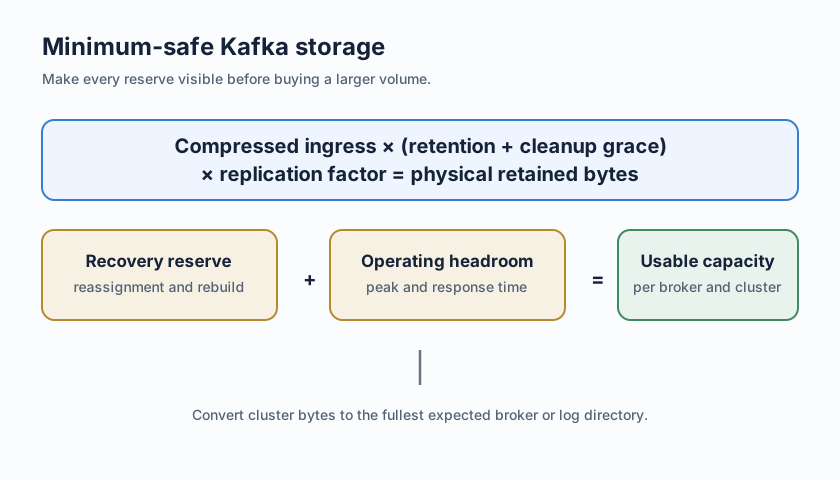
For a retained stream, begin with this cluster-level estimate:
physical retained bytes
  = compressed ingress rate
    × (retention window + cleanup grace)
    × replication factor

required usable capacity
  = physical retained bytes
    + recovery reserve
    + operating headroom
Then convert the result into a per-broker requirement using the expected placement distribution. If one broker is expected to carry 40% of the cluster's physical bytes, its usable capacity must cover that share plus its own recovery and operating reserve. Do not divide the cluster total by broker count unless partition placement has been measured or a placement policy gives you a defensible bound.
Here is an illustrative calculation, not a benchmark or a pricing claim. Assume a cluster receives 10 MiB/s of producer data, stores 8 MiB/s after compression, retains three days, and has an observed six-hour cleanup grace. With replication factor 3, physical retained bytes are:
8 MiB/s × (3 days + 6 hours) × 3
≈ 6.4 TiB for the cluster
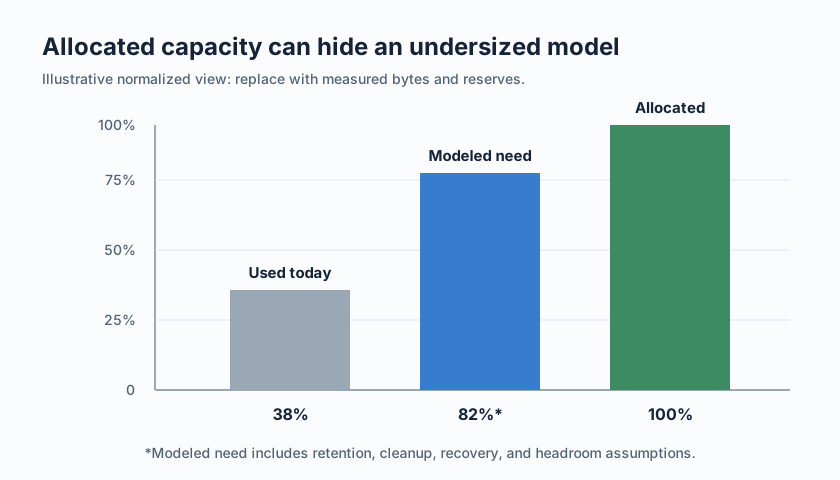
If the team adds a 20% operating headroom and a 0.5 TiB recovery reserve, the estimate becomes roughly 8.2 TiB of usable capacity. Three evenly placed brokers would need about 2.7 TiB each before filesystem and volume-specific reservations; a 40% hot-broker share would require a different per-broker limit. The numbers are deliberately explicit so the team can replace each assumption with its own measurements.
Nominal volume size is not the same as usable log capacity. Leave room for filesystem behavior, broker processes, monitoring agents, and any reserved threshold that stops Kafka from writing into the last unsafe portion of a volume. The exact reservation depends on the filesystem, volume configuration, and operational policy. Record it as a separate term rather than hiding it inside a rounded percentage.
The safety margin should also be tied to response time. If the platform can expand a volume and rebalance safely within an hour, the reserve should cover at least the expected peak physical ingress during that action plus cleanup uncertainty. If capacity changes require approval, a maintenance window, or partition movement, size for that longer path. A percentage that cannot be translated into hours of operation is difficult to defend in a review.
Compaction and Tiered Storage designs need their own boundaries. Compaction can create temporary write amplification and does not guarantee that the smallest key set is present at every moment. Kafka Tiered Storage can move older data away from local storage, but the local tier still needs a policy for hot data, fetch behavior, and metadata. Do not apply the local-disk formula without identifying which bytes remain local and what happens during catch-up or a remote-store outage.
4Metrics that say grow, metrics that say shrink
Disk utilization is a useful alert input, but it is a poor decision by itself. A broker at 65% full with a low and stable write rate may have more operating time than a broker at 45% full during a sustained traffic surge. Combine the space measurement with rate, retention, deletion, and placement data.
| Metric | Grow signal | Shrink signal |
|---|---|---|
| Time to full | Current or peak-rate forecast enters the response window | Forecast remains comfortably outside the window through a representative peak |
| Compressed ingress | Sustained physical bytes per second exceed the sizing model | Measured physical ingress is consistently below the model after a full workload cycle |
| Cleanup lag | Old segments remain past the expected cleanup interval | Deletion tracks eligibility and no backlog accumulates |
| Broker skew | One log directory approaches its limit before cluster average | Partition and replica placement leave a stable, measured low-water mark |
| Recovery reserve | Reassignment or broker replacement consumes the reserve | Recovery drills leave the reserve intact with the documented topology |
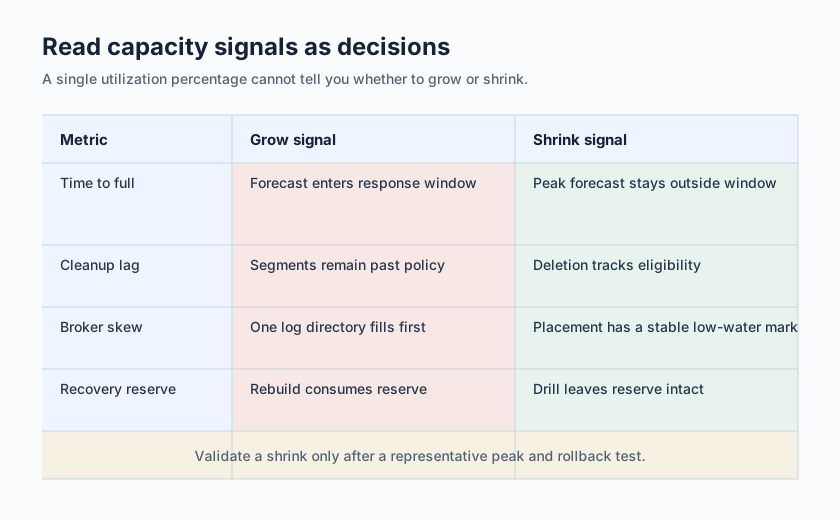
The grow decision is strongest when several signals agree. A rising disk percentage plus an earlier time-to-full forecast points to a capacity problem; a rising percentage with falling ingress and a cleanup backlog points first to a deletion or retention problem. Adding EBS to a cleanup failure only delays the same failure.
The shrink decision deserves more skepticism. Observe a complete peak period, verify that no broker or log directory is carrying a disproportionate share, and rehearse the rollback path. Shrinking volumes can be operationally constrained even when the arithmetic looks favorable. If the platform cannot reduce a volume in place, the change includes data movement, partition reassignment, or broker replacement; include that work in the recovery reserve.
5What to evaluate before changing the storage model
The worksheet above gives you a baseline for local disks. It also tells you when the disk is the wrong unit of capacity. If adding broker compute repeatedly forces a proportional storage purchase, if retained data is mostly cold, or if per-broker skew is the recurring failure mode, compare architectures using the same workload and the same service objectives.
The evaluation should answer five concrete questions:
- Where do durable bytes live, and which component pays for their capacity and requests?
- What remains local for low-latency writes and reads, and how is that layer sized?
- What happens to a broker when it is replaced, scaled, or temporarily unavailable?
- Which data movement occurs during recovery, and what are the cross-zone or cross-region billing boundaries?
- Do Kafka clients, topic policies, replication semantics, compaction behavior, and consumer recovery remain acceptable for this workload?
This is also where Tiered Storage and Shared Storage architecture must be separated. Tiered Storage usually adds a remote retention tier to a broker-local design; the broker still has a local capacity boundary for the hot tier. Shared Storage architecture changes the ownership model more deeply: brokers can use a shared durable stream store while local WAL and cache capacity serve the write and read paths. The two designs can have different failure, latency, request-cost, and recovery behavior even when both use object storage.
6What changes when the disk is no longer the unit of capacity
In Shared Storage architecture, retained stream capacity can be sized at the durable-storage layer rather than duplicated as a full local-disk plan on every broker. Compute and durable retention become separate dimensions. That can remove the tight coupling between broker scale-out and EBS allocation, but it does not remove capacity planning; it moves the measurements to object-storage retention, WAL, cache, request volume, and catch-up reads.
AutoMQ is a cloud-native streaming engine compatible with Apache Kafka and built around Shared Storage architecture. Its shared streaming storage overview describes durable stream data in object storage, while brokers provide the Kafka request and coordination layer. The practical sizing implication is that adding or replacing broker compute need not mean attaching a proportional local copy of the retained stream, subject to the deployment topology and storage policy you select.
WAL and cache become explicit parts of the worksheet. AutoMQ's WAL storage documentation describes the write and recovery boundary, but the right WAL capacity, cache size, object-storage request pattern, and catch-up behavior still depend on workload. A write-heavy topic with long retention and a read-heavy topic with frequent historical fetches should not be evaluated with the same assumptions.
Topology remains a billing boundary. A shared store may change where replication or recovery traffic travels, but the result depends on the cloud, region, Availability Zone (AZ) layout, and deployment mode. Validate cross-AZ traffic, object-storage requests, WAL storage, and private connectivity charges in the target environment. Compare those billable boundaries with the local-disk model you measured.
If a local EBS volume is the constraint, run the same retention, peak-ingress, recovery, and client-compatibility tests against the shared-storage option. Explore AutoMQ in your cloud environment after the worksheet is complete, so the evaluation starts with your workload rather than a generic volume size.
Next time a broker pages for disk, the useful question is not "Which larger volume should we buy?" It is "Which term in the capacity model changed, and how long do we have to act?" Answer that from compressed ingress, effective retention, cleanup behavior, replication, placement, and recovery time. If the answer keeps pointing to broker-local storage as the binding constraint, compare a shared-storage architecture on the same numbers.
7References
- Apache Kafka topic configurations
- Apache Kafka design and replication
- Apache Kafka log compaction
- Apache Kafka tiered storage design
- Amazon EBS volume types
- Amazon EBS pricing
- AutoMQ shared streaming storage
- AutoMQ WAL storage
8FAQ
8.1How much free space should a Kafka broker have?
There is no universal percentage. Size the reserve from peak physical ingress, cleanup delay, recovery movement, placement skew, and the time required to add capacity. A percentage is useful only when those assumptions are documented and tested.
8.2Should Kafka retention be sized in bytes or time?
Use the policy that matches the business requirement, then check the other limit as a safety guard. Time is often easier to explain for event history; bytes can cap unexpected growth. Record which policy wins for each topic and include segment cleanup delay in the estimate.
8.3Does replication factor multiply Kafka storage requirements?
For broker-local storage, replication factor multiplies the physical retained bytes across the cluster. The per-broker number still depends on partition and replica placement, so divide by broker count only when the placement distribution supports that assumption.
8.4Does shared storage eliminate Kafka storage planning?
No. Durable retention can move to a shared object-storage layer, while WAL, cache, object-storage requests, hot reads, and catch-up recovery still need limits. It changes the capacity unit; it does not remove the need to measure the workload.


