
Table of Contents
Table of Contents
A self-hosted Kafka cluster often starts as a rational engineering choice. The team wants control over versions, networking, security, cost, deployment topology, and integration with existing data systems. Kafka is also familiar: producers and consumers use stable APIs, Kafka Connect moves data, Kafka Streams processes events, and operational teams understand topics, partitions, offsets, replicas, and consumer groups.
The pressure builds later. The cluster that looked like infrastructure becomes a storage system with a pager. Disk sizing, replica movement, broker replacement, leader imbalance, upgrade windows, certificate rotation, controller health, hot partitions, and incident response all accumulate around the same team. A self hosted Kafka alternative is attractive because teams want Kafka compatibility without an operating model where every storage and capacity change feels risky.
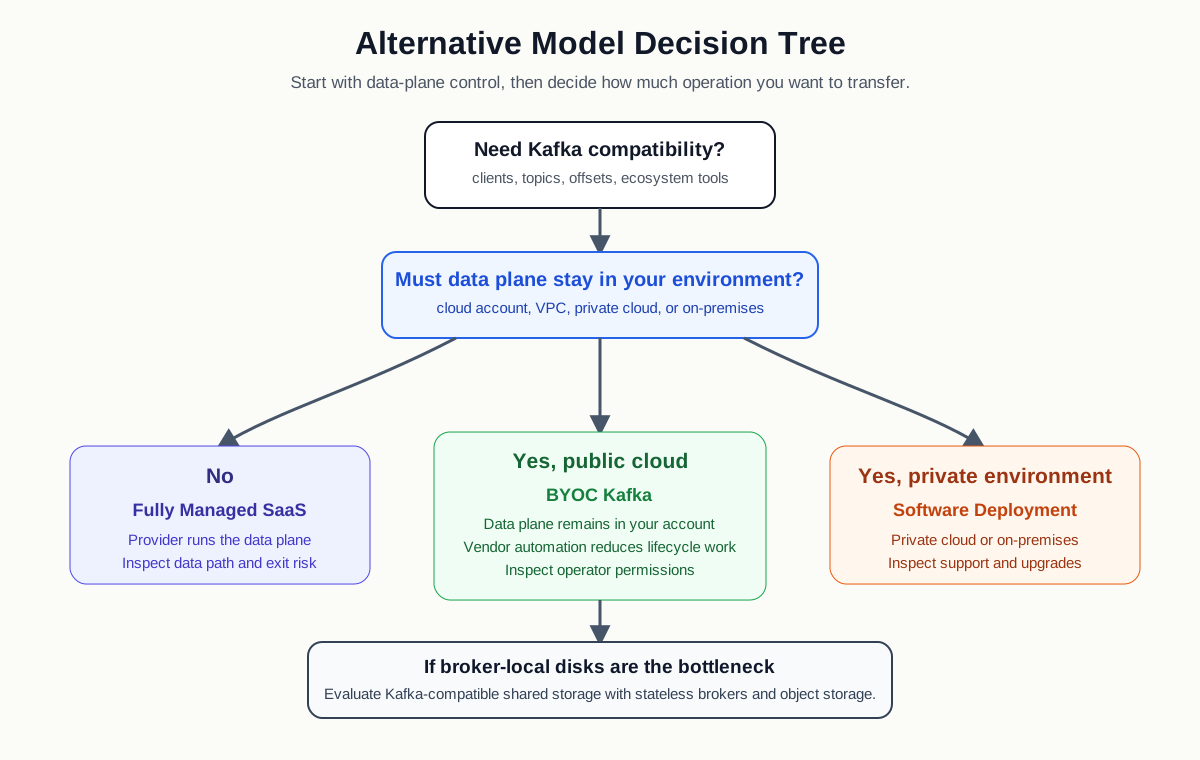
The right alternative depends on what you are trying to preserve. Some teams want less infrastructure work and can accept a provider-operated data plane. Some need the data plane to remain in their own cloud account. Others need private cloud or on-premises software, but want a more automated architecture than traditional self-managed Kafka. The evaluation should separate Kafka compatibility from Kafka operations. You may need the former without wanting to keep all of the latter.
1Why self-hosted Kafka becomes hard to operate
Traditional Apache Kafka is a shared-nothing system. Each broker serves requests and owns local log segments on its attached disks. Replication protects durability and availability, but it also means that capacity, recovery, and balancing are tied to moving data among brokers. That coupling is the root of many long-term operational costs.
Kafka's design is powerful because it gives operators direct control over partitions, replicas, retention, compression, security, and client behavior. The same control becomes a burden when the cluster grows across teams and use cases. A data platform that once handled a few event streams can become the shared backbone for observability, application events, payments, fraud pipelines, machine learning features, CDC, and internal analytics.
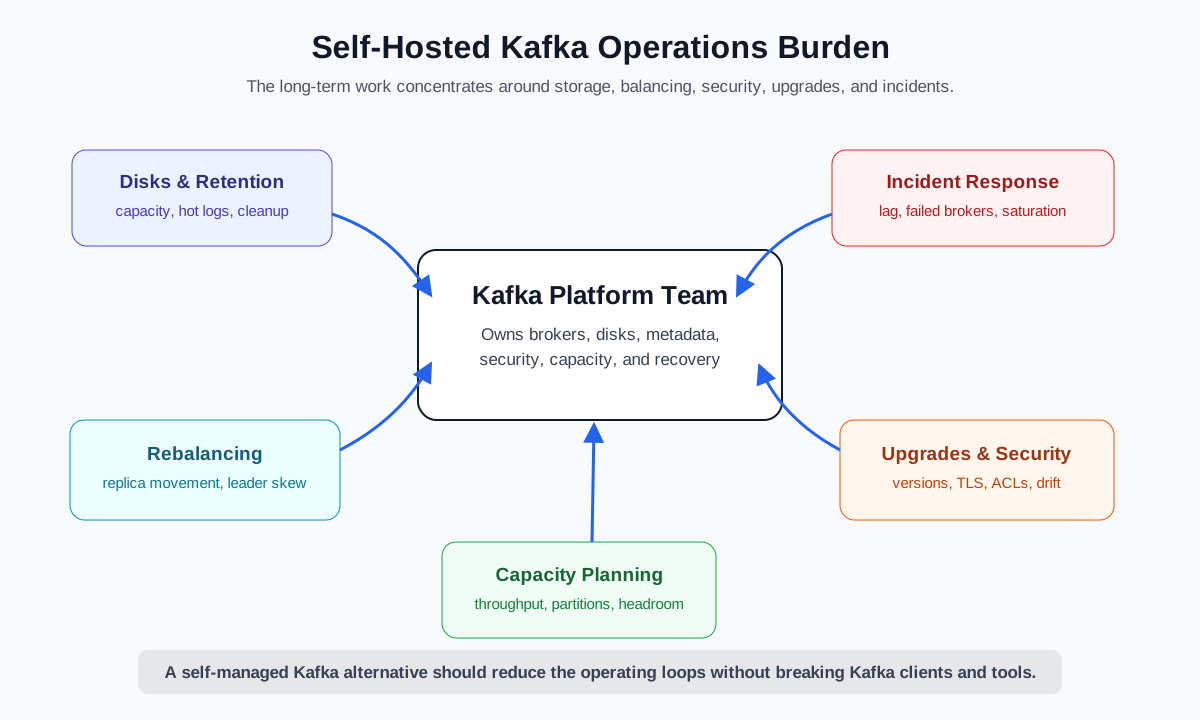
Several operational loops tend to dominate self-managed Kafka:
- Disk and retention planning: Retention is not an abstract policy. It becomes disk capacity, page cache behavior, replica storage, snapshot expectations, and emergency cleanup planning.
- Rebalancing and reassignment: Adding brokers, replacing nodes, changing partition placement, or recovering from failure can trigger large data movement. Even with automation, operators must watch throughput, under-replicated partitions, and application impact.
- Capacity forecasting: Kafka capacity is shaped by write throughput, read fanout, partition count, retention, message size, compression, replication factor, network topology, and idle headroom.
- Upgrades and configuration drift: Version changes interact with broker settings, client versions, security configuration, controller mode, protocol features, and maintenance windows.
- Security and compliance: TLS, authentication, authorization, audit evidence, secrets rotation, private connectivity, and key management remain active responsibilities.
- Incidents: Hot partitions, disk saturation, broker failures, network partitions, consumer lag, and controller instability are not rare edge cases. They are the lived reality of operating a durable distributed log.
This is why "Kafka self hosted" often becomes a platform maturity question rather than a software installation question. A team can deploy Kafka in a day and still spend years building the operational muscle to run it calmly. The cost is spread across SRE time, platform automation, incident fatigue, extra capacity, delayed upgrades, and conservative change windows.
2Alternative options to evaluate
The phrase self-managed Kafka alternative covers several models, and they are not interchangeable. The core distinction is the responsibility boundary: who runs the control plane, where the data plane lives, who operates storage, and how much Kafka behavior remains compatible.
| Option | Best fit | What it reduces | What to inspect |
|---|---|---|---|
| Fully managed Kafka SaaS | Teams that can use a provider-operated data plane | Broker provisioning, patching, baseline monitoring, some failure handling | Data residency, networking, quotas, pricing model, ecosystem portability |
| Cloud provider managed Kafka | Teams standardized on AWS, Azure, or Google Cloud | Infrastructure lifecycle and cloud-native integration work | Version availability, broker/storage model, scaling limits, regional design |
| BYOC Kafka | Teams that need customer-account data plane control | Direct cluster operations while keeping data in customer cloud boundaries | Control channel, operator permissions, telemetry, upgrade ownership |
| Private cloud or software deployment | Regulated, on-premises, or sovereign environments | Some automation and vendor support without SaaS data path | Hardware/storage assumptions, support model, upgrade process |
| Shared-storage Kafka-compatible architecture | Teams constrained by broker-local disk operations | Rebalancing, broker replacement, storage scaling, elasticity pressure | Protocol compatibility, storage durability, object storage operations |
Fully managed SaaS can be the fastest way to reduce Kafka operations. It is often the cleanest choice when the workload can run in a provider account and the team values service ownership over infrastructure control. The tradeoff is that the service boundary becomes part of your architecture. You need to understand private connectivity, data path, billing, regional availability, and exit options.
Cloud provider managed Kafka services sit closer to your existing cloud procurement and networking model. They may integrate well with IAM, VPCs, monitoring, and enterprise support. They still require careful capacity and cost evaluation because managed infrastructure does not remove the physics of durable replication, read fanout, retention, and inter-zone traffic.
BYOC and private cloud models are more interesting for teams searching for an alternative to self-managed Kafka without surrendering data plane control. In a BYOC model, the cluster runs in the customer's cloud account or VPC, while a vendor control plane, operator, or automation layer handles lifecycle work. In a software model, the customer runs the system in a private environment with vendor support and product automation. These models can reduce operational toil while preserving governance boundaries that a pure SaaS data path may not satisfy.
3Compatibility and migration requirements
Kafka compatibility should be treated as a requirement, not a slogan. Many systems can ingest events, but a self hosted Kafka alternative must protect the parts of Kafka your applications already rely on. The more central Kafka is to your architecture, the more carefully you should test client behavior before choosing a replacement path.
Start with the application surface:
- Existing producer and consumer clients should connect without rewriting application logic.
- Topic, partition, offset, consumer group, and retention semantics should behave as expected.
- Kafka Connect, Kafka Streams, MirrorMaker or replication tools, schema workflows, and admin scripts should be tested against the target platform.
- Security features such as TLS, SASL, ACLs, IAM integration, and private connectivity should match your governance model.
- Observability should expose enough broker, topic, consumer, storage, and request metrics for your SRE workflows.
Compatibility also includes operational semantics. Can you keep the same partitioning strategy? Are transactions, idempotent producers, quotas, compression, and message size limits supported in the way your workloads need? Can your teams continue to use familiar command-line tools and automation? Does the provider expose enough metadata and logs to debug client issues without opening a support ticket for every incident?
Migration risk is usually highest where Kafka has been customized over time. A cluster may contain old clients, unusual topic configurations, ACL exceptions, connector-specific assumptions, or retention rules that no one has revisited. Before migration, build an inventory of topics, partitions, client versions, peak throughput, lag patterns, authentication methods, and dependencies. The inventory often reveals that the hardest part is discovering the operational contract applications have built with the current cluster.
A practical migration plan should include parallel validation. Create the target cluster, mirror representative topics, replay traffic, validate consumer behavior, compare lag and latency, test failover, and rehearse rollback. The final cutover should be based on workload groups, not a single dramatic event. Critical producers and consumers need staged moves, clear rollback triggers, and monitoring that distinguishes application bugs from platform behavior.
4How shared storage reduces Kafka operations
Many Kafka operations are hard because durable data is tied to broker-local storage. When brokers are stateful, changing compute capacity can require moving partition data. When disks fill, operators must add storage, change retention, rebalance partitions, or move replicas. When a broker fails, recovery is not only about replacing a compute node; it is about restoring replica health and leadership distribution.
Shared storage changes the shape of those operations. In a Kafka-compatible shared-storage architecture, brokers handle Kafka protocol, request processing, leadership, caching, and scheduling, while long-term durable data is stored in a shared storage layer such as object storage. The broker becomes less of a permanent data owner and more of a compute node that can be replaced or rescheduled with less data movement.
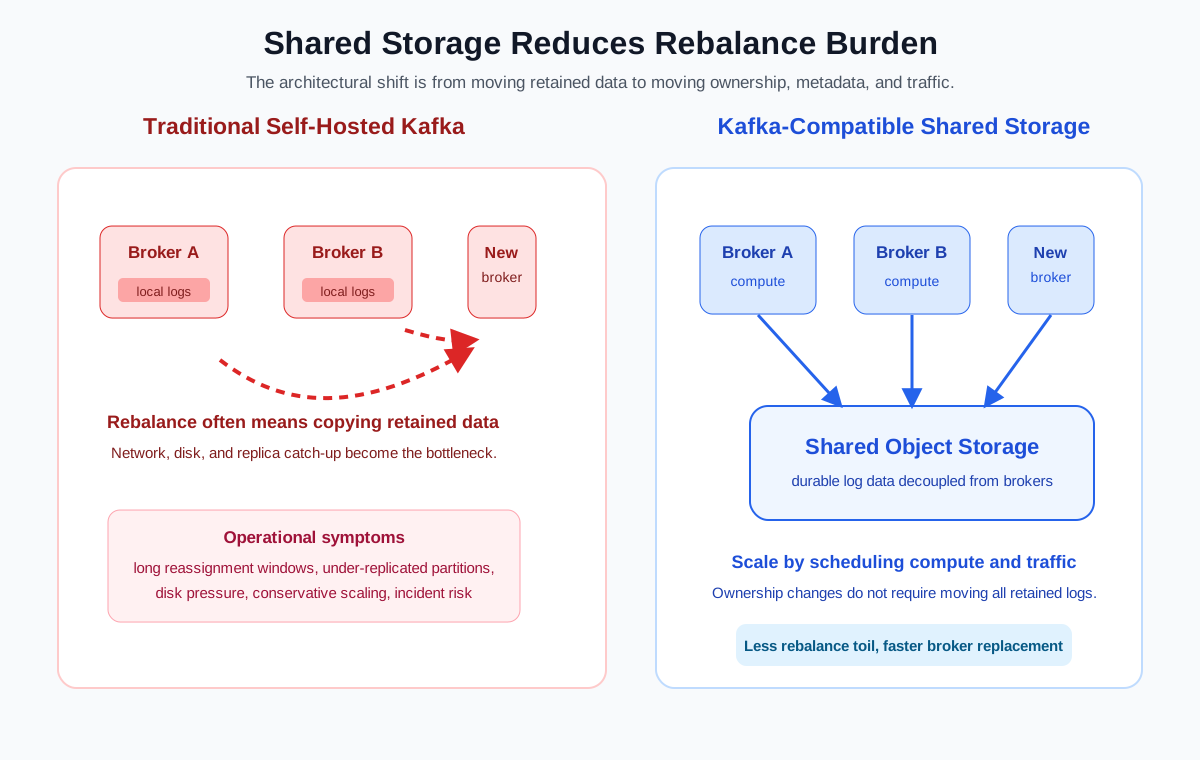
This does not make operations disappear. Object storage must be designed carefully, write-ahead logging and caching matter, metadata must remain consistent, and failure recovery must preserve Kafka semantics. But it changes the operational bottleneck. Instead of treating every capacity event as broker-local disk choreography, the platform can use shared durable storage while scheduling compute more elastically.
The operational benefits are most visible in four areas:
- Broker replacement: A failed broker no longer implies rebuilding long-term local log ownership from scratch.
- Scaling: Adding compute capacity can be more about scheduling and leadership movement than copying large retained logs.
- Retention: Longer retention can be managed through object storage capacity rather than expanding broker disks in lockstep.
- Rebalancing: Partition reassignment can become less data-heavy because durable data is not anchored to the old broker.
For teams evaluating a managed Kafka alternative, this architecture is worth separating from service packaging. A fully managed service can still use a stateful local-disk architecture. A customer-operated system can still use shared storage. The important question is whether the replacement reduces the specific operations your team wants to escape.
5Where AutoMQ fits
AutoMQ fits into this discussion as a Kafka-compatible shared-storage system designed to reduce the operational weight of traditional self-hosted Kafka. It keeps the Kafka protocol and ecosystem surface while moving persistent storage away from broker-local disks into object storage. Brokers are designed to be stateless for durable data ownership, and the system uses automated scheduling to reduce the burden of scaling, partition reassignment, and broker replacement.
The natural comparison is not "AutoMQ versus Kafka" in the sense of abandoning Kafka applications. It is "traditional self-managed Kafka operations versus a Kafka-compatible architecture with separated compute and storage." Existing producers, consumers, Kafka Connect jobs, and Kafka Streams applications remain the compatibility surface that must be protected.
AutoMQ can be evaluated in several deployment contexts. BYOC is relevant when the organization wants managed lifecycle assistance while keeping the data plane in its own cloud environment. Software deployment is relevant when the organization needs private cloud or self-operated infrastructure but wants a storage architecture that avoids tying long-term data to broker disks. Open source evaluation can help teams understand the architecture and validate compatibility before committing to a production model.
This makes AutoMQ a candidate when the main pain is not the Kafka API but the operations around disks, rebalancing, capacity planning, and elastic scaling. It is less relevant if the team wants to leave Kafka semantics entirely, replace event streaming with a different data model, or avoid running any customer-side infrastructure at all. A good evaluation should include workload tests, object storage design, security review, observability checks, and migration rehearsal.
6Replacement readiness checklist
Choosing an alternative to self-managed Kafka is easier when the decision is framed as readiness rather than preference. The following checklist helps separate a promising architecture from a risky migration.
| Area | Readiness question | Evidence to collect |
|---|---|---|
| Compatibility | Can existing clients, tools, and stream jobs run with minimal change? | Client test matrix, connector tests, admin script validation |
| Data boundary | Where do records, keys, logs, metrics, and metadata live? | Architecture diagram, security review, access policy |
| Operations | Which tasks move away from the platform team? | Responsibility matrix, upgrade workflow, incident process |
| Scaling | What happens when throughput, partitions, or retention grow? | Load test, scaling test, quota review, cost model |
| Migration | Can workloads move in stages with rollback? | Topic inventory, mirroring plan, cutover runbook |
| Observability | Can SREs debug client and broker issues quickly? | Metrics, logs, alerts, dashboards, support workflow |
| Exit path | Can you leave without rewriting applications? | Protocol compatibility, data export plan, tooling portability |
The strongest candidates make their tradeoffs explicit. A SaaS provider should be clear about data path and service limits. A BYOC provider should be clear about control plane access, operator permissions, and telemetry. A software product should be clear about upgrade ownership and support boundaries. A shared-storage architecture should be clear about durability, write path, cache behavior, object storage dependency, and recovery semantics.
Your final decision should map to the real source of pain. If your team is overloaded by routine broker operations, managed SaaS may be enough. If your governance model requires customer-account infrastructure, BYOC may be the better fit. If your most expensive pain is local-disk coupling, a Kafka-compatible shared-storage architecture may reduce operations without forcing a full application rewrite.
7References
- Apache Kafka Documentation
- Apache Kafka Operations Documentation
- Confluent Cloud Networking Overview
- Confluent Cloud Security Overview
- Amazon MSK Developer Guide
- Amazon MSK Security
- AutoMQ Documentation
- AutoMQ GitHub Repository
8FAQ
8.1What is a self-hosted Kafka alternative?
A self-hosted Kafka alternative is a deployment or platform model that reduces the operational burden of running Kafka yourself while preserving the Kafka capabilities your applications need. It may be a fully managed Kafka service, a cloud provider managed service, a BYOC platform, private cloud software, or a Kafka-compatible shared-storage architecture.
8.2Is managed Kafka always better than self-managed Kafka?
No. Managed Kafka can reduce infrastructure operations, but it may introduce service limits, pricing changes, data path concerns, networking constraints, or exit risk. Self-managed Kafka can be the right choice for teams with strong Kafka expertise, strict control requirements, and mature automation. The best choice depends on which responsibilities your team wants to keep.
8.3How do I evaluate Kafka compatibility?
Test the actual surfaces your applications use: producers, consumers, consumer groups, offsets, topic configuration, retention, transactions, idempotent producers, Kafka Connect, Kafka Streams, admin tools, authentication, authorization, and observability. Protocol compatibility is necessary, but workload-level validation is what reduces migration risk.
8.4Why does shared storage reduce Kafka operations?
Shared storage reduces operations by decoupling durable data from broker-local disks. Broker replacement, scaling, retention growth, and partition movement can become less dependent on copying large volumes of local log data. The system still needs careful storage, metadata, cache, and recovery design, but the operational bottleneck changes.
8.5Where does AutoMQ fit among self-managed Kafka alternatives?
AutoMQ is a Kafka-compatible shared-storage option that can be evaluated when teams want to reduce traditional Kafka disk, rebalance, and scaling operations without abandoning Kafka clients and ecosystem tools. It is especially relevant for BYOC, private cloud, and software deployment discussions where data plane control still matters.


