
Table of Contents
Table of Contents
Running Apache Kafka yourself on Google Cloud is not a mistake. For many platform teams, it is the rational starting point. You get version control, full configuration access, a familiar Kafka ecosystem, and freedom over brokers, disks, networks, security, monitoring, and client upgrades. If your team already has deep Kafka expertise, self-management can feel less risky than putting a critical event backbone behind a managed service boundary.
The harder question arrives later. A cluster that made sense at 20 topics may look very different after hundreds of partitions, multi-zone production requirements, longer retention, larger consumer fan-out, and a few painful recovery drills. At that point, "we run Kafka on GCP" stops being a deployment choice and becomes an operating model. The real decision is whether the control you gain is still worth the responsibilities you keep.
1Why Teams Self-Manage Kafka on GCP
Self-managed Kafka gives architects a level of control that managed messaging platforms do not always expose. You can choose the Apache Kafka version, tune broker configuration, run custom authorizer or quota behavior, integrate with existing observability pipelines, and keep producer and consumer behavior close to upstream Kafka semantics. For teams migrating from another cloud or data center, this continuity matters because the hard part is often not booting brokers. The hard part is preserving assumptions around offsets, consumer groups, topic configuration, Connect workers, schema tooling, and incident response.
Google Cloud gives several primitives that make the model viable. Compute Engine can run brokers on virtual machines, GKE can run StatefulSets with persistent volumes, Persistent Disk provides block storage options, and VPC networking gives teams control over private connectivity. Those are strong building blocks. They also mean the design space is large enough that two "Kafka on GCP" clusters can have very different reliability, cost, and scaling behavior.
That flexibility is useful, but it also pushes architecture choices back onto the Kafka team.
Self-management usually works best when the team has a clear reason to own the full stack:
- The Kafka workload depends on specific broker behavior, upgrade timing, or configuration that a managed service does not expose.
- The organization already has mature SRE coverage for Kafka, including dashboards, alerts, runbooks, capacity models, and disaster recovery drills.
- The cluster is strategic enough that the team wants direct control over client compatibility, partition placement, network topology, and security integration.
- The operating scale is stable enough that disk growth, broker replacement, and reassignment windows are predictable.
These are valid reasons. The trap is assuming that the original reason remains valid as the workload changes. Kafka's architecture rewards discipline, but it also amplifies small planning errors. Extra partitions, longer retention, and cross-zone replicas are sensible until they turn rebalancing, disk expansion, and recovery into recurring budget and reliability conversations.
2Operational Responsibilities You Own
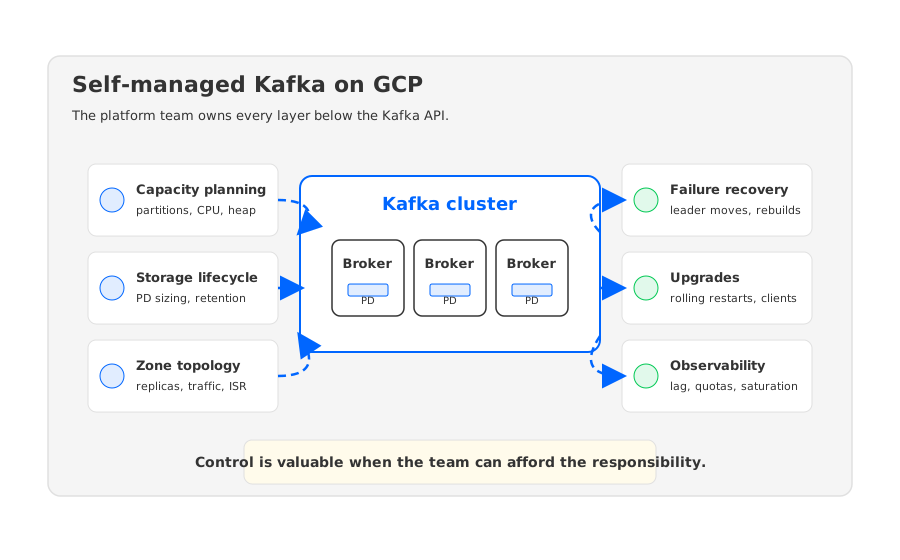
Apache Kafka's durability model is built around replicated logs. Partitions have leaders and replicas, producers write to leaders, followers replicate data, and in-sync replicas determine which copies are caught up enough to participate in durability decisions. That model is well understood and widely trusted. In a self-managed cloud deployment, however, every part of the model has to be mapped onto infrastructure you operate: broker instances, zones, disks, network paths, controller quorum, rack awareness, monitoring, and failure response.
On GCP, Persistent Disk is durable block storage, but it does not remove Kafka's broker-local state problem. If a broker is overloaded, lost, resized, or replaced, the partitions assigned to that broker still matter. Recovery and scaling remain tied to log placement. Adding brokers, increasing retention, and distributing replicas across zones still create partition movement, storage growth, and replication paths to monitor.
The responsibility list is broader than most first deployment plans admit:
- Capacity planning: You must model broker CPU, heap, page cache, disk throughput, disk capacity, network bandwidth, partition count, and consumer fan-out together. Kafka bottlenecks rarely respect a single spreadsheet column.
- Storage lifecycle: You own disk sizing, retention policies, compaction behavior, volume expansion, and the risk of hot partitions concentrating writes on a small number of brokers.
- Zone and replica topology: You decide how replicas map to zones, how rack awareness is configured, and how much failure isolation the cluster really has.
- Rebalancing and reassignment: You decide when data movement is safe, how much bandwidth to allocate, and how to avoid turning a maintenance operation into a production incident.
- Upgrades and client compatibility: You plan broker upgrades, rolling restarts, protocol compatibility, and the side effects on producers, consumers, Connect, Streams, and observability agents.
- Failure recovery: You own broker replacement, leader election behavior, under-replicated partitions, controller health, and the runbooks that connect alerts to action.
None of this means self-managed Kafka is fragile. It means it is stateful infrastructure, and stateful infrastructure has a long memory. A Kafka broker carries partition state, log segments, leadership, replica catch-up pressure, and client-facing performance characteristics. That is why broker replacement, disk pressure, and partition movement deserve more attention than the initial Terraform or Helm deployment.
3Hidden Cost and Scaling Risks
The visible cost of self-managed Kafka on GCP is compute and storage. The less visible cost is the infrastructure you reserve because Kafka cannot always scale at the exact moment demand changes. A cluster sized for average traffic may fail during peak ingest. A cluster sized for peak traffic may sit underutilized for long periods. A cluster with long retention may pay for disk capacity that is necessary for historical reads but not for current throughput. Kafka can be efficient, but it does not make state disappear.
The cost model is easiest to reason about when you separate four drivers:
| Cost driver | Why it appears in self-managed Kafka | What to watch |
|---|---|---|
| Broker compute | Brokers handle protocol, replication, compression, fetch, produce, and controller-related work | CPU saturation, request latency, network egress per broker |
| Persistent storage | Log segments live on broker-attached disks until retention or compaction removes them | Disk utilization, hot partitions, volume expansion events |
| Zone traffic | Multi-zone replication and client traffic can cross zone boundaries depending on placement | Replica placement, client locality, consumer fan-out |
| Operational reserve | Teams keep extra headroom to make failures, rebalances, and upgrades survivable | Idle capacity, maintenance windows, reassignment duration |
This is where GCP-specific planning becomes important. Persistent Disk performance and capacity characteristics depend on disk type, size, and attachment model. GKE persistent volumes give Kubernetes-native workflows, but they still bind state to storage resources that must be scheduled, attached, detached, expanded, and protected. Compute Engine instances give direct VM control, but the Kafka team then owns instance families, disk layout, OS tuning, system services, security patching, and failure replacement.
Scaling is the part that surprises teams most. Adding brokers sounds like a compute operation, but in traditional Kafka it is also a data placement operation. The cluster only benefits after partitions and leadership are redistributed, and that redistribution depends on available network, disk, and replica headroom. A self-managed cluster can have unused broker capacity and still feel hard to scale because the constraint is whether state can move without hurting the workload.
4Signals That It Is Time to Evaluate Alternatives
The right time to evaluate an exit path is before the current cluster is failing. Waiting for repeated incidents biases the decision toward emergency migration, and emergency migration is a poor way to make architecture choices. A healthier approach is to watch for signals that self-management is consuming too much engineering attention relative to the value of direct control.
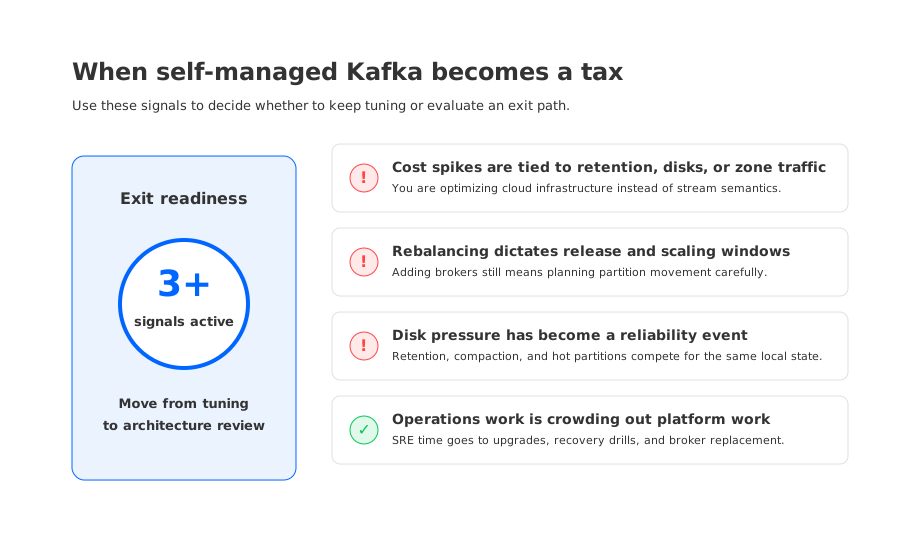
One active signal is not enough. Every serious platform has occasional disk pressure, delayed upgrades, or a difficult rebalance. The pattern matters more than the event. If several of the following conditions are true at the same time, the team has moved from normal Kafka operations into structural toil:
- Rebalances or partition reassignments are treated as high-risk change events rather than routine maintenance.
- Disk pressure has become a reliability concern, not merely a capacity planning task.
- Cost reviews keep circling back to retention, replication, cross-zone traffic, or overprovisioned brokers.
- Broker replacement takes long enough that the team delays infrastructure refreshes or instance type changes.
- Kafka upgrades require coordination across too many internal systems because operational risk is concentrated in the cluster.
- SRE time is spent preserving the cluster's current shape instead of improving the platform's capabilities.
The most important signal is organizational, not technical. If the team still wants Kafka semantics but no longer wants broker-local state to dominate scaling and recovery, the current architecture is asking the wrong people to solve the wrong layer of the problem. Application teams need Kafka APIs, offsets, ordering, partitions, and ecosystem compatibility. They usually do not need the platform team to spend its best engineering cycles orchestrating disk-bound broker state.
5Exit Paths: Pub/Sub, Managed Kafka, and Shared-Storage Kafka
There is no single correct exit path from self-managed Kafka on GCP. The right choice depends on what you are trying to preserve. Some teams want cloud-native messaging and can change application semantics. Some want Apache Kafka compatibility but less infrastructure ownership. Others want Kafka APIs while changing the storage architecture that makes operations heavy.
Google Cloud Pub/Sub is a strong option when the application can adopt Pub/Sub's messaging model. It is not a drop-in Kafka replacement, and that is precisely the point. Pub/Sub can be the right move when the team wants a managed, globally available messaging service and is comfortable adapting producers, consumers, ordering assumptions, subscription behavior, and operational tooling to the Pub/Sub model.
Google Cloud Managed Service for Apache Kafka addresses a different need. It keeps Kafka itself closer to the center of the decision, while shifting more operational responsibility to Google Cloud. That can be attractive for teams that want managed infrastructure but still want Kafka protocol compatibility and familiar ecosystem patterns. The remaining evaluation questions are about configuration surface, networking, supported versions, operational boundaries, pricing, support model, and whether the managed service removes the specific pain your self-managed cluster has.
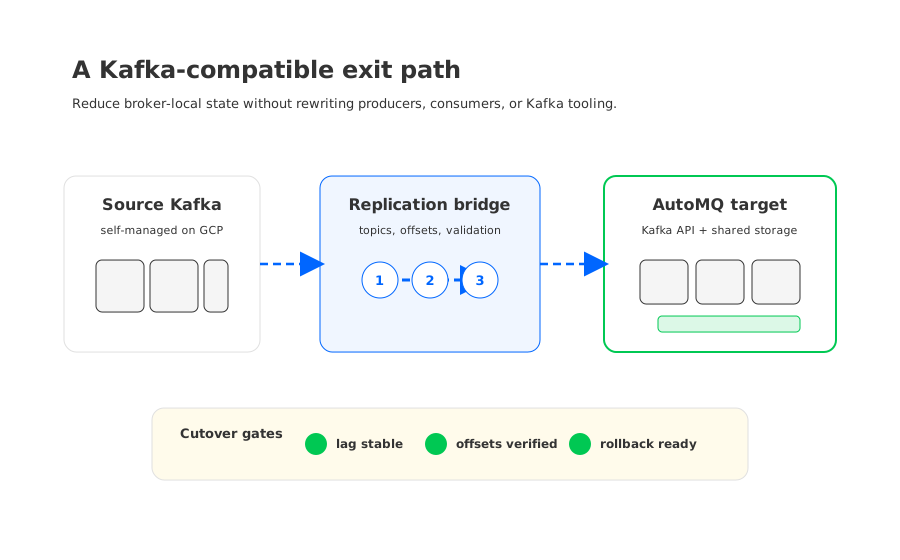
Shared-storage Kafka is the third path. Instead of treating brokers and durable logs as inseparable, it separates compute from persistent storage. AutoMQ fits this category: it is Kafka-compatible, keeps the Kafka API and ecosystem model, and moves durable stream storage away from broker-local disks into object-storage-backed shared storage. In that architecture, brokers carry less persistent state, so scaling, broker replacement, and reassignment can become metadata and traffic-routing problems rather than large data-copy projects.
This is the point where AutoMQ enters naturally, not as a universal answer, but as a specific architecture response to a specific self-managed Kafka pain. If the problem is only that your team dislikes operating software, a managed Kafka service may be enough. If the problem is that Kafka's local-disk model makes scaling, recovery, and cost structurally awkward on cloud infrastructure, then a Kafka-compatible shared-storage platform deserves a closer look.
6A Practical Exit Readiness Checklist
Before you move away from self-managed Kafka, decide what must remain stable. Kafka migrations become risky when teams treat "compatible" as a vague promise. Compatibility has to be decomposed into concrete checks: client behavior, topic configuration, partition count, consumer groups, offset migration, ACLs, quotas, schema tooling, Connect tasks, Streams state, monitoring, SLOs, and rollback paths.
A practical readiness review should answer five questions:
| Question | Why it matters |
|---|---|
| Which Kafka semantics are non-negotiable? | Ordering, offsets, transactions, compaction, retention, and consumer group behavior may affect application correctness. |
| Which operational pain is structural? | If pain comes from broker-local storage and rebalancing, changing tooling alone may not solve it. |
| Which workloads can move first? | Low-risk topics, internal pipelines, or greenfield workloads can validate the target before core systems move. |
| How will cutover be measured? | Lag, offset parity, duplicate handling, error rates, and consumer health need objective gates. |
| What is the rollback plan? | A credible rollback path reduces pressure during migration and keeps architecture decisions reversible. |
For teams evaluating AutoMQ as a migration target, the useful first step is not a sales comparison. It is an architecture assessment: identify which parts of your current GCP Kafka cluster are expensive because of workload demand and which are expensive because traditional Kafka binds durable state to brokers. The first category may be solved by tuning. The second category is where shared storage changes the shape of the problem. The AutoMQ architecture documentation is a good starting point for that review: AutoMQ shared-storage architecture.
Self-managed Kafka on GCP is worth keeping when it gives you control that your business actually uses. It is worth rethinking when the team is mainly paying to preserve broker-local state. The goal is not to abandon operational ownership at all costs. The goal is to put ownership at the right layer, where it improves the platform instead of trapping it in maintenance work.
7References
- Apache Kafka Documentation
- Google Cloud Managed Service for Apache Kafka Overview
- Google Cloud Pub/Sub Overview
- Google Cloud Compute Engine Disks
- Google Kubernetes Engine Persistent Volumes
- AutoMQ Architecture Overview
8FAQ
8.1Is self-managed Kafka on GCP still a good idea?
Yes, when your team needs deep Kafka control and has the operational maturity to support it. Self-managed Kafka is strongest when version choice, custom configuration, direct infrastructure control, and ecosystem continuity are worth the ongoing cost of capacity planning, upgrades, recovery, and rebalancing.
8.2Is Google Cloud Pub/Sub a replacement for Kafka?
Pub/Sub can replace some Kafka use cases, but it is not a drop-in Kafka replacement. It uses a different service model, so teams should evaluate ordering, subscription behavior, retention needs, client changes, and operational tooling before treating it as a migration target.
8.3When should a team move from self-managed Kafka to managed Kafka?
Managed Kafka is worth evaluating when the team wants to keep Kafka compatibility but reduce day-to-day infrastructure operations. The key question is whether the managed service removes the specific pain you have, such as upgrades, broker maintenance, scaling, networking, or storage planning.
8.4Where does AutoMQ fit in a GCP Kafka strategy?
AutoMQ fits when the team wants Kafka-compatible behavior but wants to reduce the operational weight of broker-local storage. Its shared-storage architecture keeps Kafka APIs and ecosystem assumptions while moving durable stream data away from broker-local disks.
8.5What should be checked before migrating from self-managed Kafka?
Check application semantics, topic configuration, ACLs, quotas, offsets, consumer groups, Connect jobs, Streams state, monitoring, cutover gates, and rollback plans. Prove compatibility with real workloads before production traffic moves.


