
Table of Contents
Table of Contents
Teams usually search for kafka cli automation after the scripts have already escaped the laptop. A developer has a Bash wrapper for topic creation. An SRE has a runbook for consumer group resets. A platform engineer has a Terraform module that covers clusters, but the last mile still depends on someone running kafka-topics.sh, kafka-configs.sh, or kafka-consumer-groups.sh with the right flags against the right environment. None of that feels dangerous in isolation, but it becomes a platform problem when the same actions touch production topics, ACLs, offsets, retention policies, and migration cutovers.
The real question is not whether the Kafka command-line tools can be automated. They can. The harder question is what operating model should sit around that automation so application teams get self-service workflows without turning the streaming platform into a collection of privileged shell scripts. A useful pattern treats the CLI as an execution surface, not the platform itself. Policy, ownership, validation, audit, rollback, and infrastructure boundaries need to live outside the command that happens to make the final API call.
1Why Teams Search for kafka cli automation
The search intent is practical. Teams want to remove tickets from the platform queue, standardize repeated Kafka operations, and let developers move without waiting for a human operator. The first use cases are usually small: create a topic with approved defaults, change retention for a data product, inspect consumer lag before a deploy, or reset offsets during a controlled replay. These are good candidates for automation because they are frequent, bounded, and easy to describe as intent.
The risk appears when intent and authority blur. A script that creates a topic can also create a topic with too many partitions, the wrong cleanup policy, or an owner tag that never reaches the billing system. A script that resets a Consumer group can also move offsets past data the application has not processed. A script that rotates credentials can also strand a service if the dependency order is wrong. Kafka exposes powerful administrative APIs; the CLI makes them convenient, but convenience is not the same as control.
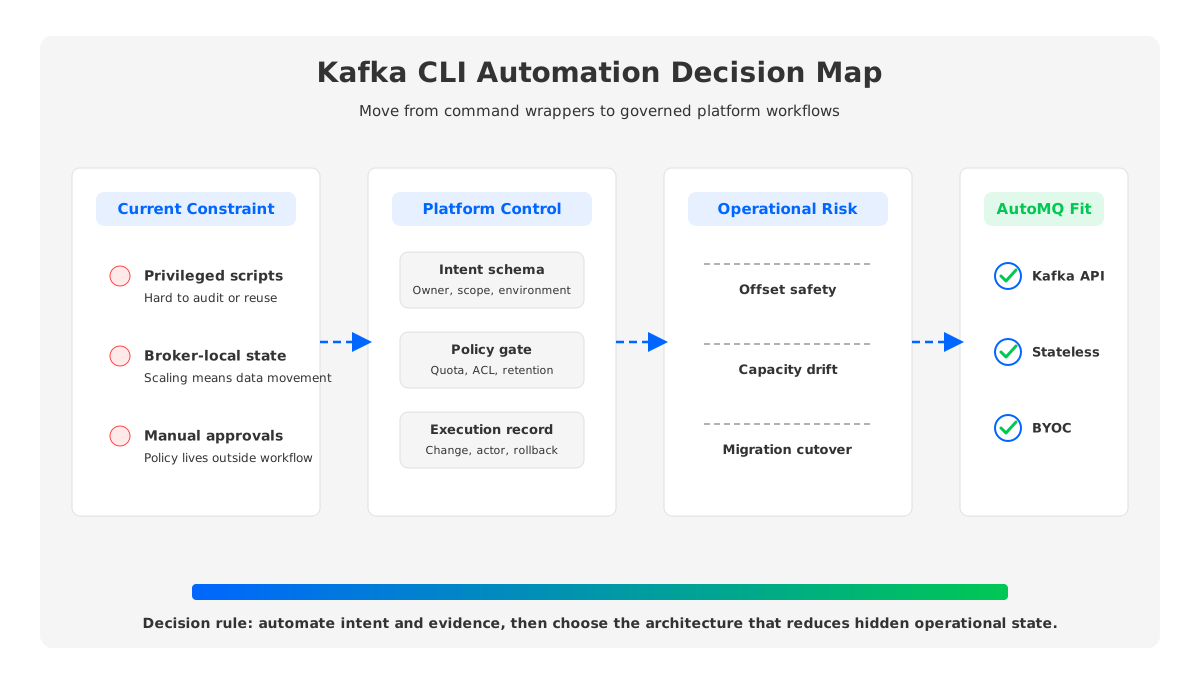
A self-service pattern should therefore separate four layers that are often mixed together in ad hoc automation:
- Intent capture. The user asks for a business-level outcome, such as a topic for a service, a retention change, or an offset operation scoped to a release window.
- Policy evaluation. The platform checks naming, ownership, quota, security, environment, and data-retention rules before any Kafka API call runs.
- Execution. The automation invokes Kafka-compatible tools, Terraform, API clients, or platform control-plane actions with narrowly scoped credentials.
- Evidence. The platform records who requested the change, what was changed, what validation passed, and how the action can be reversed or replayed.
This layering sounds heavier than a shell wrapper, but it usually reduces friction. Developers get a predictable interface. Operators get fewer one-off exceptions. Security teams get an audit trail that describes the action in platform terms instead of a paste of terminal output.
2The Production Constraint Behind the Problem
Kafka automation becomes difficult because many operational actions are coupled to the cluster's storage and replication model. Traditional Apache Kafka runs as a Shared Nothing architecture: each broker owns local log segments for the partitions assigned to it, and reliability comes from replicating those partitions across brokers. The model is proven, but it means capacity, data placement, broker health, and network traffic are all entangled with administrative actions.
Consider a simple self-service request: "increase partitions for this topic." The CLI call is straightforward, but the production impact depends on broker disk headroom, leader distribution, consumer parallelism, partition reassignment plans, and the application's ordering assumptions. A second request, "move this workload to a larger cluster," looks like a migration problem, but it also involves offsets, producer switching, ACLs, DNS, monitoring, and rollback. When platform teams automate only the CLI command, they hide the part of the work that needs the most judgment.
The same constraint shows up in cost and availability planning. With broker-local storage, adding capacity often means provisioning disk before the application needs it, then moving partition data so load becomes balanced. Cross-Availability Zone replication can be necessary for durability, but it also turns writes into network traffic between zones. Tiered Storage helps by moving older data to object storage, yet the broker still manages local hot data and leadership. Automation can reduce manual toil around these tasks, but it cannot remove the underlying coupling.
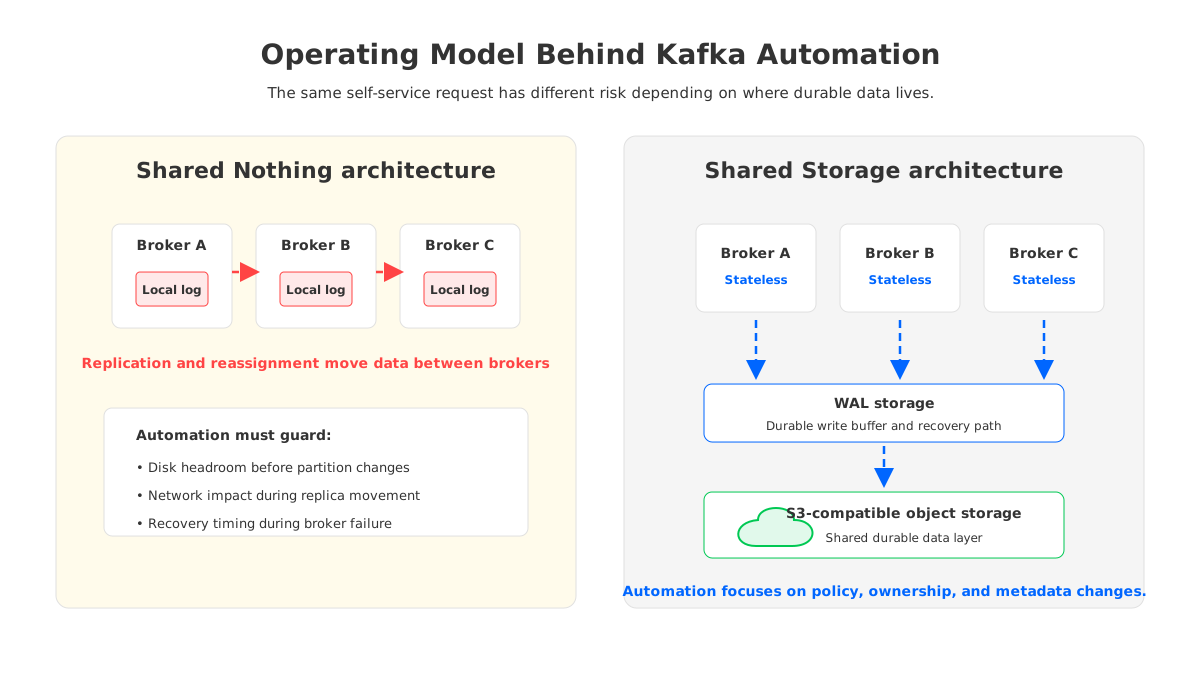
That is why the platform decision should start below the CLI. If the architecture requires operators to plan data movement for every meaningful scaling event, self-service workflows must encode those guardrails. If the architecture lets brokers remain stateless and stores durable data in shared object storage, the automation surface can be simpler because there is less broker-local state to protect.
3Architecture Options and Trade-Offs
There are three common patterns for Kafka CLI automation, and each one fits a different maturity level. The first is the direct wrapper: a script or internal command calls Kafka CLI tools with standard defaults. This works for development and narrow operational tasks. It fails when every team starts adding local exceptions, because policy lives in scattered script branches and review happens after the fact.
The second pattern is a request-driven service. Developers submit an intent through a portal, API, Git pull request, or chat workflow. The platform validates the request and then executes the required Kafka operation with service credentials. This is usually the right step for production because it creates a clean boundary between user input and administrative authority. It also supports dry runs, approvals, rate limits, and audit records.
The third pattern is declarative infrastructure. Topics, ACLs, service accounts, connectors, quotas, and sometimes migrations are described as code and reconciled by Terraform, Kubernetes controllers, or a control plane. This pattern is stronger for repeatability, but it is not a perfect replacement for imperative operations. Offset resets, emergency retention changes, and migration promotions often need controlled workflows that happen at a point in time.
| Pattern | Best fit | Main risk | What to standardize |
|---|---|---|---|
| CLI wrapper | Dev, diagnostics, narrow runbooks | Hidden privilege and drift | Approved flags, environment targeting, and output capture |
| Request service | Production self-service | Weak validation logic | Intent schema, policy checks, and audit records |
| Declarative control | Resource lifecycle | Slow response to time-bound operations | Ownership metadata, reconciliation, and rollback path |
The important detail is that these patterns can coexist. A mature platform may use Terraform for steady-state resources, a request service for governed operations, and CLI tools for break-glass diagnostics. The mistake is choosing the interface before choosing the control boundary.
4Evaluation Checklist for Platform Teams
A production checklist should test whether the automation changes the operating model or merely hides it. Start with compatibility. Your automation must work with the Kafka clients and ecosystem components the organization already uses: producers, consumers, Kafka Connect, Schema Registry integrations, observability exporters, and security plugins. Apache Kafka's own documentation is still the baseline for concepts such as Consumer groups, offsets, transactions, KRaft metadata, and Kafka Connect, so your workflow should not invent semantics that contradict those APIs.
Cost comes next because automation can make bad defaults scale faster. A self-service topic template should encode partition limits, retention boundaries, compaction choices, and ownership metadata. A migration workflow should expose the cost of double-running clusters, replication, catch-up reads, and rollback windows. A capacity workflow should show whether the request consumes broker disk, object storage, network budget, or all three.
Governance is where many CLI projects either mature or stall. Good governance does not mean every change needs a committee. It means the platform knows which actions can be automatic, which need approval, and which should be denied before they reach Kafka. For example, creating a topic in a development environment can be automatic if the template is valid. Resetting production offsets for a Consumer group should require a narrower path: explicit topic scope, current lag visibility, retention confirmation, and a rollback or replay plan.
Use this scorecard before standardizing the workflow:
- Compatibility: Does the workflow preserve Kafka protocol semantics, client behavior, and existing operational tools?
- Cost visibility: Does the request show storage, network, retention, and migration impact before execution?
- Security: Are credentials scoped to the action, environment, and resource instead of shared across broad automation jobs?
- Failure recovery: Can the platform identify partial success, retry safely, and restore the previous state where the operation allows it?
- Observability: Does every action emit metrics, logs, and audit events that connect the request to the cluster change?
- Team boundary: Does the interface let application teams own intent while the platform owns policy and execution?
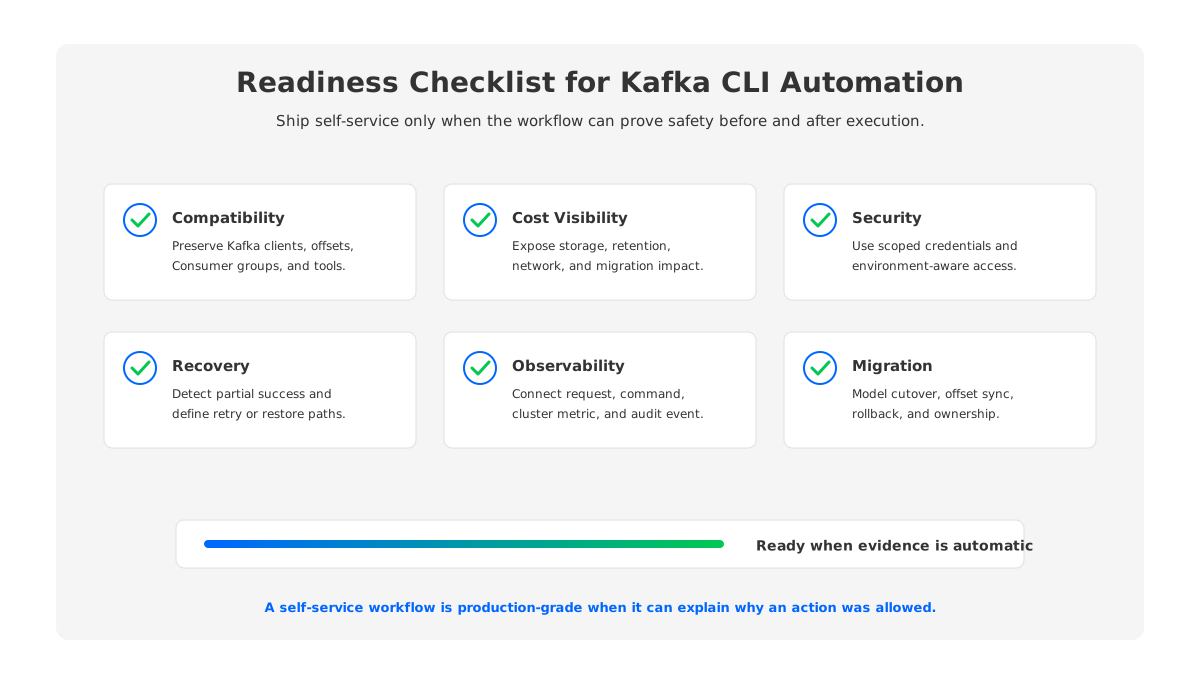
The checklist is intentionally architecture-aware. If scaling means data movement, automation must plan and observe data movement. If migration changes offsets, automation must treat offsets as first-class state. If the cluster is managed through a control plane, the CLI should not bypass the control plane for changes that affect billing, security, or lifecycle state.
5How AutoMQ Changes the Operating Model
Once the evaluation framework is clear, the architectural answer becomes easier to judge. AutoMQ is a Kafka-compatible streaming platform that replaces broker-local persistent storage with a Shared Storage architecture backed by object storage. AutoMQ Brokers handle Kafka protocol work, leadership, caching, and scheduling, while durable data is stored through S3Stream using WAL (Write-Ahead Log) storage and S3 storage. The practical effect for platform teams is that broker replacement, scaling, and partition movement no longer revolve around copying large amounts of broker-local log data.
That shift matters for self-service automation because it reduces the number of hidden infrastructure constraints behind a request. In a Shared Nothing architecture, an automation service often has to ask whether the target broker has enough disk, whether reassignment will overload the network, and whether the request should wait for data movement. In AutoMQ's Shared Storage architecture, stateless brokers and shared object storage let the platform focus more on traffic ownership, policy, and metadata changes. The CLI or API action is still governed, but the blast radius is easier to reason about.
AutoMQ also gives platform teams multiple surfaces for controlled automation. AutoMQ Console can handle cluster lifecycle, monitoring, identity, and resource management. Terraform can turn repeatable resource changes into reviewed infrastructure code. Self-Balancing helps redistribute traffic as cluster conditions change. Self-healing can isolate abnormal nodes before they become an application-visible incident. Kafka Linking supports migration workflows where message bytes and offsets need to remain consistent during a cutover. These capabilities do not remove the need for platform discipline; they give the discipline a cleaner substrate.
The deployment boundary is equally important. AutoMQ BYOC runs the control plane and data plane inside the customer's cloud account and VPC, while AutoMQ Software targets customer data centers. For teams building self-service workflows, that means automation can be designed around customer-controlled network, IAM, observability, and compliance boundaries. The goal is not to replace every Kafka command with a product button. The goal is to make each command part of a governed workflow whose execution model matches the architecture underneath it.
6A Practical Implementation Pattern
Start by inventorying the operations that developers already ask the platform team to perform. Group them by risk rather than by command name. Topic creation, quota updates, credential rotation, connector deployment, offset reset, cluster scaling, and migration promotion have very different failure modes. A good platform interface should make those differences visible instead of forcing every request through the same generic "run command" path.
Then define a small intent schema for each workflow. A topic request might require owner, environment, retention, cleanup policy, expected throughput class, and data sensitivity. An offset reset request might require Consumer group, topic, target offset strategy, validation time, and an approval record. A migration promotion request might require source and target cluster identity, sync status, consumer readiness, producer switch plan, and rollback criteria. The schema becomes the contract between application teams and the platform.
Execution should be boring. The service can call Kafka-compatible admin APIs, CLI tools, Terraform, or the platform control plane, but each execution step should be idempotent where possible and observable where it is not. Store the desired state, the evaluated policy result, the command or API response, and the post-check outcome. When an operation cannot be safely reversed, make that explicit before execution. Offset changes and retention reductions deserve more ceremony than topic description.
Finally, keep break-glass access separate. Production platforms still need emergency tools, but emergency tools should not become the default self-service path. The normal path should teach teams how to request safe changes; the emergency path should create louder evidence, narrower scope, and faster follow-up review.
7FAQ
7.1Is Kafka CLI automation enough for production self-service?
CLI automation is useful, but production self-service needs policy, scoped credentials, audit records, validation, and rollback planning around the command. Treat the CLI as an execution mechanism, not the platform boundary.
7.2Should platform teams replace Kafka CLI tools with Terraform?
Use Terraform for stable resource lifecycle, such as topics, service accounts, ACLs, and connector definitions. Keep controlled imperative workflows for time-bound actions such as offset resets, incident response, and migration promotion.
7.3How does Shared Storage architecture affect automation?
Shared Storage architecture reduces the dependence on broker-local persistent data. That can simplify scaling, reassignment, and recovery workflows because automation does not need to coordinate the same amount of physical data movement across brokers.
7.4Where should AutoMQ appear in a Kafka automation roadmap?
Evaluate the operating model first: compatibility, governance, cost, elasticity, recovery, and migration risk. AutoMQ fits when the team wants Kafka-compatible APIs with stateless brokers, object-storage-backed durability, and customer-controlled deployment boundaries.
Self-service starts as a request for faster commands, but the durable win is a safer operating model. If your next Kafka automation project is also a chance to rethink cluster elasticity, migration, and day-2 operations, evaluate AutoMQ BYOC through the AutoMQ console path.


