
Table of Contents
Table of Contents
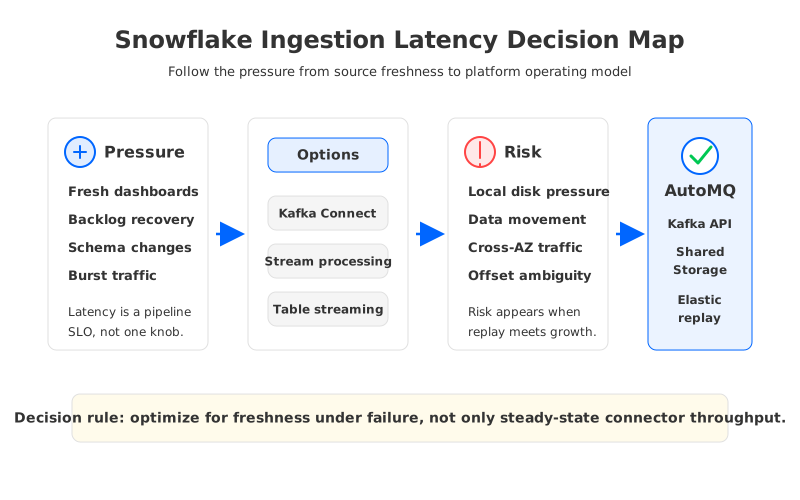
Teams usually search for snowflake ingestion latency kafka after the pipeline is already important. A dashboard is no longer allowed to lag by an hour. A risk model expects fresh operational facts. A customer-facing workflow depends on events that used to be treated as analytics data. At that point, Snowflake ingestion latency is not a connector tuning question. It is a production architecture question that starts at the Kafka topic and ends at the table a downstream team queries.
The warehouse is often blamed for latency created earlier in the path. Records wait in producer batches, accumulate in Kafka partitions, sit behind connector task limits, flush through Snowflake ingestion buffers, and then become visible to queries. Each stage may work as configured while the end-to-end path still misses the freshness SLO.
That is why a useful evaluation starts with the shape of the workload. Snowflake ingestion from Kafka has two identities at the same time: a real-time serving path for fresh facts and a recovery path for replaying old offsets after a connector outage, schema break, or table migration. The platform has to handle both without turning every freshness target into over-provisioned broker storage and manual rebalancing.
1Why teams search for snowflake ingestion latency kafka
The search phrase sounds narrow because the symptom is narrow: data arrives later than expected. Underneath that symptom are several different latency budgets. The producer cares about publish acknowledgement. Kafka operators care about broker durability, partition balance, retention, and consumer lag. The connector team cares about task parallelism, converter cost, flush thresholds, error handling, and offset commits. The analytics team cares about when data is queryable in Snowflake and whether the table contract is stable enough to trust.
Snowflake's Kafka connector documentation makes this layering visible. The connector can use Snowpipe Streaming, configure buffer flush behavior, support dead-letter queues, and track offset state between Kafka and Snowflake. Those controls do not remove the need to reason about Kafka as the durable buffer in front of Snowflake. If Kafka cannot absorb bursts, preserve replay history, and scale connector consumers without painful data movement, tuning the sink will only move the bottleneck.
The first diagnostic question is therefore not "which value should buffer.flush.time use?" It is "which part of the pipeline owns freshness under failure?" A lower flush interval can reduce waiting time under steady load, but it may increase pressure elsewhere. More connector tasks help only if partitions, broker resources, and Snowflake ingest channels keep up. A larger retention window improves recovery, but it can expand broker-local disk reservations in traditional Kafka.
This is where platform architecture starts to matter more than connector syntax. A lakehouse ingestion path fails gracefully when it has enough durable history, predictable offset recovery, and elastic compute capacity. It fails expensively when every growth event requires moving data between brokers or pre-buying local disk.
2The lakehouse freshness constraint behind the workload
Freshness is easier to define when the pipeline is a straight line: a record is produced, consumed, loaded, and queried. Production Snowflake ingestion rarely stays that simple. Multiple source applications may write into shared topics, downstream teams may consume the same stream, and Snowflake may be one of several sinks. The ingestion path becomes part of a data product, not a private batch job.
Four latency clocks need to be measured separately:
- Kafka append latency: how long producers wait before records are durably accepted by the streaming platform.
- Consumer lag: how far connector tasks fall behind the latest offsets during normal traffic and bursts.
- Sink flush latency: how long records wait inside connector and ingestion buffers before they are sent to Snowflake.
- Query freshness: when ingested records become available to the teams, models, or dashboards that depend on the table.
The clocks interact. If a connector outage lasts long enough, the recovery workload is not the same as normal traffic. Connector tasks must drain historical offsets while current events continue to arrive. A schema issue can push records into a dead-letter queue, which protects the pipeline but creates a replay task. The Kafka layer becomes the place where the business buys time.
That time has a cost. In shared-nothing Kafka, broker compute and broker-local storage are tied together. Retention grows local disk pressure. Rebalancing can require data movement. Adding brokers changes partition placement and operational state. The question is whether that model is still the right default when Snowflake ingestion depends on elastic replay, long retention, and cloud object storage economics.
| Constraint | What it means for Snowflake ingestion | Why the streaming layer matters |
|---|---|---|
| Low steady-state latency | Records should reach Snowflake quickly under normal load. | Connector tuning only helps if Kafka consumers can keep up. |
| Burst absorption | Traffic spikes should not force emergency capacity work. | Broker storage and compute headroom determine backlog tolerance. |
| Replay safety | Failed or corrected records may need to be reprocessed. | Retention and offset recovery define the practical rollback window. |
| Cost control | Freshness targets should not require permanent over-provisioning. | Local disk, replication traffic, and cross-AZ movement shape cloud spend. |
| Governance | Tables, topics, schemas, and DLQs need clear ownership. | Kafka contracts decide what Snowflake receives and what teams can trust. |
The table is intentionally not a connector comparison. A sink connector is necessary, but it is not the whole system. The durable log in front of Snowflake decides how much time the team has to recover, how much history can be replayed, and how much operational work appears whenever the workload changes.
3Stream-to-table architecture options
There are three common patterns for getting Kafka data into Snowflake. The first is direct Kafka Connect ingestion, where a Snowflake sink connector consumes Kafka topics and writes rows through Snowflake ingestion APIs. This is the most familiar route for Kafka teams because it keeps Kafka offsets, connector tasks, converters, DLQs, and operational monitoring in one recognizable framework. Its weakness is also familiar: Connect stability depends on task sizing, topic partitioning, converter behavior, and the surrounding Kafka cluster.
The second pattern is stream processing before ingestion. A Flink, Spark, or similar job consumes Kafka, cleans or reshapes events, and writes to Snowflake or to a table format that Snowflake can query. This pattern is useful when the warehouse table should not mirror raw events. It also adds state management, checkpointing, job deployment, and another recovery boundary. The ingestion latency budget now includes both Kafka lag and processing job lag.
The third pattern is table-oriented streaming, where the platform writes or exposes stream data in a table-friendly form backed by object storage. This is attractive when teams want lower friction between streaming and lakehouse systems, but it demands discipline around schema evolution, compaction, file sizing, and query semantics. It can reduce connector sprawl only when the streaming platform has a clear contract for how topics become tables.
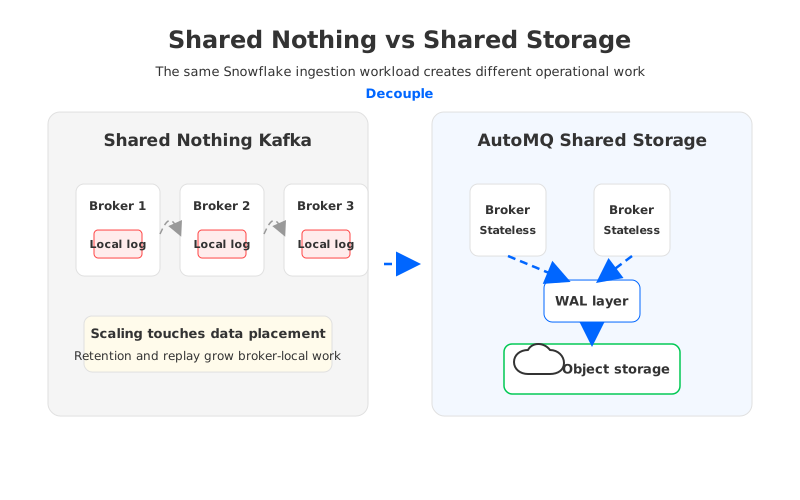
The architecture choice should be made against failure modes, not steady-state demos. A connector demo proves that records can move. A production design proves that records can still move after a schema break, failed task, AZ event, backlog, or migration. The more Snowflake becomes part of an operational decision path, the less acceptable it is for the Kafka layer to be a storage bottleneck disguised as a messaging system.
4Evaluation checklist for platform teams
A practical Snowflake ingestion review starts by assigning ownership. The data platform team should not accept an SLO it cannot observe, and the analytics team should not accept a table whose freshness depends on undocumented connector behavior. The shared contract should name the source topic, expected event key, schema policy, allowed lag, replay window, DLQ owner, rollback procedure, and cost guardrails.
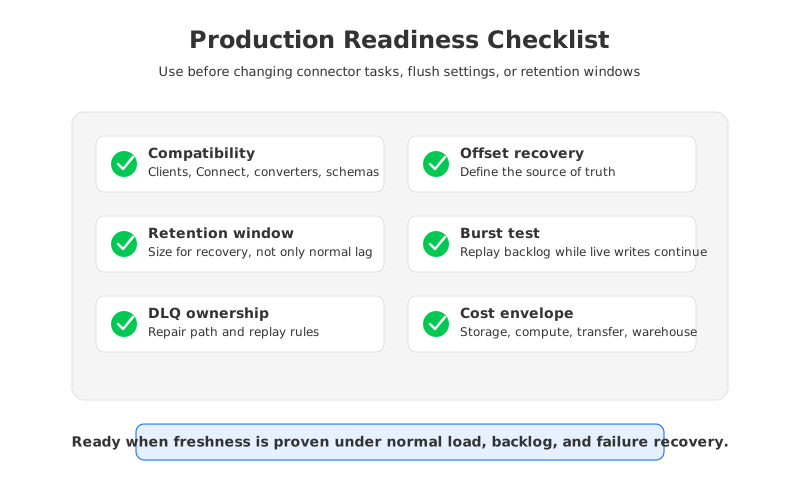
Use this checklist before increasing connector tasks or changing flush settings:
- Compatibility: Confirm that producers, consumers, Kafka Connect workers, converters, schema registry choices, and Snowflake connector versions are supported together. Compatibility failures often appear as latency because tasks restart.
- Offset recovery: Document which offset is authoritative during restart: Kafka consumer offset, Snowflake offset token, connector state, or an operator decision. Recovery ambiguity is dangerous during backfill.
- Retention window: Size Kafka retention for the longest realistic recovery path, not only for normal consumption. Include weekends, change freezes, and table migration windows.
- Burst model: Test the pipeline with a backlog and live writes at the same time. A system that handles one but not both is not ready for production freshness claims.
- DLQ workflow: Define who reads failed records, how they are corrected, and whether replay preserves ordering requirements.
- Cloud network path: Check whether Kafka, connector workers, Snowflake, object storage, and private connectivity run in the expected regions and network boundaries.
- Cost envelope: Separate storage cost, compute cost, connector worker cost, data transfer cost, and warehouse ingestion/query cost so a latency target does not hide a permanent spend increase.
The checklist usually exposes a deeper issue: traditional Kafka capacity planning is not aligned with variable lakehouse ingestion. Snowflake ingestion can be quiet for hours, then face a replay or burst that needs temporary throughput and long durable history. A platform that couples compute and storage asks teams to reserve for those moments in advance. A platform that decouples compute and storage lets the team reason about durability, retention, and processing capacity separately.
5How AutoMQ changes the operating model
After the neutral evaluation, the architectural requirement becomes clear: the Kafka-compatible layer should preserve Kafka APIs and operational semantics while reducing the broker-local storage work that replay-heavy Snowflake ingestion creates. AutoMQ fits that category as a cloud-native, Kafka-compatible streaming platform built around Shared Storage architecture and stateless brokers.
In traditional Kafka, a broker is both a compute node and a storage owner. In AutoMQ, brokers remain responsible for Kafka protocol handling, while durable stream data is persisted through a shared storage design backed by object storage. That difference changes Snowflake ingestion in three ways. Retention planning is less tied to broker-local disk reservations. Scaling decisions can focus more on connector and broker compute pressure. Recovery work becomes less dependent on moving large volumes of partition data between brokers.
Snowflake ingestion still needs careful design. Buffer settings, connector parallelism, schema evolution, and DLQ ownership still matter. The difference is that the streaming layer no longer has to turn every retention or replay requirement into local disk capacity on specific brokers. For lakehouse workloads, that distinction is significant because the expensive moments are often temporary: a backfill, table rebuild, failed connector, or burst after an upstream release.
AutoMQ also gives platform teams a cleaner way to discuss cloud boundaries. BYOC-style deployment keeps the data plane within the customer's cloud environment, which matters when Snowflake connectivity, object storage, private networking, and compliance controls are owned by the same platform organization. AutoMQ's zero cross-AZ traffic capability is relevant to cost review because ingestion pipelines often move data across zones through replication, consumers, and connector workers long before the warehouse sees a row.
For teams evaluating a table-oriented path, AutoMQ Table Topic is another angle: it is designed to connect Kafka-compatible streaming with table-oriented lakehouse access patterns. That does not replace Snowflake connector due diligence, but it widens the architecture conversation. The question becomes whether every Snowflake ingestion workload needs a sink connector as the primary abstraction, or whether some workloads are better served by stream data that is already organized for table consumption on object storage.
The practical adoption path is incremental. Keep existing Kafka clients and connector contracts where they are working. Identify Snowflake ingestion pipelines where retention, replay, scaling, or cross-AZ traffic have become recurring issues. Measure freshness under both normal load and catch-up load. Then evaluate whether a Kafka-compatible shared-storage platform changes the cost and operational profile enough to justify migration.
If that evaluation is on your roadmap, review the AutoMQ architecture docs and deployment model with the same checklist you use for Snowflake ingestion. The next step is not a generic product tour; it is validating whether your freshness SLO, replay window, and cloud boundary can be met with less broker-local storage work. Start with the verified AutoMQ entry point here: explore AutoMQ for Kafka-compatible cloud-native streaming.
6References
- Snowflake Documentation: Snowflake Connector for Kafka with Snowpipe Streaming classic
- Apache Kafka Documentation: Kafka Connect User Guide
- Apache Kafka Documentation: Consumer configuration reference
- AWS Documentation: Amazon S3 User Guide
- AWS Documentation: AWS PrivateLink overview
- AutoMQ Documentation: Difference with Apache Kafka
- AutoMQ Documentation: Table Topic overview
- AutoMQ Documentation: Eliminate inter-zone traffic overview
7FAQ
7.1Is Snowflake ingestion latency mostly a Kafka Connect problem?
Not usually. Kafka Connect is one visible part of the path, and connector settings such as task count, flush behavior, converters, and DLQ handling matter. But the Kafka cluster determines retention, replay capacity, consumer lag behavior, and how expensive it is to absorb bursts. Treat Connect tuning as one layer of the latency budget, not the entire budget.
7.2How should teams measure ingestion latency from Kafka to Snowflake?
Measure at multiple points: producer timestamp, Kafka append time, connector consume time, connector push time, Snowflake commit or visibility time, and query freshness. Snowflake documents connector metadata that can help estimate ingestion latency, while Kafka metrics expose consumer lag and task behavior. A single end timestamp hides where the delay was created.
7.3Does lower flush time always improve Snowflake freshness?
Lower flush time can reduce buffer waiting, but it is not a universal fix. It may increase API call frequency, connector pressure, or downstream cost depending on workload shape and connector version. Test it with normal load, burst load, and catch-up load before claiming a lower SLO.
7.4When does shared storage matter for Snowflake ingestion?
Shared storage matters when the Kafka layer needs long retention, frequent replay, elastic scaling, or lower operational coupling between compute and durable data. If the workload is small, stable, and rarely replayed, traditional Kafka may be adequate. If freshness depends on fast recovery from backlogs and failures, shared storage becomes part of the architecture discussion.
7.5Can AutoMQ replace the Snowflake Kafka connector?
AutoMQ is a Kafka-compatible streaming platform, not a blanket replacement for every sink connector. Existing Snowflake connector patterns can still be used where they fit. AutoMQ changes the upstream operating model by separating broker compute from durable shared storage and by supporting table-oriented streaming patterns that may reduce connector pressure for selected workloads.


