
Table of Contents
Table of Contents
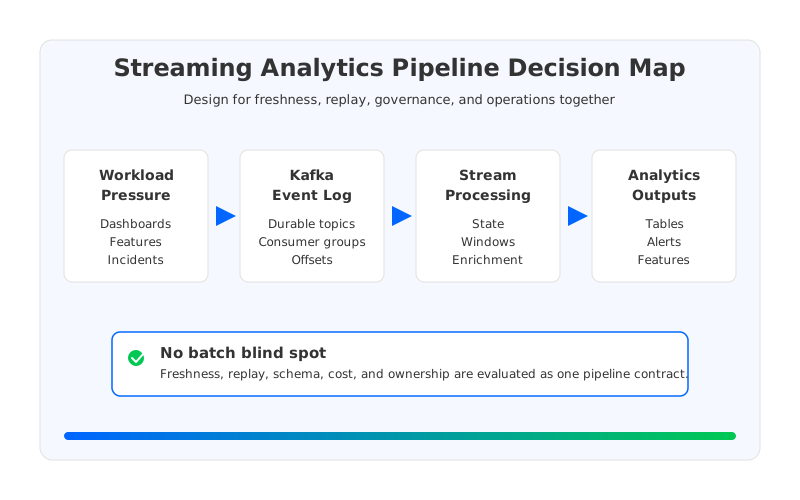
Teams search for streaming analytics pipeline kafka when batch analytics is no longer fast enough, but the production answer is not "add Kafka." They usually already have events, object storage, dashboards, ETL jobs, and stakeholders asking why daily reports cannot see current behavior. Kafka becomes attractive because it can turn operational events into a shared stream, but the architecture still has to decide what is computed in motion, what is persisted for replay, and what remains a batch responsibility.
The batch blind spot appears when the streaming layer is treated as a transport pipe. A dashboard that needs near-real-time freshness, a fraud feature that needs replayable state, and a lakehouse table that needs governed files are three different contracts. If all of them are pushed through the same topic design without retention, schema, state, and recovery planning, the pipeline becomes fast only on the happy path.
1Why teams search for streaming analytics pipeline kafka
A streaming analytics pipeline starts with a business demand, not a broker topology. Product analytics wants session events within minutes. Risk teams want a sliding window over transactions. Data science teams want fresh features without waiting for a nightly DAG. Operations teams want incident signals before the warehouse lands another partition. The common thread is freshness, but freshness alone is too thin to guide the architecture.
Kafka helps because it gives teams a durable, ordered, replayable event log with producer and consumer decoupling. That decoupling is the reason the same topic can feed stream processing, alerting, connector exports, and offline storage. It is also the reason a weak design can hide for months: every new consumer feels independent until one replay, schema break, or backfill overloads the cluster underneath.
The search query usually points to four decisions that need to be made together:
- Ingestion boundary. Decide whether applications publish directly to Kafka, through a gateway, through change data capture, or through a connector framework. Each choice changes ownership and failure handling.
- Processing boundary. Decide which transformations run in stream processors such as Kafka Streams or Apache Flink, and which transformations remain in batch engines.
- Storage boundary. Decide how long Kafka-compatible topics retain source events, derived events, and replay windows before data is materialized into object storage or analytical tables.
- Operational boundary. Decide which team owns schemas, consumer lag, connector offsets, topic quotas, security, and incident response.
These boundaries matter because a streaming analytics pipeline is not the opposite of a batch pipeline. It is a tighter contract between live systems and analytical systems. Batch still handles many workloads well, especially large historical scans and complex recomputation. The streaming layer earns its place when it makes freshness, replay, and operational ownership explicit rather than pretending that every event can be recomputed later.
2The integration constraint behind the pipeline
Kafka's biggest advantage in analytics architecture is also its sharpest constraint: it sits between many teams. Producers care about write latency and compatibility. Stream processors care about ordering, state, checkpoints, and input completeness. Connector teams care about offsets, task failures, credentials, and destination format. Analytics teams care about tables, partitions, late data, and query cost. A design that optimizes one layer while ignoring the others usually pushes the blind spot somewhere else.
Traditional Kafka adds another constraint through its Shared Nothing architecture. Brokers own local log segments, and durability comes from replicating partition data across brokers. This design is proven and widely understood, but it couples compute capacity, storage capacity, recovery behavior, and data placement. A pipeline that needs longer replay windows may need more broker disks even when CPU is idle. A temporary traffic surge may require broker expansion that triggers partition reassignment. A broker replacement can become a storage recovery event rather than a routine compute lifecycle event.
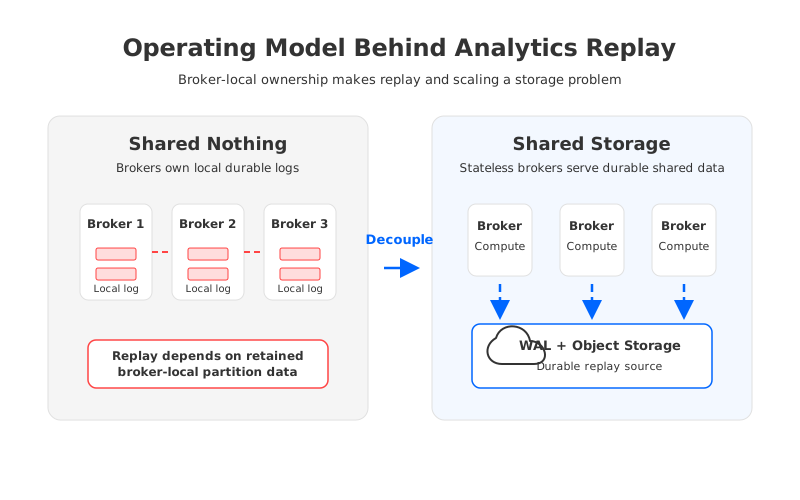
That coupling shows up in analytics pipelines at the worst time. Stream processing often discovers data quality bugs after downstream consumers have already used the output. Correcting the result means replaying from earlier offsets, rebuilding state, and exporting corrected data. If the upstream topics do not retain enough history, the team falls back to batch snapshots. If the cluster retains enough history but scaling is slow or expensive, every replay becomes a capacity negotiation.
This is why architecture reviews should separate two ideas that are often conflated. Kafka can be the system of record for recent analytical events, but that does not mean every broker should be the durable owner of every retained byte. The more the pipeline depends on replay, backfill, and multiple downstream paths, the more the storage model affects analytics reliability.
3Connector, schema, replay, and stream processing trade-offs
Connectors are often the first visible component in a streaming analytics pipeline. Kafka Connect can move data between Kafka topics and external systems while tracking connector progress through offsets and tasks. That standardization is useful because teams do not want every application to write its own export loop. The risk is assuming that a connector solves the pipeline contract. It moves data; it does not decide whether the data is correct, replayable, governed, or economical.
Schema policy is the first contract to define. Raw JSON can accelerate early experiments, but it pushes interpretation into every downstream job. Avro, Protobuf, or JSON Schema with a compatibility policy adds friction up front and reduces ambiguity later. For streaming analytics, the important question is not which serialization format sounds cleaner; it is how a bad schema change behaves during production. Does the processor stop, quarantine the record, route it to a dead-letter topic, or write corrupted analytical output?
Replay policy is the second contract. A stream processor may need to rebuild state after a bug fix, a connector may need to re-export a corrected object layout, and a data platform may need to regenerate a table partition. Kafka offsets make this possible only when the retained event history is still available and the replay load does not destabilize the cluster. A replay plan should define the source offset, target output, duplicate handling, rollback point, and observability signals before the incident.
| Decision area | What to verify | Failure mode if ignored |
|---|---|---|
| Consumer groups | Lag, offset reset policy, ownership, and alert thresholds | A stalled analytics job silently serves stale results. |
| State processing | Checkpoint cadence, state size, late data, and recovery path | A code fix requires a manual batch rebuild. |
| Schema governance | Compatibility mode, ownership, validation, and quarantine path | Bad records poison downstream tables or stop processors. |
| Connector runtime | Task isolation, retries, credentials, and destination semantics | Export failures become application-facing incidents. |
| Retention and replay | Replay window, backfill throughput, and duplicate handling | The team discovers too late that the stream cannot rebuild output. |
The table is operational by design. Many streaming diagrams show a path from producers to Kafka to processors to storage. Production pipelines fail in less photogenic places: a consumer group is reset without a rollback plan, a connector writes too many small files, a Flink checkpoint grows beyond the recovery window, or a topic retention change removes the clean replay source. Production reviews start with those failure modes because they determine whether real-time analytics is a capability or a demo.
4Evaluation checklist for data platform teams
A useful evaluation framework starts with the workload, not with a product category. A fraud-scoring pipeline, a user-behavior dashboard, a CDC-to-lakehouse pipeline, and an observability pipeline can all use Kafka-compatible infrastructure, but they stress different parts of the system. The platform team should classify each workload by freshness target, replay requirement, state size, fanout, retention, security boundary, and cost sensitivity.
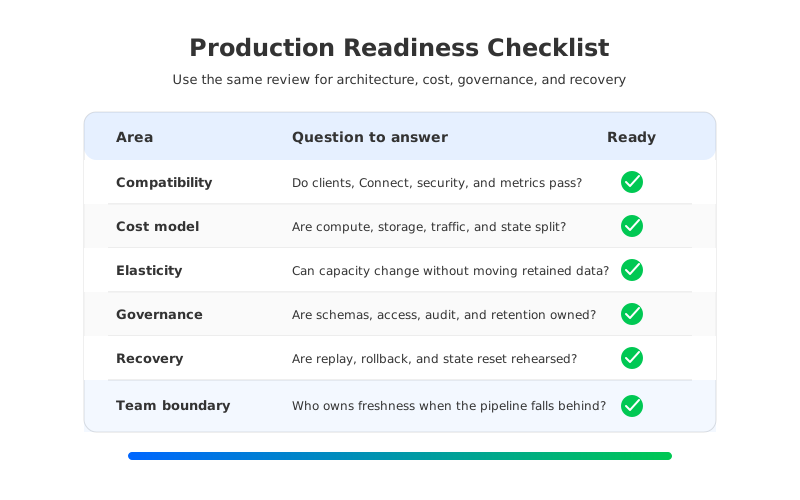
Use this checklist before standardizing the architecture:
- Compatibility. Prove that producers, consumers, Kafka Connect, stream processors, security settings, transactions where used, and monitoring integrations work with representative traffic.
- Cost model. Split broker compute, broker storage, cross-zone traffic, connector workers, stream-processing state, object storage, and downstream query cost into separate lines.
- Elasticity. Check whether scaling compute requires moving retained data, reassigning large partitions, or waiting for broker-local storage to catch up.
- Governance. Define schema ownership, topic naming, access control, encryption, audit logging, retention policy, and data classification as part of the pipeline design.
- Recovery. Run failure drills for processor rollback, connector restart, offset reset, bad-record quarantine, broker replacement, and regional dependency loss.
- Team boundary. Decide which team owns the stream, the processing job, the sink, the analytical table, and the on-call path when freshness degrades.
The cost line deserves special attention because streaming analytics often looks inexpensive during early adoption. A small topic, a few consumers, and one connector are easy to justify. The picture changes when the pipeline becomes a shared platform: multiple derived topics, longer retention, wider consumer fanout, repeated backfills, and multi-zone durability can make the streaming layer one of the largest hidden costs in the analytics estate. A clean evaluation model does not hide those costs under "Kafka operations."
The same checklist also prevents overcorrection. Not every workload needs a low-latency stream processor or long topic retention. Some outputs can remain batch because the business does not need freshness. Some streams can retain only a short window because the authoritative replay source lives elsewhere. The architectural mistake is not using batch; it is leaving batch blind spots in a system that stakeholders believe is real time.
5How AutoMQ changes the operating model
Once the evaluation reaches storage coupling, the architectural requirement becomes sharper: keep Kafka protocol semantics and ecosystem compatibility, but reduce the dependence of replay, scaling, and recovery on broker-local disks. That is where AutoMQ becomes relevant as a Kafka-compatible cloud-native streaming platform built around Shared Storage architecture. AutoMQ preserves the Kafka API surface while moving durable stream data into S3Stream, WAL storage, and object storage so brokers can operate more like stateless compute nodes.
This distinction matters for streaming analytics because replay is not an edge case. Replay is how teams correct transformations, regenerate derived topics, rebuild analytical tables, and recover from downstream mistakes. In a broker-local model, retained history is tied to the capacity and movement of broker disks. In a shared-storage model, durable data lives in an object-storage-backed layer, while brokers focus on request handling, partition leadership, caching, and scheduling.
That does not make pipeline design automatic. AutoMQ still needs the same discipline around schema policy, connector behavior, stream-processing state, access control, and observability. The change is in the operating model underneath those decisions. Longer replay windows are less likely to become a broker-local disk project. Broker lifecycle events are less likely to require wholesale log movement. Scaling decisions can focus more on traffic and compute load instead of dragging retained data behind every capacity change.
AutoMQ's Table Topic capability also fits a common analytics pattern: teams want event streams to become queryable lakehouse data without building fragile export paths for every topic. The practical value is not that every stream should bypass processing or governance. It is that the platform can treat streaming and analytical storage as part of one architecture review rather than as disconnected systems joined by a brittle connector.
6A practical migration and readiness path
The safest path is to select one representative analytics pipeline and make the hidden contracts visible. Choose a topic that has real consumers, a real freshness expectation, and a known replay story. Document the producer contract, schema policy, consumer groups, stream-processing job, connector or table destination, retention window, backfill process, and rollback criteria. Then run the same workload through the target Kafka-compatible architecture and compare behavior under normal traffic and failure drills.
A readiness scorecard keeps the proof from turning into a benchmark theater:
| Readiness signal | Healthy answer | Warning sign |
|---|---|---|
| Freshness SLO | Defined by downstream users and measured end to end | Measured only as broker throughput |
| Replay design | Offsets, state reset, duplicates, and output replacement are rehearsed | Replay depends on an engineer remembering manual steps |
| Storage model | Retention growth does not force proportional broker-local expansion | Every extra replay day becomes a disk purchase |
| Processing state | Checkpoints, state growth, and rollback are observable | State recovery is tested only during incidents |
| Migration risk | Clients, connectors, security, and observability are validated together | Compatibility is assumed from protocol claims alone |
This scorecard is also a buying guide. Managed services, self-managed Kafka, Kafka-compatible shared-storage systems, stream processors, and connector catalogs solve different parts of the problem. The strongest architecture makes the boundaries explicit: what Kafka-compatible storage guarantees, what the processing engine owns, what the connector owns, and what the analytics platform owns after data lands.
7CTA
If your search for streaming analytics pipeline kafka started with batch dashboards falling behind, do not stop at a cleaner data-flow diagram. Trace the replay path, the storage model, the connector boundary, and the team that owns freshness when something breaks. To evaluate how a Kafka-compatible shared-storage architecture changes those constraints, start a hands-on review with AutoMQ: open the AutoMQ console.
8References
- Apache Kafka Documentation, Kafka Connect: https://kafka.apache.org/documentation/#connect
- Apache Kafka Documentation, consumers and consumer groups: https://kafka.apache.org/documentation/#intro_consumers
- Apache Kafka Streams documentation: https://kafka.apache.org/documentation/streams/
- Apache Kafka KIP-405, Tiered Storage: https://cwiki.apache.org/confluence/display/KAFKA/KIP-405%3A+Kafka+Tiered+Storage
- Apache Flink Documentation, Stateful Stream Processing: https://nightlies.apache.org/flink/flink-docs-stable/docs/concepts/stateful-stream-processing/
- AutoMQ Docs, Architecture overview: https://docs.automq.com/automq/architecture/overview?utm_source=blog&utm_medium=reference&utm_campaign=aivk-0070
- AutoMQ Docs, Compatibility with Apache Kafka: https://docs.automq.com/automq/what-is-automq/compatibility-with-apache-kafka?utm_source=blog&utm_medium=reference&utm_campaign=aivk-0070
- AutoMQ Docs, Table Topic overview: https://docs.automq.com/automq/table-topic/overview?utm_source=blog&utm_medium=reference&utm_campaign=aivk-0070
9FAQ
9.1Is a streaming analytics pipeline the same as replacing batch ETL with Kafka?
No. Kafka can provide a durable event stream for low-latency processing, replay, and fanout, but batch systems still handle many historical and analytical workloads well. The goal is to remove blind spots where stakeholders expect fresh data but the architecture still depends on delayed batch recovery.
9.2Where should stream processing sit in a Kafka analytics architecture?
Stream processing should sit where the pipeline needs enrichment, joins, deduplication, windows, privacy filtering, or derived events before data reaches dashboards or analytical storage. If the pipeline only needs raw event export, a connector may be enough, but replay and schema policy still need to be designed.
9.3What is the biggest production risk in Kafka streaming analytics?
The biggest risk is usually replay without a plan. Teams discover a bad transformation, schema error, or connector failure, then find that retention, offsets, state checkpoints, and duplicate handling were never tested together. A production design should make replay a routine operation.
9.4How does AutoMQ fit into a streaming analytics pipeline?
AutoMQ fits under the processing and connector layers as a Kafka-compatible streaming platform. Its Shared Storage architecture and stateless brokers reduce the coupling between retained event history and broker-local disks, which is useful when analytics pipelines need elastic capacity, longer replay windows, and clearer recovery behavior.


