
Table of Contents
Table of Contents
A search for "StreamNative Kafka" usually means one of two things. Some teams are asking whether StreamNative, historically associated with Apache Pulsar, now offers a Kafka path they can evaluate without rewriting applications. Others are already looking at StreamNative Ursa and want to know how its Kafka-facing options compare with running Apache Kafka directly or choosing a Kafka-compatible shared-storage platform such as AutoMQ.
That distinction matters because "Kafka-compatible" is not a single checkbox. A platform can accept Kafka clients and still differ in administration APIs, ACL semantics, topic configuration, storage behavior, billing units, migration tooling, and the operational model behind the endpoint. For architects and SREs, the real question is not whether a producer can send a test message. The question is whether your existing Kafka estate can move without turning every surrounding tool into a side project.
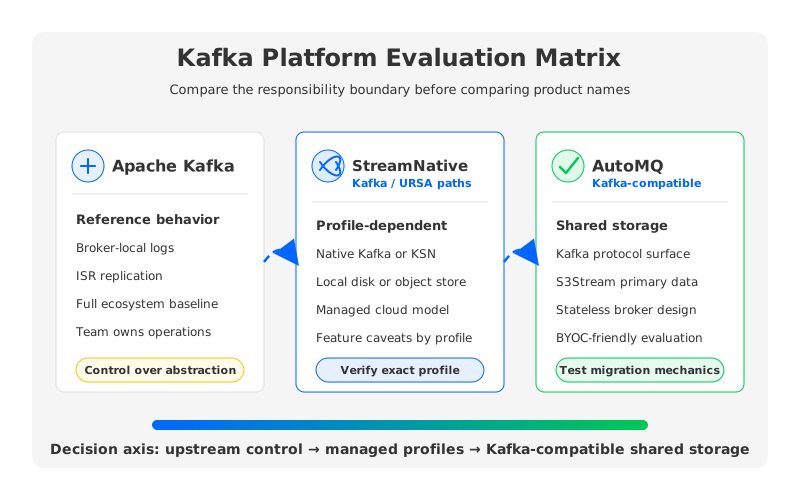
StreamNative's current documentation separates several ideas that buyers sometimes collapse into one phrase. StreamNative Cloud supports Kafka clients, documents Kafka compatibility for Pulsar-backed clusters, and describes Kafka Clusters powered by the URSA engine. URSA can expose latency-optimized paths with disk-based WALs or cost-optimized profiles with object storage and different feature caveats. Apache Kafka is the upstream broker and ecosystem standard. AutoMQ keeps the Kafka protocol and ecosystem model but replaces the broker-local storage layer with S3Stream shared storage.
1What Is StreamNative Kafka?
Kafka teams now encounter StreamNative through Kafka clients, Kafka-compatible endpoints, and URSA-backed Kafka Clusters. In StreamNative's documentation, Kafka client compatibility is described for StreamNative Cloud with support for Kafka client versions 0.9 and later, while also listing exceptions such as unsupported Kafka Admin APIs for managing SASL users and Kafka ACLs in the Pulsar-backed compatibility path.
The URSA documentation adds another layer. It says every StreamNative Cloud cluster runs on URSA, but the selected profile determines the WAL, metadata store, and exposed protocols. Latency-optimized Kafka uses KRaft and local disks. Cost-optimized Kafka uses object storage and Oxia, exposes native Kafka, and carries caveats for Kafka transactions and topic compaction.
That is a lot of nuance for a two-word search query. A practical buyer should translate "StreamNative Kafka" into a precise evaluation question: am I evaluating a native Kafka Cluster on StreamNative Cloud, a Pulsar cluster with Kafka protocol compatibility, or an URSA cost-optimized profile with object-storage economics? Each path changes the risk model.
2Compatibility Questions Kafka Teams Should Ask
Kafka compatibility starts with clients, but it does not end there. The official Apache Kafka project defines a broad ecosystem around producers, consumers, Kafka Streams, Kafka Connect, Admin APIs, security, observability, and operational commands. A production platform has to preserve enough of that surface area for the workload and the people operating it.
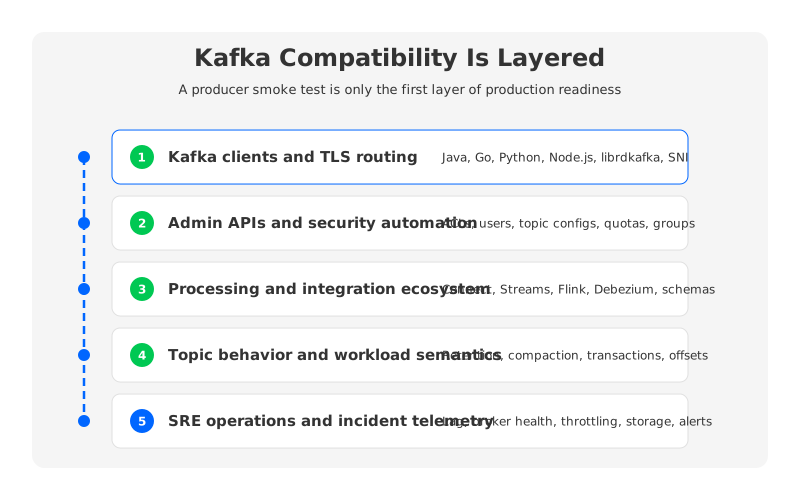
The fastest way to avoid surprises is to test the compatibility surface in layers:
- Client protocol and TLS behavior. StreamNative Cloud documents TLS SNI requirements for Kafka protocol connections on port 9093. That is a normal cloud routing constraint, but it still belongs in the pilot because proxies and older client stacks can behave differently from a direct broker connection.
- Admin and security APIs. If your automation manages Kafka ACLs, SASL users, topic configs, quotas, or consumer groups through Kafka Admin APIs, validate those calls directly. StreamNative documents specific unsupported Kafka features for its Pulsar-based compatibility path.
- Data processing ecosystem. Kafka Streams, Kafka Connect, Debezium, Flink, schema registry usage, and UI tools can depend on subtle metadata and offset semantics.
- Topic-level behavior. Retention, compaction, transactions, partition count changes, and rebalancing behavior should be tested against the exact cluster profile, because feature caveats differ between latency-optimized and cost-optimized architectures.
- Operational telemetry. Your SRE team needs the same mental model it uses during incidents: lag, broker health, partition placement, throttling, storage pressure, and network bottlenecks.
Apache Kafka still has a structural advantage: it is the reference implementation and the compatibility target. The tradeoff is the operational burden of broker-local logs, partition movement, replication, and capacity planning. A managed or re-architected platform earns its place only if it reduces that burden without creating a larger compatibility bill.
3Architecture and Operations Comparison
Apache Kafka's traditional architecture binds compute and storage inside brokers. Each broker owns local log segments for its partitions, and Kafka's replication model keeps durability through ISR replicas across brokers. This model is mature and widely understood. It is also why scaling, partition reassignment, broker replacement, and cross-AZ traffic become operationally expensive in cloud environments.
StreamNative's Kafka-facing story depends on which option you mean. A latency-optimized Kafka Cluster maps more closely to native Apache Kafka, using KRaft and local disks. The cost-optimized URSA profile moves toward object storage, stateless or leaderless broker behavior, and reduced inter-AZ replication traffic, with different feature availability. A Pulsar cluster with Kafka protocol compatibility can serve Kafka clients, but the control plane and storage semantics are not the same as upstream Kafka.
AutoMQ enters the comparison from a narrower but very deliberate angle. It is a Kafka-compatible streaming platform that keeps Kafka's protocol and computing layer while replacing the broker-local log storage layer with S3Stream shared storage. Data is durably written through a WAL path and uploaded to object storage, while brokers become much closer to stateless compute. That does not make every migration automatic, but it changes the operational bottleneck: scaling becomes less about moving large local logs between brokers and more about redistributing compute responsibility.
| Dimension | Apache Kafka | StreamNative Kafka / URSA | AutoMQ |
|---|---|---|---|
| Primary fit | Teams that want upstream Kafka control and can operate it well | Teams evaluating StreamNative Cloud, Pulsar/Kafka coexistence, or URSA profiles | Kafka teams that want Kafka compatibility with shared-storage operations |
| Storage model | Broker-local logs with replication | Profile-dependent: local disk, BookKeeper, or object storage | S3Stream shared storage backed by object storage and WAL |
| Compatibility model | Reference Kafka behavior | Native Kafka clusters or Kafka-compatible Pulsar paths, depending on profile | Kafka protocol and ecosystem compatibility with storage-layer changes |
| Operational burden | Broker sizing, disk, reassignment, replication, upgrades | Managed service plus profile-specific caveats and control-plane model | Broker compute scaling, object storage, WAL choice, migration validation |
| Main evaluation risk | Cloud cost and operational toil | Exact feature/API support for the selected profile | Validating workload fit, latency target, and migration mechanics |
The interesting comparison is which responsibility boundary you want. Apache Kafka puts more responsibility on your platform team. StreamNative moves much of the operation into a managed cloud model, with URSA offering multiple storage profiles. AutoMQ keeps the Kafka compatibility goal but uses object storage as the primary durability layer, which is attractive when your biggest pain is storage-heavy Kafka operations.
4Pricing and Cost Model Considerations
Pricing pages rarely tell the whole story because Kafka cost follows workload shape. A low-throughput cluster with long retention is mostly a storage problem. A high-fanout workload is often an egress problem. A spiky ingestion workload exposes whether the platform bills on reserved capacity, actual throughput, broker instances, storage units, or cloud infrastructure in your own account.
StreamNative's billing documentation describes several charging models. Serverless uses Elastic Throughput Units, Dedicated Kafka uses Reserved Throughput Units during public preview, Dedicated Pulsar uses Compute Units and Storage Units, and BYOC or BYOC Pro clusters are charged by Elastic Throughput Units based on actual throughput usage. It also states that usage is billed at hourly intervals and that different cluster types use different capacity planning abstractions.
For a Kafka team, that means the StreamNative Kafka pricing question should be broken into workload variables rather than treated as a flat price lookup:
- Sustained ingress and egress in MBps or MiB/s, with peak-to-average ratio.
- Number of data entries per second, especially when client batching is weak.
- Retention window and total stored data, including replay requirements.
- Whether BYOC infrastructure costs, object storage, private networking, support, and marketplace fees are included in the estimate.
- Feature requirements such as transactions, compaction, private networking, and geo-replication, because those can determine which profile or deployment model is eligible.
AutoMQ has a different cost narrative. Its shared-storage design is meant to reduce broker-local storage and data movement required for Kafka durability and scaling. That can matter when replicated disks, cross-AZ traffic, and over-provisioned capacity dominate the bill. The right comparison should still use your workload numbers rather than generic savings claims.
5Migration Risk and Rollout Plan
Migration risk is where platform comparisons become real. A vendor can claim Kafka compatibility, but production systems expose compatibility through one connector plugin, one ACL script, one lag alert, one consumer group reset command, or one emergency rollback path. The pilot should break assumptions early.
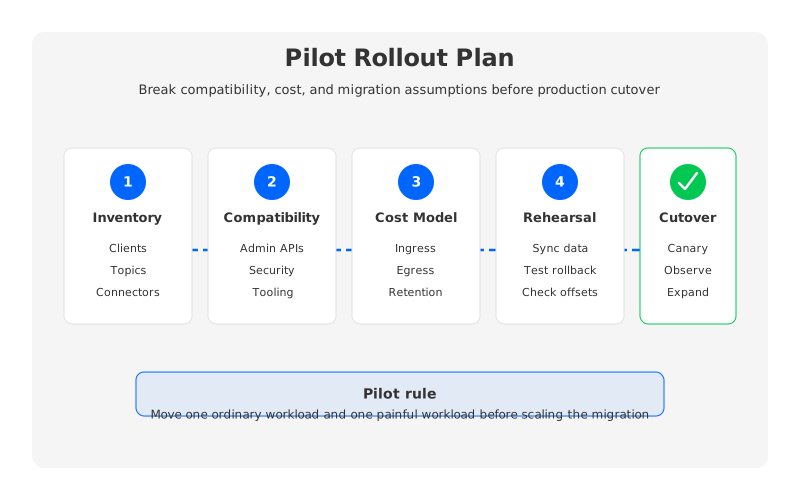
Start with a workload inventory instead of a cluster inventory. List producers, consumers, connectors, schemas, topic configs, ACL patterns, retention settings, compaction use, transactions, consumer group behavior, and monitoring dependencies. Then classify each workload into canary candidates, compatibility-sensitive systems, and systems that should wait.
The second step is a protocol and tooling test. Run your real client libraries, not only a sample Java producer. Test Kafka CLI, AdminClient calls, schema workflows, Connect tasks, rebalances, offset resets, lag dashboards, and failure scenarios against the exact profile and deployment model you would operate.
The third step is data migration rehearsal. AutoMQ's open source migration guidance recommends MirrorMaker2 for moving from Apache Kafka or other Kafka distributions, while its commercial editions document Kafka Linking for byte-to-byte synchronization and zero-downtime migration scenarios. MirrorMaker2 is useful, but it can introduce duplicate consumption or ordering caveats during cutover because synchronization is asynchronous. That is not a reason to avoid migration. It is a reason to rehearse rollback before the cutover window, not during it.
6Where AutoMQ Fits
AutoMQ fits best when the team wants Kafka compatibility as the main constraint and cloud-native storage as the architectural change. It is not a Pulsar replacement in disguise, and it is not asking teams to treat Kafka as only a wire protocol. The design goal is more specific: keep the Kafka ecosystem familiar while moving the storage responsibility away from broker-local disks and into shared object storage.
That makes AutoMQ relevant for teams that have standardized on Kafka clients, Kafka Connect, Flink integrations, Prometheus/Grafana dashboards, and Kafka runbooks, but are tired of local-log Kafka in the cloud. Partition reassignment, catch-up reads, broker replacement, retention-heavy topics, and multi-AZ replication can become expensive or slow when storage and compute are locked together. Shared storage does not remove every operational problem, but it changes the shape of the hard ones.
StreamNative deserves a fair evaluation when you want a managed service that spans Pulsar, Kafka-facing access, lakehouse integration, and URSA profiles. Apache Kafka remains the baseline when upstream behavior and maximum ecosystem familiarity matter more than operational abstraction. AutoMQ belongs in the shortlist when the main goal is Kafka-compatible shared storage with BYOC-friendly deployment and object-storage economics.
The useful next step is not a vendor beauty contest. Pick two representative workloads: one ordinary, one painful. Run the compatibility checklist, model the cost drivers, and rehearse migration and rollback. If the painful workload becomes easier without breaking the ordinary one, you have learned something no comparison table can tell you.
For teams exploring a Kafka-compatible shared-storage path, the AutoMQ GitHub repository is a practical place to inspect the architecture and run a controlled test.
7FAQ
7.1Is StreamNative Kafka the same as Apache Kafka?
Not always. StreamNative documentation describes native Kafka Clusters powered by URSA as well as Pulsar clusters that can expose Kafka protocol compatibility. Apache Kafka is the upstream reference implementation. You should verify which StreamNative cluster type and profile you are evaluating before assuming identical behavior.
7.2Does StreamNative support Kafka clients?
Yes. StreamNative Cloud documents compatibility with Kafka clients from Kafka 0.9 and later, with listed exceptions and TLS SNI requirements. Production teams should still test their exact client versions, proxies, and security setup.
7.3What is StreamNative Ursa?
URSA is StreamNative's unified data streaming engine. It supports different WAL implementations, metadata stores, and protocol surfaces depending on the cluster profile. In the documentation, URSA can back Pulsar and Kafka clusters, including latency-optimized and cost-optimized profiles.
7.4How should I evaluate StreamNative Kafka pricing?
Start with the billing model for the exact cluster type. StreamNative documents ETU-based billing for serverless and BYOC models, RTU-based billing for Dedicated Kafka during public preview, and CU/SU billing for Dedicated Pulsar. Then add your workload's ingress, egress, data entries, retention, object storage, networking, support, and cloud infrastructure costs.
7.5When is Apache Kafka still the safer choice?
Apache Kafka is often the safer baseline when you need upstream behavior, deep ecosystem familiarity, and full control over broker configuration. The tradeoff is that your team owns more of the operational work around disks, replication, scaling, upgrades, and cloud cost optimization.
7.6Where does AutoMQ differ from StreamNative Kafka?
AutoMQ focuses on Kafka compatibility with a shared-storage architecture built around S3Stream and object storage. StreamNative's Kafka-facing options sit inside the broader StreamNative Cloud and URSA platform, which spans Pulsar, Kafka, multiple profiles, and lakehouse integration. The better fit depends on whether your priority is broad managed streaming capabilities or a Kafka-compatible storage architecture change.
7.7Can I migrate from Apache Kafka to AutoMQ or StreamNative without downtime?
Downtime depends on the workload, tooling, and cutover design. AutoMQ documentation describes MirrorMaker2 for open source migrations and Kafka Linking in commercial editions for byte-to-byte synchronization and zero-downtime migration scenarios. For any platform, test offsets, duplicate handling, rollback, and consumer behavior before moving production traffic.


