
Table of Contents
Table of Contents
Pricing searches for StreamNative Ursa usually do not happen at the start of a streaming-platform evaluation. They happen when a team already knows why Ursa is interesting: Kafka and Pulsar compatibility, lakehouse-native storage, fewer disk-heavy operational concerns, and a promise of lower infrastructure waste for cloud workloads. At that point, the hard question is no longer "what is Ursa?" It is "what will this cost for our workload?"
That question is harder than a single pricing page can answer. Stream processing bills are shaped by throughput, read fanout, data retention, region, cross-zone traffic, support tier, minimum commitments, and the engineering time needed to validate compatibility. A quote that looks attractive for a steady log-ingestion workload can behave differently for bursty analytics pipelines, multi-tenant SaaS telemetry, or a Kafka estate with hundreds of connectors and strict rollback requirements.
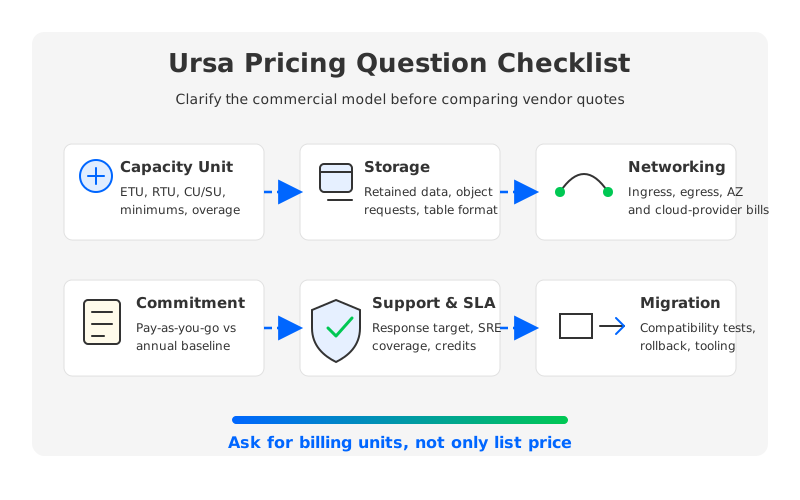
The goal is not to guess StreamNative's commercial terms. The right goal is to normalize the quote before you compare it with Confluent, Amazon MSK, self-managed Kafka, or a Kafka-compatible shared-storage system such as AutoMQ. If every vendor sees a different workload model, every quote will tell a different story.
1Why Ursa Pricing Depends on Workload Shape
StreamNative positions Ursa as a lakehouse-native streaming engine for Kafka and Pulsar, with stateless brokers, object-storage-backed design, and stream-to-table integration. That architecture changes the cost conversation because traditional Kafka pricing pressure often comes from broker-local disks, replica traffic, over-provisioned capacity, and operational labor around scaling or recovery.
The procurement implication is simple: you need to price the workload, not the brand name. A workload with 20 MiB/s of steady ingest, 1x read fanout, and 7 days of retention stresses the platform differently from a workload with the same ingest, 8x read fanout, and 90 days of retention. Even before vendor margins enter the discussion, the second workload has more outbound data, more retained data, more metadata activity, and more operational risk during migration.
At minimum, ask for a quote model that separates write throughput, read fanout, retention, region, availability model, and message rate. These inputs affect different billing dimensions: stored data, outbound data, capacity planning, request pressure, and recovery expectations.
StreamNative's public billing documentation already makes this point indirectly. Different cluster types use different charging units: Elastic Throughput Units for elastic models, Reserved Throughput Units for dedicated Kafka capacity, and Compute Units plus Storage Units for some Pulsar models. That means an apples-to-apples comparison starts by converting your workload into the vendor's billing unit, then checking what the unit includes and what it excludes.
2Pricing Questions to Ask StreamNative
The most useful StreamNative Ursa pricing discussion is not "what is the monthly price?" It is a structured quote review. You want to know how the number changes when traffic spikes, retention grows, a new consumer group doubles read volume, or security requires private connectivity.
| Question area | What to ask | Why it matters |
|---|---|---|
| Billing unit | Which unit applies to this cluster: ETU, RTU, CU/SU, or another quote unit? | A usage-based model and a reserved-capacity model behave differently under bursty traffic. |
| Minimums | What is the minimum hourly, monthly, or annual commitment? | Idle dev clusters and low-throughput production clusters can be shaped by minimum charges. |
| Ingress and egress | Are data-in and data-out billed separately? Are BYOC data transfers billed by StreamNative or by the cloud provider? | Read-heavy workloads can look small on write throughput but large on egress. |
| Storage | Is stored data billed by pre-replication volume, retained bytes, object storage usage, or another measure? | Retention and compaction policy change the long-term bill. |
| Networking | Who pays for inter-AZ, internet egress, private link, or cross-region transfer? | Cloud networking often hides outside the platform line item. |
| Support | Which support tier is included, and what response targets apply? | Production streaming systems need operational coverage, not only software access. |
| Scaling | Does scaling require reconfiguration, and are whole-number capacity steps required? | Coarse capacity steps can create over-provisioning. |
| Preview terms | Are any Kafka service pricing dimensions in preview or subject to change? | Procurement needs to know whether the quote is stable for the contract period. |
This table should become part of your vendor review packet. It is especially important when comparing Ursa with managed Kafka services because platform invoices rarely share the same responsibility boundary. One vendor may include infrastructure in the service fee. Another may bill the service fee separately while compute, storage, and network charges appear in your cloud account.
3Cost Drivers Beyond the Quote
The invoice is only one layer of streaming platform cost. For an architecture team, the bigger risk is choosing a platform based on a clean quote and then discovering that the real cost moved into migration, compatibility validation, or cloud infrastructure.
Compatibility deserves special attention. Ursa is marketed for Kafka and Pulsar workloads, but a Kafka platform migration is rarely limited to producers and consumers. Mature Kafka estates usually include Kafka Connect, Kafka Streams, Schema Registry, ACLs, quotas, observability dashboards, and incident runbooks. Even when client protocols are compatible, each surrounding workflow needs a test plan.
The hidden cost categories are usually migration engineering, ecosystem validation, operational ownership, cloud infrastructure, and contract flexibility. A committed-use discount can be valuable when demand is predictable, but it can hurt if the workload moves, shrinks, or changes shape.
These costs are not reasons to reject Ursa. They are reasons to ask for a workload-based comparison. StreamNative's own billing material distinguishes between elastic usage, reserved capacity, allocated resources, and cloud-provider-billed BYOC resources. That distinction is useful because it forces the buyer to separate platform service fees from infrastructure and operating-model responsibility.
4Build a Workload-Based Cost Model
Before you ask for a quote, build a one-page workload model that every vendor must use. The model does not need to be perfect. It needs to be explicit enough that the same assumptions drive every answer.
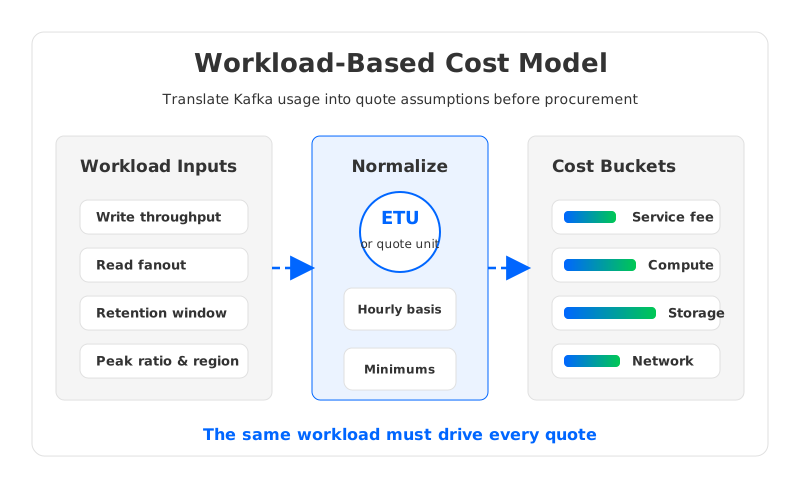
Start with the current Kafka estate if you have one. Pull average and peak write throughput, total read throughput, partition count, message rate, retained bytes, retention window, consumer group count, and region layout. If the workload is new, model expected launch traffic, 12-month target traffic, and a peak event. Procurement teams tend to like one number. Platform teams know the one number is usually the least honest version of the system.
Then map the workload into each vendor's model:
| Input | Why it belongs in the model | Quote check |
|---|---|---|
| Average write throughput | Drives retained volume and baseline processing | Is billing based on actual usage, reserved capacity, or allocated resources? |
| Peak write throughput | Drives autoscaling or reserved headroom | Are peaks billed hourly, rounded up, or capped by configured maximums? |
| Read fanout | Drives data-out volume and serving capacity | Is egress billed separately from ingress? |
| Retention hours | Drives storage and recovery expectations | Is storage priced by retained data, object storage, or service-managed retention? |
| Partition and message rate | Drives metadata, request, and broker pressure | Are there limits or unit conversions based on entries per second? |
| Availability target | Drives multi-AZ, failover, and support needs | Which SLA and support tier match the workload? |
This model also protects the technical team from an overly narrow comparison. A Kafka-compatible service can look cost-effective on ingest but become expensive under read fanout. A reserved-capacity model can look predictable but wasteful when traffic is spiky. A BYOC model can give stronger data control but push infrastructure charges into the customer's cloud bill.
5How to Compare Ursa with Kafka-Compatible Alternatives
Ursa sits in a broader category of cloud-native streaming architectures trying to reduce the cost and operational burden of traditional Kafka. Some options keep Kafka as the core system and add managed operations. Some replace more of the architecture. Some keep Kafka protocol compatibility while moving durable data away from broker-local disks and into object storage.
That last path is where AutoMQ naturally enters the evaluation. AutoMQ is a Kafka-compatible cloud-native streaming platform that uses object storage as the durable storage layer and stateless brokers for compute. For pricing work, the relevant point is not a generic "better than Kafka" claim. The relevant point is that AutoMQ exposes a workload-based pricing calculator where buyers can vary write throughput, read fanout, retention, AZ layout, cloud provider, and cluster tier, then inspect the split between cloud infrastructure and managed service fee.
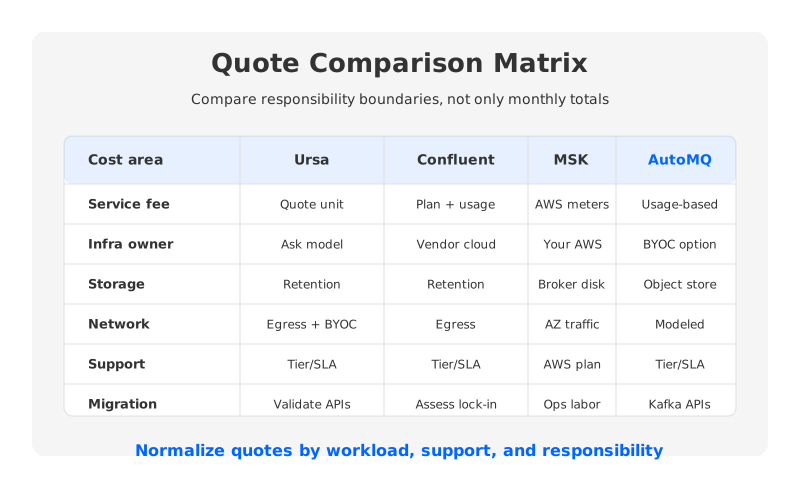
This kind of model helps when you are reviewing a StreamNative Ursa quote because it gives you a second architecture to test against the same workload. If Ursa is being evaluated for Kafka compatibility and storage efficiency, compare it with a Kafka-compatible shared-storage system using the same throughput, retention, and networking assumptions. If Ursa is being evaluated for lakehouse integration, include the data-pipeline and table-format benefits in the decision, not only the streaming bill.
The comparison should include at least four paths:
- StreamNative Ursa. Evaluate the applicable cluster type, billing unit, storage architecture, lakehouse integration, support tier, and whether the quote is usage-based or reserved.
- Confluent Cloud or another managed Kafka service. Evaluate service fees, network egress, ecosystem value, operational convenience, and any proprietary features you depend on.
- Amazon MSK or self-managed Kafka. Evaluate broker instances, storage, inter-AZ traffic, operational labor, upgrade ownership, and recovery processes.
- AutoMQ. Evaluate Kafka protocol compatibility, object-storage-backed architecture, BYOC fit, cloud infrastructure split, and usage-based managed service fees.
Do not force every option into a single "monthly total" too early. A CTO cares about architecture risk. An SRE cares about incidents and recovery. A FinOps lead cares about variable cost and commitment terms. A good pricing comparison lets each stakeholder see the cost dimension they actually own.
6Where AutoMQ Fits in a Cost Evaluation
AutoMQ is most relevant when the buyer wants Kafka compatibility but does not want traditional Kafka's broker-local storage economics. In classic Kafka, brokers handle both compute and durable local storage, so scaling and recovery often involve data movement, replica placement, disk capacity planning, and cross-AZ replication. In a cloud bill, those mechanics show up as larger storage footprints, network transfer, and operational headroom.
AutoMQ changes that cost model by separating compute from durable storage. Brokers become more stateless, while object storage carries the durable data layer. That does not make cost analysis disappear. It changes what you model: object storage capacity, object storage requests, broker compute, network paths, and the managed service fee. The advantage for procurement is that the assumptions can be made explicit, which is exactly what a StreamNative Ursa pricing evaluation needs as well.
There is also a migration angle. If your current estate is Kafka-heavy, the lower-risk alternative is often one that preserves Kafka clients and ecosystem workflows while changing the storage architecture underneath. Ursa may be attractive for teams that want StreamNative's lakehouse-native direction and Kafka/Pulsar convergence. AutoMQ may be attractive for teams that want a Kafka-compatible shared-storage architecture with a transparent workload calculator and BYOC-style infrastructure control.
7Vendor Pricing Checklist
Use this checklist before signing a StreamNative Ursa quote or any Kafka-compatible streaming contract.
| Area | Procurement question |
|---|---|
| Workload assumptions | Does the quote include average throughput, peak throughput, read fanout, retention, partition count, and message rate? |
| Billing unit | Which exact unit is used, and how is it calculated from the workload? |
| Minimum charge | What is billed when the cluster is idle or below baseline? |
| Scaling behavior | Are capacity changes automatic, manual, rounded, or contract-limited? |
| Storage | Who pays for retained data, object storage requests, replication overhead, and compaction effects? |
| Network | Who pays for ingress, egress, private connectivity, cross-AZ traffic, and cross-region replication? |
| Support | Which support tier, response target, escalation path, and SLA are included? |
| Migration | Is migration assistance included, and what is out of scope? |
| Compatibility | Which Kafka APIs, clients, connectors, and operational tools are validated for your workload? |
| Contract terms | What changes under annual commitment, marketplace billing, private offer, or BYOC? |
The best pricing conversation is boring in the right way: the workload is documented, the assumptions are visible, the quote maps to those assumptions, and every excluded cost has an owner. If your team is already comparing Ursa with Kafka-compatible alternatives, run the same workload through AutoMQ's pricing calculator and ask each vendor to explain the gaps. That creates a cleaner technical and commercial decision than comparing headline prices.
8FAQ
8.1Is StreamNative Ursa pricing publicly listed?
StreamNative publishes billing documentation for StreamNative Cloud, including charging models and units for different cluster types. For a production Ursa purchase, buyers should still confirm the applicable service, deployment model, support tier, and contract terms directly with StreamNative because public documentation may not cover every private offer or enterprise configuration.
8.2What is the most important cost driver for Ursa?
There is no single universal driver. Throughput, read fanout, retention, region, and deployment model all matter. A write-heavy workload with short retention and limited fanout has a different cost profile from a read-heavy workload with long retention and multiple downstream consumers.
8.3How should I compare Ursa pricing with Kafka pricing?
Start from the same workload model. Then compare service fees, compute, storage, network transfer, support, migration engineering, and operational ownership. Traditional Kafka, managed Kafka, Ursa, and AutoMQ can place those costs in different parts of the bill.
8.4Does Kafka compatibility remove migration cost?
No. Kafka compatibility can reduce application rewrite risk, but it does not automatically validate connectors, stream-processing jobs, security rules, observability dashboards, offset handling, or rollback processes. Treat compatibility validation as part of the pricing review.
8.5When should AutoMQ be part of the comparison?
Include AutoMQ when your team wants Kafka protocol compatibility, cloud-native storage economics, and a workload-based way to model costs. It is especially relevant for teams evaluating shared object storage and stateless brokers as an alternative to broker-local disk architectures.


