
Table of Contents
Table of Contents
Someone searching for large topic retention budget kafka is usually past the beginner stage. The cluster works, applications depend on it, and the uncomfortable question is no longer whether Kafka can retain more data. It is whether the platform should keep paying for that retention through broker-local storage, replica movement, headroom, and operational time.
Large topic retention changes the nature of a Kafka budget because the cost is not a single line item. A topic that looks harmless at seven days can become a platform planning problem at 30, 90, or 180 days. Storage grows, recovery windows stretch, broker replacement slows down, and routine rebalance work starts competing with production traffic.
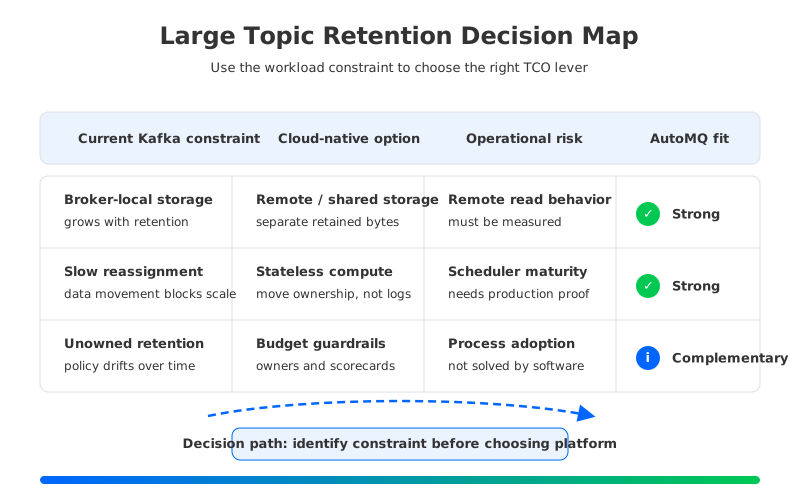
The useful question is not "How do we make Kafka storage lower cost?" It is "Which parts of the retention budget are caused by the workload, and which parts are caused by the storage model?" Once the team separates those two categories, the answer becomes less emotional. Some costs are the price of keeping data available. Others are artifacts of running a Shared Nothing architecture in a cloud environment where storage, compute, and network are priced separately.
1Why Teams Search for large topic retention budget kafka
Retention pressure usually arrives through a practical request, not an architecture review. Security wants a longer replay window. Analytics teams want to rebuild derived state from the original stream. AI and data lake teams want Kafka topics to act as a reliable landing zone before data is transformed. Product teams want safer rollback after bad downstream releases. Each request sounds reasonable on its own, and Kafka's retention settings make the first change look small.
Retention is multiplicative. A topic's retained footprint is shaped by write throughput, retention time, key distribution, compaction behavior, replication factor, compression ratio, partition count, and consumer replay patterns. A few high-throughput topics can dominate the budget even when the cluster contains hundreds of smaller topics. The budget owner sees aggregate broker storage; the platform owner sees the broker resize, partition reassignment, and longer recovery plan behind it.
Kafka has strong primitives for this workload. Topics, partitions, offsets, and Consumer groups provide a durable log with parallel consumption and replay, while transactions, idempotent Producers, Kafka Connect, and the client ecosystem support production integration. Those semantics are why teams want longer retention, so the checklist should preserve compatibility rather than turning cost control into an application rewrite.
That is the initial filter for any proposal: if the cost plan breaks client behavior, offset continuity, operational tooling, or recovery assumptions, it is not a cost plan. It is a migration project with hidden risk.
2The Production Constraint Behind the Problem
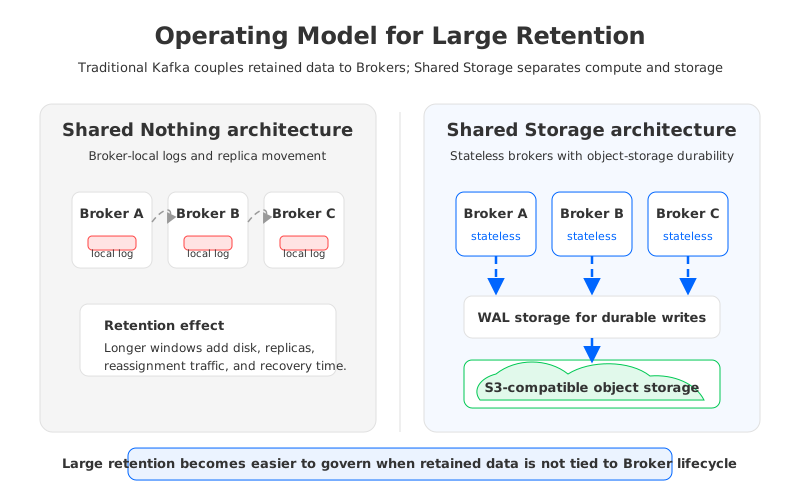
Traditional Kafka uses a Shared Nothing architecture. Each Broker owns local log segments, each Partition has replicas on different Brokers, and reliability comes from ISR (In-Sync Replicas) replication. The design is durable and familiar, but it ties retained data to Broker storage lifecycle.
That coupling creates a specific TCO pattern. When retention grows, Brokers need more local disk or cloud block storage. When Brokers are added, removed, resized, or replaced, Partition data often moves. When replication spans Availability Zones, write traffic can create inter-zone data transfer charges. When hot and cold reads share Broker resources, teams reserve extra headroom so catch-up reads do not damage tail latency.
For small retention windows, these costs are manageable because the working set stays close to the active workload. For large topics, retained history becomes a second workload inside the same Brokers. It changes recovery speed, spare-capacity targets, and confidence in elasticity.
The trap is treating retention as a storage number by itself. A production TCO model should separate at least five cost drivers:
- Primary retained data: the compressed bytes that must remain readable for each Topic.
- Replica overhead: additional copies used for durability and availability in a Shared Nothing architecture.
- Operational headroom: free disk, spare throughput, and spare instances reserved for rebalance, failures, and burst reads.
- Network movement: replication, reassignment, mirroring, cross-zone reads, and private connectivity charges.
- Human operations: capacity planning, partition movement, failure drills, migration windows, and incident response.
These categories matter because each architecture option reduces a different part of the budget. Tiered Storage may reduce local disk pressure, but it does not automatically make Brokers stateless. A managed Kafka service may reduce team effort while preserving similar storage and network economics. A Kafka-compatible platform with shared object storage changes a deeper assumption: retained data no longer has to live on the Broker that serves the request.
3Architecture Options and Trade-Offs
The most common response is to optimize the existing Kafka estate. Tighten topic-level retention.ms and retention.bytes, review compaction policy, delete unused topics, tune compression, and put ownership around retention changes. These steps are low risk and improve discipline even if the team later changes platforms.
The limitation is that tuning cannot fully remove the storage model. If retained data stays on Broker-local disks, the cluster still needs enough local capacity for the retained footprint, enough replicas for availability, and enough movement capacity for reassignment. You can reduce waste, but you cannot make a stateful Broker behave like a stateless compute node.
Apache Kafka Tiered Storage is another option to evaluate. KIP-405 introduced the ability to offload older log segments to remote storage while retaining the Kafka API model. For teams with large historical windows and strong Kafka operational maturity, this can help. The evaluation should still be specific: how much local storage remains, how remote fetch affects catch-up reads, how recovery works, which versions support the required features, and how the team will monitor the remote tier.
Managed Kafka platforms shift some operational responsibility to a provider. That can help when the bottleneck is staffing, upgrades, or day-two operations. The buyer still has to understand the pricing unit: storage, partitions, throughput, private networking, cross-zone movement, connectors, support, and data transfer may be billed differently.
The fourth option is a Kafka-compatible system built around Shared Storage architecture. Brokers focus on protocol handling, leadership, caching, and scheduling, while durable data lives in shared object storage. The key distinction is that compute capacity and retained storage capacity can be planned independently, changing elasticity, recovery, and large-retention budgeting.
Use the following matrix to keep the discussion grounded:
| Evaluation question | Existing Kafka tuning | Tiered Storage | Managed Kafka | Shared Storage architecture |
|---|---|---|---|---|
| Does it preserve Kafka clients and offsets? | Yes, if changes stay operational | Usually, with version and vendor checks | Usually, with provider-specific limits | Should be proven with compatibility tests |
| Does it reduce Broker-local retained data? | Partially | Yes for offloaded segments | Depends on service model | Yes, durable data is externalized |
| Does it make Brokers stateless? | No | Usually no | Depends on architecture | Yes, if storage is fully shared |
| Does it reduce data movement during scaling? | Limited | Limited to active/local data | Depends on provider | Strongly, because ownership can move without bulk log copy |
| What is the main risk? | Underestimating growth | Remote-read behavior and version maturity | Pricing opacity and lock-in | Migration readiness and operational fit |
The matrix is not meant to pick a universal winner. It forces the team to name the constraint. If the pain is governance, fix governance. If the pain is toil, a managed service may help. If retained data is binding compute, storage, and recovery into one expensive unit, the architecture conversation should move to shared storage.
4Evaluation Checklist for Platform Teams
A useful checklist starts with workload inventory. For each large Topic, record daily write volume, retained duration, compression ratio, Partition count, replication factor, compaction policy, peak catch-up read rate, and owner. If the team cannot identify the top cost-driving topics, no platform change will stay cost-effective for long.
Next, separate steady-state cost from change cost. Steady-state cost covers compute, storage, network, and support while the cluster is healthy. Change cost covers expansion, Broker replacement, upgrades, reassignment, disaster recovery drills, and migration windows. Long retention can look acceptable in steady state and become painful during change.
The third step is to test the failure path. A retention plan that works while all Brokers are healthy can still fail production review. Ask how long it takes to replace a Broker, how much data moves when a node is lost, how consumer catch-up behaves after an outage, and whether the platform can keep hot Producers and Consumers isolated from cold replay traffic.
Then evaluate governance. Topic owners should have budget accountability for retention changes. Retention policy belongs in application design, not post-bill cleanup. Compliance requirements should distinguish "must keep in Kafka-readable form" from "must archive somewhere." Treating them as the same can waste infrastructure.
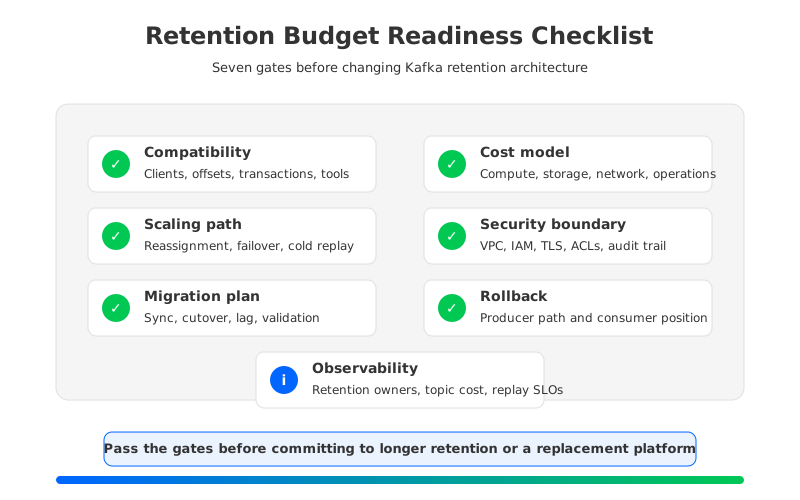
Finally, make migration risk explicit. Kafka-compatible does not mean "no validation needed." A serious readiness review should cover client versions, authentication, ACLs, TLS, quotas, transactions, idempotent Producers, Kafka Connect, Schema Registry, monitoring, consumer lag semantics, and rollback behavior. The cost target matters when the migration path protects the business.
The readiness scorecard below works well as a planning artifact because it gives finance and engineering a shared language:
5How AutoMQ Changes the Operating Model
If the checklist points to storage-model coupling as the root issue, AutoMQ is one Kafka-compatible architecture to evaluate. AutoMQ keeps Kafka protocol semantics while replacing broker-local log storage with S3Stream, a shared streaming storage layer built on object storage and WAL (Write-Ahead Log) storage. That matters because retained data is no longer planned as Broker-local capacity first.
In AutoMQ's Shared Storage architecture, durable data is written through WAL storage and uploaded to S3-compatible object storage. Brokers are stateless brokers for persistent log ownership: they handle Kafka requests, leadership, caching, and scheduling, while retained data lives in shared storage. When compute capacity changes, the platform can move Partition ownership and traffic without copying the full retained log between Broker disks.
This changes three TCO assumptions. Storage growth can follow retained bytes instead of Broker sizing boundaries. Compute can scale with active throughput instead of historical data volume. Failure recovery and balancing are less dominated by bulk data movement. The result is a different budget shape, where storage, compute, and operations are easier to reason about separately.
AutoMQ also changes the network discussion. In a traditional multi-AZ Kafka deployment, replication and some client paths can create inter-zone traffic. AutoMQ's S3-based shared storage design supports Zero cross-AZ traffic patterns for Kafka workloads when deployed and configured for that goal. For large retention budgets, cross-zone movement can become a recurring cost rather than a rare event.
The WAL choice still deserves review. AutoMQ Open Source uses S3 WAL with S3-compatible storage as both WAL and main storage. AutoMQ commercial editions can use other WAL storage options such as Regional EBS WAL or NFS WAL depending on the cloud environment and latency requirements. That choice belongs in the TCO model.
Migration is also part of the operating model. AutoMQ commercial editions provide Kafka Linking for byte-to-byte message synchronization and offset-consistent migration paths from Kafka-compatible sources. For large retained topics, the migration plan has to preserve consumer progress, Producer behavior, and rollback options while historical data is involved.
Evaluate AutoMQ by running the same checklist against your real workload. Pick the top retained topics by cost impact, model the current compute/storage/network split, define the replay window, and test representative clients and consumers. If retained history is forcing Broker overprovisioning or blocking scaling events, Shared Storage architecture is a way to remove that history from the compute lifecycle.
6FAQ
6.1Is large Kafka retention always a bad idea?
No. Long retention is valuable when teams need replay, auditability, recovery from downstream failures, or delayed processing. It becomes expensive when every retained byte also forces extra Broker-local storage, replicas, headroom, and operational movement.
6.2Should we use Tiered Storage before changing platforms?
It depends on the constraint. Tiered Storage can reduce local disk pressure for older data, and it is worth evaluating for teams that want to stay close to their existing Kafka operating model. If the main problem is that Brokers remain stateful and scaling still involves operational risk, evaluate Shared Storage architecture as well.
6.3What should FinOps ask the Kafka platform team?
Ask for the top retained topics by cost, the retention owner, the expected replay window, the replication and network assumptions, and the operational cost of Broker replacement or cluster expansion. A useful Kafka budget review includes incident and change costs alongside storage invoices.
6.4Does Kafka compatibility remove migration risk?
No. Compatibility reduces application rewrite risk, but teams still need to validate client versions, authentication, ACLs, transactions, idempotent Producers, Consumer group behavior, Kafka Connect integrations, monitoring, and rollback. Treat compatibility as a requirement to test, not a slogan.
6.5When does AutoMQ fit this problem?
AutoMQ fits when the retained data footprint is large enough that Broker-local storage, cross-AZ data movement, and slow reassignment are shaping platform decisions. Its Shared Storage architecture lets teams keep Kafka-compatible APIs while planning compute and retained storage independently.
7References
- Apache Kafka Documentation
- Apache Kafka KIP-405: Kafka Tiered Storage
- AutoMQ: Compatibility with Apache Kafka
- AutoMQ Architecture Overview
- AutoMQ S3Stream Shared Streaming Storage
- AutoMQ WAL Storage
- AutoMQ Zero Cross-AZ Traffic Overview
- AutoMQ Kafka Linking Overview
- AWS Amazon S3 Pricing
If large retained topics keep forcing every Kafka budget conversation back to Broker sizing, use the checklist against your workload and test whether separating compute from storage changes the decision. To evaluate AutoMQ BYOC or AutoMQ Software with your retention profile, start from the AutoMQ console path: talk to AutoMQ through the BYOC evaluation flow.


