
Table of Contents
Table of Contents
Searches for real time crm synchronization kafka usually start after a dashboard or revenue workflow has already exposed a timing gap. Sales wants account changes in the warehouse while the opportunity is still active. Support wants entitlement updates before a customer opens a ticket. Finance wants billing records to line up with the CRM state that produced them. The uncomfortable part is that the first prototype often works: a connector reads from a CRM API, a few topics carry change events, and downstream systems catch up during quiet hours.
Production changes the question. The team is no longer asking whether Kafka can move CRM events. Kafka can do that. The harder question is how much throughput the synchronization path can absorb without turning connector retries, Consumer group lag, broker disk pressure, schema drift, and cross-system replay into one incident. A useful plan treats CRM synchronization as an operating model, not a connector configuration.
That operating model has to answer three questions at the same time: what rate can the source and sink sustain, what failure window can the business tolerate, and what platform behavior appears when the answer changes during the day? If those questions stay separate, the architecture looks clean on paper and brittle in production.
1Why teams search for real time crm synchronization kafka
CRM synchronization is a messy streaming workload because the source of truth is business-stateful, API-limited, and full of high-value updates. A single account merge, territory change, contact update, or opportunity stage transition may trigger data lake ingestion, warehouse materialization, cache refresh, marketing automation, entitlement checks, and audit logging. The event volume may be modest compared with clickstream ingestion, but the operational tolerance is lower because stale CRM state can produce visible business errors.
Kafka is a natural center of gravity for this pattern. Kafka Connect provides a framework for moving data between Kafka and external systems, while Kafka's Consumer group model lets multiple consumers divide partitions for parallel processing. Offsets give each consumer a recoverable position in the log, and transactions can help applications coordinate writes where exactly-once processing is required. These primitives are the reason many data integration teams put Kafka between CRM, databases, warehouses, and application services.
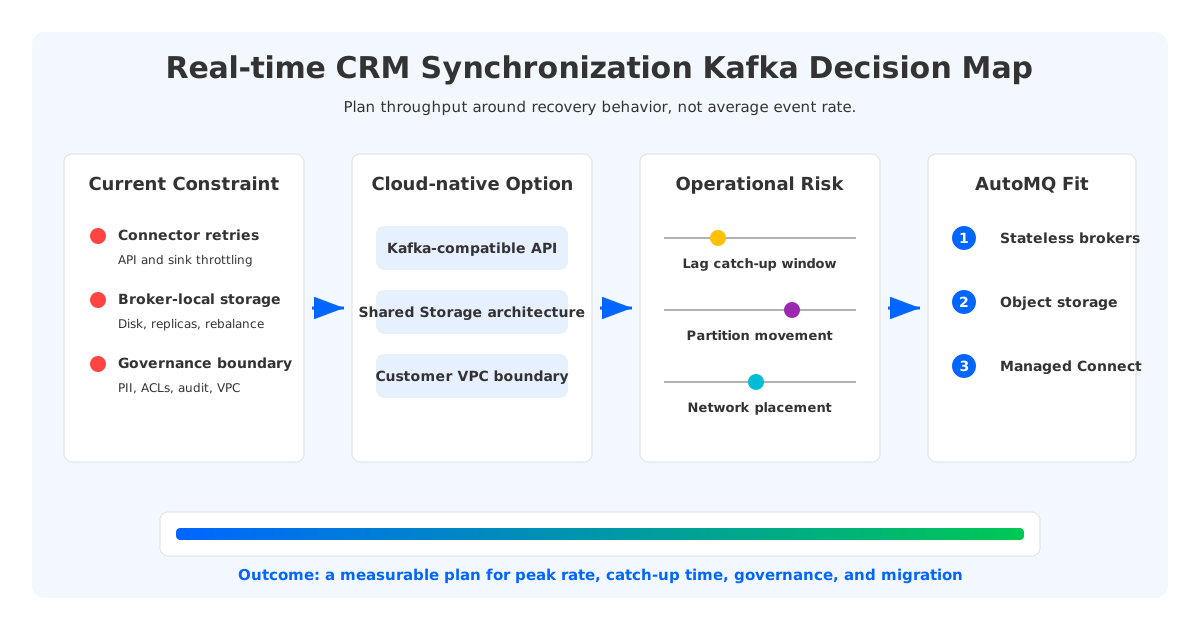
The planning mistake is to size the pipeline by average event rate. CRM workloads have uneven bursts: batch imports, sales operations cleanups, end-of-quarter updates, webhook retries, enrichment jobs, and downstream warehouse maintenance windows. Average throughput hides the period when connector workers are retrying, the sink is throttling, and consumers are falling behind. Planning has to start with peak behavior and recovery behavior, because a real-time pipeline is judged by how it catches up after being pushed out of real time.
2The production constraint behind the problem
Throughput planning starts with the narrowest part of the synchronization path, not the broker. A CRM API may limit reads by tenant, user, object type, or time window. A database sink may throttle writes, lock on upserts, or reject batches that violate constraints. A warehouse may accept high ingest rates but expose data later depending on table optimization. Kafka sits in the middle, but the end-to-end system is governed by the slowest reliable stage.
The useful unit is not "events per second" by itself. A CRM update becomes a serialized Record with key, value, headers, timestamp, schema, and sometimes before/after images. A contact update may be small; an account object with enrichment fields may be larger; a replay after schema correction may multiply the same logical event stream. Planning should measure bytes per second, records per second, partitions, keys, compaction behavior, Consumer lag, and replay duration together.
For platform teams, the production constraint usually appears in one of four forms:
- Connector pressure. Source and sink connectors need enough worker capacity, retry policy, dead-letter handling, and observability to recover without duplicating or dropping business changes.
- Partition pressure. Too few partitions cap parallelism; too many partitions increase metadata, file, and operational overhead. CRM keys also matter because ordering by account or object ID can conflict with downstream fan-out.
- Storage pressure. Retention and replay are business requirements, not housekeeping settings. If a CRM correction requires replaying 7 days of changes, the platform must keep the log available and readable under catch-up load.
- Governance pressure. CRM events often contain personal data, contract data, and commercial terms. Access control, schema review, audit logging, and data residency are part of throughput planning because they constrain where data can flow.
This is where traditional Kafka operations become part of the business discussion. A small lag can be a harmless buffer. A growing lag after the sink returns to normal means the system is under-provisioned for recovery. A broker disk that fills during a replay can turn a data integration issue into a platform incident.
3Architecture options and trade-offs
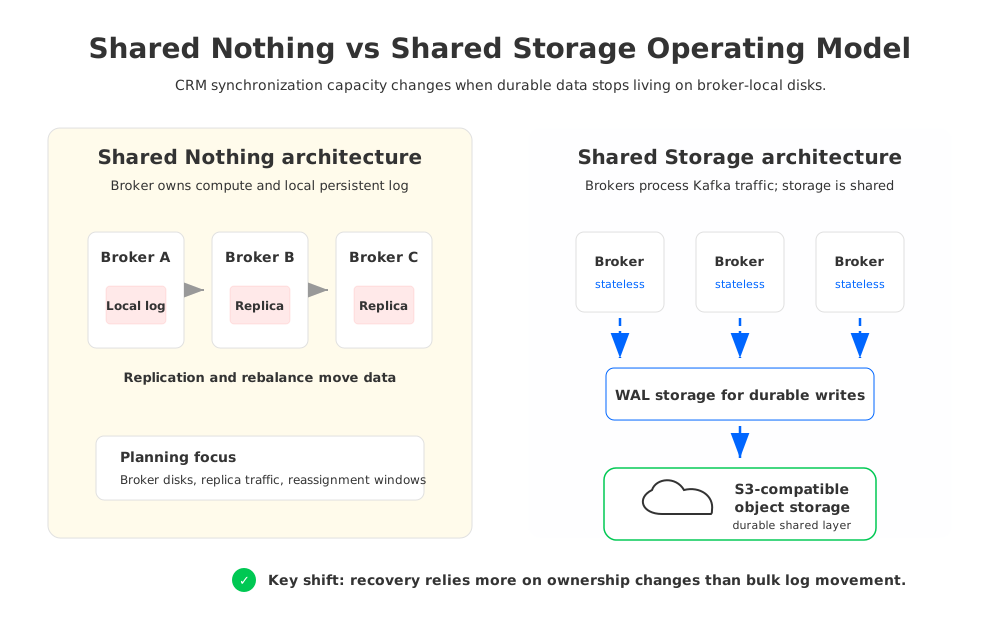
Traditional Apache Kafka uses a Shared Nothing architecture. Each Broker owns local storage for partitions, and durability is achieved through replication across brokers using leader/follower replicas. This design is proven and familiar, but it ties capacity planning to broker-local CPU, network, and disk. When a CRM synchronization workload grows, the team is often adjusting several dimensions at once: add brokers, expand disks, rebalance partitions, tune replication traffic, and keep enough headroom for recovery.
Tiered Storage changes part of that picture by offloading older log segments to remote storage, but it does not remove every broker-local planning problem. Hot data, leadership, replication, and rebalancing still shape the operating model. For CRM synchronization, that distinction matters because the painful moments are often around bursts, failover, and catch-up reads rather than long-term archive storage alone.
A neutral architecture review should compare options by workload behavior, not vendor labels:
| Decision area | What to validate | Why it matters for CRM sync |
|---|---|---|
| Compatibility | Kafka client, Connect, schema, transactions, ACLs, and offset behavior | Integration teams need migration without rewriting every producer, connector, and consumer. |
| Elasticity | Scale-out time, partition movement, and catch-up behavior | CRM bursts and repair replays need temporary capacity without long operational lead time. |
| Cost model | Compute, storage, network, API calls, PrivateLink, and operations | A pipeline with moderate event volume can still become expensive through retention, replicas, and cross-zone paths. |
| Failure recovery | Broker loss, connector failure, sink outage, and replay procedure | Real-time value depends on bounded recovery, not steady-state throughput alone. |
| Governance | VPC boundary, IAM, encryption, audit trail, and PII handling | CRM data is rarely allowed to drift across unclear control or network boundaries. |
| Migration risk | Topic copy, offset continuity, rollback path, and producer switch | A CRM cutover without rollback can block revenue, support, and analytics workflows. |
Cloud networking deserves explicit treatment. AWS documents charges for services such as PrivateLink and for certain data transfer paths; exact rates vary by region and service. That does not mean a Kafka architecture should avoid private connectivity. It means platform teams should model network placement as a first-class design input, especially when producers, connectors, brokers, object storage, and sinks sit in different Availability Zones or accounts.
4Evaluation checklist for platform teams
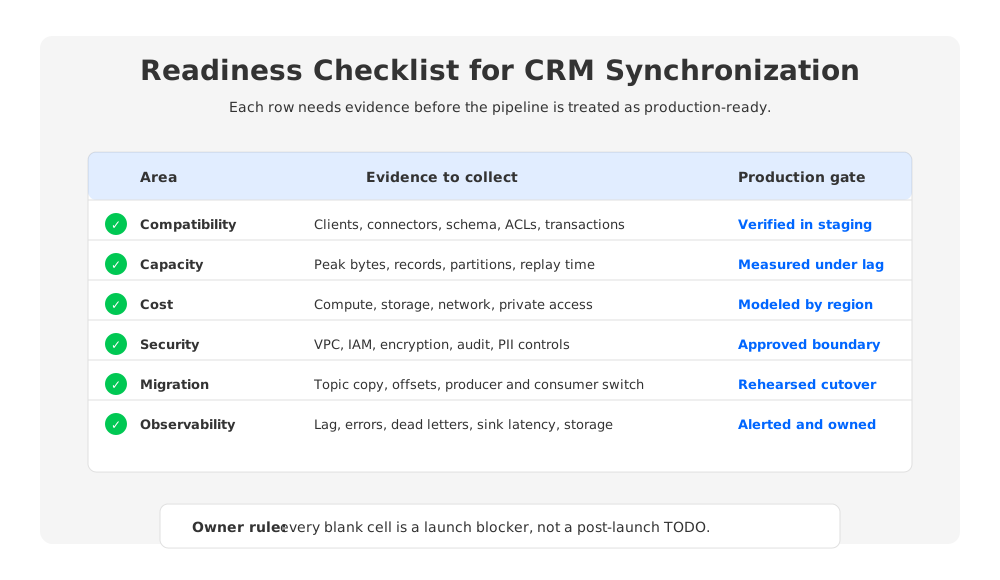
The fastest way to make throughput planning concrete is to turn it into a scorecard. Each item should be answered with measured data, a documented assumption, or an owner. A blank cell means the pipeline is not ready for production, even if the prototype can move events.
Start with workload shape. Capture peak write rate, average write rate, record size distribution, key cardinality, expected retention, replay window, and consumer fan-out. Then test the recovery path: stop the sink, let lag accumulate, restore it, and measure how long the system needs to return to its target freshness. This test is more useful than a synthetic steady-state benchmark because it exposes connector retries, broker read amplification, sink throttling, and observability gaps in one run.
The second pass should focus on correctness. Decide which objects need ordering by key, which updates are idempotent, which tables require compaction, and which downstream consumers can tolerate duplicates. Kafka offsets are a powerful recovery primitive, but they are not a business-level guarantee by themselves. A consumer can commit an offset after writing bad data, and a sink can accept duplicates unless the write path is designed for idempotency.
The third pass is operational ownership. A CRM synchronization pipeline crosses team boundaries: CRM admins, data engineering, platform engineering, security, RevOps, and analytics. The Kafka team may own topics and brokers, but it usually does not own CRM API quotas or warehouse table design. Throughput planning should name the owner for each failure mode before the incident happens.
A practical readiness scorecard has seven rows:
- Compatibility: verified clients, connectors, schema formats, and authentication methods.
- Capacity: measured peak ingest, egress, partitions, worker count, and replay duration.
- Cost: modeled compute, storage, network, private connectivity, and operational labor.
- Security: encryption, identity, network boundary, audit logs, and PII controls.
- Observability: lag, connector errors, dead-letter volume, sink latency, and broker storage signals.
- Migration: topic sync, offset continuity, producer switch, consumer switch, and rollback.
- Governance: data ownership, schema approval, retention policy, and incident communication.
If this list feels heavier than a connector setup guide, that is the point. Real-time CRM synchronization is a production platform decision disguised as a data movement task.
5How AutoMQ changes the operating model
Once the evaluation framework is clear, the architectural question becomes sharper: how much of the operating burden comes from Kafka semantics, and how much comes from binding durable storage to broker-local disks? AutoMQ is a Kafka-compatible streaming platform that keeps the Kafka protocol and ecosystem model while replacing Kafka's local log storage with a Shared Storage architecture backed by S3-compatible object storage.
That storage change affects CRM synchronization in three practical ways. First, stateless brokers reduce the amount of data movement tied to broker replacement, scale-out, and partition reassignment. Second, object-storage-backed durability changes retention planning because durable data is no longer bound to broker-local disks in the same way. Third, WAL (Write-Ahead Log) storage gives the write path a persistence layer before data is uploaded to S3 storage, so teams can choose WAL options based on latency and deployment requirements.
AutoMQ's Kafka compatibility is important here because CRM synchronization stacks are usually built from existing Kafka clients, Kafka Connect, schema tools, monitoring, and operational scripts. A platform that forces every connector and consumer to change at once increases migration risk. A Kafka-compatible API lets the team evaluate the storage and operating model separately from the application protocol.
For teams using AutoMQ BYOC, the boundary also matters. The control plane and data plane can run inside the customer's cloud environment, and AutoMQ managed Kafka Connect deploys Connect Workers in the user's VPC. That model fits CRM pipelines where data residency, private access to databases, and customer-controlled network paths are evaluation criteria rather than afterthoughts. It does not remove the need to validate CRM API quotas, sink write limits, or schema governance, but it can reduce the storage-heavy work that traditional Kafka asks platform teams to own.
Migration should still be treated as an engineering project. AutoMQ Kafka Linking is designed for migration from Apache Kafka to AutoMQ, including byte-level topic synchronization and Consumer group progress synchronization in supported scenarios. For CRM synchronization, the important planning question is not whether the migration tool exists; it is whether the team has rehearsed producer switching, consumer switching, rollback, and freshness validation using the actual CRM topics.
6FAQ
6.1Is Kafka a good fit for real-time CRM synchronization?
Kafka is a strong fit when CRM changes need to feed multiple downstream systems, when replay matters, and when teams need independent consumers. It is less useful as a thin wrapper around a single API-to-table copy where no replay, fan-out, or event history is required.
6.2How should I size Kafka throughput for CRM data?
Size by peak bytes per second, peak records per second, partition parallelism, connector worker capacity, sink write limits, retention, and replay time. The most important test is recovery from accumulated lag, not steady-state throughput alone.
6.3Do I need Kafka Connect for CRM synchronization?
Kafka Connect is often the right framework when the source or sink has a maintained connector and the team wants standardized deployment, offset handling, retry behavior, and monitoring. Custom producers or consumers may still be appropriate when the CRM API, transformation logic, or sink semantics are highly specific.
6.4Where does AutoMQ fit in the architecture?
AutoMQ fits after the team has decided that Kafka-compatible streaming is the right abstraction but traditional broker-local storage creates too much operational or cost pressure. It keeps Kafka compatibility while using Shared Storage architecture, stateless brokers, and object-storage-backed durability.
6.5What should be in a CRM synchronization migration plan?
Include source and sink inventory, topic mapping, schema compatibility, ACLs, offset handling, connector configuration, producer cutover, consumer cutover, rollback, validation queries, and ownership for every failure mode. Run the plan against a representative workload before touching the production path.
7Closing the loop
The search term real time crm synchronization kafka sounds narrow, but the production question is broad: can your team keep business state fresh when the source slows down, the sink pushes back, and the platform has to recover without surprises? Treat throughput as a contract across connectors, topics, storage, consumers, governance, and migration. The right platform is the one whose failure modes you can explain before they wake up the team.
If you are evaluating Kafka-compatible streaming for CRM synchronization and want to test a Shared Storage architecture in your own cloud boundary, start with the AutoMQ BYOC environment.
8References
- Apache Kafka documentation
- Apache Kafka Connect documentation
- AutoMQ compatibility with Apache Kafka
- AutoMQ Shared Storage architecture overview
- AutoMQ WAL storage
- AutoMQ managed Kafka Connect
- AutoMQ migration with Kafka Linking
- AWS PrivateLink pricing
- AWS EC2 on-demand pricing and data transfer notes


