
Table of Contents
Table of Contents
Your Kafka cluster is probably wasting money right now. Not because you did something wrong. Kafka's defaults were designed for a world where disk replication was free and cross-AZ traffic didn't show up on a bill.
A mid-size cluster running 300 MB/s of write throughput on AWS can easily hit $100K/month. Most teams we talk to are making at least three or four of the mistakes on this list, and the combined waste adds up to $50K or more every month. The tricky part: some of these "mistakes" are actually Kafka best practices that happen to be expensive in the cloud. And fixing them often means trading cost for risk.
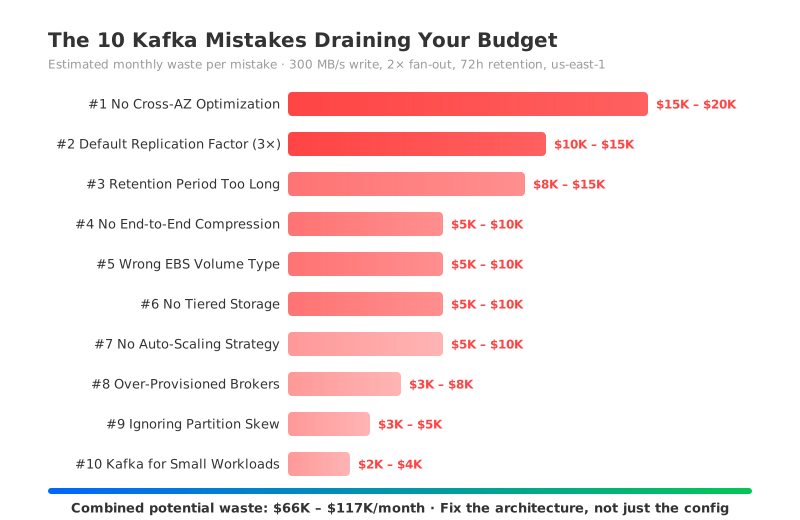
What follows are 10 of the most common ones — each with the specific Kafka configuration parameters involved, an estimated monthly waste figure, a fix, and the catch. All cost estimates are based on a reference workload of 300 MB/s write throughput, 2× read fan-out, and 72-hour retention running in AWS us-east-1 (on-demand pricing, May 2026). Where a mistake involves a different baseline (like retention set to 7 days instead of 72 hours), we note the assumption explicitly.
These 10 mistakes fall into three categories: the data tax (how Kafka's storage model inflates your bill), configuration gaps (quick wins you're probably missing), and the architecture trap (problems you can't configure away). We'll start with the biggest dollar items and work down — but pay attention to which category each one falls into, because that determines whether the fix is a config change or an architecture decision.
1Part 1: The Data Tax — How Kafka's Storage Model Inflates Your Bill
The first four mistakes are all consequences of the same design: Kafka stores data on local disks and replicates it across availability zones. Each one amplifies the others.
2Mistake #1: Not Optimizing Cross-AZ Traffic
What's wrong: Every Kafka message crosses availability zone boundaries multiple times — producer to leader, leader to followers, leader to consumers — and AWS charges $0.01/GB in each direction.
Why it's expensive: In our reference workload, cross-AZ data transfer adds up to $61,594/month — that's 59.7% of the entire Kafka bill. This single line item costs more than compute and storage combined, yet it's buried inside the generic "EC2 Data Transfer" section of your AWS invoice where most teams never notice it. We've seen platform teams spend weeks trying to trace a sudden $40K bill increase after a Kafka migration — the cross-AZ traffic wasn't showing up under any Kafka-related cost category.
The fix: Enable Follower Fetching (KIP-392) by setting replica.selector.class=org.apache.kafka.common.replica.RackAwareReplicaSelector on your brokers and configuring client.rack on consumers to match their availability zone. This lets consumers read from the nearest replica instead of always hitting the leader, cutting consumer-side cross-AZ traffic by roughly a third.
The catch: Follower Fetching only reduces consumer-side traffic. Producer-to-leader and leader-to-follower replication traffic — which accounts for the majority of cross-AZ costs — remains unchanged. You're optimizing one slice of a three-slice pie.
Estimated waste: $15K – $20K/month
3Mistake #2: Keeping the Default Replication Factor at 3
What's wrong: Kafka's default.replication.factor=3 means every byte of data is stored three times on EBS and replicated across AZs twice. This was a sensible default in data centers where replication was the only way to achieve durability. In the cloud, it's a 3× cost multiplier.
Why it's expensive: With 300 MB/s write throughput and 72-hour retention, the logical data volume is about 78 TB (300 MB/s × 72 h × 3,600 s/h). At replication.factor=3, that becomes roughly 228 TB of EBS storage at $0.08/GiB — about $36,450/month in storage alone, plus the cross-AZ replication traffic to keep those replicas in sync (see Mistake #1).
The fix: For non-critical topics (logs, metrics, staging environments), consider setting replication.factor=2 and min.insync.replicas=1 at the topic level. This cuts storage and replication costs by a third without changing your broker topology.
The catch: With replication.factor=2, a single broker failure can leave partitions with only one replica. If that broker also fails before recovery completes, you lose data. This is a real risk, not a theoretical one — and it's why most production teams keep replication.factor=3 despite the cost.
Estimated waste: $10K – $15K/month
4Mistake #3: Retention Period Set Too Long
What's wrong: Kafka's default log.retention.hours=168 (7 days) is generous. Our reference workload already uses 72-hour retention, but many teams are still running the default — and here's what that costs them. Many workloads — real-time analytics, event-driven microservices, stream processing pipelines — consume data within minutes or hours. Keeping 7 days of data on expensive EBS "just in case" is a common and costly habit.
Why it's expensive: Cutting retention from 7 days to 72 hours reduces your storage footprint by roughly 57%. On a cluster storing 228 TB (3× replicated), that's over $20K/month in EBS savings. The network cost of replicating that extra data also drops proportionally.
The fix: Audit your topics with kafka-consumer-groups.sh --describe to check actual consumer lag. If consumers are caught up within hours, set retention.ms=259200000 (72 hours) or even retention.ms=86400000 (24 hours) at the topic level. The broker-wide default can be adjusted via log.retention.hours. For topics that need long-term retention for compliance, consider offloading to S3 via Kafka Connect rather than keeping data on broker disks.
The catch: Once data is deleted, it's gone. If a consumer needs to reprocess historical data after a bug fix, a schema change, or a new downstream system, and the data has already been purged, you're out of luck. Shorter retention trades storage cost for reprocessing flexibility.
Estimated waste: $8K – $15K/month
Cross-AZ traffic doesn't just affect replication. The longer you keep data, the more replicated storage you're paying for.
5Part 2: The Configuration Gaps — Quick Wins You're Probably Missing
The next three are cheaper to fix. Most are one config change.
6Mistake #4: Not Enabling End-to-End Compression
What's wrong: If your producers aren't setting compression.type, every message hits the wire and disk at full size. JSON payloads, Avro with verbose schemas, and log lines can compress 3–5× with modern codecs, but Kafka won't compress them for you by default.
Why it's expensive: Uncompressed data inflates network transfer costs (including cross-AZ traffic) and storage costs in lockstep. With a 4:1 compression ratio, you're paying 4× more for network and storage than you need to.
The fix: Set compression.type=zstd (or lz4 for lower CPU overhead) on your producers. Kafka brokers will store the compressed batches as-is and consumers decompress on read. You can also set compression.type at the broker level (it defaults to producer, meaning the broker preserves whatever compression the producer used), but producer-side compression is more efficient because it reduces network transfer from producer to broker.
The catch: Compression adds CPU overhead on both producer and consumer sides. With zstd, expect 5–15% higher CPU utilization on producers. Every producer and consumer client needs to be updated — this isn't a broker-only change. For clusters with hundreds of producer applications, the rollout coordination can be significant.
Estimated waste: $5K – $10K/month
7Mistake #5: Using the Wrong EBS Volume Type
Some teams provision io1 or io2 EBS volumes for Kafka brokers, paying $0.125/GiB plus per-IOPS charges. Kafka's I/O pattern is predominantly sequential writes and reads, which gp3 at $0.08/GiB with 3,000 baseline IOPS handles just fine. The gp3 baseline of 3,000 IOPS and 125 MiB/s throughput is sufficient for most Kafka brokers. According to AWS EBS pricing, factoring in provisioned IOPS, the total savings from switching can reach 60–87%. On a cluster with the 228 TB of replicated storage from Mistake #2, that's $5K–$10K/month. Migration requires rolling broker restarts, but it's a one-time operation with no ongoing risk.
Estimated waste: $5K – $10K/month
8Mistake #6: Not Using Tiered Storage
What's wrong: Without tiered storage, all data — hot and cold — lives on EBS at $0.08/GiB. Kafka's KIP-405 introduced remote log storage that can offload older segments to S3 at $0.023/GB, but many clusters haven't enabled it.
Why it's expensive: In a typical workload, data older than a few hours is rarely read but still occupies expensive EBS. If 70% of your retained data is "cold," that's roughly 160 TB sitting on EBS at $12,800/month that could be on S3 for under $3,700/month.
The fix: Enable tiered storage by setting remote.log.storage.system.enable=true on your brokers and configuring a remote storage manager plugin. Set remote.storage.enable=true and local.retention.ms on topics to control how long data stays on local disk before being offloaded.
The catch: Tiered storage was introduced in Apache Kafka 3.6 and reached production-ready status in version 3.9, but it has known limitations — no support for compacted topics, and read latency for cold data increases because segments must be fetched from S3. If your consumers frequently reprocess old data, the latency impact may be noticeable. Test thoroughly before enabling on latency-sensitive topics.
Estimated waste: $5K – $10K/month
Everything above is a config change or an infrastructure swap. The next four aren't. They're baked into how Kafka works.
9Part 3: The Architecture Trap — Problems You Can't Configure Away
10Mistake #7: No Auto-Scaling Strategy
What's wrong: Kafka brokers are stateful — each one owns partitions and stores data on local disk. Adding a broker means running kafka-reassign-partitions.sh to migrate data, which can take hours or days depending on data volume. Because scaling is so painful, teams provision for peak traffic and leave those brokers running 24/7.
Why it's expensive: If your peak throughput is 2× your average, half your compute capacity sits idle most of the time. In our reference workload, compute costs $5,151/month — but the real waste is in the storage and network resources attached to those idle brokers. The total over-provisioning cost across compute, storage, and network can reach $5K–$10K/month.
The fix: There's no easy fix within traditional Kafka's architecture. You can implement scheduled scaling (adding brokers before known peaks, removing after), but each scale event requires partition rebalancing. Some teams use separate clusters for burst workloads, routing traffic via MirrorMaker — but this adds operational complexity.
The catch: This is fundamentally an architecture problem, not a configuration problem. Kafka's coupling of compute and storage means you can't scale one without the other. Any scaling strategy within the current architecture involves moving data, and moving data takes time.
Estimated waste: $5K – $10K/month
11Mistake #8: Over-Provisioned Broker Instances
What's wrong: Kafka clusters are typically sized for peak throughput plus a safety margin — AWS recommends keeping network utilization below 50% and disk utilization below 50%. The result: most brokers run at under 30% CPU utilization around the clock.
Why it's expensive: Our reference workload uses 28 r5.xlarge instances at $5,151/month. If actual average utilization is 30%, roughly $3,600/month of compute is wasted. The waste compounds when you factor in the EBS volumes and network capacity attached to each over-provisioned broker.
The fix: Monitor actual CPU, network, and disk utilization over a full traffic cycle (at least one week). Right-size by choosing smaller instance types — for example, moving from r5.xlarge to m6i.xlarge if memory isn't the bottleneck. Use num.network.threads and num.io.threads to tune broker thread pools to match your actual I/O patterns rather than relying on defaults.
The catch: Right-sizing reduces your safety margin. A traffic spike that would have been absorbed by over-provisioned brokers might now cause consumer lag or producer backpressure. You need solid monitoring and alerting before you can safely right-size — and even then, you're trading cost for risk tolerance.
Estimated waste: $3K – $8K/month
12Mistake #9: Ignoring Partition Skew
What's wrong: Uneven partition distribution means some brokers handle disproportionately more traffic than others. This happens when partition keys have skewed distributions, when topics are created without enough partitions (num.partitions too low), or when brokers are added without rebalancing existing partitions.
Why it's expensive: Hot brokers hit their network or disk limits while cold brokers sit idle. To keep the hot brokers from falling over, you end up scaling the entire cluster — paying for capacity that only a few brokers actually need. The waste is proportional to the skew: a 2:1 imbalance means roughly 50% of your cluster capacity is underutilized.
The fix: Use kafka-log-dirs.sh to check partition distribution across brokers. Monitor per-broker network and disk metrics to identify hot spots. Rebalance using kafka-reassign-partitions.sh or tools like Cruise Control. For new topics, set num.partitions high enough to distribute load evenly — a common starting point is 3× the number of brokers.
The catch: Rebalancing moves data between brokers, which consumes network bandwidth and disk I/O. On a large cluster, a full rebalance can take hours and temporarily degrade performance. Throttle the rebalance with --throttle to limit impact, but this extends the duration.
Estimated waste: $3K – $5K/month
13Mistake #10: Running a Full Kafka Cluster for Small Workloads
This one is less about configuration and more about whether Kafka is the right tool. A production-grade, multi-AZ Kafka deployment requires a minimum of 3 brokers. Even at 10 MB/s of throughput, you're paying for 3 instances, their EBS volumes, and the cross-AZ replication traffic between them (see Mistake #1). The floor is $2K–$4K/month before you send a single message. For small workloads under 50 MB/s, the fixed infrastructure cost dominates. If you don't need Kafka's full feature set, managed services like Amazon SQS or SNS may be more cost-effective. If you need Kafka protocol compatibility, serverless options like MSK Serverless (up to 200 MiB/s) or platforms with elastic scaling can right-size to small workloads. The trade-off is migration cost and ecosystem compatibility.
Estimated waste: $2K – $4K/month
14The Pattern: Most Mistakes Share the Same Root Cause
Look at the list again. Mistakes #1 (cross-AZ traffic), #2 (3× replication), #6 (no tiered storage), #7 (no auto-scaling), and #8 (over-provisioning) all trace back to the same architectural constraint: Kafka stores data on local disks and replicates it across brokers for durability. This design made perfect sense in data centers where disk was cheap and network traffic between machines was free. On AWS, it creates a cost structure where you're paying cloud prices for a data-center architecture.
You can fix each mistake individually and save 30–40% in total. But every fix comes with a trade-off: less durability, less availability, less operational headroom. Teams that go through this optimization cycle typically save 25–30% and then hit a wall. The remaining cost is the architecture itself.
15The Architecture-Level Fix: Diskless Kafka
Diskless Kafka platforms like AutoMQ replace local disk storage with object storage (S3) as the primary data tier. This one change eliminates several of these mistakes at once:
- S3 replaces EBS — S3 provides 11-nines durability natively, so there's no need for application-level 3× replication. Mistakes #2, #5, and #6 disappear. Storage costs drop from $0.08/GiB × 3 replicas to $0.023/GB × 1 copy.
- Zero cross-AZ traffic — Data writes go to S3 within a single AZ; S3 handles cross-AZ durability internally at no extra charge. Mistake #1 is eliminated at the architecture level, not patched with Follower Fetching.
- Stateless brokers with elastic scaling — Without local data, brokers scale up and down in seconds by reassigning partition metadata. No more over-provisioning for peak, no more hours-long rebalancing.
AutoMQ, built on the Apache Kafka codebase with 100% Kafka protocol compatibility, runs this architecture in production today. For the same 300 MB/s reference workload, AutoMQ costs $21,804/month compared to $103,195/month for self-managed Kafka — a 79% reduction with no trade-offs on durability or availability (based on AWS us-east-1 on-demand pricing; see AutoMQ pricing calculator for methodology).
16Where to Start
If you're making three or more of these mistakes, start with the low-risk fixes: enable compression (#4), check your EBS volume types (#5), and audit retention policies (#3). These deliver meaningful savings without touching your availability posture.
But if your Kafka bill has crossed the $50K/month threshold and you're tired of patching around architectural constraints, it might be time to look at the architecture itself. Run your own numbers with the AutoMQ pricing calculator — plug in your throughput, fan-out, and retention, and see what the difference looks like for your workload.
That cross-AZ line item on your AWS bill? Now you know exactly where it comes from.


