
Table of Contents
Table of Contents
Your AWS Kafka bill keeps climbing, and you're not alone. Kafka on AWS is expensive for structural reasons — EBS volumes replicated three times, cross-AZ data transfer fees on every message hop, and broker instances sized for peak throughput that sits idle most of the day. Most teams respond by tweaking configurations: shorter retention, smaller instances, fewer replicas. These optimizations work, but each one trades cost savings for some combination of risk, complexity, or reduced durability.
This guide walks through seven ways to reduce Kafka cost on AWS, ordered from incremental configuration changes to a fundamental architecture shift. For each method, you'll get the estimated savings, the concrete steps, and — just as importantly — the risk you're taking on. The first six are legitimate engineering practices that can shave 5–35% off your bill. The seventh eliminates 70–80% of the cost without introducing any of those tradeoffs.
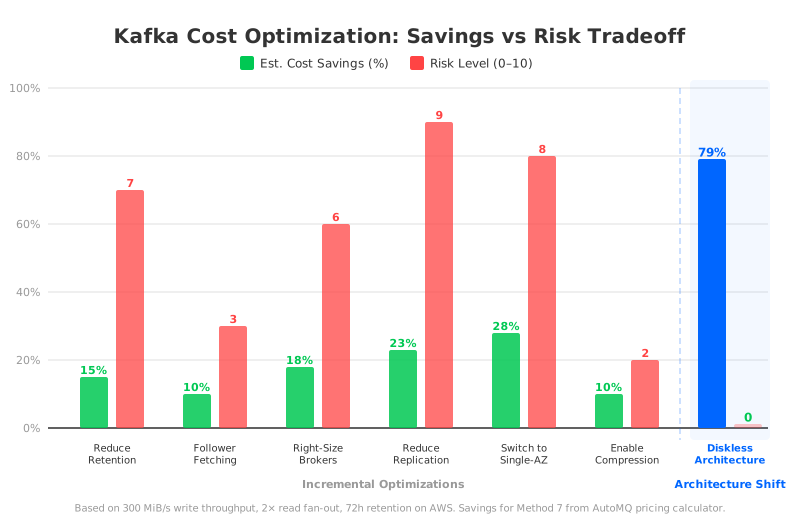
The chart above tells the story at a glance. The first six methods cluster in the lower-left: modest savings, non-trivial risk. The seventh stands alone on the right: the largest savings with no added durability or availability tradeoffs. Keep this picture in mind as we walk through each method.
1Reduce Data Retention Period
Estimated savings: 10–20% of storage costs | Risk level: 7/10
The quickest lever most teams reach for is log.retention.hours. Kafka's default retention is 168 hours (7 days), and many clusters run with even longer windows. Cutting retention from 7 days to 3 days roughly halves your EBS storage footprint, which directly reduces your bill since EBS charges $0.08/GiB/month for gp3 volumes — and Kafka replicates that storage three times by default.
The math is straightforward, but the risk is not. Shorter retention means data disappears faster. If a downstream consumer falls behind — due to a bug, a deployment issue, or an unexpected traffic spike — it may not be able to catch up before the data is gone. In regulated industries, shorter retention can also create compliance gaps. And once the data is deleted, there's no getting it back without a separate archival pipeline, which adds its own cost and complexity. This method saves real money, but it permanently narrows your safety margin for recovery.
2Enable Follower Fetching (KIP-392)
Estimated savings: 5–15% of cross-AZ traffic costs | Risk level: 3/10
Cross-AZ data transfer is one of the most expensive line items in a Kafka deployment on AWS. Every time a consumer reads from a leader replica in a different availability zone, AWS charges $0.01/GB in each direction — $0.02/GB round-trip. KIP-392 introduced follower fetching, which lets consumers read from the nearest replica instead of always going to the leader.
To enable it, set replica.selector.class=org.apache.kafka.common.replica.RackAwareReplicaSelector on your brokers and configure client.rack on your consumers to match their availability zone. MSK users can enable this through the cluster configuration. The savings depend on your consumer topology — if most consumers already happen to be in the same AZ as the leader, the impact is small. If your consumers are spread across three AZs, you could see a meaningful reduction in cross-AZ egress.
The risk here is low. Read latency may increase slightly when fetching from a follower that's a few milliseconds behind the leader, and the configuration adds some operational surface area. But you're not sacrificing durability or availability — this is one of the safer optimizations on the list.
3Right-Size Your Broker Instances
Estimated savings: 10–25% of compute costs | Risk level: 6/10
Kafka brokers are often over-provisioned. Teams pick a large instance type during initial setup, traffic grows unevenly, and nobody revisits the sizing. The result is clusters where CPU utilization hovers at 15–20% and network bandwidth is nowhere near the instance limit.
Right-sizing means matching your instance type to your actual workload. Look at your peak network throughput (not average — peak), CPU utilization, and memory pressure over the past 30 days. If you're running kafka.m5.2xlarge on MSK but your peak throughput only uses 40% of the network capacity, stepping down to kafka.m5.xlarge could cut your compute bill significantly. AWS's right-sizing guidance for Kafka recommends targeting 50% network utilization at peak to leave headroom for traffic spikes and rebalancing.
The risk is real, though. Kafka doesn't scale horizontally in seconds — adding brokers requires partition reassignment, which can take hours and puts additional load on the cluster. If you right-size too aggressively and traffic spikes beyond your headroom, the cluster can become overloaded before you can scale out. This optimization rewards teams with stable, predictable traffic patterns and punishes those with bursty workloads.
4Reduce Replication Factor
Estimated savings: 15–30% of storage and cross-AZ costs | Risk level: 9/10
Kafka's default replication factor of 3 means every message is stored on three brokers across three availability zones. That's three times the EBS storage and two additional cross-AZ replication hops per message. Dropping the replication factor to 2 eliminates one-third of the storage cost and one of the two replication hops. On paper, the savings are substantial — for a cluster writing 300 MiB/s, cross-AZ replication alone costs roughly $30,000/month at a replication factor of 3 (based on AWS pricing of $0.02/GB round-trip), and cutting one replica saves around $10,000/month in cross-AZ fees plus the associated EBS storage.
A broker fails at 3 AM. With a replication factor of 2, the surviving replica is your last copy. If that broker also goes down before the first one recovers — or if the failed broker's EBS volume is corrupted — the data is gone, permanently. Production Kafka clusters experience broker failures regularly enough that this isn't a theoretical concern. Most SREs who've operated Kafka at scale will tell you: don't drop below 3 replicas for any topic you can't afford to lose.
5Switch from Multi-AZ to Single-AZ
Estimated savings: 20–35% of total costs | Risk level: 8/10
If cross-AZ traffic is the biggest cost driver, the most direct way to eliminate it is to put everything in one AZ. A single-AZ Kafka deployment has zero cross-AZ replication fees and zero cross-AZ consumer traffic. Combined with the reduced need for cross-AZ EBS replication, this can cut 20–35% of total cluster costs.
The tradeoff is availability. AWS availability zones are designed to fail independently, and a multi-AZ deployment survives the loss of any single zone. A single-AZ deployment does not. When that AZ goes down — and AWS AZ outages do happen — your entire Kafka cluster goes with it. For non-critical workloads like development environments or batch analytics pipelines, this might be acceptable. For anything in the real-time data path, it's a gamble most teams shouldn't take.
6Enable End-to-End Compression
Estimated savings: 5–15% of network and storage costs | Risk level: 2/10
Kafka supports producer-side compression with codecs like LZ4, Zstandard (zstd), Snappy, and GZIP. When producers compress messages before sending, the compressed data flows through brokers and into storage without decompression — consumers decompress on read. This reduces network transfer volume, EBS storage footprint, and cross-AZ traffic in one move.
The savings depend heavily on your data. JSON and text-heavy payloads compress well (4:1 or better with zstd), while binary or already-compressed data sees minimal benefit. The main cost is CPU: compression and decompression add processing overhead on both producer and consumer sides. You'll also need to coordinate the rollout across all producer and consumer applications, which can be a significant effort in organizations with many independent teams publishing to Kafka.
Of all six incremental optimizations, this one has the best risk-to-reward ratio. You're not sacrificing durability, availability, or recovery capability — just trading some CPU cycles for lower storage and network costs.
These six methods, applied together, can theoretically reduce your Kafka bill by 30–50%. But look at what you're giving up across the board: shorter recovery windows, reduced fault tolerance, tighter capacity margins, single points of failure, and cross-team coordination overhead. Each optimization chips away at the safety margins that make Kafka reliable in production. And none of them address the root cause of why Kafka is expensive on AWS in the first place — the disk-based replication architecture.
7Diskless Architecture: 80% Savings Without Sacrificing Durability
The first six methods are patches on a cost model that was never designed for the cloud. Kafka was built in the data center era, where local disks were cheap, network bandwidth between machines was free, and replicating data across servers was the only way to achieve durability. That architecture made perfect sense in 2011. On AWS in 2026, it means you're paying $0.08/GiB/month for EBS storage replicated three times, plus $0.02/GB for every cross-AZ hop — costs that didn't exist in the environment Kafka was designed for.
A diskless architecture flips this model. Instead of replicating data across local disks on multiple brokers, it writes data directly to object storage (S3), which provides 99.999999999% (11 nines) durability out of the box. No EBS volumes, no cross-AZ replication traffic, no three-way storage multiplication.
Here's how each cost component changes:
| Cost Component | Traditional Kafka | Diskless (AutoMQ) |
|---|---|---|
| Storage | EBS gp3 at $0.08/GiB × 3 replicas | S3 at $0.023/GB, single copy |
| Cross-AZ replication | $0.02/GB per hop × 2 hops | $0 — S3 handles durability internally |
| Cross-AZ consumer traffic | $0.02/GB per read across AZs | $0 — reads served from local AZ |
| Broker instances | Sized for peak, always on | Stateless, auto-scaled to actual load |
AutoMQ implements this diskless architecture. Built on the Apache Kafka codebase, it's 100% compatible with the Kafka protocol — existing producers, consumers, Kafka Connect connectors, and monitoring tools work without code changes. The key architectural difference is that brokers are stateless: they don't store data on local disks. Data goes to S3, and brokers can be added or removed in seconds without partition reassignment or data rebalancing.
7.1The numbers
Using the scenario from the chart above — 300 MiB/s write throughput, 2× read fan-out, 72-hour retention on AWS — the pricing calculator produces these monthly costs:
| Apache Kafka (self-managed) | AutoMQ | |
|---|---|---|
| Compute | $5,151 (28× r5.xlarge) | $1,430 (3× m7g.4xlarge) |
| Storage | $36,450 (EBS gp3, 3× replication) | $1,722 (S3) |
| Cross-AZ traffic | $61,594 | $0 |
| Platform fees | — | $17,373 |
| Total | $103,195/mo | $21,804/mo |
That's a 79% reduction — not from cutting corners on durability or availability, but from eliminating the structural costs that make Kafka expensive on AWS. The two biggest line items — $61,594 in cross-AZ traffic and $36,450 in EBS storage — collapse to near-zero because S3 handles durability and replication internally. The compute cost drops because stateless brokers can be right-sized dynamically — no need to provision 28 instances for peak capacity when 3 can handle the load with auto-scaling.
The durability story actually improves. Traditional Kafka's three-way EBS replication depends on the health of three specific broker instances. S3 provides 11 nines of durability as a platform guarantee, independent of any individual server. If a broker fails, a new one starts in seconds and picks up where the old one left off — there's no data to recover because the data was never on the broker in the first place.
8Why Incremental Fixes Can't Match an Architecture Shift
Consider the math. If you apply all six incremental optimizations aggressively — shorter retention, follower fetching, smaller instances, reduced replication, single-AZ, and compression — you might save 40% of your Kafka bill. On the 300 MiB/s scenario above, that takes you from $103,195 to roughly $62,000/month. You'd still be paying nearly 3× what a diskless architecture costs, and you'd be running a cluster with reduced durability, no AZ redundancy, and tight capacity margins.
It's the difference between tuning query parameters on a database that's hitting disk I/O limits and migrating to a database with a fundamentally different storage engine. The six incremental methods optimize within Kafka's disk-based architecture. The seventh replaces that architecture with one designed for the cloud from the ground up.
9Getting Started
If you want to start with incremental optimizations, begin with the low-risk ones. Enable compression (Method 6) and follower fetching (Method 2) first — they deliver savings without meaningful risk. Then evaluate right-sizing (Method 3) based on your traffic patterns. Leave replication factor and AZ topology changes for last, and only if you fully understand the availability implications.
If you want to address the root cause, explore what a diskless Kafka architecture looks like for your workload. AutoMQ's pricing calculator lets you plug in your throughput, fan-out, and retention to see the cost difference. The architecture documentation explains how stateless brokers and S3-native storage work under the hood. And because AutoMQ is open source under the Apache License 2.0, you can inspect the code and run it in your own environment before making any commitment.
Your AWS Kafka bill doesn't have to keep climbing. The question is whether you want to keep patching the cost model — or replace it.


