
Table of Contents
Table of Contents
Kafka cost optimization usually starts with an uncomfortable gap. The cloud bill tells you how much money left the account, while Kafka metrics tell you how brokers, topics, partitions, and consumers behaved. Neither view alone explains which workload decision created the spend or which engineering change will reduce it without hurting reliability. Platform teams need a tooling stack that connects spend, usage, topology, and architecture scenarios.
1Quick Answer
The most useful Kafka cost optimization tools fall into eight categories:
| Category | Best Question | Typical Owner |
|---|---|---|
| Cloud billing tools | Which cloud services and SKUs are driving spend? | FinOps, platform |
| Managed Kafka billing reports | Which managed-service dimensions are billable? | Platform, procurement |
| Kafka metrics dashboards | Which clusters, brokers, topics, or consumers create load? | SRE, platform |
| Capacity planners | Are we overprovisioned for peak or retention? | Platform engineering |
| Retention and storage analyzers | Which topics store more data than their value supports? | Data platform |
| Data transfer analyzers | Where do cross-zone, cross-region, or egress costs appear? | Cloud infrastructure |
| Kafka TCO calculators | What is the all-in run cost under explicit assumptions? | Architecture, finance |
| Migration scenario calculators | What changes if the storage or service architecture changes? | Architecture, platform |
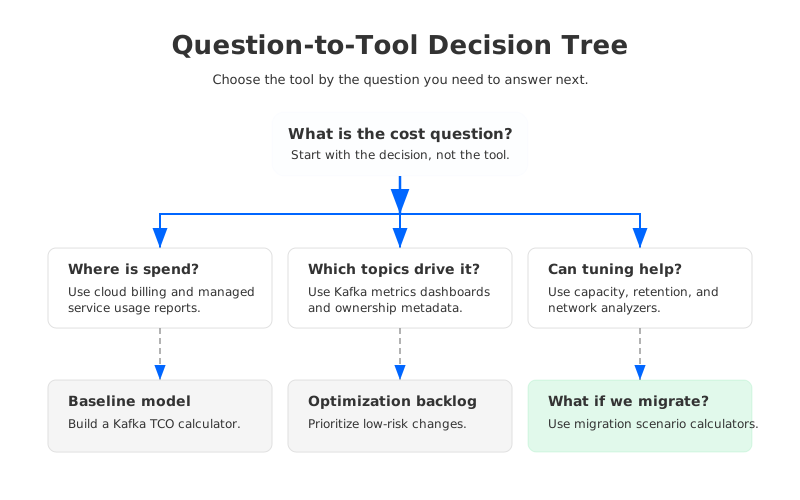
The important split is discovery versus decision support. Discovery tools tell you where cost is hiding. Decision tools help you compare a change: smaller brokers, different retention, fewer replicas, a managed service tier, or a move from broker-attached disk to object-storage-backed Kafka architecture.
2What a Kafka Cost Tool Needs to Measure
A useful Kafka cost view maps infrastructure cost to workload behavior. In self-managed Kafka, that means compute, disks, IOPS, network transfer, backup or tiered storage, monitoring, and engineering operations. In managed Kafka, it means vendor-specific billing dimensions such as ingress, egress, storage, partitions, requests, cluster capacity units, or support commitments.
Kafka makes attribution hard because spend rarely belongs to one resource tag. One topic can increase broker CPU, disk usage, replication traffic, inter-AZ transfer, consumer egress, and monitoring cardinality at the same time. A billing report can show the bill for compute, storage, or transfer, but it cannot explain which topic or tenant created the load.
A practical model needs four layers:
- Cloud spend: account, project, service, SKU, region, tag, discount, and time window.
- Kafka workload: ingress, egress, retention, partitions, replication factor, compression, request rate, and fanout.
- Topology: broker count, instance type, storage class, availability zones, regions, client placement, and network paths.
- Scenario assumptions: growth rate, peak-to-average ratio, reliability target, migration effort, and operational risk.
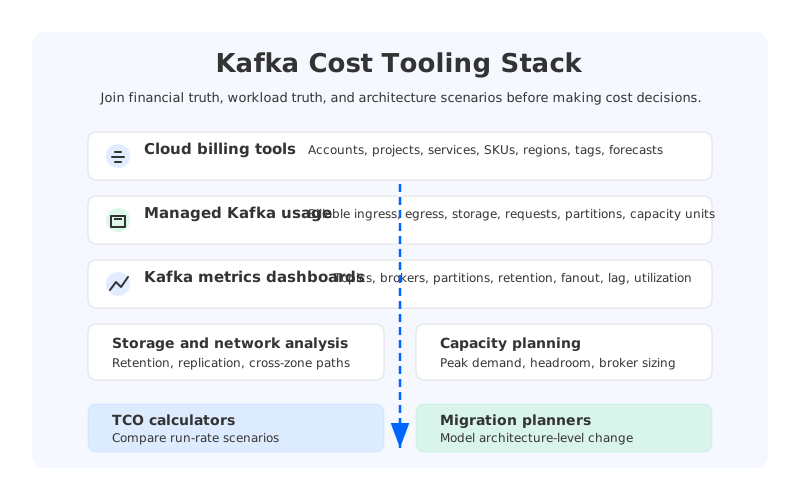
The strongest tooling stack keeps these layers visible, then joins them when the team is ready to make a decision.
3Top Kafka Cost Optimization Tools and Calculator Categories
3.1Cloud Billing Tools
Start with the cloud provider bill because it is the financial source of truth. AWS Cost Explorer lets teams view and analyze cost and usage, including historical trends and forecasts, according to the AWS Cost Explorer documentation. Microsoft describes Azure Cost Management as a FinOps tool suite for analyzing, monitoring, and optimizing Microsoft Cloud costs in the Azure Cost Management overview. Google Cloud Billing reports provide configurable views of cost history, trends, and forecasts in the Google Cloud Billing reports documentation.
For Kafka, cloud billing tools identify compute, block storage, snapshots, object storage, load balancers, NAT gateways, cross-zone traffic, cross-region replication, and marketplace charges. They are weaker at attributing those costs to Kafka topics or tenants. Require consistent tags on clusters, environments, teams, and cost centers, then export detailed billing data where Kafka metrics can be joined later.
3.2Managed Kafka Billing and Usage Reports
Managed Kafka platforms expose billable dimensions that do not always appear clearly in cloud-native billing. Confluent Cloud, for example, documents billing around consumption and resource usage, including data ingress, egress, storage, request overhead, and cluster capacity concepts in its billing documentation. Its Metrics API documentation explains how teams can monitor streaming workload metrics and integrate them with external observability platforms.
These reports answer a specific question: which managed-service usage dimensions are turning into charges? That matters when procurement sees one marketplace line item but engineering needs to know whether the driver is retention, write throughput, read fanout, partitions, or cluster sizing. The limitation is portability: a vendor report may not estimate what the same workload would cost on a different architecture.
3.3Kafka Metrics Dashboards
Kafka metrics dashboards are where cost work becomes technical. Amazon MSK publishes broker and cluster metrics to CloudWatch, and the Amazon MSK metrics documentation lists monitoring levels such as default, per-broker, and per-topic-per-broker metrics. Self-managed teams often build equivalent visibility with Prometheus and Grafana. Prometheus stores metrics as time series with labels, as described in the Prometheus getting started guide, while Grafana dashboards visualize data from many sources, according to the Grafana dashboard documentation.
Cost-focused dashboards should expose expensive behavior:
- Topic produce and fetch bytes by tenant or application.
- Retention size by topic, with growth rate and delete policy.
- Partition count and partition skew by broker.
- Replication traffic, especially in multi-AZ deployments.
- Consumer fanout and repeated reads of the same retained data.
- Broker disk utilization, CPU, network throughput, and request pressure.
Dashboards find waste, but they do not prove savings by themselves. A hot topic might be expensive because it is critical to the business. A quiet topic with long retention might be the better optimization target. The dashboard gives engineering the map; finance still needs a model for the destination.
3.4Capacity Planners
Capacity planners turn workload demand into infrastructure requirements. For Kafka, that means translating average and peak write throughput, read fanout, partition count, replication factor, retention, compression ratio, and headroom policy into broker count, disk size, network bandwidth, and operational margin.
This category is useful when clusters were sized for a past peak and never revisited. Capacity planning can expose overprovisioned brokers, disks sized for retention that no longer exists, or fixed capacity that is expensive because the peak-to-average ratio is high. It also prevents false savings: reducing broker count without checking network, controller load, leader distribution, and rebalance behavior can move cost from the bill into incidents.
3.5Retention and Storage Analyzers
Retention is easy to misunderstand because the topic setting looks like a policy choice, while the bill sees storage, replication, and sometimes restore or remote-read behavior. A retention analyzer answers which topics hold the most data, how fast they grow, who owns them, and whether the configured retention still matches the business need. It should compare write rate, retained bytes, and read usefulness. A large topic that is rarely fetched after the first hour may belong in object storage, a compacted topic, a lower-retention stream, or a separate archival pipeline.
3.6Data Transfer Analyzers
Kafka can turn network topology into a material cost driver. Producer placement, consumer placement, replica placement, cross-AZ replication, cross-region mirroring, public egress, NAT paths, and connector traffic all affect the bill. Cloud billing can show data transfer charges, but it rarely explains which Kafka path created them.
A data transfer analyzer joins cloud network charges with Kafka topology. For multi-AZ clusters, it should separate producer-to-broker traffic, broker replication traffic, consumer fetch traffic, connector traffic, and disaster recovery replication. Network savings often require architecture or placement changes, not tuning a Kafka property.
3.7Kafka TCO Calculators
A Kafka TCO calculator combines recurring infrastructure, managed-service fees, engineering operations, support, and scenario assumptions into an all-in monthly or annual view. It is the right tool when the question changes from "where is spend?" to "which option should we fund?"
Good TCO calculators are assumption-led. They ask for throughput, read fanout, retention, partitions, availability zones, region, storage choice, broker sizing, operational model, and expected growth. They also make discounts and commitments explicit because list-price comparisons can mislead teams.
3.8Migration Scenario Calculators
Migration scenario calculators sit one level above TCO calculators. They model what changes if the Kafka architecture itself changes: self-managed to managed, provisioned to serverless, broker-attached disk to tiered storage, or broker-disk storage to an object-storage-based design.
AutoMQ's pricing calculator is one example of this category. It asks for workload parameters such as throughput, fanout, request rate, partitions, retention, availability-zone mode, and cluster tier, then estimates monthly cost and component breakdown under its object-storage-backed Kafka architecture. The point is that architecture-level changes need architecture-level math, and that math works only after the team has a credible baseline from billing and metrics.
4How to Build a Kafka FinOps Workflow
Kafka FinOps works when finance, platform engineering, and application teams share one loop. Finance brings spend truth, platform brings workload truth, and application teams bring business context. The workflow below keeps those roles connected without pretending one tool can do everything.
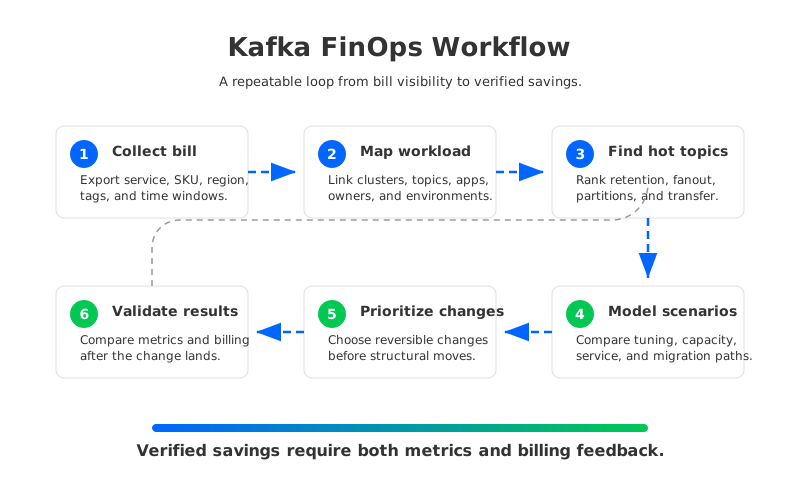
Start with billing, not tuning. Export the cloud or managed-service bill by account, project, region, service, SKU, tag, and time window. Then map those costs to Kafka clusters and environments. This step often exposes tagging gaps before it exposes Kafka waste, and that is still progress because unallocated spend cannot be optimized responsibly.
Next, join the bill to Kafka metrics. Map clusters to brokers, brokers to topics, topics to owners, and owners to applications. OpenTelemetry can help standardize telemetry pipelines because it provides a vendor-neutral framework for generating, collecting, and exporting metrics, traces, and logs, as described in the OpenTelemetry documentation. The goal is cost attribution that survives tool changes.
Once attribution exists, prioritize changes by reversibility:
- Low-risk tuning: remove unused topics, reduce excessive retention, right-size partitions, fix skew, and adjust dashboards or alerts that create unnecessary cardinality.
- Topology changes: move clients closer to brokers, reduce avoidable cross-zone paths, split noisy tenants, or revise replication patterns.
- Capacity changes: resize brokers, storage, or managed-service capacity only after validating peak behavior and failure scenarios.
- Architecture scenarios: model tiered storage, managed service changes, or object-storage-backed Kafka when tuning no longer addresses the largest cost drivers.
The final step is validation. Every accepted change should have a before-and-after view in both metrics and billing. If retention changes reduce disk usage but the bill does not move, the team may be blocked by provisioned storage or delayed billing data. Cost work is engineering work; feedback loops matter.
5Where Architecture Calculators Fit
Architecture calculators should not replace billing analysis or Kafka observability. They belong when the team has already found the main cost drivers and needs to decide whether tuning is enough. Some problems, such as over-retention or poor partition planning, should be fixed regardless of vendor. Other cost drivers are structural: replicated broker storage, fixed capacity for bursty traffic, and network paths created by the deployment model. Architecture-level scenarios let a platform team compare the current design against a different storage or service model using the same workload assumptions.
6FAQ
6.1Which Kafka cost calculator should you use?
There is no universal calculator because Kafka cost depends on deployment model, cloud provider, managed-service pricing, retention, read fanout, network topology, and operational assumptions. Use cloud billing for the baseline, Kafka metrics for workload attribution, and a TCO or migration calculator for scenario decisions.
6.2Which Kafka metrics matter most for cost?
The highest-signal metrics are produce bytes, fetch bytes, retained bytes, partition count, replication traffic, broker disk utilization, CPU, network throughput, request rate, and consumer lag. For multi-tenant clusters, labels or metadata that map topics to owners are as important as the raw metrics.
6.3When should a team use a migration scenario calculator?
Use one after you have a real baseline and at least one architectural cost driver that tuning will not solve, such as fixed overcapacity, storage growth from long retention, replication overhead, or cross-zone transfer patterns tied to the cluster design.


