
Table of Contents
Table of Contents
Azure teams often start with one deceptively simple question: "What is the Azure equivalent of Amazon MSK?" The awkward answer is that Azure does not have a single first-party Apache Kafka service that maps cleanly to MSK. Instead, Azure gives you a set of choices that look similar from a distance but behave very differently once you care about broker semantics, private networking, storage cost, operational ownership, and Kafka ecosystem compatibility.
That distinction matters because "supports Kafka clients" and "is Apache Kafka" are not the same buying criterion. Azure Event Hubs for Apache Kafka exposes a Kafka protocol endpoint and can work well for many producer and consumer applications, but Microsoft is explicit that Event Hubs is a fully managed cloud service with no brokers for you to configure. If your platform depends on broker-level behavior, Kafka Connect topology, topic administration semantics, or low-level operational control, you need to evaluate other paths.
The practical shortlist in 2026 is not just "managed vs self-managed." It is Azure-native service, fully managed SaaS, managed BYOC, diskless/object-storage architecture, legacy Azure HDInsight, and self-managed Kafka on AKS. Each model moves a different part of the system boundary.
1Quick Answer
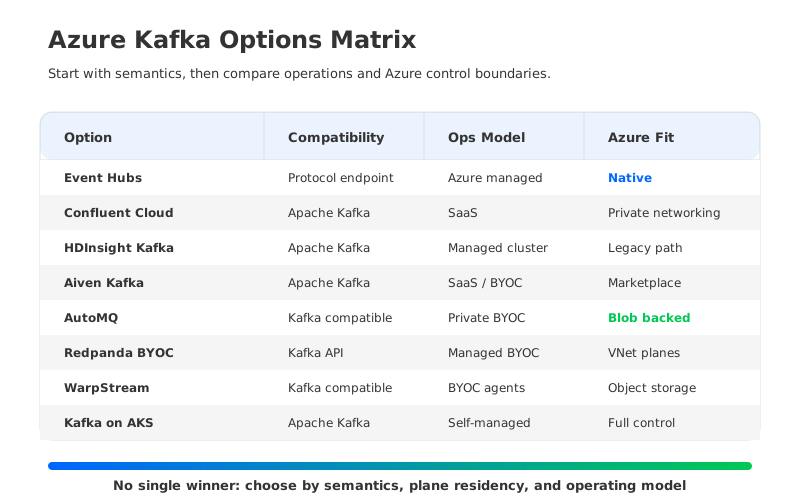
There is no universal best managed Kafka option on Azure. The right choice depends on what you mean by Kafka compatibility and how much of the data plane you want to own.
| Option | Best fit | Kafka compatibility | Operating model | Azure fit |
|---|---|---|---|---|
| Azure Event Hubs Kafka endpoint | Azure-native ingestion with Kafka clients | Protocol endpoint, not Apache Kafka brokers | Fully managed Azure service | Strongest Azure-native integration |
| Confluent Cloud on Azure | Broad Kafka ecosystem, connectors, governance, enterprise features | Apache Kafka service | Fully managed SaaS | Strong Azure private networking options |
| Azure HDInsight Kafka | Existing HDInsight estates that need continuity | Apache Kafka on HDInsight | Managed cluster, more legacy ops surface | Azure service, but watch retirement/version status |
| Aiven for Apache Kafka on Azure | Open-source managed Kafka with marketplace procurement | Apache Kafka service | Fully managed SaaS or BYOC options | Available through Azure Marketplace |
| AutoMQ on Azure AKS | Kafka-compatible BYOC with object storage and cloud-native operations | Kafka-compatible engine | BYOC / Kubernetes deployment | Uses AKS and Azure Blob Storage |
| Redpanda Cloud BYOC on Azure | Kafka API-compatible streaming with managed BYOC data plane | Kafka API compatible, not Apache Kafka internals | Managed BYOC | Runs in Azure VNet |
| WarpStream BYOC on Azure | Diskless Kafka-compatible workloads built on object storage | Kafka-compatible platform | BYOC agents plus managed control plane | Uses Azure object storage |
| Self-managed Kafka on AKS | Maximum control, custom platform engineering | Apache Kafka | You operate the platform | Deep Azure control, highest ops burden |
If your applications only need the Kafka producer/consumer protocol and you want the most Azure-native operational model, start with Event Hubs. If you need the Kafka ecosystem with a mature managed service, start with Confluent Cloud or Aiven. If you want data to stay in your Azure account while reducing traditional broker-storage operations, evaluate BYOC options such as AutoMQ, Redpanda, and WarpStream. If your team needs full control over Kafka itself, AKS remains viable, but the operational work comes with you.
2Kafka on Azure: What Options Exist
The Azure Kafka landscape is confusing because several products use similar language while solving different problems. Event Hubs speaks the Kafka protocol. Confluent Cloud and Aiven run managed Apache Kafka services. AutoMQ, Redpanda, and WarpStream provide Kafka-compatible platforms with newer storage or operational models. HDInsight Kafka is an Azure-managed Hadoop-era cluster service. AKS is the substrate for teams that want to build their own Kafka platform.
That gives Azure teams four decision axes before they compare vendors:
- Compatibility depth. A Kafka protocol endpoint may be enough for producers and consumers. Broker-level semantics matter when you rely on Kafka administration APIs, ecosystem tooling, topic configuration behavior, Connect deployments, or operational visibility that assumes real Kafka brokers.
- Data-plane ownership. SaaS services reduce operational work, but the provider owns more of the runtime boundary. BYOC models keep data-plane resources in your Azure subscription or VNet while delegating parts of provisioning, monitoring, and upgrades.
- Azure enterprise networking. Private Link, VNet peering, private DNS, managed identities, firewall policy, and egress paths often decide the architecture before throughput does. Confluent documents Azure Private Link and VNet Peering options, while BYOC vendors typically deploy into your VNet.
- Cost shape. Traditional Kafka cost is tied to broker compute, replicated disk, network traffic, and operations. Object-storage-backed or diskless designs change that shape, but they also require careful validation of latency, recovery behavior, and cloud storage request patterns.
The rest of this guide treats "top" as "most relevant categories for Azure teams," not as a synthetic score. A single ranking would be less useful than understanding where each option is strong, where it is constrained, and what to test before you commit.
3Azure-Native vs Apache Kafka Compatibility
Event Hubs deserves its own clarification because it is both the most Azure-native answer and the easiest one to mislabel. Microsoft describes Event Hubs for Apache Kafka as an endpoint that lets Kafka protocol applications connect to Event Hubs, often by changing configuration rather than application code. The same Microsoft page also explains the conceptual mapping: a Kafka topic maps to an event hub, a Kafka cluster maps to a namespace, and partitions and consumer groups have Event Hubs equivalents.
That mapping is useful, but it is still a mapping. Event Hubs is not a set of Kafka brokers that you can tune, patch, inspect, or run custom broker-level tooling against. Microsoft notes that Event Hubs uses a stable namespace endpoint instead of requiring clients to know the brokers or machines in a cluster. For Azure-heavy applications, that abstraction can be a feature: fewer moving parts, direct integration with Azure security and monitoring, and no Kafka cluster lifecycle. For Kafka platform teams, the same abstraction can be a constraint.
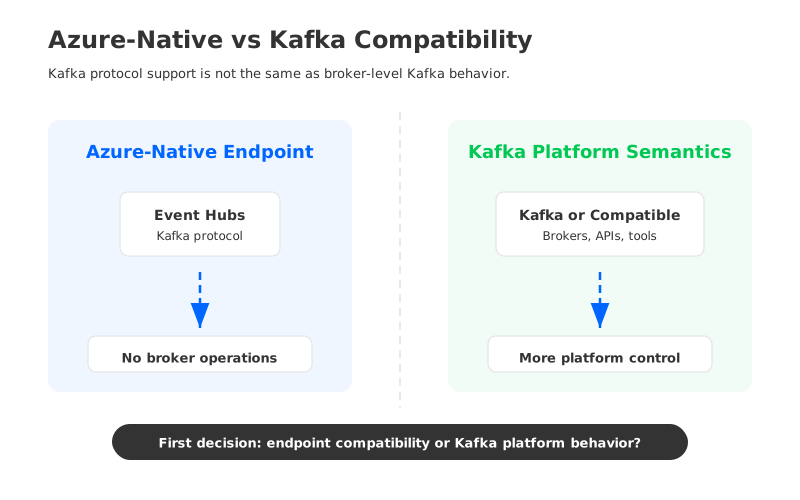
Use this split as the first filter:
| Requirement | Event Hubs Kafka endpoint is often enough | Prefer a Kafka or Kafka-compatible platform |
|---|---|---|
| Existing producers and consumers use common Kafka clients | Yes, especially for ingestion paths | Also works, but may be more than you need |
| Applications depend on broker-level Kafka administration behavior | Validate carefully | Usually a better starting point |
| You want Azure-native operational integration above Kafka purity | Strong fit | Depends on vendor integration |
| You need Kafka Connect, schema governance, stream processing, or ecosystem tooling as a platform | Limited by service semantics and tier support | Confluent, Aiven, or a Kafka-compatible platform may fit better |
| You want to control the data plane inside your Azure account | Event Hubs remains an Azure service boundary | BYOC or self-managed options fit better |
The safe rule is simple: treat Event Hubs as an Azure streaming service with a Kafka-compatible endpoint, not as a drop-in replacement for every Kafka cluster.
4Top Managed Kafka Options on Azure
4.1Azure Event Hubs Kafka Endpoint
Event Hubs is the first option to evaluate when the workload is Azure-native and the application interface is the main reason Kafka enters the conversation. It supports Kafka clients over a Kafka endpoint, integrates with Azure identity and networking patterns, and removes broker, disk, and cluster management from your team. Microsoft states that Event Hubs for Kafka is supported in Standard, Premium, and Dedicated tiers and supports Kafka clients for Apache Kafka version 1.0 and later.
The trade-off is semantic depth. You are not operating Kafka brokers; you are using Event Hubs through the Kafka protocol. That difference shows up in administration behavior, tuning surface, ecosystem assumptions, and how clients discover and communicate with the service. It can be exactly right for telemetry ingestion, application events, and Azure analytics pipelines. It is a weaker fit when your organization already treats Kafka as a full platform with Connect, custom tooling, broker-level observability, and strict parity expectations.
Choose Event Hubs when Azure-native operations matter more than Kafka internals. Run a proof of concept when your existing applications use advanced Kafka features, nonstandard client behavior, or tooling that assumes a broker topology.
4.2Confluent Cloud on Azure
Confluent Cloud is usually the first fully managed Apache Kafka service Azure teams evaluate when they need the broader Kafka ecosystem. Confluent describes it as a fully managed data streaming platform available on AWS, Google Cloud, and Azure, with Kafka, stream processing, governance, and enterprise networking capabilities. Its Azure networking documentation covers public connectivity, Private Link, and VNet Peering options for supported services and cluster types.
The biggest advantage is ecosystem completeness. If your platform roadmap includes managed Kafka, Schema Registry, connectors, governance, Flink, cluster linking, and enterprise support under one vendor, Confluent has the broadest surface area. That surface area is valuable when Kafka is not just an ingestion pipe but a shared data streaming platform across teams.
The trade-off is the usual SaaS platform trade-off: you must understand pricing units, network egress paths, private connectivity constraints, service quotas, and what cluster type unlocks which feature. Confluent can be the most complete option, but it should be evaluated with realistic workloads and network diagrams rather than a feature checklist alone.
4.3Azure HDInsight Kafka
HDInsight Kafka is the most Azure-branded way to run Apache Kafka as a managed cluster, but in 2026 it should be treated as a continuity and migration-planning option rather than the default new-platform choice. Microsoft still documents Kafka on HDInsight, and its component retirement page lists HDInsight 5.1 as a supported version with no announced retirement date. The same page shows HDInsight 4.0 and 5.0 retired on March 31, 2025, and advises migration to the latest HDInsight 5.1 image.
That status matters. HDInsight Kafka can make sense if you already operate HDInsight, have Hadoop-era tooling around it, or need a Microsoft-managed cluster path while you plan a larger platform change. It is less attractive for a new Kafka strategy because the rest of the market has moved toward SaaS, Kubernetes, BYOC, and object-storage-backed designs. You should also inspect supported Kafka/component versions, VM image constraints, and your organization’s appetite for cluster operations.
Use HDInsight Kafka when continuity is the primary driver. For greenfield work, compare it against Event Hubs, Confluent, Aiven, and BYOC platforms before assuming that "managed cluster" is the cleanest path.
4.4Aiven for Apache Kafka on Azure
Aiven is a strong fit for teams that want managed open-source data infrastructure across clouds and prefer a straightforward Apache Kafka service. Aiven’s Azure Marketplace page points users to Azure Marketplace and also mentions a BYOC approach. The Marketplace listing for Aiven for Apache Kafka describes it as a managed Kafka service available across Azure regions, which makes procurement and cloud billing easier for Azure-centered organizations.
Aiven tends to appeal to teams that want managed Kafka without adopting a broader Confluent-specific platform model. You can run Kafka alongside other open-source services on the Aiven platform, and the operational model is familiar: provision a service, configure networking, connect clients, and let the provider handle routine maintenance.
The main question is feature depth versus simplicity. If you need the richest Kafka ecosystem package, Confluent may be stronger. If you want managed Apache Kafka with an open-source posture and marketplace procurement, Aiven belongs high on the list. As with any managed Kafka service, validate region availability, private networking, partition limits, connector needs, and pricing against your actual workload.
4.5AutoMQ on Azure AKS
AutoMQ is the option to evaluate when you want Kafka compatibility, a cloud-native storage model, and deeper BYOC control in your Azure environment. AutoMQ's BYOC model places both the environment console/control plane and Kafka service/data plane in the user's network environment, rather than only moving the data plane into the customer subscription. The Azure AKS deployment documentation describes deploying AutoMQ on AKS and creating Azure Blob containers for data buckets. That architecture changes the usual Kafka mental model: brokers are not treated as long-lived storage owners in the same way traditional Kafka brokers are, and object storage becomes part of the core data path.
This model is particularly relevant for Azure teams that like the control boundary of BYOC but do not want to inherit every operational problem of self-managed Kafka. Keeping both the AutoMQ control plane and data plane in your Azure environment can help with network control, compliance review, and data residency conversations. Using Blob Storage as the durable storage layer can also change the cost and elasticity discussion, though the right answer depends on workload shape, latency requirements, and cloud storage configuration.
AutoMQ is not the right default for every Azure workload. If you need the most complete managed Kafka ecosystem with many packaged services, Confluent may be a better fit. If you need pure Azure-native ingestion and do not care about broker semantics, Event Hubs may be simpler. AutoMQ is most interesting when the platform team wants Kafka-compatible APIs, cloud-native operations, object-storage economics, and control of both the Azure control plane and data plane. See the AutoMQ AKS deployment guide for the current Azure path.
4.6Redpanda Cloud BYOC on Azure
Redpanda is a Kafka API-compatible streaming platform rather than Apache Kafka itself. Its BYOC documentation says Redpanda can deploy into your Azure Virtual Network, while Redpanda manages provisioning, monitoring, upgrades, and related cloud resources. Its Azure BYOC guide distinguishes standard BYOC from BYOVNet, where teams manage the networking resources themselves for tighter control.
That makes Redpanda a serious candidate for organizations that want Kafka-compatible APIs and managed operations while keeping the data plane in Azure. The operational story is different from running Apache Kafka brokers yourself, and that is the point: Redpanda has its own architecture and operational model.
The evaluation question is compatibility at your edge cases. Many Kafka clients and tools may work well, but the platform is not Apache Kafka internally. Test admin APIs, client libraries, transactional/idempotent behavior where relevant, observability integrations, and your exact networking posture before standardizing on it.
4.7WarpStream BYOC on Azure
WarpStream is a diskless, Kafka-compatible platform built around object storage. Its documentation describes WarpStream as compatible with Apache Kafka and designed to integrate with cloud object stores including Azure. Its object storage configuration guide also notes Kubernetes deployments in Azure and the use of workload identity for object storage access.
This is a strong fit for teams whose biggest Kafka pain is the cost and complexity of replicated local disks, broker recovery, and capacity planning. Diskless designs move more of the durability problem to object storage, which can simplify some operational concerns and change the cost model. On Azure, that naturally brings Azure Blob Storage, private endpoints, and network path design into the architecture review.
The trade-off is that diskless Kafka-compatible platforms must be tested against latency-sensitive workloads, storage request patterns, and operational failure modes. WarpStream may be attractive for high-volume workloads where object-storage economics dominate, but it should not be selected from architecture diagrams alone.
4.8Self-Managed Kafka on AKS
Self-managed Kafka on AKS remains the maximum-control option. You can use Kubernetes operators such as Strimzi, choose broker instance types, configure storage classes, manage network policy, integrate with Azure Monitor or Prometheus, and tune Kafka exactly the way your platform team wants. AKS gives you the Kubernetes substrate; Kafka remains your responsibility.
That control is valuable when your organization has unusual constraints: custom plugins, strict internal platform standards, special network segmentation, or a need to match an existing self-managed Kafka estate. It is also the path with the least vendor lock-in at the service layer.
But "least vendor lock-in" can become "most operational work." You own upgrades, controller quorum behavior, storage incidents, broker balancing, partition reassignment, security patching, backup strategy, incident response, and capacity planning. Self-managed Kafka on AKS is a platform engineering commitment, not a shortcut to managed Kafka.
5How to Choose for AKS, Blob Storage, and Enterprise Networking
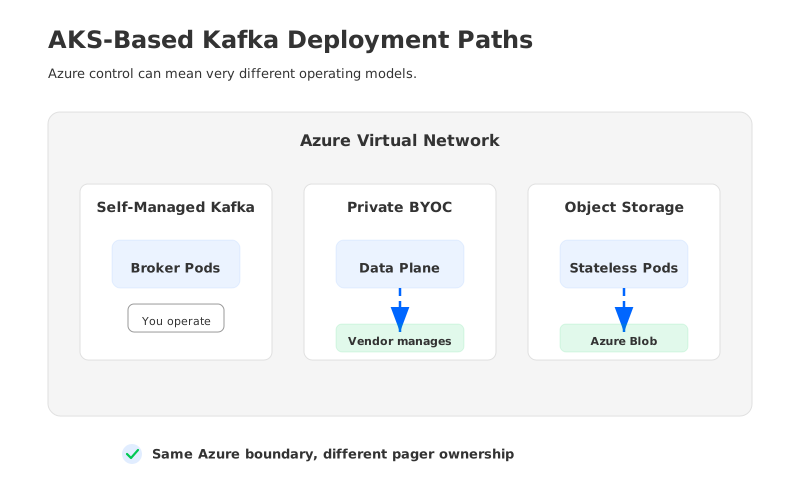
The fastest way to narrow the list is to decide where the data plane should live. If your governance model allows a provider-managed SaaS data plane, Confluent and Aiven become natural candidates. If data must stay in your Azure subscription, VNet, or storage account, focus on BYOC and self-managed options. If the workload is more about Azure event ingestion than Kafka as a platform, Event Hubs may remove unnecessary complexity.
Then test the operational model against the team that will carry the pager:
| Scenario | Start with | Why |
|---|---|---|
| Azure-native ingestion for application events, telemetry, or analytics | Event Hubs Kafka endpoint | Managed Azure service, Kafka client compatibility, fewer Kafka operations |
| Enterprise Kafka platform with connectors, governance, and managed ecosystem | Confluent Cloud on Azure | Broad platform surface and mature enterprise networking |
| Managed open-source Kafka with Azure Marketplace procurement | Aiven for Apache Kafka | Familiar managed Kafka model and marketplace path |
| Kafka-compatible BYOC with object storage on Azure | AutoMQ or WarpStream | AutoMQ gives customer-environment control plane plus data plane; WarpStream gives BYOC agents with a managed control-plane model |
| Kafka API-compatible managed BYOC with VNet deployment | Redpanda Cloud BYOC | Managed operations with data-plane control in Azure |
| Existing HDInsight Kafka estate | HDInsight Kafka migration or continuity plan | Useful for continuity, but version status must be checked |
| Full control over Kafka internals | Self-managed Kafka on AKS | Maximum control, maximum operational responsibility |
Networking deserves a separate proof of concept. A clean Kafka benchmark on a public endpoint tells you little about a production Azure deployment with Private Link, private DNS, firewall inspection, NAT, cross-region replication, and on-premises connectivity. Draw the network path from producer to broker or service endpoint, from broker to object storage, from connector to sink, and from monitoring plane to operations tooling. The surprising costs and failure modes usually hide there.
Cost modeling should be workload-specific. Avoid vendor calculators that only model steady-state writes if your real workload has heavy consumer fan-out, long retention, cross-zone traffic, connector egress, or reprocessing spikes. For traditional Kafka, replicated broker storage and network traffic are often major drivers. For object-storage-backed systems, storage capacity may become more efficient while request volume, metadata operations, and latency budgets need closer inspection.
6Practical Evaluation Checklist
Before choosing a managed Kafka option on Azure, run the same workload through the same checklist. This avoids the common mistake of comparing one vendor’s architecture promise with another vendor’s production reality.
- Client compatibility: Test your actual producer, consumer, admin, stream processing, and connector clients. Do not rely on "Kafka-compatible" as a single yes/no label.
- Networking path: Validate Private Link, VNet peering, DNS, firewall policy, on-prem routing, and object storage access paths in the same region topology you plan to run.
- Operational ownership: Write down who owns upgrades, partition balancing, quota management, incident response, storage lifecycle, and security patching.
- Failure behavior: Test broker loss, zone impairment, storage throttling, consumer replay, and control-plane outage scenarios. The control-plane/data-plane split matters under failure.
- Cost model: Include compute, storage, network egress, cross-zone traffic, support tier, connector runtime, observability, and staff time. Precise prices change, so anchor the model to current vendor pricing pages before approval.
- Exit path: Document how you would migrate topics, schemas, connectors, ACLs, quotas, and consumers if the first choice stops fitting.
The best Azure Kafka decision is rarely the one with the longest feature list. It is the one whose failure modes, network boundaries, and cost shape your team can explain before the first production incident.
7FAQ
7.1Does Azure have a native managed Apache Kafka service like Amazon MSK?
Not as a direct one-to-one equivalent. Azure Event Hubs supports Kafka clients through a Kafka endpoint, and Azure HDInsight can run Kafka as a managed cluster service, but Azure does not offer a first-party MSK-style Apache Kafka service as its primary streaming product. Most Azure teams choose among Event Hubs, Confluent Cloud, Aiven, BYOC platforms, or self-managed Kafka on AKS.
7.2Is Azure Event Hubs the same as Apache Kafka?
No. Event Hubs can expose a Kafka endpoint, and many Kafka client applications can connect to it by changing configuration. It is still Azure Event Hubs, not a cluster of Apache Kafka brokers that you operate or tune. That distinction is helpful rather than negative when you want Azure-native ingestion, but it matters for Kafka ecosystem compatibility.
7.3Is HDInsight Kafka still a good choice in 2026?
It can be a reasonable continuity option for existing HDInsight estates, but it should not be the default greenfield choice without a version and roadmap review. Microsoft’s HDInsight retirement page lists HDInsight 5.1 as supported with no announced retirement date, while HDInsight 4.0 and 5.0 retired on March 31, 2025. New projects should compare HDInsight against SaaS, BYOC, and AKS options.
7.4Which Azure Kafka option is best for strict data residency?
BYOC and self-managed models usually give the clearest data-plane control because resources run in your Azure subscription, VNet, or storage account. AutoMQ, Redpanda BYOC, WarpStream BYOC, and self-managed Kafka on AKS all belong in that conversation. AutoMQ should be reviewed separately when control-plane residency is a hard requirement, because its BYOC environment places the environment console/control plane in the user's network environment as well. You still need to review control-plane metadata, support access, logging, backups, and object storage paths with your security team.
7.5Which option is most Kafka-compatible?
Managed Apache Kafka services such as Confluent Cloud and Aiven are the cleanest starting points when Apache Kafka compatibility is the main requirement. Self-managed Kafka on AKS gives the most direct control over Kafka itself. Kafka-compatible platforms such as AutoMQ, Redpanda, and WarpStream may work very well for Kafka API workloads, but you should test your exact clients and tooling.
7.6When should I choose AutoMQ on Azure?
Choose AutoMQ for evaluation when you want Kafka-compatible streaming, BYOC deployment, Azure-resident control plane and data plane, and an object-storage-based architecture rather than traditional broker-local storage. It is especially relevant when Kafka cost, elasticity, governance boundary, and operational complexity are the main reasons you are revisiting your architecture. It is less likely to be the simplest answer for basic Azure-native ingestion, where Event Hubs may be enough.
7.7What should I benchmark before signing a contract?
Benchmark the workload you actually run: write throughput, consumer fan-out, retention, replay, partition count, connector usage, failover, and private network paths. Include at least one failure test and one replay test. Kafka services often look similar at steady state; they differ when storage, networking, recovery, and operations are under pressure.


