
Table of Contents
Table of Contents
Kafka cost reviews often start with broker instance prices. That is understandable because compute is visible, straightforward to sort in a cloud bill, and painful when a cluster is overprovisioned. It is also incomplete. A Kafka deployment can look reasonable at the broker layer while quietly spending through replicated storage, cross-zone traffic, retention, consumer fan-out, operational toil, and managed-service packaging.
The hard part is that these drivers amplify one another. Higher retention increases storage, which can require larger brokers. More replicas and consumers increase network traffic. A managed service may hide the operational work, but the workload physics still show up somewhere in the bill.
1Quick Answer
The 9 Kafka cost drivers every cloud team should compare are broker headroom, replication factor, cross-AZ traffic, storage media, retention, read fan-out, partition count, managed-service premium, and people or incident cost. Some are configuration problems: compression, retention windows, right-sizing, and topic hygiene can improve them without changing architecture. Others are architecture problems: broker-attached storage, replica storage amplification, cross-zone replication, and data movement during scaling are harder to remove while Kafka compute and storage remain tied to stateful brokers.
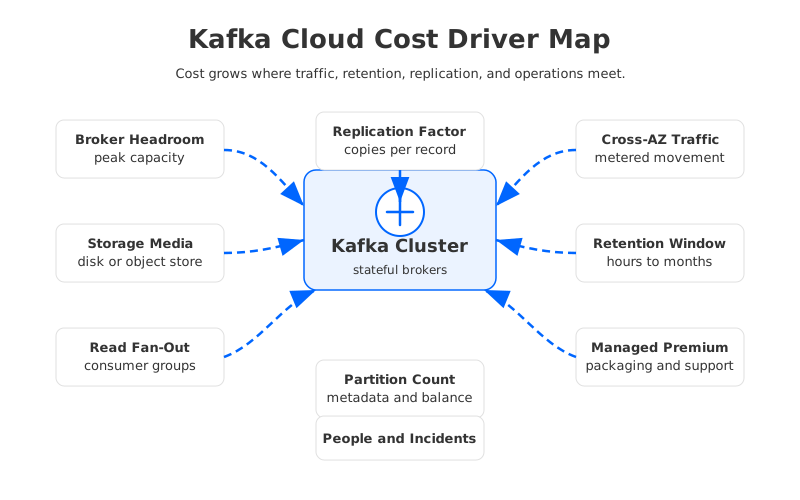
A useful Kafka TCO review should therefore ask 3 questions before comparing vendors:
- What does the workload require? Capture write throughput, read fan-out, retention, availability zones, peak-to-average ratio, and recovery expectations.
- Which costs scale with traffic? Network egress, cross-zone replication, object storage requests, and managed throughput pricing can move with every MiB produced or consumed.
- Which costs scale with architecture? Replicated broker disks, stateful rebalancing, and fixed cluster headroom can persist even when traffic is idle.
2Why Kafka Cost Is Hard To Estimate
Kafka was designed around brokers that own partitions, write logs to local disks, and replicate data to other brokers for durability. In public cloud, that design crosses metered boundaries. Compute is billed by instance time. Block storage is billed by provisioned capacity and performance characteristics. Cross-zone or inter-zone movement can be billed separately according to each provider's networking rules, as shown in official AWS, Azure, and Google Cloud pricing pages for EC2 data transfer, Azure bandwidth, and Google Cloud VPC network pricing.
The cloud bill also separates decisions that Kafka operators experience as one system. Increasing retention feels like a topic-level change, but it can require more disk per broker, a different EBS or managed-disk tier, larger instances, or more brokers. Increasing replication factor feels like a durability setting, but it multiplies stored bytes and can add network traffic across zones. Adding consumers feels like an application change, but every catch-up read and replay has infrastructure consequences.
This is why "Kafka costs $X per month" is rarely portable. A real estimate needs assumptions: region, instance family, broker count, replication factor, storage type, retention, compression ratio, read fan-out, cross-zone placement, support plan, and operational model. Without those inputs, a precise number is precise-looking guesswork.
3Top Kafka Cost Drivers To Compare
The checklist below is intentionally architecture-neutral. It works for self-managed Kafka, cloud-provider managed Kafka, commercial Kafka-compatible services, and object-storage-first systems. The point is not to declare one universal winner; the point is to expose where each model charges you.
| Cost driver | What to compare | Why it matters |
|---|---|---|
| 1. Broker headroom | Peak-to-average traffic, CPU, memory, network, page cache | Kafka clusters are often sized for bursts and recovery, not average traffic. Idle headroom still bills every hour. |
| 2. Replication factor | RF 2 vs RF 3, rack awareness, ISR policy | Replication improves durability but multiplies storage and network work. |
| 3. Cross-AZ traffic | Producer path, replica fetch, consumer path, rebalance traffic | Multi-AZ resilience can turn internal replication into metered network movement. |
| 4. Storage media | Local SSD, block storage, managed disk, object storage | Storage choice changes capacity cost, throughput limits, recovery behavior, and operational complexity. |
| 5. Retention | Hours, days, replay expectations, compacted topics | Retention-heavy topics can dominate storage even when write throughput is moderate. |
| 6. Read fan-out | Number of consumer groups, replay frequency, lag catch-up | Kafka write cost can be easier to predict than replay cost because every extra consumer group reads its own stream. |
| 7. Partition count | Topic count, partition skew, controller load, file handles | Too many partitions increase metadata, recovery, and operational overhead before they increase business value. |
| 8. Managed-service premium | Broker-hour packaging, storage markup, throughput units, support | Managed Kafka reduces toil but can bundle cost in ways that are hard to compare line by line. |
| 9. People and incidents | On-call load, upgrades, security patches, capacity planning | Self-managed infrastructure can look lower-cost until staffing and incident risk are included. |
These drivers do not have equal weight in every environment. A log-ingestion cluster with long retention may be storage dominated. A low-retention event bus with many downstream teams may be read-fan-out dominated. A compliance-sensitive deployment across 3 availability zones may be network dominated. The better exercise is to rank the drivers for your workload, using Kafka metrics and cloud billing data from a period that includes normal peaks.
4How To Read The 9 Drivers
The table is the starting point, but each driver deserves a specific diagnostic question:
- Broker headroom: Which resource actually sets the broker size: CPU, memory, disk throughput, network, page cache, or failover reserve? A cluster sized for one hot dimension can waste the others.
- Replication factor: With RF 3, each logical byte is stored on 3 brokers before compression, segment format, compaction, and retention behavior are considered. The question is whether Kafka-level replicas and cloud-storage durability are overlapping more than your workload needs.
- Cross-AZ and inter-zone traffic: Kafka metrics show bytes in and bytes out, but the cloud bill cares where bytes move. Producer placement, leader placement, follower replicas, consumers, and rebalances can all cross metered boundaries.
- Storage media: Kafka storage is capacity plus throughput, IOPS, durability, recovery time, and operational behavior. Block storage pricing pages such as AWS EBS pricing, Azure managed disks pricing, and Google Cloud disk pricing separate those dimensions in different ways.
- Retention: Retention turns streaming into storage. A topic retaining 7 days of data has a different cost profile from the same topic retaining 30 or 90 days, even when throughput is unchanged. For object-storage modeling, use official pages such as AWS S3 pricing.
- Read fan-out: Kafka's value comes from decoupling producers and consumers, so fan-out is not a defect. It becomes a cost driver when many consumer groups replay the same data or catch up from lag across zones.
- Partition count: Partitions provide parallelism, but they also increase metadata, open files, leader election work, recovery complexity, and balancing work. Over-partitioning becomes visible during restarts and reassignments.
- Managed-service premium: Managed Kafka changes who operates the platform; it does not erase the workload. Pricing pages such as Amazon MSK pricing expose dimensions like broker instance hours, storage, data transfer, and provisioned throughput.
- People and incident cost: Kafka teams still handle upgrades, client compatibility, partition reassignments, broker replacement, disk pressure, lag, ACLs, certificates, observability, and capacity planning. Those hours belong in TCO even when they do not appear in a cloud SKU.
This diagnostic style keeps the review practical. You do not need to solve every driver in one quarter. You need to know which 2 or 3 explain most of the bill and which ones are symptoms of the same architecture constraint.
5Configuration Levers Vs Architecture Levers
Once the cost drivers are visible, the next mistake is treating every cost as the same kind of problem. Some costs are configuration problems. Others are consequences of the storage architecture.
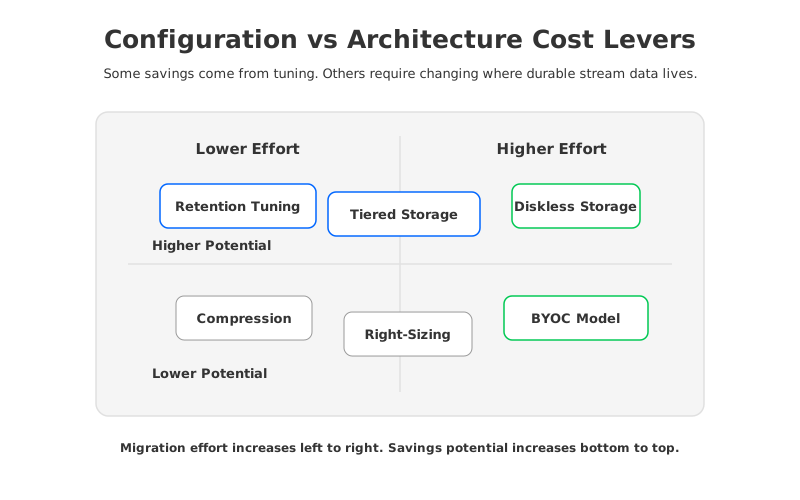
Configuration levers are usually the first move:
- Compression and batching reduce bytes before they hit storage and network.
- Retention tuning removes data that no consumer or compliance process needs.
- Partition hygiene reduces metadata and operational overhead.
- Broker right-sizing aligns instance shape with actual CPU, memory, network, and disk pressure.
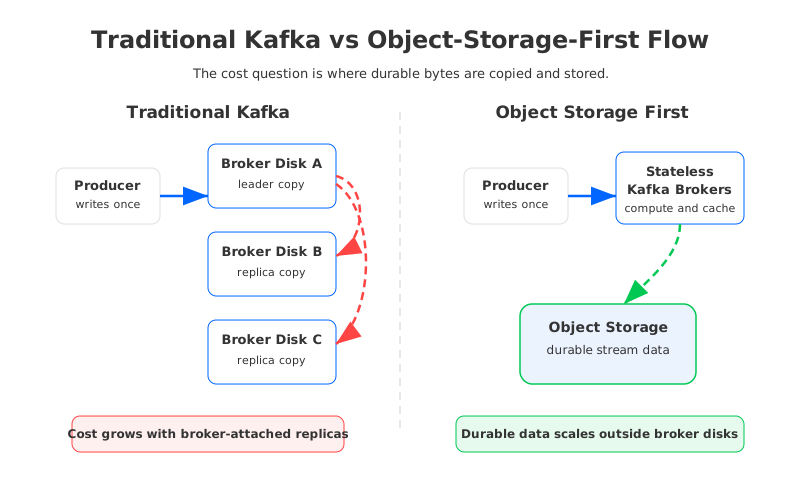
Architecture levers matter when the same costs keep returning after tuning. If broker-local storage is the durable system of record, storage and compute scale together. If replication is handled by Kafka brokers, logical writes become multiple physical writes. If brokers own data, scaling and recovery can require data movement.
6How AutoMQ Changes The Cost Model
AutoMQ is relevant after this analysis because it targets several architecture-level drivers directly. The AutoMQ overview describes a Kafka-compatible system that separates compute from storage and stores stream data in S3-compatible object storage. In that model, brokers are less tightly coupled to durable data ownership, and object storage becomes the primary storage layer rather than a cold tier bolted onto broker disks.
That does not make every cost disappear. You still need to model object storage capacity, requests, WAL configuration, network placement, read patterns, and the operating model. The difference is where the hardest multipliers sit. Broker-attached storage, replica storage amplification, and data movement during scaling are architecture-level costs in traditional Kafka.
For teams doing a real comparison, use the same workload assumptions across all options: write throughput, read fan-out, retention, availability zones, compression ratio, peak traffic, recovery goals, and region. AutoMQ's pricing page can be used as one official starting point, but the important discipline is consistency.
7FAQ
7.1What is usually the biggest Kafka cost driver?
There is no universal answer. Storage dominates long-retention workloads, network dominates multi-AZ high-throughput workloads, compute dominates bursty low-retention workloads with high headroom, and people cost dominates small teams running many clusters. The right starting point is to map your bill to the 9 drivers above.
7.2Is managed Kafka always more expensive than self-managed Kafka?
Not necessarily. Managed Kafka may cost more on visible infrastructure line items, but it can reduce upgrade work, incident load, security maintenance, and capacity-planning effort. The comparison should include both cloud bill and engineering time.
7.3Does tiered storage solve Kafka cost?
Tiered storage can help retention-heavy workloads by moving older data to remote storage, but it does not fully remove the cost mechanics of the hot write path. Broker-local storage, replication, and stateful operations may still matter.
7.4When should a team evaluate object-storage-first Kafka?
Evaluate it when configuration tuning no longer addresses the main drivers: replicated broker storage, cross-zone replication, long retention, elastic scaling, or operational recovery. At that point, the question is no longer "which knob do we turn?" but "which architecture makes this cost unnecessary?"
The broker price is worth checking. It is not the whole story. In 2026, the better Kafka cost review starts with the drivers that turn one message into compute, storage, network, and operational work across the cloud bill.


