
Table of Contents
Table of Contents
An Amazon MSK Connect connector can be configured correctly and still fail before it processes a single record. In a private subnet, the worker must resolve the right names, reach the MSK brokers, reach the AWS APIs it depends on, fetch its plugin and secrets, and pass security checks at each hop. Follow the packet and identity path in order: subnet and route evidence, interface endpoints and DNS, security groups, then plugin, IAM, KMS, and task state.
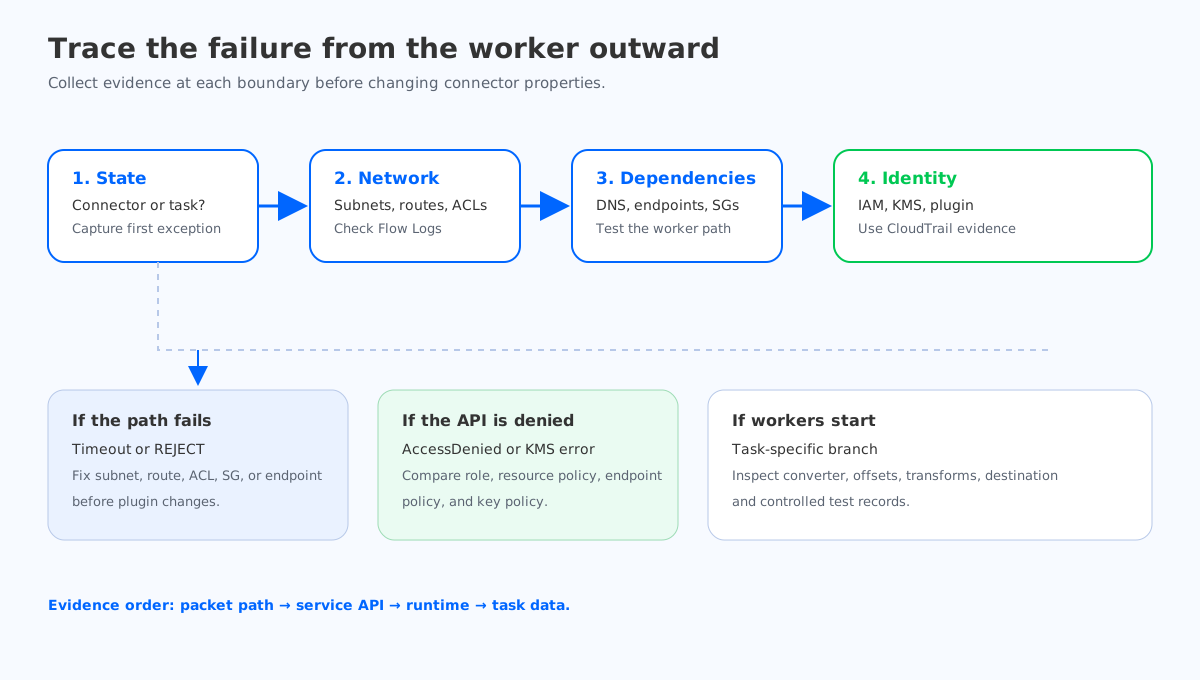
1Start with the failure stage, not the error string
MSK Connect exposes several states that look similar from a console view. Separate them before changing configuration:
- Connector creation fails: the service rejected a request, a worker configuration is invalid, or a referenced plugin, secret, or IAM role cannot be used.
- Connector stays provisioning or restarting: the worker cannot establish its network or control-plane dependencies, or the runtime is repeatedly exiting.
- Connector is running but tasks fail: the worker started, but the plugin cannot authenticate, resolve a broker, deserialize data, or reach a source or sink.
- Tasks run but records do not move: inspect connector lag, offsets, transforms, and destination behavior. Network reachability is no longer the first suspect.
Record the connector state, task state, first failure timestamp, and the exact log stream before making a change. A later retry can hide the original exception. Keep one failed attempt and correlate it with Flow Logs, CloudWatch logs, and MSK metrics.
Test from the same network boundary as the worker. A laptop on the corporate network can resolve an MSK broker name and still prove nothing about a private-subnet worker.
2Verify subnet and route selection
MSK Connect uses the worker configuration's subnet and security-group selections. Begin by listing the Availability Zones, route table associations, and network ACLs for every selected subnet. A connector can appear healthy in one subnet and fail when a task lands in another with a different route table or endpoint association.
For each worker subnet, answer these questions:
- Is the subnet route table the one you expect, and is the local VPC route present?
- Does the route table send AWS service traffic to the intended interface or gateway endpoint?
- If the connector talks to a source or sink outside the VPC, is there a route through Transit Gateway, VPC peering, VPN, or another approved path?
- Do network ACLs allow the ephemeral return ports as well as the destination port?
- Are the selected subnets in the same VPC and Region as the resources the connector must reach?
Private subnets do not mean “no network access.” They mean the path must be explicit. A missing route to an endpoint ENI produces timeouts; a route to the wrong VPC produces a similar symptom with a different root cause.
Use VPC Flow Logs to distinguish a dropped connection from a connection that never reached the subnet. Look for the worker ENI's source address, the destination address, and REJECT records at the time of the failure. Flow Logs do not show every application-layer reason, but they quickly identify a security-group or network ACL problem.
3Check interface endpoints and private DNS
A private MSK Connect deployment commonly needs AWS API access without a public IP. Interface VPC endpoints create elastic network interfaces in selected subnets and provide private paths to supported services. The exact endpoint set depends on the plugin and deployment, but typical dependencies include Amazon S3 for plugin artifacts, Secrets Manager for credentials, CloudWatch Logs for worker logs, and the AWS APIs used by the connector or its custom code.
Check all four endpoint pieces:
| Evidence | What it proves | Typical failure |
|---|---|---|
| Endpoint exists in the VPC and Region | A private ENI is available | Endpoint created in another VPC or Region |
| Worker subnet is associated with the endpoint | The worker can route to the ENI | Endpoint subnets do not cover selected worker AZs |
| Private DNS is enabled where supported | Standard service names resolve to private IPs | Worker resolves a public address and times out |
| Endpoint policy allows the action | The API request is authorized at the endpoint | AccessDenied despite a broad IAM role |
Do not assume that a successful DNS lookup proves the API call will work. Resolve the service name from the worker path, then check the endpoint policy and IAM policy separately. Endpoint policies can deny an action even when the execution role allows it.
S3 is a frequent source of confusion because gateway endpoints and interface endpoints have different routing behavior. If the plugin or a connector library reads from S3, confirm which endpoint type your design uses and whether the route table is associated with it. Secrets Manager and CloudWatch Logs use interface endpoints; their endpoint security group must allow HTTPS from the worker security group.
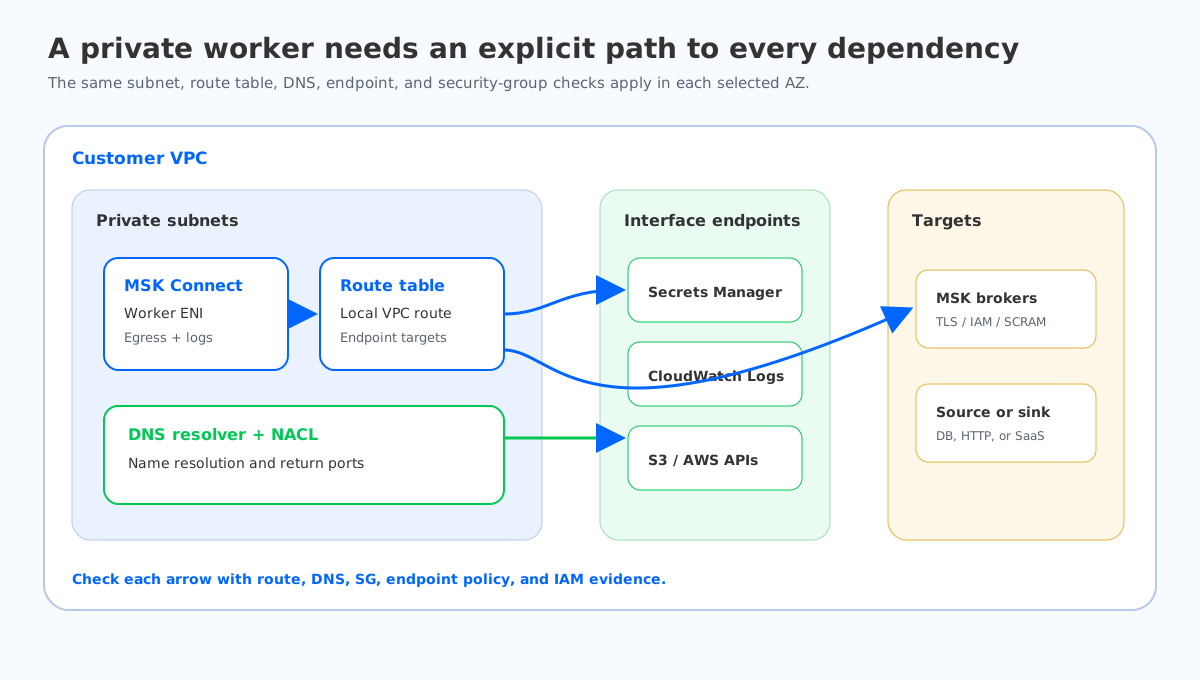
4Prove DNS before changing connector properties
MSK broker bootstrap names and AWS service endpoints depend on VPC DNS. Confirm that the VPC has DNS resolution and DNS hostnames enabled, and that the DHCP options set points to the expected resolver. AWS documents these controls in the VPC DNS guide.
Use the failure pattern:
- Name does not resolve: inspect VPC DNS attributes, DHCP options, Route 53 Resolver rules, and private hosted zones.
- Name resolves to a public address: private DNS for an interface endpoint may be disabled, or a resolver rule may be sending the query elsewhere.
- Name resolves to a private address but connection times out: move to routes, endpoint security groups, network ACLs, or the target service.
- TLS fails after connection: the network path works; inspect the hostname used for TLS, trust material, and authentication settings.
Test the exact broker bootstrap endpoint and AWS service hostnames used by the worker. Avoid replacing an MSK hostname with an IP address as a workaround. Broker addresses can change, and TLS certificates are issued for names, not hand-entered addresses.
For custom DNS, capture the resolver path rather than guessing. A Route 53 Resolver rule can make a name resolve differently from the VPC default.
5Read security groups as a graph
Security groups are stateful, but the allowed direction still matters. The worker security group needs egress to each dependency, and the dependency's security group needs ingress from the worker security group on the service port.
Map the graph explicitly:
- Worker to MSK brokers: broker listener port for the selected authentication mode.
- Worker to Secrets Manager, CloudWatch Logs, or other interface endpoints: TCP 443 to the endpoint security group.
- Worker to a database or HTTP sink: the destination port from the worker security group or its approved egress path.
- Return traffic: allowed automatically by stateful security groups, but still subject to network ACLs.
Referencing a security group is safer than allowing a broad CIDR when both resources share a VPC. It also makes the dependency visible during review. If the target is reached through a load balancer, inspect the load balancer security group and the target security group separately.
Use VPC Flow Logs and endpoint connection logs together. A REJECT from the worker ENI points to the worker's egress, subnet ACL, or route. A REJECT on the endpoint ENI often means the endpoint security group does not allow the worker group. An accepted flow followed by an application timeout moves the investigation to TLS, IAM, or the target service.
6Separate plugin and worker failures
Once the network path works, inspect the plugin package and worker configuration. MSK Connect loads a custom plugin into the worker runtime, then starts connector tasks with the worker and connector properties. A malformed archive, incompatible connector version, missing converter, or invalid transform can make a task fail even though the worker is reachable.
Ask the logs:
- Which plugin artifact and version did the worker load?
- Did the connector class initialize?
- Did the task fail before connecting to Kafka, or after opening a broker connection?
- Which converter, serializer, or transform threw the first exception?
- Did every task fail at the same point, or only one partition assignment?
Prioritize the first exception in the task log. A later “Task threw an uncaught and unrecoverable exception” line is usually a wrapper, not the root cause. If the log only shows a generic restart, increase the connector log level temporarily and send logs to a CloudWatch Logs group that the worker can reach. The MSK Connect monitoring documentation describes the available worker and connector metrics.
Change one boundary at a time, then compare the new task timestamp with the previous failure.
7Verify IAM and KMS at the action boundary
IAM errors can look like network errors when a connector waits for a denied API call. Identify the principal used by the worker and inspect the trust policy, permission policy, and resource policy for each dependency.
For a private-subnet connector, check at least:
- The MSK Connect service can assume the execution role.
- The role can read the plugin location and any referenced secret.
- The role can publish logs to the configured CloudWatch Logs group.
- The role has the MSK permissions required by the selected authentication mode.
- If a customer-managed KMS key protects a secret or log group, the key policy allows the role and the required AWS service principal.
- Endpoint policies do not narrow these actions unexpectedly.
The MSK Connect IAM guide is the starting point for service permissions. Use CloudTrail for the denied API call and inspect the errorCode, eventName, resource ARN, and assumed-role session. CloudTrail tells you which policy boundary failed; the connector log often does not.
Treat KMS as a separate gate. A role may call Secrets Manager while the key policy denies kms:Decrypt, producing an access error after networking succeeds. Record the key ARN and test the same role against the same resource.
8Use task state as the final branch
When workers start, routes resolve, and permissions pass, task state narrows the remaining search:
- All tasks fail during initialization: suspect plugin class, converter, credentials, or a shared destination dependency.
- One task fails while others run: inspect partition-specific data, offsets, schema records, or a single destination shard.
- Tasks restart after a period of activity: inspect idle connection timeouts, broker reauthentication, destination throttling, and memory pressure.
- Tasks are running but no records arrive: compare source offsets, connector offsets, consumer lag, and sink acknowledgments.
Create a small test topic or source record. A controlled record separates “connector cannot connect” from “connector connects but filters or transforms the record.”
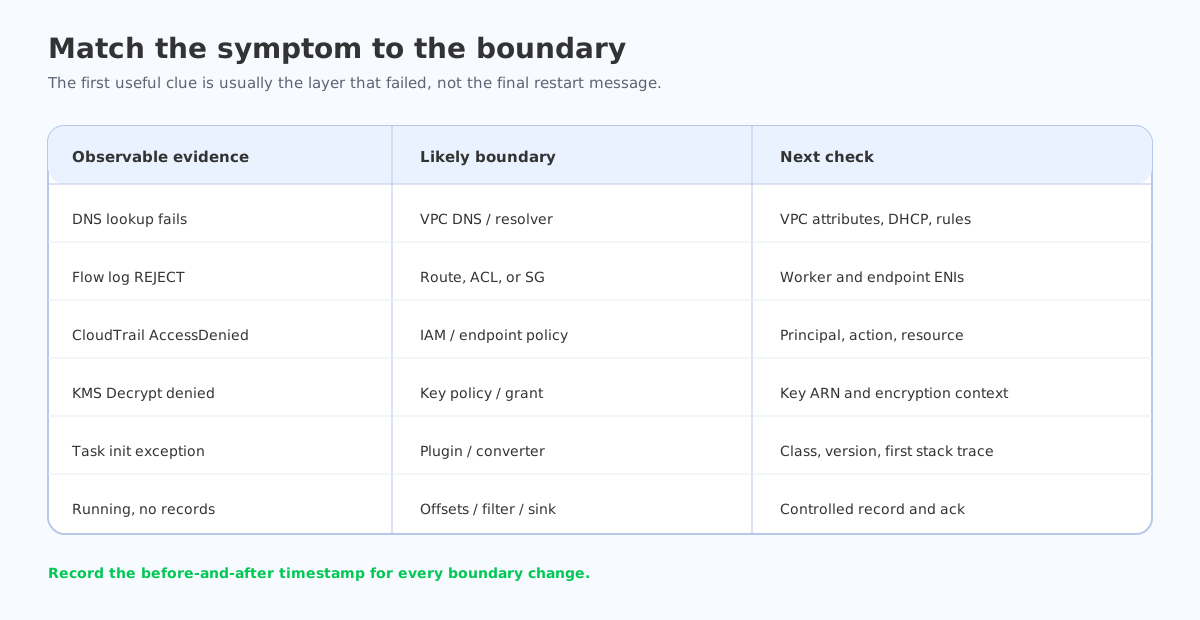
9A repeatable incident runbook
Keep this short runbook with the connector definition:
- Capture connector and task state, worker log group, and the first exception timestamp.
- Confirm every selected worker subnet, route table, network ACL, and endpoint association.
- Verify DNS for MSK bootstrap names and each AWS service dependency.
- Check VPC Flow Logs for the worker ENI and endpoint ENIs.
- Compare worker, endpoint, MSK, and destination security-group rules.
- Use CloudTrail to identify denied IAM or KMS actions.
- Reproduce with one test record and the least complex connector configuration.
- Change one boundary at a time, then record the new task attempt and evidence.
A runbook that says “check the network” is too broad. Name the subnet, route table, endpoint, security group, principal, action, and log stream.
10Where AutoMQ fits, and where it does not
Private-subnet troubleshooting is a network and identity problem first. Moving the Kafka cluster does not fix a missing endpoint route or a denied KMS action. Once those boundaries are understood, architecture may become part of the decision if the team is also evaluating broker storage, elasticity, or a customer-controlled deployment model.
AutoMQ is a Kafka-compatible streaming platform that separates broker compute from durable shared storage. That model can be relevant when a connector migration is part of a broader platform change, but it does not remove the need to design private connectivity, IAM, DNS, and connector-specific observability. Keep the same evidence gates during a proof of concept.
To test that architecture against your client and connector paths, use the AutoMQ product overview after you have captured the current MSK Connect baseline.
11References
12FAQ
12.1Does MSK Connect need a NAT gateway in a private subnet?
Not always. The required path depends on the connector and AWS services it calls. Interface endpoints and gateway endpoints can provide private access to supported services. An external database or SaaS destination may still require NAT, Transit Gateway, VPN, or another approved path.
12.2Why does a connector resolve an MSK hostname but still time out?
DNS resolution only proves that a resolver returned an address. Check the route table, network ACL, worker egress, broker security group, listener port, and VPC Flow Logs. If the connection reaches the broker, inspect TLS and authentication next.
12.3Which VPC endpoints are required for MSK Connect?
There is no universal list. Review the plugin location, secrets, logging destination, and any AWS APIs called by the connector. Common dependencies include S3, Secrets Manager, and CloudWatch Logs, but the endpoint type and policy must match the actual workload.
12.4How do I tell an IAM error from a network error?
Use both connector logs and CloudTrail. Timeouts and flow-log rejects indicate path problems. A CloudTrail AccessDenied event identifies a denied action, principal, resource, or KMS key policy after the request reached the API.
12.5Should I restart the connector after fixing a route or endpoint?
Start a new task attempt after recording the original failure. Restarting can be part of the recovery, but the evidence should show that the worker reached the dependency after the network or policy change. Keep the before and after timestamps in the incident record.


