
Table of Contents
Table of Contents
A vendor quote tells you what a streaming platform charges. It does not tell you what the platform will cost after your producers, consumers, retention policy, migration work, cloud network, and on-call model all show up in the same bill. That gap matters for StreamNative Ursa because Ursa is not a single deployment shape. StreamNative documentation describes URSA-backed latency-optimized and cost-optimized profiles, with different storage backends, metadata systems, protocol surfaces, and billing dimensions depending on the cluster type.
The practical question is not "What is the Ursa list price?" The better question is "Which workload shape am I buying for, and which costs move when I choose Ursa instead of Kafka, Confluent Cloud, MSK, or another Kafka-compatible shared-storage platform?" A cost model that cannot answer that question will miss the charges that appear after the proof of concept: retained data, read fanout, cross-zone traffic, connector runtime, support, and engineering time.
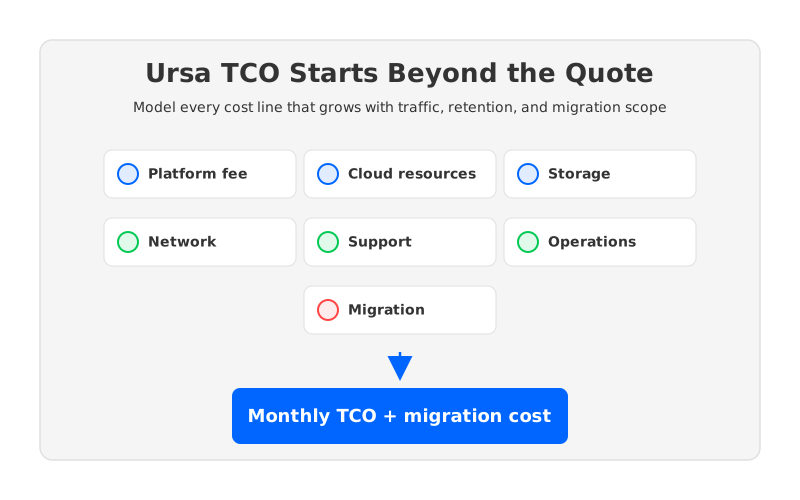
StreamNative's public billing documentation gives useful anchors. Dedicated Kafka clusters use Reserved Throughput Units during public preview, BYOC clusters use Elastic Throughput Units based on actual usage, and Dedicated Pulsar clusters use Compute Units plus Storage Units. StreamNative also says Dedicated Kafka pricing for dimensions beyond RTU is pending and subject to change during the preview phase. That means many buyers should treat a quote as one input to a larger spreadsheet, not as the spreadsheet itself.
1Price vs Total Cost of Ownership
Streaming cost hides in multiplication. A write may become replicated bytes, retained bytes, fetched bytes, connector bytes, monitoring bytes, and data transfer bytes between Availability Zones or Regions. A managed service can simplify operations, but it cannot make workload physics disappear.
For Ursa, the first modeling step is to separate three layers:
- StreamNative service charges. These include the billing unit for your cluster type, such as RTU, ETU, CU, SU, ingress, egress, storage, connectors, functions, support, and marketplace billing behavior where applicable.
- Underlying cloud resource charges. In BYOC or private deployments, the buyer may still pay the cloud provider for compute, object storage, disks, network, Kubernetes, load balancers, observability, and backup infrastructure.
- Change-management cost. Kafka compatibility, Pulsar compatibility, connector behavior, security rules, schemas, transactions, topic compaction, and rollback design can change how much engineering work the migration consumes.
These layers are easy to mix because the invoice line may look simple. StreamNative notes that marketplace usage may appear as a single StreamNative Cloud service line, while surrounding cloud resources may remain elsewhere in the cloud bill. FinOps teams should map both views before comparing Ursa with another platform. A lower service line can lose its advantage if it moves cost to storage retrieval, networking, or integration work.
2The Ursa TCO Model
Start with monthly workload facts, not vendor units. Vendor units are useful after the workload is described; they are dangerous when they become the starting point. A TCO worksheet should begin with numbers your application teams already understand: sustained ingest, peak ingest, average message size, retention, consumer fanout, replay frequency, topic count, partition count, connector count, and recovery objective.
The base formula is deliberately plain:
Monthly TCO =
  platform fees
  + cloud compute
  + durable storage
  + read and write request cost
  + network transfer
  + connectors and functions
  + observability and security tooling
  + support
  + migration and compatibility work
  + operations labor
The StreamNative-specific part is the mapping from workload facts to its billing dimensions. For Dedicated Kafka clusters in public preview, check reserved capacity in RTUs and any separately quoted data-in, data-out, and storage dimensions. For BYOC Kafka clusters, model ETU usage and then add the cloud resources that are not included in the service fee. For latency-optimized Pulsar profiles, model local-disk or BookKeeper-related capacity differently from cost-optimized object-storage profiles.
| Cost line | What to capture | Why it changes TCO |
|---|---|---|
| Throughput capacity | Sustained MiB/s, peak MiB/s, request rate, reserved headroom | Reserved capacity punishes overestimation; elastic capacity punishes noisy peaks. |
| Durable storage | Retained GiB, retention hours, compaction policy, replay window | Long retention changes storage from a background item into a core budget line. |
| Read fanout | Consumer groups, replay frequency, analytics pulls, egress paths | High fanout can make reads more important than writes. |
| Network | Cross-AZ, cross-Region, internet egress, PrivateLink or peering | Network fees can be invisible in platform pricing but visible in cloud bills. |
| Migration | Client behavior, connectors, schemas, security, unsupported features | Compatibility gaps become engineering cost, not line-item pricing. |
The table gives procurement, SRE, and architecture teams one shared vocabulary instead of letting every group optimize a different number.
3Workload Scenarios to Compare
Most teams should not build one Ursa estimate. Build at least three, because the platform that looks efficient for log ingestion may look different for high-fanout analytics. A single average scenario usually hides the axis that will dominate production.
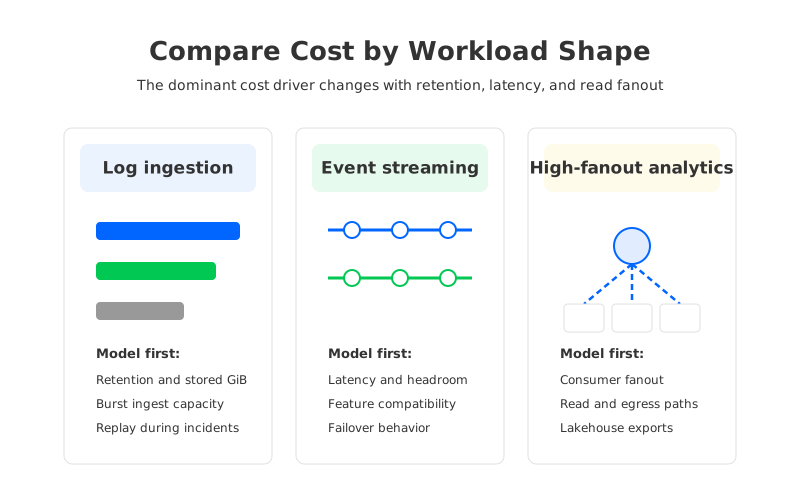
Log ingestion is write-heavy, retention-heavy, and often tolerant of higher tail latency than transactional event pipelines. The model should emphasize retained bytes, storage class, object-storage requests, burst handling, and replay during incident response. If logs are retained for days or weeks, a cost-optimized object-storage profile can look attractive, but you still need to validate hot-read latency and indexing behavior.
Core event streaming is more balanced. The business may care about low producer latency, stable consumer lag, transactions, compaction, schema evolution, and predictable failover. Here the model should include reserved headroom and feature compatibility, not only storage. StreamNative's Kafka compatibility documentation says StreamNative Cloud supports Kafka clients from version 0.9 onward, but it also notes limitations for Ursa-powered clusters, including transactions and topic compaction. If your current Kafka estate depends on those features, the cost is redesign work or a blocked migration.
High-fanout analytics turns reads into the budget driver. The same event may be consumed by dashboards, fraud systems, lakehouse ingestion, ML feature jobs, and ad hoc replays. In that scenario, egress paths, cache efficiency, object reads, and lakehouse integration deserve more scrutiny than the nominal write charge. StreamNative positions URSA around open object storage and lakehouse formats, but you still need to test the real read pattern rather than assume that retained data has low access cost.
4Migration and Compatibility Costs
Migration cost is where a pricing comparison becomes a production decision. A team moving from Apache Kafka to a Kafka-compatible service wants existing clients, Kafka Connect jobs, ACLs, monitoring, and runbooks to survive the move with minimal changes. The more application code you rewrite, the less relevant the platform unit price becomes.
Use a compatibility checklist before accepting a TCO estimate:
- Client protocol and TLS behavior. StreamNative documents SNI requirements for Kafka protocol connections on StreamNative Cloud. Validate older client libraries, proxies, service meshes, and private networking paths.
- Kafka feature dependencies. Transactions, topic compaction, idempotent producers, consumer group behavior, offset tooling, and admin APIs should be tested against the exact Ursa profile under consideration.
- Connector and stream processing estate. Kafka Connect, Debezium, Flink, Spark, and lakehouse sinks may rely on operational assumptions that do not show up in a simple producer-consumer benchmark.
- Rollback plan. Dual-write, mirror, offset translation, DNS cutover, and backfill procedures all consume engineering time. A migration without rollback is not a cost optimization project; it is a bet.
This is also where a Kafka-compatible shared-storage alternative such as AutoMQ becomes a useful control in the model. AutoMQ keeps Kafka protocol and ecosystem compatibility as the starting point, while replacing Kafka's local-log storage layer with S3Stream and shared object storage. That architecture changes the storage and scaling cost structure without asking Kafka teams to switch to a Pulsar-oriented operational model.
5Comparing Ursa Cost with AutoMQ and Managed Kafka
A fair comparison should not ask "Which vendor has the lowest headline number?" It should ask which architecture moves the dominant cost driver. Traditional Kafka and many managed Kafka offerings still carry local-disk, broker-bound storage economics. Tiered storage can reduce historical retention pressure, but primary storage and reassignment remain tied to broker-local state. Object-storage-native systems make durable storage a shared service rather than a broker possession.
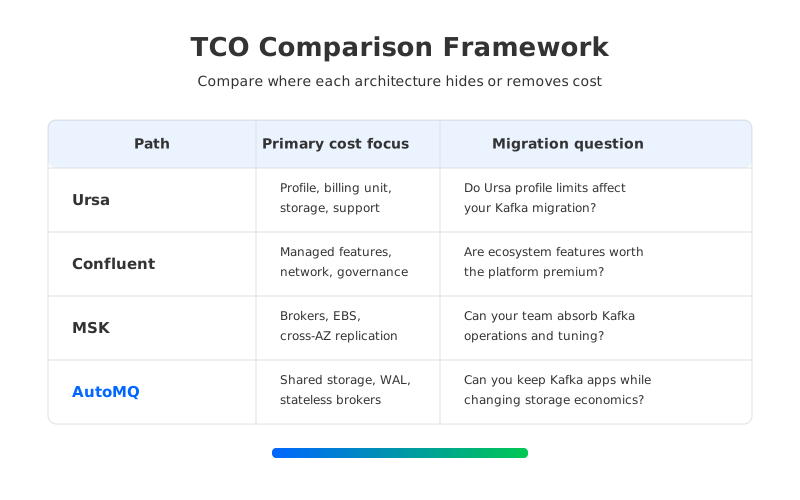
Ursa's cost-optimized profiles and AutoMQ's shared-storage architecture both reflect that cloud-native direction, but they enter from different product histories. Ursa comes from StreamNative's Pulsar and unified streaming stack. AutoMQ comes from the Kafka side: preserve Kafka compute and protocol semantics, replace the storage layer, and make brokers stateless. For Kafka-heavy estates, that distinction matters because the migration surface is part of TCO.
Use this comparison frame:
| Platform path | Cost model focus | Migration question |
|---|---|---|
| StreamNative Ursa | URSA profile, billing unit, storage profile, protocol surface, support, cloud resources | Which Ursa profile matches the workload, and do Kafka feature limits affect the migration? |
| Confluent Cloud | Cluster type, throughput, storage, networking, connectors, governance, support | Are platform features worth the premium for this workload and team? |
| Amazon MSK | Broker instances, EBS, storage throughput, cross-AZ replication, operations, upgrades | Can the team absorb Kafka operations and cloud resource tuning? |
| AutoMQ | Kafka-compatible shared storage, object storage, WAL choice, stateless brokers, BYOC resources | Can the team keep Kafka applications while changing the storage economics? |
The point is not that one row always wins. Each row hides cost in a different place. If your workload is retention-heavy and Kafka-compatible, shared object storage may dominate. If your workload depends on a broad managed ecosystem, governance features may dominate. If you need Pulsar-native semantics, Kafka-only compatibility is not enough.
6TCO Worksheet
The most useful worksheet is small enough to survive a vendor meeting. Put every assumption in a cell that someone can challenge. Then run normal, peak, and failure-recovery scenarios.
Start with these fields:
- Workload identity: cluster name, application owners, environment, cloud provider, Region, deployment model, expected launch date.
- Traffic: average ingress MiB/s, peak ingress MiB/s, average egress MiB/s, peak egress MiB/s, message size distribution, request rate, number of producers and consumers.
- Retention: retention hours by topic class, compacted topics, replay window, historical read frequency, lakehouse export volume.
- Resilience: Availability Zones, replication or storage durability model, failover objective, disaster recovery Region, backup requirements.
- Platform quote: billing unit, included capacity, overage rate, support fee, marketplace behavior, annual commitment, minimums, preview caveats.
- Cloud bill: compute, disks, object storage, request charges, load balancers, private connectivity, cross-AZ traffic, cross-Region traffic, observability.
- Migration: client changes, connector changes, feature gaps, performance testing, data migration, rollback, training, runbook updates.
Then add three outputs: monthly steady-state cost, monthly peak-period cost, and one-time migration cost. The third number matters more than teams expect. A platform that saves a modest monthly amount can still be the wrong choice if it requires a long rewrite.
7How to Read the Result
The spreadsheet should make one cost driver obvious. If it does not, the model is too vague. For log ingestion, retained storage may dominate. For real-time services, reserved headroom and feature compatibility may dominate. For analytics fanout, read and egress may dominate. For regulated teams, support, private networking, security review, and procurement terms may dominate.
Once the dominant driver is visible, ask which architecture reduces that driver without creating a larger migration cost. That is the point where AutoMQ can enter the conversation naturally for Kafka teams. If the main problem is that Kafka's broker-local storage makes scaling, replication, and retention expensive, a Kafka-compatible shared-storage system gives you a different cost curve while keeping existing Kafka clients and ecosystem tools in scope. If the main problem is a Pulsar-native workload or a unified Pulsar/Kafka strategy, Ursa deserves a different kind of evaluation.
Return to the first quote you received. It may be accurate, but it is only one layer of the decision. A real Ursa cost estimate should tell you what happens when the workload grows, consumers replay, Region design changes, and migration work is counted with the same seriousness as infrastructure spend. For Kafka-focused teams comparing cloud-native architectures, run AutoMQ through the same worksheet and compare the cost curve rather than the slogan; the AutoMQ project is a useful next stop for validating Kafka compatibility and shared-storage assumptions.
8References
- StreamNative Cloud Billing Overview
- StreamNative Data Streaming Engine
- StreamNative Kafka Compatibility Overview
- AWS S3 Pricing
- AWS: Understanding Data Transfer Charges
- AutoMQ Architecture Overview
- AutoMQ Overview
9FAQ
9.1Is StreamNative Ursa pricing public?
StreamNative publishes billing dimensions and examples for StreamNative Cloud, but buyers should verify the exact quote, cluster profile, support terms, and preview caveats directly with StreamNative. Dedicated Kafka clusters are described as public preview in the billing documentation, and some pricing dimensions may be pending or subject to change.
9.2What is the biggest hidden cost in Ursa TCO?
The biggest hidden cost depends on workload shape. For retention-heavy logs it may be stored data and object-storage access. For event streaming it may be reserved capacity and feature compatibility. For analytics fanout it may be read traffic, egress, and replay behavior.
9.3How should I compare Ursa with AutoMQ?
Compare them as architecture choices, not only vendor SKUs. Ursa is part of StreamNative's URSA-backed streaming platform across Pulsar and Kafka profiles. AutoMQ is a Kafka-compatible shared-storage platform that keeps Kafka protocol and ecosystem compatibility while moving durable data to object storage.
9.4Does Kafka compatibility remove migration cost?
No. It lowers migration risk, but you still need to test clients, TLS behavior, admin tooling, connectors, topic features, security rules, monitoring, and rollback. Compatibility claims become useful only after they are tested against your exact workload.
9.5What should be in an Ursa cost spreadsheet?
Include traffic, retention, read fanout, cluster profile, billing unit, support, cloud resources, network transfer, connector runtime, observability, migration labor, and rollback cost. Keep normal, peak, and failure-recovery scenarios separate.


