
Table of Contents
Table of Contents
Search for "Ursa Kafka" and the first question is usually not about a feature. It is about identity. Is Ursa a Kafka distribution, a Pulsar product, a storage engine, a managed service, or a lakehouse bridge wearing a Kafka API? That confusion is reasonable because StreamNative talks about Ursa in the same breath as Kafka, Pulsar, and lakehouse-native streaming. For a Kafka platform team, the practical question is narrower: if an application already speaks Kafka, what changes when the broker layer underneath it is Ursa?
The short answer is that StreamNative positions Ursa as the engine behind its native Kafka and Pulsar services, with a design centered on decoupled compute and storage, a leaderless architecture, and direct use of object storage and lakehouse table formats. That does not make it "Apache Kafka with a different logo." It makes it a Kafka-facing streaming platform that needs to be evaluated on compatibility depth, operating model, migration path, and commercial boundaries.
1What People Mean by "Ursa Kafka"
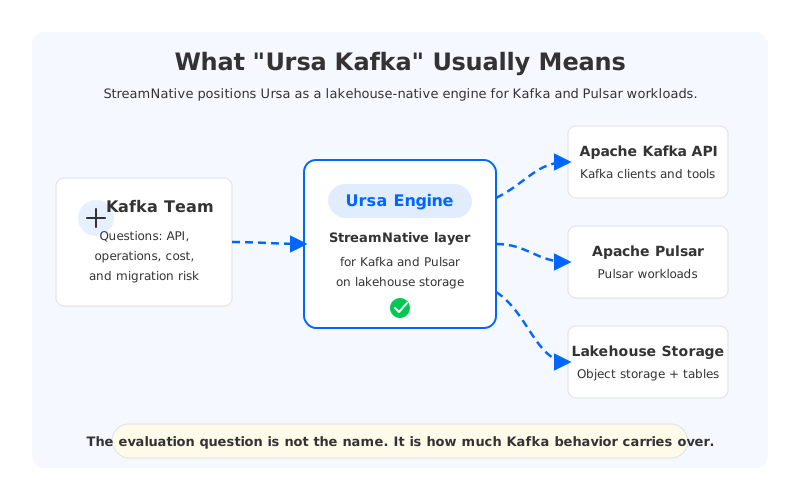
"Ursa Kafka" is shorthand, not an official Apache project name. In most searches, it points to StreamNative's Kafka-facing service powered by the Ursa engine. StreamNative's Ursa page describes Ursa as a lakehouse-native streaming engine built for Kafka and Pulsar, while the StreamNative site also presents native Apache Kafka and Apache Pulsar on its Lakestream architecture. The phrase therefore mixes three layers: the Kafka protocol at the client boundary, the StreamNative service and control plane, and Ursa as the storage and execution engine underneath.
That distinction matters because Kafka teams rarely migrate "a cluster" in isolation. They migrate client behavior, operational procedures, access controls, monitoring, retention policies, topic semantics, and a mental model that has been built around partitions, leaders, offsets, consumer groups, and broker-local storage. A product can accept Kafka clients and still differ in how it handles compaction, transactions, throttling, quotas, tiering, failure recovery, or admin operations. The surface area is bigger than the bootstrap URL.
The simplest way to read the category is this:
- Apache Kafka is the open source event streaming system and protocol ecosystem many teams already run.
- StreamNative is the vendor offering managed streaming services, including Kafka and Pulsar-facing services.
- Ursa is StreamNative's lakehouse-native engine, described by StreamNative as serving Kafka and Pulsar workloads.
- Pulsar remains part of StreamNative's heritage and product line, but Ursa's Kafka story targets teams that want Kafka-facing behavior rather than a Pulsar migration first.
This framing avoids a common evaluation trap. If you ask, "Is Ursa Kafka or Pulsar?" you may get a branding answer. If you ask, "Which Kafka behaviors does Ursa preserve, and which operational assumptions does it change?" you get a test plan.
2How Ursa Relates to StreamNative, Pulsar, and Kafka
StreamNative's public positioning puts Ursa underneath both Kafka and Pulsar workloads. Its Ursa page describes "native Kafka and Pulsar" with no code changes, and its deep-dive posts explain a storage design that moves away from the classic broker-local disk model. StreamNative also publishes Kafka client documentation, including Kafka compatibility and protocol feature pages, which is where Kafka teams should start before running a proof of concept.
This is also where wording needs discipline. A Kafka-compatible platform can mean several different things. It might mean clients can produce and consume records through the Kafka protocol. It might mean common admin APIs work. It might mean Kafka Connect and Kafka Streams are supported well enough for production. It might mean wire protocol behavior and Kafka semantics are close enough that applications do not need code changes. Those are related claims, but they are not identical.
For a real migration, the compatibility question usually breaks down into a few concrete surfaces:
| Evaluation surface | What to verify | Why it matters |
|---|---|---|
| Client protocol | Producer, consumer, admin client, security settings | Most application changes appear here first |
| Topic semantics | Partitions, retention, compaction, transactions | Data correctness depends on these behaviors |
| Ecosystem tools | Kafka Connect, Kafka Streams, Schema Registry, observability tools | Platform teams rarely run clients alone |
| Operational APIs | Topic management, quotas, ACLs, metrics, alerts | SRE procedures need predictable controls |
| Failure behavior | Broker failure, zone failure, catch-up reads, rebalancing | Architecture changes show up during incidents |
The table is intentionally plain. It is easy to get pulled into architecture language and skip the boring tests that decide whether a migration is safe. A Kafka application that uses only simple produce and consume calls is a different workload from one that depends on transactions, compaction, custom partitioning, Kafka Streams state stores, Connect task behavior, and strict replay procedures.
3The Storage Architecture Question Is the Real Difference
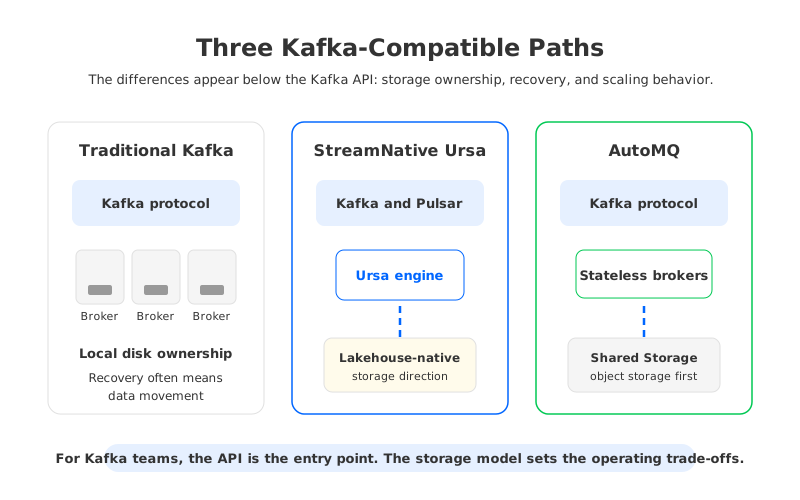
Traditional Kafka's operating model comes from a Shared Nothing architecture. Each broker owns local log segments for the partitions assigned to it, and replication protects data by copying those partitions to other brokers. That design is familiar, battle-tested, and operationally transparent. It also makes storage ownership a broker responsibility, which is why rebalancing, broker replacement, disk pressure, and cross-zone replication can become large operational events.
Ursa's pitch is different. StreamNative describes Ursa as lakehouse-native and leaderless, with compute decoupled from storage and data written toward object storage and open table formats. The important evaluation point is not whether that sounds attractive. The important point is that the failure and cost model changes. If broker-local disks stop being the center of persistence, then recovery, retention, and data movement no longer behave like classic Kafka. That can reduce some pains, but it also means your team must test the changed assumptions.
Kafka teams should resist treating this as a binary "old architecture versus better architecture" story. Local disks have useful properties: predictable low-latency writes, mature operational behavior, and a huge amount of ecosystem experience. Shared or lakehouse-oriented storage has different advantages: less dependence on individual broker disks, a clearer path to long retention, and closer alignment with analytics systems. The right question is which trade-off matches your workload.
That is also where AutoMQ belongs in the comparison. AutoMQ is a Kafka-compatible cloud-native streaming platform that keeps the Kafka protocol and moves Kafka storage onto object storage through a Shared Storage architecture with stateless brokers. It is not the same design as Ursa, and it should not be evaluated as if all shared-storage systems were interchangeable. But it sits in the same decision space for teams asking whether broker-local storage is still the right default in the cloud.
4What Kafka Teams Should Evaluate Before a Pilot
A useful Ursa pilot starts with workload selection. Do not start with the easiest demo topic unless that topic resembles production. Pick one workload that exercises the behaviors you care about: retention, replay, compaction, consumer lag, bursts, Connect pipelines, security rules, and incident recovery. A pilot that proves only that a producer can send records and a consumer can read them is a smoke test, not an architecture evaluation.
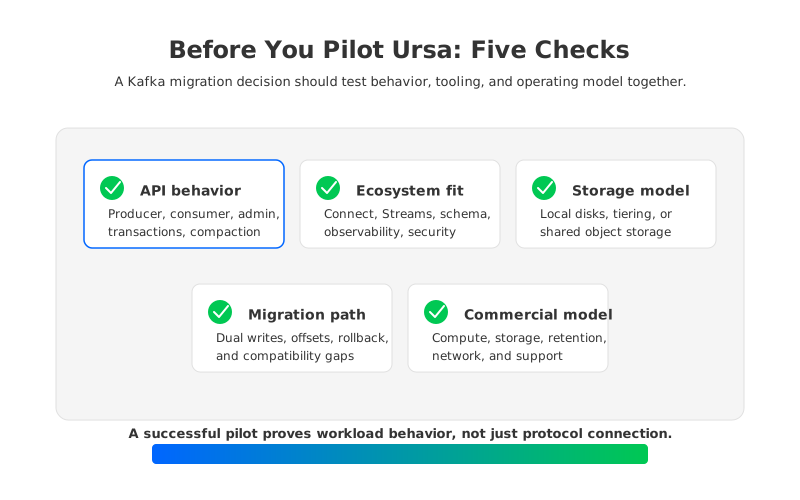
The evaluation should include five checks.
- Compatibility depth. Test the actual clients, libraries, security settings, serializers, admin scripts, and topic configurations used in production. Include edge cases such as compacted topics, idempotent producers, transactions, and offset reset behavior if your workloads depend on them.
- Operational behavior. Observe what happens when capacity changes, a broker fails, a zone has trouble, or a topic has a large backlog. Architecture claims become real during recovery and catch-up reads.
- Ecosystem fit. Verify Kafka Connect, Kafka Streams, observability dashboards, alerting rules, schema workflows, and access controls. These are often the parts that make a platform migration take months instead of weeks.
- Data and governance boundaries. Confirm where data is stored, which account owns the storage, how encryption keys are managed, what table formats are created, and how the lakehouse integration affects downstream governance.
- Commercial model. Model the bill around compute, retained data, writes, reads, networking, support, and any table or lakehouse features. Avoid comparing list prices without matching workload assumptions.
This is less exciting than a benchmark chart, but it is closer to how Kafka platforms fail or succeed. The pilot should produce a runbook, not only a pass/fail result. At the end, your SREs should know how to scale the system, how to read the metrics, how to debug a slow consumer, how to restore service during an incident, and when to call the vendor.
5Migration and Ecosystem Questions
Kafka migrations are rarely blocked by the happy path. They are blocked by the edge cases around offsets, client versions, ACLs, topic configuration gaps, Connect connector behavior, and rollback. If Ursa is being evaluated as a Kafka-compatible destination, the migration plan should make those edges explicit before any production traffic moves.
Start with offset continuity. Consumers care about where they resume, not where a vendor says a topic was copied. Then test ordering assumptions at the partition level, producer retries, transactional behavior if used, and the handling of compacted topics. After that, move to ecosystem components. A Connect sink that behaves differently under retries can create duplicate writes downstream even when the Kafka protocol path looks fine. A Streams application with state stores may care about restore speed and changelog behavior more than raw produce throughput.
The rollback plan deserves its own review. Teams often write a forward migration plan that assumes success and leaves rollback as a paragraph. For Kafka, rollback is a data consistency problem. You need to know whether producers can be pointed back, whether consumers can resume from the original cluster, whether dual writes are used, whether offsets are translated, and how long both systems must run in parallel.
The practical output should be a checklist like this:
| Migration area | Question to answer before production |
|---|---|
| Producers | Can every producer library and security profile connect without code changes? |
| Consumers | Can consumer groups preserve or map offsets with a tested rollback path? |
| Topics | Are retention, compaction, partition count, and topic configs supported as used? |
| Connect and Streams | Have connector retries, task restarts, and state restore been tested? |
| Observability | Do existing SLOs map to metrics the team can alert on? |
| Governance | Is data residency, encryption, and access ownership clear? |
None of these questions are specific attacks on Ursa. They are the questions any serious Kafka team should ask when a platform claims Kafka compatibility while changing the storage and operating model underneath.
6How AutoMQ Compares as a Kafka-Compatible Path
AutoMQ enters the discussion when the team has already accepted the central premise: the Kafka API may remain stable while the storage architecture changes. AutoMQ's public documentation describes native compatibility with Apache Kafka, a Shared Storage architecture, and stateless brokers. In practice, that means the comparison with Ursa should not be "Kafka versus not Kafka." It should be "which Kafka-compatible architecture changes the fewest assumptions for our workload while solving the pains we actually have?"
AutoMQ's design target is Kafka compatibility with object storage as the primary durable layer. Its documentation describes AutoMQ Brokers as stateless, with storage separated from compute through S3Stream and object storage. For teams whose main pain is broker-local disk operations, partition reassignment, long retention, cross-zone replication traffic, or scaling lag, that design is worth evaluating next to Ursa's lakehouse-native approach.
There are three fair comparison points:
- Protocol and ecosystem continuity. If a team wants to keep Kafka clients, Kafka Connect, and Kafka operational habits, compatibility depth should be proven with the team's own workloads.
- Storage and recovery model. Ursa and AutoMQ both challenge the broker-local disk default, but their internal designs and product boundaries differ. Test recovery behavior rather than inferring it from category labels.
- Deployment and control boundary. AutoMQ BYOC is designed so the environment runs in the customer's own cloud account. For some teams, that matters as much as latency or cost because data ownership, VPC controls, and procurement rules are part of the platform decision.
The strongest reason to compare them is not vendor shopping. It is architectural clarity. Once you see that Kafka compatibility and Kafka storage architecture can be separated, you can ask better questions. Which parts of Kafka are application contracts? Which parts are historical implementation choices? Which parts are operational habits your team actually wants to keep?
7Before You Choose
If you came in searching for Ursa Kafka, the useful takeaway is not a label. Ursa is part of StreamNative's Kafka and Pulsar story, and the official materials describe a lakehouse-native engine with a different storage model from traditional Kafka. For Kafka teams, that makes Ursa interesting, but it also raises the bar for evaluation. A protocol-compatible endpoint is the beginning of the test, not the end.
Before you pilot Ursa, write down the Kafka behaviors your business depends on. Then test them against StreamNative's official compatibility docs, your own client libraries, your Connect and Streams jobs, your incident procedures, and your cost model. If your broader goal is to keep Kafka compatibility while moving away from broker-local storage, include AutoMQ in the same evaluation and compare it on workload behavior, data control, recovery, and operational fit. You can start with the AutoMQ documentation or try the project through the AutoMQ GitHub path.
8FAQ
8.1Is Ursa the same thing as Apache Kafka?
No. Apache Kafka is the open source event streaming project and protocol ecosystem. StreamNative Ursa is described by StreamNative as a lakehouse-native streaming engine for Kafka and Pulsar workloads. Kafka teams should evaluate which Kafka protocol features, APIs, and operational behaviors are supported for their use case.
8.2Is Ursa based on Pulsar?
StreamNative has deep Apache Pulsar roots, and its current product materials discuss both Kafka and Pulsar. Public Ursa materials position the engine as serving native Kafka and Pulsar workloads rather than as a simple Pulsar rebrand. For a Kafka team, the relevant question is how Kafka clients, tools, and semantics behave on the service.
8.3Can Kafka applications use Ursa without code changes?
StreamNative's Ursa page claims native Kafka and Pulsar support with no code changes. Treat that as a hypothesis to validate with your own clients, security settings, topic configs, transactions, compaction, and ecosystem tools. Compatibility should be tested at the workload level.
8.4How is AutoMQ different from Ursa?
AutoMQ is a Kafka-compatible cloud-native streaming platform using a Shared Storage architecture and stateless brokers backed by object storage. Ursa is StreamNative's lakehouse-native engine for Kafka and Pulsar services. Both move beyond classic broker-local disks, but their designs, deployment models, and product boundaries differ.
8.5What should a Kafka team test first?
Start with the hardest ordinary workload, not a synthetic demo. Include client behavior, compacted topics, consumer group offset handling, Connect or Streams jobs, metrics, failure recovery, and rollback. A good first pilot should produce operational evidence your SRE team can trust.
9References
- StreamNative Ursa product page
- StreamNative Lakestream and native Kafka announcement
- StreamNative Ursa-for-Kafka deep dive: storage and leaderless architecture
- StreamNative Ursa-for-Kafka deep dive: write path, read path, and compaction
- StreamNative Kafka compatibility overview
- StreamNative Kafka protocol and features
- Apache Kafka documentation
- AutoMQ native compatibility with Apache Kafka
- AutoMQ stateless broker architecture


