
Table of Contents
Table of Contents
If you are searching for Ursa vs Kafka, you are probably not asking whether both systems can move records from producers to consumers. The sharper question is whether Ursa can replace a Kafka estate without breaking the applications, connectors, operational procedures, and failure assumptions already built around Kafka.
Kafka has become more than a broker. It is a protocol, a storage model, an operations discipline, and an ecosystem of tools that assume certain semantics. Ursa, as described in StreamNative's documentation, is StreamNative's unified stream storage engine for its cloud profiles, including Kafka and Pulsar profiles. That makes the comparison easy to misread if "Kafka-compatible" is treated as yes-or-no.
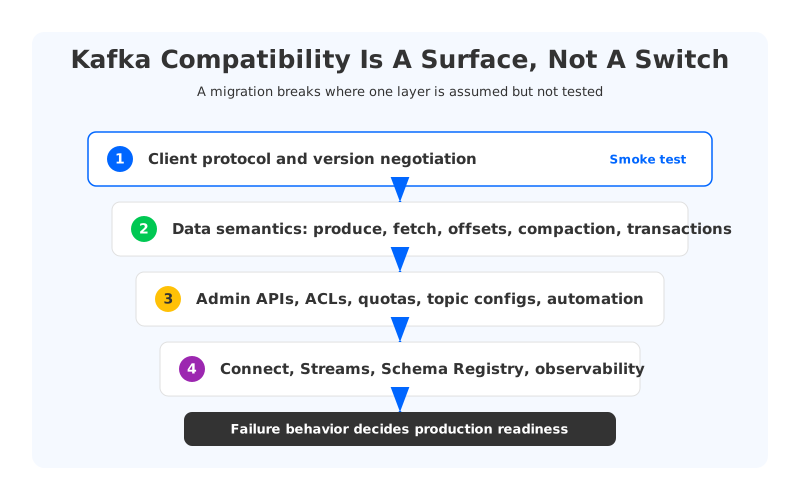
Evaluate Ursa vs Kafka layer by layer: client protocol, request coverage, topic configuration, transactions, compaction, schema registry, security administration, connectors, stream processing, observability, and failure recovery. Some layers may be enough for analytics ingestion. Others matter immediately when a platform uses Kafka Streams, exactly-once processing, compacted topics, or mature broker-level runbooks.
1Quick Comparison Table
The table below focuses on migration risk, not vendor positioning. "Kafka" means upstream Apache Kafka operated directly or through a managed Kafka service. "Ursa" means StreamNative's URSA engine and Kafka-compatible profiles as documented by StreamNative as of June 2, 2026. Exact support can vary by cluster profile, so a PoC should verify the specific profile you plan to buy.
| Area | Apache Kafka | StreamNative Ursa / Kafka Service | Migration implication |
|---|---|---|---|
| Core client protocol | Native Kafka protocol | Kafka-compatible protocol surfaces, with profile-specific behavior | Basic producers and consumers may be straightforward, but edge APIs need testing |
| Storage architecture | Broker-local log storage with replication; newer Kafka versions also support tiered storage | URSA supports multiple WAL and metadata profiles, including object-storage-backed cost-optimized profiles | Operational behavior changes because storage ownership and replication are different |
| Kafka Admin APIs | Native Kafka administrative model | StreamNative docs list unsupported Admin areas such as Kafka ACL management through Kafka Admin APIs | Platform automation may need changes |
| Transactions | Native Kafka transaction protocol | StreamNative docs state transactions are not supported in Ursa Engine on the compatibility overview; protocol docs show limited request support | Exactly-once applications need direct validation |
| Topic compaction | Native compacted topic support | StreamNative docs note Ursa Engine limitations around topic compaction in compatibility guidance | CDC, changelog, and state-store workloads need tests |
| Kafka Streams | First-class Kafka client library | StreamNative has Kafka compatibility and processing docs, but stateful Streams workloads depend on the underlying feature surface | Treat Kafka Streams as a workload class, not a generic client test |
| Connect ecosystem | Native ecosystem expectation around topics, offsets, configs, and errors | Connectors may work if their Kafka API usage fits the supported surface | Test your actual connectors, not a hello-world connector |
| Cost model | Depends on broker compute, disks, replication, network, operations | Cost-optimized profiles use object storage and stateless/leaderless concepts in StreamNative docs | Lower storage/network cost may come with latency or feature tradeoffs |
The point is not that one column wins every row. Kafka's strength is ecosystem maturity and semantic coverage. Ursa's appeal is StreamNative's attempt to unify Kafka, Pulsar, and lakehouse-oriented storage profiles under one cloud engine. Your migration risk depends on which bet your workloads can tolerate.
2What Kafka Compatibility Really Means
Kafka compatibility starts with the wire protocol, but it does not stop there. A simple producer can connect, write records, and receive acknowledgements while a real platform still fails because a connector relies on an Admin API, a stream processing app depends on transactions, or an SRE dashboard expects broker-level metrics that no longer have the same meaning. Protocol compatibility is the entrance exam. Platform compatibility is the graduation exam.
For a serious Ursa Kafka comparison, separate compatibility into these layers:
- Client protocol and version negotiation. Can your Java, Go, Python, Node.js, .NET, C++, and Rust clients connect without SDK changes? Do they negotiate versions correctly? StreamNative's Kafka compatibility page says StreamNative Cloud is compatible with Apache Kafka clients from version 0.9 and later, with exceptions.
- Data semantics. Do produce, fetch, offset commit, consumer group, idempotent producer, transaction, delete records, and compaction behaviors match what your applications assume? This is where partial support matters.
- Administrative operations. Many platform teams automate topic creation, config updates, ACLs, quotas, broker metadata inspection, partition changes, and disaster recovery procedures. Unsupported Admin APIs can move work from code to runbooks.
- Ecosystem behavior. Kafka Connect, Kafka Streams, schema registry clients, and observability tools are not passive libraries. They exercise deep corners of Kafka.
- Operational model. Kafka operators reason about leaders, replicas, ISR, broker disks, reassignment, controller behavior, and lag. A different storage engine can remove some problems while making old dashboards less useful.
- Failure semantics. Compatibility during normal traffic is necessary. Compatibility during broker loss, AZ loss, client retries, throttling, rolling upgrades, and catch-up reads is what production cares about.
The most expensive incompatibilities often appear only after a failure test, because the happy path rarely uses the hardest parts of the protocol.
3Ursa Architecture And Product Positioning
StreamNative's documentation describes URSA as the data streaming engine behind StreamNative Cloud profiles. It supports different write-ahead log and metadata-store combinations depending on whether a profile is latency-optimized or cost-optimized, and whether the exposed surface is Kafka or Pulsar. The docs also describe object-storage-backed cost-optimized profiles, where brokers are stateless and records use an object-storage-oriented design instead of traditional inter-broker replication.
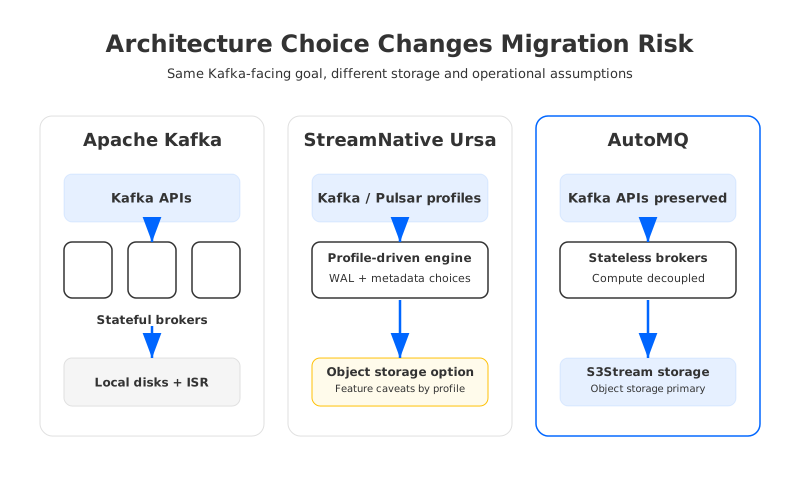
This architecture explains both the appeal and the caution. If your workload is high-volume ingestion, log aggregation, CDC fan-in, or analytics-oriented streaming, object storage can change the economics of retention and replication. But if your current Kafka deployment leans heavily on the full Kafka feature surface, the migration question becomes less about raw storage design and more about which Kafka behaviors have been preserved, emulated, changed, or deferred.
StreamNative's own compatibility pages make that distinction visible. The Kafka compatibility overview notes that transactions and topic compaction are not supported in Ursa Engine. The Kafka protocol and features page lists supported Kafka requests and shows specific gaps for Ursa Engine, including transaction-related requests such as AddPartitionsToTxn, AddOffsetsToTxn, and EndTxn, as well as transaction-description requests. It also says some storage, replica, security, quota, and newer KIP-related requests are not supported because the underlying model differs from Kafka.
That does not make Ursa unusable. It means "Ursa vs Kafka" should be framed as workload fit. Append-heavy telemetry may care more about cost-optimized storage than transactions. A payments platform using exactly-once Kafka Streams and compacted changelog topics will care about the missing edges first.
4Migration Risks Kafka Teams Should Test
The first migration risk is assuming that client compatibility equals application compatibility. A Java producer smoke test proves only that one client can write one kind of record under one set of settings. It says little about consumer group churn, idempotent producer behavior, schema evolution, ACL automation, lag monitoring, or retry storms.
The second risk is hidden Admin API dependency. Terraform modules create topics, CI jobs validate configs, Connect clusters create internal topics, security tooling manages ACLs, and incident scripts inspect broker state. If those workflows depend on APIs that StreamNative maps to Pulsar administration, marks unsupported, or implements differently for Ursa profiles, the migration is no longer "zero code changes" at the platform layer.
The third risk is semantic mismatch in stateful workloads. Kafka Streams uses Kafka topics for input, output, repartitioning, and changelog state. Exactly-once processing relies on transactions. CDC pipelines often use compacted topics. These are everyday building blocks in mature Kafka environments.
| Workload pattern | Minimum test | Why it matters |
|---|---|---|
| Basic producers and consumers | Produce, fetch, commit offsets, rebalance under rolling deploys | Confirms the common protocol path |
| Kafka Connect | Run your actual source and sink connectors with internal topics | Connectors often use Admin APIs and compacted internal topics |
| Kafka Streams | Run stateful topology with repartition and changelog topics | Streams turns compatibility gaps into application-level failures |
| Transactional producers | Test idempotence, transactions, fencing, retries, and abort paths | Exactly-once assumptions are brittle under partial support |
| Compacted topics | Test CDC upsert topics and tombstone behavior | Compaction semantics affect correctness, not only storage |
| Operations tooling | Test Terraform, ACL automation, dashboards, alerts, backup, and failover scripts | Platform code is part of the migration surface |
The fourth risk is performance interpretation. StreamNative's data streaming engine documentation describes different latency profiles and notes that cost-optimized profiles can be sub-second and tunable down to about 200 ms, while latency-optimized profiles target lower latency classes. If your SLO is analytics freshness, that may be fine. If your SLO is low-millisecond event coordination, profile choice matters more than product name.
5Where AutoMQ Fits In The Comparison
Once compatibility is decomposed this way, another architecture category becomes useful: Kafka-compatible shared storage that preserves the Kafka ecosystem while replacing the storage layer. AutoMQ is in that category. It keeps Kafka protocol and ecosystem compatibility as the user-facing contract, while replacing broker-local log storage with S3Stream.
The distinction is subtle but important. AutoMQ is not asking a Kafka team to adopt a Pulsar-derived control surface or a multi-protocol abstraction first. It is designed as a Kafka-compatible streaming platform whose architectural change happens below the Kafka API.
AutoMQ's documentation describes S3Stream as offloading Kafka's built-in ISR-based log storage layer to object storage, with WAL storage used for write acceleration and recovery and S3-compatible object storage acting as primary durable storage. The architecture goal is similar to the pressure that makes Ursa interesting: disks tied to brokers make scaling, reassignment, and cloud cost management harder than they need to be. The path is different. AutoMQ puts the compatibility bet first and the storage redesign underneath it.
That makes AutoMQ a useful control point in an Ursa vs Kafka evaluation:
- If you want upstream Kafka semantics first, Apache Kafka or a managed Kafka service remains the baseline.
- If you want Kafka plus a cloud-native storage redesign without changing the Kafka-facing contract, AutoMQ is worth testing as a shared-storage Kafka option.
- If you want StreamNative's broader Kafka, Pulsar, and lakehouse direction, Ursa may fit, but the exact cluster profile and compatibility gaps need explicit validation.
Choose the architecture whose incompatibilities are visible, acceptable, and testable for your workload.
6PoC Checklist For Ursa vs Kafka
A useful PoC should be small enough to run in days, but realistic enough to fail for the right reasons. Bring the awkward parts: your oldest client library, your busiest connector, your stateful stream job, your compacted CDC topic, your ACL automation, and the dashboard an on-call engineer opens during an incident.
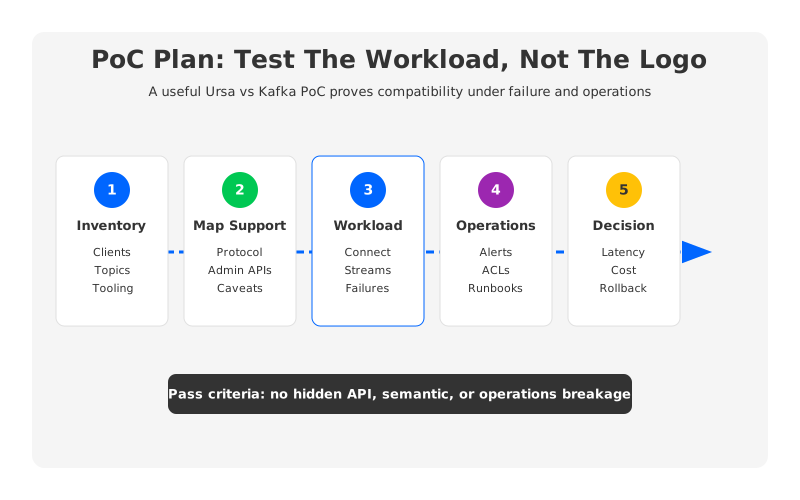
Use this checklist as the minimum bar:
- Inventory the compatibility surface. List client languages, versions, authentication modes, topic configs, connector types, Kafka Streams apps, transactional producers, compacted topics, Admin API usage, and monitoring.
- Map each item to official support. Read StreamNative's Kafka compatibility and protocol feature pages for the exact Ursa profile under consideration. Record every unsupported or partial item before testing.
- Run workload-specific tests. Use real message sizes, partition counts, retention settings, consumer group patterns, and failure modes. Include rolling restarts and client retry storms.
- Test operational workflows. Re-run topic automation, ACL changes, schema registry workflows, connector redeploys, alert rules, dashboards, and incident scripts.
- Compare cost and latency together. Lower storage or replication cost is useful only if the latency profile, feature surface, and operations model still fit the workload.
- Define rollback before cutover. A migration with no rollback path is not a PoC; it is a production bet with a nicer name.
For teams evaluating AutoMQ in the same cycle, run the same workload matrix. The comparison is clearer when every candidate is tested against the same clients, connectors, failover events, and cost model.
7How To Decide
Choose Apache Kafka, or a managed service that stays close to Apache Kafka, when semantic coverage and ecosystem predictability are more important than storage-layer redesign. This is common for platforms with many independent teams, old clients, stateful Kafka Streams applications, compacted topics, transaction-heavy services, and mature operations automation.
Choose Ursa when the specific StreamNative profile matches your workload and the documented gaps do not affect correctness. It is worth evaluating for organizations aligned with StreamNative, Pulsar, or lakehouse-oriented streaming, and for workloads where object-storage economics matter more than full Kafka feature parity.
Choose AutoMQ when your main goal is to keep Kafka compatibility while changing the cloud architecture underneath it. That path is attractive when teams want lower storage/network pressure, stateless broker operations, and object-storage-backed durability without asking application teams to relearn the Kafka-facing ecosystem.
The search term "Ursa vs Kafka" sounds like a product comparison. In production, it is a compatibility audit. The winning platform is the one whose tradeoffs you can explain before cutover, observe during failure, and reverse if the first answer was wrong.
If you are comparing Kafka-compatible shared-storage architectures, review AutoMQ's architecture and migration documentation, then test it with the same PoC matrix you use for Ursa and Kafka.
8FAQ
8.1Is Ursa compatible with Kafka?
StreamNative documents Kafka-compatible protocol support for StreamNative Cloud, but compatibility varies by engine and profile. As of June 2, 2026, StreamNative's compatibility overview states that transactions and topic compaction are not supported in Ursa Engine, and the protocol feature page lists additional unsupported or partial Kafka requests. Treat Ursa as Kafka-compatible for supported workloads, not as automatically identical to Apache Kafka.
8.2Is Ursa a replacement for Apache Kafka?
It can be a replacement for some Kafka workloads if the required client, admin, connector, processing, and operational behaviors are supported by the chosen StreamNative profile. It is not a drop-in replacement for every Kafka deployment by default.
8.3What is the biggest migration risk from Kafka to Ursa?
The biggest risk is hidden dependency on Kafka features outside the basic producer and consumer path. Transactions, compaction, Admin APIs, Connect internals, and Streams state stores can matter more than a connection test.
8.4How is AutoMQ different from Ursa?
AutoMQ preserves the Kafka-facing API and ecosystem while replacing Kafka's local-disk log storage with S3Stream and object storage. Ursa is StreamNative's unified streaming engine across Kafka and Pulsar-oriented profiles. Both address cloud storage economics, but they make different compatibility tradeoffs.
8.5Should I benchmark Ursa against Kafka on throughput alone?
No. Throughput is only one part of the decision. A production comparison should include p99 latency, catch-up reads, consumer group stability, failover behavior, connector compatibility, Streams workloads, transaction behavior, topic compaction, operational automation, and total cost.
8.6What should I test before migrating Kafka to Ursa?
Test the exact client versions, connectors, Kafka Streams applications, topic configurations, authentication and authorization flows, schema registry usage, monitoring stack, failover procedures, and rollback plan. Use official support tables as the starting point, then verify behavior with your own workload.
9References
- StreamNative Documentation: Data Streaming Engine
- StreamNative Documentation: Kafka Compatibility Overview
- StreamNative Documentation: Kafka Protocol and Features
- StreamNative Documentation: Migrate to StreamNative Kafka Service
- Apache Kafka Documentation
- Apache Kafka Streams Introduction
- AutoMQ Documentation: S3Stream Shared Streaming Storage
- AutoMQ Documentation: S3 Storage
- AutoMQ Documentation: Migrate to AutoMQ Cloud


