
Table of Contents
Table of Contents
An AWS team comparing Ursa vs MSK is usually deciding where Kafka responsibility should live: inside AWS-managed infrastructure, inside StreamNative's managed service and URSA engine, or inside a Kafka-compatible architecture that keeps the data plane closer to the customer's own cloud account. That decision affects networking, storage, incident response, feature compatibility, procurement, and the shape of the monthly bill.
Amazon MSK starts from a familiar premise. It is a managed Apache Kafka service inside AWS, with Standard and Express brokers for provisioned clusters, plus a serverless option for teams that want AWS to manage more capacity decisions. StreamNative Ursa starts from a different premise: a data streaming engine that can serve Kafka-facing workloads and use object-storage-oriented profiles, with StreamNative Cloud billing dimensions such as Elastic Throughput Units and Reserved Throughput Units depending on cluster type. Both can be valid. The wrong move is treating "managed Kafka on AWS" as one category.
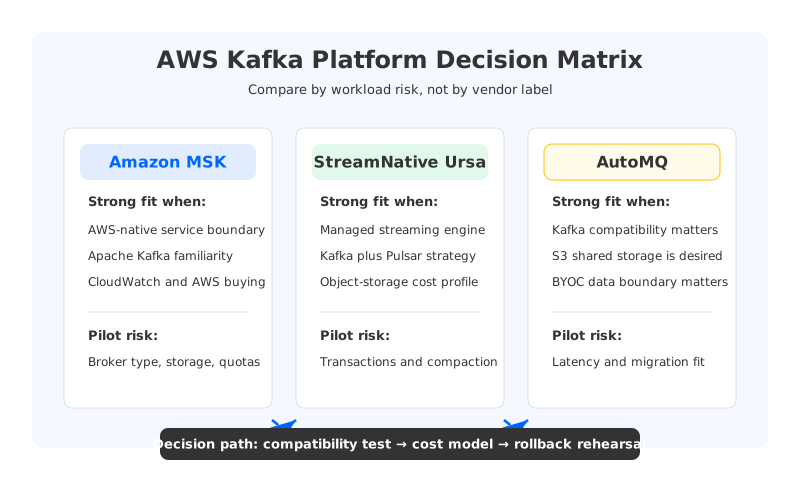
The quick answer is practical: choose MSK when AWS-native service integration, upstream Kafka familiarity, and AWS procurement dominate. Evaluate Ursa when you want a StreamNative-managed platform with Kafka-facing access, object-storage economics, and potential alignment with Pulsar or lakehouse-oriented streaming. Consider AutoMQ when the workload must stay Kafka-compatible but the main pain is broker-local storage, partition movement, cross-AZ replication cost, or data-plane control in your own AWS environment.
1What "Ursa vs MSK" Really Means
MSK is an AWS service for Apache Kafka. In MSK Provisioned, AWS now distinguishes Standard brokers and Express brokers. Standard brokers expose more of the traditional Kafka capacity model, including storage management choices such as EBS storage and tiered storage. Express brokers are more AWS-managed, with AWS describing higher per-broker throughput and faster recovery characteristics than Standard brokers. MSK Serverless changes the model again by abstracting cluster capacity and charging for usage dimensions rather than broker instances.
Ursa is not a drop-in AWS service with the same boundary. StreamNative documentation describes URSA as the data streaming engine behind StreamNative Cloud clusters, and its Kafka compatibility documentation says StreamNative Cloud supports Kafka client versions 0.9 and later with documented exceptions. The important caveat is profile-specific compatibility. StreamNative's Kafka compatibility page states that Ursa-engine powered clusters do not support transactions and topic compaction at the time of writing. For teams using Kafka Streams, compacted topics, transactional producers, or exactly-once workflows, that one sentence can decide whether a workload belongs in a pilot.
This is why the comparison should start with workload shape, not product names. A telemetry pipeline with simple producers and consumers has a different risk profile from a payment pipeline using transactions, a CDC topology using compacted topics, or a Kafka Streams application with state stores. MSK gives you a managed AWS route to Apache Kafka behavior. Ursa gives you a StreamNative route to Kafka-facing streaming on a newer storage engine. The evaluation changes as soon as your workload depends on the edge of the Kafka feature surface.
2Compatibility and Ecosystem
Kafka compatibility is a contract between applications, operators, and tooling. Producers and consumers are the visible part, but production Kafka estates depend on AdminClient behavior, ACL automation, topic configuration, compaction, transactions, schema tooling, connectors, consumer group operations, metrics, and failure semantics. A platform that accepts Kafka protocol traffic can still surprise you if the surrounding control plane behaves differently.
| Compatibility area | Amazon MSK | StreamNative Ursa | What to test |
|---|---|---|---|
| Kafka clients | Managed Apache Kafka service inside AWS | StreamNative documents Kafka client compatibility for Kafka 0.9 and later | Exact client versions, TLS, authentication, retries, batching |
| Topic features | Depends on broker type and Kafka version, but follows MSK's Apache Kafka service model | Ursa-engine docs currently call out transactions and topic compaction limitations | Compacted topics, transactional producers, Kafka Streams, ksqlDB-like workloads |
| Admin operations | Familiar Kafka administration surface, with AWS service boundaries | Kafka protocol support plus StreamNative-specific control plane | ACL scripts, topic config automation, quotas, user management |
| Ecosystem | AWS integrations, CloudWatch, IAM options, private connectivity, Kafka ecosystem | StreamNative Cloud, Pulsar/Kafka strategy, lakehouse-oriented features | Connectors, schema workflows, observability, incident runbooks |
The table does not make MSK universally safer or Ursa universally riskier. It says the risk moves. MSK buyers should still validate broker type, version support, storage mode, quotas, and operational visibility. Ursa buyers should validate whether their exact Kafka feature usage fits the selected StreamNative profile. That validation has to use real workloads, because compatibility gaps often hide in the systems around Kafka rather than the producer API itself.
3AWS Operations and Networking
AWS-native operation is MSK's strongest argument. Clusters live inside AWS networking, integrate with AWS identity and monitoring patterns, and can be purchased through AWS procurement. For many platform teams, that simplicity is not cosmetic. It means incident responders already know where to look, security teams already understand the boundary, and FinOps can tie spend back to AWS accounts, tags, and cost allocation models.
Ursa's operational model depends on the StreamNative Cloud deployment choice. StreamNative's pricing page describes fully hosted and BYOC deployment options, and its billing documentation distinguishes serverless, dedicated Kafka, dedicated Pulsar, and BYOC models. That can be attractive when the team wants StreamNative to manage the service while still considering where infrastructure runs. It also adds a qualification step: the buyer must verify private networking, support access, cloud marketplace billing, data location, metadata location, and the exact responsibilities retained by the customer's AWS team.
AutoMQ enters the conversation at this responsibility boundary. It is a Kafka-compatible cloud-native streaming platform that moves durable stream data to object storage through S3Stream while using broker compute more elastically. In AutoMQ Cloud BYOC environments, the data plane resources can run in the customer's own network environment, which matters when security and platform teams want Kafka compatibility without moving the operational boundary completely outside their AWS account.
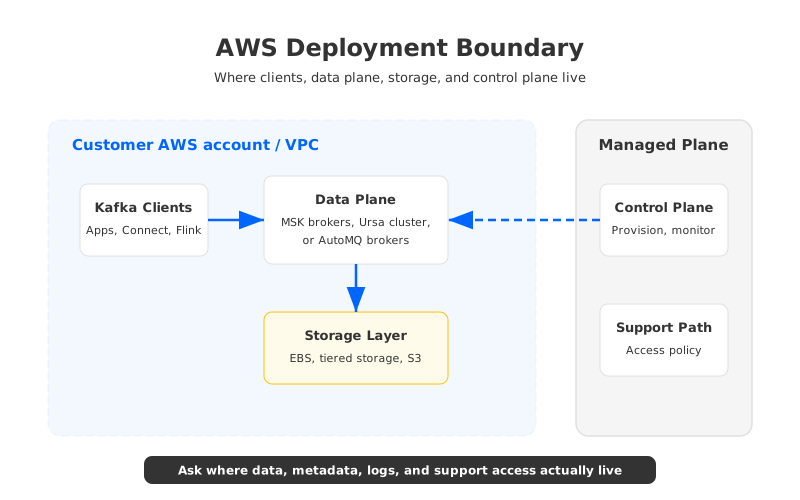
The clean decision question is not "which one is more managed?" It is "which operational boundary matches the risk we are willing to own?" MSK keeps the service inside AWS. StreamNative can shift more responsibility to a streaming vendor and, depending on deployment, into a BYOC arrangement. AutoMQ is relevant when the desired boundary is Kafka-compatible data plane in the customer's cloud plus shared-storage operations.
4Storage and Cost Model
Kafka cost on AWS is rarely one line item. Traditional Kafka turns retained data into broker storage, broker sizing, replication, and recovery capacity. Multi-AZ durability usually means data is copied across availability zones at the application layer. Long retention can make storage dominate. High fan-out can make egress dominate. Spiky workloads expose whether capacity is reserved, elastic, or hidden behind a managed abstraction.
MSK's pricing model depends on the selected product. Provisioned clusters bill around broker instances and related resources such as storage and data transfer. Express brokers change the operational storage management boundary because AWS manages more of the broker storage behavior. MSK Serverless has its own usage-based dimensions. This variety is useful, but it means a fair MSK estimate must specify broker type, region, retention, ingress, egress, partition count, replication, storage mode, and network path.
Ursa cost comparison needs the same discipline. StreamNative's billing overview says billing dimensions vary by cluster type and identifies ETU-based models for serverless and BYOC clusters, RTU-based reserved capacity for dedicated Kafka clusters, and CU/SU-style models for dedicated Pulsar clusters. It also notes hourly billing and minimum units. That is normal managed-service economics. But it means "Ursa is lower cost" or "MSK is lower cost" is not a useful claim until the workload has been mapped to the right meter.
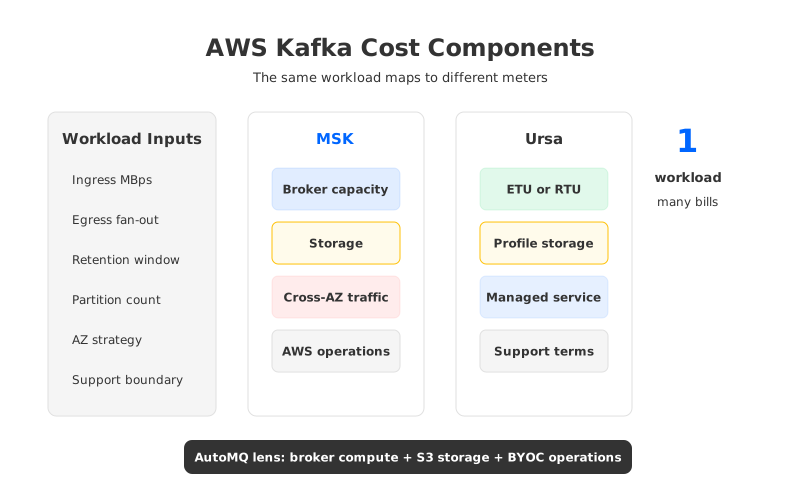
For architecture teams, the useful cost model has five parts:
- Compute and broker capacity. Are you reserving broker instances, reserved throughput units, elastic throughput, or Kubernetes compute in your own account?
- Storage and retention. Is retained data priced like EBS, a managed storage abstraction, object storage, or a combination?
- Replication and cross-AZ traffic. Does the platform copy records between brokers for durability, rely more on shared storage, or hide replication inside a managed service?
- Managed-service premium and support. Marketplace charges, support fees, service units, and vendor management should be included rather than treated as procurement noise.
- Operational labor. A platform that reduces reassignment, scaling, recovery, and upgrade work can change total cost even when the service line item is not the lowest.
Shared-storage Kafka-compatible architectures, including Ursa profiles and AutoMQ, attack the same cloud mismatch from different product directions: broker-local Kafka was designed around local logs, but cloud workloads often want retained data to live in object storage and compute to scale independently. The deciding factor is whether the architecture preserves the Kafka behavior your workload actually uses.
5Migration and Rollback Planning
Migration risk is where Ursa vs MSK becomes a production engineering problem. Moving from self-managed Kafka to MSK is often familiar because the target remains an AWS-managed Apache Kafka service. The hard work is still real: network routes, IAM or SASL settings, topic configs, ACLs, connector offsets, schema registry integration, monitoring, and cutover sequencing all need rehearsal.
Moving to Ursa can be attractive when the workload fits StreamNative's Kafka compatibility surface and the buyer wants the URSA engine's storage model. The migration plan should treat this as compatibility validation, not only endpoint replacement. If transactions, topic compaction, Kafka Streams, or custom AdminClient automation are in use, those tests belong at the beginning of the pilot rather than near the go-live window.
A sensible pilot uses the same test harness for every option:
- Select one boring workload and one painful workload. The boring workload validates everyday operations; the painful one exposes why you are considering change.
- Replay real topic configuration. Retention, compaction, partition counts, message size, and security settings are part of the workload.
- Exercise failure paths. Restart brokers or agents, force consumer rebalances, test lag recovery, and verify dashboards.
- Rehearse rollback. MirrorMaker2, dual writes, or vendor migration tooling can move data, but rollback needs a decision point and a tested consumer path.
MSK may win when the organization values lowest migration surprise inside AWS. Ursa may win when the workload fits its current Kafka feature surface and the team wants StreamNative's managed engine direction. AutoMQ may win when the team wants the Kafka application surface to stay familiar while changing the storage and scaling model that caused the original pain.
6Where AutoMQ Fits on AWS
AutoMQ is not a third column added for symmetry. It fits a specific AWS decision pattern: the team wants Kafka compatibility, object-storage-backed shared storage, elastic broker operations, and a BYOC-friendly data boundary. That pattern appears when the application ecosystem is already Kafka but the infrastructure model is fighting the cloud bill or the operations team.
The architectural difference is direct. Traditional Kafka binds durable data to brokers, so scaling, reassignment, and recovery can become data-movement projects. AutoMQ keeps Kafka protocol compatibility while using S3Stream to store persistent stream data in object storage; WAL is used for write acceleration and recovery, while S3-compatible storage becomes the durable layer. You still need to test latency, client behavior, and migration mechanics. But the hard problem changes from "move terabytes of broker-local logs safely" to "manage compute over shared storage."
For AWS teams, that difference is especially relevant when:
- Retention-heavy topics force broker storage over-provisioning.
- Cross-AZ replication traffic is a visible cost driver.
- Broker replacement or partition reassignment takes longer than the incident budget allows.
- Security wants the data plane in the customer's cloud account or network environment.
- Application teams cannot afford a rewrite away from Kafka clients and ecosystem tooling.
The practical next step is to run a workload-based comparison rather than a vendor-by-vendor debate. Put MSK, Ursa, and AutoMQ through the same compatibility tests, the same cost model, and the same rollback rehearsal. If your main issue is AWS-native procurement and managed Apache Kafka behavior, MSK may remain the right answer. If your main issue is StreamNative's multi-protocol and storage strategy, Ursa deserves a serious pilot. If your main issue is Kafka storage economics and operational elasticity on AWS, inspect AutoMQ's S3Stream architecture and run a controlled test from the AutoMQ GitHub repository.
7References
- Amazon MSK broker types
- Amazon MSK Express brokers
- Amazon MSK pricing
- StreamNative Kafka compatibility overview
- StreamNative Cloud billing overview
- StreamNative pricing
- AutoMQ S3 storage architecture
- AutoMQ BYOC environment overview
8FAQ
8.1Is Ursa the same as Amazon MSK?
No. Amazon MSK is AWS's managed Apache Kafka service. Ursa is StreamNative's data streaming engine used in StreamNative Cloud, including Kafka-facing workloads and different storage profiles. They can both serve Kafka buyers, but their service boundaries, pricing units, compatibility caveats, and operational models differ.
8.2Is Ursa fully Kafka-compatible?
StreamNative documents Kafka client compatibility for Kafka 0.9 and later, but it also documents exceptions. In particular, its Kafka compatibility page states that Ursa-engine powered clusters do not currently support transactions and topic compaction. Treat compatibility as workload-specific and test the exact features your applications use.
8.3When should an AWS team choose MSK?
MSK is usually the first option when the team wants an AWS-native managed Kafka service, familiar Apache Kafka behavior, AWS procurement, private networking inside AWS, CloudWatch integration, and reduced migration surprise for existing Kafka workloads. The exact choice between Standard, Express, and Serverless should be based on workload shape.
8.4When should an AWS team evaluate Ursa?
Evaluate Ursa when you want StreamNative's managed streaming platform, are interested in object-storage-oriented streaming architecture, need Kafka-facing access, or want a vendor strategy that may span Kafka, Pulsar, and lakehouse-oriented streaming. Start the pilot with compatibility-sensitive workloads, not only simple produce and consume tests.
8.5Where does AutoMQ fit in an Ursa vs MSK comparison?
AutoMQ fits when the team wants Kafka compatibility and AWS-friendly data control, but the main pain is Kafka's broker-local storage model. Its S3Stream architecture stores durable stream data in object storage and makes broker compute more elastic, which can help with retention-heavy topics, scaling, and reassignment-heavy operations.
8.6How should I compare Ursa, MSK, and AutoMQ pricing?
Use a workload model. Include ingress, egress, retention, partition count, replication, private networking, storage, support, marketplace billing, and operational labor. A generic per-unit comparison misses the most important part of streaming cost: how each architecture turns your workload into capacity, storage, and network usage.


