
Table of Contents
Table of Contents
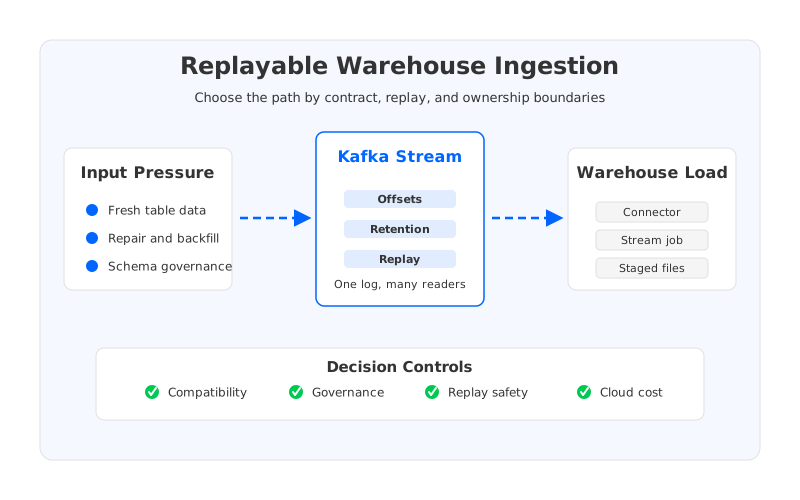
Teams usually search for snowflake streaming elt kafka when the batch loading pattern has started to leak into operations. The warehouse team wants fresher data. The application team wants Kafka to stay the system of record for events. The platform team has to keep connectors, schemas, retention, replay, and cost under control while business users ask why yesterday's dashboard does not match the live system. The hard part is not sending records from Kafka to Snowflake once. The hard part is making the path replayable, governed, and boring enough to run every day.
That word, replayable, changes the architecture discussion. A warehouse ingestion path that only optimizes for low latency may fail the first time a connector pauses, a schema changes, or a downstream table needs to be rebuilt. A path that only optimizes for durability may overprovision Kafka storage and make every catch-up read expensive to operate. The right design is a balance between Kafka semantics, connector lifecycle, warehouse loading behavior, and the storage model underneath the streaming platform.
1Why Teams Search for snowflake streaming elt kafka
The search intent is rarely academic. A data platform team is usually trying to decide whether Kafka should feed Snowflake through a managed connector, a custom Kafka Connect sink, a Flink job, staged files in object storage, or a table-format path such as Iceberg. Each option can work. Each option also creates a different ownership boundary. A connector-centered design makes ingestion repeatable, but it can hide transformation logic inside configuration and connector runtime behavior. A stream-processing design gives teams more control, but it moves more responsibility into job code, state management, and release discipline.
Snowflake ingestion has its own constraints. Snowpipe Streaming and Kafka connector paths are designed for continuous loading, but the pipeline still has to handle authentication, topic selection, schema conversion, error handling, batching, ordering assumptions, and destination validation. Kafka gives the team offsets and retention, which are powerful tools for recovery. They are not a guarantee that replay is safe. If a sink writes duplicate rows, changes delete semantics, or lands malformed records into a target table, the connector may look healthy while the warehouse becomes wrong.
The practical question is therefore not "Can Kafka stream into Snowflake?" The practical question is "Which ingestion path keeps the failure small enough to reason about?" That question pulls the conversation away from feature checklists and toward operating model. A good design should say who owns source contracts, who owns connector runtime, who owns warehouse table shape, who approves schema evolution, and who can run a rollback without inventing one during an incident.
2The Integration Constraint Behind the Pipeline
Warehouse ingestion sits between two different kinds of systems. Kafka is optimized for ordered, replayable logs. Snowflake is optimized for analytical storage and query execution. The connector or stream job between them has to translate log semantics into table semantics, and that translation is where most production surprises live. A Kafka topic can keep multiple versions of an event, preserve order within a partition, and allow consumers to resume from offsets. A warehouse table wants a current shape, a loading strategy, and a queryable contract that analysts can trust.
Three boundaries deserve separate design treatment:
- Transport boundary. Kafka Connect, a managed connector, or a stream-processing job needs stable access to Kafka, Snowflake, credentials, network routes, and error handling. A green task status only proves the transport path is alive.
- Contract boundary. Keys, schemas, null handling, deletes, timestamps, and data types decide whether the table means what consumers think it means. This boundary belongs in review, not in a hidden converter default.
- Replay boundary. Retention, offsets, idempotency, dead-letter topics, and target-table repair determine whether recovery is controlled or improvised. Replay is an architecture property, not a button.
Those boundaries explain why warehouse ingestion often becomes a Kafka platform decision. If the Kafka cluster uses broker-local storage, longer retention and catch-up reads increase broker disk planning pressure. If scaling a connector fleet requires more broker capacity, the platform team may need to add nodes and move data before the data team can test a target ingestion pattern. The warehouse path may be conceptually downstream, but its reliability depends on the streaming layer underneath it.
3Connector, Schema, Replay, and Stream Processing Trade-offs
The connector path is the most direct route for many teams. Kafka Connect gives a standard worker model, REST lifecycle controls, task status, offset handling, converters, transforms, and plugin isolation patterns. For a Snowflake sink, this can be a strong fit when the data already has a clear table contract and the transformation requirement is light. The risk is that connector configuration becomes the place where semantic decisions accumulate. A rename transform here, a timestamp conversion there, a dead-letter rule added during an incident, and suddenly the "connector config" becomes the main documentation of a critical data product.
The stream-processing path is stronger when the ingestion contract needs logic. Flink or Kafka Streams can normalize records, join reference data, enforce validation, and write to a staging or table format path with explicit code review. That control has a price: the team must operate job state, checkpointing, deployment, scaling, and recovery. If the goal is only to move CDC events from Kafka into Snowflake with minimal transformation, a stream processor may add more moving parts than value. If the goal is to publish warehouse-ready facts with strong validation, a stream processor can make the contract visible.
The file or table-format path sits in the middle. Kafka records can be landed in object storage and loaded by Snowflake, or represented through an open table format where multiple engines can consume the same data. This path can reduce direct connector pressure on the warehouse and create a durable intermediate layer. It also introduces file sizing, compaction, metadata, and freshness trade-offs. The right answer depends on whether the team values sub-minute visibility, replay simplicity, multi-engine access, or low operational coupling.
| Ingestion path | Best fit | Main risk | Replay posture |
|---|---|---|---|
| Kafka Connect sink | Clear table contract, limited transforms | Runtime config hides semantics | Offset-based replay plus target idempotency |
| Stream-processing job | Validation, enrichment, governed logic | Job state and release complexity | Replay through Kafka plus job checkpoints |
| Object storage staging | Batch-friendly loading and audit trail | File sizing and freshness tuning | Rebuild from staged files and Kafka retention |
| Table-format path | Multi-engine analytics and reuse | Metadata and compaction operations | Reprocess into table snapshots or partitions |
The table is intentionally neutral. It does not rank the paths because production fit depends on ownership. A small platform team with strong connector standards may choose Kafka Connect and keep transformation out of the ingestion layer. A data engineering team with mature Flink operations may prefer code-defined validation. A lakehouse-oriented team may land events into object storage first and let Snowflake read from an external or table-managed path. What matters is that the replay story is designed before the first incident.
A warehouse ingestion pipeline is only real-time until the first repair. After that, its value depends on how cleanly it can replay history without damaging the table contract.
4Evaluation Checklist for Data Platform Teams
The easiest way to make the decision concrete is to score the path against controls that survive vendor and tool changes. Start with compatibility. Kafka clients, Kafka Connect workers, schema registries, and Snowflake connector versions need to be tested as a release unit, not as isolated components. Then test replay. A candidate design should prove how it handles duplicate delivery, offset rewind, connector restart, schema incompatibility, and warehouse-side rejection. If the answer depends on a human manually deleting rows from a production table, the design is not ready.
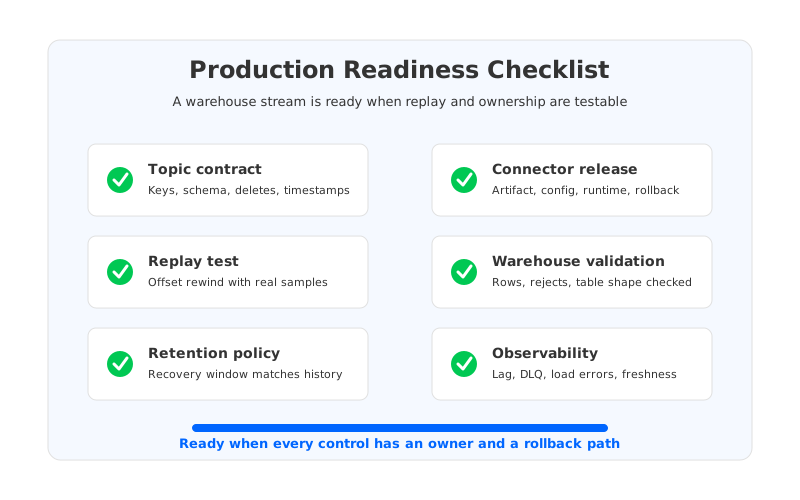
Use this checklist before treating a Kafka-to-warehouse stream as a production dependency:
| Control point | Pass condition | Risk if skipped |
|---|---|---|
| Topic contract | Keys, values, schema evolution, and delete semantics are documented | Warehouse tables drift silently |
| Connector release | Artifact, config, worker runtime, and rollback are versioned | Upgrade recovery depends on memory |
| Replay test | Offset rewind or rebuild is tested with representative data | Backfills create duplicates or gaps |
| Destination validation | Warehouse row counts, rejects, and table shape are checked outside connector status | Healthy tasks write bad data |
| Retention policy | Kafka retention matches recovery and audit requirements | Repair window expires during incident |
| Network boundary | Private connectivity, credentials, and data movement routes are reviewed | Cost and security surprises appear late |
| Observability | Lag, task state, DLQ volume, load errors, and freshness are alerted | Users find failures before operators |
The cost dimension belongs in the same checklist. Teams often model connector CPU and warehouse credits, then underweight Kafka storage and network behavior. Replay-heavy ELT stresses Kafka in a different way from tailing consumption. A normal day may involve steady writes and small reads. A repair day may involve large catch-up reads, longer retention, and extra connector capacity. If the streaming platform uses a Shared Nothing architecture with broker-local persistent storage, the team has to plan for data placement, disk headroom, and rebalancing whenever capacity changes. That is not a flaw in Kafka; it is a consequence of tying compute and durable data to the same broker lifecycle.
5How AutoMQ Changes the Operating Model
Once the neutral checklist is written down, the infrastructure requirement becomes clearer: the team needs Kafka-compatible semantics, but it also needs retention, replay, and scaling to stop being dominated by broker-local disk operations. This is where AutoMQ fits as a Kafka-compatible cloud-native streaming platform built around Shared Storage. AutoMQ keeps the Kafka protocol and ecosystem surface while moving durable storage to object storage, using a WAL layer for low-latency writes and stateless broker nodes for compute.
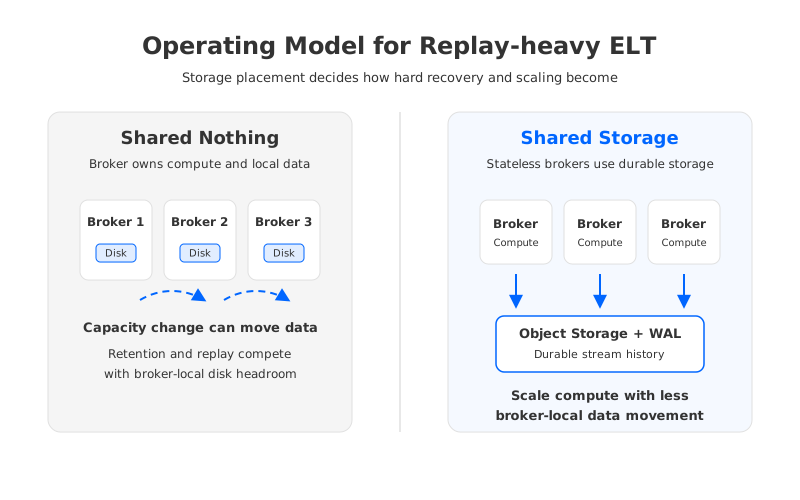
For warehouse ingestion, the practical effect is not that AutoMQ replaces Snowflake, Kafka Connect, or stream processing. It changes the operating model underneath them. Retained records are not planned as broker-local disk inventory in the same way. Broker compute can scale more independently from durable data. Replay-heavy validation and catch-up reads become less entangled with storage rebalancing windows. In cloud deployments, AutoMQ also documents customer-controlled deployment models and zero cross-AZ traffic design, which matter when Kafka, object storage, warehouse connectivity, and governance boundaries all sit inside the same cloud architecture review.
That distinction is important because it keeps the product discussion honest. AutoMQ will not decide whether a nullable field should become a Snowflake column, whether a delete should be represented as a tombstone or a merge, or whether a Flink job owns enrichment. Those are data contract decisions. What AutoMQ can change is the platform friction around the decisions: how much retained history costs to operate, how quickly teams can add connector capacity, how much broker-local data movement is created by growth, and how predictable the recovery boundary feels when replay is required.
6A Migration Pattern for Existing Warehouse Pipelines
Most teams should start with one painful ingestion domain, not the whole warehouse estate. Pick a pipeline that already has visible pressure: a high-volume CDC stream, a Snowflake table that needs frequent repair, a connector with fragile schema handling, or a backfill that routinely competes with normal production traffic. Write down the current path first. Which topics feed it? Which connector or job owns it? Which offsets matter? Which warehouse tables are touched? Which team can approve a replay?
Then run a dry repair. Pause the pipeline in a non-production environment, inject a schema change, send a representative error record, rewind or replay a bounded range, and verify the warehouse outcome outside the connector UI. The goal is not to pass a demo. The goal is to reveal which assumptions are undocumented. Teams often discover that the rollback command exists, but the destination table cannot tolerate duplicate writes; or that Kafka retention is long enough, but connector throughput is too low to catch up inside the business recovery window.
After the dry repair, choose the path deliberately. If the connector approach passes with clear ownership, use it. If validation logic dominates the risk, move that logic into a stream-processing job with explicit tests and checkpoints. If auditability and multi-engine access dominate, add an object-storage or table-format layer. If infrastructure friction dominates all options, evaluate whether a Shared Storage Kafka-compatible platform changes the economics of replay and retention enough to warrant migration.
7A Practical Next Step
Return to the original search: snowflake streaming elt kafka. The phrase sounds like a connector question, but the production answer is broader. A durable warehouse ingestion path needs contracts, replay, observability, and a streaming storage model that does not turn every repair into a capacity project. If you are comparing Kafka-compatible platforms for this work, read AutoMQ's diskless Kafka architecture explanation and use it alongside your own ingestion checklist: see how AutoMQ implements low-latency diskless Kafka.
8References
- Apache Kafka documentation: Kafka Connect user guide
- Apache Kafka documentation: Kafka consumer configuration
- Apache Kafka documentation: Exactly-once semantics
- Snowflake documentation: Snowpipe Streaming with Kafka connector
- Snowflake documentation: Kafka connector overview
- AutoMQ documentation: What is AutoMQ
- AutoMQ documentation: Shared Storage architecture
- AutoMQ documentation: Kafka compatibility
9FAQ
9.1Which path should teams use for streaming Kafka data into Snowflake?
There is no universal best path. Kafka Connect is often the simplest choice for direct ingestion with limited transforms. Stream processing is better when validation, enrichment, or contract logic must be explicit. Object storage or table-format staging can be better when auditability, replay, and multi-engine access are more important than the lowest possible ingestion latency.
9.2Is Kafka replay enough to recover a Snowflake ingestion failure?
Kafka replay is necessary but not sufficient. The destination must tolerate duplicate records, schema changes, delete handling, and partial writes. A production design should test offset rewind, connector restart, dead-letter handling, and warehouse validation before relying on replay as a recovery plan.
9.3Should Snowflake ingestion logic live in Kafka Connect or Flink?
Keep simple movement in Kafka Connect when the topic contract already matches the target table and operational simplicity matters. Use Flink or another stream processor when the pipeline needs joins, enrichment, validation, stateful logic, or stronger code review around data semantics. The boundary should be based on ownership and failure mode, not tool preference.
9.4Where does AutoMQ fit in a Snowflake streaming ELT architecture?
AutoMQ fits at the Kafka-compatible streaming infrastructure layer. It does not replace Snowflake, Kafka Connect, Flink, or schema governance. It can reduce storage-bound operational friction for retention, replay, and scaling by using Shared Storage, object-storage-backed durability, and stateless brokers while preserving Kafka ecosystem compatibility.


