
Table of Contents
Table of Contents
Teams usually search for event replay analytics kafka after Kafka has become more than a transport layer. The cluster is feeding Flink jobs, dashboards, feature pipelines, audit workflows, and backfills that were supposed to be occasional. Then an incident, schema fix, model retraining job, or regulatory request turns replay into a regular production pattern.
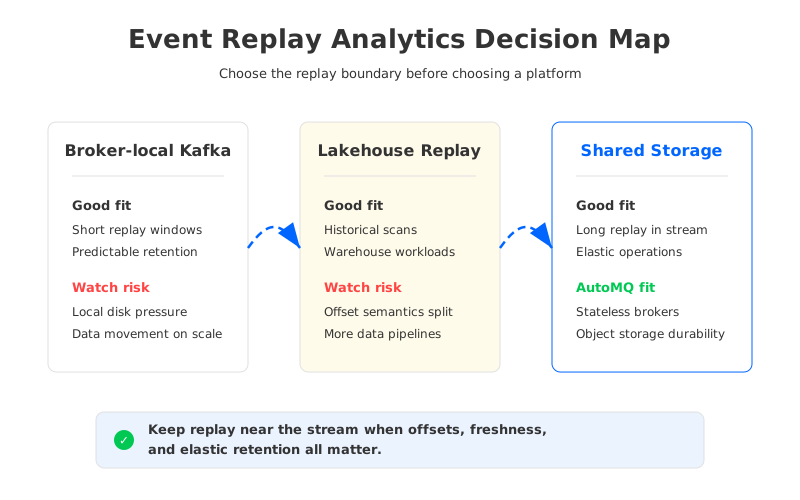
The hard part is not reading old events. Kafka can retain data, consumers can seek by offset, and processing jobs can rebuild state from a known position. The hard part is deciding where replay belongs once analytics becomes a first-class workload. A separate batch copy adds lag and another governance surface; broker-local Kafka storage can make long replay compete with live traffic. The useful question is narrower: which replay loops should stay close to Kafka semantics, and which ones should move into a lakehouse or warehouse?
1Why teams search for event replay analytics kafka
Replay-heavy analytics starts with a reasonable expectation: the event log already has the order, keys, timestamps, and offsets that downstream systems need. A fraud team may rerun scoring logic after a rule change. A data platform team may rebuild derived tables after a bad deployment. A machine learning team may need a time-bounded slice of user behavior with the same ordering guarantees production consumers saw. In each case, the Kafka log preserves operational context that is often lost after data lands in a table.
That expectation is strongest when replay is tied to correctness, not only exploration. A consumer group offset is not a generic bookmark; it is the position from which a service believes it can continue processing. Kafka's model around partitions, offsets, consumer groups, transactions, and idempotent production gives teams a vocabulary for reasoning about what has been processed and what can be processed again. Analytics teams value that vocabulary when replay output affects production decisions, not only ad hoc reports.
The pressure builds when replay and live ingestion share the same topics. A platform team cannot pause producers while a backfill scans retained data or let replay starve tailing consumers. The architecture question moves from "Can Kafka store enough data?" to "Can the platform isolate live and historical access patterns while preserving Kafka compatibility?"
2The production constraint behind the problem
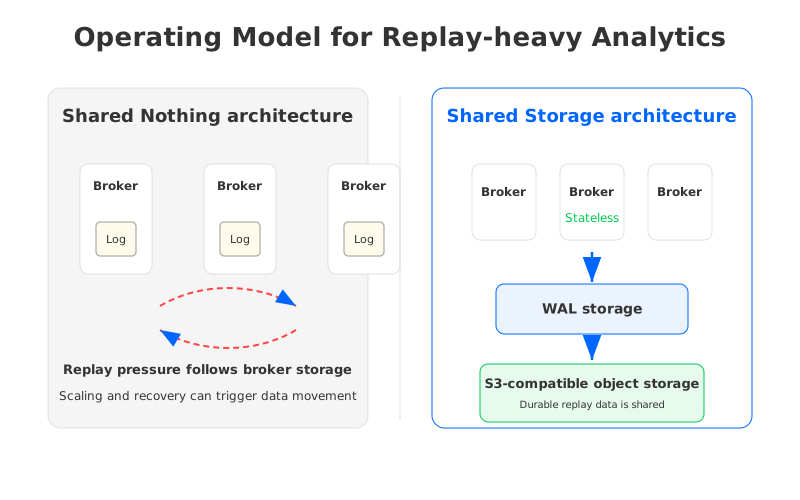
Traditional Apache Kafka clusters are built around a Shared Nothing architecture. Each broker owns local log segments for its partitions, and replication keeps copies on other brokers for durability. That model works well for high-throughput event streaming because data locality is explicit. The same locality becomes a constraint when analytics replay stretches retention, increases catch-up reads, and changes failure recovery.
Replay-heavy workloads expose four constraints that teams often underestimate during the first design review:
- Storage follows peaks and retention, not only average traffic. One long retention use case can affect every topic sharing the cluster.
- Scaling is entangled with data placement. Adding or replacing brokers may require partition reassignment, not only metadata changes.
- Cross-Availability Zone replication becomes part of the operating model. Multi-AZ Kafka improves resilience, but replication traffic and consumer placement need governance.
- Cold reads compete with hot-path expectations. Replay far behind the head of the log stresses disk, cache, network, and broker request handling differently from tailing consumers.
None of these constraints means Kafka is the wrong abstraction. They mean the storage architecture underneath Kafka determines how fragile replay becomes. A cluster sized for ingestion may look healthy under normal consumer lag and still struggle when multiple teams need historical events at the same time.
3Architecture options and trade-offs
There are three common ways to handle event replay for analytics. The first is to keep replay inside the existing Kafka cluster. This fits short replay windows, governed topics, and jobs that need exact Kafka offsets. The burden is that brokers must serve live traffic and retain enough historical data for replay. The more teams treat the log as a long-lived source, the more broker-local storage becomes part of the analytics platform.
The second option is to offload historical analysis into a lakehouse or warehouse. This fits broad scans, BI-style queries, and workloads that benefit from columnar files, table metadata, and SQL engines. It also creates a translation boundary: events become rows or files, offsets become ingestion metadata, and replay correctness depends on the export path. For exploratory analytics, that boundary is acceptable. For operational reprocessing from precise positions, it needs careful design.
The third option is a Kafka-compatible streaming platform with Shared Storage architecture. Brokers keep the Kafka protocol surface, but durable stream data is stored in shared object storage rather than tied to broker-local disks. A WAL (Write-Ahead Log) layer absorbs writes and supports recovery, while object storage holds persistent data. The important change is that broker replacement, scaling, and partition movement no longer require the same volume of data movement because data ownership is decoupled from the broker process.
| Option | Where replay happens | Strong fit | Main risk to evaluate |
|---|---|---|---|
| Broker-local Kafka | Existing Kafka log | Short replay tied to offsets and consumer groups | Broker storage, reassignment, and cold-read contention |
| Lakehouse or warehouse | Exported tables or files | Large historical scans and BI workloads | Offset semantics and freshness split across systems |
| Kafka-compatible shared storage | Kafka API on shared object storage | Long replay that should stay close to stream semantics | WAL choice, cache behavior, and platform maturity |
This is not a maturity ladder where every team lands on the third option. A clean architecture usually uses more than one path. The better split is semantic: keep replay near the stream when offsets, freshness, and operational correctness matter; move replay to tables when scans, joins, and long-running analysis matter more than Kafka-native position management.
4Evaluation checklist for platform teams
The most useful evaluation starts with ownership. Replay is a shared responsibility between streaming infrastructure, processing frameworks, data governance, and application teams. When ownership is vague, the architecture may look clean on a diagram and fail during the first backfill because nobody knows whether to tune storage, extend retention, throttle the job, or rebuild an export.
Use the following checklist before selecting a platform or changing retention policy:
- Compatibility: Which clients, serializers, transactions, consumer group behaviors, and offset patterns must remain unchanged? A replay plan that breaks consumers is a migration, not an optimization.
- Cost model: Can the team separate compute, storage, and network costs when replay grows? If all three scale together, analytics demand is hard to attribute.
- Elasticity: What happens when replay needs temporary capacity? The answer should cover broker scale-out, cache behavior, partition movement, and rollback.
- Governance: Where do access control, audit, schema policy, and retention policy live? The more copies you create, the more governance surfaces you inherit.
- Failure recovery: If a broker, zone, or processing job fails mid-replay, what state is authoritative: the Kafka offset, an external checkpoint, a table snapshot, or a migration tool's metadata?
- Observability: Can SREs distinguish live ingestion pressure from historical replay pressure? Shared dashboards that hide this distinction create slow incident response.
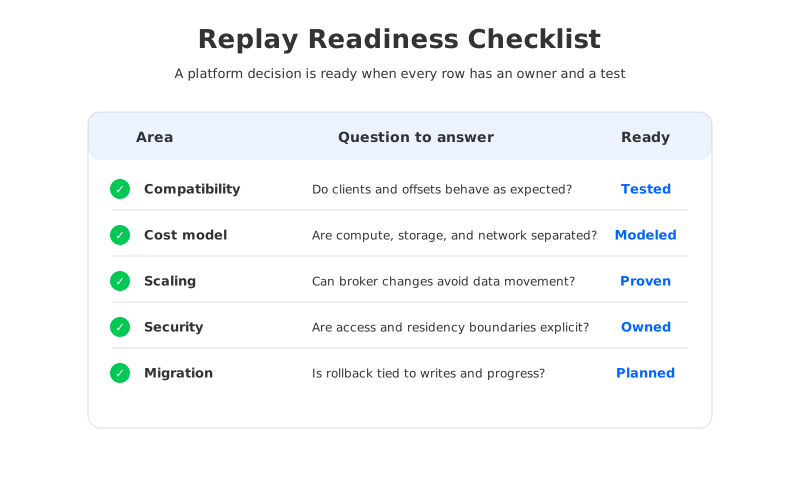
The checklist usually reveals the same pattern: replay is manageable when it is rare and bounded, but it becomes a platform concern when it is repeatable, cross-team, and tied to production correctness. At that point, adding retention alone is not a strategy.
5How AutoMQ changes the operating model
This is where AutoMQ enters the discussion as a Kafka-compatible cloud-native streaming platform, not as a replacement for the evaluation work above. AutoMQ keeps compatibility with Apache Kafka APIs and client behavior while using Shared Storage architecture underneath the broker layer. Durable stream data is backed by S3-compatible object storage, and AutoMQ Brokers are stateless with respect to persistent log storage.
For replay-heavy analytics, that architecture changes the operational question. Instead of reserving broker-local disk for long retention and future backfills, the team can evaluate how shared object storage, WAL storage, cache policy, and compute capacity work together. WAL choice still matters. AutoMQ Open Source uses S3 WAL, while AutoMQ commercial editions can use EBS WAL, Regional EBS WAL, and NFS WAL depending on deployment requirements. The point is that durability and broker lifecycle are no longer bound to the same local disk budget.
Stateless brokers also change migration and scaling. When a broker is added, removed, or replaced, the platform is not forced to treat every partition movement as a large data-copying event. AutoMQ features such as Self-Balancing and Seconds-level partition reassignment build on that separation: the control plane can rebalance traffic and ownership while persistent data remains in shared storage. For analytics teams, this matters because replay bursts often create temporary capacity needs.
AutoMQ also gives teams a path to keep stream and lakehouse workflows closer without treating Kafka as a query engine. Table Topic is designed to write streaming data into Apache Iceberg tables, which can reduce the ETL surface for lakehouse ingestion. That does not eliminate the need for Flink, Spark, or analytical engines where transformation and query logic belong. It does make the boundary more explicit: Kafka-compatible streaming remains the source of ordered events, while table formats serve workloads that are better expressed as table scans.
Deployment boundaries matter because replay can make old sensitive events visible again. AutoMQ BYOC runs the control plane and data plane in the customer's cloud account, and AutoMQ Software targets private data center deployments. Those models let platform teams evaluate replay through familiar cloud controls: VPC boundaries, bucket ownership, IAM policy, audit, region selection, and operational access.
6A practical decision matrix
The fastest way to make the decision concrete is to score replay use cases, not platforms. Pick one high-value replay scenario and write down its freshness requirement, retention window, source-of-truth requirement, and failure behavior. Then decide whether the loop needs Kafka semantics or analytical table semantics.
| Replay scenario | Keep near the stream when | Move toward tables when |
|---|---|---|
| Rebuilding processing state | Consumer offsets and event order define correctness | State can be rebuilt from curated snapshots |
| Model feature backfill | Fresh events and historical slices share production logic | Features are computed in batch windows |
| Audit investigation | Exact event sequence and original keys matter | Analysts need broad filtering and joins |
| Dashboard correction | The pipeline must resume from a known Kafka position | A materialized table can be recomputed safely |
This matrix keeps the conversation away from generic platform preferences. Kafka is not automatically better because it has the original event log, and a lakehouse is not automatically better because it stores more history. The right boundary makes correctness, cost, and operations testable.
7Migration and rollback should be designed early
Replay architecture changes often fail at the switch, not at the benchmark. A candidate platform may pass throughput tests while the migration plan still lacks offset continuity, producer cutover behavior, ACL mapping, and consumer rollback steps. Platform teams should test migration with the same replay scenario they intend to support after the change.
AutoMQ Kafka Linking is designed for migration from Apache Kafka or Kafka-compatible systems to AutoMQ, including byte-level message synchronization and consumer progress synchronization. Those capabilities matter because replay correctness depends on position continuity. Open source teams can also evaluate Apache Kafka tools such as MirrorMaker2, but they should treat offset behavior, topic mapping, and rollback as first-class test items.
Do not approve a replay architecture until rollback has a named owner. The rollback path should say what happens to producers, consumers, offsets, replicated topics, table exports, and alerting. If the rollback answer is "we will decide during the incident," the design is not production-ready.
8FAQ
8.1Is Kafka a good system for analytics replay?
Kafka is a strong source for replay when the job depends on event order, partition keys, offsets, and production consumer behavior. It is not a universal analytics engine. Large exploratory scans, joins across many domains, and BI-style workloads often fit better in a lakehouse or warehouse.
8.2Does Tiered Storage solve replay-heavy analytics?
Tiered Storage can help by moving older log segments to remote storage while brokers retain the Kafka log abstraction. It does not make brokers stateless, and it does not remove every operational concern around hot reads, cold reads, broker capacity, and recovery. Evaluate it as one storage option, not as a complete replay operating model.
8.3When should replay move closer to the stream?
Replay should stay close to the stream when correctness depends on Kafka-native semantics: offsets, ordering within partitions, consumer group progress, idempotent writes, transactions, or fast recovery from a known processing position. If the workload mainly needs historical filtering, joins, and aggregate scans, table-oriented systems may be a better execution layer.
8.4How does AutoMQ fit with lakehouse analytics?
AutoMQ can act as a Kafka-compatible streaming foundation while storing durable stream data in shared object storage. Table Topic can also write streaming data into Apache Iceberg tables for lakehouse workflows. That lets teams keep operational replay near Kafka semantics and use table formats where analytical engines are the better tool.
The original question was not whether Kafka or the lakehouse should win every replay workload. It was where correctness, freshness, and operating cost are easiest to keep under control. If your platform team is deciding whether replay should stay in Kafka, move to tables, or use a Kafka-compatible shared storage architecture, test the decision with one production replay scenario. You can start with AutoMQ on GitHub through this short link: https://go.automq.com/github?utm_source=blog&utm_medium=cta&utm_campaign=event-replay-analytics-kafka.
9References
- Apache Kafka documentation
- Kafka Connect documentation
- Kafka transactions and exactly-once semantics
- Kafka KRaft documentation
- AutoMQ compatibility with Apache Kafka
- AutoMQ architecture overview
- AutoMQ S3Stream shared streaming storage
- AutoMQ WAL storage
- AutoMQ Table Topic overview
- AutoMQ migration overview
- AWS data transfer pricing


