
Table of Contents
Table of Contents
A mid-size Apache Kafka cluster — 300 MiB/s write throughput, two consumer groups, 72 hours of retention — runs over $100,000 per month on AWS when self-managed. Even a more modest setup easily crosses $50,000. With Amazon MSK, the bill is lower but still lands north of $57,000. Most engineers who see these numbers for the first time assume the brokers are the problem. They start right-sizing instances, shopping for lower-cost EC2 families, maybe switching to Graviton. The savings are real but modest — single-digit percentages off a six-figure bill.
The actual cost structure tells a different story. Kafka's disk-based replication architecture interacts with AWS's pricing model in ways that create a compounding effect: 3× replicas multiply your Elastic Block Store (EBS) bill, cross-AZ replication racks up bidirectional data transfer fees, and peak-provisioned brokers sit idle most of the day. Understanding where the money actually goes is the first step toward fixing it — and the answer is not what most people expect. All AWS pricing in this article is based on us-east-1 on-demand rates as of April 2026.
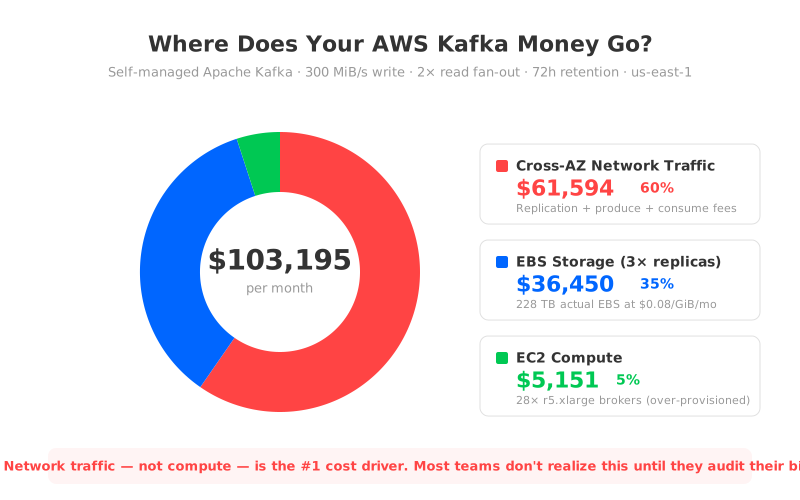
The chart above breaks down a real scenario: self-managed Apache Kafka on AWS at 300 MiB/s write throughput with 2× read fan-out and 72-hour retention in us-east-1. Cross-AZ network traffic accounts for 60% of the total bill. Storage comes second at 35%. Compute — the thing most teams try to optimize first — is just 5%.
1Cross-AZ Network Traffic: The $61,000 Line Item Nobody Sees
Network traffic is the single largest cost driver for Kafka on AWS, and it's also the most invisible. It doesn't show up as "Kafka networking" on your bill — it's buried in EC2's Data Transfer charges, mixed in with every other service in your account.
Kafka generates cross-AZ traffic from three sources, and AWS charges $0.01/GB in each direction — $0.02/GB round-trip. In a balanced three-availability-zone (AZ) deployment:
- Replication traffic: Every message written to a leader partition gets pulled by two followers (assuming
replication.factor=3). If brokers are spread across three availability zones — which they should be for high availability — two out of three replications cross an AZ boundary. - Producer traffic: Producers connect to the leader for each partition. Roughly two-thirds of produce requests cross an AZ boundary in a balanced three-AZ deployment.
- Consumer traffic: Consumers also read from the leader by default. With 2× read fan-out, the consumer-side traffic is double the write throughput, and the same two-thirds cross-AZ ratio applies.
The math adds up fast. At 300 MiB/s sustained write throughput, the monthly data volume is roughly 740 TiB of ingress alone. Factor in replication and consumer egress, and the cross-AZ traffic bill reaches $61,594 per month — more than the compute and storage costs combined.
What makes this particularly painful is that there's no clean way to eliminate it within the traditional Kafka architecture. KIP-392 (Follower Fetching) can reduce consumer-side cross-AZ reads, but it only addresses one of the three traffic sources, adds configuration complexity, and introduces slightly higher read latency. The replication traffic — the largest component — is inherent to how Kafka achieves durability.
MSK doesn't change this equation. AWS waives inter-broker replication fees for MSK, but producer-to-broker and broker-to-consumer cross-AZ charges still apply. For the same 300 MiB/s workload, MSK's cross-AZ bill is still $30,797/month — just from client-side traffic.
2EBS Storage: The 3× Multiplication Trap
Storage is the second-largest cost component, and the multiplier here is straightforward but brutal: Kafka's replication factor turns every byte of logical data into three bytes of physical EBS.
For a 300 MiB/s workload with 72-hour retention, the logical data volume is about 76 TB. With replication.factor=3, the actual EBS footprint is 228 TB. At the EBS gp3 rate of $0.08/GiB/month in us-east-1, that's $18,240/month just for the raw storage — before accounting for headroom.
And you do need headroom. EBS volumes must be provisioned upfront — you can't pay for only what you use at any given moment. To handle traffic spikes and avoid running out of disk (which causes broker failures), most teams provision 1.3–1.5× their expected peak. The pricing calculator puts the total EBS cost for this scenario at $36,450/month, accounting for provisioning overhead across 28 brokers — roughly double the theoretical minimum.
| Item | Value |
|---|---|
| Logical data (300 MiB/s × 72h) | ~76 TB |
| Physical EBS (3× replicas) | ~228 TB |
| EBS gp3 rate (us-east-1) | $0.08/GiB/month |
| Theoretical storage cost | ~$18,240/month |
| With provisioning overhead (28 brokers) | $36,450/month |
For comparison, S3 Standard storage in the same region costs $0.023/GB/month — and S3 handles durability internally with 99.999999999% (11 nines), so there's no application-level replication needed. The same 76 TB of logical data on S3 would cost roughly $1,750/month. Compared to the provisioned EBS cost of $36,450, that's over a 20× difference — and it's the core insight behind every "diskless Kafka" architecture.
3EC2 Compute: Over-Provisioned and Under-Utilized
Compute is the smallest slice of the pie at around 5%, but it's the one most teams focus on first — because it's the most visible. You can see your broker instances in the EC2 console. You can't easily see your cross-AZ data transfer.
A 300 MiB/s Kafka cluster typically requires 20–30 brokers (the calculator sizes 28× r5.xlarge instances at 50% network utilization threshold). At $0.252/hour per r5.xlarge, that's $5,151/month in compute. Not trivial, but dwarfed by the $61,594 in network fees and $36,450 in storage.
The waste here is utilization-driven. Kafka brokers must be provisioned for peak throughput, but most workloads have significant variance — peak-to-average ratios of 2–3× are common. That means your brokers are running at 30–40% CPU utilization most of the time, and you're paying for the other 60–70% around the clock. You can't scale down during off-peak hours because Kafka's stateful architecture ties partitions to specific brokers, and rebalancing data takes hours.
MSK adds a management premium on top. MSK Standard requires more brokers for this workload — 33 kafka.m5.xlarge instances versus 28 self-managed r5.xlarge — and each costs $0.42/hour versus $0.252/hour for bare EC2. For the same workload, MSK Standard compute costs $10,118/month compared to $5,151 self-managed. MSK Express brokers (express.m7g.large at $0.408/hour) require even more instances due to per-broker throughput limits, landing at $11,616/month for 39 brokers.
This is why right-sizing your instances yields disappointing results. Even if you cut compute costs by 30% through aggressive optimization, you've saved $1,500/month off a $103,000 bill. The leverage is elsewhere.
4The Multiplier Effect
Step back and look at the full picture. Kafka's architecture was designed in an era when servers had local disks and network traffic between machines in the same data center was free. That design made perfect sense at LinkedIn in 2011. On AWS in 2026, every one of those assumptions has a price tag:
| Kafka Design Assumption | AWS Reality | Cost Impact |
|---|---|---|
| Data replicated 3× across brokers | Cross-AZ transfer: $0.02/GB round-trip | $61,594/month in network fees |
| Replicas stored on local/attached disk | EBS gp3: $0.08/GiB/month × 3 replicas | $36,450/month in storage |
| Brokers sized for peak, run 24/7 | On-demand EC2 pricing, no auto-scaling | $5,151/month at <40% avg utilization |
The total for self-managed Kafka: $103,195/month. MSK Standard reduces this to $86,477 (by waiving inter-broker replication fees) but adds its own management premium. MSK Express brings it down further to $57,706 with a different pricing model — but the cross-AZ client traffic and storage costs remain.
This isn't Kafka's fault, and it isn't AWS's fault. It's a mismatch between an architecture designed for data-center economics and a billing model designed for cloud resource metering. The replication protocol that gives Kafka its durability guarantee is the same protocol that generates the majority of your AWS bill.
5The Architecture-Level Fix
Once you see the cost structure clearly, the solution becomes obvious: stop replicating data at the application layer and let the cloud infrastructure handle durability.
That's the core idea behind diskless Kafka architectures. Instead of writing to EBS and replicating across brokers, data goes directly to S3 — which provides 11-nines durability internally, charges $0.023/GB/month with no replication overhead, and doesn't charge for cross-AZ data transfer within the service.
The impact on each cost component:
- Network: Zero cross-AZ replication fees. Data enters S3 through a single-AZ endpoint; S3 handles cross-AZ durability internally at no extra charge.
- Storage: $0.023/GB on S3 versus $0.08/GiB × 3 on EBS. For 76 TB of logical data, that's ~$1,750/month versus $36,450 — a reduction of over 95%.
- Compute: Stateless brokers can scale in and out in seconds, so you provision for current load, not peak load. No data rebalancing needed.
Combined, these changes cut the total infrastructure bill by roughly 80%.
AutoMQ, built on the Apache Kafka codebase with 100% protocol compatibility, implements this architecture in production. For the same 300 MiB/s workload, AutoMQ's monthly cost is $21,804 — compared to $103,195 for self-managed Kafka and $86,477 for MSK Standard. The savings come not from clever optimization tricks, but from eliminating the architectural mismatch that creates the cost in the first place.
6Key Takeaways
Three things to remember from this breakdown:
- Cross-AZ network traffic is the #1 cost driver for Kafka on AWS — typically 50–60% of total infrastructure spend. It's also the hardest to see on your bill.
- 3× replication multiplies your EBS storage cost by 3× (or more, with provisioning overhead). S3 handles durability at 1/20th the price without application-level replication.
- Compute is the smallest cost component, which is why instance right-sizing alone can't meaningfully reduce your Kafka bill. The leverage is in network and storage.
If you want to see what these numbers look like for your specific workload, run your parameters through the AutoMQ pricing calculator. The math might surprise you — or it might confirm what your AWS bill has been trying to tell you all along.


