
Table of Contents
Table of Contents
Kafka migrations fail less often because the target cluster is impossible to run and more often because the cutover was treated like a DNS change. The application teams hear “Kafka compatible” and assume the move will be painless. Platform teams know better. Topics, ACLs, consumer offsets, schemas, lag, ordering, quotas, and rollback windows all have to line up before a production workload can move without downtime.
A zero-downtime migration is not a single event. It is a controlled overlap between two clusters. The old cluster keeps serving production while the new cluster proves it can receive the same data, serve the same clients, and survive the same failure assumptions. Only then do producers and consumers move. AutoMQ's Kafka compatibility helps because applications do not need to rewrite their Kafka clients, but compatibility does not remove the need for migration discipline.
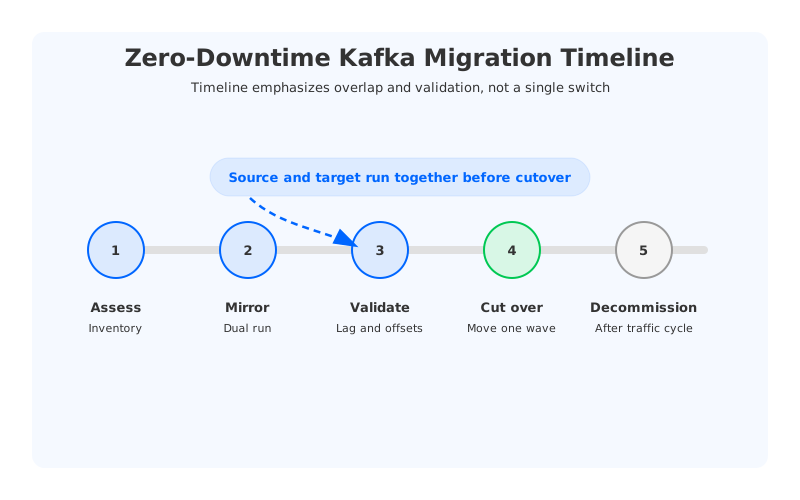
1Start with inventory, not tooling
MirrorMaker2 is useful, but it should not be the first thing you configure. The first step is inventory. You need to know which topics exist, who owns them, which consumers read them, which producers write them, what schemas are used, how offsets are committed, what ACLs apply, and which workloads can tolerate replay or temporary lag.
This inventory usually reveals that a Kafka cluster is not one system. It is a collection of workloads with different risk profiles. A logging topic and a payment topic should not share the same cutover plan. A batch consumer that can replay a day of data is not the same as a low-latency service that expects tightly bounded lag. Treating them the same is how migrations become incidents.
A practical inventory should include:
- Topic name, owner, partition count, retention, cleanup policy, and expected throughput.
- Producer applications, deployment owners, and retry behavior.
- Consumer groups, offset commit pattern, lag tolerance, and replay tolerance.
- Schema registry dependencies and compatibility settings.
- ACLs, quotas, client certificates, and network paths.
- Business criticality and acceptable rollback window.
Once this map exists, group topics into migration waves. Start with low-risk workloads. Use them to validate the mechanics, observability, and runbooks before touching critical paths.
2Build the target cluster like production
A migration target should not be a temporary test cluster wearing a production name. It needs production networking, monitoring, security, quotas, topic configuration, and failure assumptions before mirroring starts. If the target is AutoMQ, this is where Kafka compatibility helps: clients still use Kafka APIs, and topic-level semantics remain familiar. The platform team still needs to validate the deployment model, storage configuration, network reachability, and observability.
The target cluster should match the source where compatibility matters and differ where the new architecture intentionally improves the system. Topic partition counts, cleanup policies, retention expectations, ACLs, and schema behavior should be deliberate. Broker count and storage layout may differ because AutoMQ uses stateless brokers and object storage rather than broker-local disks. That is an architectural change, but it should not leak into application behavior.
3Mirror data and offsets continuously
The standard migration pattern is continuous replication from source to target. MirrorMaker2 is a common choice because it understands Kafka topics and can sync consumer offsets. Other tools can work, but the same principle applies: keep the target close enough to the source that cutover is a small step, not a data migration marathon.
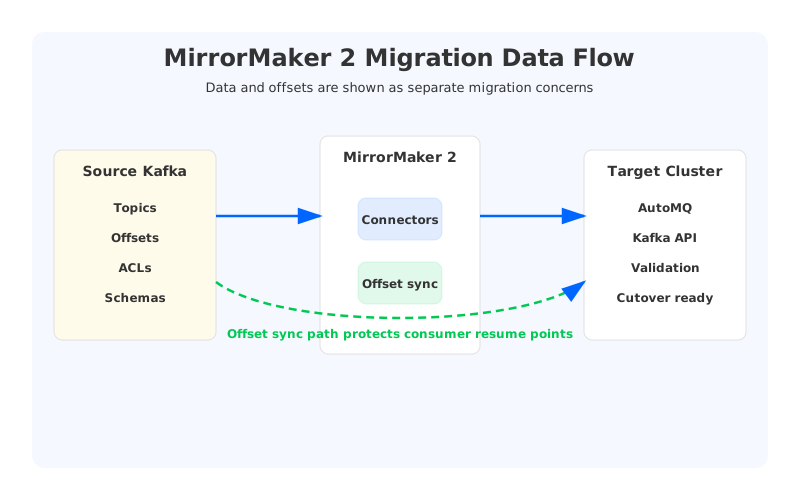
During mirroring, monitor both data lag and semantic correctness. Data lag tells you whether the target is caught up. Semantic checks tell you whether the data is usable. Compare message counts, sample records, schemas, topic configs, and consumer offset mappings. If a consumer group restarts on the target and reads from the wrong point, the migration can still create duplicate processing or data loss even when replication lag is low.
A useful validation table looks like this:
| Check | What it proves | Failure signal |
|---|---|---|
| Replication lag | Target is close to source | Lag grows during peak traffic |
| Offset sync | Consumers can resume safely | Group starts too early or too late |
| Topic config parity | Behavior matches source | Retention or compaction differs |
| ACL parity | Clients can connect after cutover | Authorization errors in dry run |
| Schema compatibility | Producers and consumers agree | Deserialization failures |
| Rollback test | Return path is credible | Source cannot catch up or accept clients |
This is also the stage where teams should test failure behavior. Stop a replication task. Restart a consumer on the target. Simulate a producer retry storm. Validate that monitoring catches the issue before the business does.
4Cut over by workload, not by cluster
The safest cutover moves one workload group at a time. For a given wave, freeze risky configuration changes, confirm lag is within the agreed threshold, notify application owners, and switch producers or consumers according to the plan. Some teams move consumers first to validate read behavior. Others move producers first for specific topics and keep consumers mirrored. The right order depends on whether duplicate writes, duplicate reads, or delayed processing is more dangerous for that workload.
AutoMQ's Kafka compatibility can make this step operationally smaller. In many cases, the application change is a bootstrap server update plus security configuration. That is still a production deployment. The team needs a release plan, an owner, a rollback trigger, and monitoring focused on application-level behavior rather than only broker metrics.
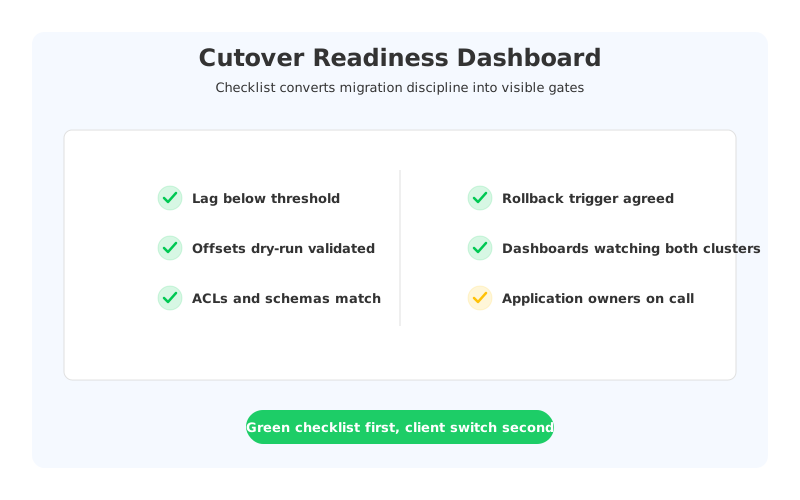
A cutover should happen only when the checklist is green:
- Replication lag is below the threshold for the workload.
- Consumer offsets have been validated with a dry run or shadow consumer.
- Topic configs, ACLs, quotas, and schemas match the migration plan.
- Producers and consumers have been tested against the target cluster.
- Dashboards and alerts exist for both source and target during the overlap.
- The rollback path has been tested, not merely discussed.
The rollback trigger matters because people make worse decisions under incident pressure. Decide in advance what counts as failure: sustained lag, error rate, data mismatch, consumer offset drift, or application SLO breach. When that trigger fires, the team should follow the runbook instead of debating strategy in the middle of the migration.
5Decommission slowly
The old cluster should remain available until the target has carried production through a meaningful traffic cycle. That might be a day, a week, or longer depending on workload criticality. During this period, keep enough mirroring or validation in place to detect late consumers, forgotten batch jobs, or rarely used producers. Kafka clusters often contain long-tail clients that do not show up during a short migration window.
When decommissioning begins, archive the migration inventory, final topic mapping, offset decisions, and rollback notes. Those artifacts are valuable for the next migration and for incident review. The goal is not just to move one cluster. It is to make platform migration a repeatable capability.
6Where AutoMQ fits
AutoMQ should not be positioned as a shortcut around migration discipline. Its role is more specific: it gives teams a Kafka-compatible target whose architecture removes some of the reasons they wanted to migrate in the first place. Stateless brokers reduce data movement during scaling. Object storage changes retention economics. BYOC keeps data in the customer's cloud account. Kafka compatibility keeps the application surface familiar.
That combination is useful because migration risk is paid once, but platform cost and operational drag are paid every month. A zero-downtime plan reduces the one-time risk. A diskless Kafka architecture addresses the recurring problem. The best migration projects make both sides explicit before the first topic moves.
7Treat rollback as a product feature
Rollback is often written as a single line in a migration plan: “switch clients back to the source cluster.” That line hides the hardest part of the operation. If producers have already written to the target, switching back can create split-brain data. If consumers have committed offsets on the target, returning them to the source may cause duplicates or gaps. If schemas or ACLs changed during cutover, the old cluster may no longer behave exactly like the environment teams tested the week before.
A real rollback plan defines direction. For some workloads, the target becomes the source of truth as soon as producers move, and rollback means moving consumers while keeping producer writes on the target. For others, producers stay on the source until consumers prove they can read from the target safely. The plan should state which side owns writes at every stage, how offsets are translated, and what happens to data produced during the overlap.
This is also why wave-based migration matters. A low-risk topic teaches the team how rollback actually behaves in the environment. It verifies monitoring, ownership, communication, and runbook timing before a critical workload is involved. Kafka compatibility reduces application change, but it does not remove distributed-systems reality. The safest migrations respect that reality from the first rehearsal.
After each wave, hold a short migration review. Capture which checks caught real issues, which alerts were noisy, which application owners needed more context, and which assumptions were wrong. The next wave should be safer because the previous wave taught the runbook something concrete.


