
Table of Contents
Table of Contents
For Kafka platform teams, "zone-redundant Kafka on Azure" sounds like a solved deployment pattern: put brokers in three Azure Availability Zones, set replication factor to three, spread replicas, and move on. That is a useful start, but it is not a complete HA design. Kafka availability comes from the interaction between broker placement, partition leadership, in-sync replicas, producer acknowledgments, storage durability, client routing, recovery, and replication traffic.
Azure Availability Zones are physically separate groups of datacenters within a region, with independent power, cooling, and networking. Microsoft also notes that many services can be zonal or zone-redundant, and that the service-specific reliability guide matters because zone behavior differs by service. That distinction is important for Kafka. A self-managed Kafka cluster on Azure VMs behaves differently from Azure Event Hubs with the Kafka endpoint, and both behave differently from a Kafka-compatible shared-storage architecture.
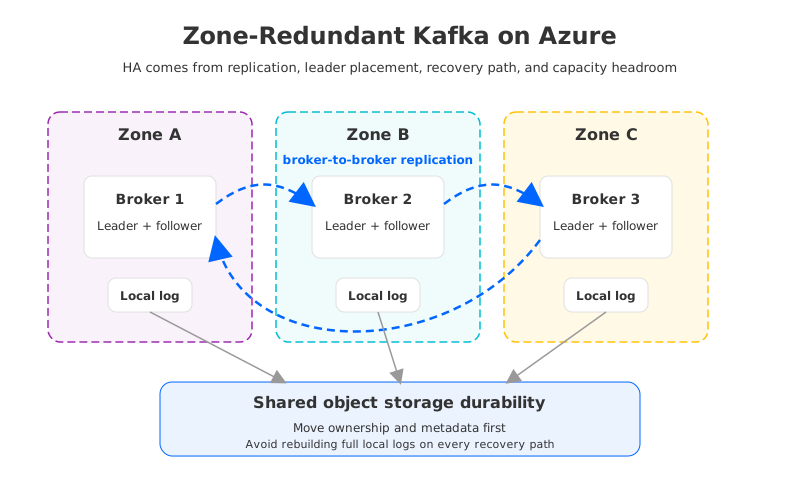
The practical question is not "Can Kafka run across zones?" It can. The better question is: what must move when a zone fails, and who pays for that movement during steady state?
1What Zone Redundancy Means for Streaming Workloads
Streaming systems are unusually sensitive to availability design because they combine low-latency writes, ordered partition logs, long retention, and many dependent consumers. A web service can often retry against another instance with little persistent state. A Kafka broker is different: it is a compute process, a replication participant, a leader for some partitions, a follower for others, and traditionally the owner of local log segments.
When an Azure region supports Availability Zones, a Kafka team can distribute brokers across zones to reduce the blast radius of a zone failure. It does not automatically answer several harder questions:
- Are leaders evenly distributed across zones, or does one zone carry most write traffic?
- Does every critical topic use enough replicas and a safe
min.insync.replicaspolicy? - Will producer
acks=allcontinue to make progress if one zone fails? - How much replication traffic crosses zones during normal operation?
- How long does recovery take if the failed broker's local disk state must be rebuilt elsewhere?
- What happens to consumers with committed offsets, state stores, or transactional workloads during failover?
Azure's own zone model also separates in-region zone resilience from region-level disaster recovery. Availability Zones protect against a zone-level event; they do not protect against a full regional outage. For Kafka, that means zone redundancy is an HA pattern, not a complete DR pattern. Region-level DR still requires a separate plan, often involving MirrorMaker 2, Cluster Linking, Event Hubs geo features, or another replication mechanism with its own tested RPO, RTO, and tradeoffs.
2Traditional Kafka Replication Across Azure Zones
Apache Kafka replication is leader-based. Each partition has one leader replica that handles reads and writes, and follower replicas fetch data from the leader. The in-sync replica set is the group of replicas that are caught up enough to be eligible for durability decisions. With common production settings such as replication factor three, min.insync.replicas=2, and producers using acks=all, a write is acknowledged only after enough replicas have confirmed it according to the configured policy.
Across Azure zones, that model creates a reliability benefit and an operational cost at the same time. The benefit is straightforward: if a broker or zone fails, Kafka can elect another in-sync replica as leader. The cost is that every write to a partition leader has to be replicated to followers, and those followers are often in other zones by design.
Consider a three-zone cluster:
| Design element | Why it matters for HA | What can go wrong |
|---|---|---|
| Broker placement | Keeps brokers from sharing one zone failure domain | VM scale sets or node pools can drift into uneven capacity |
| Replica placement | Keeps partition copies in multiple zones | Some partitions may still concentrate replicas or leaders |
| ISR policy | Controls when writes are considered durable | Too strict can stop writes; too loose can increase data-loss risk |
| Leader balance | Determines steady-state write paths | A hot leader zone increases latency and network pressure |
| Reassignment | Restores redundancy after failure or scaling | Traditional reassignment copies data and can take significant time |
The hidden issue is not only cross-zone data movement. It is repeated movement. Kafka replicates records between brokers. If brokers use Azure Managed Disks or zone-redundant storage for part of the stack, the storage layer may add its own durability behavior below Kafka. That does not make the design wrong; it means the HA plan must state which layer owns durability, which layer owns availability, and which traffic is paid for or capacity-limited.
Microsoft's current Azure Availability Zones overview says Azure does not charge for data transfer between Availability Zones in the same region. The Azure bandwidth pricing page also distinguishes availability zones from billing zones and says same-region Azure service data transfer has no additional data transfer costs. That helps in-region Kafka designs, but FinOps teams should still model NIC throughput, VM sizing, disk throughput, load balancer paths, private endpoints, inter-region traffic, and downstream services that have billable transfer or capacity effects.
3Event Hubs Availability Model
Azure Event Hubs with the Kafka endpoint changes the design conversation because it removes the self-managed broker layer from the user's architecture. Microsoft manages the underlying clusters, compute, storage, traffic routing, and zone behavior. In its Event Hubs reliability documentation, Microsoft states that Event Hubs supports zone-redundant deployments in all service tiers in supported regions, with zone redundancy automatically enabled at no extra cost when a namespace is created in a supported region. The same document says Dedicated tier zone support requires a minimum of three capacity units.
That is a different operating model from self-managed Kafka. With Event Hubs, the platform team does not place brokers, tune ISR, rebalance leaders, replace failed disks, or run partition reassignment. For teams whose workloads fit Event Hubs semantics and limits, that simplicity can be valuable.
The tradeoff is abstraction. Event Hubs exposes a Kafka protocol endpoint, but it is not Apache Kafka running as a user-controlled broker fleet. Teams should validate:
- Kafka client compatibility, including producer, consumer, admin, transaction, and Kafka Streams behavior that the application actually uses.
- Partition count, throughput unit, processing unit, or capacity unit assumptions.
- Retention, capture, schema registry, private networking, and monitoring requirements.
- Region-level DR requirements, because Event Hubs metadata geo-disaster recovery and geo-replication have different data replication semantics and tier requirements.
- Exit paths if a workload later needs Kafka features beyond the Event Hubs compatibility surface.
For HA architects, the right mental model is: Event Hubs makes the Azure zone-redundant service responsible for availability inside the region, while Kafka makes the platform team responsible for proving the broker-level availability design. Both are valid. They simply move responsibility to different places.
4Cross-Zone Cost Is More Than a Bandwidth Line
On Azure, same-region availability zone data transfer is not usually the headline cost problem for Kafka. The bigger issue is often capacity overhead: extra broker capacity, extra disk capacity, and enough network headroom to survive degraded states.
A zone failure is a capacity event as much as an availability event. If one of three zones is lost, the remaining zones need to absorb leaders, client connections, replication catch-up, and consumer reads. A cluster running at 70 percent steady-state utilization may look efficient on a dashboard, but it may not have enough room to sustain a zone outage while maintaining latency SLOs. The safer design often runs with lower utilization, which means paying for idle capacity as an availability reserve.
Model four buckets:
| Cost bucket | Traditional Kafka on Azure | Why it matters |
|---|---|---|
| Compute | Brokers sized for steady traffic plus failover headroom | Failure modes can concentrate leaders and client load |
| Storage | Local or managed disks multiplied by replication factor | Long retention turns HA into a storage planning problem |
| Network | Broker-to-broker replication, client traffic, connectors | Same-region zone transfer may be free, but throughput is not infinite |
| Operations | Reassignment, incident response, upgrades, balancing | HA that depends on manual recovery is expensive in practice |
Many teams optimize steady state and under-model degraded state. A FinOps review should ask what the bill and SLO look like during broker replacement, partition reassignment, zone evacuation, and post-failure catch-up. Those are the moments when Kafka's local-disk architecture can turn availability engineering into a long-running data movement project.
5How Shared-Storage Kafka Changes Recovery
The alternative architecture is to decouple Kafka-compatible brokers from durable log storage. In a shared-storage model, the durable data is stored in shared cloud storage rather than being owned primarily by broker-local disks. Brokers still serve Kafka protocol traffic, but broker failure recovery no longer depends on rebuilding large local replicas before the partition can be safely served by another broker.
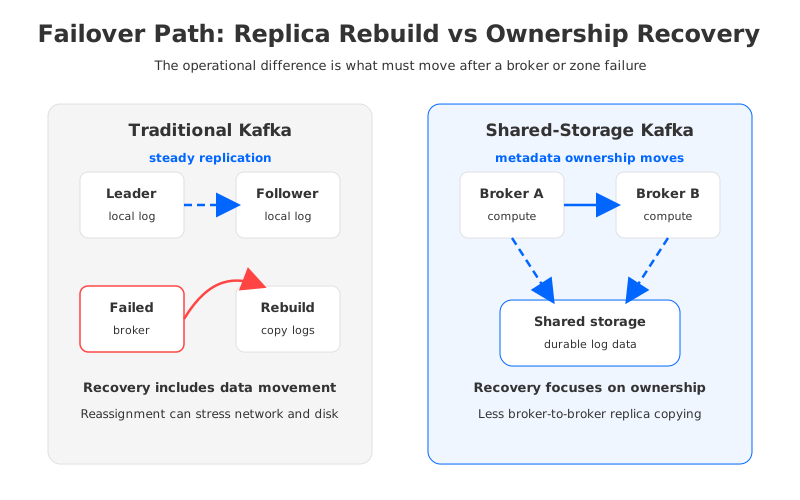
This changes the recovery question. Traditional Kafka asks: which broker has an in-sync local replica, and how do we rebuild missing replicas after the failure? Shared-storage Kafka asks: which broker should own the partition now, and how quickly can metadata, ownership, and cached state be recovered so clients can resume?
AutoMQ is one Kafka-compatible implementation in this category. Its documentation describes a shared storage architecture that offloads Kafka's storage layer through S3Stream, stores data into object storage, and makes brokers stateless. The continuous self-balancing documentation also states that partition reassignment in this architecture does not involve data synchronization and copying.
That matters for zone-redundant Kafka on Azure because it targets one costly failure behavior in traditional Kafka: large broker-to-broker replica movement. If durable data already lives in shared object storage, failover can focus on ownership and metadata recovery rather than copying entire partition logs. Any "seconds-level" recovery claim still depends on controller health, client retry behavior, cache warm-up, network paths, storage configuration, and partition count. Architecturally, the recovery path is shorter because it is not dominated by local log reconstruction.
There is also a cost angle. Shared object storage can reduce pressure to keep multiple full broker-local replicas for durability. It can also reduce the amount of broker-to-broker replica traffic needed for recovery and balancing. That does not eliminate all cross-zone or storage traffic; producers, consumers, caches, metadata, and storage services still move data. It does change which traffic is structural and which traffic is incidental.
6A Practical HA Design Checklist
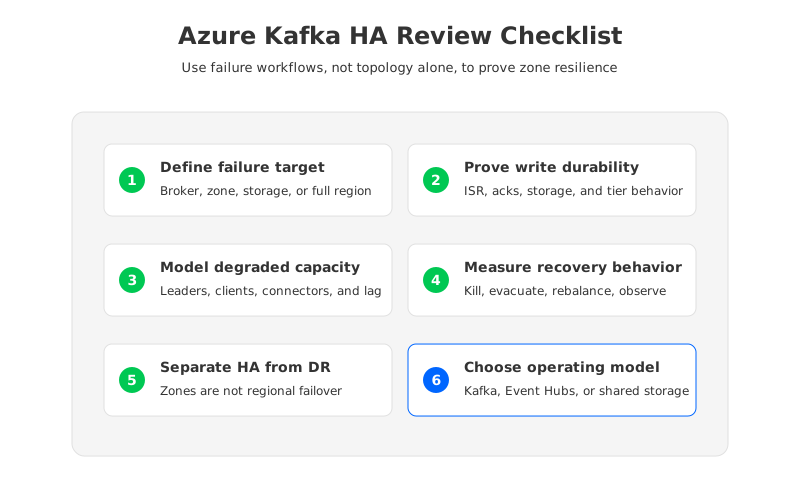
Zone-redundant Kafka designs should be reviewed as a failure workflow, not only as a topology diagram. The following checklist is useful for self-managed Kafka, Event Hubs, and shared-storage Kafka evaluations:
-
Define the failure target. A broker failure, a VM scale set issue, a single zone outage, a storage service incident, and a regional outage require different designs. Do not let "multi-AZ" hide that distinction.
-
Model write durability. For traditional Kafka, review replication factor,
min.insync.replicas, produceracks, unclean leader election, and topic overrides. For Event Hubs, review the tier's zone and geo features. For shared-storage Kafka, review the storage durability model and the broker ownership recovery path. -
Model degraded capacity. Decide how much producer, consumer, connector, and replication load the remaining zones must absorb. If the design cannot meet latency SLOs during a zone loss, it is not truly zone-resilient for that workload.
-
Measure recovery behavior. Run broker kill, zone evacuation, leader rebalance, and partition movement drills. Use application-level metrics, not only broker health. Track produce latency, consumer lag, rebalance duration, transaction behavior, and connector recovery.
-
Separate HA from DR. In-region zone redundancy is not cross-region disaster recovery. If the business requires regional failover, define data replication, DNS or endpoint switching, offset continuity, schema compatibility, and the expected RPO/RTO under tested conditions.
7Where AutoMQ Fits
AutoMQ should not be treated as a drop-in answer to every Azure streaming decision. Event Hubs is compelling when a team wants Azure-native operations and the workload fits its Kafka endpoint behavior. Self-managed Kafka remains relevant when teams need full Apache Kafka control and can operate the cluster well. AutoMQ becomes interesting when the team wants Kafka compatibility but does not want HA, scaling, and balancing to be dominated by broker-local storage.
The natural fit is a platform team that cares about Kafka semantics, BYOC-style infrastructure control, and lower operational drag during failover. Shared object storage provides the durable data foundation. Stateless brokers make compute replacement more like service recovery than disk recovery. Ownership and metadata recovery reduce partition-movement copying. Reduced broker-to-broker replica pressure also simplifies the cost discussion: the team can evaluate how much recovery can be handled as metadata and cache recovery.
For architects and SREs, the decision framework is simple but demanding: choose the model whose failure behavior you are willing to operate. If you choose traditional Kafka, prove the ISR, leader, capacity, and reassignment path. If you choose Event Hubs, prove the compatibility and tier assumptions. If you choose shared-storage Kafka such as AutoMQ, prove the storage configuration, ownership recovery, cache behavior, and client retry profile. Zone redundancy is the beginning of the design, not the evidence that the design works.
8References
- Azure Availability Zones overview
- Azure Event Hubs reliability and availability zones
- Azure bandwidth pricing
- Apache Kafka documentation: replication
- AutoMQ architecture overview
- AutoMQ stateless broker documentation
- AutoMQ continuous self-balancing documentation
9FAQ
9.1Is Kafka automatically zone-redundant on Azure if I deploy brokers in three zones?
No. Three-zone placement is only the topology. You still need replica placement, ISR policy, leader balance, producer acknowledgments, capacity reserve, monitoring, and tested recovery workflows.
9.2Does Azure charge for data transfer between Availability Zones in the same region?
Microsoft's Azure Availability Zones overview says Azure does not charge for data transfer between Availability Zones in the same region. Still model VM bandwidth, disk throughput, inter-region traffic, private networking, downstream services, and recovery traffic.
9.3Is Event Hubs with the Kafka endpoint the same as running Kafka across Azure zones?
No. Event Hubs provides a Kafka protocol endpoint on a managed Azure streaming service. It can remove broker operations, but teams must validate compatibility, tier limits, DR features, and application behavior.
9.4How does shared-storage Kafka reduce failover pressure?
Shared-storage Kafka keeps durable log data in shared cloud storage and treats brokers more like compute nodes. Recovery can focus on ownership, metadata, and cache state instead of copying full local replicas.
9.5Can AutoMQ guarantee seconds-level RTO for every Azure Kafka workload?
No architecture should make that unconditional claim. AutoMQ's stateless broker and shared-storage design can shorten the recovery path under suitable conditions, but actual RTO depends on partition count, storage configuration, controller health, client retries, and testing.


