
Table of Contents
Table of Contents
A new Amazon MSK topic can start with a deceptively simple question: how many partitions should it have? The usual answer—pick a round number, multiply it by the replication factor, and add more later—breaks down when a workload has bursty producers, several consumer groups, or a broker upgrade on the horizon. A partition count is a capacity decision, a parallelism decision, and an operational decision at the same time.
The reliable way to plan is to calculate the smallest count that satisfies the workload, then test that count against MSK’s per-broker guidance and the cluster’s future operations. AWS publishes both recommended and maximum partition counts for Standard brokers, but those values are not a substitute for measuring your own record size, key distribution, consumer behavior, and recovery objectives. This guide turns those inputs into a reviewable worksheet.
1Start with the workload, not the broker SKU
Partition sizing has three independent ceilings. Producer throughput determines how much data each partition must accept. Consumer throughput determines how much work can run in parallel for each group. Recovery and operations determine how much metadata and replica movement the cluster can tolerate during a restart, patch, or reassignment.
Write these inputs down for each topic:
- Peak ingress: the sustained and burst rate in MiB/s, together with average and maximum record size. A topic that averages 20 MiB/s but receives a 10-minute burst at 120 MiB/s needs a different plan from a flat 20 MiB/s stream.
- Read parallelism: the number of consumer groups, their processing rate, and whether one consumer can keep up with one partition. A partition can have many consumers across different groups, but a single group cannot usefully run more active consumers than it has partitions.
- Ordering and key distribution: the keys that must remain ordered and the chance of a hot key. More partitions do not repair a producer that sends most records to one key.
- Retention and recovery: retained bytes, replica factor, restart tolerance, and the time available to restore service after a broker event. These inputs affect storage and replica work even when application throughput is unchanged.
A useful worksheet keeps the units explicit. It also separates a target operating rate from a documented service ceiling. The ceiling tells you where throttling or degradation may appear; it is not a performance promise for your workload.
2Convert throughput into a partition floor
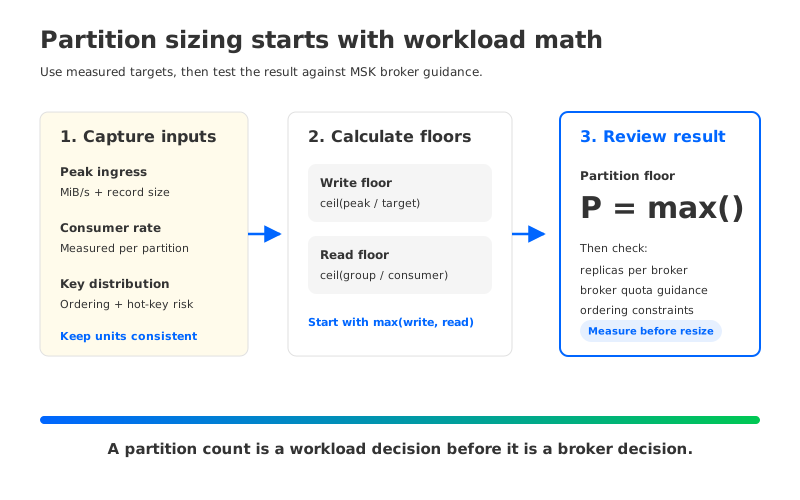
For writes, start with a measured target rather than the maximum advertised rate:
write_partitions = ceil(peak_ingress / target_ingress_per_partition)
The target should come from a load test using your record size, compression, acknowledgments, and client version. AWS lists a maximum throughput per partition for MSK Standard brokers in its quota documentation. Treat that value as a boundary for design review, then choose a lower target that leaves room for protocol overhead, retries, and bursts.
Reads need their own calculation:
read_partitions = ceil(peak_group_read_rate / target_consumer_rate_per_partition)
If a consumer group must process 240 MiB/s and a tested consumer instance handles 8 MiB/s of your decoded records, the group needs at least 30 partitions to expose enough parallel work. That is a workload example, not an MSK guarantee; the measured 8 MiB/s must include deserialization, downstream calls, commits, and the failure behavior you care about.
The starting count is the larger of those floors, then rounded to a number that fits your assignment and growth policy:
starting_partitions = max(write_partitions, read_partitions)
Do not use a single “partitions per broker” number to replace this calculation. Broker guidance protects cluster operations; it does not tell you whether one consumer group can finish its work before the next batch arrives.
3Count replicas when you check broker pressure
Amazon MSK’s Standard broker guidance counts leader and follower replicas per broker. That matters because a topic with 100 partitions and replication factor 3 creates 300 partition replicas for the cluster before you account for other topics. A balanced three-broker placement would carry about 100 replicas per broker, although actual placement depends on the assignment.
The basic check is:
replicas_per_broker ≈ (topic_partitions × replication_factor) / broker_count
Run the calculation across the whole cluster, not one topic at a time. A topic with a modest write rate can still consume operational headroom if it has a high replication factor, long retention, or many consumer groups. Conversely, a high-throughput topic with few partitions can create hot leaders even when the replica count looks comfortable.
AWS lists recommended partition counts for each Standard broker family and a higher maximum number that supports update operations. For example, the Developer Guide lists 1,000 recommended partitions and 1,500 maximum update-supporting partitions for kafka.m5.large and kafka.m5.xlarge; larger M5 and M7g sizes have higher values. The recommendations include leader and follower replicas and apply to scenarios that send traffic across the provisioned partitions. They are guidance, not a promise that every workload will remain healthy at the maximum.
High-partition, low-throughput topics can sometimes pack more partitions per broker, but AWS calls for testing before taking that path. High partition counts also increase metadata work and can make CloudWatch or Prometheus metrics incomplete. Consumer groups add another layer: each group-topic-partition combination creates tracked offset state, including groups that have no active consumers until their offsets expire or are deleted.
4Quotas are a design input, not a late-stage error
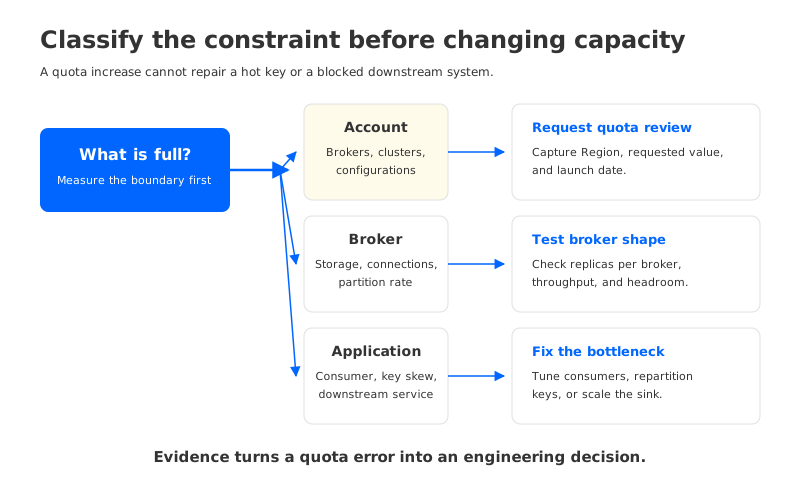
The MSK quota page is often consulted after a deployment fails, but it is more useful before the cluster exists. Account quotas, brokers per cluster, per-broker storage, connection rates, and partition throughput all constrain the shape you can request. Some quotas are adjustable through Service Quotas; approval is not immediate, so a production launch should include the request lead time.
Keep three quota classes separate in your plan:
| Quota class | What it constrains | Evidence to capture |
|---|---|---|
| Account and cluster | Number of brokers, clusters, and configurations in a Region | Service Quotas view and approved increases |
| Broker and partition | Ingress/egress, connections, storage, and partition rate | AWS quota table plus load-test results |
| Application | Consumer concurrency, connection pools, retries, and downstream capacity | Client metrics and saturation tests |
The table is a reminder that a quota increase cannot fix a hot key or a slow sink. If one partition carries most of a topic’s traffic, adding brokers may leave that leader hot. If every consumer is blocked on a database, adding partitions can create more waiting tasks without increasing completed work.
5Preserve ordering while planning growth
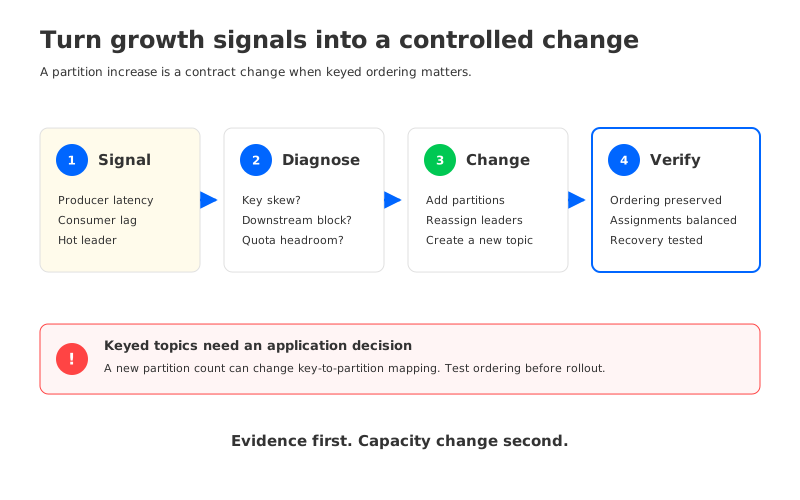
Partition growth is not a free resize. Kafka assigns a record to a partition based on the producer’s partitioner and key. Increasing a topic’s partition count can change the mapping for keyed records, so records with the same key may no longer stay in one partition across the change. That is why a growth plan should state whether key-level ordering is a hard requirement before anyone runs kafka-topics.sh --alter.
For append-only or round-robin workloads, adding partitions can be a practical way to expose more producer and consumer parallelism. For keyed workloads, consider a new topic and a controlled migration when preserving key routing matters more than keeping the original topic name. The choice belongs in the application contract, not in an on-call change made during a traffic spike.
Growth also changes placement. After adding brokers, inspect assignments with kafka-topics.sh --describe; new partitions do not automatically move every existing hot partition to the new brokers. AWS recommends using the partition reassignment tool carefully and limits the size of a reassignment call in its best-practice guidance. Reassignment adds replication traffic and CPU work, so schedule it with headroom and observe the cluster while it runs.
6Build a review loop around signals
A partition plan should have a review trigger, not only a launch number. Track per-broker CPU, network, disk usage, produce and consume latency, request throttling, under-replicated partitions, consumer lag, and the distribution of leaders. Correlate the signals before increasing partitions: rising producer latency with one hot leader points to placement or key skew; rising consumer lag with low broker utilization points to downstream processing; broad latency growth with rising CPU points to broker capacity.
Use a short review record for every change:
- State the trigger. Include the time window, topic, partition, consumer group, and metric that crossed the team’s agreed threshold.
- Check the constraint. Recalculate write and read floors, replica count per broker, and the remaining account or cluster quota.
- Test the change. Confirm key ordering, consumer rebalance time, recovery behavior, and assignment distribution in a staging or controlled production window.
- Record the rollback. A partition increase cannot be reversed in place. The rollback may be a producer pause, a new topic, or a client routing change.
This loop turns “we need more partitions” into an auditable decision. It also prevents the opposite mistake: adding partitions to solve a downstream bottleneck that belongs in the consumer or database tier.
7Where a different storage model changes the calculation
The formulas above remain valid for Kafka-compatible systems because partitions still define ordering and consumer parallelism. The pressure behind the formulas can change, however, when storage and broker compute are designed separately.
AutoMQ is a Kafka-compatible, cloud-native streaming platform that uses shared object storage and stateless brokers. That architecture can change how retained bytes, broker-local disk, and broker scaling interact. It does not remove the need to size partitions for producer throughput, consumer concurrency, or key ordering. The useful comparison is therefore specific: if your MSK plan is constrained by broker-local storage or by scaling compute and retained data together, evaluate whether a shared-storage design changes that constraint; if the bottleneck is a hot key or a slow consumer, it does not.
This is also the right boundary for an exit-path discussion. Keep the topic and client contracts stable, measure the workload with the same partitioning assumptions, and compare the operational work that remains. A platform change is justified when it removes a measured constraint, not because a larger partition number looks cleaner on a diagram.
8A partition planning checklist
Before creating or expanding a production topic, capture these answers in the design review:
- What are peak, burst, and sustained ingress rates, in the same units?
- What consumer rate has been measured with the real payload and downstream work?
- Which keys require ordering, and how will a partition increase affect them?
- What is the replication factor, and how many replicas land on each broker?
- Which AWS recommended and maximum partition-per-broker values apply to the chosen broker family?
- Which account, cluster, connection, storage, and throughput quotas need approval?
- How will assignments be inspected after creation or reassignment?
- What signal triggers a review, and what is the rollback path if the change is wrong?
If the team cannot answer the last two questions, the topic is not ready for a growth plan. A partition count without an assignment check and rollback path is a guess with a number attached.
9FAQ
9.1How many partitions should an Amazon MSK topic have?
Use the larger of the write-throughput and consumer-parallelism floors, then validate the result against replica placement and MSK broker guidance. There is no universal count that fits every record size, consumer, and retention policy.
9.2What is the Amazon MSK partition limit per broker?
AWS publishes recommended and maximum values by Standard broker type. The recommended value includes leader and follower replicas and is intended for workloads that use the provisioned partitions. Check the MSK best-practice table for the broker family and Kafka mode you plan to run.
9.3Can I add partitions to an MSK topic later?
You can increase a topic’s partition count, but you cannot reduce it in place. For keyed records, the new partition count can change key-to-partition mapping, so treat the operation as an application contract change and test ordering and consumer rebalances first.
9.4Does a higher partition count increase consumer throughput?
It can expose more parallel work when the consumer group and downstream systems have spare capacity. It will not fix a hot key, a blocked database, or a broker that is already throttling. Measure the bottleneck before changing the topic.
10References
- Amazon MSK quotas
- Amazon MSK best practices: partitions per Standard broker
- Amazon MSK Provisioned clusters
- Apache Kafka topic and partition design
Partition planning is ultimately a conversation between workload shape and operational evidence. If you want to test a Kafka-compatible shared-storage architecture against the same worksheet, start with AutoMQ.


