
Table of Contents
Table of Contents
When a team starts comparing Event Hubs Dedicated with a Kafka cluster, the workload has usually crossed a threshold where mistakes become expensive. The question is no longer whether Azure can ingest events. It can. The harder question is whether the platform you buy gives you the control surface, cost model, replay behavior, and ecosystem guarantees your organization expects from Kafka.
Event Hubs Dedicated is attractive because it solves a real problem for large Azure streaming workloads: predictable capacity in a managed, single-tenant service. Microsoft describes the Dedicated tier as a single-tenant option for enterprise-scale, mission-critical event streaming, billed by Capacity Units and designed for high-volume ingestion. It also exposes an Apache Kafka endpoint, which can make the service look like a shortcut for teams that already have Kafka producers and consumers.
That shortcut is useful, but it is not the same as owning a Kafka cluster.
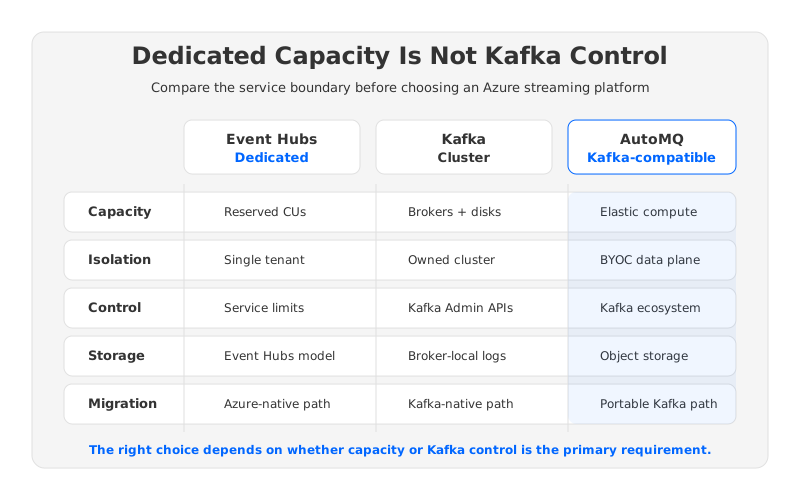
The difference matters most when platform teams need more than ingestion capacity. A Kafka cluster is also a control plane around topics, partitions, retention, replication, clients, Connect, Streams, security, observability, and migration paths. Event Hubs Dedicated abstracts many of those concerns away. Sometimes that abstraction is exactly the point; sometimes it hides the levers a Kafka platform team needs.
1What Event Hubs Dedicated Actually Gives You
Event Hubs Dedicated should not be dismissed as “Event Hubs with a higher quota.” Its value is more specific: capacity isolation, managed operations, and Azure-native integration for large streaming workloads. For teams already standardized on Azure, that is a serious offer.
In Microsoft’s terminology, Dedicated clusters are provisioned by Capacity Units, which represent preallocated CPU and memory resources. Self-serve scalable Dedicated clusters can scale incrementally by CUs within documented limits, and Microsoft notes that actual throughput per CU depends on producer count, consumer count, partition count, payload size, and egress rate. Dedicated gives you reserved capacity; it does not turn workload modeling into a constant.
Dedicated is strongest when the workload looks like this:
- The application is Azure-first, and the event stream primarily feeds Azure services, analytics, security, telemetry, or operational pipelines.
- The main risk is noisy-neighbor interference or inconsistent latency in a shared service tier.
- The team wants Microsoft to own broker-like maintenance tasks such as infrastructure updates, load balancing, patching, and service availability.
- Kafka protocol access is needed mainly for producers and consumers, not for deep Kafka platform operations.
For pure ingestion at enterprise scale, that is a credible architecture. The trap is assuming that “Dedicated + Kafka endpoint” means “Kafka cluster, but managed by Azure.” It means Event Hubs remains the service model, while Kafka protocol compatibility becomes an access path.
2What a Kafka Cluster Gives You
Kafka cluster ownership looks heavier because it is heavier. You manage brokers, partitions, replication, storage, network placement, rolling upgrades, quotas, ACLs, client compatibility, and observability. On Azure, that often means Kafka on VMs, AKS, or a Kafka-compatible managed platform. The operational surface is larger than Event Hubs Dedicated, but so is the control surface.
For many enterprise teams, that control is the product requirement:
- Broker and topic control. Kafka teams often need direct control over topic configuration, retention, compaction, partition counts, replication factor, rack awareness, quotas, and Admin API behavior.
- Ecosystem control. Kafka Connect, Kafka Streams, schema registries, MirrorMaker-style replication, monitoring tools, and client libraries assume Kafka semantics beyond simple produce and consume.
- Storage control. Traditional Kafka binds log storage to broker-local disks. Newer Kafka-compatible architectures can change this by using shared object storage, but the point remains: the Kafka platform team chooses the storage model.
- Migration optionality. A Kafka cluster can be moved, mirrored, replaced, expanded, or connected across clouds using Kafka-native patterns.
This is why “managed” is not a single dimension. Event Hubs Dedicated manages the service for you. A Kafka platform preserves Kafka as the system of record for event streaming. Those are different outcomes.
3The Kafka Endpoint Is Useful, but Compatibility Has Edges
Azure Event Hubs for Apache Kafka lets Kafka clients connect to Event Hubs using the Kafka protocol. For straightforward producers and consumers, that can reduce migration friction because teams can reuse Kafka client libraries while moving the service side into Azure Event Hubs.
But compatibility should be evaluated by workload behavior, not by the existence of an endpoint. Kafka applications commonly depend on admin operations, topic conventions, partition assignment behavior, offset workflows, security integrations, connector behavior, or operational tooling. Some dependencies live in code; others hide in deployment scripts, dashboards, and runbooks.
A practical compatibility review should cover:
| Area | What to Validate Before Choosing Dedicated |
|---|---|
| Client protocol | Which Kafka client versions, authentication mechanisms, and producer/consumer features are used? |
| Admin workflows | Do applications or platform tools create, alter, inspect, or rebalance topics through Kafka Admin APIs? |
| Connector ecosystem | Do source and sink connectors assume Kafka broker behavior, internal topics, or specific topic settings? |
| Stream processing | Do Kafka Streams or stateful consumers depend on changelog topics, repartition topics, or exactly-once patterns? |
| Operations | Do SRE dashboards and alerts depend on Kafka broker metrics, log directories, ISR state, or partition reassignment progress? |
This table is not an argument against Event Hubs. It is an argument against treating protocol compatibility as architectural equivalence. If your workload only needs durable ingestion and consumer groups, Event Hubs Dedicated can be a clean fit. If your workload needs the broader Kafka operating model, a Kafka cluster or Kafka-compatible platform is the safer comparison.
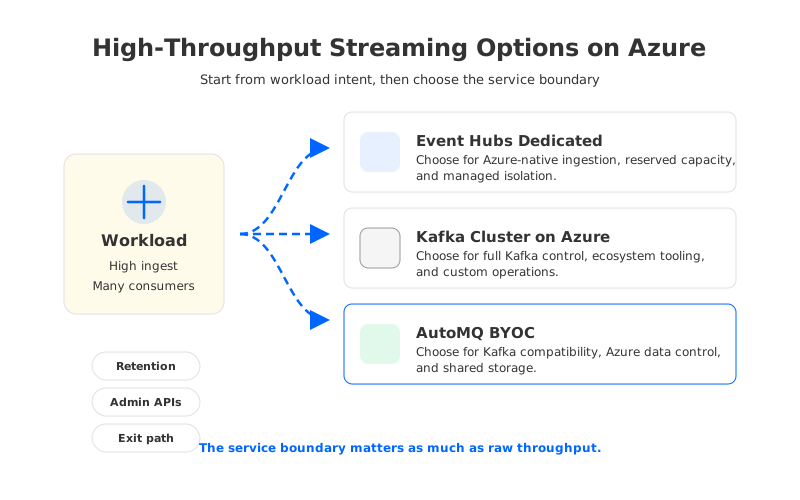
4Cost: CU Reservation Is Not the Same as Kafka TCO
Event Hubs Dedicated pricing is CU-based. Azure’s pricing page lists Dedicated billing per Capacity Unit, with tier-level characteristics such as maximum retention shown alongside other Event Hubs tiers. The exact commercial rate can vary by region, currency, agreement, and sales terms, so budget owners should verify it directly in Azure pricing or with Microsoft.
The more important point is the shape of the bill. Dedicated capacity is a reserved service envelope. You pay for capacity whether traffic is flat, spiky, or seasonal. This can work well for consistently high-throughput workloads, but it can be inefficient when the cluster is sized for peaks that occupy a small part of the month.
Kafka cluster TCO has a different shape:
- Compute cost comes from brokers, controllers, Connect workers, monitoring, and sometimes Kubernetes nodes or VM scale sets.
- Storage cost comes from local disks, managed disks, snapshots, tiered storage, or object storage depending on architecture.
- Network cost can become material when replication, consumer traffic, cross-zone placement, or cross-region mirroring moves data across Azure boundaries.
- Operational cost includes human time spent on upgrades, partition reassignment, incident response, storage expansion, capacity planning, and migration.
Traditional Kafka often looks flexible at the infrastructure layer but rigid at the storage layer. Adding brokers can require partition movement, expanding retention can require more disk, and rebalancing traffic can trigger data movement. Those mechanics are not free.
This is where newer Kafka-compatible architectures change the decision. AutoMQ, for example, keeps Kafka protocol compatibility while moving durable stream data to object storage such as Azure Blob through a shared-storage architecture. Brokers become comparatively stateless compute, so scaling and recovery are less tied to copying partition data between broker-local disks. For Azure BYOC, that gives platform teams a middle path: keep Kafka ecosystem control in the customer cloud environment while changing the scaling mechanics underneath.
That point should be evaluated technically, not as a slogan. If you need Event Hubs semantics, choose Event Hubs. If you need Kafka semantics but dislike Kafka’s disk-bound operations, compare a traditional Kafka cluster with a Kafka-compatible shared-storage design.
5Scaling Models: Capacity Units, Stateful Brokers, and Stateless Brokers
The scaling model is where Dedicated and Kafka diverge most visibly.
Event Hubs Dedicated scales by allocating more Capacity Units within the tier’s supported model. The service hides broker placement and storage mechanics, so application teams do not think about partition reassignment or disk fill during routine capacity changes. The tradeoff is that you scale capacity, not Kafka internals.
A traditional Kafka cluster scales by adding brokers, storage, partitions, or all three. That gives fine-grained control, but the team must handle data locality. Partitions and replicas live on broker storage, so moving load often means moving data. Kafka scaling is not only a compute operation.
Shared-storage Kafka-compatible systems separate those concerns. With AutoMQ, durable data is written to shared object storage and brokers act more like stateless serving and coordination nodes. Scaling compute no longer implies moving all historical partition bytes between broker disks. The operational unit changes from “move data to scale brokers” to “adjust compute against shared durable storage.”
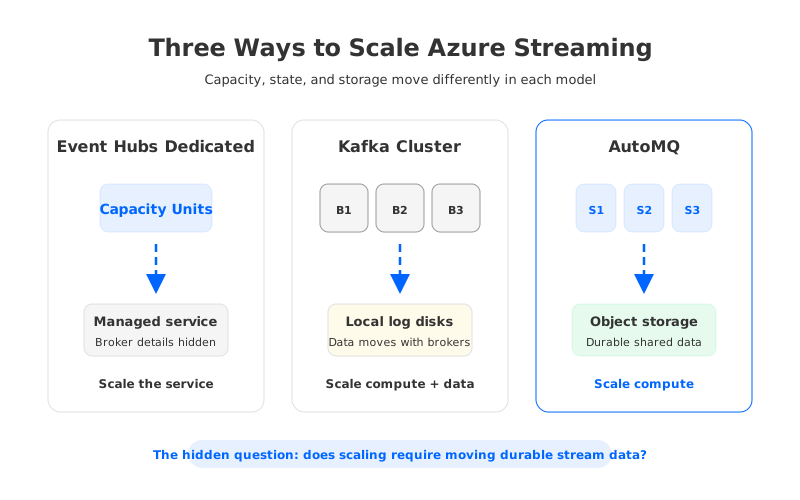
For high-throughput Azure workloads, this distinction affects more than operations. It influences failure recovery, cost predictability, capacity planning, and how confidently a platform team can support bursty tenants.
6Isolation Is Not the Same as Portability
Dedicated gives strong isolation inside the Event Hubs service model, which is valuable for compliance-sensitive and noisy-neighbor-sensitive workloads. But isolation should not be confused with portability.
A Kafka cluster gives you portability through Kafka’s ecosystem and operational patterns: clients, topic tools, Connect connectors, stream processing frameworks, cross-cluster replication, and SRE practice. A Kafka-compatible platform running in Azure BYOC can keep the data plane in the customer’s Azure environment while preserving Kafka-facing interfaces. Event Hubs Dedicated gives you an Azure-native managed event streaming service with Kafka access, not a portable Kafka control plane.
Enterprise architects should ask a blunt question: if this platform becomes the backbone for payment events, telemetry, customer activity streams, fraud pipelines, ML feature updates, and security logs, what would it take to leave or interoperate later?
The answer may still be Event Hubs Dedicated. Some organizations deliberately choose Azure-native services for tighter Azure integration. Others need Kafka semantics because their applications, teams, vendors, and governance models already speak Kafka. The costly mistake is buying one while assuming it behaves like the other.
7Decision Framework for Enterprise Teams
The cleanest decision is not “Event Hubs Dedicated or Kafka.” It is “which control surface do we want to standardize on?”
| Decision Question | Event Hubs Dedicated Fits Better When... | Kafka Cluster or Kafka-Compatible Platform Fits Better When... |
|---|---|---|
| Primary job | Azure-native event ingestion is the core requirement. | Kafka is the application and platform contract. |
| Operations | You want Azure to hide broker operations. | You need broker, topic, admin, connector, and observability control. |
| Cost model | Reserved CU capacity matches sustained high throughput. | You need to optimize compute, storage, network, and retention separately. |
| Ecosystem | Kafka clients are enough for the workload. | Kafka Connect, Streams, Admin APIs, replication, and tooling matter. |
| Storage | Event Hubs retention limits and service model are acceptable. | You need Kafka log semantics with configurable storage architecture. |
| Exit path | Azure-native commitment is acceptable. | Portability and migration optionality are strategic requirements. |
For budget owners, the key exercise is to model both steady-state and peak-state economics. Dedicated capacity may be rational when traffic is consistently high and managed isolation outweighs the premium. A Kafka cluster may be rational when the organization values ecosystem control and can operate it well. A Kafka-compatible shared-storage option such as AutoMQ may be rational when the team wants Kafka semantics on Azure but wants to reduce the drag of broker-local disks, overprovisioned capacity, and data-heavy scaling events.
8Where AutoMQ Fits Without Turning This Into a Vendor Checklist
AutoMQ is relevant because it changes one of Kafka’s old assumptions: that brokers must own local persistent log storage. By making brokers stateless and storing durable data in shared object storage, AutoMQ keeps the Kafka-facing experience while changing how scaling, retention, and recovery behave in cloud infrastructure.
That makes it a practical Azure Kafka alternative for teams with three simultaneous requirements:
- They need Kafka protocol and ecosystem compatibility, not only Kafka-like ingestion.
- They prefer a BYOC deployment model where the data plane runs in their Azure environment.
- They want object-storage-backed economics and stateless broker scaling instead of the traditional cycle of broker sizing, disk planning, and partition reassignment.
This does not make Event Hubs Dedicated the wrong answer. It makes the decision more precise. Event Hubs Dedicated is managed Azure event streaming with dedicated capacity and Kafka protocol access. Kafka clusters are Kafka platforms with a larger control surface. AutoMQ sits in the Kafka-compatible category for teams that want that control surface with a cloud-native storage model.
The expensive mistake is not choosing Event Hubs. The expensive mistake is choosing Dedicated because it sounds like Kafka capacity, then discovering later that the organization really needed Kafka platform control.
9References
- Azure Event Hubs Dedicated tier overview
- Compare Azure Event Hubs tiers
- Azure Event Hubs pricing
- Azure Event Hubs for Apache Kafka overview
- Apache Kafka operations documentation
- AutoMQ architecture overview
- AutoMQ stateless broker documentation
- AutoMQ BYOC product overview
10FAQ
10.1Is Event Hubs Dedicated the same as a managed Kafka cluster?
No. Event Hubs Dedicated is a single-tenant Azure Event Hubs tier with dedicated capacity and Kafka protocol access. A Kafka cluster exposes Kafka as the platform control surface, including Kafka-native administration, ecosystem tooling, and topic configuration.
10.2When should I choose Event Hubs Dedicated instead of Kafka on Azure?
Choose Event Hubs Dedicated when your workload is Azure-native, needs managed high-throughput ingestion, benefits from single-tenant isolation, and does not require deep Kafka broker or ecosystem control.
10.3When is a Kafka cluster better than Event Hubs Dedicated?
A Kafka cluster is usually a better fit when Kafka is the architectural contract across teams, applications, connectors, stream processors, and operational tooling. If you depend on Kafka Admin APIs, Connect, Streams, topic-level configuration, or cross-cloud portability, validate Event Hubs compatibility carefully.
10.4How should teams compare Azure Event Hubs Dedicated pricing with Kafka cost?
Do not compare only an hourly CU price with VM prices. Model sustained traffic, peak traffic, retention, egress, cross-zone movement, operational labor, connector infrastructure, monitoring, and migration cost. The calculator must include architecture behavior.
10.5Where does AutoMQ fit in an Azure streaming architecture?
AutoMQ fits when a team wants Kafka compatibility and ecosystem control in Azure, but wants to avoid broker-local disk constraints. Its shared-storage design uses object storage and stateless brokers, making scaling and recovery less dependent on moving partition data between stateful brokers.


