

Table of Contents
Table of Contents
This article is republished from Nicoleta Lazar's original post on the Fresha Data Engineering Medium publication.

Around one year ago, during Confluent Current 2025, the team at Aiven made public their ongoing work on the new KIP-1150 — Diskless Kafka, a new version of Apache Kafka that would not rely on local disks for persistence and durability, but would instead leverage cloud storage to provide these guarantees. The goal was to decrease operational costs while making entire Kafka clusters more elastic, easier to scale, and faster to rebalance.
A lot has changed since then, including a whole revamp of the original proposal into a new Diskless 2.0 solution. We have also covered the main ideas behind this overhaul of Kafka, where brokers become stateless and disposable, in a previous article.
The timing could not have been better for us at Fresha: we were already investigating alternatives to AWS MSK. We were not particularly happy about its pricing model — per topic and partition — which meant we were overpaying by a significant margin. At the same time, every month AWS performed security patches, leading to cluster rebalances that took hours to complete. Ufff.
Still, what convinced us to finally pay the migration cost was the fact that AWS MSK does not offer an out-of-the-box path for migration from ZooKeeper to KRaft:
Amazon MSK supports in-place upgrades to most Apache Kafka versions. However, when upgrading from a ZooKeeper-based Kafka version to a KRaft-based version, you must create a new cluster. Then, copy your data to the new cluster, and switch clients to the new cluster. (source)
So since we were forced to do a cluster migration anyway, why migrate to AWS MSK at all?
The new KIP-1150 felt quite interesting to us, and we wanted to use diskless Kafka in production already, at least for one of our clusters: the so-called CDC Warehouse, which is essentially only used to move data from our source databases (PostgreSQL) to our warehouse (Snowflake) via Snowpipe connectors and to our OLAP engine (StarRocks) via the Apache Flink connector. The latency here was not super critical for us — we could tolerate a 200 ms to 500 ms delay to move data into the destinations. This meant we were free to experiment.
There were already a series of companies providing managed solutions for some form of Diskless Kafka. Notable mentions include:
- WarpStream: a commercial solution and the first player that introduced the concept of Diskless Kafka in 2023 and revolutionized the space.
- Aiven Inkless: the alternative proposed by the creators of KIP-1150, who want to push the diskless path into open source Kafka in the future. I am looking forward to that future!
- AutoMQ: a newer Diskless Kafka offering that was already being tested at production scale in Asian markets.
In the end, we opted for the solution that is open source, and as such we could reason about it and understand the implementation.
So, around wintertime, we started working on a migration plan from AWS MSK to AutoMQ. Spoiler alert: it worked, and we are now running Diskless Kafka in production, for the last couple of months, since the end of February 2026.
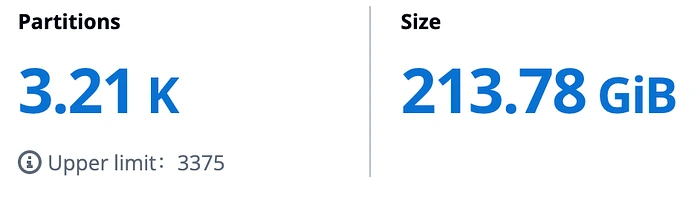
Our current scale for this CDC Warehouse cluster. Our topics have a retention of three days, and only some topics keep seven days of data. So the size here is for the last three days.
1Deploying AutoMQ
Before we can dive into the actual plan, let us take a detour and explain our actual production deployment of AutoMQ.
We opted for BYOC (Bring Your Own Cloud) with a monthly subscription. The cost for this subscription depends on the number of AKUs (AutoMQ Kafka Units) that are needed — we have reserved 3 AKUs that cost around $400 per month. The rest of the cost is given by the actual infrastructure: AWS S3 buckets and API calls, the AWS ECS instance where the control plane of AutoMQ runs, monitoring, and so on.
The AutoMQ BYOC console supports two deployment modes: K8S (runs brokers as pods in EKS) and IaaS (runs brokers as EC2 instances in an Auto Scaling Group). We decided to use IaaS.
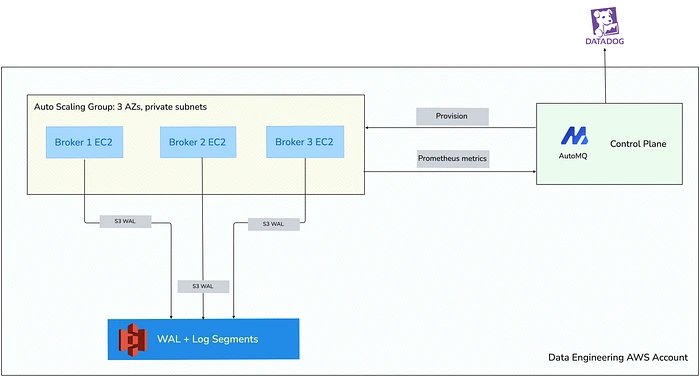
High-level diagram of how AutoMQ is deployed.
Another spoiler alert: in our case, after more than two months of running AutoMQ, it is approximately 50% cheaper than MSK — from $3,200 per month to $1,600 per month in total, including the license cost. And the best part is that if we suddenly needed to serve more traffic, our S3 costs would not go up proportionally. We can just batch more records and keep the number of S3 calls in check. In other words, we would have more linear growth rather than the exponential one we had with MSK.
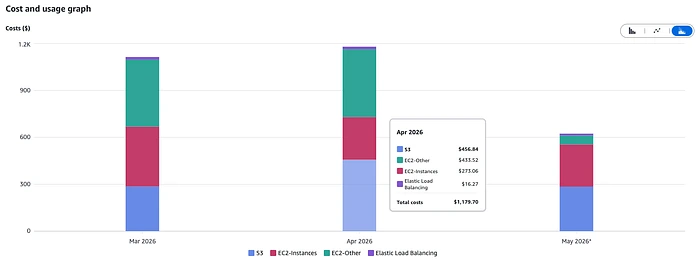
Infra cost for running AutoMQ in production. The overall cost is given by this infra cost plus the subscription.
2Migrating topics and connectors
Now, back to our migration plan. As mentioned above, this CDC Warehouse cluster is used to power our CDC pipelines and a series of Flink pipelines.
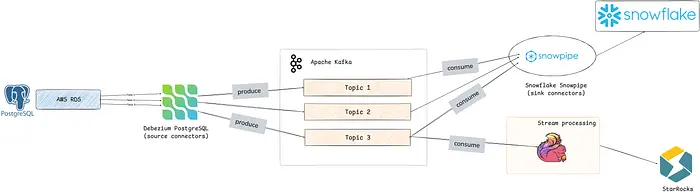
A high-level overview of how data flows into Kafka: we capture CDC changes from our PostgreSQL sources with Debezium. We then consume those messages using Snowpipe or Flink and sink to destination databases.
Fortunately for us, AutoMQ provides its own tool for migrating Kafka between clusters with zero downtime. They call it AutoMQ Linking. What is nice about this is that it preserves offsets for consumers:
The solution provides Offset-Preserving Replication, ensuring that all consumer offsets are maintained during the transition. This comprehensive approach allows for the smooth transition of consumers, Flink jobs, Spark jobs, and other infrastructure to the new clusters without disruption or data loss. (source)
The process is quite simple: you set up AutoMQ Linking between cluster A (source) and cluster B (destination). Then you choose a couple of topics you want to migrate and enable mirroring for them. You first update the producers and then consumers to use the new cluster. If everything is good, you promote the topic in AutoMQ. Finally, you are free to delete the old topic from the original cluster. It is that simple.
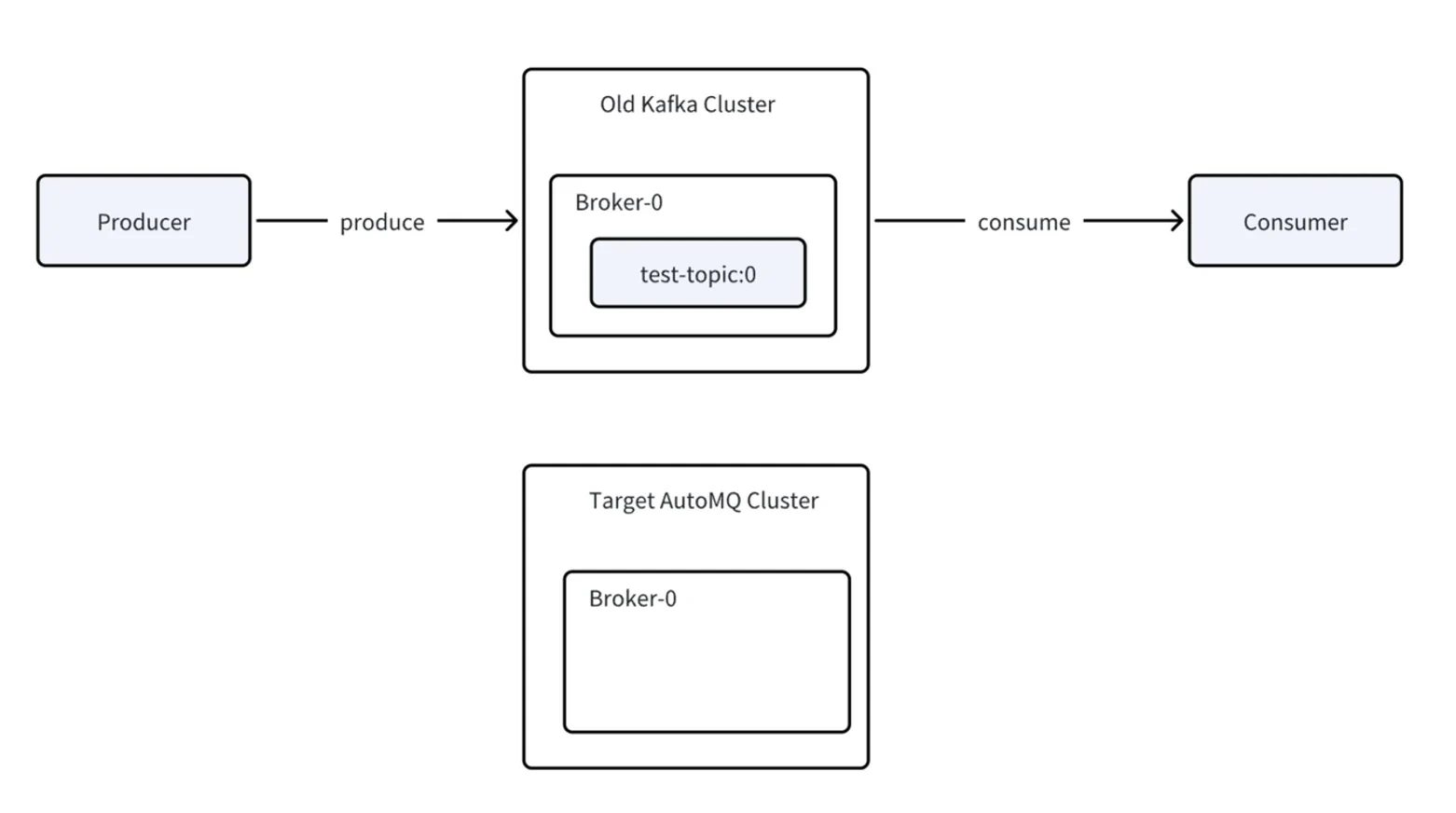
A condensed diagram of how the migration to an AutoMQ cluster works.
Check the diagram above for a condensed view of all the steps needed for a migration to an AutoMQ cluster:
- The target cluster is already set up; select topics to mirror data and metadata from the source cluster to the destination.
- Update producers to connect to the new cluster. During this time, the data is forwarded back to the original cluster, and in case of issues users can simply go back.
- Now it is the consumers' turn to be updated. They do not start processing data immediately; instead, AutoMQ checks that all members are offline in the source cluster and that offsets are synced before promoting the consumer group.
- Consumer groups are promoted automatically once the prerequisites are met. At this point, the migration is done, and the source topic can be safely dropped.
Let us unpack this a little bit more, and account for Kafka connectors as well. Ultimately, they are still producers (source connectors) and consumers (sink connectors), but their offset state lives outside the consumer group protocol and inside the connect-offsets internal topic. This means that you need to mirror the internal Kafka Connect topics, too.
What is important to remember is that when AutoMQ Linking is enabled, the synchronization between clusters is both ways. After a producer is switched to the new cluster, all the data and metadata will be forwarded back to the original one. This makes rollbacks trivial. Also, there is no need to stop either producers or consumers; there is no downtime at any point during the migration.
We were able to migrate approximately 150 Kafka Connectors in a matter of days.
The only configuration changes that we had to make to our connectors for AutoMQ compatibility were the removal of tiered storage settings. In our CDC warehouse cluster we have topic.creation.enable: true, and as such we had to set sensible defaults to be applied to each new topic.
topic.creation.default.remote.storage.enable: "true"
topic.creation.default.local.retention.ms: "43200000" # 12 hours
topic.creation.default.retention.ms: "604800000" # 7 days
topic.creation.default.segment.ms: "14400000" # 4 hours
This is because in AutoMQ the tiered storage functionality as defined by KIP-405 is disabled in the brokers. It makes sense: the data is already in S3. Without removing these settings, you would see:
Create Mirror Topic: avro.landing_pages_manager.public.treatment_type_tags
kafka-linking.create.progress.hide
org.apache.kafka.common.errors.InvalidConfigurationException:
Tiered Storage functionality is disabled in the broker.
Topic cannot be configured with remote log storage.
2.1Aside: topic auto-creation
When connectors are set to automatically create topics, an AdminClient of the connector is created to poll the cluster metadata, check whether a given topic exists, and if not, create it with the configured defaults.
The connectors worked just fine at the beginning, but after the AutoMQ cluster was restarted following an upgrade, we noted lots of warnings such as:
[AdminClient clientId=connector-adminclient-dbz
Metadata update failed (org.apache.kafka.clients.admin.internals.AdminMetadataManager)
[kafka-admin-client-thread | connector-adminclient-dbz
org.apache.kafka.common.errors.TimeoutException: Timed out waiting for a node
assignment. Call: fetchMetadata
Upon investigation, it turns out that after a rolling restart, the IP addresses of the cluster might change, but the AdminClient might still have the old IPs cached internally. To avoid this, it is necessary to ensure that the metadata recovery strategy is set to rebootstrap. Fortunately, this is already the default for Kafka clients greater than 4.x, but older clients need to be adjusted. This Kafka Connect cluster was still on 3.8, and as such we altered the configs at the connect level:
admin.retries: 5
admin.metadata.recovery.strategy: rebootstrap
consumer.metadata.recovery.strategy: rebootstrap
producer.metadata.recovery.strategy: rebootstrap2.2How about Schema Registry?
Schemas are persisted in a dedicated topic — by default _schemas — and this topic needs to be migrated as well. The process works exactly as defined above.
In our case, we did the migration in two stages: we first moved topics and connectors and left the Schema Registry service pointing to the old MSK cluster. Only after we migrated everything else did we move to the last piece of infrastructure still using MSK.
We started by setting up a new Kafka Schema Registry service that points to the new AutoMQ cluster. Then we enabled AutoMQ Linking for the _schemas topic. But remember how I mentioned that data gets synced back to the original cluster when AutoMQ Linking is set up? Well, when we deployed the service, the topic dedicated to storing schemas was automatically created, and as such it existed when we enabled mirroring. What AutoMQ did was synchronize this new, empty topic with the topic from the MSK cluster.
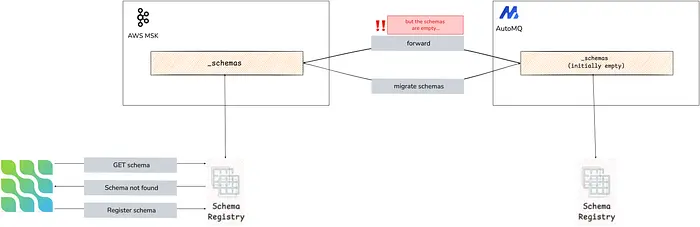
Mistakes happen.
Oh well, painfully obvious in hindsight. The schemas were recreated in the end with new IDs, and we had to set up a Schema Registry proxy to translate old IDs to new IDs. Painful, but it did the trick, and we learned to be more careful with the order of operations next time around.
2.3How about our Flink pipelines?
Flink jobs are, in the end, just consumers. The only difference is that the jobs are stateful and store offsets in Flink's state using the checkpoint mechanism. Fortunately, AutoMQ has a guide for how to handle this migration.
In our case, we opted for reassigning the producers and consumers and starting brand-new Flink jobs from the earliest offsets, even though it meant reprocessing three days of data. We did not need to concern ourselves with savepoints, just because our Flink SQL pipelines are not too complicated: mostly reading from Kafka, doing limited data coercions, and sinking either back to Kafka or StarRocks. For the regular joins that we do have, we just took a snapshot of the necessary database tables in order to rebuild the state. But then again, we could afford to do that. In general, it is best to consult the official guides.
2.4Where we are now
We have been running AutoMQ in production since the end of February, and we are happy about it. The costs went down, we ditched ZooKeeper, and we do not need to brace for the monthly cluster rebalancing impact. We will go deeper in a subsequent article about the performance, a comparison with AWS MSK, and more lessons learned, so watch this space!
That being said, our team at Fresha does not plan to stop here. We have more interesting experiments to carry out in our journey of improving the Kafka experience for all engineers in the company. We are interested in also migrating the other Kafka cluster that we still have on MSK, which is dedicated to business events and for which low latency becomes critical. AutoMQ supports such use cases by using a WAL storage option such as AWS FSx to deliver millisecond-level latency. We have not yet tested the limits here, but will report back once we do.
And finally, on the same topic of future enhancements we are planning on our roadmap, there is the Topic Table feature, which in theory allows us to tier data into Iceberg tables directly. This will be incredibly useful for us, as we could remove some of the pipelines that we currently have just to create and maintain Iceberg tables.
Nothing above would have been possible if it were not for Anton Borisov insisting we try out AutoMQ. But it was Paritosh Anand who set up all the infrastructure and facilitated the interactions with the AutoMQ team. I am grateful to both for helping turn the initial “What would it take to migrate away from MSK?” into “we are now running Diskless Kafka in production.”


