
Table of Contents
Table of Contents
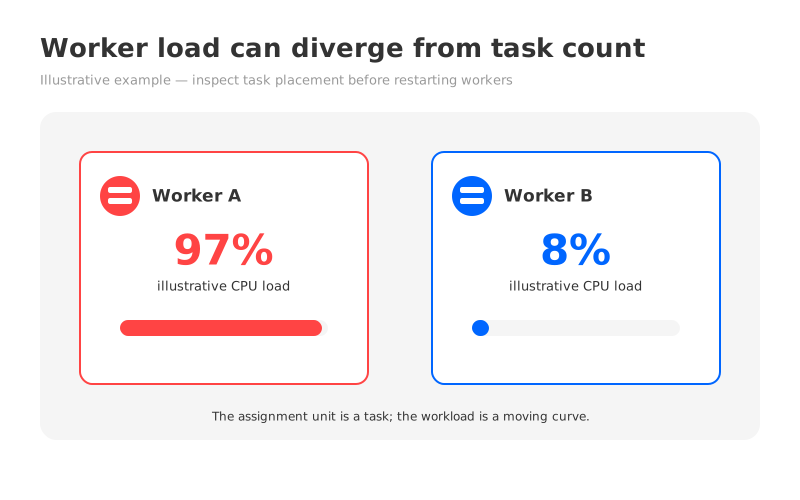
In an anonymous illustrative incident, a platform engineer opens the Kafka Connect dashboard to investigate a sink that has started missing its freshness target. One worker is carrying several busy tasks; another has plenty of headroom. The connector is healthy according to its process state, and the cluster has more than one worker, so the first instinct is to ask why the scheduler did not spread the work more evenly.
Here is the useful distinction: Kafka Connect distributes connector and task assignments across workers, but it does not continuously divide live throughput, CPU time, target latency, or source backpressure into equal shares. A task is an assignment unit. Its workload is a moving curve. Those two shapes can diverge for a long time.
The following numbers are an illustrative example, not a production measurement: a dashboard might show one worker at 97% CPU and another at 8% while a hot connector has too few effective tasks to use the available fleet. The percentages make the symptom clear; they do not prove a universal threshold or a Kafka Connect guarantee. The diagnosis starts with task placement and workload shape.
1The assignment unit is a task, not a throughput share
In distributed mode, Kafka Connect workers form a group and coordinate connector and task assignments. Connector configurations and task configurations are stored in Kafka, and workers receive the work they should run. The Kafka Connect documentation describes the distributed runtime and its configuration surface.
That coordination answers a placement question: which worker should run each task instance? It does not answer a much harder question in real time: which worker has the least remaining CPU after accounting for serialization, network waits, batching, retries, garbage collection, plugin behavior, and the target system’s response time? Connect can rebalance assignments when the group or its work changes, but a reassignor is not a general-purpose load scheduler with a shared cost model for every connector plugin.
This is why a connector with tasks.max=8 does not mean eight equal slices of work. tasks.max is a ceiling requested by the connector. The connector may create fewer tasks because its source or sink cannot partition the work further, because the current configuration exposes fewer independent shards, or because the plugin deliberately chooses another task count. Even when eight tasks exist, they can have different partitions, keys, record sizes, batch behavior, or downstream response times.
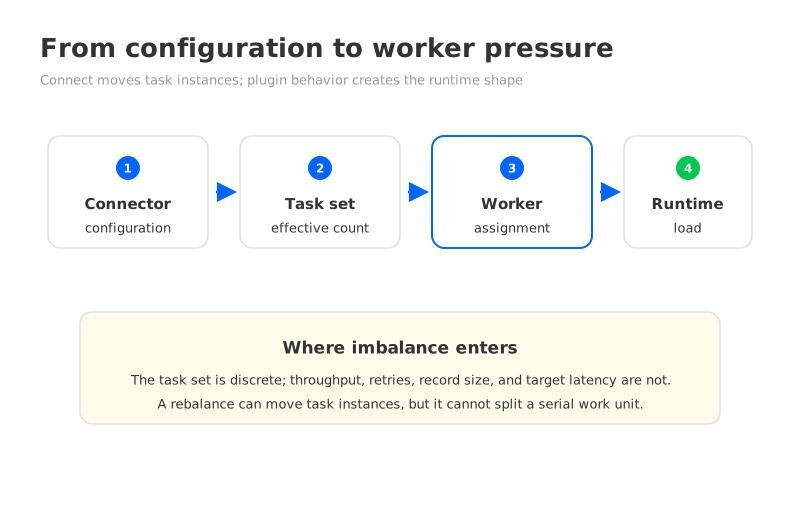
The practical chain looks like this:
- A connector reports or creates a set of task configurations.
- The Connect group assigns those task instances to the available workers.
- Each task follows the plugin’s own polling, transformation, batching, retry, and I/O behavior.
- The resulting CPU, memory, network, lag, and target pressure determine the worker’s real load.
The first two steps are visible in assignment state. The last two produce the imbalance operators feel. Treating them as one problem leads to the familiar but incomplete answer: increase tasks.max and wait.
2What triggers a rebalance and what it can change
A rebalance is a coordination event, not a promise that the next placement will be faster or more equal. Typical triggers include a worker joining the Connect group, a worker leaving or failing, connector or task membership changing, and configuration changes that require the group to reconcile its assignment. A restart can therefore move work even when the underlying data rate has not changed.
During a rebalance, Connect calculates the resulting assignment from the workers and the known connector and task set. Tasks may stop on one worker and start on another. Depending on the runtime and cooperative behavior in use, the transition can be staged, but it still has a cost: task shutdown and startup, connection re-establishment, cache warm-up, in-flight work, and a temporary change in the metrics you are using to judge balance.
The key boundary is simple:
A rebalance can move task instances. It cannot make a single task split itself, make a slow target answer faster, or turn a connector with one effective shard into eight independent workers.
That boundary also explains why repeatedly restarting workers is a poor balancing strategy. A restart can produce a different assignment by changing group membership, but it does not change the connector’s task cardinality or the load inside a task. If the same hot task returns to a worker, the graph will return to the same shape after the restart noise disappears.
Before changing anything, capture the assignment at the same time as the load symptom. Record each connector, task ID, worker ID, task state, and the connector-specific rate or lag associated with the task. Then record the worker signals that could explain pressure: CPU, heap and garbage collection, network throughput, request latency, retries, and target-side throttling or rejection. A placement map turns “worker two is busy” into a testable hypothesis.
3Three reasons a valid assignment can look wrong
3.1Hot and cold work share the same fleet
A connector that reads a quiet set of partitions and a connector that follows a busy or bursty source can each have a healthy task state while placing very different demands on a worker. A sink may also spend most of its time waiting for the destination database, object store, API, or rate limiter. CPU alone will miss some of that pressure, while throughput alone will miss expensive transformations or large records.
The imbalance becomes persistent when the hot workload is concentrated in a small number of tasks. A worker running one high-volume task and several quiet tasks can be more constrained than a worker running many modest tasks. Rebalancing the same units does not remove the hot task.
3.2Task granularity limits parallelism
More configured tasks help only when the connector can use them. Source connectors often divide work by tables, shards, partitions, or another source-defined boundary. Sink connectors may divide work by topic partitions or by the connector’s own batching model. If the source exposes one serial cursor or the sink protects ordering through one path, the task count may remain low even when the worker fleet is large.
Task granularity can also be too fine. Adding tasks can multiply connections, buffers, transformation work, producer or consumer activity, and target-side concurrency. A connector may look more balanced by CPU while creating more pressure on the database or API it serves. The useful question is not “Can I set a larger number?” but “What independent work units can the source and sink safely sustain?”
3.3Heterogeneous connectors make equal counts misleading
Two tasks are equal in the assignment table only in the narrow sense that each has one task ID. They may not be equal in record size, serialization cost, transformation depth, retry frequency, batch size, network path, or destination latency. A CDC snapshot, a steady change stream, and a backfill can occupy the same fleet while behaving like three different services.
This is also why worker CPU is a weak definition of balance. A worker with moderate CPU but a growing sink queue is not balanced in the operational sense. A worker with high CPU but stable freshness and no errors may be within its intended envelope. Balance means that no worker or downstream dependency is the limiting factor for the workload’s service objective.
4Four mitigations and when each applies
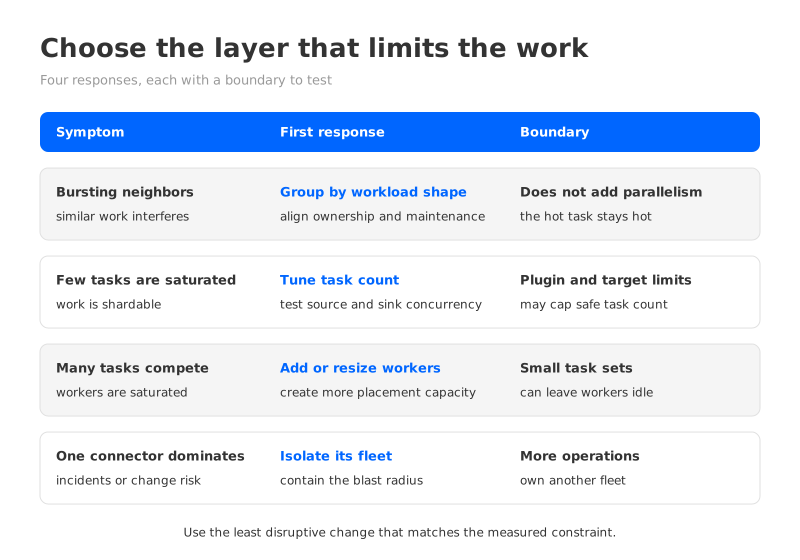
The right mitigation depends on which layer is limiting the work. Use the least disruptive change that addresses the measured cause, then observe through a full workload window rather than judging the first graph after a rebalance.
4.1Group connectors by workload shape
Group connectors that have similar operational behavior: steady sinks together, bursty backfills together, latency-sensitive paths together, or integrations with similar target limits together. The point is to make worker pressure easier to interpret and to stop a bursty connector from being hidden among quiet neighbors. Grouping can mean a deliberate connector fleet boundary or a controlled placement policy where your deployment model supports it.
Use this first when the workers are healthy individually but the fleet mixes incompatible load shapes. It is especially useful when one group has predictable maintenance windows or a distinct on-call owner. Grouping has a boundary: it does not create more task parallelism. If the hot connector itself has one effective task, moving it beside similar connectors may make the dashboard clearer while leaving its throughput ceiling unchanged.
4.2Adjust the task count with source and sink evidence
Raise or lower the connector’s task limit only after checking the plugin’s partitioning model, source quotas, destination concurrency, ordering requirements, and recovery behavior. More tasks can help when there are independent shards or partitions waiting to be processed and the current tasks are saturated. It can hurt when the target is the bottleneck or when each task adds too much connection and buffering overhead.
Use this when a task-level view shows that work is parallelizable and the source and sink can accept more concurrency. Change the count in a controlled step, record the resulting task placement, and compare per-task throughput, freshness, error rate, and target pressure. The boundary is clear: tasks.max cannot exceed what the connector can instantiate, and it cannot compensate for a serial source or a downstream system with a fixed rate limit.
4.3Add workers or resize the worker fleet
More workers give the assignment mechanism more places to put task instances. That can reduce noisy-neighbor pressure when the connector has enough tasks and several tasks are independently busy. Resizing can also provide more heap, CPU, or network headroom when the current workers are saturated by the total fleet.
Use this when the total task set is large enough to occupy additional workers and the worker resource is the measured constraint. Check the arithmetic of the assignment: adding workers to a small task set can create idle workers without changing the hot task. More workers also increase the operational surface, including upgrades, capacity tracking, group membership, and failure scenarios, so a low worker average is not, by itself, a reason to scale out.
4.4Isolate a noisy connector or workload in its own fleet
Isolation gives a connector or workload class a hard boundary. A high-volume CDC flow, a backfill, a connector with unusual plugin behavior, or a target with a separate maintenance policy may deserve its own Connect cluster or worker fleet. The benefit is containment: its CPU, memory, restarts, plugin versions, and rebalance events are easier to attribute, and a burst does not consume the same shared slots.
Use isolation when the cost of noisy-neighbor incidents is higher than the cost of another fleet, or when ownership, security, upgrade cadence, and failure domains are already different. The boundary is operational overhead. A separate fleet needs its own monitoring, deployment path, patching plan, capacity reserve, and incident ownership. Isolation is a control boundary, not a balancing algorithm.
| Symptom | First mitigation to test | Why it fits | Boundary to record |
|---|---|---|---|
| Similar connectors interfere during bursts | Group by workload shape | Makes pressure and ownership more predictable | Does not add task parallelism |
| A few tasks are saturated and work is shardable | Adjust task count | Exposes more independent work units | Source and sink may cap safe concurrency |
| Many independent tasks compete for worker resources | Add or resize workers | Creates more placement capacity | Small task sets may leave workers idle |
| One connector dominates incidents or change risk | Isolate its fleet | Contains failure and upgrade blast radius | Adds another platform to operate |
5Keep the platform boundary explicit
Kafka Connect runs as an independent component with its own workers, group coordination, connector plugins, task assignments, and operational metrics. That makes task balancing a Connect runtime concern. The broker platform can affect the records, offsets, network path, and service behavior that Connect consumes, but it does not turn the Connect worker group into a broker-side task scheduler.
If you run Connect against AutoMQ, keep that boundary in the design. AutoMQ is a Kafka-compatible streaming platform, and its Kafka compatibility documentation is the place to validate a workload’s broker-side contract. The Connect workers remain an independently operated component, so the same assignment diagnosis and four mitigation choices still apply. AutoMQ’s architecture documentation explains the platform’s compute and storage model; it does not claim to rebalance Connect tasks for you.
That separation is useful during an evaluation. Test the connector against the target platform with its real plugin, authentication, offsets, task lifecycle, source and sink limits, error handling, and rollback procedure. Keep the worker fleet and broker platform on separate lines in the test plan. A passing broker compatibility check does not prove that a connector’s task shape will use workers evenly.
6Measure balance as an operating condition
The final dashboard should answer two questions at once: where is the work, and is the work meeting its service objective? A balanced task count with growing lag is a failure. An uneven CPU graph with stable freshness and no target pressure may be acceptable for a deliberately isolated workload.
Track these signals together:
- Placement: connector-to-task-to-worker mapping, task count versus requested maximum, worker joins and leaves, and rebalance frequency and duration.
- Worker pressure: CPU, heap, garbage collection, network, thread-pool saturation, and process or task restart rate.
- Work progress: source records or bytes, sink records or bytes, task-level throughput, consumer lag where applicable, backlog age, and freshness.
- Dependency pressure: source throttling, destination latency, connection usage, rejected requests, batch response time, and retry or dead-letter activity.
For a compact balance view, compare the busiest worker with the fleet median for the resource that is actually limiting the workload. Keep the raw series beside the comparison; a ratio without its time window hides bursts and recovery. Review the same view after a deployment, worker change, task-count change, and source or sink traffic shift.
The engineer looking at the illustrative 97% and 8% bars should therefore ask three questions before restarting anything: Which task is producing the pressure? Can that task be split safely? Is the correct response a task-count change, a worker-fleet change, a workload boundary, or a separate fleet? Those questions lead to an explainable change and leave a better record than a lucky reassignment.
If you are evaluating a Kafka-compatible platform for a Connect workload, bring this assignment map and metric set into the test. Start an AutoMQ evaluation when you are ready to measure the broker-side contract and the independently operated Connect fleet together. The goal is not identical worker graphs. It is a workload whose placement, pressure, and service outcome you can explain.


